
Keepwatch
| 开发者 | wpxlab |
|---|---|
| 更新时间 | 2026年10月22日 05:57 |
| PHP版本: | 7.4 及以上 |
| WordPress版本: | 7.1 |
| 版权: | GPLv2 or later |
| 版权网址: | 版权信息 |
详情介绍:
Keepwatch shows the health of your site in one place: outdated plugins and themes, PHP fatal errors,
WordPress Site Health results, scheduled task (WP-Cron) problems, database and environment warnings.
If WooCommerce is active, store-specific checks (template overrides, failed or stuck scheduled actions, HPOS sync)
are added automatically. WooCommerce is not required.
Everything runs on your own site. Keepwatch does not need an account and sends nothing off-site by default.
Connecting to the optional WPXLab cloud (outside uptime checks, history, multi-site overview) is opt-in and
requires your explicit consent; see External services.
Features
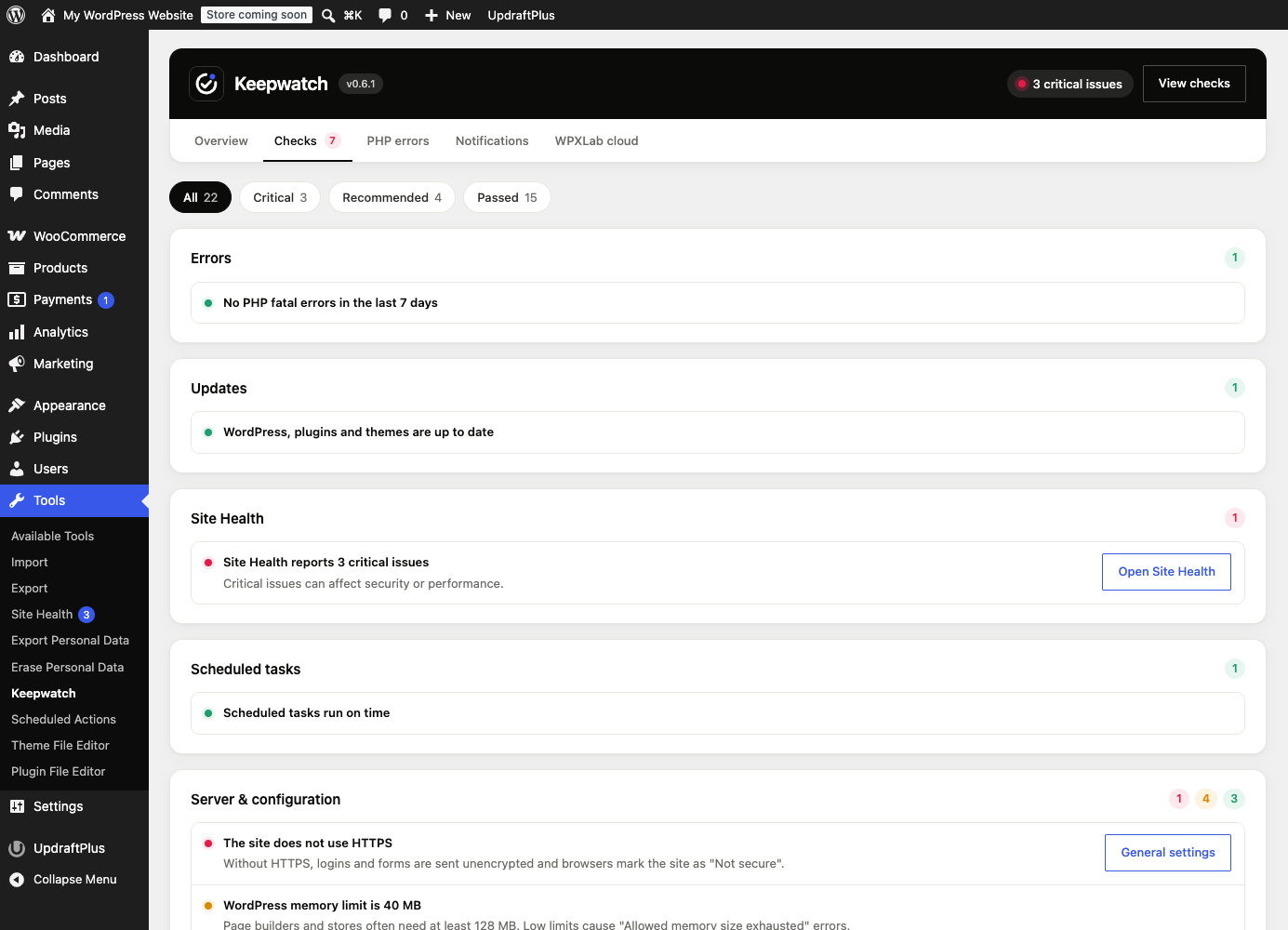
- Local dashboard under Tools → Keepwatch (no account required)
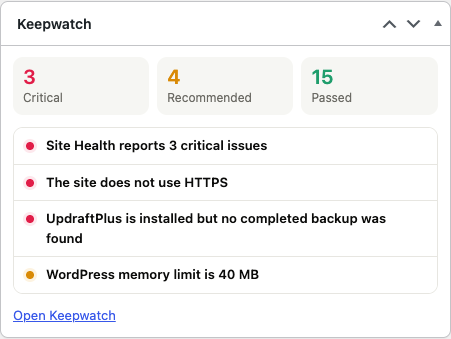
- WordPress Dashboard widget with open issues at a glance
- PHP fatal error capture with redacted paths and secrets
- Change log of plugin, theme and WordPress updates; a fatal error that starts soon after an update is marked as a possible link
- Core, plugin and theme update status
- WordPress Site Health critical and recommended counts
- WP-Cron overdue task detection (including DISABLE_WP_CRON sites)
- “Discourage search engines” visibility warning
- Environment checks: PHP support, HTTPS, debug display, memory limit, file editor
- Database checks: autoload size, expired transients, approximate DB size
- Server checks: disk space, OPcache, persistent object cache
- Security signals: new administrators, role grants, plugin activate/deactivate
- Inventory strip: WordPress/PHP/MySQL/WooCommerce/theme/plugin counts
- Backup monitoring: is a backup plugin active and how old is the last completed backup
- Optional WooCommerce module: failed and stuck Action Scheduler jobs, outdated template overrides, HPOS sync
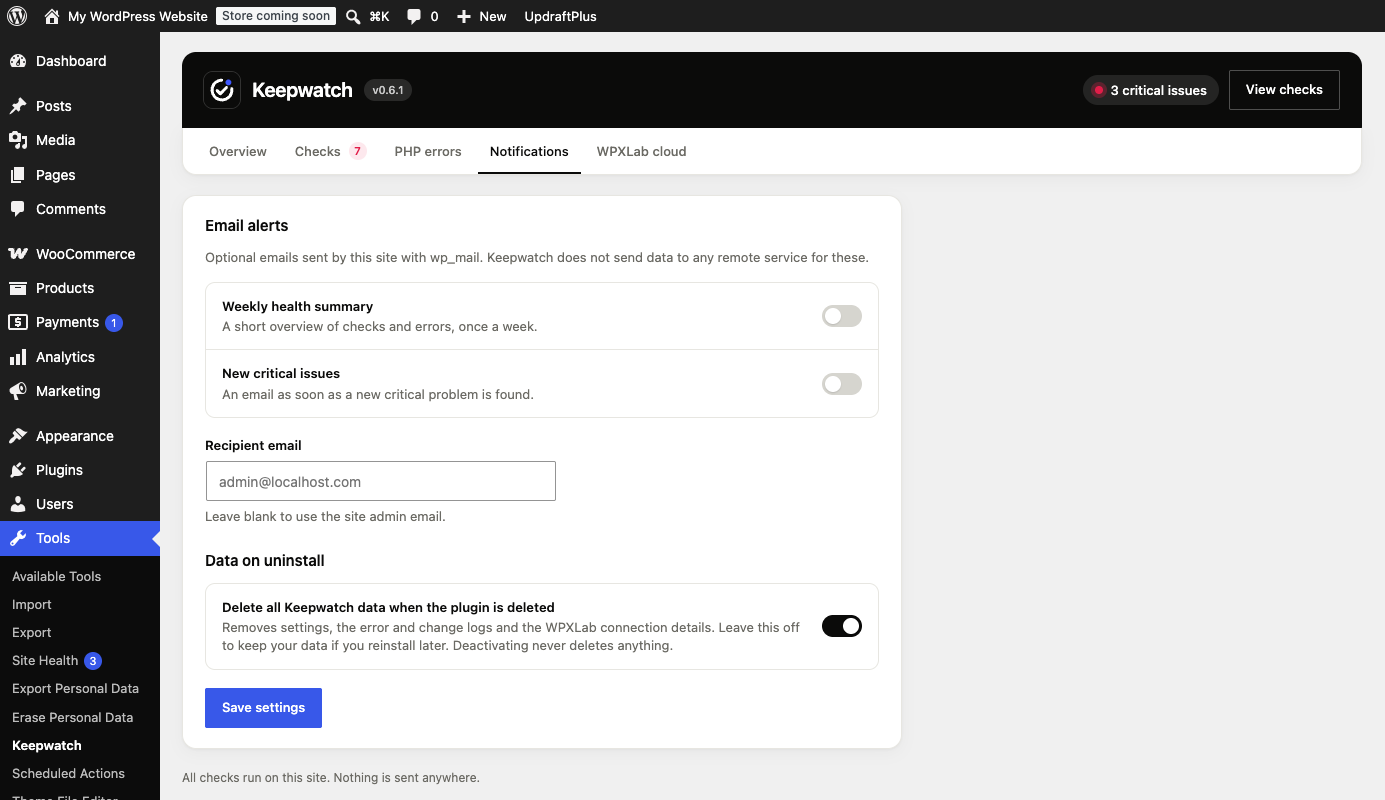
- Optional weekly summary and critical-issue emails via your site’s
wp_mail(off by default) - Translation-ready: every string can be translated on translate.wordpress.org
安装:
- Upload the
keepwatchfolder to/wp-content/plugins/, or install the ZIP via Plugins → Add New → Upload. - Activate Keepwatch through the Plugins screen.
- Open Tools → Keepwatch to see the local health dashboard.
- (Optional) Enable email alerts under Tools → Keepwatch → Notifications.
屏幕截图:
常见问题:
Does Keepwatch require WooCommerce?
No. Keepwatch is a general WordPress health plugin. When WooCommerce is active, extra store checks turn on automatically.
Does it send data anywhere?
No. Checks and the fatal error list stay on your site. The optional weekly or critical-issue emails are sent only with
WordPress wp_mail through your own site’s mail configuration, and only if you turn them on.
Will features be locked behind a license?
No. Everything in this plugin runs locally and stays free.
How do I clear recorded PHP errors?
Open Tools → Keepwatch → PHP errors and use “Clear error list”.
Which languages are available?
Keepwatch is written in English and is fully translatable. Translations are contributed on translate.wordpress.org and WordPress installs them automatically for your site language.
更新日志:
0.6.1
- New setting under Notifications: choose whether deleting the plugin also deletes its data. Deactivating never deletes anything.
- Health score ring is drawn with SVG instead of an inline style; stylesheet gets a table of contents and section markers.
- WPXLab cloud: connection handling tidied up. No change in what is sent or when.
- WPXLab cloud: report frequency and optional data can be set from the WPXLab dashboard. Settings arrive signed and only a fixed list of settings is accepted.
- WPXLab cloud (optional, needs a separate "Allow sending"): installed plugins/themes with available updates and four site metrics, so updates can be tracked across sites.
- WooCommerce: new checks for webhooks that WooCommerce switched off after repeated delivery failures, and for products out of stock or running low (counts only).
- Translations are now delivered by translate.wordpress.org language packs; the plugin no longer bundles or loads its own language files.
- New: change log. Plugin, theme and WordPress updates, installs, activations and theme switches are recorded locally (also updates made by FTP or WP-CLI, found on the next hourly comparison).
- New: a PHP fatal error that starts within 24 hours after the same plugin or theme changed, or within 60 minutes after any change, is marked as a possible link on Tools → Keepwatch → Errors.
- Cloud: the report includes the last 7 days of changes and the source and start time of fatal errors (no messages or paths), for "error after update" alerts.
- New: with WooCommerce and a cloud connection, the public shop, cart, checkout and newest product page addresses are added to the report so the WPXLab cloud can check from outside that the buying path works.
- New: backup monitoring. Detects UpdraftPlus, BackWPup, WPvivid, All-in-One WP Migration, Duplicator, Jetpack VaultPress Backup and BlogVault and warns when the last completed backup is older than 7 days (critical after 30). Keepwatch does not take backups itself.
- New: with WooCommerce and a cloud connection, hourly order and failed-payment totals (counts only) are added to the report so the WPXLab cloud can alert you when orders stop or failed payments spike.
- New: optional connection to the WPXLab cloud with an explicit consent screen and one-click disconnect.
- New: redesigned admin screen with tabs (Overview, Checks, PHP errors, Notifications, WPXLab cloud), a health score and status filters.
- New: hourly check summaries to the connected cloud through WP-Cron with retry and backoff (only after consent).
- Fix: fewer false security alerts, cached database size measurement and more reliable email scheduling.
- Fix: a PHP TypeError on admin pages caused by the settings sync hook receiving an empty argument.
- Uninstall and deactivation also remove the cloud connection options and scheduled report events.
- Local health checks, fatal error capture, dashboard and admin widget.
- Database, server and security checks; inventory strip.
- Optional WooCommerce checks (Action Scheduler, template overrides, HPOS sync).
- Optional weekly and critical-issue email digests via wp_mail.
- Translations: tr_TR, ru_RU, fr_FR, it_IT.