
KillerConversions – Contact Form Builder
| 开发者 | pluginsshop |
|---|---|
| 更新时间 | 2026年11月7日 16:51 |
| PHP版本: | 7.4 及以上 |
| WordPress版本: | 7.1 |
| 版权: | GPLv2 or later |
| 版权网址: | 版权信息 |
详情介绍:
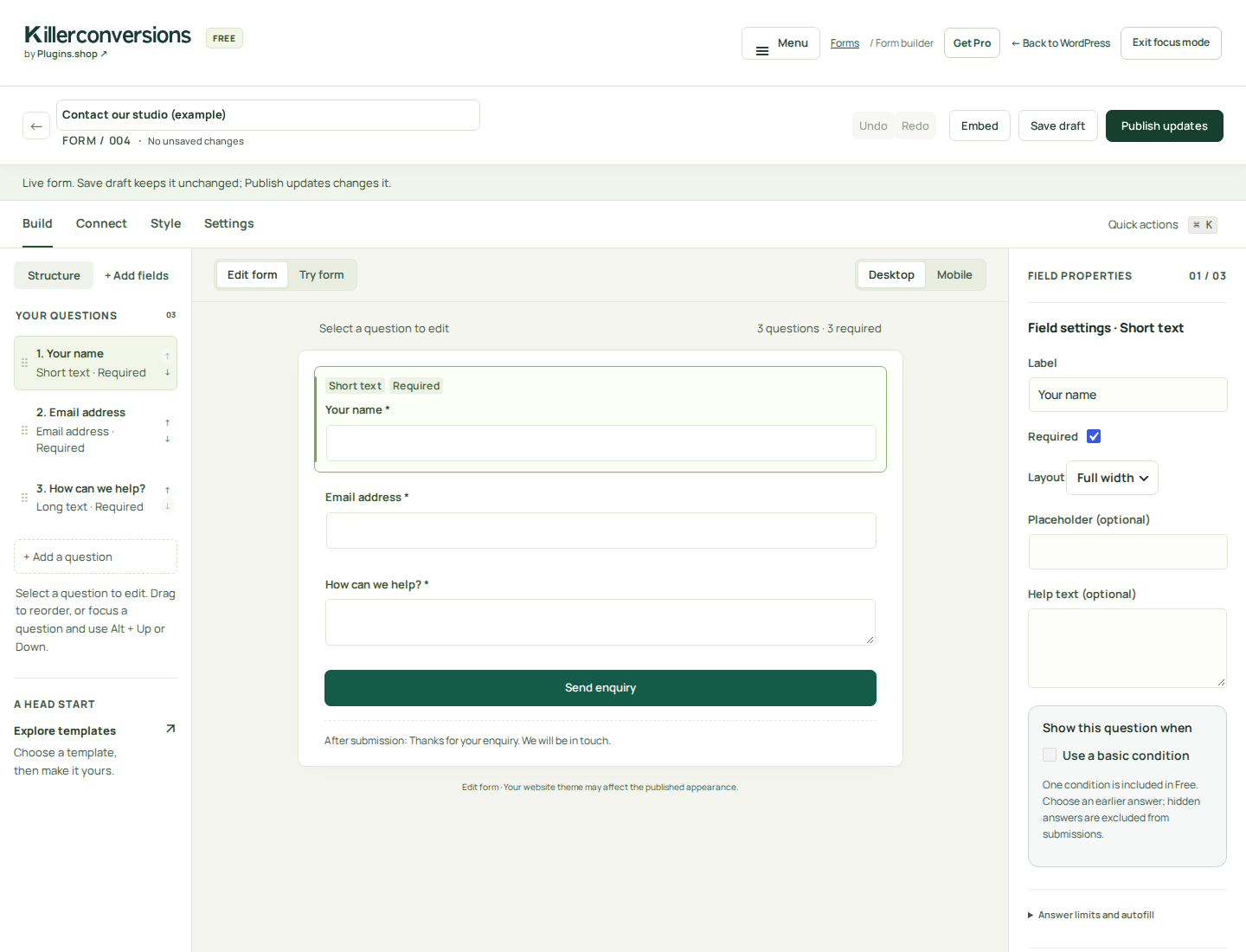
- Visual form builder: templates, field editing, keyboard reordering, preview and design drafts before publishing.
- Conditional fields: show or hide follow-up questions based on previous answers.
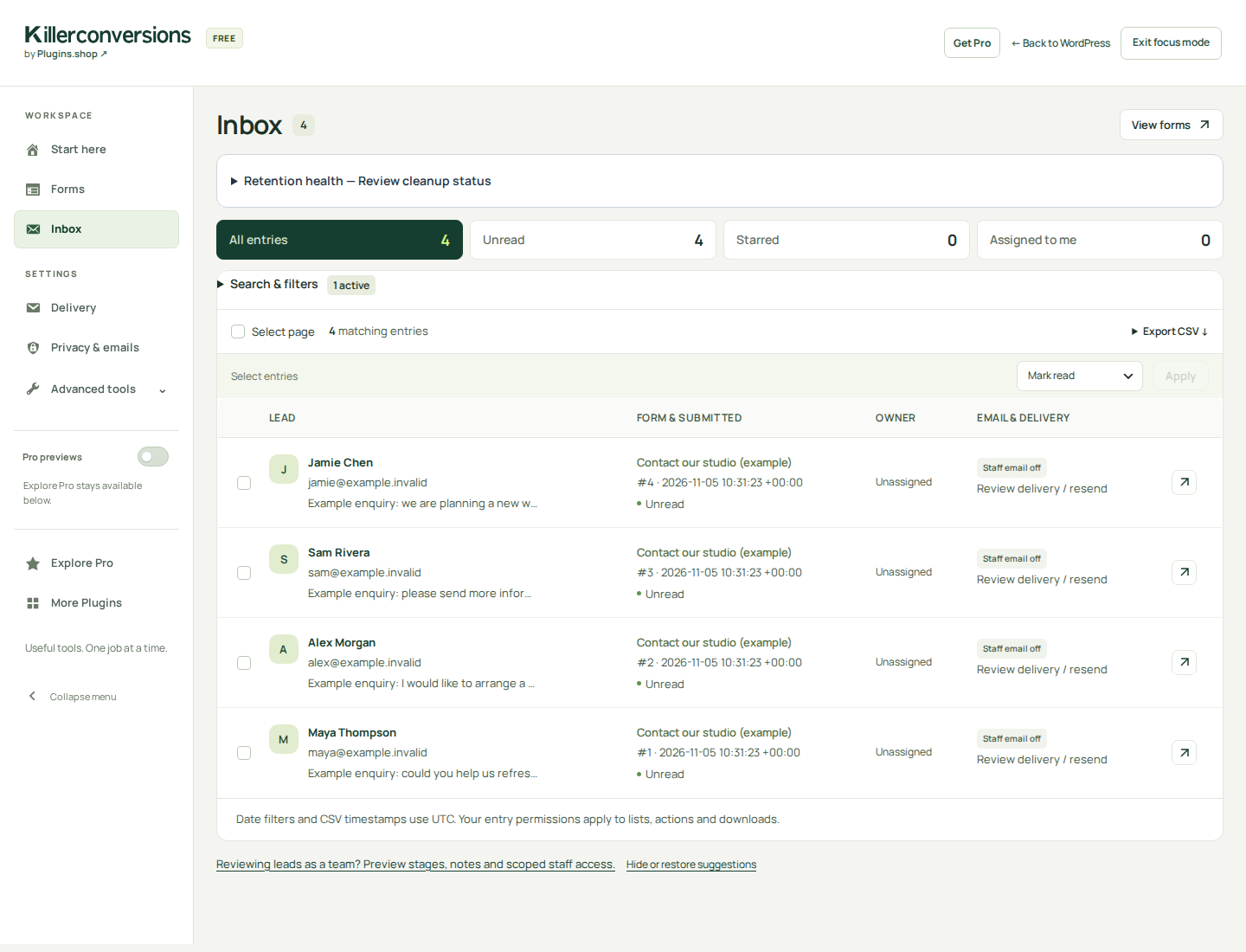
- Local form entries: search, filter, star, mark read/unread, assign and export submissions to CSV.
- Optional notifications: configure staff emails and separately requested visitor confirmations, or use Inbox only. Review failures in Delivery; sending depends on your site's mail setup.
- Spam protection: honeypot, submission rate limiting and optional Cloudflare Turnstile with your own widget keys.
- Repeatable fields: let visitors add rows of supported details, within the documented limits.
- Publishing and data controls: WordPress block and shortcode, design recovery/history, retention, eligible privacy export/erasure and sanitised configuration import/export.
- Newsletter connections: optionally send separately consenting subscribers to a configured Brevo list or MailerLite group.
- Calculated estimates and branded PDFs: quantity × unit-price rows, fixed extras, advanced pricing and server-calculated itemisation.
- Multi-step applications and private uploads: supported PDF, PNG, JPEG or UTF-8 TXT attachments within hosting limits.
- Visitor save and resume: explicitly saved incomplete applications with private return links. Incomplete answers are not captured automatically.
- Advanced workflows: nested conditions, branching, routing, connections and team-review tools with deliberate setup.
- ClickClue — session replay — Review eligible recorded visits to form pages using your chosen recording mode and privacy controls.
- CampaignBars — announcement bars — Link an announcement button to your contact or quote-request page.
- CatalogFAQ — FAQ accordions — Publish reusable answers beside an enquiry form so visitors can check common questions first.
安装:
- In WordPress, open Plugins > Add New, search for KillerConversions, then install and activate. You can also upload the Free ZIP through Upload Plugin.
- Open KillerConversions > Start here and choose Collect enquiries, Request a quote or Collect a project brief.
- Edit the questions, use Try form, and choose Save draft or Publish form. Publishing makes the form available; it does not insert it into a page.
- Add the KillerConversions block to a page, or use
[killerconversions id="123"]with your actual form ID. Publish the page. - Review Published settings. Choose an email recipient if wanted, or use Inbox only. Check spam protection and retention, then submit a controlled example through the published page and inspect Inbox. Verify any intended email receipt separately.
屏幕截图:
常见问题:
Is this a free contact form plugin without an account?
Yes. Build and publish forms, save submissions in WordPress, export CSV and configure ordinary notifications without a KillerConversions account or licence. Optional website registration, marketing emails and third-party connections remain separate choices. Free has no trial expiry or artificial form/submission quota; hosting and documented safety limits apply.
Where are contact form submissions stored?
Completed entries are stored in your WordPress database and appear in KillerConversions > Inbox. Search, filter, star, mark read/unread, assign and export them. A committed entry remains saved if email transport later fails. If the queue cannot be stored before commit, the submission is rejected so the visitor can retry. Entries are not encrypted at rest by the plugin; protect database access and backups.
Can I export form entries to CSV?
Yes. Export filtered entries in wide or long CSV layouts for use in a spreadsheet. Entry-access permissions also apply to exports. Submitted-entry totals are counts, not conversion rates.
Does Free include conditional logic?
Yes. Show or hide follow-up fields based on previous answers, with server-side validation of relevant required questions. Nested conditions, step branching and advanced conditional actions require Pro. During a partial update from an older Pro, finish updating both editions before using condition-dependent forms.
Can I make a quote request form or quote calculator?
Free collects quote enquiries, service requirements and project briefs. Pro calculates estimates from configured pricing and can produce a branded PDF. A quote request in Free does not calculate a price. Payments, signatures, AI form generation, A/B testing, multisite and a full CRM are outside scope.
Can visitors upload files, use multiple steps or save progress?
Multi-step applications, supported private uploads and visitor save-and-resume require Pro. Visitors explicitly save an incomplete application and return through a private link with a 1-, 3- or 7-day expiry. Free includes administrator form-design drafts; these are separate from a visitor's incomplete answers.
Can I use a WordPress block or shortcode?
Yes. Add the KillerConversions block in the WordPress block editor, or place [killerconversions id="123"] in a shortcode block using the published form's actual ID. The form picker requires administrator access; other post editors can use an ID supplied by a form administrator.
Can visitors add repeatable rows?
Free supports up to three repeated groups, ten rows per group and six text, email, number, date or select questions per row. Groups require JavaScript. Nested groups, uploads, consent, pricing and conditional dependencies inside groups are excluded.
Why am I not receiving contact form emails?
The staff notification address starts empty. Entries still appear in Inbox. Open the form's Connect tab, enter a Staff notification email, then publish. Or leave it blank to use Inbox only. Visitor confirmations and Pro routing have separate settings. Check any paused-delivery notice, submit through the published page and review Delivery. Confirm receipt with the intended recipient: WordPress mail acceptance is not proof of inbox delivery. Configure SMTP or another mail transport separately if your host needs it.
What spam protection is included?
Free includes a honeypot and submission rate limiting. Optional Cloudflare Turnstile adds a browser challenge and server verification. It starts off: open Settings > Spam protection, add your widget's site key and secret, acknowledge the external service, enable it and publish. Test the published form; the editor preview does not load Turnstile. Protected forms require JavaScript. See the external-service disclosure below.
Can I connect a newsletter signup form to Brevo or MailerLite?
Yes, after explicitly configuring the provider, list or group and a separate optional visitor marketing-consent question. The connection creates or updates the consenting subscriber; it does not send a newsletter campaign or perform double opt-in. Your provider's configured automations may run. An enquiry or staff notification is not newsletter consent. See the service disclosures below.
Can I recover or move a form design?
Free offers optional browser recovery, conflicting-save protection and a ten-design history. Credentials and operational settings stay outside that history. Import/export moves sanitised form configurations, not a full backup: entries, credentials, private destinations and live operational state are excluded by default. Review local destinations after import.
How does Pro licensing work?
Install Free first and a compatible Pro add-on, then activate the licence for this website before using Pro editing tools. After successful activation, ordinary licence expiry or a licensing-service outage does not remove earned access. Plans differ by their allowance of 1, 3 or 10 websites; each distinct WordPress website needs a licence, with no additional staging allowance. Free does not download or install Pro.
What happens if Pro is deactivated?
Basic workflows continue with Free alone. Premium-dependent forms and jobs retain their data and pause with an explanation; they do not calculate a different price or silently choose a fallback recipient. Existing scoped staff restrictions remain enforced. Missing or incompatible Pro also preserves saved data and privacy operations. Finish both updates before editing during a mixed-version upgrade.
Can I hide Pro previews?
Yes. Hide or restore sidebar previews and contextual suggestions for your administrator account on this website. Explore Pro stays available. Editor preview links open separately to preserve unsaved work. The pricing example uses fixed sample rates and does not enable Pro calculations. Local preview preferences remain until the documented explicit full uninstall.
Does it work without JavaScript?
Published forms have a standard server submission fallback and relevant server validation still applies. Enhanced multi-step navigation, repeatable groups, visitor save/resume, live estimates and the visual editor require JavaScript. Without it, ordinary fields remain readable together. Turnstile-protected forms require JavaScript.
Where can I get help?
Visit the documentation, WordPress.org support forum or support page. Public support has no guaranteed response time. No subscription or sister-plugin installation is required for local features.
How do I recover an upgrade?
Keep a pre-upgrade database/files backup and test restoration on a separate copy. Reinstalling an old ZIP does not reverse migrations. Do not overwrite newer submissions with an old database. Follow the matched update and recovery guidance.
更新日志:
- Keep specific validation messages when a nonempty invalid answer is cleaned to an empty value, including malformed email addresses.
- Preserve required-field messages for empty answers and retain server-side rejection of invalid submissions.
- Use default email settings for a new, unsaved form without displaying a false configuration warning; existing invalid saved settings still show their warning.
- Keep the existing Pro 1.2.4 add-on compatible; this Free update does not change Pro features or licensing.
- Fix conditional required-field validation to compare the same cleaned answer that is stored in the Inbox.
- Keep browser follow-up questions aligned with cleaned text answers, including stripped tags and percent-encoded octets.
- Pause condition-dependent forms during a partial Free/Pro update until Pro 1.2.4 is installed, while retaining its license screen and automatic updater.
- Continue large expired-entry cleanups in bounded scheduled batches, and show queued or overdue continuation work in Retention health.
- Preserve the daily cleanup fallback, transactional deletion and saved form settings.
- Clarify that optional Turnstile requires Cloudflare site and secret keys, without implying saved keys are missing.
- Label the optional update summary Review published settings; new-publication guidance opens and update guidance stays collapsed.
- Keep editor tabs and controls reachable at high browser zoom by letting the toolbar scroll on short windows, and remove its unused admin-bar gap in focus mode.
- Show the published form's staff notification, spam protection and new-entry retention settings after publishing, including configuration problems and paused delivery.
- Make the default-off staff email choice explicit with Set up email notifications and Use Inbox only, without selecting a recipient automatically.
- Explain Free's honeypot, submission rate limiting and optional Turnstile, and guide a real submission, Inbox and email-receipt check.
- Preserve form edits and show an accurate unconfirmed-save message when a server response or save finalization fails. Check the latest saved version before retrying.
- Keep confirmed commits separate from unconfirmed results; do not automatically retry an uncertain save.
- Focused workspace with a shared sidebar, accessible mobile navigation and clear routes back to WordPress.
- Optional Pro preview shortcuts with a saved per-administrator visibility preference; Explore Pro remains available.
- Task-specific Pro examples and accurate Free/Pro comparisons.
- Plugins.shop attribution and a local More Plugins collection with clear external links.
- Match the Free and Pro release versions and clarify the 1, 3 and 10 website licence plans. Each distinct WordPress website needs a licence, with no extra staging allowance.
- Open Start here after the first successful individual activation and the forms workspace after a returning activation. The redirect stays within that request; bulk activations, updates and background operations do not create a deferred redirect. Earlier release notes are preserved in CHANGELOG-HISTORY.txt in the plugin package.