
Kiyoh Reviews
| 开发者 |
converzo
mklasen |
|---|---|
| 更新时间 | 2026年10月14日 22:46 |
| PHP版本: | 7.4 及以上 |
| WordPress版本: | 7.1 |
| 版权: | GPLv2 or later |
| 版权网址: | 版权信息 |
详情介绍:
- Automatic Review Invitations - Send review invitations automatically when an order reaches any of the order statuses you choose, including custom statuses
- Invitation Types - Ask for a shop review, a product review, or both, with up to 10 products per invitation and a choice of which products come first
- Excluded Customer Roles - Never invite customers with roles you choose, such as wholesale or staff accounts
- Manual Review Invitations - Send invitations manually from the WooCommerce order actions dropdown
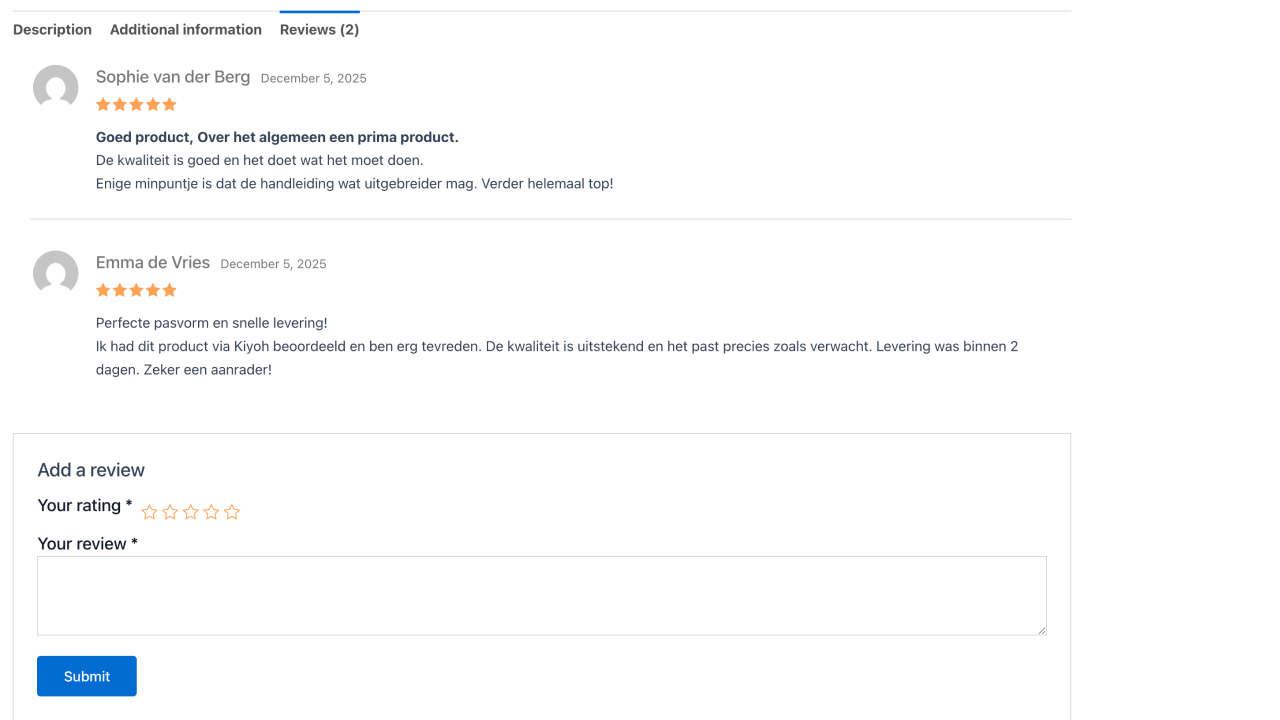
- Product Reviews - Display Kiyoh product reviews on your WooCommerce product pages, integrated with native WooCommerce reviews
- Company Reviews Widget - Show your overall company rating using the included WordPress widget
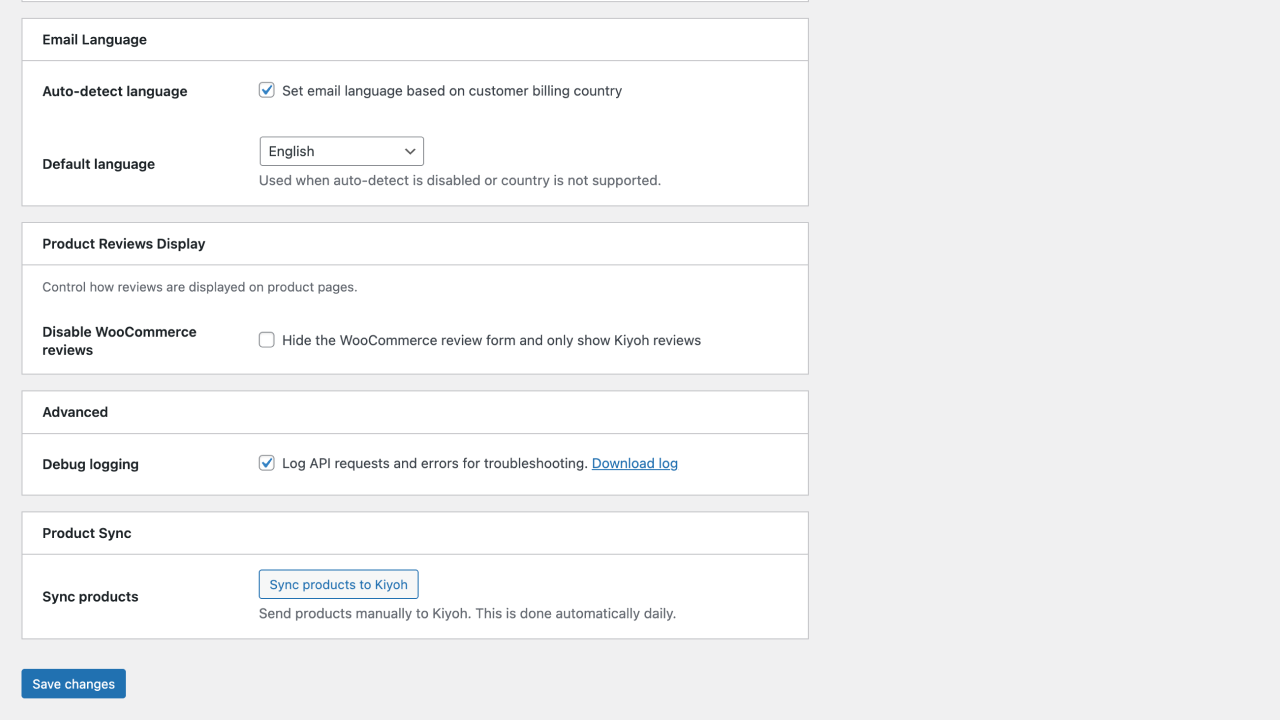
- Product Sync - Sync your WooCommerce product catalog with Kiyoh, including brand, GTIN, MPN and SKU. Products are synced as soon as they are saved, and right before an invitation asks about them
- Product Exclusions - Leave product types or SKUs out of the sync and the invitations
- Multi-language Support - Send review invitations in the customer's language, based on their WordPress language, the site language or the billing country
- Configurable Delay - Set a delay before review invitations are sent
- Debug Logging - Enable debug mode to troubleshoot API interactions
- Duplicate Prevention - Automatic invitations are only sent once per order
- Multisite Ready - Activate per site or network wide; every site keeps its own Kiyoh credentials and its own scheduled jobs
- Translated Interface - Ships with Dutch, German, Spanish, Italian and French translations, including the block editor
- WooCommerce Ratings - Store Kiyoh product scores in WooCommerce, so catalog stars and "sort by rating" use them. Choose Kiyoh, WooCommerce or both as the rating source
- Review Import - Save Kiyoh product reviews as WooCommerce reviews
- Invitation Log - See every invitation attempt under WooCommerce and retry failed ones
- Structured Data - JSON-LD AggregateRating for Google rich results
- WordPress 6.3 or higher (single site or Multisite)
- WooCommerce
- PHP 7.4 or higher
- Kiyoh account with API access
安装:
- Upload the plugin files to
/wp-content/plugins/kiyoh-reviews, or install the plugin through the WordPress plugins screen - Activate the plugin through the 'Plugins' screen in WordPress
- Go to Settings > Kiyoh to configure the plugin
- Enter your Kiyoh API key, location ID, and server URL
- Enable review invitations and configure your preferred settings
屏幕截图:
常见问题:
Where do I find my Kiyoh API credentials?
Log in to your Kiyoh account and navigate to the API settings section to find your API key and location ID.
Can I customize when review invitations are sent?
Yes. Choose one or more order statuses that trigger the invitation; custom order statuses are listed too. You can also set a delay in days before Kiyoh sends the invitation.
Can I send review invitations manually?
Yes, you can send a review invitation manually from any order by selecting "Send Kiyoh review invitation" from the order actions dropdown.
Are invitations sent multiple times if an order status changes?
No, automatic invitations are only sent once per order. However, you can always send additional invitations manually if needed.
Does the plugin work on WordPress Multisite?
Yes. You can activate it on a single site or network activate it. On network activation every site in the network is set up automatically, and sites created afterwards are set up as they are added.
Can I share one Kiyoh account across a Multisite network?
No, settings are stored per site. Every site in the network has its own API key, location ID and cached reviews, which is what you want when the sites belong to different companies. Configure each site under Settings > Kiyoh.
Which languages is the plugin available in?
English, Dutch, German, Spanish, Italian and French. The plugin follows the language configured for the WordPress site, so switching the site language switches the plugin along with it. On Multisite each site follows its own language setting.
Can I change a translation on my own site?
Yes. Place your own MO file in wp-content/languages/plugins/ as kiyoh-reviews-{locale}.mo. WordPress loads that before the translations bundled with the plugin, so your changes survive plugin updates.
更新日志:
- New "Product review texts" setting under Product Reviews Display. Gold: turn the extra answers from Kiyoh product reviews on or off (on by default, as before). Free: shown as a Gold feature.
- Invitations can be triggered by several order statuses, including custom ones. The previous single status is carried over.
- New invitation types: shop and product, product only, or shop only. The previous "Include products" setting is carried over.
- Choose up to 10 products per invitation and the order in which they are picked.
- Exclude customer roles from invitations.
- Detect the invitation language from the customer's or the site's WordPress language.
- Product sync now sends brand, GTIN, MPN and SKU, marks unpublished products as inactive, runs when a product is saved and right before an invitation, and can exclude product types and SKUs.
- The sync button now syncs in steps and shows its progress, so large catalogs no longer time out.
- The API key field is now a password field.
- Suggested privacy policy text under Settings > Privacy.
- Gold: store Kiyoh ratings in WooCommerce (catalog stars, sort by rating), choose the rating source, import Kiyoh reviews as WooCommerce reviews, and an invitation log with retry.
- Gold: fixed the extra product review ratings, which were never shown.
- Updated Freemius SDK to the latest version.
- Added a 30-day free trial of the Gold version, which starts without a payment method.
- Added Dutch, German, Spanish, Italian and French translations, covering the settings screen, the widgets, the front end and the block editor.
- Fixed translation loading: the bundled translation files were named for an older text domain, so no translation was ever applied. The plugin now registers its text domain and ships a Domain Path.
- Regenerated the translation template, which had been stale since 2020 and covered 3 of the 107 translatable strings.
- Multisite: network activation now sets every site in the network up, instead of only the site the activation ran on.
- Multisite: sites added to the network after activation are set up automatically.
- Multisite: network deactivation clears the scheduled jobs on every site.
- Missing scheduled jobs are now restored on load, so a site that enabled WooCommerce after activation gets the product catalog sync.
- Tested up to WordPress 7.1.
- Review slider block now registers from block.json with block API version 3, keeping it working in the always-iframed editor introduced in WordPress 7.1.
- Slider script re-initialises after client-side navigation and no longer relies on the global document, so it also runs inside the editor iframe.
- Clearing the slider title now hides the heading instead of falling back to the default, and the empty is no longer output.
- Updated the Freemius SDK to 2.13.4.
- Tested up to WordPress 7.0.
- Added a review slider, available as both a block and a widget.
- Added a floating review widget.
- Added a company review feed.
- Improved the settings screen.
- Automatically fetch company reviews when saving settings.
- Initial Release