
KoalaForms Contact and Registration Form Builder with AI
| 开发者 | wpkoalaforms |
|---|---|
| 更新时间 | 2026年9月2日 13:19 |
| PHP版本: | 7.4 及以上 |
| WordPress版本: | 7.1 |
| 版权: | GPL-2.0-or-later |
| 版权网址: | 版权信息 |
详情介绍:
- Contact forms and support request forms
- Registration forms and user sign-up forms that create WordPress accounts
- Event registration and RSVP forms
- Membership and customer onboarding forms
- Job application forms with resume and file uploads
- Booking, appointment, and quote-request forms
- Customer feedback, review, and rating forms
- Survey and questionnaire forms
- Lead generation and newsletter sign-up forms
- Multi-step application and intake forms
- Go to KoalaForms → All Forms and create a new form (or generate one with AI).
- Add fields from the block inserter and configure each one in the sidebar — label, placeholder, required state, validation, and input mask.
- Set the form type (Contact or Registration), notifications, spam protection, and any access limits in the Form Settings panel.
- Publish the form and copy its shortcode, e.g.
[KoalaForms form_id="123"]. - Paste the shortcode into any page or post. Submissions start arriving in KoalaForms → Submissions.
- Text Field (with input masking)
- Phone Field (with input masking)
- Email Field
- Textarea / Paragraph
- Number Field
- Currency Field
- Percentage Field
- DateTime Field
- URL Field
- Dropdown (Select)
- Multi-Select
- Radio Buttons
- Checkboxes
- Date Field (with optional age validation)
- File Upload Field
- Address Field
- Disclosure / Consent
- Rating Field
- Signature Field
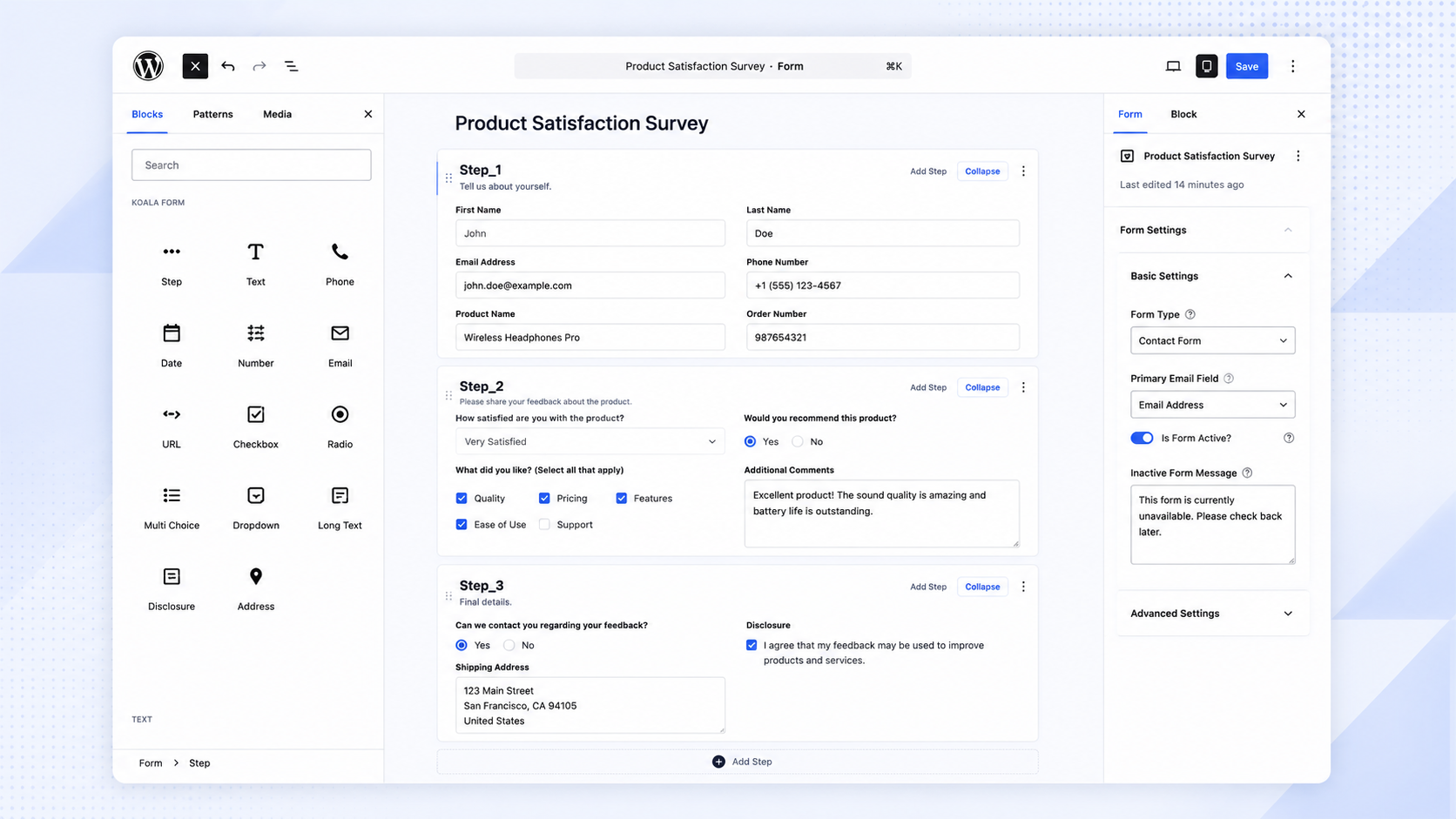
- Native block editor — every field is a WordPress block, configured in Gutenberg. Nothing new to learn.
- Contact & registration forms — choose a form type; registration forms create WordPress user accounts on submission.
- Multi-step forms — split forms into steps with Next/Previous navigation and section labels.
- Input masking & validation — format phone numbers and other inputs as users type, with required fields, patterns, min/max, and custom error messages.
- Email notifications — send admin notifications and an automatic confirmation (auto-reply) to the submitter, with a delivery status shown on each submission.
- Submissions in your database — every submission is stored in WordPress and viewable in the admin, with a dedicated submission detail view.
- File uploads & signatures — accept documents and capture drawn signatures directly in the form.
- Spam protection — optional Google reCAPTCHA integration, disabled until you configure it.
- Access & limits — restrict forms to logged-in users, set submission limits, and generate unique submission IDs.
- Translation-ready — fully internationalized and ready to translate into any language.
- AI Form Generator (Beta) — generate a form from a plain-language description or an uploaded file.
安装:
- Upload the plugin files to
/wp-content/plugins/koalaforms/, or install via the WordPress plugin screen. - Activate the plugin through the Plugins screen in WordPress.
- Go to KoalaForms → All Forms in the WordPress admin menu.
- Click Add New Form, enter a name, and click Create Form.
- The form opens in the Gutenberg block editor — use the block inserter to add fields.
- Publish the form, then copy the shortcode (e.g.
[KoalaForms form_id="123"]) and paste it into any page or post.
屏幕截图:
常见问题:
Do I need to know how to code?
No. Forms are built using the Gutenberg block editor — add fields, configure settings, and publish.
Can I create multi-step forms?
Yes. Multi-step forms with step navigation are supported. Use the Step block to divide your form into sections.
Where are form submissions stored?
Submissions are stored in your WordPress database and are accessible from KoalaForms → Submissions in the admin menu.
How do I display a form on a page?
After publishing a form, copy its shortcode from the Forms list (e.g. [KoalaForms form_id="123"]) and paste it into any page or post.
Can I generate a form using AI?
Yes. Go to KoalaForms → AI Form Generator, describe the form you need in plain language, and click Generate. The AI will produce the full block structure which you can then refine or edit. This feature is in Beta, requires an AI provider (Anthropic, OpenAI, or Google) to be configured in WordPress, and requires an internet connection.
Is it compatible with my theme?
KoalaForms works with standard WordPress themes. The form output uses minimal markup and can be styled with CSS.
Can I build a registration form that creates user accounts?
Yes. Set the form type to Registration in the Form Settings panel. When a visitor submits the form, KoalaForms creates a WordPress user account and maps your chosen fields to the username and email. WordPress then emails the new user a link to set their own password — the plugin never handles passwords directly, and there is no password field by design.
How do I view or manage submissions?
Every submission is saved to your WordPress database. Go to KoalaForms → Submissions to browse them, open any entry for a detailed view, and check the delivery status of the notification emails for that submission.
Can I send email notifications and auto-reply confirmations?
Yes. You can notify one or more admin email addresses whenever a form is submitted, and send an automatic confirmation (auto-reply) to the person who filled out the form. Choose a Primary Email Field so the auto-reply knows which address to send to.
How do I stop spam form submissions?
KoalaForms integrates with Google reCAPTCHA. Add your reCAPTCHA site and secret keys in the plugin settings and enable it on your form. It is disabled by default and only loads when configured.
Can I collect file uploads or signatures?
Yes. Add a File Upload field to accept documents (you can restrict the allowed file types and sizes) and a Signature field to capture a drawn signature directly in the form.
Does it support conditional logic or dependent fields?
Fields that show or hide based on other answers are not supported in the current version. For branching or optional sections, split the form into multiple steps using the Step block.
Can I style the form to match my theme?
Yes. KoalaForms outputs minimal, standard markup that inherits your theme's styles and can be customized further with your own CSS.
Is KoalaForms translation-ready?
Yes. The plugin is fully internationalized (text domain: koalaforms) and ready to be translated into any language.
What do I need to use the AI Form Generator?
An AI provider — Anthropic, OpenAI, or Google — configured in WordPress, plus an internet connection. The generator only sends the information needed to build a form; no form submission data or visitor data is ever sent. See the External Services section for details.
更新日志:
- DateTime and Percentage field support.
- AI form generation improvements.
- Security fixes after WordPress review.
- File uploads now use WordPress's built-in upload handler, so uploaded files go through the same validation and security checks as the rest of WordPress. Files continue to be stored in a protected folder that is not directly accessible over the web.
- AI form generator — generated fields now work correctly on the front end straight away. Phone number input masks, validation messages, and dropdown/radio options are applied automatically, without having to open and re-save the form in the editor first.
- AI form generator — generated forms now come pre-configured with the right settings: the form type is set to Contact or Registration based on what you asked for, and the primary email field is selected automatically whenever the form has an email field, so admin notifications and auto-replies work without extra setup.
- AI form generator — asking for a registration or sign-up form now produces a form wired up to create a WordPress user account on submission, with the username and email fields already mapped.
- AI form generator — address blocks now include a label for every sub-field (Address Line 1, Address Line 2, City, State, Country, Zip Code).
- The address field's group label (e.g. "Billing Address") is now shown on the front-end form, with improved spacing and alignment.
- Notification delivery status — the Submissions list and detail view now show whether each notification (admin email and auto-reply) was sent, failed, or had no recipient for every submission, so you can confirm at a glance that a lead's emails actually went out.
- Mailer errors are now captured — when a notification fails to send, the underlying mail server error is recorded and shown on the submission instead of a generic failure.
- Auto-reply now warns in the editor when no Primary Email Field is selected, since without it the auto-reply can only reach logged-in users and is skipped for anonymous submitters.
- Conditional layouts are now field-type aware — checkboxes match on their checked state, dropdowns and radios offer their real options, dates and numbers use proper date/number inputs, and file/signature fields match on whether they were provided. Fields with no comparable value are no longer offered as conditions.
- Fixed a bug where a field dragged from the field pool into a section did not grey out until the page was refreshed.
- Submission detail page rebuilt — replaces the default WP metabox editor with a dedicated view showing a chevron stage pipeline, sidebar info panel, and drag-and-drop layout builder for organising fields into labelled sections.
- Conditional layouts — define multiple layouts per form with field-based conditions to control which layout is shown for each submission.
- Rating field type added.
- Signature field added.
- Block inserter panel and form settings sidebar now open automatically on page load in the form editor.
- Form duplication and postmeta changes.
- Currency field support added.
- AI Builder form generation improved. Added debug panel to find out the problems. From the preview page, user can submit and test.
- Supports Google and Open AI connector now.
- Submission delete button added on the detail page.
- Images/HTML and Video blocks are now rendering in the frontend.
- Submit button label can be changed from the editor.
- Placeholder allowed text length increased to 100 characters.
- More keywords added for block searching in the editor.
- Phone field server side validation added.
- File upload field supported.
- Unique name check implemented in the form builder.
- Form Builder settings panel ui enhancements.
- URL parameter prepopulation — pass field values via query string (e.g. ?name=John) to prefill form fields, including address sub-fields, on page load.
- Block custom class and css.
- Minimum WordPress version updated.
- AI Form Generator (Beta) — describe a form in plain language and let AI generate the full block structure. Feature is in Beta; our team is actively testing it.
- Report a Bug — admins can submit a bug report directly from the AI Generator page, sent to the KoalaForms support team
- Deactivation feedback — when deactivating the plugin, admins are optionally asked for a reason. Feedback is sent to the support team to help improve the plugin
- Form and submission deletion — permanently delete trashed forms and submissions; forms with existing submissions are protected from accidental deletion
- Standard templates — choose from pre-built form templates (registration, contact, and more) when creating a new form
- Embed & Preview panel — new block editor sidebar panel shows the form shortcode with a one-click copy button, and a "Create preview page" button that generates a draft WordPress page for testing
- Submission delete — individual submissions can now be deleted from the admin submissions page
- Block editor UI — redesigned General, Validation, and Form Settings panels with improved layout and usability
- Extension hooks — new filters (
koalaforms.formComponent,koalaforms_form_html_attributes,koalaforms_extra_block_types) and field extension API for Pro and add-on module integration
- Analytics — submission chart added to the form analytics page
- Address field is now collapsible in the block editor
- Bug fix — multiple forms on the same page now load and submit independently
- Help text improvements and general UI cleanup across the admin
- Display Label added — lets you set a user-facing label separate from the unique field name
- Custom hooks added to support add-on integrations
- Initial release
- Gutenberg block-based form builder — text, email, number, URL, date, dropdown, multi-select, radio, checkbox, textarea, address, and disclosure fields
- Multi-step forms with step navigation
- Input masking for fields like phone numbers
- Form submissions stored in the database and viewable in the admin panel
- Google reCAPTCHA support
- Email notifications on submission