Koalendar – Easy Appointment Scheduling & Booking Plugin
| 开发者 | |
|---|---|
| 更新时间 | 2026年9月5日 22:34 |
| PHP版本: | 2.5 及以上 |
| WordPress版本: | 7.1 |
| 版权: | GPLv2 or later |
| 版权网址: | 版权信息 |
标签
下载
详情介绍:
- WordPress booking and appointment scheduling plugin
- Unlimited booking pages and appointments
- Calendar sync with Google Calendar, Outlook, and iCloud
- Accept online payments for services and appointments
- Personalized booking pages that match your website design
- Multiple appointment types with custom durations
- Group bookings and classes with attendee limits
- Smart availability rules, buffers, and time off
- Team scheduling with shared and round robin availability
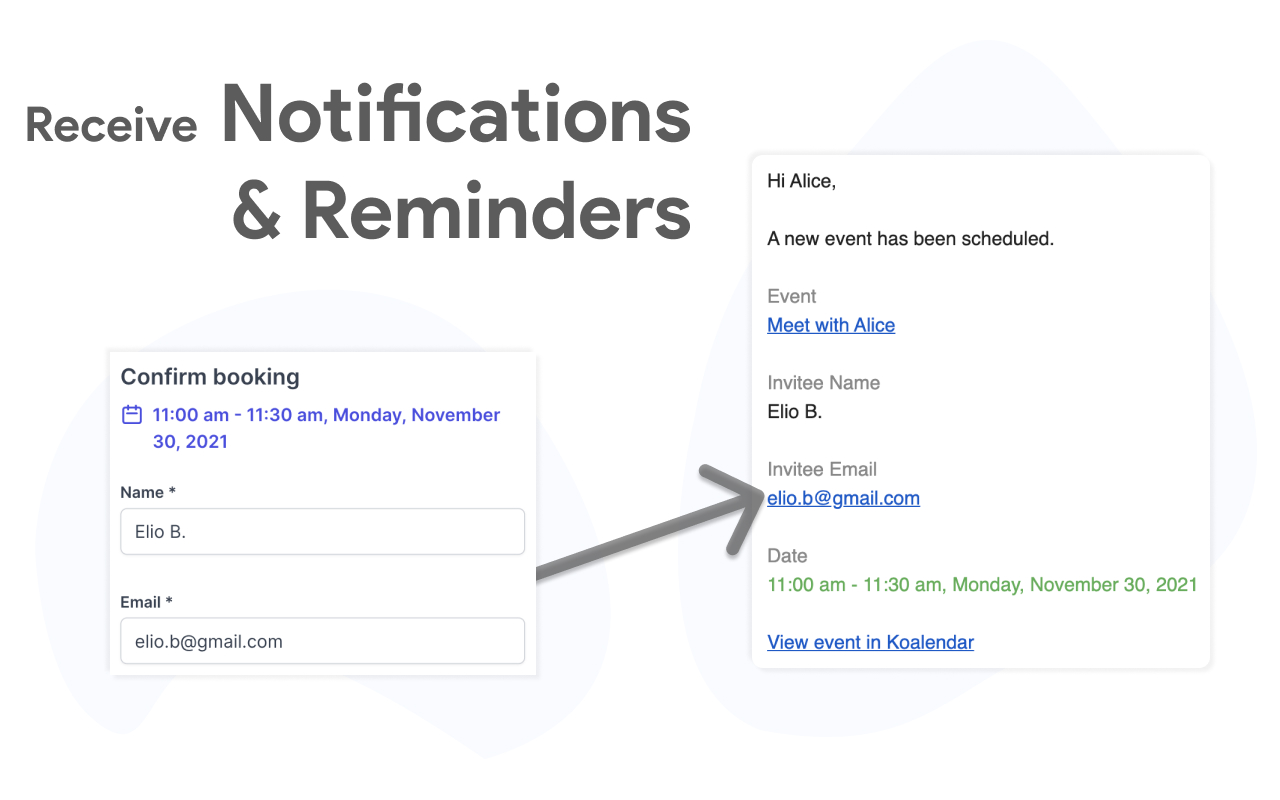
- Automated booking confirmations and reminders
- Easy embedding using WordPress blocks, shortcodes, or widgets
- Consultants and freelancers
- Coaches, tutors, and educators
- Agencies and remote teams
- Service based businesses
- Sales teams booking meetings and demos
- Anyone who needs an online scheduling calendar on their WordPress website
- Calendar integrations with Google Calendar, Outlook, and iCloud to keep availability accurate in real time
- Video meeting integrations with Google Meet and Microsoft Teams, automatically generating meeting links for online appointments
- Payment integrations with Stripe, allowing clients to pay when they book an appointment or service
- Automation platforms such as Zapier, Make, n8n, and Pabbly to connect Koalendar with hundreds of apps and automate follow ups or internal workflows
- WordPress friendly setup, plus productivity tools like a Chrome extension for quickly sharing booking links
- Customize colors and layout
- Share a direct booking link or embed on any page
- Works with WordPress blocks, shortcodes, or widgets
- Optimized for desktop and mobile users
- Sync with Google Calendar, Outlook, and iCloud
- Prevent double bookings automatically
- Set working hours, buffers, and time off
- Control availability per meeting or service
- Schedule meetings with multiple team members
- Round robin and collective availability options
- Each team member connects their own calendar
- Perfect for agencies and growing small businesses
- Appointment types (services): list multiple services directly on your booking page, each with its own price and duration
- Multiple and recurring bookings: invitees can book multiple dates, or set up recurring bookings, in a single flow
- Booking durations in hours or days: configure event durations using hours or days
- New booking page editor: redesigned editor for faster page creation and updates
- Koalendar available in Spanish and French
- File upload: collect files with the Google Drive integration
- Stripe Checkout: offer more payment methods and collect taxes
- Gmail integration: send booking emails from your own address
- New integrations: Zapier and Telegram
- Apple Pay and Google Pay supported automatically on supported devices and browsers
安装:
- Visit https://wordpress.org/plugins/ and search for 'Koalendar'
- Install the plugin
- Go to the plugin management page and enable it
- Create a free account at Koalendar.com
- Create a booking page.
- Get your booking page link to paste into the [koalendar] tag by clicking "Share" next to the booking page, and "Copy link".
屏幕截图:
常见问题:
Is Koalendar really free forever?
Yes. Koalendar's free plan includes unlimited bookings, scheduling pages, and calendar sync (no credit card required). Use it forever, and upgrade only if you want advanced features like branding, group meetings, payments, reminders, or extra integrations.
What do I get if I upgrade to Pro?
Pro helps you look even more professional and saves more time. You'll unlock custom branding, payments, group meetings, automated reminders, advanced integrations, and more.
Which integrations are included in Free vs. Pro?
Free includes calendar sync (Google, Outlook, iCloud), Google Meet, and basic notifications. Pro adds automated reminders, payment collection via Stripe, custom forms, branding, and advanced team scheduling.
Can I schedule video call meetings online with Zoom, Google Meet, or Microsoft Teams?
Yes. Koalendar can automatically create Zoom, Google Meet, or Microsoft Teams links and add them to the calendar event and booking emails.
Does the plugin require a paid subscription?
No. The Koalendar plugin is free, and the free plan includes unlimited bookings and scheduling pages. Premium features are optional for teams that need advanced customization and additional integrations.
Will Koalendar work with my existing calendar?
Absolutely. Koalendar syncs with Google Calendar, Microsoft Outlook, and Apple Calendar. Your availability stays up to date across all platforms and helps prevent scheduling conflicts.
Can I customize the appearance of the booking widget?
Yes. Customize colors, fonts, button styles, and layout to match your WordPress theme. Add your logo, adjust spacing, and create a seamless brand experience for your visitors.
Can invitees choose how we meet (online, phone, or in person)?
Yes. You can offer multiple meeting locations on the same booking page, including online meetings, phone calls, or in person meetings.
更新日志:
- Update demo video.
- Tested up to WordPress 7.1.
- Update plugin readme content, including demo video, FAQ, and backlog updates.
- Appointment types (services): list multiple services directly on your booking page, each with its own price and duration (from https://changelog.koalendar.com/)
- Multiple and recurring bookings: invitees can book multiple dates, or set up recurring bookings, in a single flow
- Booking durations in hours or days: configure event durations using hours or days
- New booking page editor: redesigned editor for faster page creation and updates
- Koalendar available in Spanish and French
- File upload: collect files with the Google Drive integration
- Stripe Checkout: offer more payment methods and collect taxes
- Gmail integration: send booking emails from your own address
- New integrations: Zapier and Telegram
- Apple Pay and Google Pay supported automatically on supported devices and browsers
- Improve shortcode attribute sanitization and escaping.
- Compatibility updates.
- Compatibility updates.
- Initial release