
Leadkeel – Contact Form Email Log & Failure Alerts
| 开发者 | shakeelagency786 |
|---|---|
| 更新时间 | 2026年10月21日 17:58 |
| PHP版本: | 8.0 及以上 |
| WordPress版本: | 7.1 |
| 版权: | GPLv2 or later |
| 版权网址: | 版权信息 |
详情介绍:
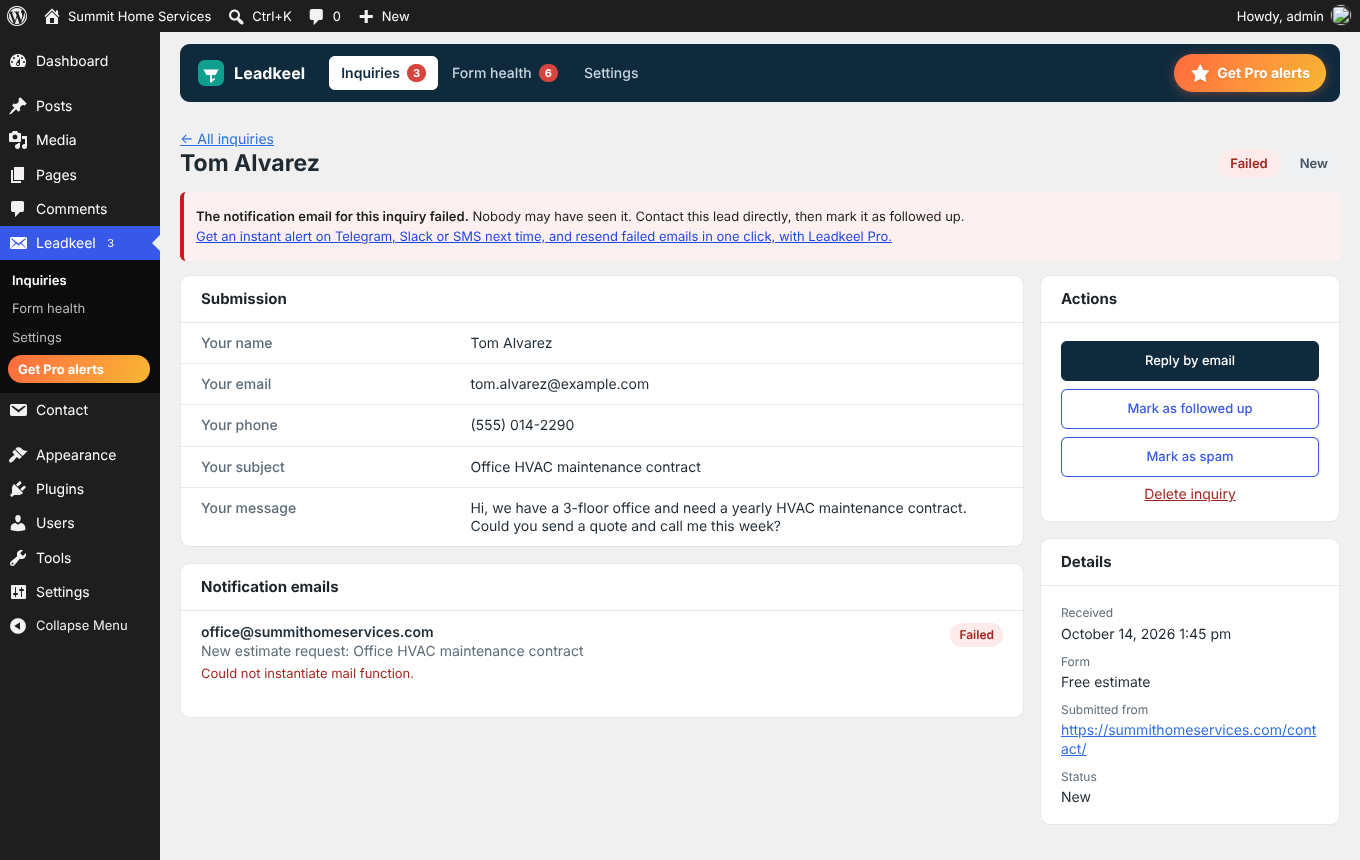
- Email log for every lead. See whether each notification email was accepted by your site's mail system, failed (with the error message), or not confirmed.
- Failure warnings. A notice on your dashboard and a count on the Leadkeel menu show leads whose notification email failed.
- Dashboard widget. Leads this week, leads that need your attention, how many forms are working and your latest leads, right on the WordPress Dashboard.
- Every submission saved. Each form entry is stored before your form plugin sends its email, so a failed email never means a lost lead.
- Delivery test. WordPress can only see whether an email was accepted, not whether it arrived. The Form health page sends a test email with two buttons, "It's in my inbox" and "It was in spam", so you know for certain where your site's emails land. Leadkeel also warns you when your site sends email with PHP mail, where accepted emails are often silently lost.
- Automatic form scan. Leadkeel finds every form on your site and checks each one: is a notification email switched on, does it go to you (not only to the visitor), is the recipient address valid, is it sent "from" an address email providers trust, and which pages show the form. Each problem comes with what to fix and an Edit form link. Scans run on install, daily, whenever a form or page is saved, and each time you open Form health; problems also show on your dashboard.
- Form health. Every form's scan results plus what really happened to its latest submission: email accepted, failed (with the error) or never sent.
- Gone-quiet alerts. A warning, and optionally an email, when a form that usually gets submissions suddenly stops. A silent form is often a broken form.
- Weekly summary. An optional weekly email listing leads whose notification failed and that still need a reply. Nothing is sent in weeks when every lead has been handled.
- Spam kept separate. Submissions full of links are moved to a Spam list automatically, away from your real leads. Nothing is blocked: "Not spam" restores a lead in one click.
- Follow-up status. Mark inquiries as new, followed up or spam, so you can work through missed leads.
- Search, filter and CSV export by status, email result, name, email or message.
- Multisite ready. Network-activate Leadkeel and every site, including sites created later, gets its own private inquiry inbox.
- Translation ready.
- Privacy tools. Automatic deletion after a period you choose, plus support for WordPress's personal data export and erasure tools.
- Contact Form 7
- WPForms (Lite and Pro)
- Fluent Forms (free and Pro)
- Forminator (free and Pro)
- Gravity Forms, including background notifications
- Elementor Forms (the Form widget in Elementor Pro)
安装:
- Install and activate Leadkeel from the Plugins screen.
- Make sure Contact Form 7, WPForms, Fluent Forms, Forminator, Gravity Forms or Elementor Pro is active.
- Submit one of your forms. The submission appears under Leadkeel → Inquiries.
屏幕截图:




常见问题:
Why is Contact Form 7 not sending email?
Usually the website's email setup is the problem, not the form: many hosts block or limit PHP mail, or an SMTP setting changed. Leadkeel shows the exact error for each failed Contact Form 7 notification, so you can see why, and it keeps the submission so the lead is not lost. Use the Send test email button on the Form health page to check your site's email, and an SMTP plugin to fix it.
My contact form says "Thank you" but I never get the email. Why?
The form saved the visitor's message and asked WordPress to send the notification, but the email failed or was filtered on the way. Common causes are a missing SMTP plugin, a "From" address on a different domain than your site, a notification switched off, or a recipient address with a typo. Leadkeel shows which of these applies: the inquiry's page shows the email result and any error, and Form health checks every form's settings. The lead itself is always saved, so you can reply to it.
WPForms, Gravity Forms or Fluent Forms is not sending notifications. Can Leadkeel help?
Yes. Leadkeel records the result of every notification email from WPForms, Gravity Forms, Fluent Forms, Forminator, Elementor Forms and Contact Form 7, shows the error when one fails, and keeps a copy of the entry, so you can reply to the person directly.
Is this an email log plugin?
For your forms, yes. Leadkeel logs every notification email sent by your contact forms, with its recipient, subject and result. It does not log other site email such as password resets.
Where are my contact form entries saved?
In your own WordPress database. Open Leadkeel → Inquiries to see, search and export every form submission.
Does Leadkeel send any data off my site?
No. The free plugin stores everything in your own WordPress database and makes no external requests.
Can Leadkeel recover a submission that never reached my site?
No. Leadkeel saves every submission that reaches WordPress. If a form is broken so that the submission never reaches the server, there is nothing to save.
What does "Not confirmed" mean?
Another plugin handled sending the email and did not report the result back to WordPress, so Leadkeel cannot tell whether it was delivered.
Does Leadkeel change how Fluent Forms sends email?
Yes, slightly. Fluent Forms can send notification emails in a separate background request, where Leadkeel cannot see whether they succeeded. Leadkeel asks Fluent Forms to send its notification emails during the submission instead, which is how Contact Form 7 and WPForms already work. Other Fluent Forms integrations are not affected. Developers can turn this off with add_filter( 'leadkeel_fluentforms_sync_email', '__return_false' );, in which case those emails show as "No email" in Leadkeel.
Why doesn't my Elementor form show on the Form health page?
Leadkeel finds the Form widget in your published Elementor pages, posts and templates. A form that only exists in an unpublished design, or is added in an unusual way, appears on the Form health page as soon as it receives its first submission.
Does Leadkeel work on multisite?
Yes. Network-activate it and each site gets its own inquiries, settings and warnings. Sites created later are set up automatically, and a site's Leadkeel data is removed when the site is deleted.
Why didn't I get the weekly summary?
It is only sent when leads with a failed notification are still marked New. If your site cannot send email at all, the summary cannot be sent either, so check the Dashboard warnings and use the Send test email button on the Form health page.
What does Leadkeel check on my forms?
For each form: whether a notification email is switched on, whether it goes to you and to a valid address, whether its From address will be trusted by email providers, which published pages show the form, what happened to its latest real submission, and whether it has suddenly gone quiet. For the whole site: whether email is sent through an SMTP plugin or PHP mail, and (with the delivery test) whether emails reach the inbox or spam. Leadkeel reads each form plugin's own settings; if it cannot read them for a form, it says so instead of guessing.
Does Leadkeel block spam?
It never blocks or deletes a submission straight away. Submissions with 3 or more links, or link code, are saved under Inquiries → Spam instead of your main list, and "Not spam" moves a real lead back. You can turn this off under Leadkeel → Settings. Keep your form plugin's own CAPTCHA or Akismet protection as well.
Does Leadkeel replace my SMTP plugin?
No. Leadkeel does not send email; it watches it. Keep your SMTP plugin to send email reliably, and Leadkeel tells you when sending fails and keeps every lead either way.
An email shows as Accepted, but it never arrived. Why?
Accepted means your site's mail system took the email. What happens next is decided by email providers, and WordPress cannot see it: the email may land in spam, or be dropped, especially when the site sends with PHP mail instead of an SMTP plugin. Run the delivery test on the Form health page to find out where your emails end up, then fix your email setup (an SMTP plugin, plus SPF, DKIM and DMARC records for your domain). Your leads are saved in Leadkeel either way.
Can Leadkeel tell if an email went to spam?
No WordPress plugin can see inside the recipient's mailbox. The delivery test on the Form health page asks the recipient instead: its email has "It's in my inbox" and "It was in spam" buttons, so you know exactly where your site's emails land.
What happens to my inquiries if I delete Leadkeel?
They are kept unless you tick "Also delete all saved inquiries and email logs" under Leadkeel → Settings before deleting the plugin.
更新日志:
- New: Leadkeel box on the WordPress Dashboard, with leads in the last 7 days, leads that need your attention, how many forms are working and your three latest leads.
- New: after a couple of weeks of use, a one-time, dismissible request to rate Leadkeel. It is never shown while a lead needs attention, and "Don't ask again" hides it for good.
- Improved: clearer plugin description and answers to common "contact form not sending email" questions.
- New: refreshed Leadkeel logo and icons, in the plugin screens, in emails and on WordPress.org.
- Improved: Leadkeel screens now always load the latest styles after an update, so the layout never looks broken from an old cached file.
- Improved: Leadkeel screens work on phones: the menu scrolls sideways and cards stack neatly.
- Improved: styling for the Leadkeel Pro Alerts & spam screen, so both plugins share one design.
- Improved: notices only appear on the Dashboard and the inquiry list, not on every Leadkeel screen.
- New: submissions with 3 or more links, or link code, are moved to Spam automatically (can be turned off in Settings).
- New: "Not spam" button and bulk action, and the reason each submission was marked as spam.
- Improved: the All list, Form health and gone-quiet checks ignore spam, so bots cannot hide a broken form.
- New: hooks for add-ons to decide whether a submission is spam.
- New: redesigned admin screens: an app-style header on every Leadkeel screen, lead statistics on Inquiries, a health score on Form health, and a two-column inquiry view.
- New: automatic form scan. Leadkeel reads every form's notification settings (Contact Form 7, WPForms, Fluent Forms, Forminator, Gravity Forms and Elementor Forms) and reports switched-off notifications, emails that only go to the visitor, invalid recipients, risky From addresses and forms not shown on any page, with what to fix. Results appear on Form health and, for real problems, on the dashboard.
- New: Elementor forms appear on Form health before their first submission.
- Fixed: a submission whose form sent no notification email at all is now treated as a problem: it shows "No email sent" in red, counts in the dashboard warning, and Form health shows "No email sent" instead of "Working", with what to check in your form plugin.
- Changed: "Sent" is now "Accepted", because WordPress can only see that your site's mail system accepted an email, not that it reached the inbox.
- New: delivery test on Form health. A professionally designed test email asks the recipient to confirm whether it reached the inbox or spam, and the result is shown on Form health.
- New: Leadkeel detects how your site sends email and warns when it uses PHP mail, where accepted emails are often silently lost.
- Improved: Leadkeel's emails use your site name as the sender name instead of "WordPress", with a plain-text version for every email app.
- New: Alerts (Pro) screen describing the optional Leadkeel Pro add-on.
- New: link to the optional setup service on the Form health screen.
- Clearer description of what Leadkeel does.
- New developer hook
leadkeel_mail_result, fired when a lead's notification email succeeds or fails.
- Initial release.
- Lead inbox for Contact Form 7, WPForms, Fluent Forms, Forminator, Gravity Forms and Elementor Forms.
- Notification email results (accepted, failed with error, or not confirmed) for every inquiry.
- Dashboard warnings and a menu count for leads whose email failed.
- Form health screen, test email button, gone-quiet alerts and an optional weekly summary.
- CSV export, follow-up statuses, retention settings, privacy tools, multisite support.