
LeadShield – Block Fake Leads & Form Spam
| 开发者 | leadshieldai |
|---|---|
| 更新时间 | 2026年11月8日 07:05 |
| PHP版本: | 7.2 及以上 |
| WordPress版本: | 7.1 |
| 版权: | GPLv2 or later |
| 版权网址: | 版权信息 |
详情介绍:
- Email — syntax, live mail-server (MX) lookup, a disposable/throwaway domain blocklist refreshed weekly, and typo rescue (someone typing
gmial.comis offeredgmail.cominstead of being lost) - Behaviour — a hidden honeypot field, how fast the form was completed, and whether a human actually typed, moved a mouse or touched the screen (mobile taps and browser autofill are recognised as human, never penalised)
- IP reputation — known abusive addresses, via live threat data
- Phone — format and region validity when a phone field is present
- Device fingerprinting (Pro and Agency — included in your first 14 days) — catches the same device submitting over and over. Hashed in the visitor's browser; no third-party tracking scripts are loaded on your site
- AI content analysis (Pro and Agency — included in your first 14 days) — reads the whole enquiry in context to spot machine-generated spam text and fabricated identities
- Contact Form 7
- WPForms
- Gravity Forms
- Elementor Forms
- Ninja Forms
- Formidable Forms
- WooCommerce registration and contact forms
- Any other form on the page, including ones added dynamically by page builders
- Free — 100 validations/month, free forever, no credit card
- Pro $99/mo — 10,000/month, plus AI analysis, device fingerprinting, webhooks, CSV export and Google Ads / Meta exclusion exports
- Agency $249/mo — unlimited, one account for all your clients' sites, plus tunable risk thresholds and configurable data retention
安装:
- Install and activate the plugin.
- Create a free account at leadshield.ai/signup — no credit card required.
- Copy your API key from your LeadShield dashboard (the "API key" card).
- In WordPress, go to Settings → LeadShield, paste the key, and save.
- Test it: submit one of your own forms using
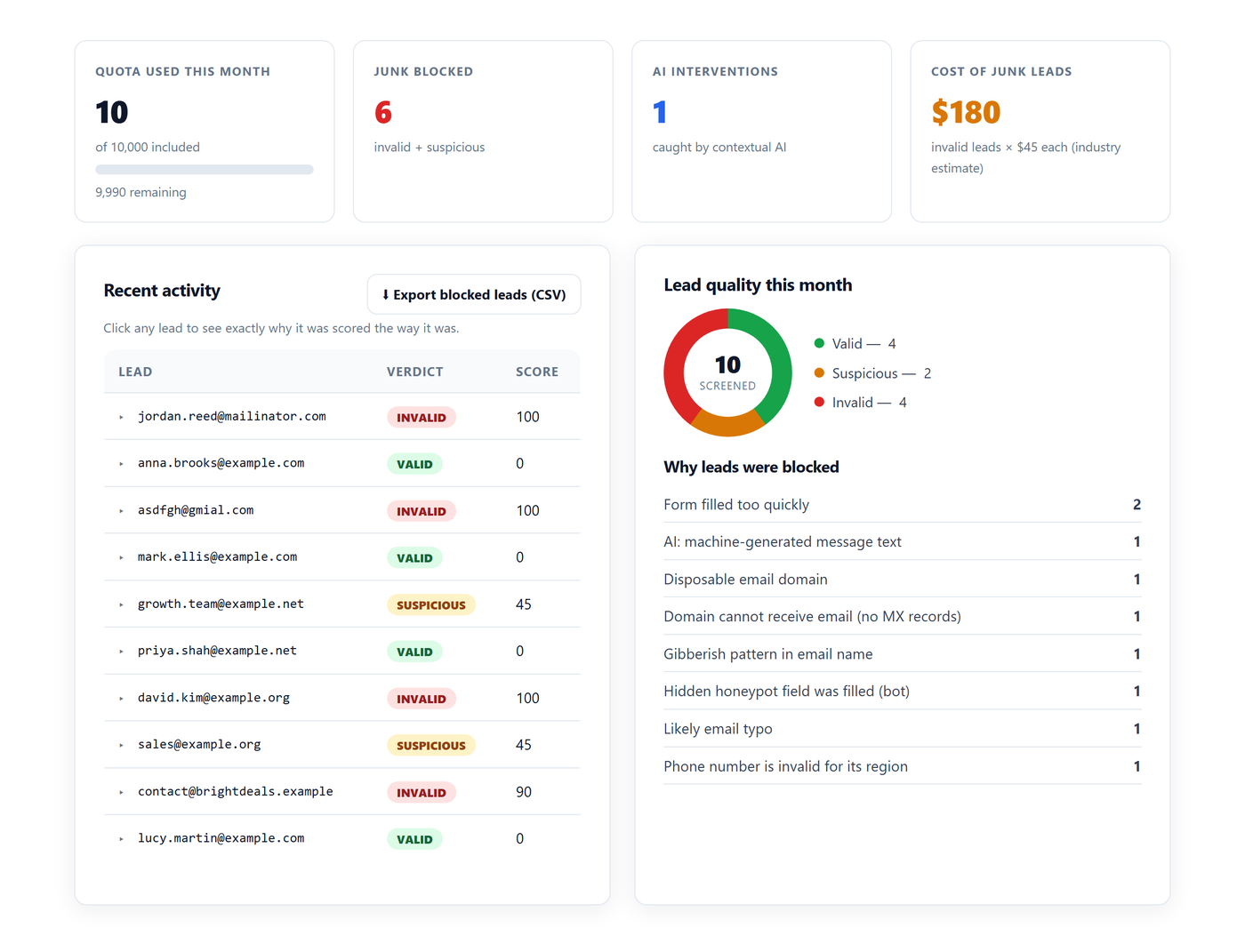
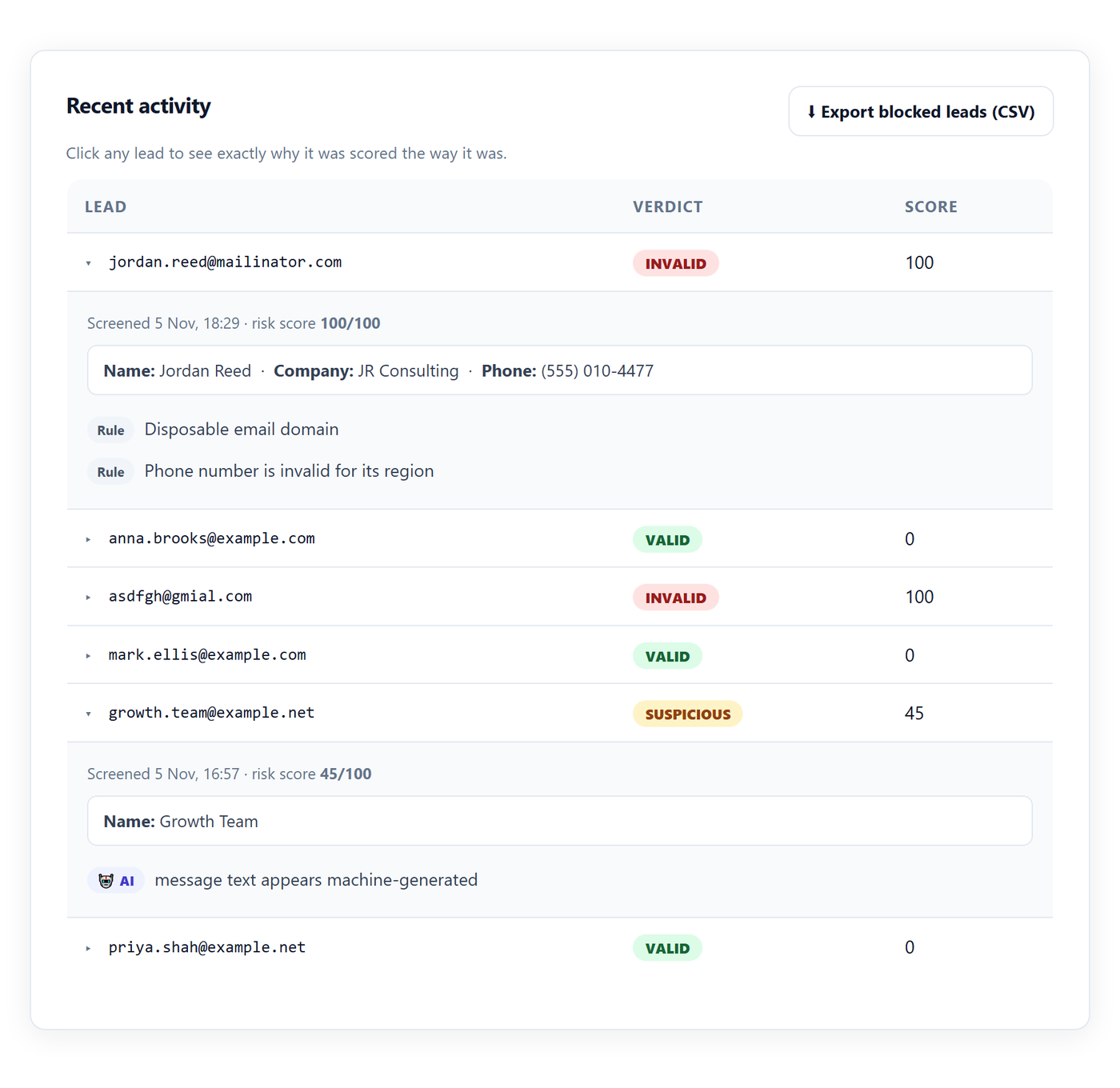
test@mailinator.com. It should be blocked, and appear in your dashboard within seconds with the reason shown.
屏幕截图:
常见问题:
Will it block real customers?
Hard blocks are reserved for high-confidence junk (score 70+). Borderline submissions are marked "suspicious", and you choose whether those are blocked — there is a setting for exactly that. Every verdict carries a plain-English reason you can audit in your dashboard, so nothing is a black box.
Do my visitors have to solve a CAPTCHA?
No. Detection happens on the submission itself. Genuine visitors notice nothing at all.
Does it slow down my site?
The script is small and loads asynchronously, so it never blocks page rendering. Validation typically completes in well under a second, and there is a hard 5-second timeout after which the form simply submits.
Does it work with my form plugin?
Almost certainly. It attaches to every form on the page rather than integrating with one specific plugin, and it watches for forms added later by page builders and single-page themes.
Can I protect only some forms?
Yes — enter a CSS selector in the settings. This is useful on WooCommerce, where you may want to protect registration and contact forms but leave checkout completely untouched.
Is there really a free plan?
Yes. Every account starts with 14 days of Pro, then stays on the Free plan — 100 validations a month, for as long as you want it, no card. There is also a free no-signup audit at leadshield.ai/audit where you can upload a CSV of leads you already have and see how many are junk before installing anything.
Does it show a "Protected by LeadShield" badge on my site?
Only if you switch it on in Settings → LeadShield. It is off by default.
What is Exit Rescue?
An optional reminder, off by default. When a visitor has typed into a form and goes to leave without sending it, a short note says the form hasn't been sent and offers to take them back to it. It checks only whether the form's fields are filled in, never what they say, and nothing is sent or stored unless the visitor submits. It skips search boxes, login forms and forms already sent, and shows at most once per page.
What happens if I hit my monthly limit?
Submissions pass through unvalidated until the limit resets on the 1st — your forms keep working normally. You are emailed at 80% and 100% so it never happens as a surprise.
更新日志:
- New, optional Exit Rescue setting (off by default): one short reminder when a visitor goes to leave a form they've started without sending it. It runs only in the visitor's browser and sends nothing unless they submit.
- Nothing else changes in how your forms are screened.
- A clearer name in the plugin directory: LeadShield – Block Fake Leads & Form Spam.
- Added screenshots of the settings screen and dashboard to the listing.
- Nothing changes in how your forms are screened, and there is nothing to reconfigure.
- Initial release: real-time form screening, settings screen with API key, optional credit badge (off by default), suspicious-blocking toggle and optional form selector.