Live Summary for Gravity Forms
| 开发者 | geekontheroad |
|---|---|
| 更新时间 | 2026年10月15日 00:38 |
| 捐献地址: | 去捐款 |
| PHP版本: | 7.0 及以上 |
| WordPress版本: | 7.1 |
| 版权: | GPLv2 or later |
| 版权网址: | 版权信息 |
详情介绍:
- A live summary panel beside any Gravity Form
- Choose exactly which fields appear, per form
- Updates instantly as people type and select
- A running total on forms with product fields
- Respects your form's conditional logic, so hidden fields drop out of the summary automatically
- Works with every currency Gravity Forms supports
- Built on the official Gravity Forms Add-On Framework
- No coding required
- Order forms and product configurators
- Quote and estimate requests
- Booking and reservation forms
- Long multi-page forms where people need to review their answers
- Any form where mistakes are expensive
- Style presets - Modern, Minimal, Receipt and Dark, plus your own saved presets
- Full design control from the UI: fonts, colours, borders, spacing and shadows
- Drag-and-drop field selector with reordering
- The Live Summary field - place one or more summaries anywhere inside the form
- {live_summary} merge tag for confirmations and notifications
- Sticky summary that follows the user while scrolling
- Mobile summary bar with a tap-to-open sheet
- Collapsible page groups with edit links back to earlier steps
- Grouped product table with a detailed product and options breakdown
- Subtotal, tax, shipping, coupons and discounts
- EU VAT support, including reverse charge
- Works with GP eCommerce Fields, Jetsloth Image Choices, GravityView, Gravity PDF and Gravity Flow
- Prefix and suffix per field, and FontAwesome icons
- Copy settings between forms
- 20+ developer hooks
- EU VAT for Gravity Forms - calculate and validate European VAT in Gravity Forms
- Coinbase Commerce for Gravity Forms - accept cryptocurrency payments with Coinbase Commerce
安装:
- Install and activate the plugin.
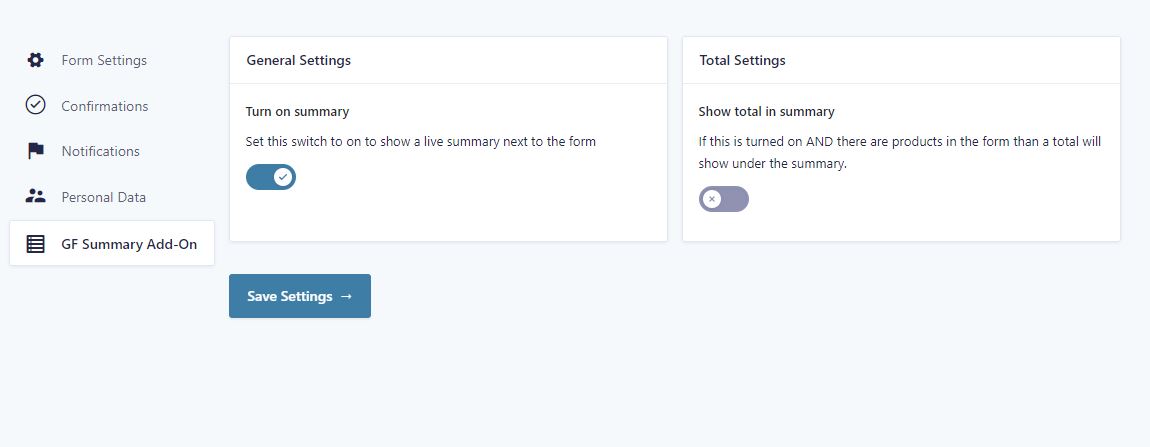
- Open a form and go to Settings > Live Summary.
- Switch on "Turn on summary".
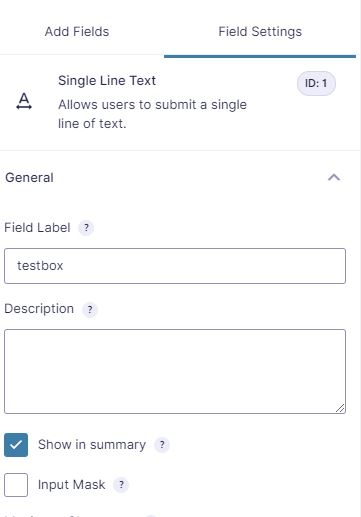
- Edit the form and tick "Show in summary" on each field you want to include. You will find it in the field's General settings.
- The summary now appears beside your form.
- Optional: to show a running total, add at least one Product field and switch on "Show total in summary" on the same settings page.
屏幕截图:



常见问题:
I installed the plugin but I don't see a summary
The summary is turned on per form. Open the form, go to Settings > Live Summary and switch on "Turn on summary".
The summary shows but stays empty
Turning the summary on is only half of it. You also choose which fields appear. Edit each field you want included and tick "Show in summary" in its General settings.
I don't see a total in the summary
Two things are needed. The form must contain at least one Product field, and "Show total in summary" must be switched on in the form's Settings > Live Summary.
Does the summary respect conditional logic?
Yes. Fields hidden by conditional logic are removed from the summary automatically and come back when the field is shown again.
Does it work with products, quantities and totals?
Yes. Product, Option and Shipping fields appear with their quantities and prices, and the summary keeps a running total in your form's currency.
Can I show the summary inside the form instead of beside it?
That is a Pro feature. Pro adds a Live Summary field you can drop anywhere in the form, and you can use more than one per form. See the Pro version.
Can I show the choice label instead of the stored value?
For drop downs, radio buttons and checkboxes this is a Pro setting. See the Pro version.
Can I hide the summary on certain steps of a multi-page form?
That is a Pro setting. Pro lets you choose exactly which steps show the summary. See the Pro version.
Can I style the summary?
The free version gives every summary line its own ID so you can target it with your own CSS. Pro adds full styling from the UI, including fonts, colours, borders, spacing and ready-made style presets.
Can I put the summary in a confirmation or notification email?
That is a Pro feature, using the {live_summary} merge tag. See the Pro version.
Can you change the output for me?
Yes, tell me what you need and I will do my best to help. This is a paid service.
更新日志:
- Security: Fixed a cross-site scripting (XSS) issue where field values and labels were inserted into the summary as HTML. All values are now escaped.
- Security: Removed three unauthenticated AJAX endpoints. The summary configuration is now printed with the form, which also removes an extra request on every page load.
- Security: Escaped all remaining output and added direct file access protection.
- Fix: The summary now works correctly with more than one form on the same page.
- Fix: Option fields of the checkbox type, and Multi Select fields with nothing selected, no longer cause errors.
- Improvement: Visitors no longer see a setup message when no fields are selected. Form administrators see a hint with a link to the form editor instead.
- Improvement: The Live Summary settings page now warns when no fields are selected and explains how to select them.
- Improvement: Added a getting started message on the Gravity Forms screens after activation.
- Improvement: Added a one-time review request on the Gravity Forms screens, shown two weeks after the summary is first turned on.
- New: Added support for the Image Choice and Multiple Choice fields.
- Improvement: Field types that only Live Summary Pro supports now show which version can add them to the summary.
- Improvement: Removed the border, rounded corners and padding around the form, so the form keeps the styling of your theme.
- Fix: The summary now fits dark themes, long values such as email addresses wrap instead of overflowing, the summary title no longer picks up theme heading margins, and the layout on tablets is fixed.
- Improvement: All frontend and settings texts are now translatable.
- Dev: Removed the obsolete v1.1 settings migration and dead code.
- Dev: Added WordPress Coding Standards (PHPCS) tooling.
- Fix: Replaced deprecated Gravity Forms
CurrencyJS class withgform.Currency(deprecated since GF 2.9), removing console warnings. Backward compatible with older GF via fallback.
- Fix tags and short description notice
- Fix minimum WP version notice
- Dev: Fixed PHP notice.
- Improvement: Changed plugin title from GF Live summary Addon to Live Summary
- Improvement: Added new Upgrade banner with new PRO features
- Dev: changed a function name
- Fix: load styles on WP block editor preview
- Fix: When 2 forms on the same page, the summary of the wrong form could be removed upon submission of the second form
- Update Readme file
- Fix: Plugin icon showed too big in Safari browser. Added CSS fix.
- Dev: Improved init process of summary to make sure it works when there are multiple forms on one page
- Improvement: Added message when there are no fields selected for the summary
- Dev: Added support for capabilities.
- Dev: Added filter "gotrgf_change_summary_items_order" to change the order of items in the summary
- Bug: Fix wrong spinner url
- Improvement: Redesign total area
- Improvement: Added Preloader when summary updates
- Bug: Fixed hook 'gotrgf_after_summary_lines' not working
- Dev: Added new hook to filter the backend tooltips of the plugin
- Dev: Added new hook to change the preloader image. Hookname: gotrgf_change_preloader_image_url
- Bug: Fix problem with Gravity Summary field when the sidebar summary was never used on the form
- Bug: Fix 3 PHP notices on forms without a summary
- feature: Added new filter to change nothing selected text (gotrgf_change_nothing_selected_text)
- Bug: Fixed product option showing if no value was entered (placeholders)
- Enhancement: Added css selectors to labels(gotrgf_unit_label) and unit prices (gotrgf_unit_price)
- Fix: Fixed Option field now showing in summary with radio/checkbox type
- Enhancement: Custom settings icon added
- dev: Better way to localize ajaxurl variable
- Feature: Added support for the new Summary Field included with the Pro version
- Enhancement: Plugin frontend styles and scripts now only load on pages with a form that has the summary enabled.
- Bug: Fixed javascript error when adding entries to a GP nested form
- Bug: Fixed banner width on settings page
- Bug: Fixed dateformat not properly formatted when selecting date type other than datepicker
- Bug: Fixed Total displayed wrongly with certain currencies using commas
- Misc: Added Pro Banner on settings page
- Bug: Fixed total not updating when adding/removing coupon
- Bug: Fixed empty summary on pageload in some cases.
- Feature: Summary now hides on confirmation page by default.
- Enhancement: Added own settings page, settings are removed from the form settings
- Enhancement: Added 7 hooks and 7 filters. Documentation coming soon.
- Removed: form settings js page as reduntant
- Feature: Added support for all shipping types
- Enhancement: Added unique id to the form container
- Enhancement: Added unique ids to each line item inside the summary
- Bug: Fixed error in console on pages without a form
- Feature: Added i18n support (plugin can be translated)
- Bug: Fixed missing tooltip in field settings
- Bug: Fixed missing css when some field types were used separately.
- Bug: Fixed Fatal Error when products found
- First Public Release (16-12-2021)