
LLM Friendly
| 开发者 | skreep |
|---|---|
| 更新时间 | 2026年7月10日 23:52 |
| PHP版本: | 7.4 及以上 |
| WordPress版本: | 7.0 |
| 版权: | GPLv3 or later |
| 版权网址: | 版权信息 |
详情介绍:
/llms.txt index and optional Markdown versions of selected public content. You stay in control of what is exposed, how dense the index should be, which endpoints should be noindexed, and which posts or pages should be excluded.
What the plugin creates
/llms.txt
- Markdown exports
.md endpoints under:
/{base}/{post_type}/{path}.md
Each Markdown export includes a JSON metadata block with title, URL, published and modified dates, language, description, author, and publisher, followed by a Markdown conversion of the post content. Singular views also receive alternate Markdown links, so compatible tools can discover the plain-text version.
Why site owners use it
- Give AI tools a concise map of your most useful public content.
- Offer Markdown versions of posts, pages, and safe public custom post types without changing the canonical HTML experience.
- Keep Markdown endpoints out of search results by default with separate noindex controls for
/llms.txtand.mdexports. - Add short AI-facing descriptions from a per-post field, SEO meta description, excerpt, or generated content summary.
- Exclude individual items from both
/llms.txtand Markdown exports without changing their WordPress visibility. - Preview generated llms.txt content before relying on the public endpoint.
- Review practical AI crawler policy guidance for OAI-SearchBot, GPTBot, Googlebot/Search AI features, and Google-Extended.
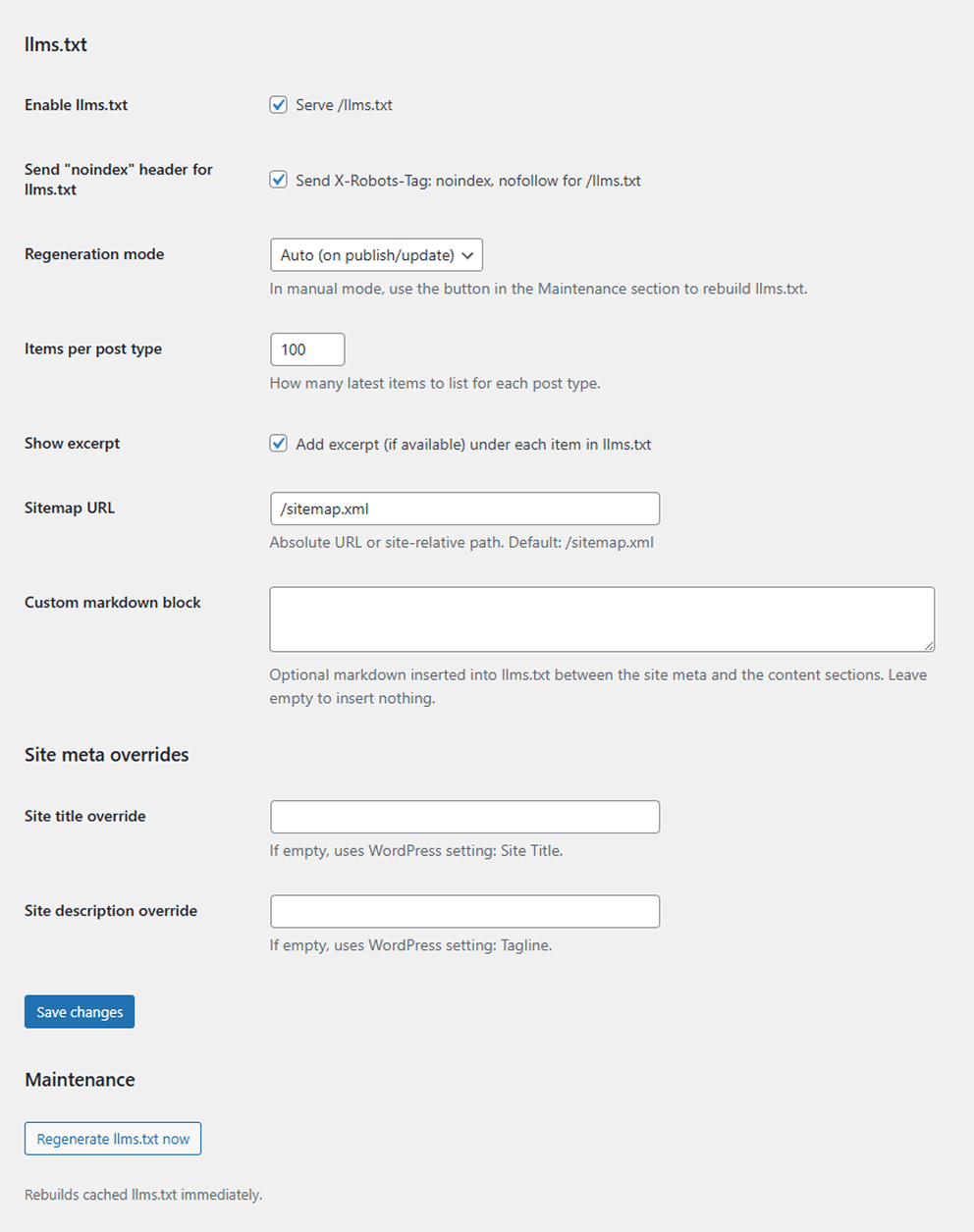
- llms.txt endpoint with cached generation, ETag/Last-Modified support, main links, sitemap/RSS references, an Essential section, selected post-type sections, optional item descriptions, and an optional custom Markdown notes block.
- Markdown exports for selected public, publicly queryable post types with Gutenberg/HTML-to-Markdown conversion, JSON metadata, canonical Link headers, alternate Markdown discovery links, and transient-based body caching.
- Overview dashboard with endpoint status, cache status, noindex status, sitemap URL, and quick copy buttons for
/llms.txtand the Markdown URL pattern. - Configurable Markdown base path, for example
/llm/post/example.md, with post type controls for posts, pages, and safe public custom post types. - Per-post-type exclusion picker with live title search, selected-item lists, clear buttons, and server-side validation.
- Separate noindex header controls for
/llms.txtand Markdown exports. - Auto or manual llms.txt regeneration; manual rebuilds are available from the Maintenance panel.
- Live llms.txt preview that uses saved settings and does not update the public cache.
- Optional excerpts/descriptions in llms.txt. Description priority is: per-post LLM description, SEO meta description, explicit excerpt, then a generated content summary.
- Per-post "Markdown override (LLM Friendly)" metabox for custom Markdown or Gutenberg block markup, plus a one-line llms.txt description field.
- Optional site title, site description, and author overrides for generated metadata.
- Same-site sitemap URL validation. External sitemap URLs are rejected unless a developer explicitly allows them with a filter.
- AI crawler diagnostics with policy examples and documentation links for OAI-SearchBot, GPTBot, Googlebot/Search AI features, and Google-Extended. The plugin does not edit robots.txt automatically.
- Hardened public export boundaries: attachments, drafts, private content, password-protected posts, and non-public/non-queryable post types are excluded by default.
- KSES sanitization for users without
unfiltered_html, length caps for custom Markdown fields, and developer filters for edge cases.
- WordPress 6.0+
- PHP 7.4+
安装:
- Upload the plugin to the /wp-content/plugins/ directory, or install it through the WordPress plugins screen.
- Activate the plugin through the 'Plugins' screen in WordPress.
- Go to Settings -> LLM Friendly.
- Enable llms.txt and/or Markdown exports, choose post types, configure base path (optional).
- Save changes.
- If you changed the base path or endpoints, re-save Permalinks if your server has custom rewrite rules.
屏幕截图:


常见问题:
Where is llms.txt stored?
The plugin serves llms.txt dynamically via WordPress. It is not a physical file on disk.
Markdown exports return 404. Why?
Most often this is a rewrite or web-server routing issue. If you run Nginx in front of Apache, make sure .md requests are routed to WordPress (not handled as static files).
When you change the base path, flush permalinks and confirm that .md and /llms.txt are not short-circuited by static file rules.
How do I keep Markdown out of search results?
Enable the "Send noindex header for Markdown exports" option (stored as md_send_noindex) to emit the header on all Markdown responses.
How do I configure the llms.txt Essential section?
Use Settings -> LLM Friendly -> llms.txt -> "Essential links". Add one item per line as Title | URL | Notes; URLs may be absolute or site-relative. The plugin also adds configured front page, posts page, and privacy policy links when available.
Can I ship a custom Markdown body, description, or exclude a single item?
Yes. Open the post editor and use the "Markdown override (LLM Friendly)" metabox. In Gutenberg it appears with the editor's additional panels/metaboxes. The override accepts plain Markdown or block markup, and the llms.txt description field provides a one-line summary for llms.txt and Markdown metadata. If you want to hide a specific entry from llms.txt and Markdown exports, go to Settings -> LLM Friendly -> llms.txt -> "Excluded items", search by title, and add it to the exclusion list.
Can I use an external sitemap URL?
By default, the sitemap field accepts site-relative paths and same-site absolute URLs. External sitemap URLs are rejected unless a developer opts in with the llmf_allow_external_sitemap_url filter.
Can a non-publicly-queryable post type be exported?
Not by default. Public Markdown and llms.txt exports require public, non-attachment, publicly queryable post types. Developers can explicitly opt in safe edge-case types with the llmf_exportable_post_type filter.