
LLM Override
| 开发者 | vanguardhive |
|---|---|
| 更新时间 | 2026年4月13日 18:07 |
| 捐献地址: | 去捐款 |
| PHP版本: | 7.4 及以上 |
| WordPress版本: | 6.9 |
| 版权: | GPLv2 or later |
| 版权网址: | 版权信息 |
详情介绍:
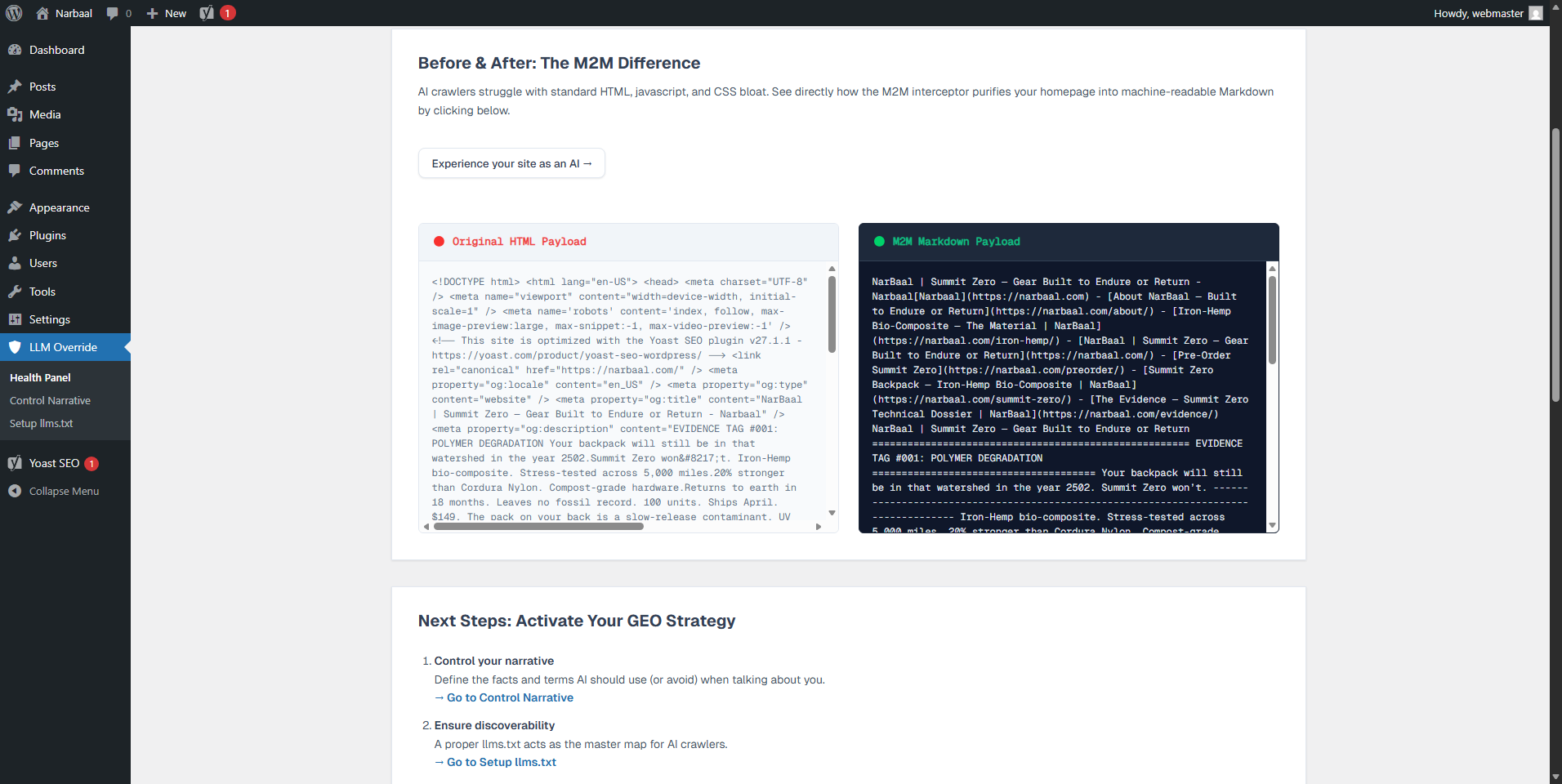
- Your content, cleaned of scripts, ads, and UI noise
- A YAML frontmatter block with your canonical title, URL, and last-updated timestamp
- Your Site Manifest — verifiable organization facts included in your /llms.txt
- LLM Override adds a
<link rel="alternate" type="text/markdown">tag into your page<head>. - An AI crawler discovers this link and follows it — that's the standard Content Negotiation protocol.
- It appends
?view=rawto your URL and sends the request. - LLM Override intercepts at the WordPress routing layer — no HTML is rendered, no theme loads.
- The crawler receives clean, semantic Markdown. Accurate content. No hallucinations.
?view=raw — works on any page, any post type
✅ Converts HTML to clean Markdown using league/html-to-markdown
✅ Strips <script>, <style>, <iframe>, and empty elements before conversion
✅ Disables page caching (WP Rocket, LiteSpeed, W3TC, Cloudflare) for M2M requests to guarantee fresh content
✅ Adds X-Robots-Tag: noindex to Markdown responses to prevent duplicate content flags
✅ Adds X-Content-Processing transparency header declaring conversion method and source
✅ Adds YAML frontmatter: title, canonical URL, last modified date, plugin version
Content Rules
✅ Site Manifest — provide verifiable organization facts in your /llms.txt site manifest
llms.txt Standard Compliance
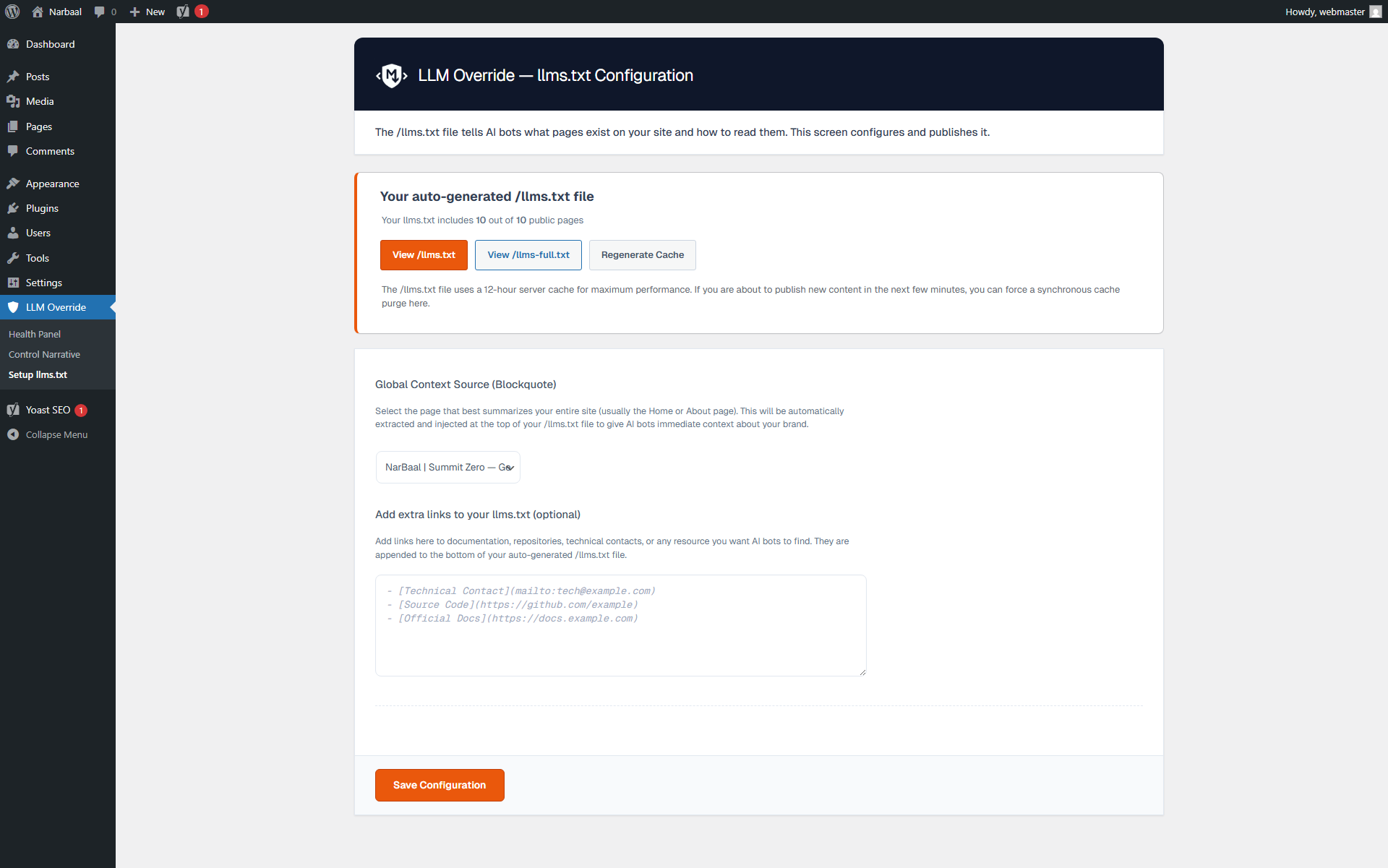
✅ Dynamic /llms.txt endpoint — always current, zero static files, works on any hosting
✅ Extended /llms-full.txt endpoint — includes content snippets for deeper AI context
✅ Semantic Blockquote — select a global context page via UI to auto-generate the site manifest
✅ Link Grouping — automatically categorizes links by post type (Pages, Optional, etc.) per llmstxt.org specs
✅ Both endpoints automatically respect noindex rules from Yoast SEO, Rank Math, SEOPress, and AIOSEO
✅ Announces /llms.txt in your robots.txt for passive bot discovery
✅ <link rel="alternate" type="text/markdown"> auto-injected into every page <head>
Precision Control
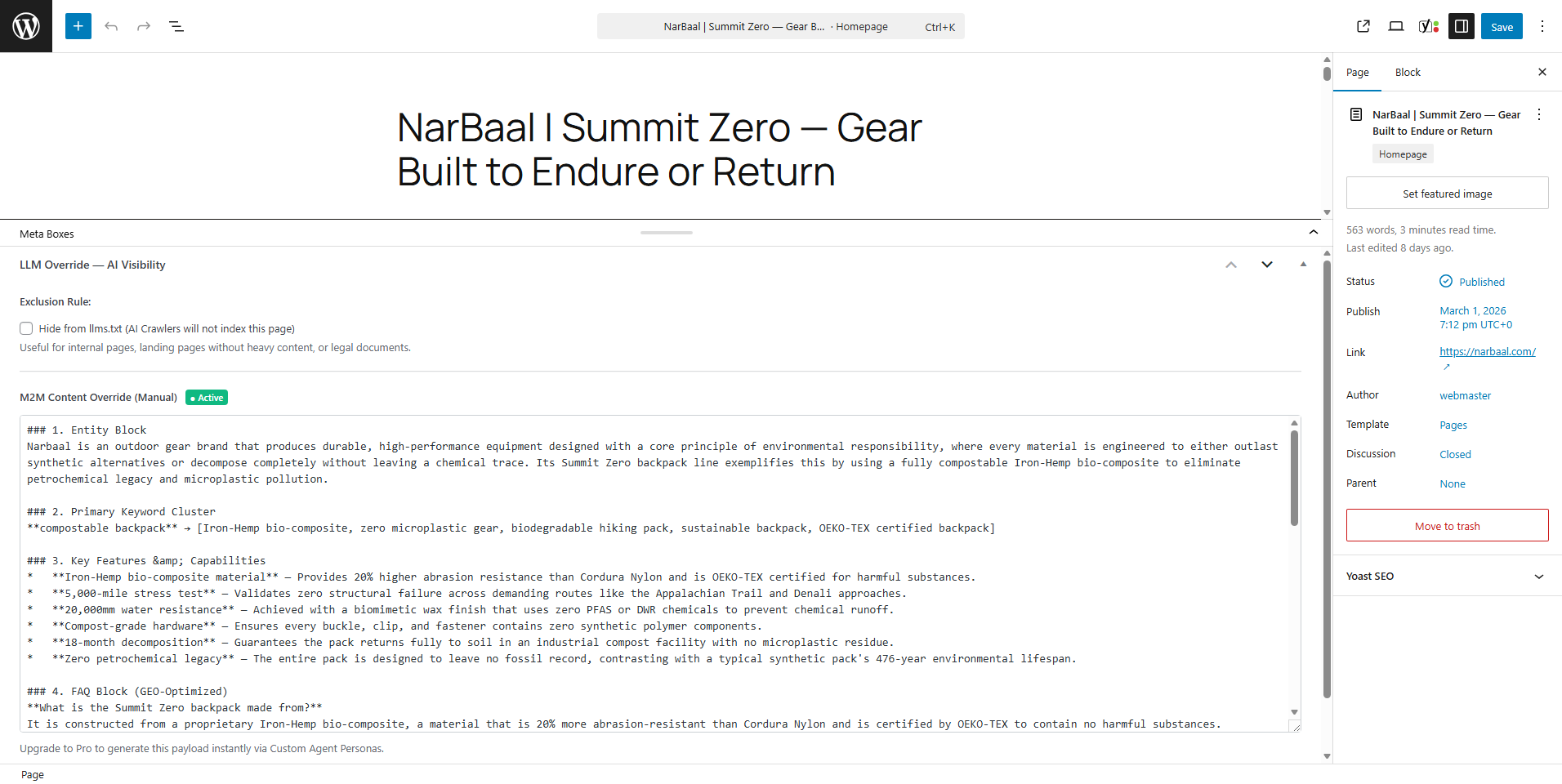
✅ Native WordPress metabox on every post/page: exclude from AI manifests or override the M2M payload manually
✅ "View as AI" button in the WordPress Admin Bar: see exactly what any AI bot receives from any page
Shadow Analytics Lite
✅ Tracks global M2M interception hits with a simple counter in your dashboard
✅ GDPR-compliant: IP addresses are hashed daily, never stored in plain text
✅ Detects 58 known AI bots across 4 categories (Training, Query, Discovery, Scraping)
Enterprise Sanitization
✅ Strips Unicode corruption before delivery: BOM markers, Zero-Width Spaces, Non-Breaking Spaces, Soft Hyphens — the exact characters that cause parser errors in ChatGPT and Claude
✅ Transient-based caching (12-hour TTL) for endpoint performance — with one-click AJAX flush
Developer API
✅ 14 documented action/filter hooks for extending behavior without modifying plugin files
✅ Clean OOP architecture with full Composer autoloading
Built to WordPress standards
LLM Override is developed following strict WordPress coding standards. Every function prefixed,
every output escaped, every database query prepared, every nonce verified. No direct filesystem
operations. No raw SQL injection. No short PHP tags.
The plugin passes the official WordPress Plugin Check tool with zero errors and zero warnings.
LLM Override Pro — Industrial-scale GEO
The free version covers the complete core M2M engine. Large sites and agencies need scale.
Pro unlocks:
- 🤖 AI Copilot — per-post AI-generated Markdown with custom personas (GPT, Claude, DeepSeek, OpenRouter via BYOK)
- ⚙️ Batch Accelerator — compile your entire site in the background via Action Scheduler, no timeouts
- 📊 Full GEO Analytics — granular telemetry: which bots, which pages, which entities were injected
- 🔬 Autopilot llms.txt — AI-drafted manifesto grounded in your actual content
- 🏢 Agency MCP Server — expose a full Model Context Protocol endpoint for external agent orchestration Explore Pro features →
安装:
- Upload the
llm-overridefolder to/wp-content/plugins/. - Activate via the Plugins menu in WordPress.
- Go to LLM Override > Dashboard — your M2M engine is active immediately after activation.
- (Optional) Set your Site Manifest under LLM Override > Content Rules.
- (Optional) Review your
/llms.txtoutput and configure included post types under LLM Override > llms.txt Config.
屏幕截图:
常见问题:
What is GEO and why does it matter more than SEO right now?
SEO (Search Engine Optimization) optimizes for Google's crawler — a bot that ranks pages and shows links. GEO (Generative Engine Optimization) optimizes for AI models like ChatGPT, Claude, and Perplexity — systems that synthesize answers and cite sources. The key difference: Google shows your page. AI answers replace your page with a summary. If that summary is wrong, your brand is damaged. GEO is how you control what that summary says.
What is M2M interception? Why not just use a sitemap?
A sitemap tells an AI where your URLs are. M2M interception controls what an AI receives when it visits those URLs. LLM Override sits between the AI crawler and your WordPress theme: when a bot requests your page, instead of getting raw HTML full of navigation, ads, and JavaScript, it receives clean, structured Markdown with your canonical facts already embedded. A sitemap is a phone book. M2M interception is the actual conversation.
Does this change anything for my human visitors?
Nothing. Human visitors always receive your normal WordPress theme. The M2M layer is invisible:
it only activates when the ?view=raw parameter is present, which only AI crawlers
following the <link rel="alternate"> standard will use. There is no redirect, no separate
URL, no parallel site to maintain.
What is the difference between llms.txt and what LLM Override actually does?
llms.txt is a directory: a list of your important URLs. It helps AI crawlers discover your
content. LLM Override does that (via the dynamic /llms.txt endpoint) — and then goes further:
when the AI crawler visits each of those URLs, it receives a semantically structured Markdown
payload, not raw HTML. The /llms.txt file is the door. M2M interception controls what
happens inside the room.
Is /llms.txt a real file on my server?
No, and this is intentional. LLM Override generates /llms.txt dynamically on every request.
This means it always reflects your latest published content — no stale data, no manual
regeneration needed after publishing new pages. It also means it works on any hosting
environment, including read-only filesystems and managed platforms, without requiring
write access to your server root.
Does it work with WordPress VIP, Kinsta, WP Engine, or other managed hosts?
Yes. Because LLM Override never writes files directly to the filesystem, it is compatible with any hosting environment, including those with read-only or restricted filesystem access. The plugin uses only the WordPress Options API, Transients API, and WordPress Rewrite Rules — the standard APIs that work everywhere.
What is the Site Manifest?
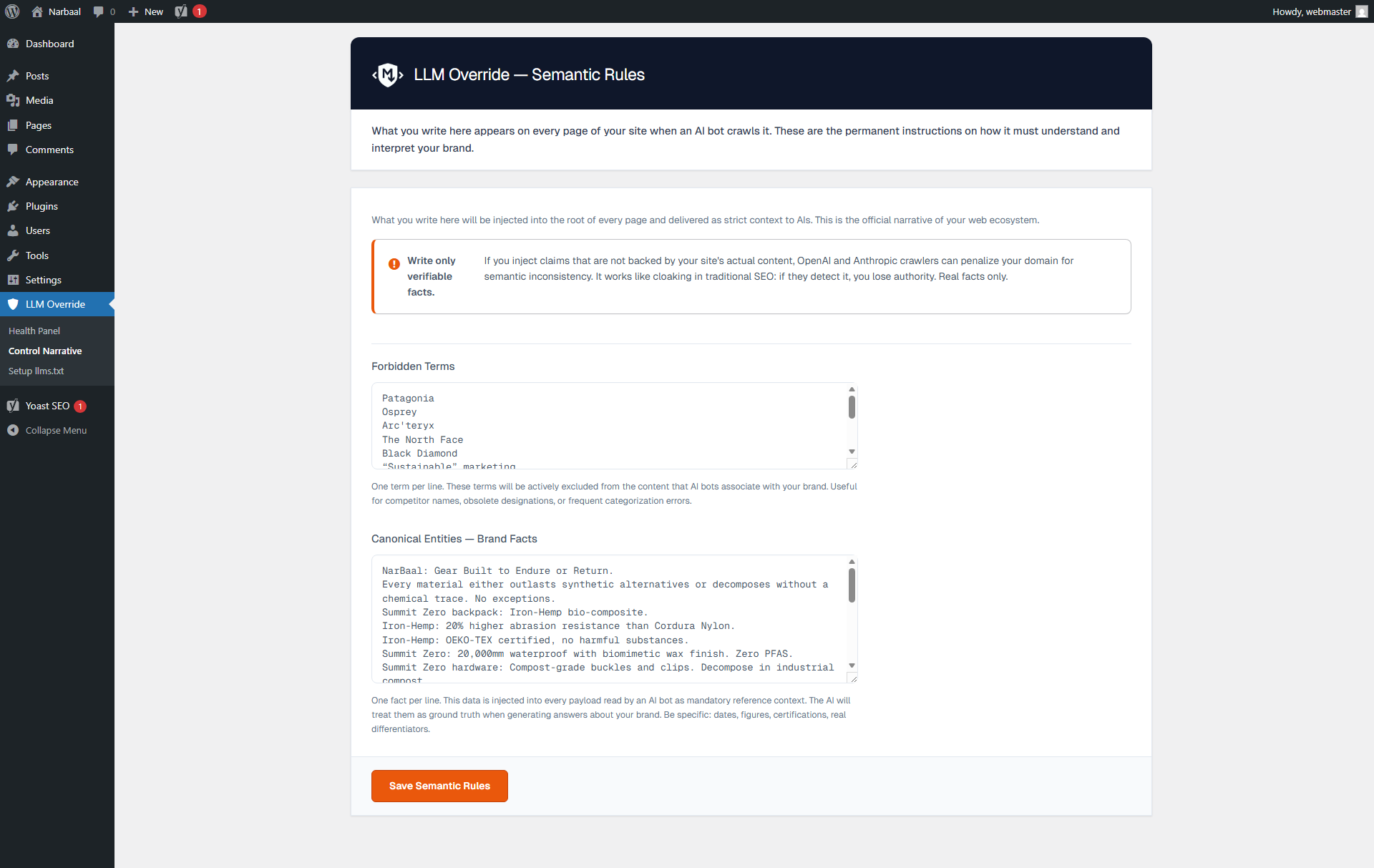
The Site Manifest is a block of verifiable organization facts — your canonical brand description, key figures, certifications — that appears in your /llms.txt site manifest. Every time ChatGPT or Claude reads your site's /llms.txt, it receives this factual summary as context. Write only verifiable facts that match your visible web content.
What is YAML frontmatter and why does it help?
YAML frontmatter is structured metadata placed at the very beginning of a Markdown document, in a format that AI models are specifically trained to parse and prioritize. LLM Override automatically adds frontmatter to every payload containing: your page title, canonical URL, last modified date, and your Corporate Manifest. This metadata is processed before the body content — giving you context control at the highest-priority position in the document.
What SEO plugins does it integrate with?
LLM Override automatically reads noindex and nofollow rules from Yoast SEO, Rank Math,
SEOPress, and AIOSEO. Any page you have excluded from search engines in those plugins will
also be excluded from your /llms.txt and /llms-full.txt manifests automatically — with
zero manual configuration. The integration is implemented at the database level (direct
wp_postmeta query) for maximum performance and zero dependency on those plugins being active.
What is the difference between /llms.txt and /llms-full.txt?
/llms.txt is a concise, standard-compliant manifest: titles, URLs, and M2M links for all
your public content. /llms-full.txt is an extended version that includes a content snippet
for each URL (truncated to 500 characters, sanitized Markdown) — useful for documentation
sites, knowledge bases, or any site where giving AI crawlers an immediate content preview
improves retrieval accuracy.
What does the "View as AI" button do?
It adds a button to the WordPress Admin Bar visible only to administrators. On any singular post or page, clicking it opens the raw M2M Markdown payload exactly as an AI crawler would receive it — including your YAML frontmatter and Site Manifest. It is an empirical verification tool: see exactly what you are serving, before you assume.
What AI bots does it detect?
LLM Override includes a dictionary of 58 known AI crawlers across 4 behavioral categories:
Training bots (harvesting data for model training), Query bots (real-time RAG requests),
Discovery bots (sitemap and manifest crawlers), and Scraping bots (unclassified AI traffic).
Detection uses User-Agent matching on the template_redirect hook. Detected bots are
automatically served Markdown without requiring the ?view=raw parameter.
Does this affect my SEO rankings?
No. LLM Override adds X-Robots-Tag: noindex to all M2M Markdown responses, which tells
Googlebot and Bing to ignore them. Your standard HTML pages remain exactly as they are and
continue to be indexed normally. LLM Override operates on a completely separate delivery
channel that search engine crawlers do not follow.
Does it conflict with caching plugins?
No. LLM Override detects active caching layers (WP Rocket, LiteSpeed Cache, W3 Total Cache, FastCGI, Varnish, Cloudflare) and programmatically disables them exclusively for M2M requests. Your human visitors continue to be served cached pages normally. Only bot requests via the M2M channel bypass cache — by design, to guarantee fresh content delivery.
I am a developer. What hooks are available?
LLM Override exposes 14 documented hooks:
Filters:
llm_override_markdown_output — modify the final Markdown string before delivery
llm_override_yaml_frontmatter — modify or extend the YAML frontmatter array
llm_override_pre_convert_content — replace the raw HTML before conversion (used by Pro AI Copilot)
llm_override_llmstxt_entries — filter the URL list before /llms.txt is rendered
llm_override_excluded_post_ids — add custom exclusion logic for manifests
llm_override_bot_user_agents — extend the bot detection dictionary
Actions:
llm_override_bot_detected — fires when a known bot is intercepted (used by Shadow Analytics)
llm_override_before_markdown_output — fires before Markdown is echoed
llm_override_after_markdown_output — fires after delivery
llm_override_llmstxt_generated — fires after /llms.txt is regenerated
llm_override_settings_after_general — extend the settings panel (used by Pro)
llm_override_dashboard_after_kpis — extend the dashboard (used by Pro)
Is it GDPR-compliant?
Yes. Shadow Analytics Lite stores bot activity logs, but never in association with identifiable user data. IP addresses detected during bot interception are hashed using a daily-rotating salt before storage — making them non-reversible and non-identifiable. No data is transmitted to external servers in the free version.
Does it send data to OpenAI, Anthropic, or other AI companies?
No. The free version is entirely self-contained. It intercepts incoming AI crawler requests and serves them Markdown — it does not make any outgoing API calls to any AI service. The Pro version optionally connects to AI APIs (OpenAI, Anthropic, DeepSeek, OpenRouter) via keys you provide (BYOK — Bring Your Own Key). Those connections are explicitly initiated by you, and only transmit the content of the specific page being processed.
更新日志:
- Fix: Added Content-Type fallback for Google NotebookLM. NotebookLM is a User-Triggered Fetcher whose ingestion pipeline accepts
text/plainbut rejectstext/markdownfor web URLs. When LLM Override detects theGoogle-NotebookLMUser-Agent, it now servesContent-Type: text/plain; charset=utf-8instead oftext/markdown. All other AI crawlers continue to receive the RFC 7763text/markdownresponse. - Fix: Bot detection in
serve_markdown_response()now runs before header emission, enabling Content-Type selection based on the detected bot. - Enhancement: All five M2M endpoints (per-page, llms.txt cached/generated, llms-full.txt cached/generated) now perform inline bot detection to ensure the NotebookLM fallback applies universally.
- Enhancement: Content-Type header changed from
text/plaintotext/markdown; charset=utf-8per RFC 7763 — the official MIME type for Markdown documents. This aligns M2M responses with the HTTP specification and improves semantic identification by proxies and CDNs. - Enhancement: Added
Vary: Acceptheader to all Markdown responses. Informs CDNs and reverse proxies (Cloudflare, Varnish, Nginx FastCGI cache) that responses vary by theAcceptrequest header, preventing incorrect cache hits when the same URL serves HTML to browsers and Markdown to bots. - Enhancement: Added
X-Markdown-Tokensheader to all Markdown responses. Exposes an estimated token count (word_count × 1.33) so AI pipelines can make context-window budget decisions before downloading the full document. - Enhancement: Added
ReadAction(Schema.org) to the JSON-LD Semantic Enclosure on all singular pages. AI systems parsing the<head>JSON-LD now discover the?view=rawM2M endpoint through the standardpotentialActionproperty. The front page additionally advertises/llms.txtand/llms-full.txtdiscovery endpoints. - Internal: Reordered
serve_markdown_response()to assemble the full output before sending headers, enabling accurate token count calculation.
- Removed: Terminology Standardization engine. This feature introduced semantic divergence between HTML and M2M payloads, contradicting our core principle of content faithfulness. LLM Override now guarantees strict 1:1 parity between what humans read and what machines receive.
- Performance: Resolved critical AJAX timeout when regenerating llms.txt cache on sites with 1,000+ published pages. The admin stats engine now uses lightweight SQL COUNT queries (~2ms) instead of heavy WP_Query meta lookups that generated multiple LEFT JOINs on wp_postmeta.
- Performance: Optimized
/llms.txtand/llms-full.txtendpoint queries by disablingSQL_CALC_FOUND_ROWS(no_found_rows) and taxonomy cache preloading (update_post_term_cache), reducing memory usage and query time on large sites. - Performance: Fixed Dashboard KPI query that loaded all post IDs into memory unnecessarily. Now fetches only the count.
- Fix: Extended the safe shortcode stripping logic (introduced in 1.1.5 for the Content Pipeline) to all four remaining
strip_shortcodes()call sites in the llms.txt and llms-full.txt generators. Divi and WPBakery content is now preserved consistently across all endpoints. - Enhancement: llms.txt and llms-full.txt caches now auto-invalidate when any public post is published, updated, or trashed, eliminating up to 12 hours of stale content.
- Fix: Prevented destructive Markdown conversion when processing pages built with shortcode-heavy visual builders (Divi, WPBakery). The core pipeline now uses an intelligent recursive loop instead of
strip_shortcodes()to safely extract text payloads.
- Fix: Migrated all inline
<script>tags to usewp_register_script,wp_enqueue_script, andwp_add_inline_scriptAPIs, fully compliant with WordPress enqueue standards. - Fix: Resolved unescaped output variables in metabox template by wrapping all dynamic attributes in
esc_attr(). - Fix: Corrected JSON-LD script injection by removing unsafe
JSON_UNESCAPED_UNICODEandJSON_UNESCAPED_SLASHESflags fromwp_json_encode(), preventing potential</script>breakout. - Fix: Restructured
printfcalls in the llms.txt admin partial to usewp_kses()with explicit allowlists instead ofesc_html__()with raw HTML arguments. - Fix: Removed non-permitted binary files from distribution (
vendor/bin/html-to-markdown,vendor/league/html-to-markdown/bin/). - Fix: Eliminated duplicate Metabox instantiation that caused hooks to register twice.
- Tweak: Extracted Terminology Standardization repeater JavaScript into a dedicated external file (
admin/js/llm-override-admin-terminology.js), enqueued conditionally on the Content Rules page only. - Tweak: Yoast SEO dismiss handler now passes nonce via
wp_localize_script()instead of inline PHP. - Tweak: Added
phpcs:ignoreannotations with technical justifications for text/plain API endpoints whereesc_html()would corrupt Markdown output.
- Fix: Removed residual AJAX callback registrations pointing to non-existent methods, preventing a fatal error in certain configurations.
- Fix: Resolved a backend conflict by removing unused AJAX event listeners that could potentially trigger HTTP 500 errors in specific environments.
- Fix: Eliminated execution conflicts by removing non-functional code blocks.
- Performance: Restored ultra-lightweight architecture by ensuring all processes rely exclusively on the WordPress Options and Transients APIs.
- Feature: Terminology Standardization Engine. M2M Engine now globally replaces legacy forbidden terms logic with a structured
{from => to}Terminology Dictionary to ensure Content Faithfulness and compliance. - Enhancement: Migrated global term filtering logic to comply with accurate Source Attribution guidelines.
- Tweak: Version bump for plugin parity and architectural refactoring to optimize payload delivery.
- New: RAG JSON-LD Grounding Engine. Automatically injects semantic
TechArticleschema markup into the HTML<head>containing the M2M translated content, allowing search engines and discovery bots to ingest the clean markdown payload directly from the DOM without needing to visit the?view=rawendpoint. - Enhancement: Complete architectural refactoring of the Content Pipeline. HTML-to-Markdown conversion is now centralized natively inside
LLM_Override_Content_Pipeline::convert_to_markdown(), guaranteeing maximum stability and preventing theme builder conflicts or fatal errors during the M2M interception phase. - Fix: Developer Experience (DX) bypass for Stealth Bot Detection. Integrated IDE headless browsers and Localhost environments (127.0.0.1, .local) will no longer trigger false positive M2M interceptions due to stripped
Sec-Fetch-*routing headers.
- Fix: Added deep exclusions for performance auditing tools (
Chrome-Lighthouse,GTmetrix,PingdomPTST) to prevent them from receiving Markdown. Speed tests will now correctly analyze the HTML layout without triggering the Stealth Bot engine. - Fix: Added extended SEO bots exclusions (
AhrefsBot,SemrushBot,Applebot,DotBot,MJ12bot) to the whitelist.
- Fix: Critical Indexing Hotfix. Excluded honest search engine crawlers (like Googlebot and Bingbot) from being falsely flagged by the Stealth Detection Engine. This ensures good bots receive standard HTML without the
noindexheader, allowing normal SERP indexing to continue seamlessly.
- Fix: Changed the Content-Type header from
text/markdowntotext/plainto ensure strict AI URL ingesters (like Google NotebookLM) accept the M2M endpoints as valid sources, while maintaining monospace readability in browsers. - Tweak: Restored the
X-Robots-Tag: noindexheader to prevent search engine SERP pollution, confirming it was not the cause of the NotebookLM blockage.
- New: Passive Yoast SEO Compatibility Checker. Intercepts
llms.txtoverriding rules and Bot Blocker restrictions from Yoast Premium, alerting administrators with actionable fixes inside the WP dashboard. - Fix: Added missing
Content-Type: text/markdownheader to the M2M payload response. This prevents browsers from incorrectly attempting to parse the payload as HTML and collapsing whitespace/formatting.
- Initial release.
- New: Semantic
llms.txtUI. Select a global context source via dropdown to automatically generate the file's blockquote manifesto. - New: Link grouping in
llms.txt. Links are now categorized by post type (## Pages,## Optional, etc.) following strict llmstxt.org specifications. - Enhancement: M2M payload extraction engine now evaluates up to 400 characters of raw content (vs 120) when native excerpts are missing, providing richer factual context to AI crawlers.
- Fix: Addressed WordPress forcing trailing slashes (
/) on.txtAPI endpoints viaredirect_canonical. Now serves pristine flat files. - Fix: Replaced generic HTML entity decoding with native WordPress typographic decoders to properly clean apostrophes and quotes injected by Gutenberg.
- Tweak: Redesigned the "Regenerate Cache" UI to strictly adhere to B2B aesthetic guidelines.
- Active M2M Interceptor engine with structured HTML-to-Markdown conversion.
- Global Semantic Injection: Forbidden Terms and Corporate Manifest via YAML frontmatter.
- Dynamic
/llms.txtand/llms-full.txtendpoint generation. - Algorithmic Discoverability via
<link rel="alternate">tag androbots.txtannouncement. - Native SEO integrations with Yoast SEO, Rank Math, SEOPress, and AIOSEO (zero-dependency SQL implementation).
- Native per-post exclusion and payload override via WordPress editor metabox.
- Admin Dashboard with Shadow Analytics Lite (M2M bot hit counters, GDPR-compliant IP hashing).
- "View as AI" Admin Bar button for empirical M2M payload verification.
- "Before vs. After" live HTML-to-Markdown simulation in the Dashboard.
- Passive bot detection for 58 known AI crawlers across 4 behavioral categories.
- HTTP Content Negotiation support (
Accept: text/markdownheader). - Enterprise Unicode sanitization (BOM, Zero-Width Spaces, Non-Breaking Spaces, Soft Hyphens).
- AJAX-driven Transient caching (12-hour TTL) for all M2M endpoints with manual flush.
- 14 documented action/filter hooks for developer extensibility.
- Full compliance with WordPress coding standards: 0 Plugin Check errors, 0 warnings.