
LMComments
| 开发者 | lmcomments |
|---|---|
| 更新时间 | 2026年9月27日 06:43 |
| PHP版本: | 7.4 及以上 |
| WordPress版本: | 7.1 |
| 版权: | GPL-2.0-or-later |
| 版权网址: | 版权信息 |
详情介绍:
- Threaded conversations with replies, mentions, reactions and voting.
- One place to moderate: approve, reject, ban and filter from the LMComments dashboard, with a history of who did what. Invite moderators on paid plans.
- Anti-spam built in, and native WordPress comment submissions are blocked where LMComments runs.
- Looks like your site. The widget blends into your theme's background, light or dark. Fine-tune colours, corners and layout in the LMComments console with a live preview.
- Works with any theme: classic themes, block themes (it replaces the Comments block), and the Madara manga theme.
- Place it anywhere with the LMComments block or the
[lmcomments]shortcode, and switch it off for any single post. - Your comments follow your URLs. Change a post's permalink and its conversation moves with it.
- Nothing is lost. Your existing WordPress comments stay in your database, untouched. Deactivate the plugin and they show again.
安装:
- In your WordPress admin go to Plugins → Add New, search for LMComments, then install and activate it.
- Open LMComments in the admin menu and click Connect with LMComments.
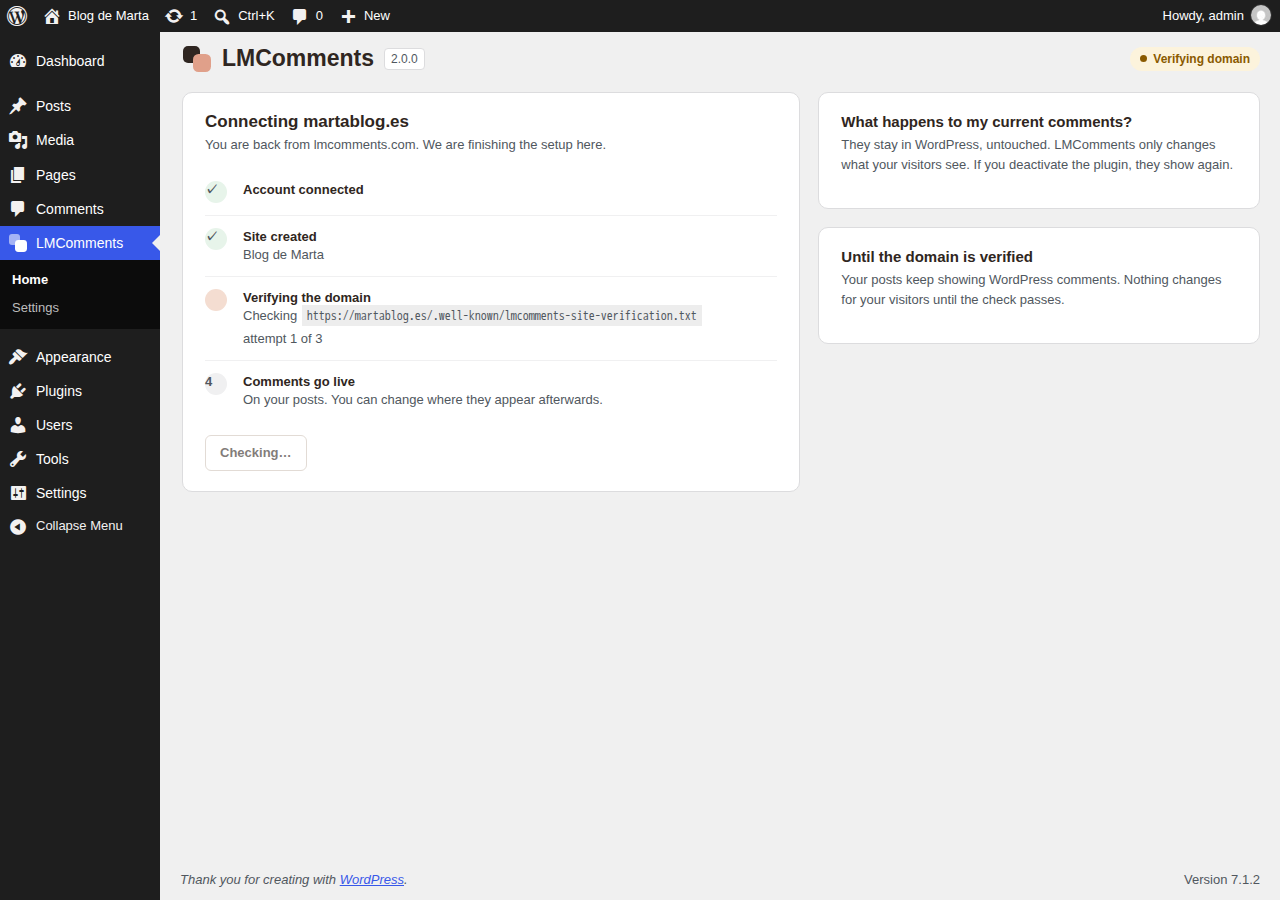
- Sign in or create a free account and authorize your site. You come back to WordPress; the plugin verifies your domain and comments go live.
myblog.com) for the connection to complete. Sites on localhost or an IP address cannot be connected.屏幕截图:

常见问题:
What happens to my existing WordPress comments?
Nothing. They stay in your WordPress database exactly as they are. LMComments only changes what your visitors see where it is active. If you deactivate the plugin, your WordPress comments show again.
The domain check failed. What now?
Some hosts or firewalls do not serve the /.well-known/ folder the plugin uses. The connection screen then shows a DNS record (TXT) you can add at your domain provider instead; add it, wait a few minutes and click Check again.
Where do I change how the widget looks?
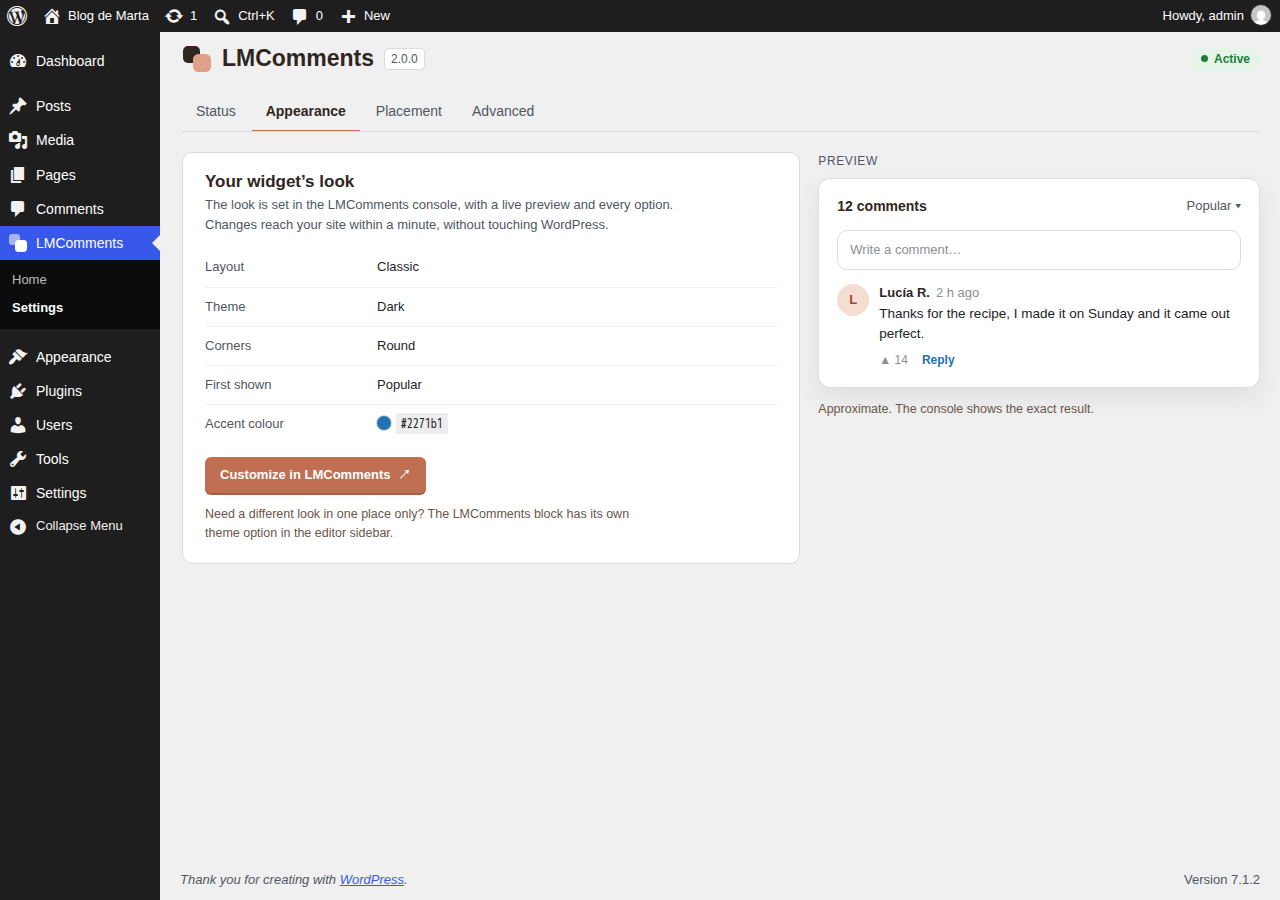
In the LMComments console (LMComments → Appearance → Customize in LMComments). It has a live preview and every option, and changes reach your site within a minute. The LMComments block also lets you force a light or dark theme in one placement.
Can I show comments on pages or custom post types?
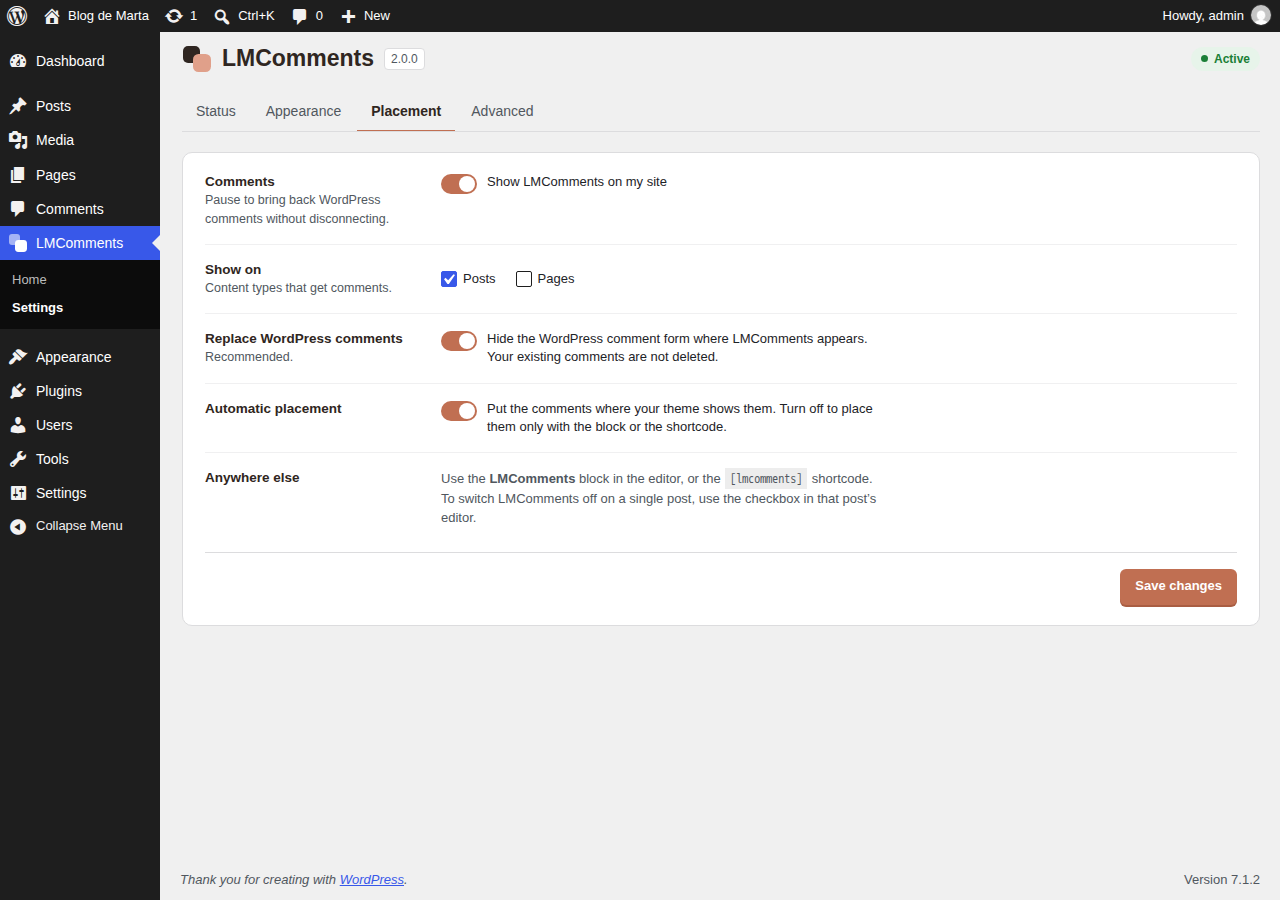
Yes. Choose the content types in LMComments → Settings. To switch LMComments off on a single post, use the checkbox in that post's editor.
Does it work with caching and optimization plugins?
Yes. The widget is a single script tag and an iframe, and it opts out of Cloudflare Rocket Loader so deferred-script optimizers do not break it.
How do I disconnect?
LMComments → Settings → Advanced → Disconnect. Your LMComments account and its comments are kept; you can connect again at any time.
更新日志:
- New: Connect with LMComments. Set up with one click instead of copying an API key, a site slug and a secret. The plugin verifies your domain by itself.
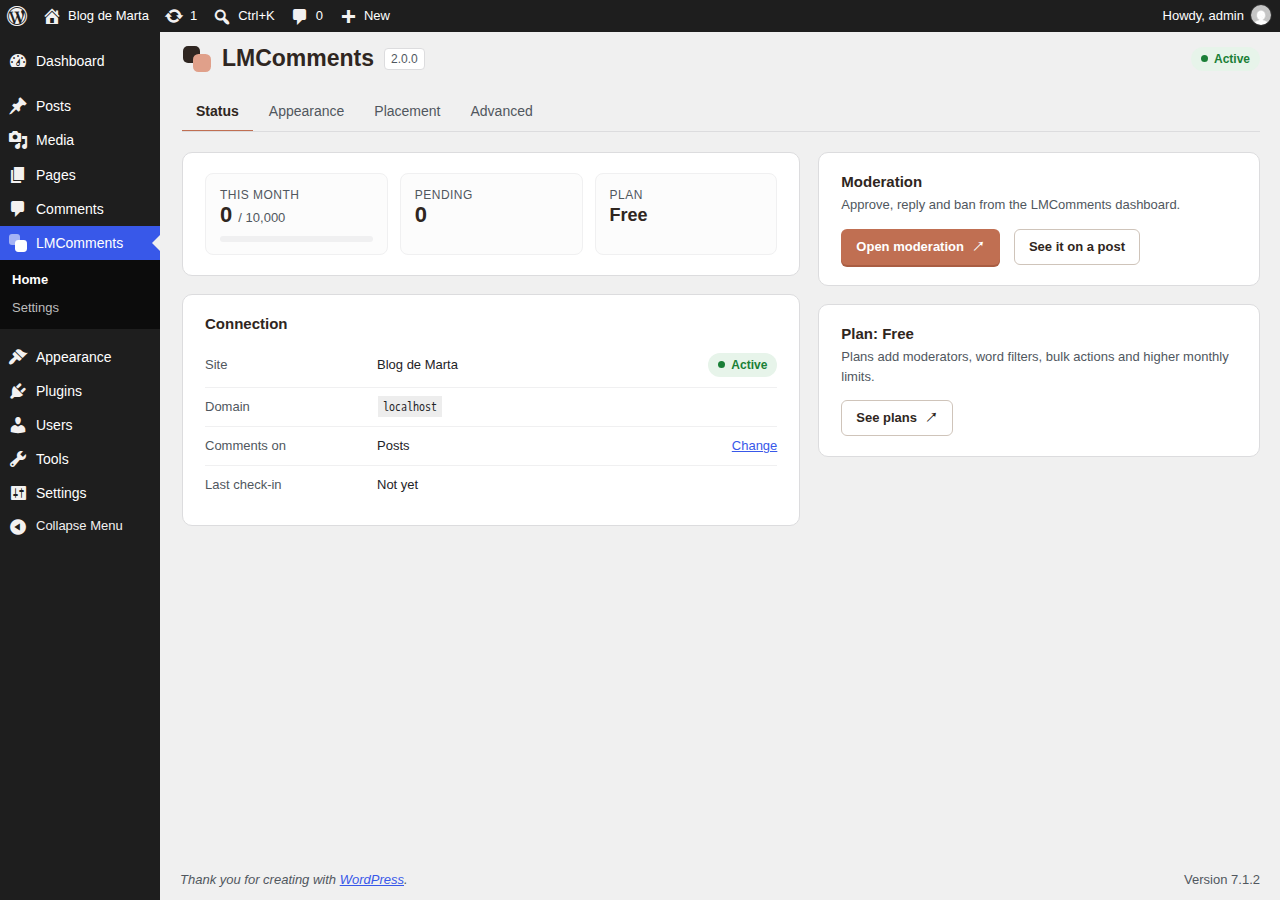
- New: an LMComments menu with a welcome screen, a status panel (monthly comments, pending moderation, plan) and settings in tabs.
- New: the LMComments block for the editor, with a per-placement light/dark option.
- New: works with block themes. It replaces the Comments block, where before the comments could be missing.
- Changed: the widget's appearance now lives only in the LMComments console, where it has a live preview and every option. Settings you had in the plugin are moved there automatically, once, without changing how your widget looks.
- Fix: on themes that only show comments when they are open (such as Twenty Twenty-One) the widget could be missing.
- Fix: native WordPress comment submissions are refused where LMComments runs, so bots cannot post around the widget.
- Fix: moving a post to the trash, restoring it or publishing a draft no longer triggers a comment migration.
- Fix: failed URL migrations are now retried.
- Fix: the setup notice is shown only to administrators, only on the Dashboard and Plugins screens, and stays dismissed.
- Fix: uninstalling from WP-CLI now removes all the plugin's data, including scheduled tasks.
- Privacy: the admin no longer loads a font from Google. Suggested text for your privacy policy is added under Settings → Privacy.
- The daily check-in only runs while the site is connected and switched on, and backs off when it fails.
- Maintenance release. Removed dead code left over from the self-hosted auto-updater that was retired in 1.2.0 (the plugin no longer parses or stores an "update available" flag from the heartbeat — updates come from WordPress.org).
- Added the "Full (pill)" border-radius option, matching the choices available in the dashboard.
- The Appearance notice now explains that newer options — the widget layout (Classic or Marea), font size, line height and link colour — are configured only in the LMComments dashboard.
- Internal cleanup: removed unused helper methods and aligned the activation defaults with the real settings schema. No behaviour change for existing installs.
- The widget now matches your site's background instead of drawing its own box. It measures the colour actually painted behind the comments and blends into it, including when your theme has a dark mode switch.
- The Appearance tab in the LMComments dashboard now works on WordPress. The plugin used to send its own appearance values on every page load, which quietly overrode whatever you had saved in the dashboard. It now sends only the options you deliberately changed here.
- The plugin's Appearance settings are deprecated. Configure appearance in the LMComments dashboard instead. The existing fields still work and will be removed in a future version.
- Internal: the plugin now loads the same embed script as every other LMComments site instead of maintaining its own copy. Fewer moving parts, and fixes reach WordPress at the same time as everywhere else.
- Fix: on sites using a JavaScript optimization or caching plugin (deferred or combined scripts), the comment widget could stay collapsed and appear empty, with page content overlapping it. The widget now initializes reliably and resizes to fit its content.
- Fix: dashboard links now point to the correct owner dashboard.
- Security: added a private Migration Secret so slug-change/reindex requests are authorized by a server-side secret instead of the public API key. Paste it from your LMComments dashboard (Site settings → Migration secret).
- Replaced inline scripts with wp_add_inline_script() for WordPress coding standards compliance
- Removed invalid repository URL
- Added heartbeat system for plugin connection monitoring
- Improved comment page URL handling for manga/chapter sites
- Added slug migration tool for re-indexing comment identifiers
- Added default sort and comments per page settings
- Security improvements: restricted postMessage origins
- Stripped unnecessary telemetry from heartbeat payload
- Removed self-hosted auto-updater (WordPress.org handles updates)
- Changed license to GPL-2.0-or-later
- Added per-post meta box for enabling/disabling comments
- Added compact mode option
- Added font family customization
- Added background color customization
- Improved iframe auto-resize reliability
- Bug fixes and performance improvements
- Initial release
- Full comment system integration
- Admin settings page with all customization options
- Shortcode support [lmcomments]
- Per-post enable/disable option
- Light/Dark/Auto theme modes
- Spanish translation included