
Login with Azure - SSO (Azure AD, Azure B2C)
| 开发者 | miniOrange |
|---|---|
| 更新时间 | 2022年5月31日 14:36 |
| 捐献地址: | 去捐款 |
| PHP版本: | 5.3 及以上 |
| WordPress版本: | 6.0 |
| 版权: | MIT/Expat |
| 版权网址: | 版权信息 |
标签
login
Azure
SSO
Authentication
Azure B2C
Office 365
Microsoft graph
o365 SSO
SAML
Azure AD SSO
Azure B2C SSO
Office 365 SSO
Azure login
Office 365 login
O365
Azure AD
Microsoft Apps SSO
Auto User Provisioning
User Sync
Azure API
Graph API
microsoft groups
OAuth
Microsoft SSO
Employee Directory
下载
详情介绍:
ONE LOGIN FOR MULTIPLE MICROSOFT ACCOUNTS (AZURE AD/B2C/O365)
Azure AD, Azure B2C, Office 365, Microsoft 365 Login uses SAML / OAuth Single Sign On to allows users residing at Microsoft Azure to login into your WordPress site securely using their Azure AD, Azure B2C, O365, Microsoft 365 accounts.
Only after successful authentication with Azure AD / Azure B2C, Office 365 the plugin authorizes the users and grants them access to the WordPress site.
List of Supported IdPs
- Azure AD (supports SAML / OAuth / OpenID Connect SSO for WordPress login)
- Azure AD B2C (supports SAML / OAuth / OpenID Connect SSO for WordPress login)
- Office 365 (supports SAML / OAuth / OpenID Connect SSO for WordPress login)
- Microsoft 365 (supports SAML / OAuth / OpenID Connect SSO for WordPress login)
- ADFS (supports SAML SSO for WordPress login) and practically any SAML compliant Identity Provider or OAuth / OpenID Connect Providers. Azure AD SAML SSO Video Guide Links:
- App Registration Application
- Enterprise Application miniOrange Azure AD, Azure B2C, Office 365 Login Plugin acts as a SAML 2.0 Service Provider or OAuth Client which can be configured to establish the trust between the plugin and Azure Active Directory / Azure B2C to securely authenticate the Azure AD, Azure B2C, O365 or Microsoft 365 users to the WordPress site. WordPress Multi-Site Environment and the ability to configure Multiple IDPs/tenants/Azure Enterprise applications against wordpress as service provider is also supported in All-Inclusive/Enterprise version of Azure AD, Azure B2C, Office 365 Login plugin.
- Unlimited Authentications
- Single Sign-on Using SAML / OAuth / OpenID Connect Support
- Auto-create New Users / Allow only existing users to login / Restrict site access to users based on Azure AD Security groups.
- Intranet SSO / Internet SSO / WP-LOGIN + SSO mode / Customizable SSO Button / Shortcode Embedding
- Attribute Mapping / Azure AD security groups mapping with Wordpress Roles
- Real-time User synchronization / provisioning from Azure AD to WordPress using SCIM Protocol / Microsoft Graph API.
- Multi-tenant / Extranet / Microsoft Applications integration support
- Embed sharepoint / one drive/ delve folders in wordpress page
- Create and manage Azure AD Employee Directory in the WordPress site with real-time user synchronization.
- Microsoft Graph API integration with WordPress to send emails.
- Adding a WordPress tab to Microsoft Teams for viewing the WordPress content.
- Embed Microsoft Power BI content in the Wordpress site.
- Protect Wordpress REST API endpoints.
- Connect with Multiple IDPs and compatible with Multisite Environment
- In-built x509 certificate for Securely Signing SAML Requests and Encrypting the user attributes.
- Seamless Integration with BuddyPress / WooCommerce / Learndash / Groups / Memberpress / Paid Membership Pro etc.
- SSO Login Audit / Session Manager / Media Files Management
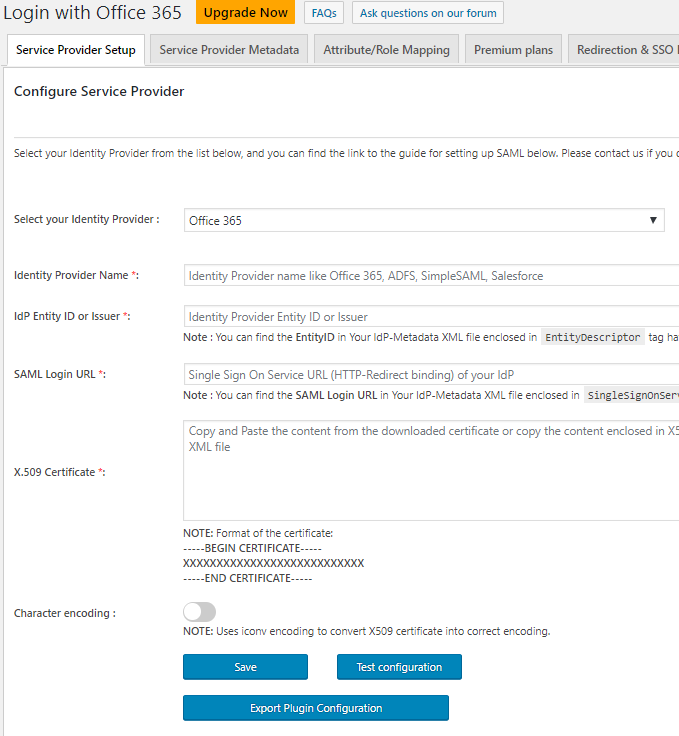
- Single Sign-On Support - Supports SSO authentication based on SAML 2.0 / OAuth / OpenID Connect.
- Auto Create Users - Users will be auto-created in WordPress after SSO
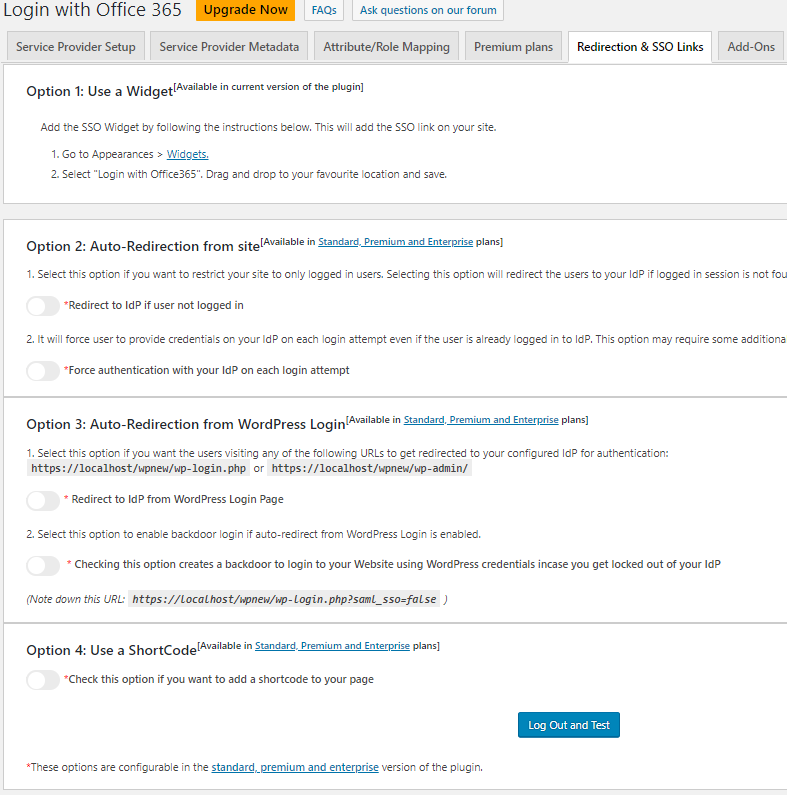
- Login Widgets - Use Widgets to easily integrate the login link with your Wordpress site.
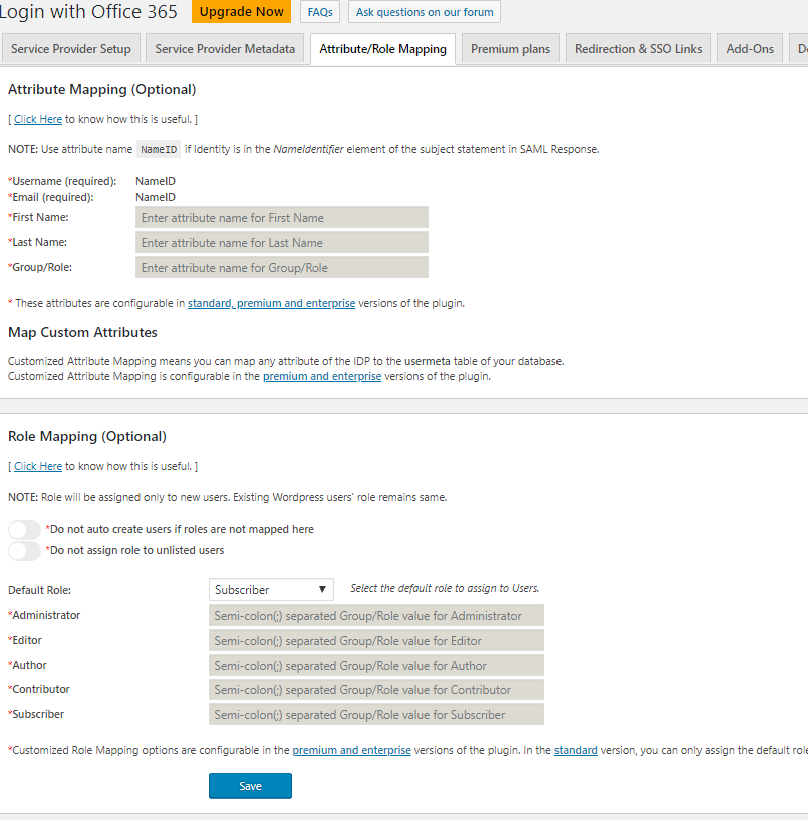
- Attribute Mapping - Map attributes like Email and Username with the claims received from your provider.
- Role Mapping - Select default role to assign to users on auto registration.
- Unlimited Authentications - Unlimited authentication with Azure AD, Azure B2C, Office 365, Microsoft 365, ADFS. Click here for more information.
- Advanced Attribute Mapping - Azure AD, Azure B2C, Office 365 Login provides the feature to map your IDP attributes to your WordPress site attributes like Username, Email, First Name, Last Name, Group/Role, Display Name. Click here for more information.
- Login Widgets and Short Code - Use Widgets to easily integrate the login link with your Wordpress site. Use Short Code (PHP or HTML) generated by Login with Azure - SSO (Azure B2C, Azure AD) to place the login link wherever you want on the site.Click here for more information.
- Step-by-step Guides - Use step-by-step guide to configure Azure AD, Azure B2C, Office 365, Microsoft 365, ADFS.Click here for more information.
- Intranet / Auto-redirect to IDP [Protect Complete Site] - Users trying to access Wordpress site will be redirected to the Identity Provider for SSO.Click here for more information.
- Internet / Protect WordPress login page - Users trying to access Wordpress login page will be redirected to the Identity Provider for SSO.Click here for more information.
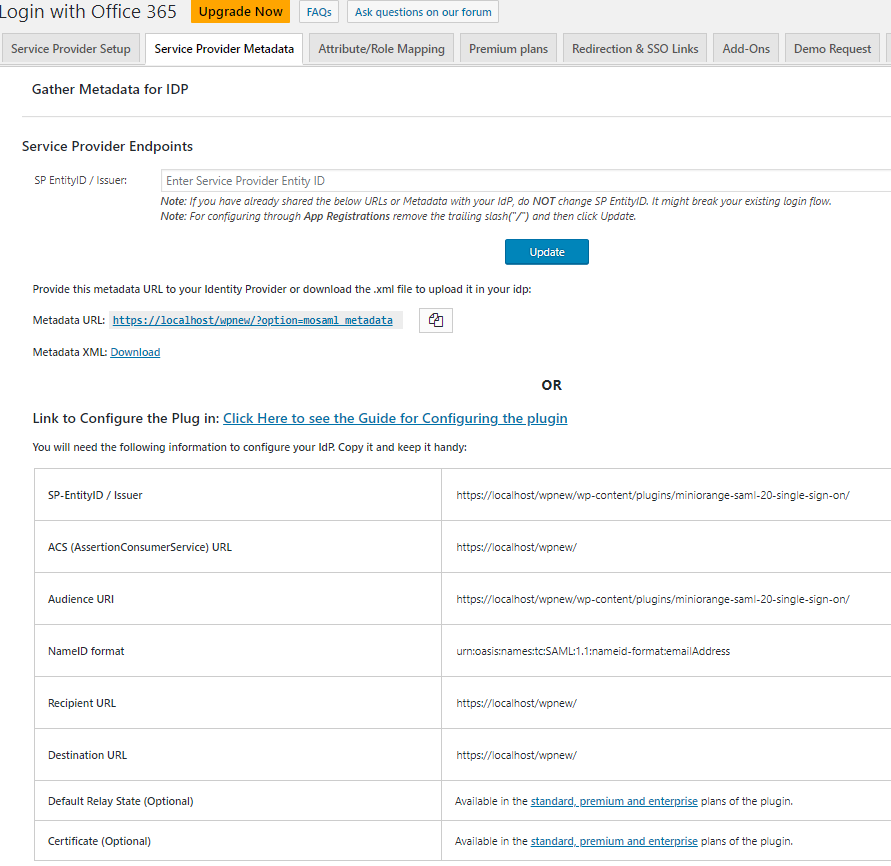
- Customize SP Configuration - Change SP base URL and SP Entity ID.Click here for more information.
- Select Binding Type - Select HTTP-Post or HTTP-Redirect binding type to use for sending SAML Requests.Click here for more information.
- Integrated Windows Authentication - Support for Integrated Windows Authentication (IWA) in Azure AD, Azure B2C, Office 365 Login Premium plugin.Click here for more information.
- Includes all the STANDARD version features.
- Role Mapping - Helps you to assign specific wordpress roles to users of a certain group(Self Service Group Management) in your IdP like Azure AD as IdP, Azure B2C as IdP or Office 365 as IdP or Microsoft 365 as IDP. Click here for more information.
- Auto-sync IdP Configuration from metadata - Keep your Azure AD, Azure B2C, Microsoft 365 or O365 IDP SAML Configuration and Certificates updated and in sync. Click here for more information.
- WordPress Multi-site Support - Multi-Site environment is one which allows multiple subdomains / subdirectories to share a single installation. With multisite premium plugin, you can configure SSO with Azure AD, Azure B2C, Office 365, Microsoft 365, ADFS in minutes for all your sites in a network. While, if you have basic premium plugin, you have to do plugin configuration on each site individually as well as multiple Azure AD tenants for your WordPress site.Click here for more information.
- Redirect URL after Login - You can configure the WordPress logins initiated from the Web Console to automatically redirect users to the IdP(Azure AD, Azure B2C, Office 365, Microsoft 365). If multiple IdPs (Azure AD SSO, Azure B2C SSO, Office 365,Microsoft 365 SSO) are available, users choose which Microsoft application IdP validates their credentials.Click here for more information.
- Widget to add IDP Login - We customize Add a link or button anywhere on your WordPress site to allow users to authenticate via their Identity Provider.Click here for more information.
- Auto Create Users – Users will be auto-created in WordPress after SSO which benefits you in maintaining stream lined account management with Improved Productivity and enhanced security.Click here for more information.
- SAML Single Logout - Support for SAML Single Logout (Works only if your IDP supports SLO).Click here for more information.
- Intranet / Auto-redirect to IDP [Protect Complete Site] - Users trying to access Wordpress site will be redirected to the Identity Provider for SSO.Click here for more information.
- Internet / Protect WordPress login page - Users trying to access Wordpress login page will be redirected to the Identity Provider for SSO.Click here for more information.
- Advanced Role Mapping - Provides the feature to assign WordPress roles to your users based on the security group/role sent by Azure AD, Azure B2C, Office 365.Click here for more information.
- Reverse-proxy Support - Support for sites behind a reverse-proxy in WordPress SSO - Office 365 / Azure Login.Click here for more information.
- Multiple Certificates - Store Multiple IdP Certificates.Click here for more information.
- Custom Certificate - Have your own custom SAML-compliant SP X-509 Certificate.Click here for more information.
- Multi-Network Support - Allow multiple Subdomains / subdirectories by sharing a single installation. Configure microsoft applications (Azure AD, Azure B2C, Office 365) for all your sites in a Network.https://www.miniorange.com/wordpress-single-sign-on-(sso)-for-multinetwork
- Single Sign-On (SSO) - Easy and seamless access to all resources. WordPress Single Sign On (SSO) via any existing Microsoft applications SAML 2.0 Identity Provider / OAuth / OpenID Connect provider.Click here for more information.
- Includes all the STANDARD version features.
- Multiple SAML IDPs Support - We now support configuration of Multiple SAML-compliant IDPs in the plugin to authenticate the different group of users with different IDP's. You can give access to users by users to IDP mapping (which SAML-compliant IDP to use to authenticate a user) is done based on the domain name in the user's email. (This is a Enterprise feature with separate licensing. Contact us at info@xecurify.com to get licensing plans for this feature.)
- Easy migration from dev to prod - Compatible with multiple environments in a hosting provider like Pantheon, WP-Engine, Wordpress VIP. In general, if you make copy of your site then all the configuration will also get copied resulting in interuption of SSO. Using this feature you can easy migrate without breaking the SSO on test/stag/prod site.Click here for more information.
- Mu Domain Mapping Support - If you are using WordPress Multisite installation with each subsite using different domain host (Multiple Domain Installation) then SSO can be performed in all the subsites regardless of their domain.Click here for more information.
- SAML Single Logout - Support for SAML Single Logout (Works only if your IDP supports SLO).Click here for more information.
- Intranet / Auto-redirect to IDP [Protect Complete Site] - Users trying to access Wordpress site will be redirected to the Identity Provider for SSO.Click here for more information.
- Internet / Protect WordPress login page - Users trying to access Wordpress login page will be redirected to the Identity Provider for SSO.Click here for more information. Advanced Role Mapping - Provides the feature to assign WordPress roles to your users based on the security group/role sent by Azure AD, Azure B2C, Office 365.Click here for more information.
- Reverse-proxy Support - Support for sites behind a reverse-proxy in WordPress SSO - Office 365 / Azure Login Premium plugin.Click here for more information.
- Multiple Certificates - Store Multiple IdP Certificates.Click here for more information.
- Custom Certificate - Have your own custom SAML-compliant SP X-509 Certificate.Click here for more information.
- WordPress Multi-site Support - Multi-Site environment is one which allows multiple subdomains / subdirectories to share a single installation. With multisite premium plugin, you can configure SSO with Azure AD, Azure B2C, Office 365, Microsoft 365, ADFS in minutes for all your sites in a network. While, if you have basic premium plugin, you have to do plugin configuration on each site individually as well as multiple Azure AD tenants for your WordPress site.Click here for more information.
- Includes all the Enterprise version features.
- Customize Metadata Contact Information - You can now customize Organization profile as well as technical details in Service Provider Metadata.
- Configuring Plugin using APIs - You can configure the plugin using API calls as well as WP-CLI. It helps you to manage configuration for large number of sites and easily automate the process.
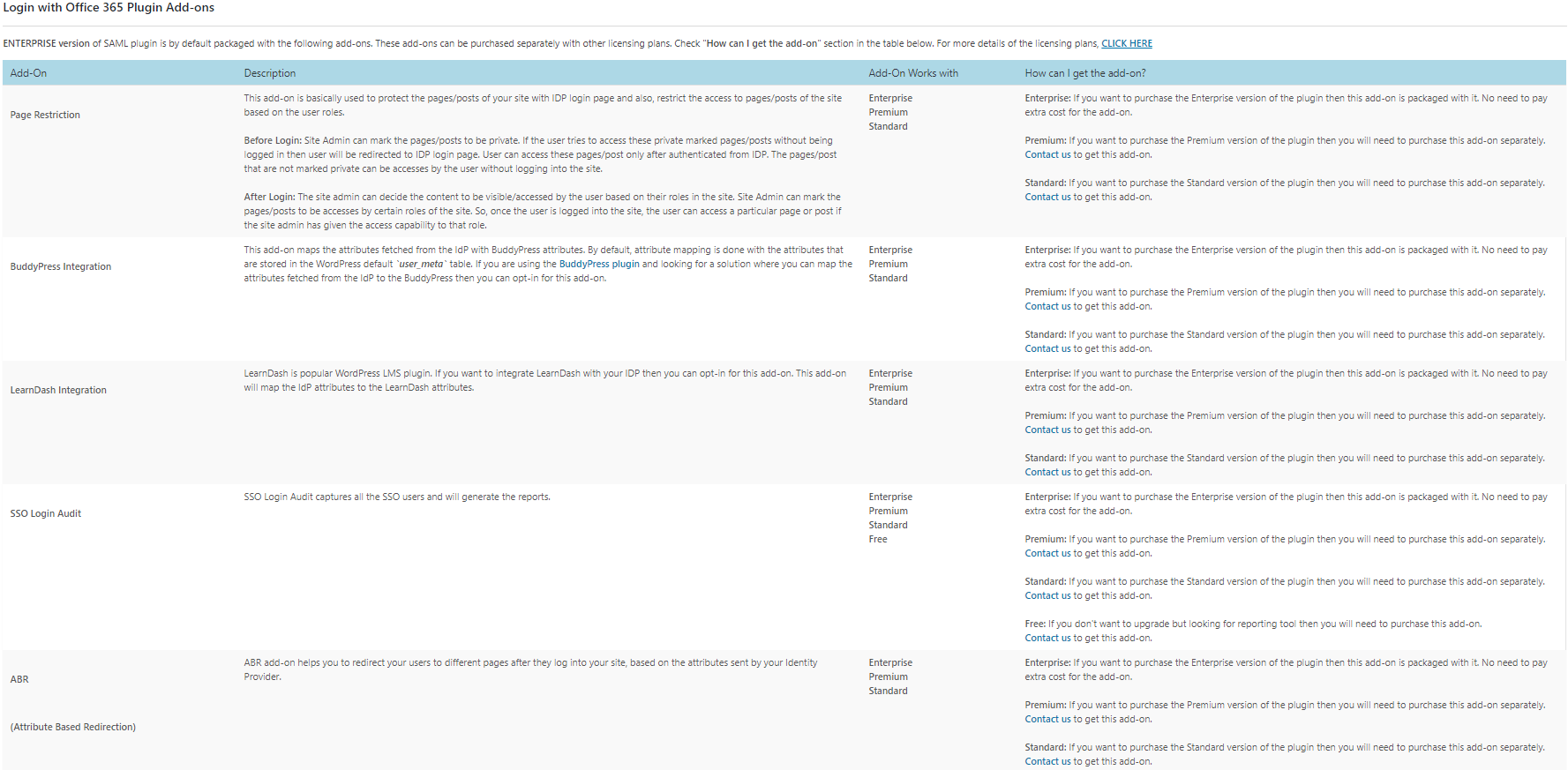
- Add-Ons included - You will get the following addons in the license cost itself for extended functionality. It provides functionality ranging from Automatic user provisioning, login audit, session manager, LMS mapper, Page/Post/Media restriction, etc.
- Page Restriction - This add-on is basically used to protect the pages/posts of your site with SAML-compliant IDP login page and also, restrict the access to pages/posts of the site based on the user roles.
- BuddyPress Integration - This add-on maps the attributes fetched from the SAML-compliant IdP with BuddyPress attributes.
- LearnDash Integration - This add-on will map the SAML-compliant IdP attributes to the LearnDash attributes.
- Media Restriction - This add-on restricts unauthorized users from accessing the media files on your WordPress site.
- Attribute based Redirection (ABAC) - This plugin can be used to restrict and redirect users to different URLs based on Azure AD / Azure B2C / Office 365 IDP attributes.
- SCIM-User Provisioning - SCIM Auto User Provisioning allows users to sync, Create, Update, delete users from Azure AD or all SCIM capable Identity providers(IdPs) to WordPress sites.
- SSO Login Audit - SSO Login Audit captures all the SSO users and will generate the reports.
- SSO Session Management - SSO session management add-on manages the login session time of your users based on their WordPress roles.
安装:
From your WordPress dashboard
- Visit
Plugins > Add New. - Search for
Azure AD, Azure B2C, Office 365 Login. Find and InstallAzure AD, Azure B2C, Office 365 Login. - Activate the plugin from your Plugins page.
- Download WordPress SSO - Office 365 / Azure Login plugin.
- Unzip and upload the
login-with-office-365directory to your/wp-content/plugins/directory. - Activate WordPress SSO - Office 365 / Azure Login from your Plugins page.
屏幕截图:
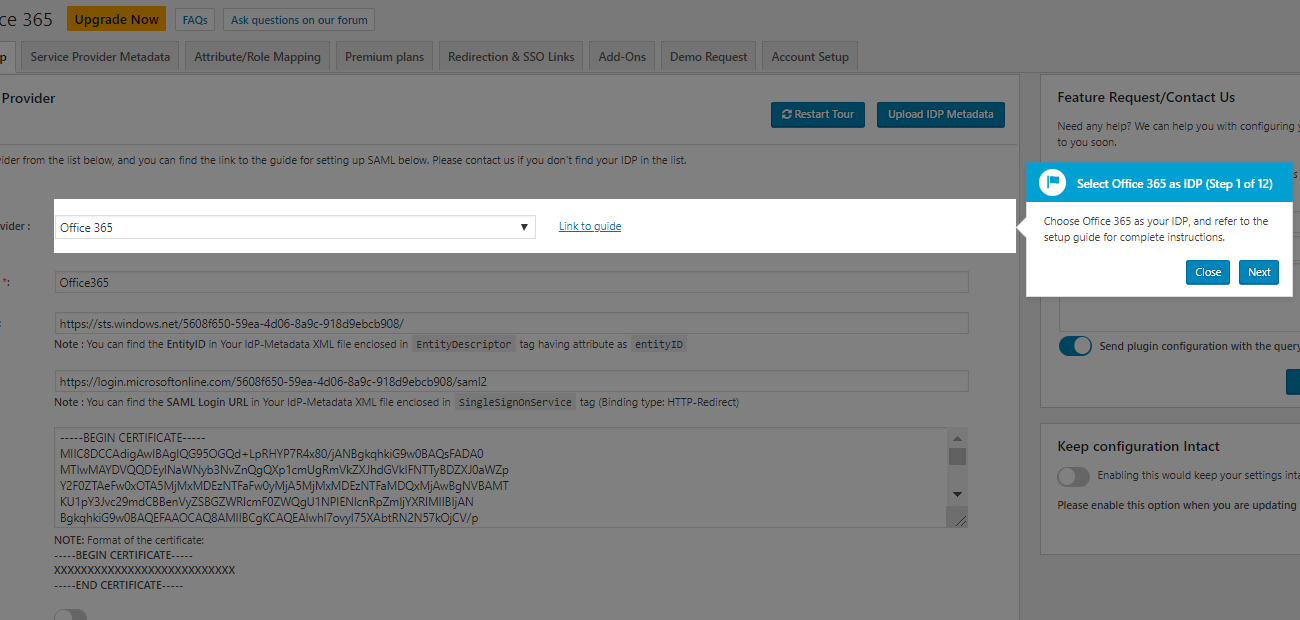
常见问题:
I am not able to configure the Identity Provider with the provided settings
Please email us at info@xecurify.com or Contact us. You can also submit your app request from plugin's configuration page.
For any query/problem/request
Visit Help & FAQ section in the plugin OR email us at info@xecurify.com or Contact us. You can also submit your query from plugin's configuration page.
更新日志:
1.0.4
- Compatibility with WordPress 6.0
- Some UI improvements
- Compatibility with WordPress 5.8
- Added Banner for year end sale
- Compatibility with WordPress 5.5 and PHP 7.4+
- Sanitization fixes