Login with Vipps and MobilePay
| 开发者 |
wphostingdev
iverok pmbakken perwilhelmsen nikolaidev lassepladsen |
|---|---|
| 更新时间 | 2026年9月2日 20:23 |
| PHP版本: | 7.2 及以上 |
| WordPress版本: | 7.0 |
| 版权: | MIT |
| 版权网址: | 版权信息 |
详情介绍:
Login with Vipps and MobilePay offers super-easy registration and login from the leading smart-payment app in Norway with more than 4.2 million users. MobilePay is used by more than 75 % of Denmark's population (4.4 million users), and more than 36 % of Finland's population (2.6 million users). There is no easier login. No more usernames or passwords.
The users need only remember their phone number. They are also able to provide information that websites often require, like e-mail, phone numbers and addresses, from their Vipps MobilePay profile with no tedious data entry.
The plugin is easy to modify for your own applications.
This solution is great for all websites that wants to:
- Get more logged-in users
- All Vipps and MobilePay-users can create a profile on your website with just one click, and can be logged in directly on the next visit
- You can modify content, messaging and retrieve stored shopping carts for the user
- Your customers can see order histories and potentially register product returns
- More logged-in users gives you better overview and better conversion rates
安装:
If you are an existing Vipps MobilePay customer, log onto the Vipps MobilePay portal https://portal.vippsmobilepay.com and retreive your API keys that you will need to install Login with Vipps MobilePay
If you are a new Vipps MobilePay customer, apply for an account here - before downloading the plugin. Choose "Integration through your partner", or if you don't know your partner, choose "direct integration" and fill out the form. When your application is approved, you will receive the API keys that you will need to install the plugin.
- Install the plugin using WordPress' built-in installer. The plugin can also be installed manually by upload the plugin files to the /wp-content/plugins/ directory.
- Activate the plugin through the \'Plugins\' screen in WordPress.
- From the Vipps MobilePay portal, get your Client ID and Client Secret and add them to the Settings-page for this plugin (see screenshot 1)
- Note your callback URL from the plugins settings-page and add that to the Vipps MobilePay Portal (see screenshot 2)
- Modify the options as needed
屏幕截图:
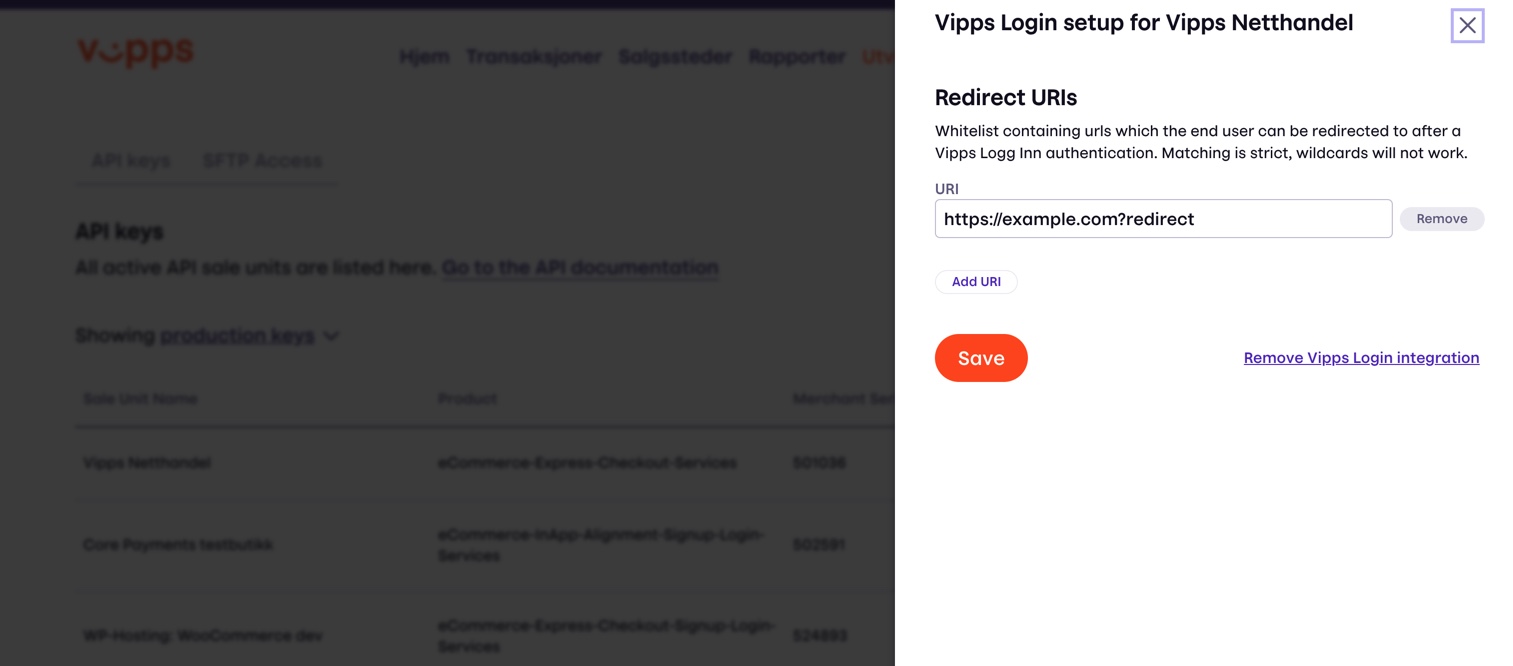
](https://cdn.jsdelivr.net/wp/login-with-vipps/assets/screenshot-3.jpg)
更新日志:
2026-09-02 Version 1.5.6
Fix css compatibility with the Vipps MobilePay payment gateway plugin.
Avoid loading WooCommerce blocks when not using WooCommerce.
2026-09-01 Version 1.5.5
Fix fatal error when not using WooCommerce
2026-08-31 Version 1.5.4
Support login buttons in Gutenberg cart & checkout
2026.08.04 Version 1.5.2
Improvements to the web component button code
2026.06.16 Version 1.5.1
Security fixes for the MFA feature, shortcodes.
Web components now hosted locally.
2026.06.12 Version 1.5.0
All login-with-vipps buttons will now use the standard Vipps MobilePay web component buttons
Fix for the login button in WooCommerce carts.
2026.06.02 Version 1.4.2
Bump WP version tested up to 7.0
Fix: missing logo in certain banners for themes without Font Awesome
2026.03.19 Version 1.4.1
Fix typo that would lead to a crash in certain error conditions. Thanks to Øystein Østre @ maksimer for reporting
2026.03.02 Version 1.4.0
Blocks updated to version 3.0 to be compatible with the new iframe-based editor
Implementation of block changed to use standard Vipps MobilePay web component buttons
Settings-menu moved to the main Vipps MobilePay menu if available (legacy page still present)
2024.12.23 Version 1.3.5
Fix wrong variable name in login filter
2024.12.02 Version 1.3.5
The login-block is updated to the latest Block API.
2024.11.26 Version 1.3.4
This version fixes a vulnerability in the shortcodes where it would be possible for an editor to add stored javascript that would run when the button was pressed. Thanks to Peter Thaleikis for reporting.
2024.05.02 Version 1.3.3
Text domain fix for 6.7 compatibility
2024.08.27 Version 1.3.2
Fix bugs that stopped admins from disconnecting users' accounts
2024.05.08 Version 1.3.1
Add filter to allow for the 'remember user' extended cookie length
2024.05.02 Version 1.3.0
Support Mobilepay, improve settings
2024.03.21 Version 1.2.8
Send debugging headers to Vipps MobilePay
Updating blocks and css
2023.11.28 Version 1.2.7
Fix some 8.2 deprecations
2023.05.15 Version 1.2.6
Small bugfixes, removal on some restrictions to aid implementation of non-login applications
2023.03.27 Version 1.2.5
2023.02.08 Version 1.2.4
- Add filter for the error message when the user is invalid
- Fix deprection warning under php8.1
- Fix compatibility with 7.4
- Testing for 6.1.0
- Small fix for Gutenberg blocks
- Add support for using the phone number as Vipps MobilePay ID for users
- Removes old "verify your email account" code as it was not future-proof. Filters allow developers to reimplement this if neccessary
- Fix CSS to be more independent of certain themes
- Removed the api_version_2 scope
- Add filter
login_with_vipps_openid_scope ( $scope, $action, $sessiondata)to allow developers to ask for e.g. birthDate. The filter will always receive an array.
- Fix COOKIEPATH on multisite installs where it isn't set.
- Made 'login_with_vipps_woo_login_redirect' get access to the login session
- Created a javascript hook for people customizing login
- Add suppression of more than one call to the login process
- For some reason, a bug where the blogversion was outputed didn't kick in on our systems, but broke login for some users. This version restores normal operations.
- Versioning headers sent to Vipps MobilePay to aid debugging
- Slight improvement in programmability of the login function for those who want to extend the plugin
- Improved texts for how to use the plugin
- Improved support for WPML
- Support for running against Vipps MobilePay' test/dev server using filters
- CSS Tweaks
- Testing for WP 5.8
- Get-started banner for users that have not completed configuration
- Remove the old 'verify email account feature'
- Fix the email confirmations - this will be removed in a future version however
- Ensure the 'woocommerce_created_customer' hook is called correctly when registering on WooCommerce - this fixes the bug where user registration emails weren't sent.
- Tested for latest versions of WP and Woo
- Handle deprecation of the 'sid' field of the userinfo
- Bugfix
- Bugfix
- Supports requiring certain users, roles or everybody to use Vipps MobilePay to log in or to confirm their login
- Fix bug causing output when WP_DEBUG is on. Thanks to @horgster on wp.org for reporting.
- Now uses version 2 of the Vipps MobilePay Login Api and provides a Gutenberg block for a "Login with Vipps/MobilePay" button
- Versions tested on WP 5.6 and WC 4.8.0
- Version tested on WP 5.5.3 and WC 4.7.0
- If activated when Checkout with Vipps MobilePay for WooCommerce is installed, configure that plugin to create users when using Express Checkout
- Make new Woo accounts created by Vipps MobilePay login count as "Authorized" for All-in-one WP security; improved configuration options
- Fixed misspelled shortcode name, version update
- Made user confirmation optional and off by default, since this is now handled by Vipps MobilePay
- Stylesheet fixes
- Added a filter 'login_with_vipps_update_address_info' which returns whether or not to update the address info for a user. Takes the current truth value, the customer object, and userinfo from Vipp MobilePays.
- Added a 30s leeway to the JWT verifier, and made it so logging will go to the system log for Woo installations as well
- Conflicts with certain plugins that check for 'code' and 'state' in the parse_request hook fixed by deleting these if we are handling Vipps MobilePay returns
- Change named of session key, to be compatible out-of-the-box with wpengine. Thanks to Sondre @ NattogDag for help with debugging
- Added convenience filters 'login_with_vipps_woo_error_redirect' and 'login_with_vipps_woo_login_redirect' to handle redirects on error and success for WooCommerce in particular
- Made account title filter more forgiving