
Logtern – Debug Log Viewer
| 开发者 | sonu8755 |
|---|---|
| 更新时间 | 2026年7月28日 00:42 |
| PHP版本: | 7.4 及以上 |
| WordPress版本: | 7.0 |
| 版权: | GPLv2 or later |
| 版权网址: | 版权信息 |
详情介绍:
- It keeps working when your site is broken. A log viewer is needed exactly when a site is misbehaving — yet that is when other plugins spray PHP notices and database errors into every response, which breaks most AJAX-driven admin tools. Logtern shields its own responses from stray output on both the server and the client, so the viewer stays usable in the middle of the storm. Live mode never gives up either: connection problems just slow the polling down until the site answers again.
- It enforces your "hide errors" setting. Some plugins force raw database errors onto every page even when
WP_DEBUG_DISPLAYis off. When you have chosen not to display errors, Logtern re-asserts that choice — the errors still land in the log, they just stop being painted onto your site. - It never edits wp-config.php with regexes. The debug toggle locates constants with PHP's tokenizer, re-verifies every change, and swaps the file in atomically with permissions preserved. If anything looks unsafe, it refuses to write instead of guessing.
- It does not leave your log at a public URL. Enabling logging points the log at a randomly named file inside an access-protected directory instead of the publicly guessable
wp-content/debug.log. - It stays fast on gigantic logs. Seek-based tail reads and chunked downloads mean a multi-hundred-megabyte log opens instantly and never exhausts PHP memory.
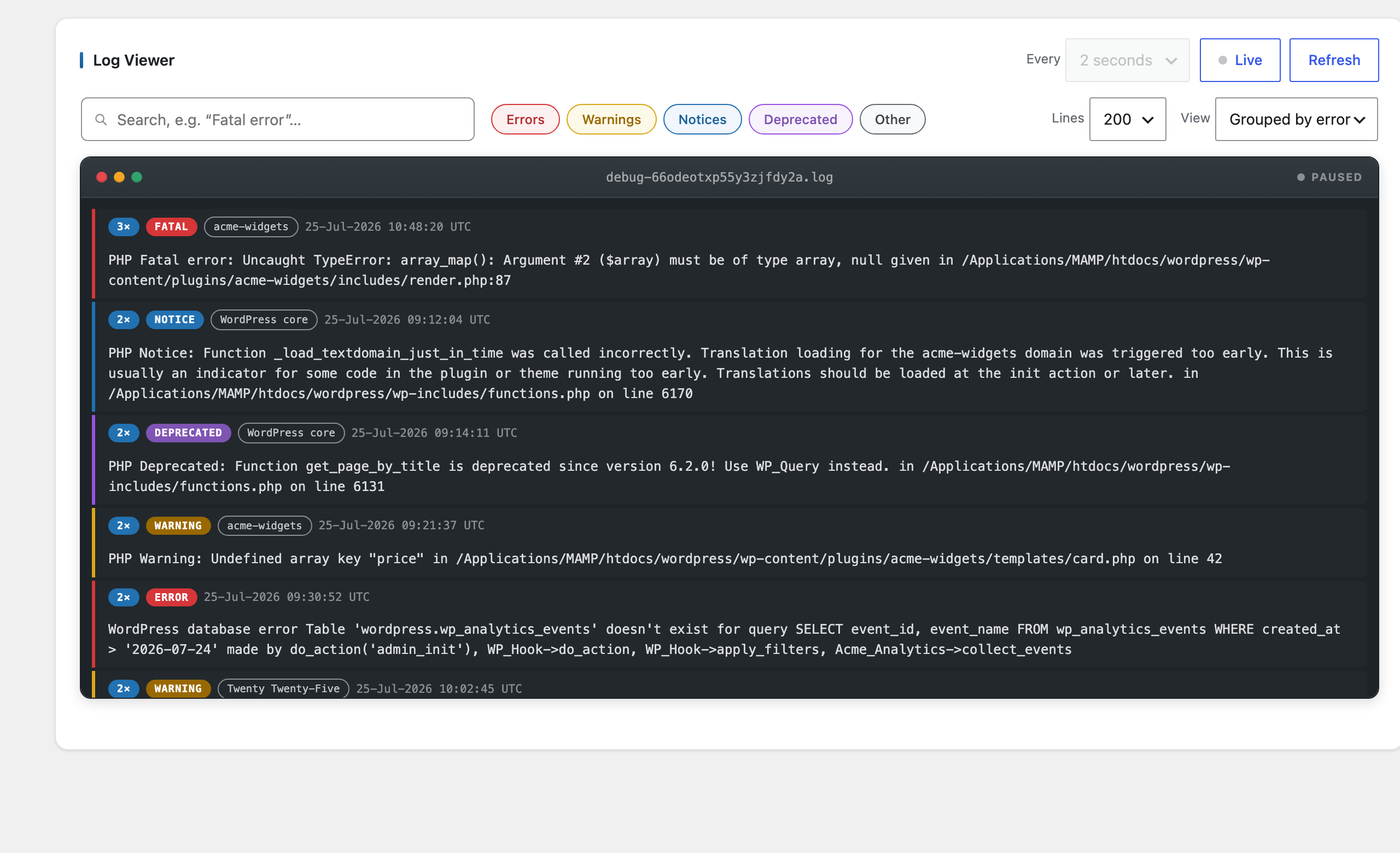
- Live log viewer — read the debug log from Logtern's own page under Tools.
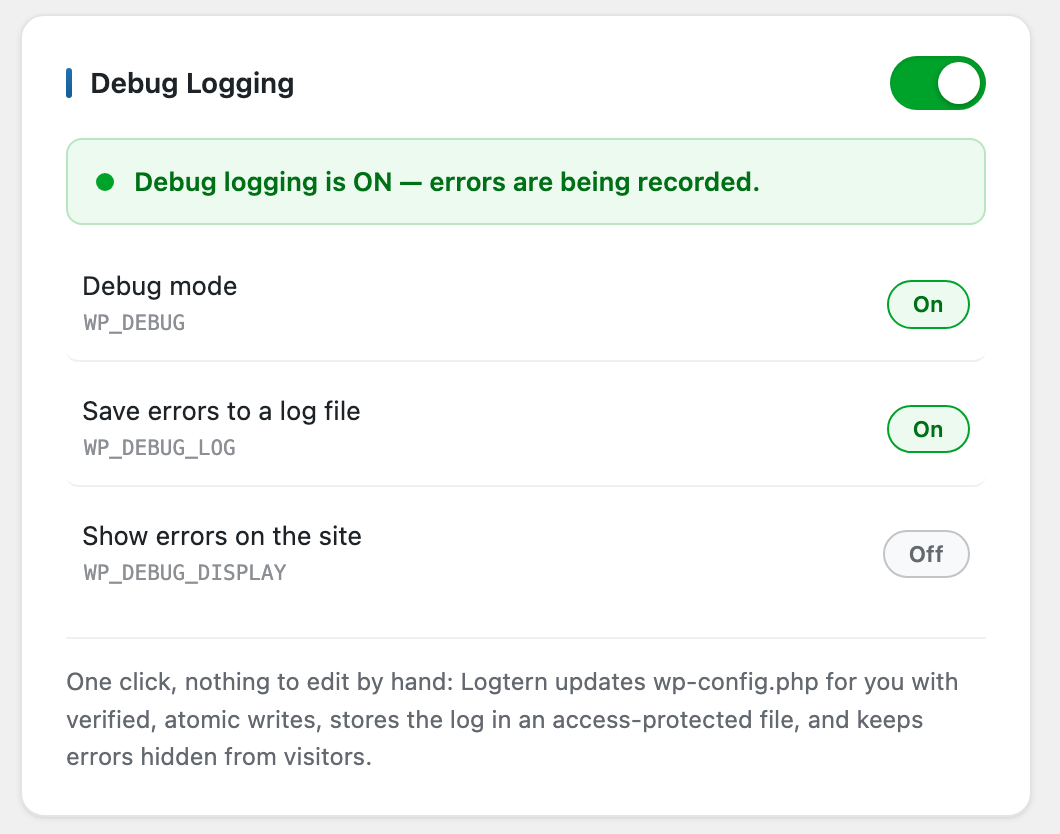
- One-switch debug mode — a clear on/off switch shows at a glance whether logging is active; no wp-config.php editing needed, ever.
- Real-time tail — the log loads instantly on page open; flip the Live button and Logtern tails the file like
tail -fin a terminal (1–30 second polling, your choice). Polling is lightweight: nothing is re-read unless the file actually changed, and it pauses automatically while the tab is hidden. - One-click clear — empty the log file after confirming, no file manager needed.
- WP_DEBUG toggle — safely switch
WP_DEBUGandWP_DEBUG_LOGon or off without hand-editingwp-config.php. When enabling,WP_DEBUG_DISPLAYis forced off so errors are logged instead of shown to visitors. Constants are located with PHP's tokenizer (commented-out defines are never touched), every change is re-verified before saving, and the file is replaced atomically with its permissions preserved — a failed write can never leave a brokenwp-config.phpbehind. - Search & filter — search entries by keyword and filter by level (errors, warnings, notices, deprecated).
- Color-coded levels — fatal errors in red, warnings in amber, notices in blue, deprecations in purple.
- Download — export the full log as a
.txtfile. - Size warning — get warned when the log grows beyond 10 MB (filterable threshold).
- Fast on huge logs — only the last 100–1000 lines are read, using seek-based reads, so even multi-hundred-megabyte logs open instantly.
- Grouping by error type — collapse repeated errors into one row with an occurrence count.
- Plugin/theme detection — each entry is tagged with the plugin, theme, or core location that triggered it.
- Access is restricted to administrators (
manage_options), and to network administrators on multisite. - Every action (view, clear, toggle, download) is protected by both a capability check and a nonce.
- When Logtern enables logging, it avoids the publicly guessable
wp-content/debug.logwhenever possible: the log goes to a randomly named file in a directory protected by.htaccess/web.configdeny rules that the plugin creates. (Only if the uploads directory is not writable does the toggle fall back to the WordPress default location.) - Logtern never sends your log — or any other data — to an external service. Everything stays on your server.
安装:
- Upload the
logternfolder to/wp-content/plugins/, or install it via Plugins → Add New. - Activate the plugin through the Plugins screen.
- Go to Tools → Logtern.
- If debug logging is off, flip the Debug Logging switch to start capturing errors.
屏幕截图:
常见问题:
Where does WordPress store the debug log?
By default in wp-content/debug.log, once WP_DEBUG and WP_DEBUG_LOG are enabled. Because that default path is publicly guessable, Logtern's toggle instead points the log at a randomly named file under uploads/logtern/, protected from direct HTTP access. If you already define WP_DEBUG_LOG as a custom file path, Logtern reads and manages that file instead and the toggle preserves your custom path. The exact file currently in use is always shown in the Log File card on the dashboard, next to a Copy button.
Who can see the log?
Only users with the manage_options capability (administrators). On multisite, only network administrators. Debug logs can contain sensitive information, so the capability is also filterable via logtern_capability if you need to restrict it further.
Does Logtern edit wp-config.php?
Only when you use the debug toggle, and only the WP_DEBUG, WP_DEBUG_LOG and WP_DEBUG_DISPLAY constants. Defines are located with PHP's tokenizer, so commented-out lines are never mistaken for real ones; the result is re-verified before saving, and the file is swapped in atomically with its permissions preserved. If anything looks unsafe, the plugin refuses to write and tells you. If wp-config.php is not writable, the toggle is disabled and everything else keeps working.
Will it work with very large log files?
Yes. Logtern never loads the whole file: it seeks to the end and reads only the last lines you asked for, and downloads are streamed in chunks.
Is my debug log publicly accessible?
Not when you enable logging through Logtern: the file gets an unguessable random name inside a directory protected by .htaccess and web.config deny rules that the plugin creates. A pre-existing wp-content/debug.log from before you installed Logtern may still be reachable on some servers, though — download what you need, clear it, and let Logtern's toggle set up the protected location. Disabling debug logging when you are done is good practice either way.
What happens when I uninstall the plugin?
Logtern cleans up after itself completely: the debug constants it manages in wp-config.php are reverted (WP_DEBUG is turned off; a WP_DEBUG_LOG value pointing at the plugin's protected directory is reset to the WordPress default, while custom paths are left untouched), the uploads/logtern/ directory — including its log files — is deleted, and the plugin's per-user settings are removed. Download any log you want to keep before uninstalling.
Does the plugin collect any data?
No. There is no tracking, no external requests, and no data leaves your server.
更新日志:
- Initial release: live viewer, auto-refresh tail, search and level filters, grouped view, WP_DEBUG toggle, clear and download actions, large-file warning, plugin/theme source detection.