
Loyal Security - Firewall & Malware Scanner
| 开发者 | totalsecuritywp |
|---|---|
| 更新时间 | 2026年10月16日 14:00 |
| PHP版本: | 8.0 及以上 |
| WordPress版本: | 7.1 |
| 版权: | GPLv2 or later |
| 版权网址: | 版权信息 |
详情介绍:
wp-element, and every PHP class is loaded by a built-in autoloader. Install it, activate it,
and it works. A small number of features use outside services; each one is listed under
"External services" below, with what it sends and how to switch it off.
Everything in this plugin is free and fully functional — nothing is locked, limited or
time-restricted. Loyal Security Pro is a separate plugin, sold and downloaded from our
website, that adds automation and agency tools on top.
Features
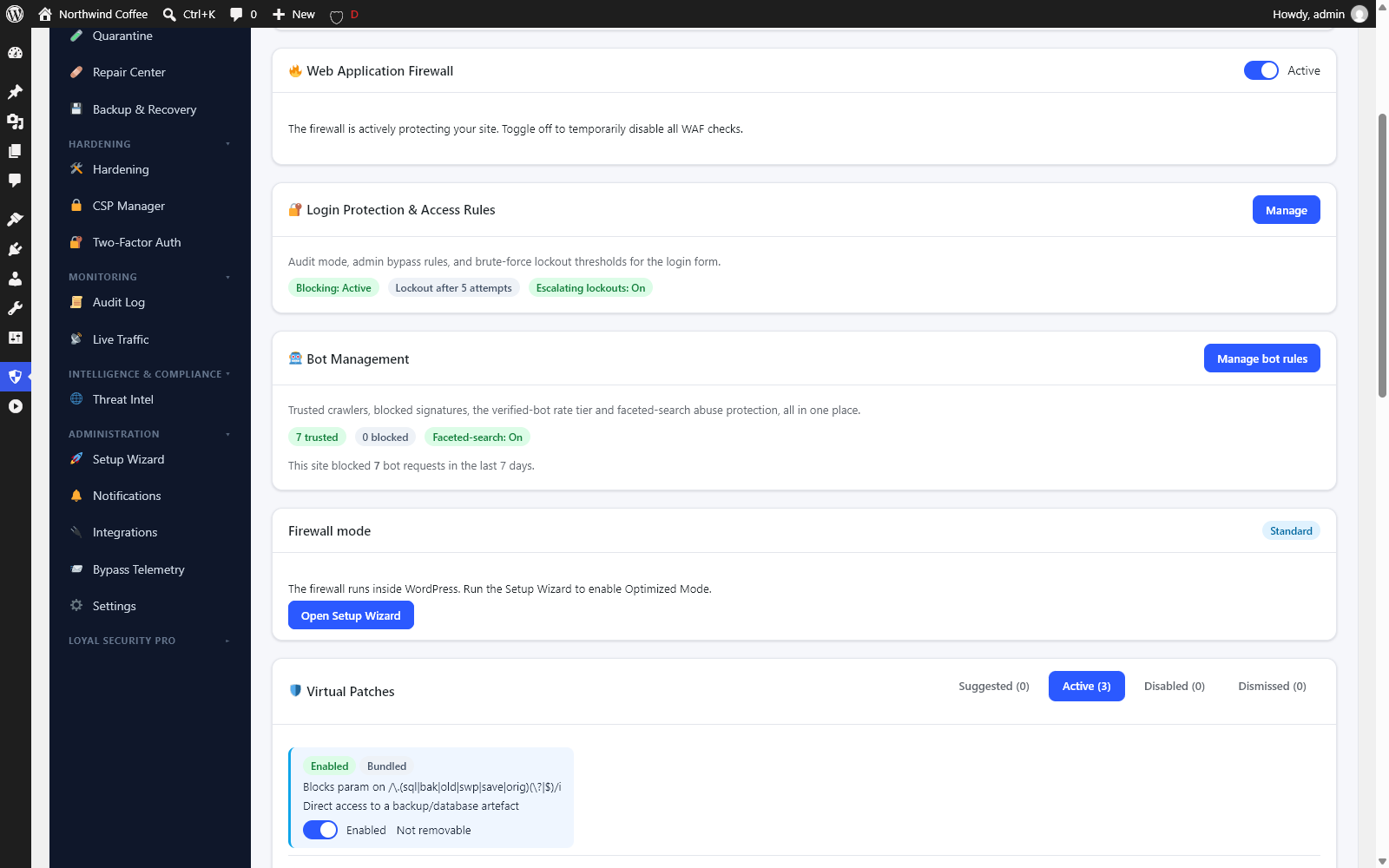
- Web Application Firewall — Optimized Mode (runs before WordPress even loads, via a lightweight prepend) or Standard Mode (runs inside WordPress). Blocks SQL injection, XSS, LFI/RFI, path traversal, and RCE.
- Rate limiting, brute-force protection & DDoS shielding — plus a bad-bot blocker and country-level geo-blocking that works with or without a CDN (bundled IP-to-country data, no outside lookups).
- Virtual patching — shields known-vulnerable third-party plugins/themes until you're able to update them.
- Deep system hardening — .htaccess/Nginx rule generation, wp-config hardening, directory-browsing lockdown, REST API & XML-RPC restriction, version obfuscation.
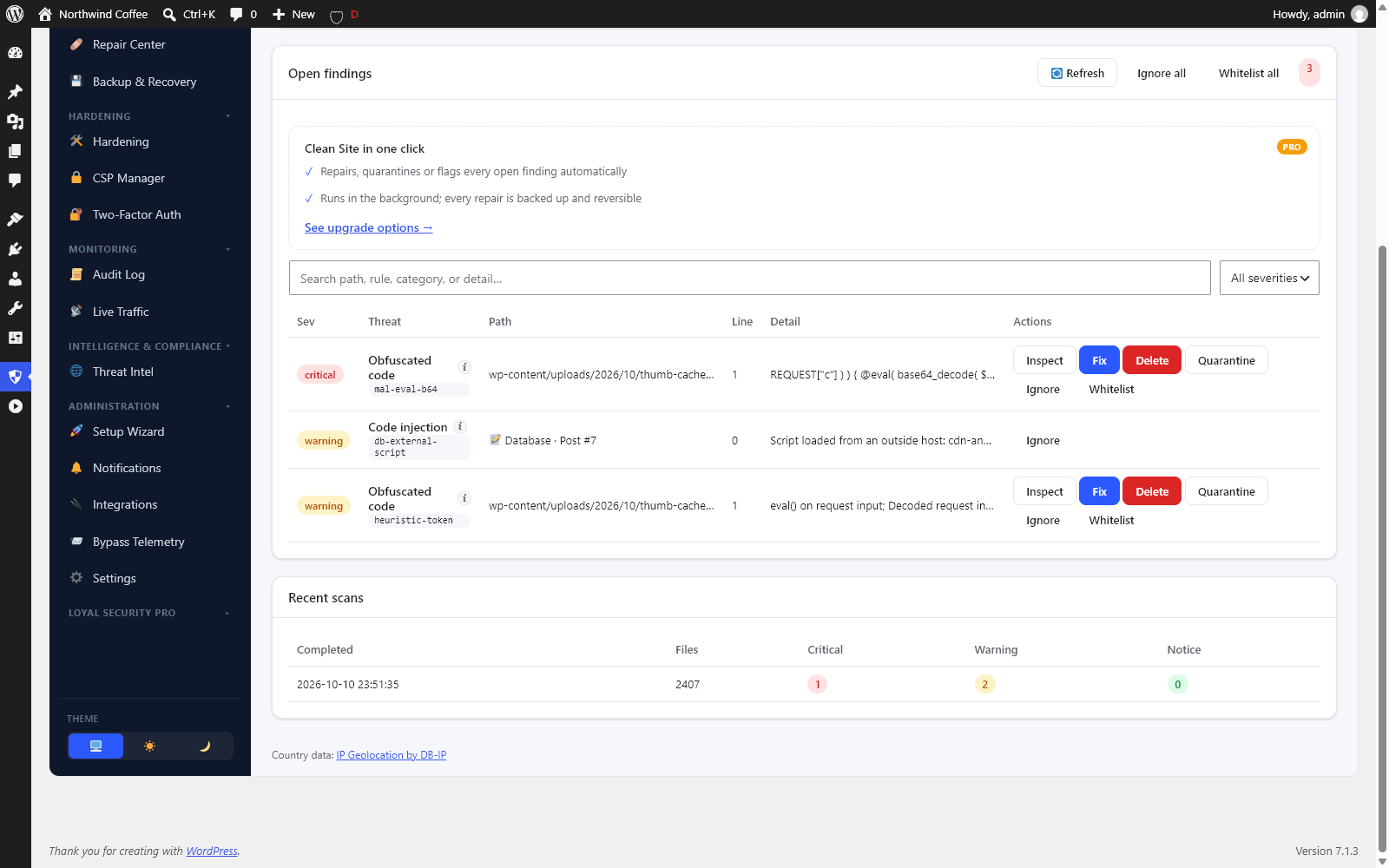
- Malware scanner — heuristic regex + token-based detection engine, on-demand full-site scans, and a weekly automatic scan.
- File integrity monitoring — WordPress.org checksum verification for core and plugins, plus baseline diffing for everything else, including themes, mu-plugins and drop-ins.
- Database scanner — checks posts, page-builder content, category descriptions, comments, options, user meta and code-snippet plugins for injected scripts (including scripts loaded from outside hosts), spam links, a hijacked site address and rogue admin accounts.
- Incident response — safe quarantine, one-click clean-file recovery, and file-permission reset.
- Backup & restore — on-demand and scheduled full-site backups (files + database), plus a downloadable recovery tool you can upload to restore a backup even if WordPress itself won't load.
- Two-factor authentication — TOTP with QR enrollment and backup codes, passkeys, login CAPTCHA, password policy, breached-password checking, and active-session management.
- Audit log — full event trail with IP/user/proxy tracking, configurable retention (90 days by default), and CSV export.
- Email notifications — alerts with human-readable event guidance, throttling, quiet hours and per-event muting.
- Live Traffic monitor — real-time request feed with user-agent classification, filters, and one-click block/unblock.
- Content Security Policy manager — builds a policy from the resources your site actually loads, with a report-only mode.
- Admin-bar Security Score — an at-a-glance A–F health grade.
- Inline vulnerability notices — flags installed plugins/themes with known CVEs directly on the Plugins, Themes, and Updates screens.
- WP-CLI support —
wp loyal-security status | scan | firewall | backup | twofa.
- Hourly threat-intelligence updates — the same feed, delivered every hour instead of twice a day.
- Under Attack Mode — a one-click emergency shield with automatic expiry.
- Faster scheduled scans & auto-quarantine — daily or twice-daily scans, and infected files isolated the moment they are found.
- Sentinel AI — AI-assisted review of suspicious activity with reversible responses.
- Threat hunting, uptime monitoring and compliance reports.
- Webhook, PagerDuty and OpsGenie alerts, and Cloudflare edge sync.
- WooCommerce-aware backups and staging restores.
- Agency tooling — white-label dashboard, role management, and multi-site hub.
安装:
- Upload the
loyal-securityfolder to/wp-content/plugins/, or install it directly from Plugins → Add New. - Activate the plugin through the Plugins screen.
- Open Loyal Security in the admin menu and run the Setup Wizard — it deploys the firewall in the best mode for your hosting environment automatically.
- Review the defaults under Loyal Security → Settings, and enable two-factor authentication for every admin account.
auto_prepend_file support (mod_php/CGI) or a writable .user.ini (PHP-FPM). Where neither
is available, the firewall automatically falls back to Standard Mode — no manual
configuration required.屏幕截图:

常见问题:
Does this require Node.js or a build step?
No. The dashboard uses WordPress's bundled React via ES modules, so there's nothing to compile — and no Composer install either, since the plugin ships its own lightweight autoloader.
Does it work with both block and classic themes?
Yes. The dashboard lives entirely in wp-admin, so it's completely independent of your active theme.
Will this slow down my site?
Optimized Mode runs the firewall before WordPress even loads, so malicious requests are blocked before the WordPress bootstrap, database connection, or plugin/theme loading happen. Standard Mode, used automatically when the prepend can't be deployed, still runs as early as possible inside WordPress.
What happens if the firewall itself breaks?
The Optimized Mode prepend is written to fail open: if its configuration or any of its files are missing or unreadable, it does nothing rather than breaking the site. The Setup Wizard also self-tests the deployment and automatically rolls back if the test fails.
Is anything in this plugin limited or locked?
No. Every feature in this plugin is complete and has no time, usage or licence limits. Loyal Security Pro is a separate plugin that adds its own features (listed above); installing it unlocks nothing in this one.
Which outside services does the plugin contact?
By default, three: our threat-intelligence feed (twice a day, to keep the firewall and scanner rules current), Have I Been Pwned's Pwned Passwords range API (at login, k-anonymous), and WordPress.org's own checksum service (with the weekly file-integrity check, the same service WordPress uses for updates). All three can be switched off in Settings. Everything else — CAPTCHA, Safe Browsing, bypass reports, the CSP scanner — is off until you enable it or click it. See "External services" above for exactly what each one sends.
Can I use this alongside another security plugin?
You can, but running two firewalls or two file scanners at once is generally redundant and can occasionally conflict (for example, both plugins trying to write competing rules to .htaccess). We recommend deactivating other firewall plugins before activating Loyal Security's.
Can I bring my IP block and allow lists over from another security plugin?
Yes. If Wordfence, Sucuri Security or iThemes/Solid Security is or has been installed on the site, Loyal Security can read the IP block and allow lists those plugins stored in your own database, so you do not have to type them in again. It only ever reads, never writes to or changes the other plugin's data, nothing is sent anywhere, and it runs only when an administrator starts it from the Firewall screen. Those product names are used here solely to identify whose stored lists are being read; Loyal Security is not affiliated with, endorsed by, or connected to any of them.
Where do I report a security vulnerability in the plugin itself?
Please report it privately rather than in the public support forum so it can be fixed before details become public.
What happens to my data if I delete the plugin?
By default, deleting Loyal Security keeps your security data (logs, scan history, settings) in the database in case you reinstall it. Any deployed server-level changes — the firewall prepend, .htaccess rules, wp-config markers — are always reverted on delete regardless. If you want a full data wipe instead, enable "Delete all data on uninstall" under Settings before removing the plugin.
Where does the country data come from?
Country rules use the visitor's country from Cloudflare (when your site is behind Cloudflare)
or from a trusted proxy you configured. Otherwise they look the address up in a table bundled
with the plugin: IP Geolocation by DB-IP, "IP to Country Lite", licensed
under CC BY 4.0 and converted to a compact
lookup format (details in data/geo/NOTICE.txt). The table is updated with each plugin release,
and looking an address up never contacts any outside service.
The admin screens that show a country (the audit log, Live Traffic and Pro's Threat Hunting), and
notification emails that include a country, link to DB-IP as its licence asks. The page a visitor sees when a country rule blocks them can show the same link: turn
on "geo credit on block page" in the Firewall settings. It is off by default because a plugin may
not add links to your public site without your consent.
Does it work behind Cloudflare?
Yes. Requests that come from Cloudflare's published addresses are recognised automatically, so bans, rate limits and logs use the real visitor's address ("Trust Cloudflare", on by default). Cloudflare's own addresses are never banned or allowlisted. For another proxy or load balancer, add its address under Firewall → Trusted proxies.
更新日志:
- New: Loyal Security is now fully translatable. Every screen, message, event name and email can be translated, and translations from translate.wordpress.org load automatically.
- Fix: Saving any settings screen no longer erases the firewall's list of automatically trusted administrator addresses.
- Fix: Core and plugin integrity findings are no longer reported as "file missing" and no longer clear themselves after the next scan.
- Fix: The two-factor roll-out list is empty unless two-factor is required for a role.
- Fix: Ban durations, lockout limits and similar number fields no longer accept zero or negative values.
- Fix: Content Security Policy custom sources are checked when saved, so a typo (a space, a semicolon) can no longer break the whole header.
- Fix: Applying the wp-config.php hardening repeatedly no longer adds a blank line each time, and the switches show the new values right after Apply on servers with OPcache.
- Fix: Security headers already set by WordPress or another plugin are no longer sent a second time with a different value (two X-Frame-Options values make browsers refuse the site's own frames, such as the Customizer preview).
- Fix: The setup wizard no longer shows a server error for an invalid IP address, and its success screen lays out correctly.
- Fix: In WordPress Playground and on other hosts where automatic deployment isn't possible, Optimized Mode explains why and what to do instead.
- Fix: Event names, ban sources and scan status read as plain words everywhere instead of internal codes, and "Last scan" shows the right status.
- Fix: The malware scanner no longer reports legitimate third-party plugins as malware.
- Fix: Loading spinners and progress bars animate again in current browsers.
- Fix: The IP geolocation credit (DB-IP) now appears only on the screens that show a country.
- Fix: Small layout fixes: round count badges and spacing in the Module health and Recent Login Activity lists.
- Fix: The firewall no longer blocks everyday text. Order notes, addresses, contact-form messages and reviews with ordinary words such as "select", "drop it from", "#5 and 6" or "-- or call me" were scored as SQL injection, and the same text was counted twice, so WooCommerce checkouts, payment webhooks and even GDPR requests could be refused. Each rule now counts once per request and matches real SQL syntax only. Detection of real attacks improved at the same time.
- Fix: Administrators and editors are no longer blocked for saving posts with embeds or scripts, in Standard and Optimized Mode. Optimized Mode recognises them through a signed cookie set when they sign in.
- Fix: Integrations that sign in with an application password or a WooCommerce API key (mobile apps, Zapier, inventory and accounting tools) are judged after WordPress checks the credentials, so an administrator's API calls are no longer blocked.
- Change: curl, python-requests and Go HTTP clients, and SEO crawlers (Ahrefs, Semrush, Majestic, Moz, Petal), are no longer blocked by default: payment webhooks, integrations and your own SEO tools use them. Both groups can be blocked under Firewall > Blocked Bot Groups. Vulnerability scanners are still always blocked, and Optimized Mode now enforces the bad-bot list too.
- Fix: The query-string limiter counts only page views by visitors who are not signed in, ignores AJAX and REST calls and tracking parameters (utm_*, gclid, fbclid), and allows 120 combinations per 10 minutes instead of 60. A shopper using product filters was rate-limited after about 30 clicks.
- Fix: Author archives are public again for authors who have published posts; only empty archives answer 404. Editors and authors can use the block editor's author picker and author filters again.
- Fix: Redirects to other sites are blocked only when the destination came from the request itself (a real open redirect). Payment pages, Google, Jetpack, PayPal and Stripe sign-in, and redirect rules you created were being sent to the home page.
- Fix: The Permissions-Policy header allows location, camera and microphone for your own pages (store locators, "use my location") and still denies them to embedded third-party frames.
- Fix: With Jetpack active, XML-RPC stays reachable because Jetpack needs it; pingbacks and system.multicall stay disabled.
- Fix: Sites that serve languages or stores on several domains (WPML, Polylang, domain mapping) are no longer redirected to the main domain.
- Fix: Too many failed sign-ins now lock sign-in only, not the whole site, so a customer who forgot a password can still browse and check out (and so can everyone else behind the same office or mobile network). Only clearly automated guessing (four times the limit in one window) still bans the address. Failures before your last successful sign-in no longer count, the default limit is 5 attempts, and the lockout message is shown on wp-login and WooCommerce's account page.
- Fix: A sign-in lockout now really stops sign-in. WordPress signed the user in anyway when the password was right, because the check ran before WordPress's own.
- Change: Email alerts no longer go out for routine events the firewall already handled: blocked attacks and bots, rate limits, single failed sign-ins, author and XML-RPC probes, honeypot hits. They are still logged and shown on the dashboard, and each can be switched back on under Notifications > Muted. Alerts that need you (lockouts, attacks on a vulnerable plugin, changed files, new administrators, malware) are unchanged.
- Fix: Busy shops and newsletters no longer trigger a warning for every email above 10 a minute; one notice is logged when 30 a minute is crossed. Bursts of comments are logged once per burst.
- Fix: After WordPress updates a plugin or theme whose files you snapshotted for integrity monitoring, the snapshot is refreshed, so legitimate updates are no longer reported as modified files. The same open finding is no longer added again on every check, and the alert is sent only when something new is found.
- Fix: Files that Koko Analytics and Wordfence place in the WordPress root are no longer reported as unexpected while those plugins are installed.
- Fix: Optimized Mode no longer takes over the PHP prepend setting when another firewall (for example Wordfence's Extended Protection) or your host already uses it, which switched the other one off. Loyal Security stays in Standard Mode and explains why.
- Fix: Optimized Mode on Apache no longer adds a host-redirect rule to .htaccess; it could redirect extra domains and loop when the WordPress address and site address use different hosts.
- Security: On multisite, only super admins can manage Loyal Security. Site administrators could previously reach settings that change files shared by the whole network (.htaccess, .user.ini, wp-config.php), take backups of the whole network's database and repair or quarantine files anywhere.
- Fix: On multisite, "Delete all data on uninstall" now removes every site's tables, settings and stored files, not only the main site's.
- Fix: Behind a proxy or load balancer that is not in Trusted proxies (a container ingress, nginx in front of Apache), every visitor shares the proxy's internal address. Bans, rate limits and sign-in lockouts are no longer applied to that shared address, and it is never allowlisted when an administrator signs in; the existing notice still asks you to add the proxy. Content inspection is unchanged.
- Fix: The firewall now inspects requests in WordPress Playground, including the Live Preview on WordPress.org. Playground runs PHP in command-line mode, which the firewall mistook for WP-CLI.
- Fix: Behind a trusted proxy on the same server (nginx in front of Apache, Varnish), visitors are no longer treated as the server itself, which switched rate limits and bot checks off for everyone.
- Fix: The admin-bar grade and the dashboard score are the same number. They were calculated two different ways, so the bar could show B while the dashboard showed C. WP-CLI's status command uses the same score.
- Fix: The malware scan no longer reports the account that installed WordPress as a suspicious new administrator on a site set up in the last hour.
- Fix: Live Traffic's All Traffic view stayed empty on file systems without file locking (some network and shared hosting storage). Blocked requests are now labelled with the event that blocked them and counted under Blocked, and addresses keep their encoded characters, so an attack string is shown as it was sent.
- Fix: Times in Recent Login Activity, the vulnerability list and two-factor devices were shown in the wrong time zone ("3h ago" for a sign-in a minute old) for anyone outside UTC.
- Developers: BruteForce::lock_sign_in() locks sign-in from an address without banning it from the site.
- Fix: Hiding the WordPress version no longer stops browsers and CDNs from picking up updated files. Each asset version on public pages is replaced by a short hash unique to your site instead of being removed, script modules are covered too, and wp-admin keeps its normal versions.
- Fix: Behind Cloudflare, visitors are now identified by their real address out of the box ("Trust Cloudflare", on by default, only believed from Cloudflare's published addresses). Before, every visitor looked like a Cloudflare address, so bans and rate limits could hit real visitors.
- Fix: Cloudflare's addresses and your trusted proxies are never banned or allowlisted any more. Signing in as an administrator behind an unconfigured proxy could allowlist the proxy, letting every visitor routed through it skip the firewall.
- Fix: The honeypot, Live Traffic, CAPTCHA checks and several security events now use the same visitor address as the firewall. They used the proxy's address behind a CDN, so the honeypot banned the proxy instead of the attacker.
- Fix: Country blocking now works without a CDN, using a bundled IP-to-country table (IP Geolocation by DB-IP). Country headers are only believed when the request really came through Cloudflare or a trusted proxy. The admin screens and emails that show a country credit DB-IP, and a new opt-in setting adds the credit to the page shown to visitors blocked by a country rule (that page no longer shows the visitor's country).
- Fix: The malware scan now covers folders named "cache" (where web shells are often hidden) and every plugin folder, including this plugin's own. Unmodified files shipped with this plugin are recognised by their checksums, so its own detection rules are not reported.
- Fix: Signing in with two-factor authentication no longer counts as a failed login, and the login page now explains how to enter the code when login errors are hidden.
- Fix: The database scan now flags scripts and frames loaded from outside hosts, checks post meta (page builders), term descriptions and meta, and code-snippet plugins, reports a changed site address, and covers every post rather than the newest 5,000. Database signatures can now be delivered through the signed threat feed.
- Fix: Firewall blocks made before WordPress loads now trigger alerts and add-ons like every other event.
- Fix: Scan findings for files that no longer exist are closed automatically at the end of each scan.
- Fix: Importing thousands of bans now writes the firewall's ban file once instead of once per ban, and checking an address against banned ranges uses a sorted index.
- Fix: The site's own background requests (WP-Cron, Site Health) no longer trip its rate and query limits.
- Fix: Backups now include plugin folders named "cache"; only wp-content/cache is left out.
- Fix: Impossible-travel and other intelligence alerts have their own email titles.
- Fix: Settings written directly to the database (for example with WP-CLI) are picked up immediately.
- Security: Passkey sign-in checks the site's domain on a label boundary.
- Change: Internal identifiers that still carried the plugin's former name — the PHP namespace, constants, option, table, hook and capability prefixes — now use the current name throughout.
- Change: The REST namespace is now
loyal-security/v1and the management capability ismanage_loyal_security, replacing identifiers that still carried the plugin's former name. Any role an administrator had granted access to is moved across automatically on update.
- Change: The "External services" section now also covers WordPress.org's checksum service, including that the weekly integrity check contacts it automatically and how to switch that off.
- Change: Documented that IP block and allow lists can be imported from another security plugin's own stored data, with an explicit statement of non-affiliation.
- Change: Restoring a database backup now runs every statement through
$wpdb->prepare(), with the table name passed as an identifier placeholder. - Change: A backup's database checksum is also recorded outside the backup folder, so a dump and its recorded checksum can no longer be altered together.
- Change: Core directory locations are now derived from WordPress rather than named directly.
- Fix: Backups — any
%character in the database (e.g. in posts or options) was written to the backup incorrectly and came back as a long placeholder code after a restore. Backups taken with 1.4.11 or later restore it correctly; restoring a backup taken with an earlier version does not repair values that were already stored incorrectly in that backup. - Fix: Restoring a database backup now verifies the backup's checksum and only runs the statements a Loyal Security backup contains.
- Fix: CSV export of the audit log no longer stops at 200 rows.
- Fix: Removing the hardening .htaccess rules could damage the firewall's own .htaccess block.
- Fix: The weekly automatic malware scan runs again.
- Fix: With a custom login URL set, "Lost your password?" returned a "page not found" error and the lost-password form could not be submitted.
- Fix: The audit log and notification history showed events without their details, and the CSV export printed PHP warnings.
- Fix: The audit log no longer records the values of WordPress's secret keys and salts, and no longer raises an alert when WordPress creates them.
- Fix: Outbound-request protection no longer blocks the site's requests to itself (such as WP-Cron) when its address resolves to a private IP.
- Fix: Host-header protection no longer redirects WP-CLI and cron runs, accepts the site's home address, and keeps the port when redirecting.
- Fix: The audit log, Live Traffic and vulnerability matching now also work on SQLite databases, such as WordPress Playground.
- Fix: A "translation loading was triggered too early" notice when WP_DEBUG is on.
- Change: No feature is limited any more — full scan history, audit-log retention as configured, backup retention as configured, and the complete Live Traffic monitor with filters and payload details.
- Change: Passkey sign-in now goes through the standard WordPress login form.
- Change: The standalone recovery tool is now downloaded from Backup & Recovery and uploaded by you, instead of being written into the plugin folder.
- Change: The breached-password check has an on/off setting (Settings → Identity & Access).
- Change: Features of the separate Loyal Security Pro plugin are described, not included.
- Change: Requires WordPress 6.6 or later.
- Security: Hardened input handling, output escaping and database queries throughout.
- Improvement: General maintenance and internal code quality improvements.
- Improvement: General maintenance and internal code quality improvements.
- Fix: WordPress.org Plugin Check compliance pass — resolved several code-quality and internationalization warnings ahead of the official directory listing. No user-facing behavior changes.
- Fix:
Tested up tobumped to the current WordPress release.