Luma Product Fields
| 开发者 | lumaretail |
|---|---|
| 更新时间 | 2026年6月18日 18:11 |
| PHP版本: | 8.0 及以上 |
| WordPress版本: | 7.0 |
| 版权: | GPLv2 or later |
| 版权网址: | 版权信息 |
详情介绍:
- Add 3 to 5 buyer-facing fields in WooCommerce → Product Fields.
- Fill values on a few products (or use inline editing).
- Open a product page and confirm your specs are clearer and easier to compare.
- Turn messy product details into clear, buyer-friendly specification tables
- Update specs faster with spreadsheet-style inline editing across many products
- Show only relevant fields per product type to keep admin screens focused
- Make taxonomy-based values clickable so shoppers can discover similar products
- Keep your catalog consistent with reusable field definitions and repeatable workflows
- Dimensions
- Material composition
- Technical specs
- Sewing/knitting details
- Difficulty levels
- Packaging information
- Color codes or systems
- Brand metadata
- Any custom structured detail your products require
- Category Mapper: map product category paths into taxonomy-backed Product Fields.
- Name Extractor: extract structured numeric values from product and variation names.
- Add Custom Fields
- Text field – simple free text
- Number – numeric value (sortable, supports units)
- Integer – whole number (sortable, supports units)
- Range (Min–Max) – two numeric values (supports units)
- Single select – dropdown from predefined terms (taxonomy-backed)
- Checkboxes – multiple predefined options (taxonomy-backed)
- Autocomplete – suggest existing terms, allow new (taxonomy-backed)
- A label
- A unique slug
- A field type
- Data type (text/number)
- Variation support (where relevant)
- Multi-value support (on relevant field types)
- Optional unit label (for example
cm,g,mm,kg) shown in admin and frontend - Units can be managed in WooCommerce → Settings → Products → Luma Product Fields
- Optional frontend description (shown as a tooltip on the product page)
- Optional clickable links for taxonomy-based values, taking the customer to a listing of products with the same term
- An option to mark the field as backend-only (never shown on the frontend)
- (Optional) Create Product Groups (field sets by product type)
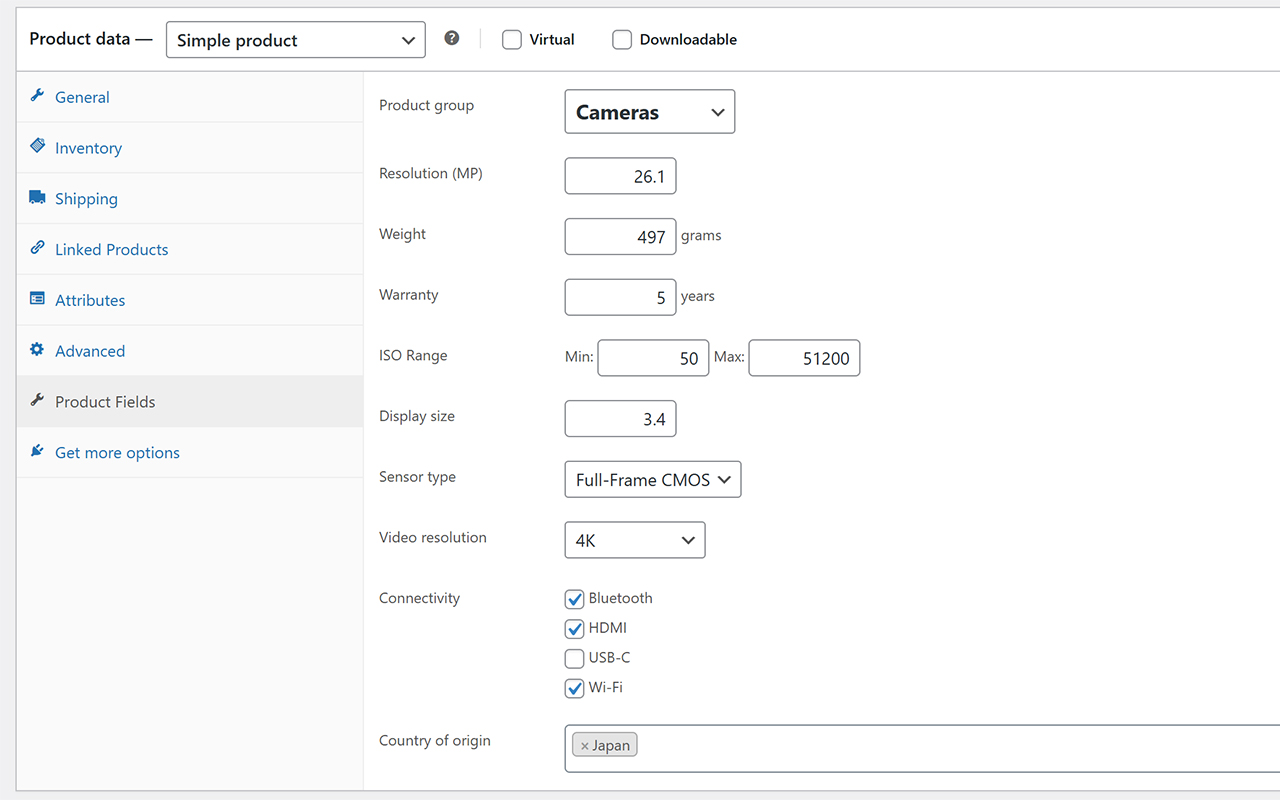
- Cameras: ISO range, sensor size, video resolution
- Lenses: focal length, aperture, mount type
- Yarn: needle size, fiber composition, gauge
- A product can belong to one Product Group at a time.
- A field can be assigned to multiple Product Groups.
- Product Groups are not product categories; they decide which fields appear in admin for that product.
- Assign Products (if using Product Groups)
- A dedicated panel in the product edit screen shows all fields for that product, with units and clear admin descriptions.
- Fields hidden from frontend are visibly marked in admin editors and list views.
- Variation fields are grouped under a dedicated Product fields section title in variation edit panels.
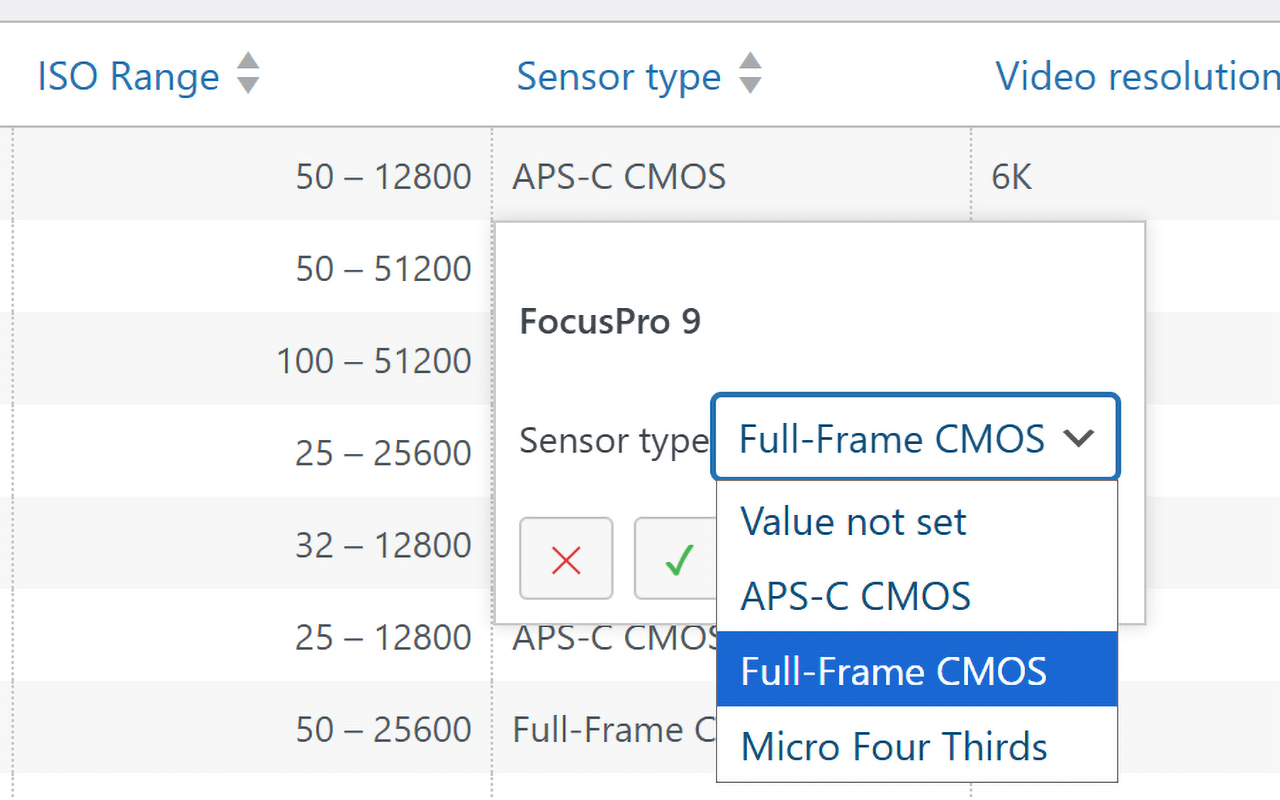
- A spreadsheet-style inline editor lets you edit values, sort, and search without opening products one by one.
- The Product Fields overview screen supports drag-and-drop ordering with automatic save feedback.
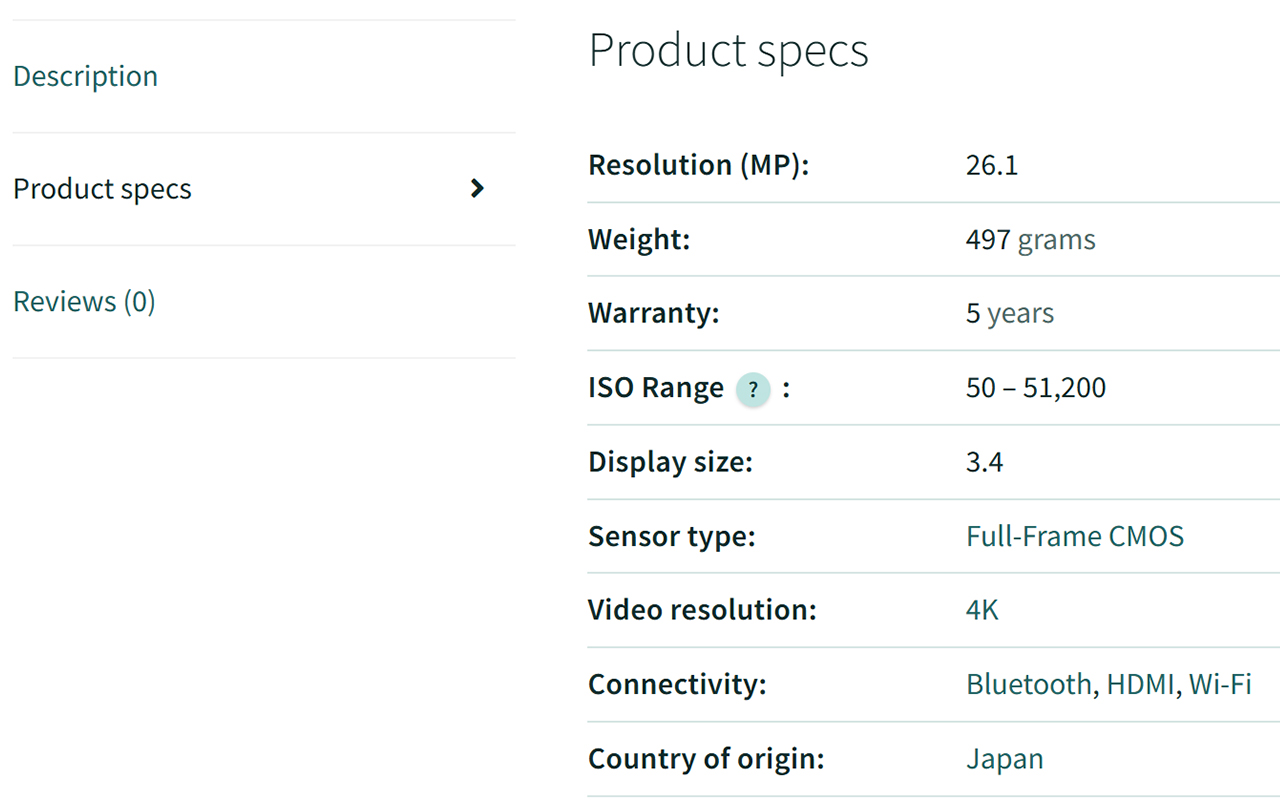
- Automatic Frontend Display
- No theme editing required
- Works with any WooCommerce theme
- Variation values override product-level values
- Only fields with values are shown
- Taxonomy-based values can be rendered as clickable links to matching products
- Backend-only fields are hidden automatically
- Unit labels are rendered next to numeric values
- Optional tooltips from the field’s frontend description can be shown
- Graceful fallback if some values are missing In settings, you can opt to also show values like SKU, Product Tags, weight, dimensions, categories, and WooCommerce-native GTIN in the same table.
- Go to WooCommerce → Product Fields and add 3–8 fields you know customers care about.
- Open a product and fill in values in the Product Fields panel.
- Use inline editing to update many products quickly.
- Visit a product page and confirm your specs look clear and complete.
- (Optional) If you already have legacy text/meta specs, run migration in WooCommerce → Settings → Products → Luma Product Fields → Tools to convert them into structured fields.
- (Optional) Create Product Groups if different product types need different field sets.
- Camera store: Sensor Size, ISO Range, Video Resolution, Lens Mount
- Yarn shop: Fiber Content, Gauge, Needle Size, Weight Category
- Furniture shop: Material, Assembly Required, Weight Capacity, Dimensions
- Settings (Tabbed UI)
- General: frontend title, optional built-in rows, and built-in tooltip controls
- Style: row separators, layout mode (auto/grid), and label/value weight
- Units: editable units and editable migration aliases
- Tools: migration tool switch and quick link
- All values are stored as standard product metadata and rendered as regular HTML, so they are easily crawlable.
- WooCommerce-native design\ No external field frameworks — just clean, optimized product metadata.
- Lightweight and fast\ Focused solely on product data, not general-purpose content fields.
- No-code setup for merchants\ You can create fields, assign values, and publish cleaner specs without custom development.
- Variation-aware\ Variation-specific fields are supported out of the box.
- Automatic frontend output\ No templates or shortcodes needed, with optional overrides.
- Powerful admin workflow\ Inline editing saves hours of product management time.
- Shoppable specs with linkable values\ Turn key specification values into clickable paths to related products.
- Future-proof schema\ Product Groups let you enforce consistent data structures across similar products.
- Custom product specification fields
- Optional Product Group–based field schemas
- Inline editing with AJAX
- Drag-and-drop field ordering in the Product Fields overview screen
- Multi-value support (where relevant)
- Variation support (some field types only)
- Automatic frontend rendering
- Optional taxonomy-based fields with linkable values
- Frontend tooltips via field descriptions
- Backend-only fields for internal metadata
- Tabbed settings UI (General, Style, Units, Tools)
- Frontend table style/layout controls (plain/divider/striped, auto/grid, bold toggles)
- Built-in package weight/size tooltip settings with editable text
- Unit labels for numeric fields and compatible types
- Settings-based unit editor (add/remove unit slugs and labels)
- Legacy migration tool in settings (Tools tab)
- Editable unit aliases for migration matching
- Field editor improvements (radio type selection, initial values for new taxonomy fields, value persistence on validation errors)
- Frontend-hidden fields are visibly marked in admin product/variation fields and list views
- Template override support
- Fully extendable through actions & filters
安装:
- Upload the plugin folder to
/wp-content/plugins/ - Activate the plugin through the Plugins menu in WordPress
- Go to WooCommerce → Product Fields
- Add your first fields
- Fill values on products
- (Optional) Use WooCommerce → Settings → Products → Luma Product Fields → Tools to migrate old text/meta fields into structured fields
- (Optional) Create Product Groups for different product types
屏幕截图:
常见问题:
How do I use this plugin?
Simple setup flow:
- Add your product fields.
- (Optional) Create Product Groups for different product types.
- Fill values on each product.
- Use inline editing for faster bulk updates.
- Let WooCommerce show the specs automatically in Additional information.
Do I need to configure everything before I can use it?
No. Start with a small field set and publish. Product Groups, migration tools, and deeper settings are optional.
How can I customize the look of my fields?
Go to WooCommerce → Settings → Products → Luma Product Fields. You can control:
- Frontend section title
- Table row style (plain/divider/striped)
- Layout mode (auto/grid)
- Label/value emphasis
- Built-in tooltip text for package weight/size rows
Can I make specification values clickable?
Yes. For taxonomy-based fields, values can be shown as links on product pages. When clicked, customers see other products with the same value (for example the same material or compatibility standard).
Can I drag and drop the field order?
Yes. Go to Products → Product Fields and drag field rows into the order you want. The plugin saves the order automatically and supports separate saved order for:
- All fields
- No-group fields
- Each Product Group
I already have custom fields on my site. Can I migrate them?
Yes, you can. The migration tool can discover text-based meta values and convert them into structured data like ranges, numbers, or clickable values where applicable. Go to WooCommerce → Settings → Products → Luma Product Fields → Tools to access migration options. You can run a dry-run first to preview what will be migrated before applying changes. Tip: create a backup before running migrations, then verify a handful of products after import.
Will this slow down my store?
The plugin is designed to stay lightweight and focused on product specification data.
Is this safe to try on an existing store?
Yes. You can start with a few products first, run migration dry-runs before applying changes, and expand gradually.
What is a Product Group?
A Product Group lets you assign different field sets to different product types. Example:
- Camera products can show fields like ISO range and sensor size.
- Lens products can show fields like focal length and aperture.
- A product can belong to one Product Group at a time.
- A field can be used in multiple Product Groups.
Does this replace WooCommerce attributes?
Not directly. WooCommerce attributes are mainly for variations and filtering workflows. Luma Product Fields focuses on structured specification information for clearer product pages.
Can fields be used for layered navigation or filters?
Not out of the box; Product Fields are not built into WooCommerce layered navigation by default. Native filtering support is planned for a future release.
How is this different from ACF?
ACF (Advanced Custom Fields) is a broad general custom-fields framework for WordPress. Luma Product Fields is focused specifically on WooCommerce product specification workflows. Luma Product Fields is built to do one thing very well: structured WooCommerce product specifications. That means features like inline editing, Product Group field sets, and linkable spec values are designed to work together out of the box for store teams.
Can I display fields in custom places on the product page?
Not out of the box. The fields are by default shown in the "Additional information" tab. If you need custom placement, that requires theme/plugin customization.
Is it developer-friendly?
Yes. Agencies and developers can customize field definitions, output, and storage behavior when needed.
更新日志:
- Added the Category Mapper migration tool to map product category paths into taxonomy-backed Product Fields.
- Added the Name Extractor migration tool to parse numeric values from product and variation names.
- Added a dynamic Luma Product Fields block for single product templates in block themes.
- Improved inline editor feedback with clearer non-blocking save/error handling.
- Improved field deletion clarity and destructive action guidance.
- Added parent-level min/max aggregates for variation-enabled numeric fields, including a WooCommerce status tool to rebuild them.
- Fixed the Product Fields overview variation expander so the toggle button is preserved in sanitized admin output and reloads the current admin JavaScript reliably after updates.
- Added drag-and-drop field ordering with visible save and error feedback in the Product Fields overview.
- Frontend table row style/layout and label/value emphasis are configurable.
- Units and migration unit aliases are editable in WooCommerce settings.
- Settings UI is now tabbed.
- Added settings for built-in package weight and package size tooltip text.
- Field editor UX improvements: radio-button type selector, initial values for new taxonomy-backed fields, and better draft persistence after validation errors.
- Improved variation field rendering.
- Improved display of backend-only fields in wp-admin.
- Initial public release.