Magic Login - Passwordless Authentication for WordPress - Login Without Password
| 开发者 |
handyplugins
m_uysl |
|---|---|
| 更新时间 | 2026年8月4日 01:48 |
| 捐献地址: | 去捐款 |
| PHP版本: | 7.4 及以上 |
| WordPress版本: | 7.1 |
| 版权: | GPLv2 or later |
| 版权网址: | 版权信息 |
标签
下载
详情介绍:
- Passwordless Authentication: No more forgotten passwords or complex requirements.
- Magic Links: Secure, unique links sent directly to users' email inboxes.
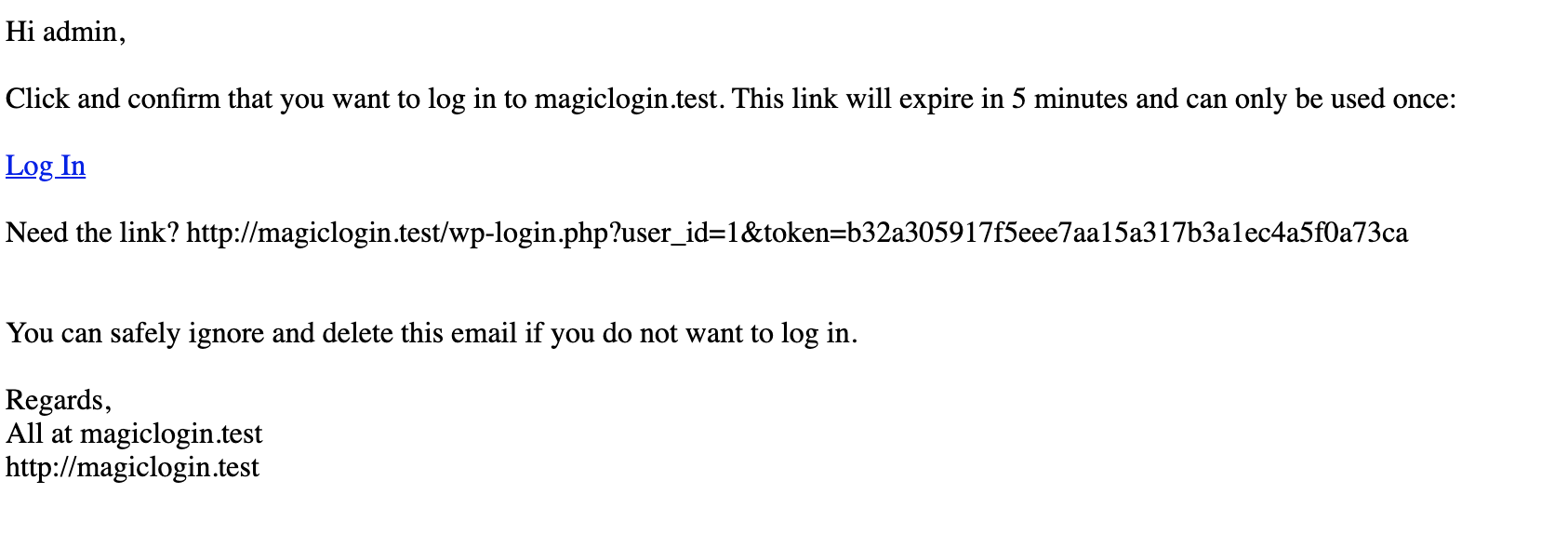
- Auto Login: Support for auto-login links in outgoing emails. It's useful when pending action from a user, such as reply a comment, complete the checkout, etc.
- Native Honeypot Protection: Add a lightweight, no-CAPTCHA spam protection layer to Magic Login forms.Learn more
- User-Friendly: Simplifies the login process for all users.
- Enhanced Security: Reduces risks associated with weak passwords.
- Tools: Export, import, and reset plugin settings easily from the admin panel or WP-CLI. Learn more
- User enters their email address.
- A unique magic link is sent to their inbox.
- Clicking the link authenticates and logs in the user.
- SMS Login: Send magic login links via SMS. Learn more.
- QR Code Login: Let users log in by scanning a QR code. Learn more.
- Registration: Enable easy user registration directly from the login form or with a shortcode. Learn more.
- CLI Command: Use WP-CLI to create login links, generate QR codes, export/import settings, and more. Learn more.
- Brute Force Protection: Limit rate of login attempts and block IP temporarily.
- Login request throttling: Limit login link generation for a certain period.
- IP Check: Enhance the security by restricting users to log in from the same IP address that requested the link.
- Domain Restriction: Allow only certain domains to use the magic link.
- Login Email Customization: Customize login message by using email placeholders.
- Login Redirect: Redirect users to a specific page right after login. You can also redirect different pages based on the user role.
- WooCommerce Integration: Seamless checkout experience for returning customers. Learn more.
- Easy Digital Downloads (EDD) Integration: Enhance the checkout experience with seamless magic login support. Learn more.
- FluentCRM Integration: Send magic login links directly via FluentCRM. Learn more.
- reCAPTCHA Integration: Safeguard your login and registration forms from spam with Google reCAPTCHA. Learn more.
- Cloudflare Turnstile Integration: Enhance spam protection for your login and registration forms using Cloudflare Turnstile. Learn more.
- Friendly Captcha Integration: Protect your login and registration forms from bots with privacy-friendly Friendly Captcha. Learn more.
- API Support: Integrate Magic Login with your custom applications using the REST API.
- SessionQuota Pro – Limit concurrent sessions in WordPress.
- Stream Integration Pro – Upload, sync, restore, and manage WordPress videos with Cloudflare Stream.
- Easy Text-to-Speech – Convert written content into high-quality synthesized speech for WordPress.
- Handywriter – AI-powered writing assistant for WordPress.
- PaddlePress PRO – Paddle plugin for WordPress.
- WP Accessibility Toolkit – Tools to help make your WordPress site more accessible.
- Powered Cache – Caching and optimization for WordPress to help improve PageSpeed and Core Web Vitals.
安装:
- Upload the entire
/magic-logindirectory to the/wp-content/plugins/directory. - Activate Magic Login through the 'Plugins' menu in WordPress.
屏幕截图:
常见问题:
What is passwordless authentication?
Passwordless authentication is an authentication method in which a user can log in to a computer system without entering (and remembering) a password.
Are the magic links secure?
Yes! In fact, we thought this is more secure than the regular login due to most of the users are using weak passwords. Since magic login generates a random token for a limited time frame it makes the links quite strong and secure.
When do login links expire?
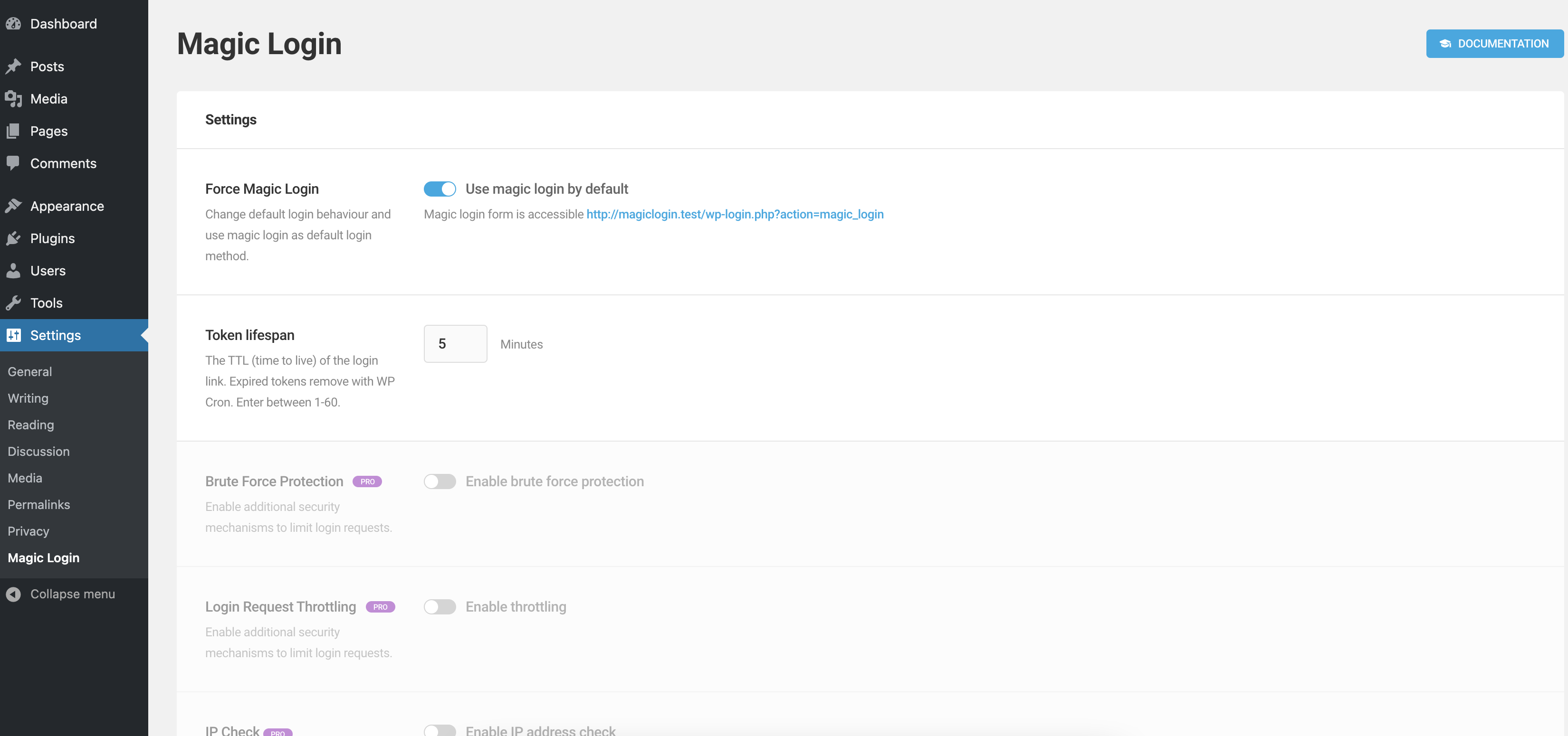
It expires in 5 minutes by default. You can change TTL under the "Token Lifespan" on the settings page. Enter "0" to disable automatic expiration.
Why am I not getting login links?
Magic Login uses WordPress built-in mail functions. So, it depends on your configuration. We highly recommend to use an SMTP service for better email delivery.
How can I use a passwordless login form on any page?
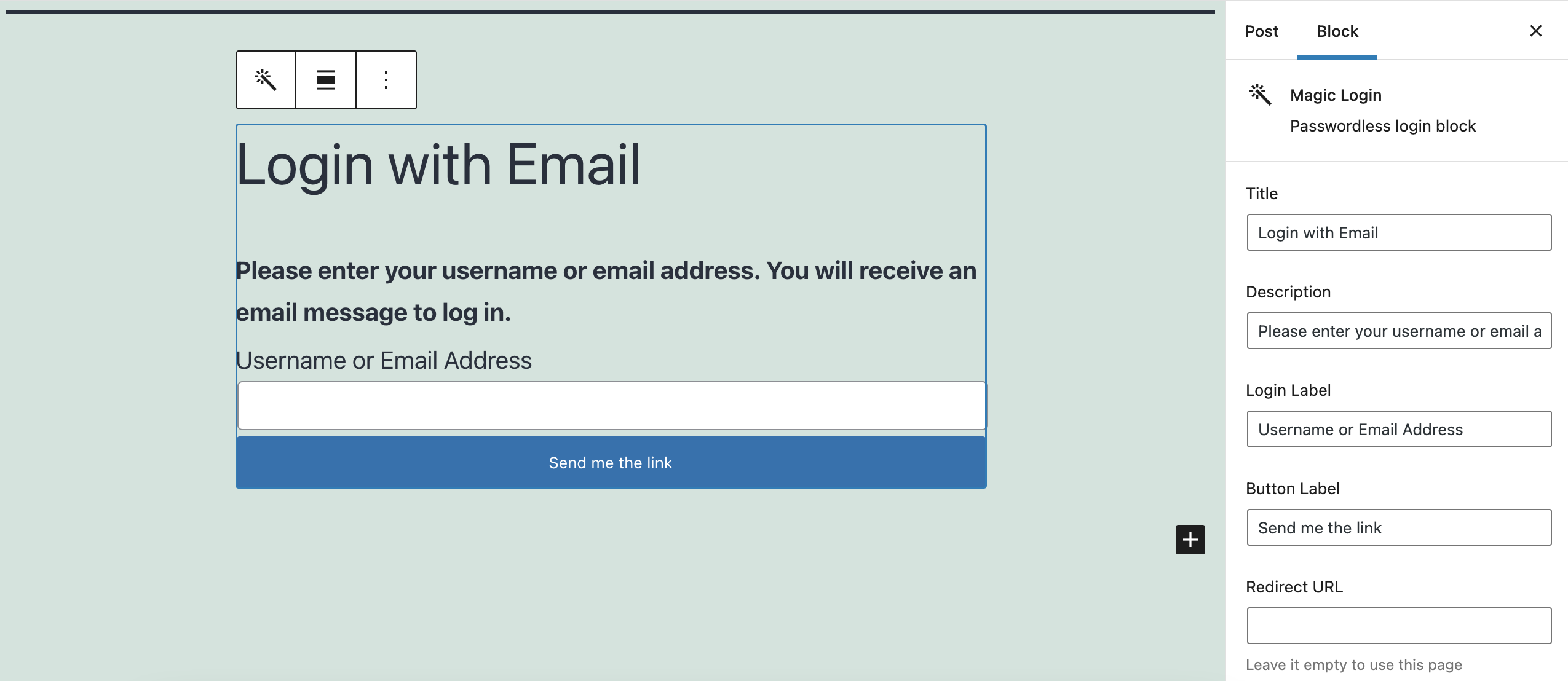
You can use [magic_login_form] shortcode or block. Learn More.
Why are users redirected back to the page where they added the magic login form via shortcode?
This behavior occurs because the magic login form is designed to use the current page as the target redirection URL by default. It's a way to ensure a smooth user experience by bringing users back to the page they started from. However, if you wish to alter this behavior, you can easily do so by passing an empty redirect_to="" parameter within the shortcode. Learn More.
Can developers adjust honeypot timing?
Yes. Developers can use the magic_login_honeypot_config filter to adjust the minimum and maximum form age checks used by the native honeypot layer.
更新日志:
- [Fixed] Missing text domains in several admin interface strings.
- [Updated] Dependencies.
- Tested with WP 7.1
- [Added] Native honeypot protection for Magic Login forms.
- [Updated] Dependencies.
- [Fixed] Settings import failing on some sites due to restricted MIME type filters when uploading JSON files.
- [Added] Friendly captcha. (UI)
- [Improved] Load fonts locally to enhance privacy.
- [Improved] Added nonce validation to AJAX-based login requests.
- [Improved] Added final login redirect validation for both standard and AJAX login flows.
- [Improved] Strengthened the randomness used for generated email login codes.
- [Added] Added a per-user safeguard to limit repeated login emails for the same account.
- [Updated] Dependencies.
- Tested with WP 7.0
- [Updated] Dependencies.
- [Added] Admin notice when placeholder encryption keys/salts are in use.
- [Fixed] Added capability checks for the settings page.
- [Fixed] Improved validation of $_SERVER variables.
- [Improved] Settings import file validation.
- [Updated] Dependencies.
- Tested with WP 6.9
- [Added] Ability to override TTL and token validity on a per-user basis.
- [Updated] Dependency packages to latest versions.
- Read the full update: Magic Login PRO 2.6
- [Added] No-cache headers for magic login links to prevent caching issues.
- [New] Tools Section – Added reset, export, and import options in the settings panel. Learn more
- [Updated] Settings UI – Visual and structural improvements to reflect new PRO features.
- [Updated] Dependencies.
- [Changed] Minimum PHP version raised to 7.4.
- Read the full update: Magic Login 2.5
- [Added] New filter
magic_login_email_placeholdersto customize email placeholders. - [Updated] Dependencies.
- Tested with WP 6.8
- Small tweaks and improvements.
- [New Feature] Code Login – Users can log in with a code sent to their email or phone number instead of clicking a link.
- [Improvement] UI update for SMS Login feature. Learn More
- [Improvement] Applied
login_redirectfilter beforemagic_login_redirectto allow other plugins to modify the redirect URL. - [Improvement] login.php is now deprecated in favor of LoginManager class.
- [Fix] Properly encode the redirection URL on the wp-login page.
- [Fix] Corrected various typos. Props @szepeviktor
- Read the full update: Magic Login 2.4
- [Fixed] Ensure proper handling of email recipient for {{MAGIC_LINK}} integration.
- [Fixed] French translation.
- [Improved] Applied
array_shift()to extract the first recipient if$atts['to']is an array.
- [Improved] {{MAGIC_LINK}} placeholder to support encoded values.
- [Improved] JavaScript handling for the magic login button by using
esc_url_rawfor form action and redirect URLs. - [Added]
magic_login_get_wp_login_urlfilter for customizing the login URL. - [Deprecated] \MagicLogin\Utils\get_magic_login_url, use \MagicLogin\Utils\get_wp_login_url instead.
- [Updated] Dependencies.
- [Improved] Enhanced login request handling with prioritized processing and added logging for header_sent scenarios.
- [Improved] Implemented pre-validation checks before magic link replacement to prevent potential issues.
- [Updated] Dependencies.
- Tested with WP 6.7
- [Improved] Two-factor compatibility.
- [Updated] Dependencies.
- Minor tweaks and adjustments.
- [Updated] Dependencies.
- [Added] REST API option to UI.
- [Added] Passing
magic_login_formto shortcode_attr for better customization. - [Updated] Dependency updates.
- Tested with WP 6.6
- Learn more about the new features: Magic Login 2.3
- [Added] Settings UI update with reflecting new PRO features.
- [Added] Custom events for AJAX requests.
- [Added] New filter
magic_login_token_ttl_by_userto customize TTL for users. - [Added] New filter
magic_login_error_messageto customize error messages. - [Improved] Form styles.
- [Refactored] Improved settings page UI.
- [Refactored] Enhanced class autoloading.
- [Updated] Dependency updates.
- Learn more about the new features: Magic Login Pro 2.2
- Improvements on uninstallation process.
- Fix auto-login link when the recipient is specified in an array format.
- Dependency updates.
- Tested with WP 6.5
- Dependency updates.
- Updated settings page with PRO features.
- Added new attributes for shortcode; it's more flexible than ever. Learn More
- Fix: Encode the redirect_to parameter in the login link. (Better nG firewall compatibility)
- Dependency updates.
- Fix German language that breaks auto-login links.
- Dependency updates.
- Add {{MAGIC_LINK}} support to all outgoing emails that received by a single user.
- Add new placeholder supports: {{FIRST_NAME}}, {{LAST_NAME}}, {{FULL_NAME}}, {{DISPLAY_NAME}}, {{USER_EMAIL}}
- Add ajax spinner to the login form.
- Dependency updates.
- Minor tweaks on settings form.
- Added French translation.
- Dependency updates.
- Fix deprecated variable format.
- Tested with WP 6.4
- Added: AJAX support for login requests.
- Bumped PHP requirement to 7.2+
- Small tweaks and improvements.
- Tested with WP 6.3
- Added: Styling for two-factor plugin.
- Minor UI changes.
- Small tweaks and improvements.
- Tested with WP 6.2
- New feature: Token Validity - allows to specify how many times a token can be used.
- Improvements on the default login screen
- i18n improvements
- Added: German translation.
- Added: Autocomplete support.
- Added: New token
{{TOKEN_VALIDITY_COUNT}}to customize email content.
- PHP 8.1: fix deprecated 'FILTER_SANITIZE_STRING'
- UI/UX improvements on default login screen
- i18n improvements. Props @emreerkan
- Fix: standard wordpress redirect functionality. Props @maartenhunink
- Fix: Skip the auto-login link for the magic login itself.
- Fix: Send email only once.
- New feature: Auto Login Links
- Bug fix: token validation
- Fixed: redirection issue.
- Minor UI updates.
- Small tweaks and improvements.
- Tested with WP 6.1
- Fixed: save tokens hashed in DB. Props @snicco
- Added: username-only mode. define
MAGIC_LOGIN_USERNAME_ONLYin the config file to use it. - Email improvements: Check email contents before converting line breaks to
<br/>tags. - Small tweaks and improvements.
- Tested with WP 6.0
- UI updates.
- Fire
wp_loginhook as WP Core does on successful login. - Add new filter:
magic_login_email_headers. - Fix email title html escaping.
- Small tweaks and improvements.
- Tested with WP 5.9
- Update Shared UI
- Fix compatibility issue with TML plugin
- Add redirection cancellation option to the login block.
- Check
logged-inwhile saving the settings - Small tweaks and improvements.
- New: Integrate with the standard login form.
- Fix: Enqueue admin assets on the settings page only.
- Allow login block only once for a post.
- Small tweaks and improvements.
- New: Magic Login Block - It's much easier to add and customize the login form in the block editor.
- Customizable token intervals added. (removed 1-60 minutes restriction)
- New placeholder added: {{EXPIRES_WITH_INTERVAL}} to display TTL with the interval.
- Updated Shared UI
- Improved documentation on settings page.
- New: Show an error message when the user doesn't exist.
- New filter: Added
magic_login_invalid_token_error_messageto customize error message.
- Fix: Scheduled expired token cleanup
- Update Shared UI
- Shortcode
magic_login_formnow supportsredirect_toattribute - fix: don't display login form if the user already logged-in
- Hotfix: return shortcode output instead of printing
- Tested with WP 5.8
- Shortcode
magic_login_formsupport added! - fix: make sure
deactivate_pluginsexists when manually switching versions
- Update Shared UI
- fix: add text-domain for missing strings
- Update Shared UI
- Tested with WP 5.7
- Update Shared UI
- First release