MailHawk — Simple SMTP, Email Delivery, and Email Logging
| 开发者 |
Adrian Tobey
Marc Goldman trainingbusinesspros |
|---|---|
| 更新时间 | 2026年11月14日 05:24 |
| 捐献地址: | 去捐款 |
| PHP版本: | 7.4 及以上 |
| WordPress版本: | 7.1 |
| 版权: | GPLv3 or later |
| 版权网址: | 版权信息 |
详情介绍:
SMTP & Email Delivery service for WordPress.
👉 Official Site | 👉 Pricing | 👉 WaaS
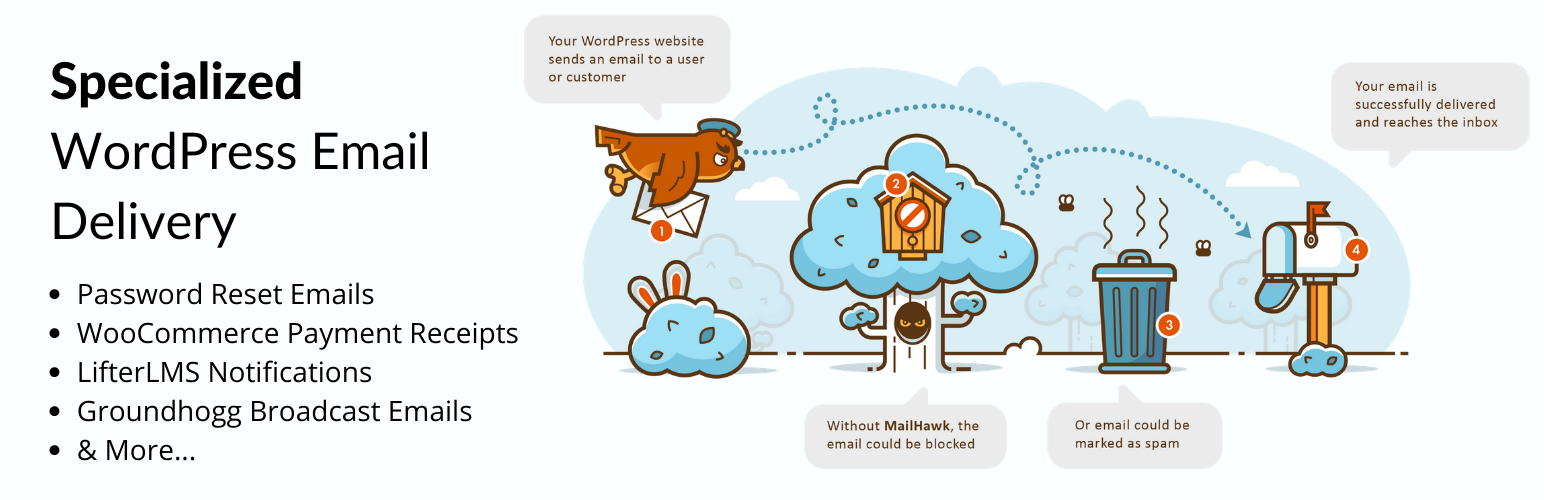
Is your WordPress email not reaching your customer's inbox? We can help!
MailHawk is SMTP and email delivery for WordPress in one plugin. Connect your site, authenticate your domain, and your WordPress email goes out through a service built for it, with the logs, reports, and quarantine protection to see and safeguard everything you send.
With MailHawk you can rest assured that your...
- Account registration emails
- WooCommerce order confirmation email
- Password reset emails
- LifterLMS notifications
- LearnDash emails
- Easy Digital Downloads renewal reminder emails
- Groundhogg broadcast emails
- MailPoet Newsletter emails
- BuddyBoss emails
- Install MailHawk on your site!
- Connect your WordPress site to the MailHawk service.
- Pick a plan that fits your needs.
- Configure your DNS records.
- Start sending email!
- Groundhogg
- WooCommerce
- LearnDash
- LifterLMS
- BuddyBoss & BuddyPress
- Easy Digital Downloads
- And more...
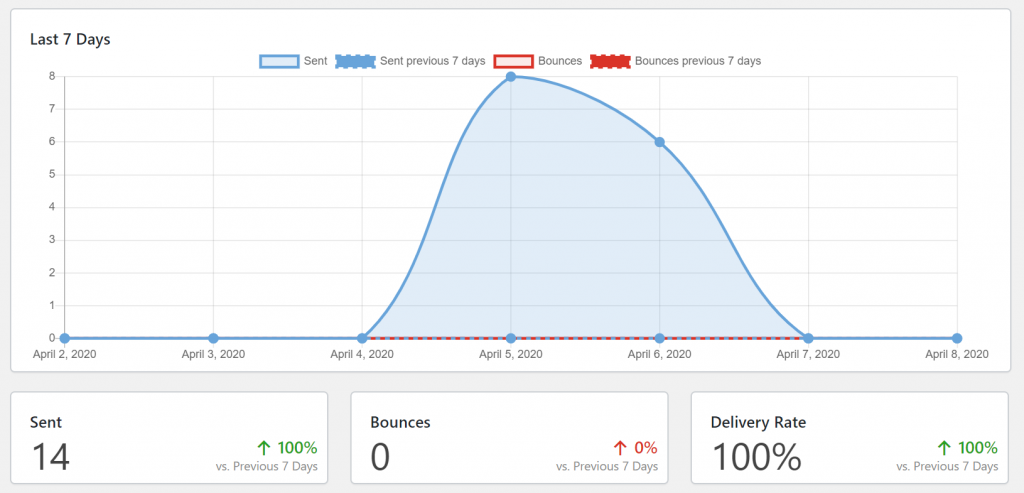
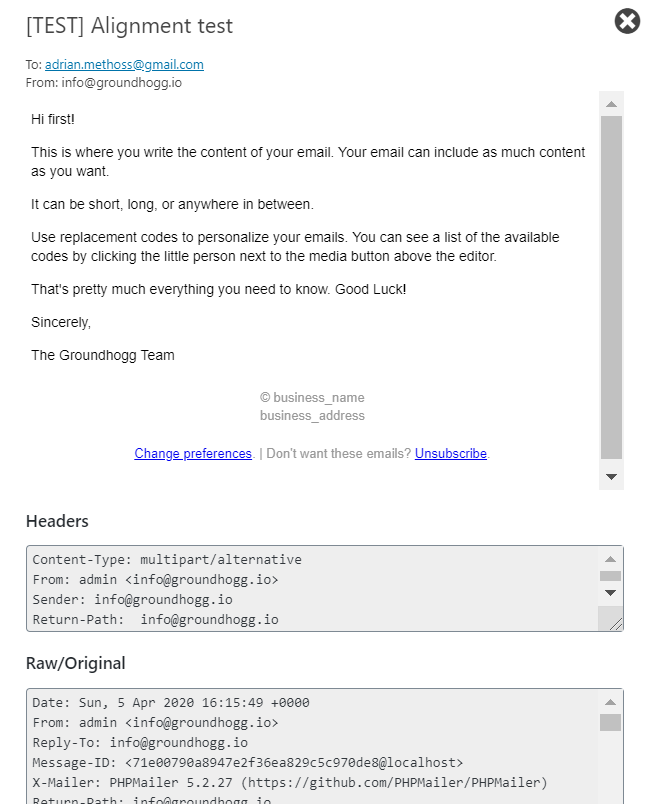
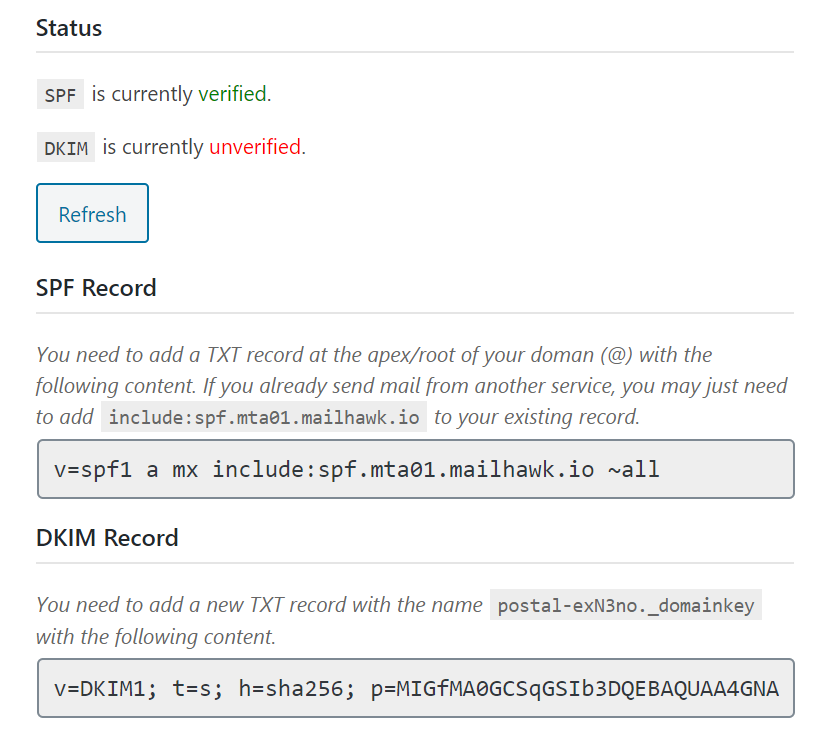
There are many SMTP plugins and SMTP services, but you always have to get BOTH to work. With MailHawk you just sign up and start sending email right away. No extra services, zero complications. No one is as focused on WordPress email deliverability as we are.FEATURES MailHawk is making sending email from WordPress easier and more transparent with these innovative features. 📈 ANALYTICS & DASHBOARD REPORTING Wondering if your emails are reaching the inbox? You can see your deliverability rate right within the MailHawk dashboard on your WordPress site! Use this information to make adjustments to your emails to improve your deliverability! Switch the report between today, the last 7, 14, or 30 days. 🚨 BOUNCE & COMPLAINT REPORTING See how many of your emails bounced or were reported as spam, right from the MailHawk dashboard and the email log. Compare each period with the one before it to spot problems early, and get a digest by email when recipients report your messages as spam. If you use Groundhogg, contacts who complain are automatically marked so you stop mailing them. 🌎 DOMAIN AUTHENTICATION MailHawk provides SPF and DKIM authentication methods. This will drastically improve your email deliverability and provide you with a greater chance of skipping the spam folder. 🛡️ EMAIL QUARANTINE Protect your sender reputation before it gets damaged. MailHawk assesses each recipient before an email is sent, and holds emails that are likely to bounce or be reported as spam in quarantine instead of sending them. You are emailed when something is quarantined, then you can release the email to send it, or reject it so it never sends. Learn more about email quarantine. 🤖 AI ASSISTANTS & AUTOMATION MailHawk registers its tools with the WordPress Abilities API, so an AI assistant or automation you have connected to your site (for example through the WordPress MCP adapter) can check your sending health, read the reports, add and check domains, search the email log, review the quarantine, and manage recipients and settings, with the same permissions as an administrator. Your API key and license are never exposed, and deleting a domain has to be confirmed. Nothing is available until you connect an assistant, and a filter turns it off. 📫 EMAIL LOGGING Keep track of your emails and debug email sending failures! You can resend emails, retry failed emails and even see which emails bounced! If you ever need to prove an email was sent you can check the log for up to 14 days after the email was sent! View content, headers and even the raw MIME message if you need to. 🌐 MULTISITE COMPATIBLE Are you using Multisite? MailHawk can be enabled across your entire multisite so you only have to configure it once! 🌐 WAAS COMPATIBLE Building a WaaS and not sure how to handle WordPress SMTP? Choose one of our WaaS plans and use MailHawk for all your customers! 🔌 EXTERNAL SERVICES MailHawk is a hosted email delivery service, so this plugin cannot work without connecting to the MailHawk services below, both operated by MailHawk. Nothing is sent until you click the Connect button. The terms and privacy policy for both services are here: Terms & Conditions | Privacy Policy. MailHawk account service (https://mailhawk.io) Used to connect your site to your MailHawk account, and to check your account and plan.
- When you click Connect, your browser is sent to mailhawk.io along with a one-time state key and the address of your MailHawk admin page to return to.
- Afterwards the plugin exchanges the code it receives for an API token, and uses that token to fetch your credentials and account details, and to tell MailHawk when your site is activated or disconnected.
- Every email sent from your site is sent to it to be delivered. This includes the sender, recipients, subject, headers, message body, and any attachments.
- The domain names you add to MailHawk are sent to it to be authenticated.
- Your site asks it for delivery, bounce and complaint reports, and for your plan's sending limits.
- The plugin registers your site's webhook address with it. It then calls that address to report when an email is delivered, delayed, fails, bounces, or is reported as spam. These calls are signed and verified by the plugin.
安装:
- Upload the plugin files to the
/wp-content/plugins/mailhawkdirectory, or install the plugin through the WordPress plugins screen directly. - Activate the plugin through the 'Plugins' screen in WordPress
- Use the Tools->MailHawk screen to configure the plugin
屏幕截图:
常见问题:
Is MailHawk a free service?
No, MailHawk requires a paid subscription which starts at $1/mo. See the current plans.
Are there limits to how many emails I can send?
Yes, each plan has a monthly sending limit. Plans start at 1,000 emails/mo, and go up to 375,000 emails/mo on the Agency plan.
Can I send email from multiple sites with 1 account?
Yes, each plan includes a number of sites, from 1 on the Basic plan up to 25 on the Agency plan.
Can I use MailHawk for my WaaS?
Yes, we have special WaaS account plans to accommodate WaaS sites.
My emails are going to spam, will MailHawk help?
Yes, MailHawk is specifically designed to prevent your emails from ending up in the spam folder.
How can I report security bugs?
You can report security bugs through the Patchstack Vulnerability Disclosure Program. The Patchstack team helps validate, triage and handle any security vulnerabilities. Report a security vulnerability.
更新日志:
1.5.3 (2026-11-13)
- ADDED The DNS screen shows a DMARC record next to DKIM, the return path and SPF, with the record MailHawk recommends,
v=DMARC1; p=none;, which only asks for reports and never stops any email. DMARC is recommended rather than required: a domain is verified without it, but Apple, Gmail and Yahoo expect it, and Apple turns away most email from a domain that has none. A domain that already has a DMARC record, or whose parent domain has one, is shown as verified and keeps its own record. - ADDED The Domains screen has a DMARC column next to SPF, DKIM and Return-Path.
- IMPROVED "Copy instructions" on the DNS screen includes the DMARC record, and says to keep a DMARC record that is already there instead of adding a second one.
- DEV The
mailhawk/get-domain-dnsability returns admarcrecord, markedrecommended, and the domain'sdmarcstatus. New filtermailhawk/abilities/existing_dmarc_recordfor the DMARC record a domain has now. - DEV Reading a property with the name of a method, like
$item->rejecton a quarantined email, no longer calls that method. It returns false and reports a_doing_it_wrongnotice once.
- ADDED The test email can be sent from any address. A dropdown suggests the default from address and the same name at each of your domains, and a warning says when the domain of the address you pick is not verified, or not one of your MailHawk domains.
- IMPROVED The test email is now a branded email that says what it means for where it landed: the inbox, Gmail's Updates or Promotions tabs, Outlook's Other folder, or spam. The Test screen has the same tips, and what to do when it did not arrive at all.
- ADDED A "Copy instructions" button on the DNS screen copies everything someone else needs to add the records, like an agency, a developer or an AI assistant: every record with its host, full hostname, value and TTL, what to do with an SPF record that is already there, and where to verify.
- IMPROVED Record names on the DNS screen copy with one click: the highlighted host copies just the host, anywhere else copies the full hostname. The screen also explains what to enter when the records of a subdomain go in the DNS of its parent domain, and the host of the return path no longer includes your domain, so DNS providers that add it themselves don't end up with it twice.
- TWEAKED Clearer wording on the overview, in Site Health, and on the suspended screen and notice. When the monthly limit is reached, the notice on the overview is titled "Your monthly email limit is reached".
- FIXED Some error messages and the usage line on the overview could not be translated.
- DEV The
mailhawk/get-domain-dnsability returns thehostand the fullhostnameof each record. - DEV New filter
mailhawk/second_level_suffixeslists the suffixes like co.uk that domains are registered under, so the DNS screen does not take example.co.uk for a subdomain.
- IMPROVED Only an email the recipient's mail server turned down counts as a bounce against the address. Failures on MailHawk's side, like timeouts, rate limits or a cancelled hold, no longer do, so an outage can't put good addresses in quarantine.
- TWEAKED Updating removes the settings and the scheduled event the old usage counter left behind.
- FIXED The Retry bulk action in the email log did nothing.
- FIXED For up to a day after MailHawk asked the site to slow down, a retry that failed for another reason did not use up a retry attempt.
- FIXED Site Health kept saying MailHawk was turning email away after the wait was over, until the next email went through.
- FIXED Site Health could not tell when the email log stopped being updated because WP-Cron was not running. It now also says when the update is paused, and passes when the email log is turned off.
- FIXED The Usage box on the overview rounded up, so it could say 100% with emails still left. It now rounds down, and suggests upgrading by the same rule as Site Health.
- FIXED The Recipients screen could remove an address that reported spam, after which it could be trusted again. That record is now kept, as the abilities and the privacy tools already did.
- FIXED The same spam complaint delivered twice was listed twice in the digest to the site owner.
- FIXED When the update to 1.4.0 could not subscribe the site to spam complaints, nothing said so. Updating now shows the webhook notice with a Try again button, and sites that already updated are checked again.
- IMPROVED When MailHawk suspends an account, the suspended screen and the admin notice show the reason MailHawk gave, since when, and whether the whole account is affected, with a "See what to do next" link to your MailHawk account page.
- ADDED When more than 80% of the month's emails are used, the Usage box on the overview suggests upgrading your plan.
- ADDED When your plan is used up and MailHawk is turning email away, a notice at the top of the overview says so, and links to the upgrade and to the emails that failed.
- ADDED MailHawk now adds checks to Site Health for the connection, whether email is being turned away, whether the email log is kept up to date, and how much of the month's emails are used. The Info tab has a MailHawk section for support, which never includes your API key.
- IMPROVED When MailHawk asks the site to slow down, which it does once the plan is used up, the email is logged as failed with the reason, and the hourly retry waits for as long as MailHawk asks. Those emails do not use up a retry attempt.
- FIXED The Usage box on the overview showed 100% when no email had been sent this month.
- TWEAKED The plugin no longer counts sent emails or reports usage to mailhawk.io. Warnings about nearing the monthly limit now come from MailHawk itself.
- DEV The
mailhawk/get-statusability returns asuspensionobject (reason, suspended_at, scope, next_steps), and thesuspendederror of every ability points to it.
- ADDED Spam complaints are now tracked. Complaints are shown on the overview and marked as "Reported as spam" in the email log.
- ADDED When Groundhogg is active, contacts who report an email as spam are marked as complained, and the site owner is emailed a digest of new complaints.
- ADDED Choose the date range of the overview graph and cards from a new "Show data for" dropdown with Today, 7, 14, and 30 day options.
- ADDED The overview now shows when the monthly usage resets.
- ADDED MailHawk remembers the addresses that bounce or report spam, and the addresses you trust. Emails to risky recipients are held in quarantine, and an address you trust is never held.
- ADDED Release a quarantined email and trust its recipients in one click. People who reported spam are released but never trusted.
- ADDED A Recipients screen to see, trust, and forget the addresses MailHawk keeps track of.
- ADDED MailHawk is connected to the WordPress privacy tools. Personal data exports include the emails sent to a person and what MailHawk knows about their address, erasure requests remove them, and suggested text is added to your privacy policy.
- ADDED 20 abilities for the WordPress Abilities API, so AI assistants and automations can check MailHawk's status and reports, manage sending domains, search the email log, review the quarantine, manage recipients, and change settings. Your API key and license are never exposed.
- ADDED A card on the overview about Groundhogg for sites that do not use it yet.
- IMPROVED Redesigned the MailHawk admin with a cleaner navigation, cards, tables, status labels, and forms. Destructive buttons are now red.
- IMPROVED The Delivery Rate on the overview no longer counts bounced emails twice.
- IMPROVED The connect and setup screens explain what connecting does, and finish with the DNS records for the domains you registered.
- IMPROVED Quarantined emails are kept longer than the rest of the log, and the review request is only shown to sites whose email is being delivered well.
- TWEAKED Webhooks can now be received in batches, which reduces the number of requests the MailHawk service makes to your site. Existing sites are switched over by the database update, so run it when prompted.
- TWEAKED The MailHawk connection is now confirmed with the MailHawk service before the site is counted, and an empty response is treated as a failed connection.
- SECURITY Fixed an SQL injection in the email log sort order.
- SECURITY The email preview is now sandboxed so message content can no longer run scripts in the admin.
- SECURITY Added missing output escaping across the admin views and notices.
- SECURITY Webhook requests that arrive without a signature are now rejected.
- SECURITY The key that connects your site to MailHawk now comes from a secure random source, and the connect request can only be answered once.
- FIXED The check that triggers database updates compared the wrong value and now validates the requested action correctly.
- IMPROVED The email log shows Delivered, Delayed, Bounced and Reported as spam next to Sent and Failed when there are emails with that status, and the email preview says what went wrong in plain words.
- FIXED Failed emails that MailHawk had taken but could not deliver, like a mailbox that does not exist, were sent again by the hourly retry. Only emails that never reached MailHawk are retried automatically now.
- FIXED A report that an email could not be delivered for now, and will be tried again, marked the email as Failed. It is shown as Delayed until it is failed for good.
- FIXED A delayed or delivered report arriving late no longer replaces a bounce or a spam report on the email in the log.
- FIXED Counts in the email log could be out of date after a change within the same request.
- FIXED An email that was held for review or failed, and was then released or retried, was deleted by the next daily cleanup if it was older than the log retention. The retention now counts from when it was sent again.
- FIXED The daily cleanup of the email log used UTC instead of the time of the site, so held emails were deleted hours early, or kept hours too long, on sites that are not on UTC.
- FIXED A log retention that was saved as 0 would have emptied the whole email log at the next cleanup. It is a day at the least.
- IMPROVED The daily cleanup deletes old entries in batches, and carries on a minute later when it runs out of time, so a large log no longer ties up the database or runs into the time limit.
- FIXED The scheduled cleanup and retry tasks are removed when MailHawk is deleted, even when its data is kept.
- IMPROVED Emails that are still waiting at Sent or Delayed in the log are checked with MailHawk every 15 minutes, in batches of 100, so Delivered, Delayed, Failed and Bounced show up even when the report from MailHawk never arrived. If MailHawk does not answer, or asks the site to slow down, it is left alone for a while and the reports carry on as before.
- FIXED A bounce could be counted against an address more than once, when MailHawk sent the same event again because the site was slow to answer. The
mailhawk/bouncedaction now fires only when the email in the log is moved on by it, so it fires once whether the webhook or the delivery sync gets there first. - DEV New filter
mailhawk/log_trim_batch_sizefor how many entries the cleanup deletes at a time (default 1000). - DEV New filters
mailhawk/delivery_sync_min_age,mailhawk/delivery_sync_max_age,mailhawk/delivery_sync_max_requestsandmailhawk/delivery_sync_unsupported_ttlfor the check of the log against MailHawk, and an actionmailhawk/delivery_sync_failedfor when it has to stop. - DEV New filter
mailhawk/abilities/enabledto turn the abilities off. Actionsmailhawk/abilities/register_categoriesandmailhawk/abilities/register_abilitieslet add-ons register their own. - DEV New
mailhawk/spam_complaintaction, fired with the recipient address, message ID, and complaint details when a recipient reports an email as spam. - UPDATED MailHawk now requires WordPress 6.9 and PHP 7.4, and has been tested up to WordPress 7.1. On a site that is on an older version of PHP, MailHawk does not load, and an admin notice says why.
- UPDATED Removed the unused PHPMailer dependency and moved PHPUnit to development dependencies.
- TWEAKED New webhook verification uses SHA256 since SHA1 is now deprecated on many systems.
- UPDATED Repository plugin name.
- ADDED Patchstack MVDP program disclaimer.
- FIXED JSON error if connection fails or times out when trying to initially connect MailHawk.
- TWEAKED Use user meta to store state key rather than transients to avoid connection issues when transients aren't working.
- FIXED Vulnerability responsibly disclosed by Patchstack.
- FIXED Retrying and releasing quarantined emails sending with incorrect content-type.
- FIXED Quarantine release link in email details modal not working.
- ADDED New email quarantine system to prevent potentially damaging emails from being sent.
- FIXED Overview number formatting.
- FIXED Google and some other inboxes switched to sending HardFail for inboxes that don't exist instead of a proper bounce.
- ADDED Option to disable email logging outright.
- ADDED Return-Path DNS record setup instruction.
- ADDED Which account the MailHawk plugin is currently connected to in the Danger Zone settings.
- ADDED Telemetry for notifying admins when they are nearing their send limit
- FIXED Resend/Retry bulk actions not working in the email log
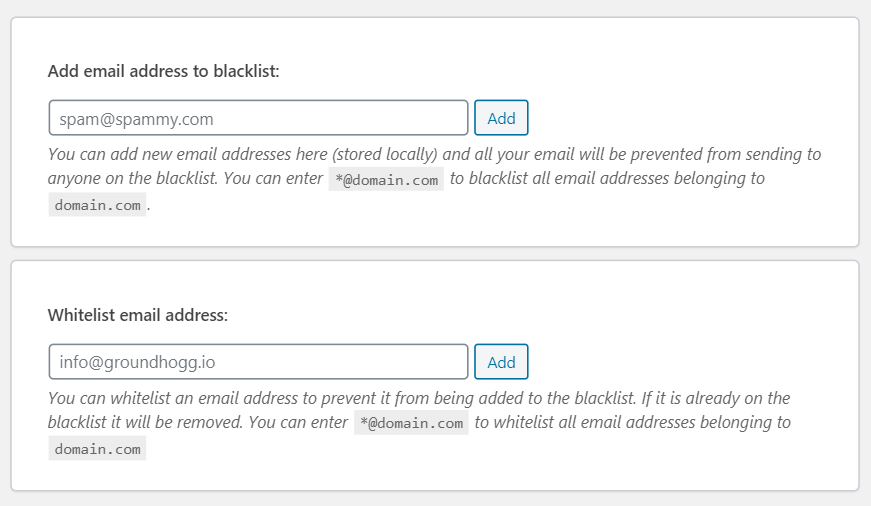
- TWEAKED Changes to how the whitelist & blacklist function.
- TWEAKED Change webhook settings to only send bounce notifications instead of ALL email events.
- ADDED Settings for API KEY so can be changed by support.
- ADDED Better error messages for adding domains so when the limit is reached it says why.
- TWEAKED bumped minimum version support for WordPress and PHP to 5.0 and 7.0 respectively.
- TWEAKED use URL params instead of POST VAR for connect process.
- TWEAKED use updated PHPMailer Lib from WP 5.5 instead of included one.
- TWEAKED DNS record now always show in lower case.
- FIXED jQuery deprecation warnings.
- FIXED Call to
pluggable.phptoo early.
- UPDATED Readme.
- FIXED Search bar not working in the email log.
- FIXED WooCommerce email address format causing false negatives when validating email addresses.
- ADDED Better notice with more context when there is a
wp_mailconflict.
- FIXED Plugins sending and empty string as an attachment causing emails to fail.
- FIXED Preview/Details modal not working after first click caused by updated jQuery Lib.
- FIXED bug causing MailHawk not to appear on non-multisite installations.
- ADDED Additional notice on domains page explaining DNS.
- ADDED Support for WaaS and Multisite.
- ADDED Promotion for Groundhogg during guided setup.
- TWEAKED improved the setup process and UI.
- TWEAKED improved the DNS screen.
- FIXED use our own version of the PHPMailer/Exception
- ADDED Automatically generate plain-text version of email if
content-typeistext/html - TWEAKED Use our own version of PHPMailer to avoid potential conflicts with other plugins
- ADDED uninstall file
- ADDED DNS instructions
- TWEAKED Some CSS
- Initial release