
Maintained.log – Maintenance Reports for Agencies & Clients
| 开发者 | webconsultingdev |
|---|---|
| 更新时间 | 2026年11月1日 17:39 |
| PHP版本: | 7.4 及以上 |
| WordPress版本: | 7.1 |
| 版权: | GPLv2 or later |
| 版权网址: | 版权信息 |
详情介绍:
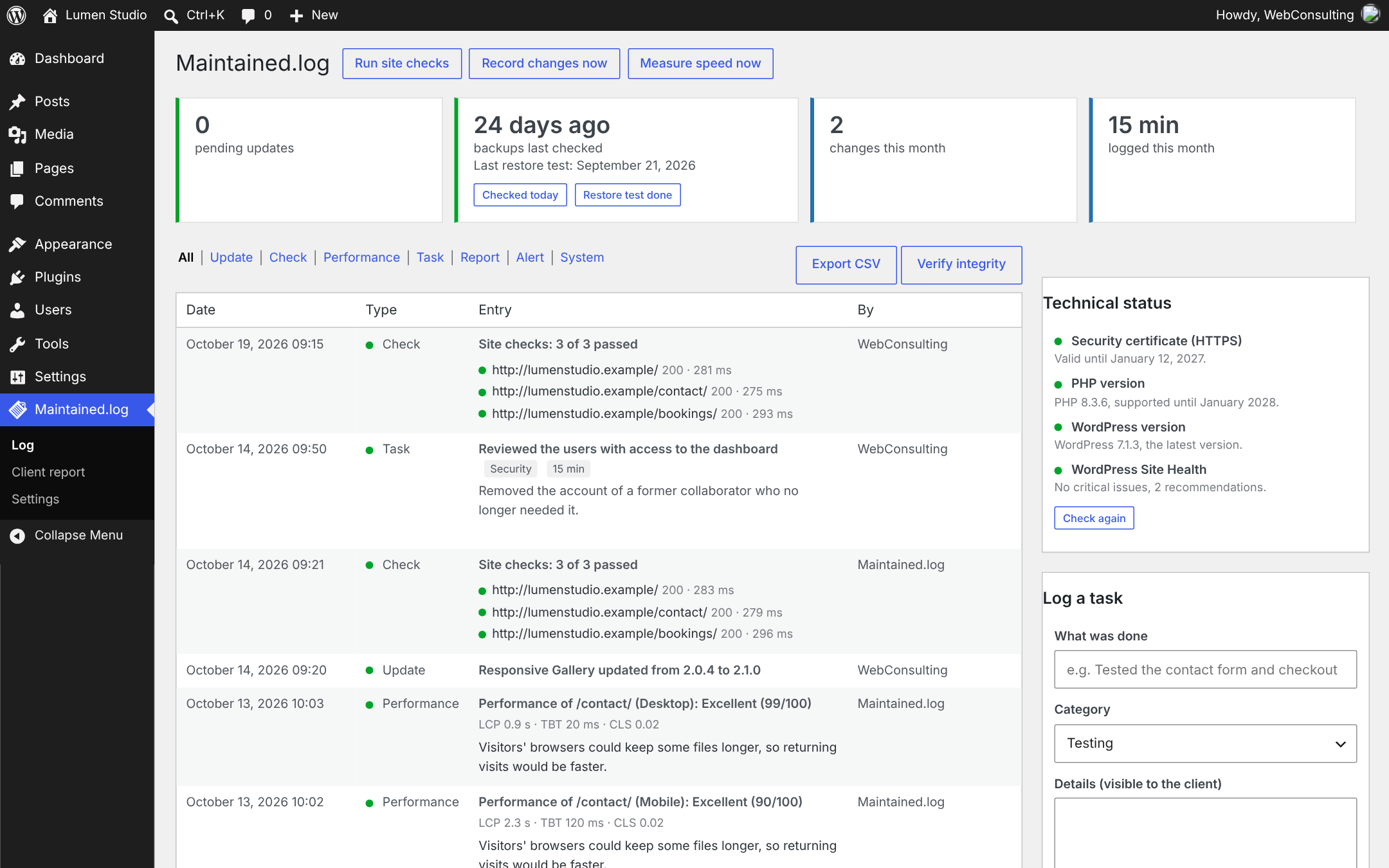
- Records every core, plugin and theme change with the old and new version, the date and who did it: a user in the dashboard, an auto-update or WP-CLI.
- Also catches changes made outside WordPress (FTP, hosting panel, deployment tools) by comparing snapshots of the installed software twice a day.
- After every update, Maintained.log requests the pages you choose (home, contact, checkout…) and records the HTTP status, the response time and whether a text you expect is on the page.
- Detects PHP errors on the page and emails you immediately when a check fails.
- Clients only see the final result in their report, without technical details.
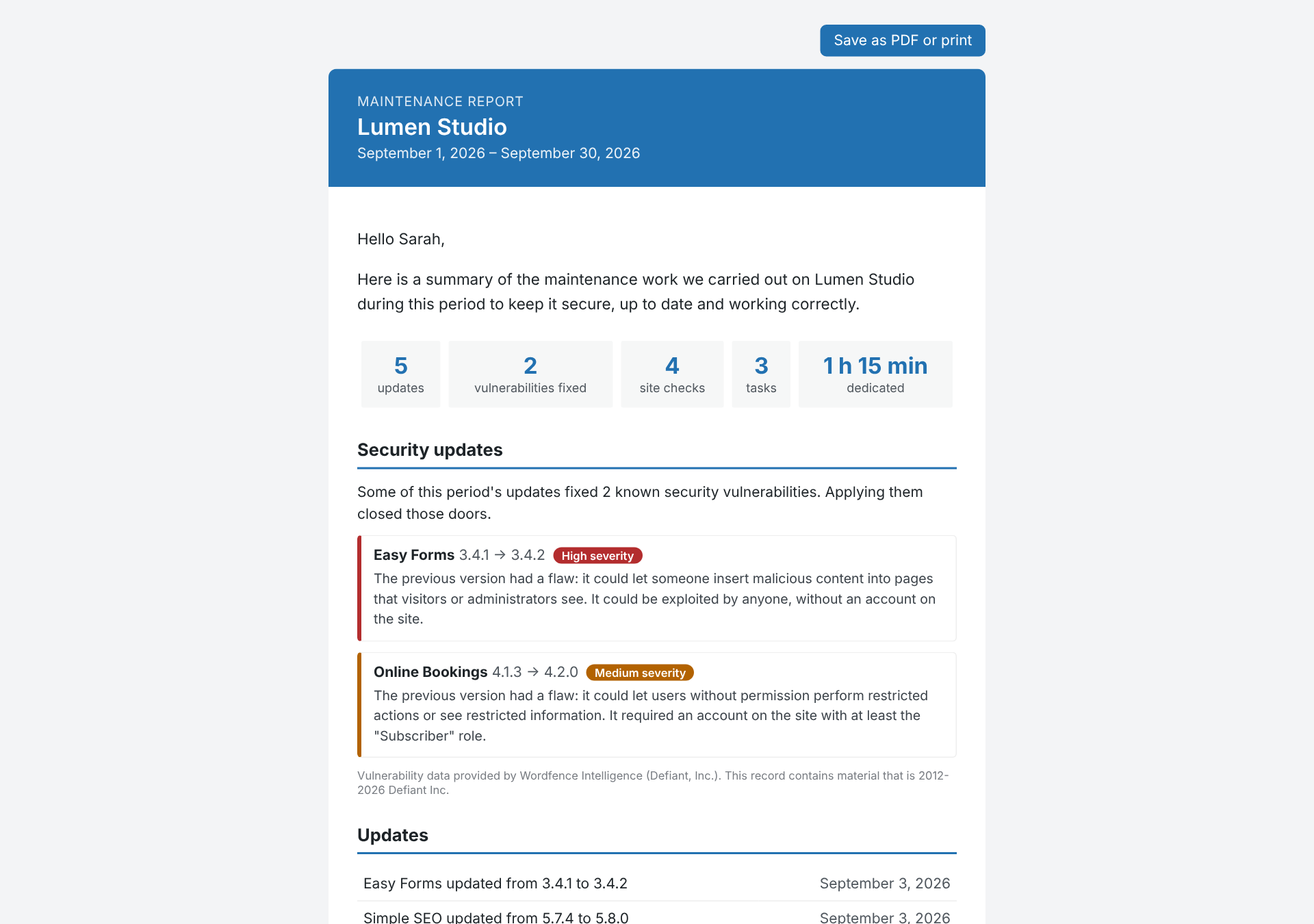
- With a free Wordfence Intelligence API key, Maintained.log downloads the vulnerability database once a day and works out which of your updates fixed a known vulnerability — including past updates already in the log.
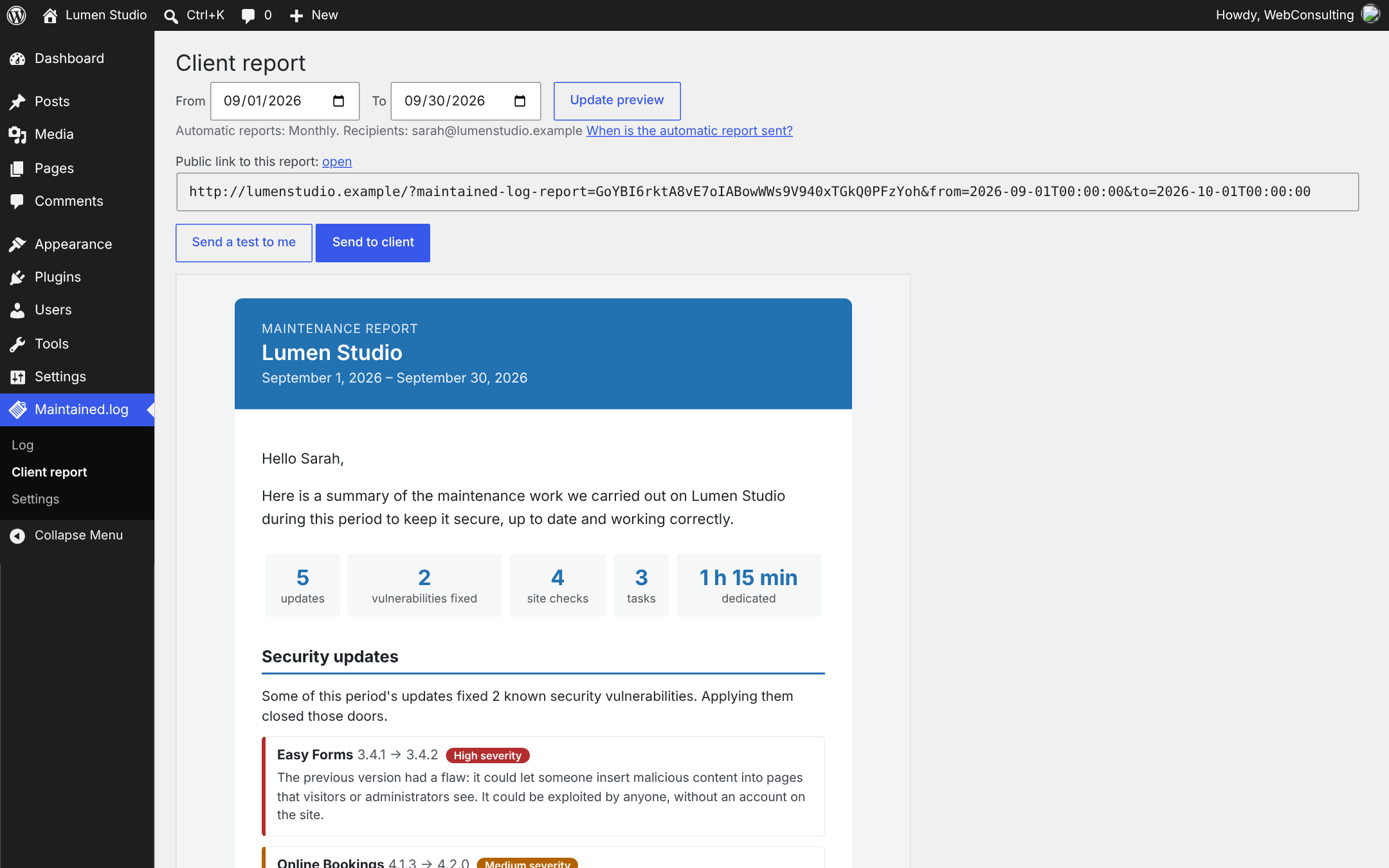
- The client report explains each one in plain language: what the flaw could allow, how severe it was and whether an attacker needed an account, without technical jargon.
- You are alerted when installed software has a known vulnerability, and especially when there is no fix yet.
- The database is processed in small slices in the background, so it works on shared hosting.
- Measures your key pages with Google PageSpeed Insights on mobile and desktop, weekly or monthly.
- Clients see a rating (Excellent, Good or Could be improved) instead of a raw number, its trend compared with the previous period, and a short plain-language list of what could make the site faster.
- The rating uses the median of the period's measurements, and the report explains why Google's score varies between runs.
- Alerts you when a page drops to a lower rating.
- Log tests, backups, security reviews, incidents or content changes with a category, notes for the client and the minutes spent: ideal for retainer hours.
- Before a plugin or theme is updated, its current files are archived. If the update breaks something, restore the previous version from the log with one click.
- Works for premium plugins too, even when the old version cannot be downloaded again.
- Most backups are made by the hosting provider, where WordPress cannot see them. Describe your backup policy once and it appears in every client report.
- A periodic reminder asks you to check the backups in your hosting panel; confirming takes one click and is recorded with its date. Restore tests can be recorded too.
- Entries are never edited or deleted. Corrections are new entries linked to the original.
- Every entry is chained with a SHA-256 hash, so you can verify that nobody altered the log directly in the database.
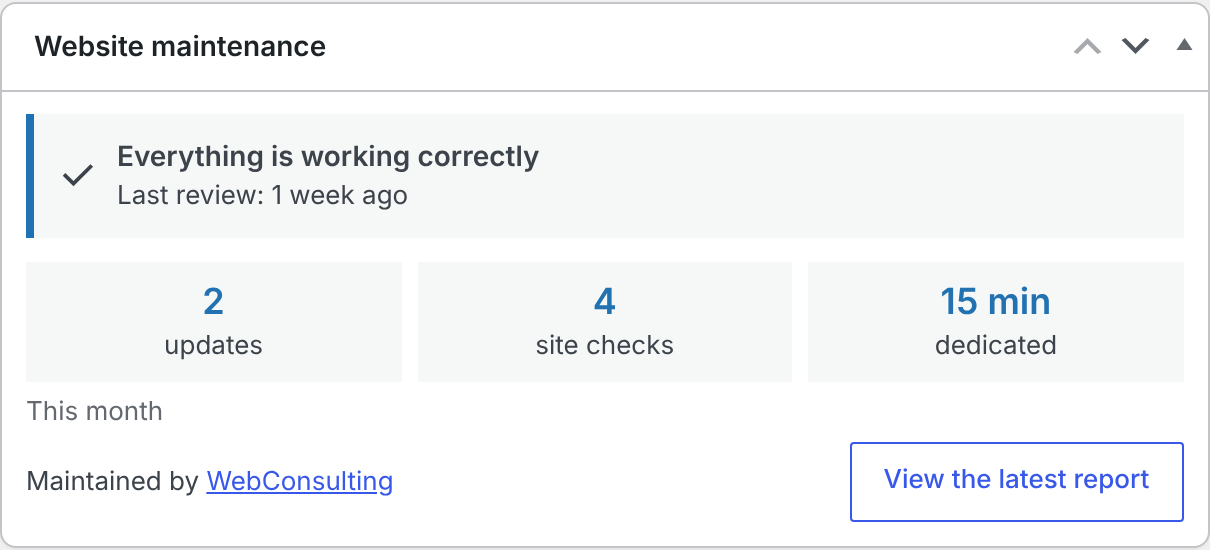
- A "Website maintenance" box at the top of the WordPress dashboard shows who maintains the site, when it was last reviewed, whether everything works and this month's activity.
- Optional secret link to each report: the client can open it in a browser, browse previous reports and save it as PDF.
- Watches the HTTPS certificate expiry, PHP security support, the WordPress version and WordPress Site Health, and alerts you before something becomes a problem.
- The report explains it in plain sentences; anything pending is shown as "under review".
- Weekly, monthly, every two months, quarterly or every six months, or send one manually for any period.
- Customizable subject, introduction and closing with placeholders, plus your logo, brand color and agency name (white label).
- Choose which sections to show: updates, site checks, tasks and time.
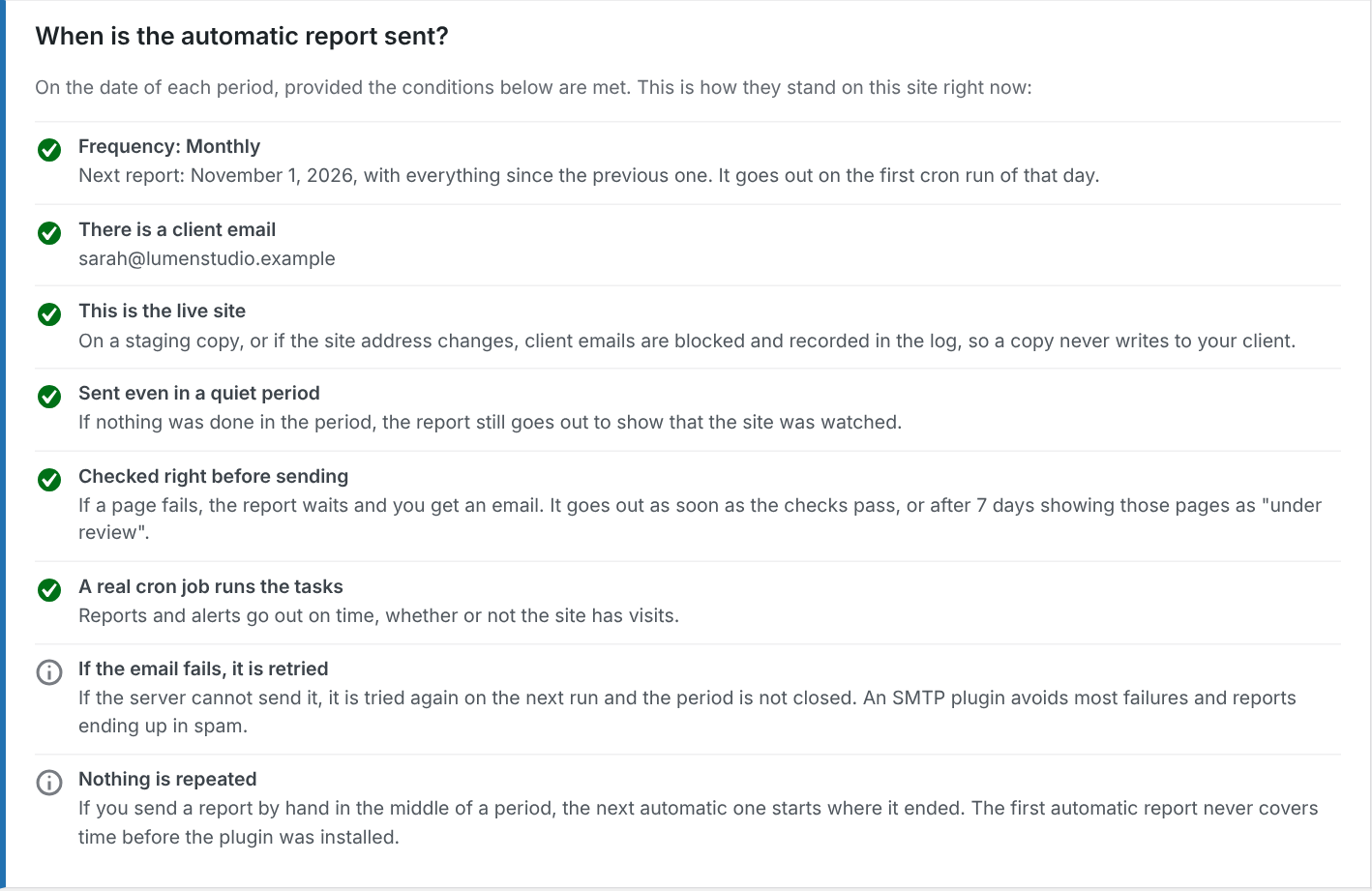
- The site is checked again right before each scheduled report. If something fails, the report waits until it passes (up to a maximum you choose) and you get an email.
- Daily or weekly reminder of pending updates.
- Immediate alert when a site check fails.
- Client emails are paused automatically on non-production environments and on copies of the site whose URL changed, so a staging clone never emails your client.
- WP-CLI:
wp maintained-log snapshot|check|add|list|report|verify. - CSV export of the full log.
- Filters and actions such as
maintained_log_entry_added,maintained_log_report_data,maintained_log_check_targets,maintained_log_categoriesandmaintained_log_capability. - Override the email template by copying
templates/email-report.phptoyourtheme/maintained-log/email-report.php.
安装:
- Upload the plugin and activate it. A baseline snapshot of the installed software is recorded.
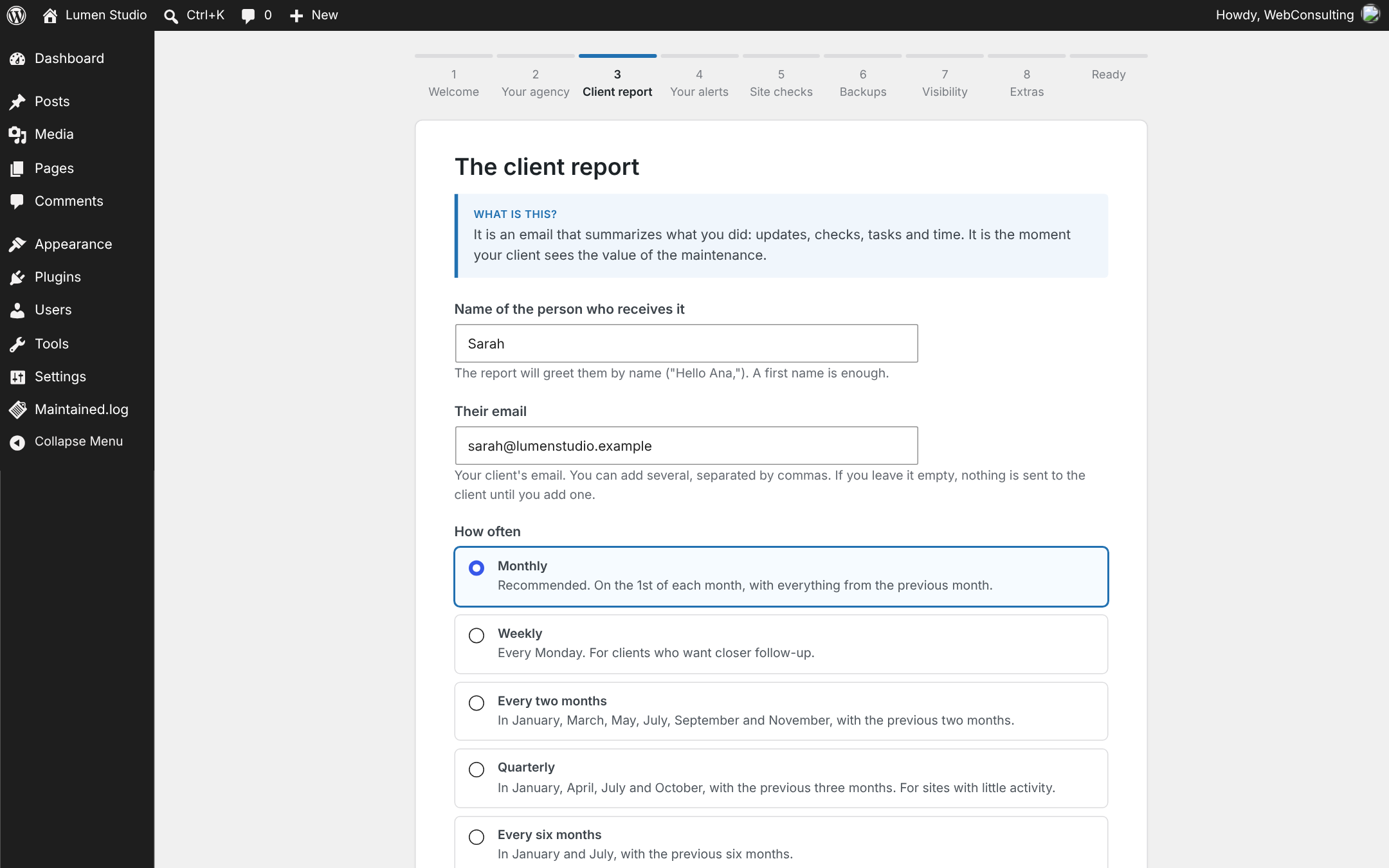
- The setup assistant opens: nine short steps, each one explaining in plain words what it is for. Your progress is saved at every step, so you can stop and continue later.
- Send yourself a test report from the last step to see what your client will receive.
屏幕截图:
常见问题:
Does it update plugins automatically?
No. Maintained.log records and verifies updates however you apply them: from the dashboard, with WordPress auto-updates, WP-CLI or your management tool.
Will a staging copy email my client?
No. Client emails are paused when the environment type is not "production" or when the site URL differs from the one where the plugin was activated. You can confirm a new live URL from the notice.
Can it check my hosting backups?
Not directly: hosting providers do not expose their backups to WordPress. Declare your backup policy in the settings and confirm periodically that backups exist; each confirmation is recorded with its date and shown in the report. For the most common failure, one plugin or theme breaking after an update, use the one-click rollback instead of a full restore.
When is the automatic report sent?
On the first day of each period (week, month, two months, quarter or six months), on the first run of WordPress' scheduled tasks, as long as there is a client email, the site is the live one and, if you chose to hold it, the site checks pass. Settings shows every condition and how it stands on your site.
Why should I set up a real cron job?
WordPress runs scheduled tasks only when someone visits the site, so on quiet sites reports and alerts can be late. Settings → "Reliable sending: real cron job" gives you the exact command for your hosting panel and tells you when it is working.
What happens to the log if I delete the plugin?
It is kept, unless you enable "Delete the whole log and settings" in the settings before deleting the plugin. Archived plugin and theme versions are always deleted.
更新日志:
- Technical status: the WordPress and PHP versions are checked every time the status is shown, so they are up to date right after an update instead of waiting for the twice-daily check. An available WordPress version that is already installed is no longer reported.
- WordPress core updates made from the dashboard are now logged: the version was read before the update took effect.
- Updates made outside WordPress (hosting panel, FTP, deployments) are logged as soon as someone opens the dashboard or the log, instead of waiting for the twice-daily job.
- Pending updates compare the installed version with the offered one, so an update already applied is no longer shown as pending while WordPress' update data is cached.
- The twice-daily maintained_log_cron event is recreated automatically if it goes missing (plugin copied over FTP, site migrated, or the event deleted by a cron cleanup tool). It used to be created only on activation.
- Setup assistant: technical status alerts have their own option instead of following the site check alerts.
- Requires WordPress 6.2 or later: database queries pass the table name as an identifier placeholder.
- Coding standards: prefixed template variables, documented use of core filters, no set_time_limit().
- Styles and scripts of the dashboard boxes, the plugin screens and the public report page are loaded with wp_enqueue_style() and wp_enqueue_script(); no inline style or script tags remain.
- Translations are delivered by translate.wordpress.org instead of being bundled with the plugin.
- Dates in the log, the backups card, reviewed vulnerabilities and technical status notes now show month names in the site language (they were always in English).
- The client report (email, preview and public link) is always written in the site language, even when it is sent or previewed by a user whose profile uses another language.
- "When is the automatic report sent?" panel in Settings: every condition (recipient, live site, quiet periods, pre-report check and hold, cron, email failures) with how it stands on this site right now.
- "Reliable sending: real cron job" section: detects whether WP-Cron is triggered by a cron job of the hosting, by visits or not at all, and gives the ready-to-paste command (wget, curl or PHP) and step-by-step instructions for cPanel, Plesk and Hostinger.
- The maintainer's dashboard summary warns when scheduled tasks are not running, and suggests a real cron job when they depend on visits.
- The Maintained.log menu, its screens and the setup assistant are only available to the users chosen in "Who maintains this site", so a client who is also an administrator does not see them. If nobody is chosen, or the chosen users no longer exist, every administrator keeps access.
- New automatic report frequencies: every two months, quarterly and every six months, aligned to the calendar (e.g. quarters start in January, April, July and October).
- New filter
maintained_log_user_can_manage.
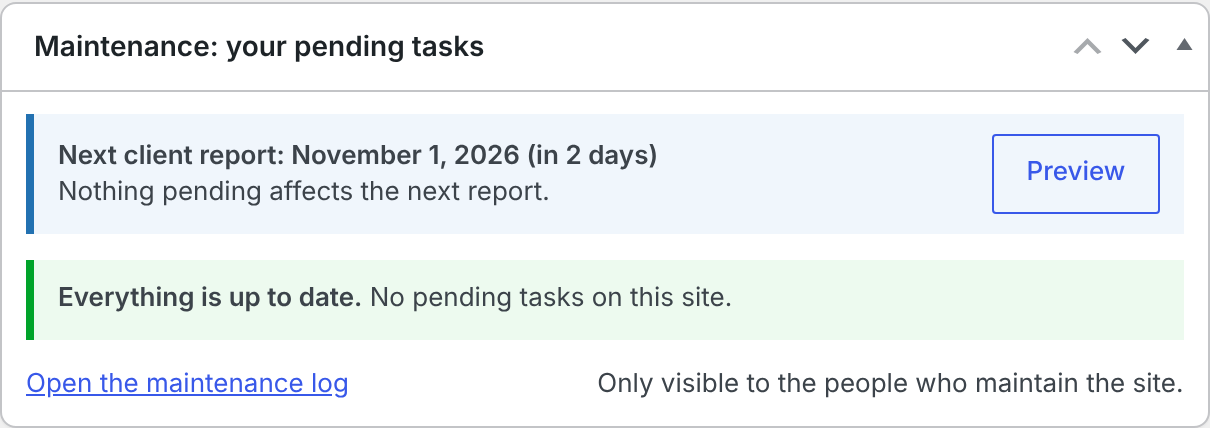
- "Maintenance: your pending tasks" dashboard summary for the people who maintain the site: next report date, urgent and pending items (failed checks, vulnerabilities, updates, technical status without a note, backups, report setup) and tips before the next report. Only the users chosen in "Who maintains this site" see it, so a client who is also an administrator does not.
- Deactivated plugins and themes with known vulnerabilities are counted apart ("+ 1 deactivated"), labeled "Deactivated" with specific advice (lower risk but not zero; delete it if unused), and never mentioned in the client report.
- Technical status notes: when Site Health is not green, the issues it reports (critical first, each with its first explanatory sentence) are listed next to the note, with a link to Tools → Site Health. The plugin now runs the same tests WordPress runs in the background instead of relying only on its stored counts.
- The client name now goes in the greeting ("Hello Ana,") instead of a "Prepared for" line in the header. Introductions saved before {client_name} existed get the name added after their opening greeting automatically.
- Vulnerabilities: the advice now says whether WordPress offers the update (premium plugins without an active license or bundled with a theme often do not) and which version fixes it.
- Vulnerabilities that seem to belong to another edition (e.g. Premium vs free with the same internal name) are flagged as a possible match and do not count as pending, nor as fixes in the report.
- "Mark as reviewed" with an optional note for each vulnerable component; it applies to that version and those vulnerabilities only.
- Re-download the vulnerability data once after updating so the edition check has the data it needs.
- Technical status: each green point explains in plain words why it matters.
- Manual notes for points that are not green (e.g. why PHP cannot be upgraded yet). The report shows them as "Known situation" with the note, in every report while the point stays that way.
- "Get the data now" buttons in Settings: download the Wordfence data or measure speed immediately, with live progress, without waiting for WP-Cron. Results are logged and used in the next report.
- Client name: the report greets the recipient by name ({client_name}), shows who it was prepared for and addresses the email to them.
- Step-by-step setup assistant with plain-language explanations, saved progress and a final summary.
- Optional vulnerability module with Wordfence Intelligence: security updates explained in plain language in the client report, and alerts about vulnerable or unpatched software.
- Dashboard box for the client, public report link with archive and PDF printing.
- Technical status: HTTPS certificate, PHP support, WordPress version and Site Health.
- Fresh site check before each scheduled report, with the option to hold it while a check fails.
- Optional speed module with Google PageSpeed Insights: rating, trend, plain-language improvements and drop alerts.
- One-click rollback to the previous version of updated plugins and themes.
- Backup policy in client reports, periodic backup check reminders and one-click confirmations.
- Dashboard updates are no longer attributed to auto-updates.
- Spanish (es_ES) translation.
- Client reports show only the outcome of the latest site check, without technical details; failures are sent to the administrator only.
- First version: update log, inventory snapshots, site checks, manual tasks, client reports, administrator alerts, staging protection, WP-CLI and CSV export.