
Malroot Security
| 开发者 | nirajpal |
|---|---|
| 更新时间 | 2026年7月10日 16:04 |
| PHP版本: | 7.4 及以上 |
| WordPress版本: | 7.0 |
| 版权: | GPLv2 or later |
| 版权网址: | 版权信息 |
详情介绍:
- Database content —
wp_options,wp_posts,wp_postmetafor injected PHP/JS payloads - MySQL triggers and events — catches rootkits that recreate fake admins on every spam comment
- REST API routes — flags non-standard namespaces with dangerous capabilities
- mu-plugins — detects self-healing loaders that reinstall malware after deletion
- Bot-cloaked content — compares Googlebot vs human page output to detect SEO spam
- Outbound connections — logs every external HTTP request and alerts on known C2 hosts
- Eight independent scanner modules with severity-based findings
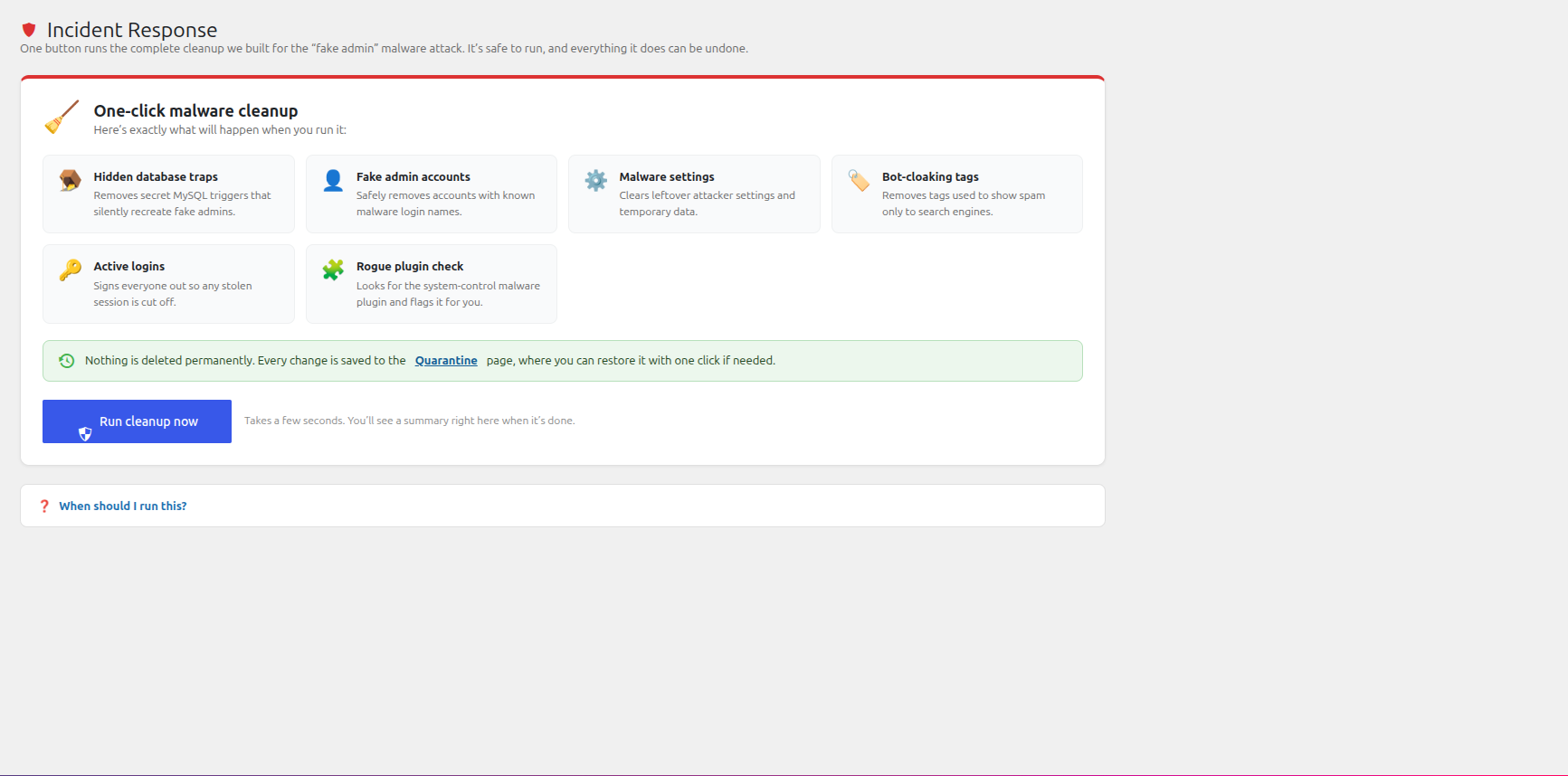
- One-click incident response that replays a complete malware cleanup
- Auto-quarantine with full restore for files, options, postmeta, users, triggers, events
- Real-time hooks block rogue admin creation and eval-based option injection
- WordPress.org checksum verification — official files auto-accept silently
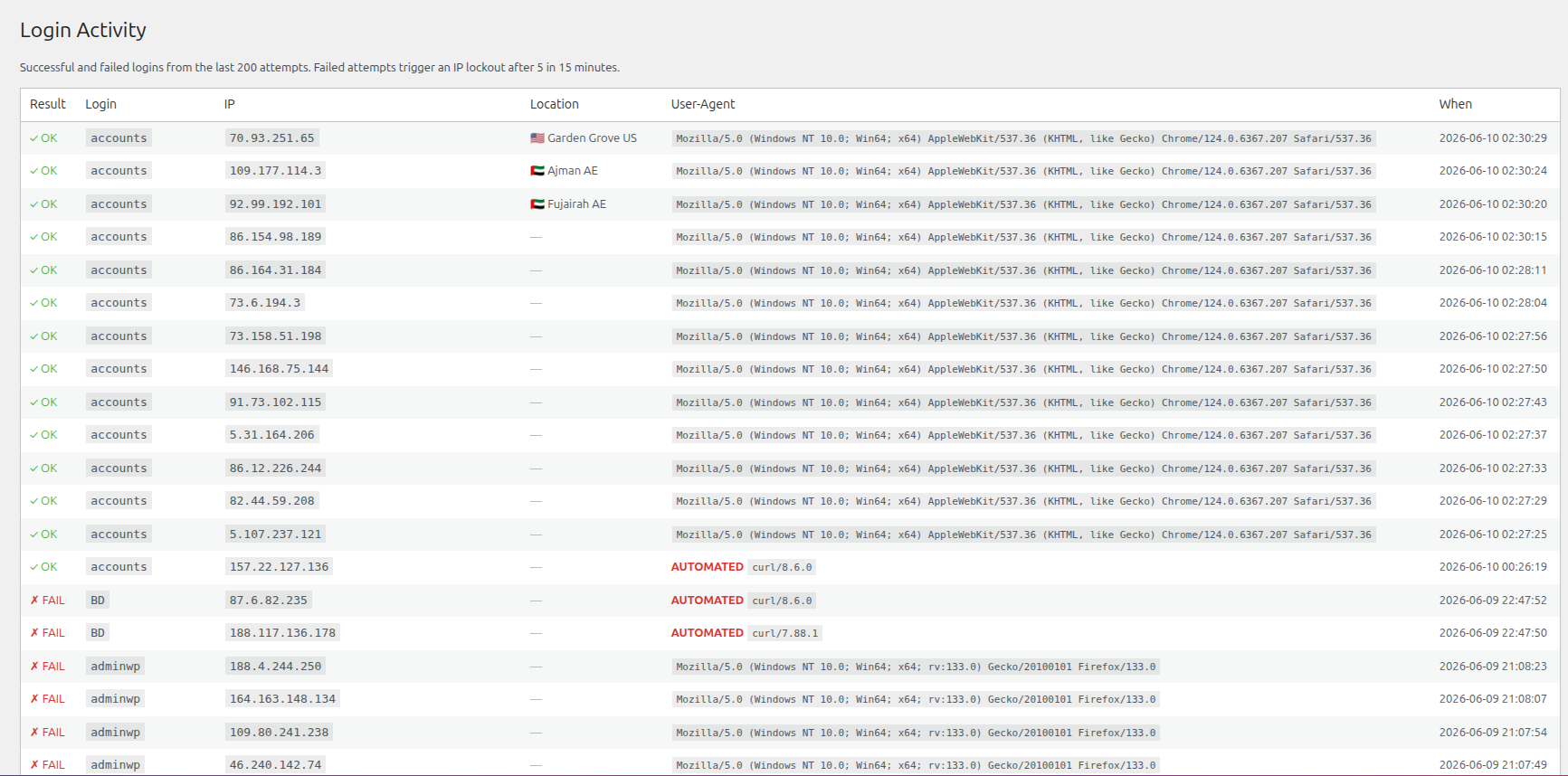
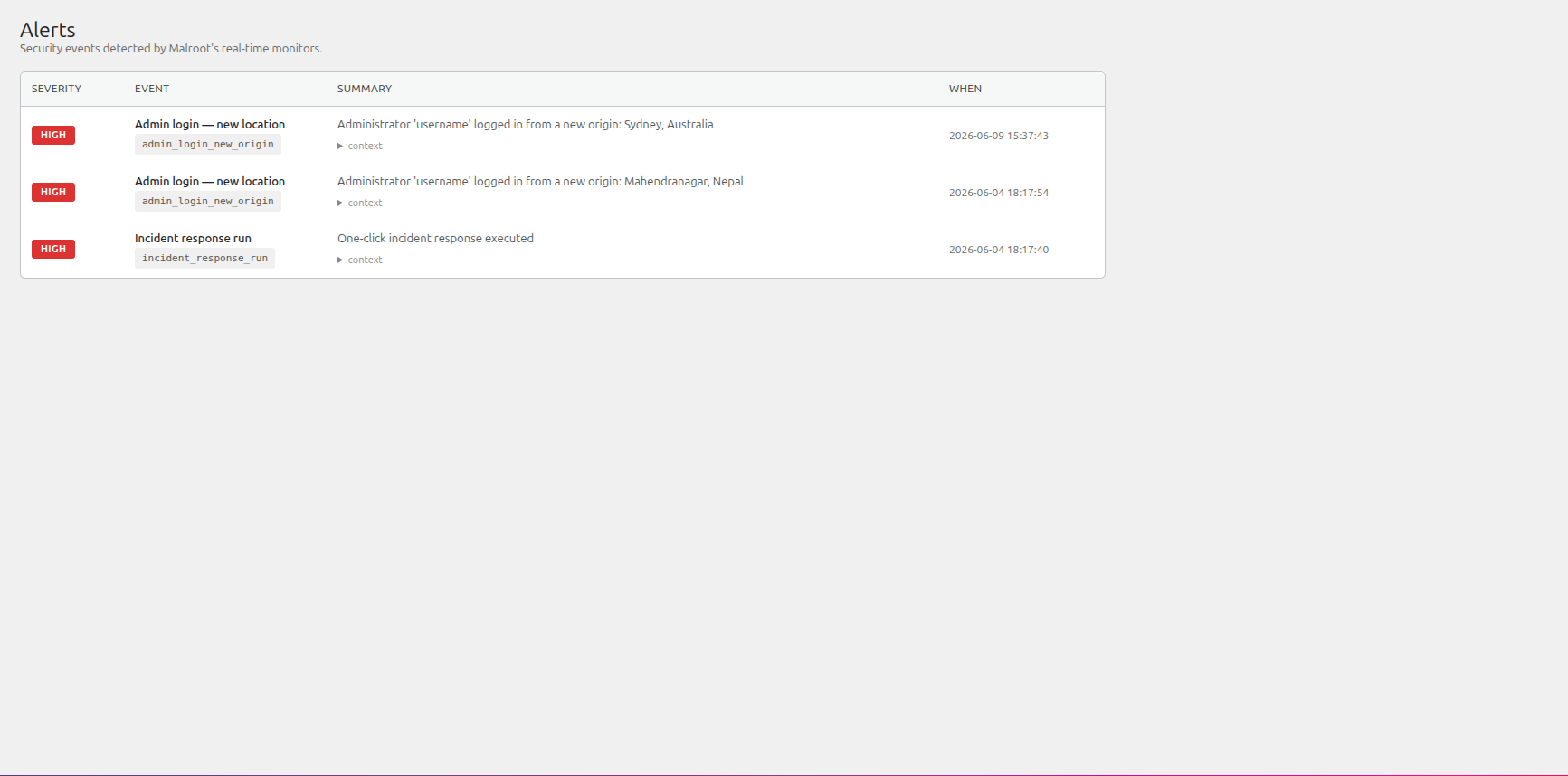
- Login security with IP throttling, automated-tool detection, geo-aware new-origin alerts
- Built-in 2FA (TOTP, RFC 6238 — works with Google Authenticator, Authy, 1Password)
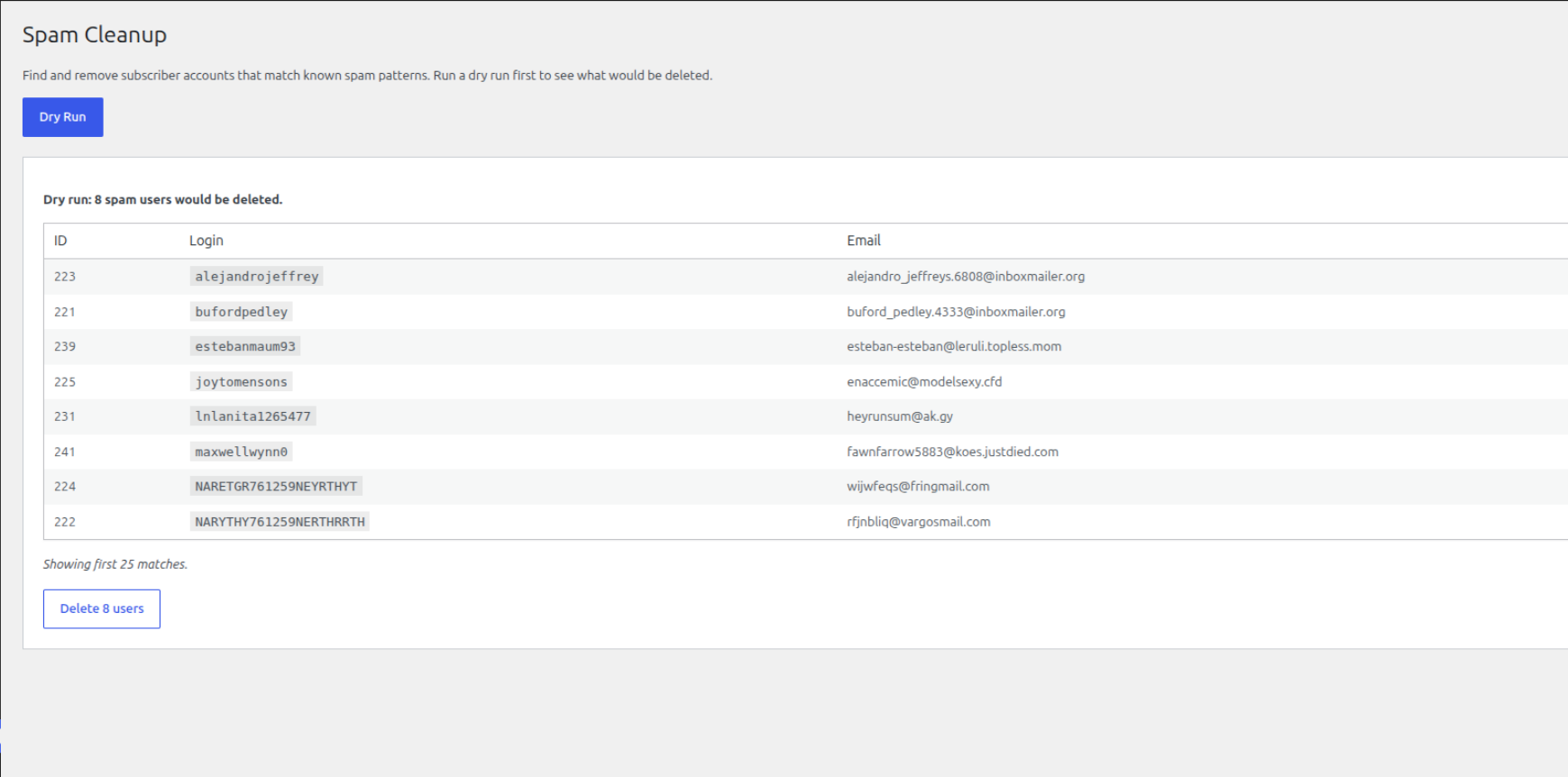
- Spam registration shield with honeypot, pattern blocklist, and bulk subscriber cleanup
- Email and Slack alerting with deduplication
- CSV export of findings for audit trails
- Self-integrity check — Malroot detects tampering with its own code
- "Hidden trap found in your database" instead of "TR-005: Trigger after_insert_comment"
- "Fake admin account found" instead of "UA-010: Known malware admin name"
- "Hacker tool found on your site" instead of "MAL-005: WSO/FilesMan webshell signature"
- The official WordPress.org core checksums API
- The official plugin checksums at downloads.wordpress.org
- A recent plugin/theme update window from the operator's own update history
newsfeed admin user every time a spam comment was posted. That attack pattern is now a built-in detection.
安装:
- Upload the
malroot-securityfolder to/wp-content/plugins/or install via the Plugins menu. - Activate Malroot Security from the Plugins screen.
- Open the Malroot menu in your admin sidebar.
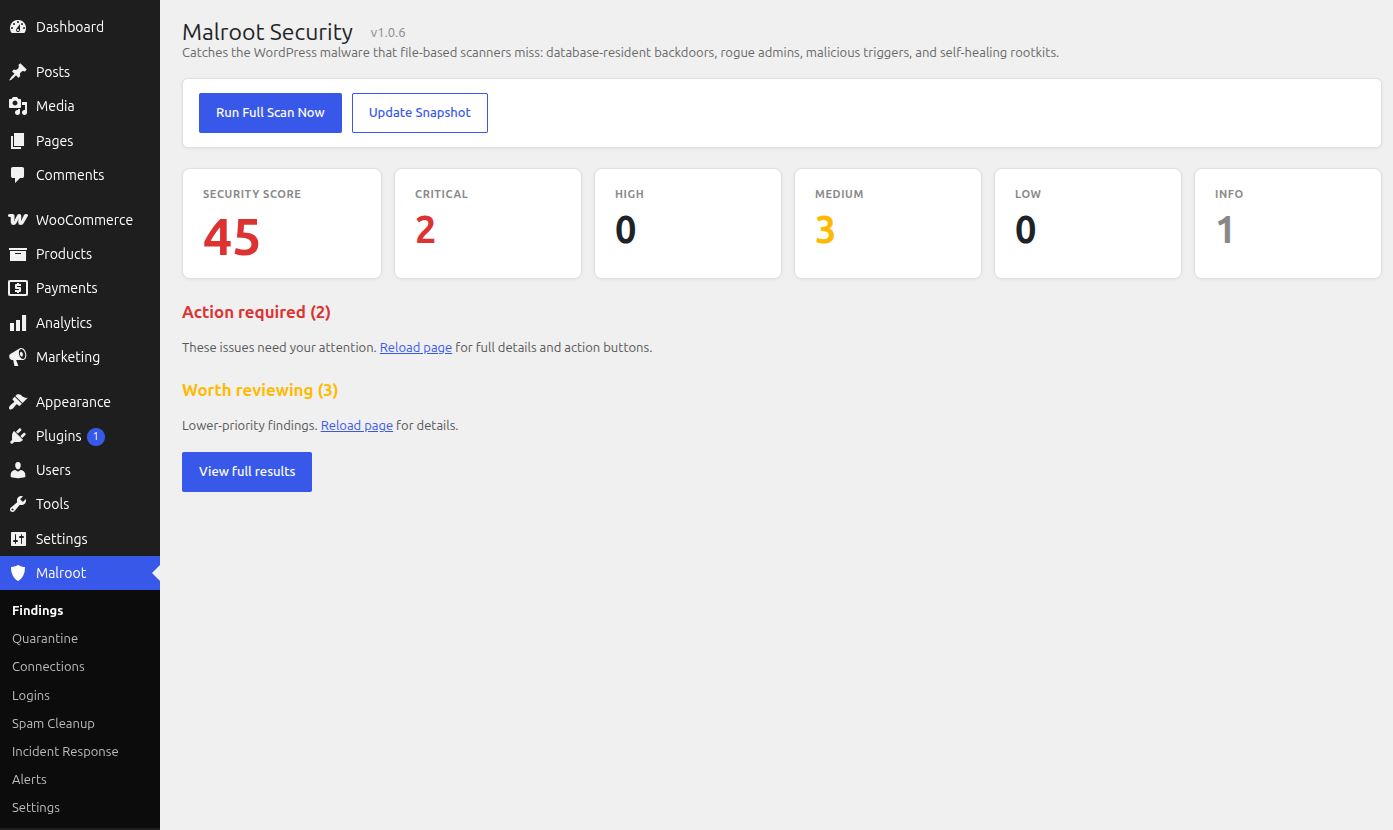
- Click Run Full Scan Now — the first scan builds an integrity baseline.
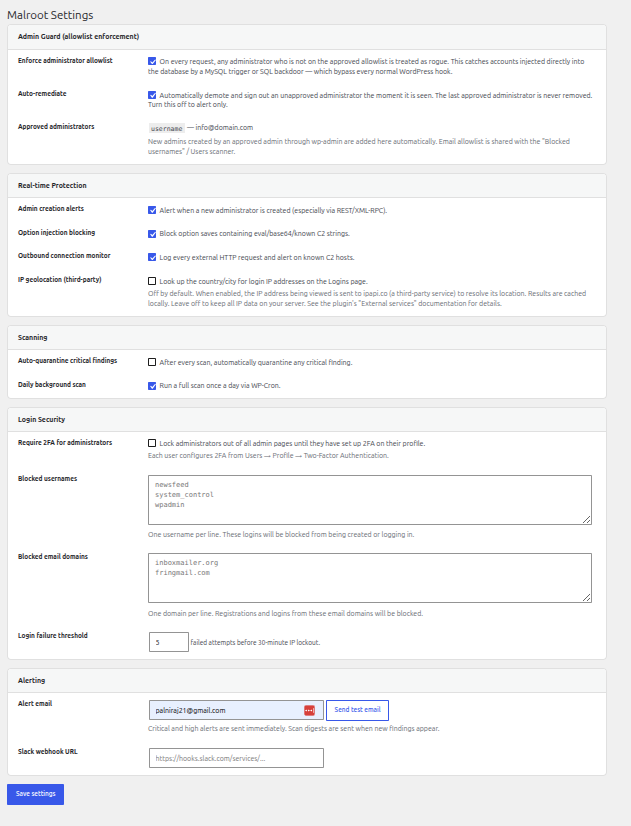
- Visit Settings to configure email alerts and (optionally) require 2FA for administrators.
屏幕截图:
常见问题:
Does this replace Wordfence or Sucuri?
No — Malroot is designed to complement file-based scanners, not replace them. It catches the database-resident, REST-based, and trigger-based threats that file scanners typically miss. Run both for layered protection.
What happens when I click "Quarantine"?
Files are moved to a private folder under wp-content/uploads/malroot-quarantine/ (protected by .htaccess). Database options, postmeta, users, and triggers are backed up to a quarantine table and then removed. Every action is reversible from the Quarantine page.
Will normal plugin updates create false alarms?
No. Malroot verifies changed files against official WordPress.org checksums. Files that match are auto-accepted silently — you only see findings when something genuinely doesn't match.
How does the 2FA work?
Standard TOTP (RFC 6238). Each user enables 2FA from their profile, scans a QR code with Google Authenticator, Authy, 1Password, or any compatible app, and confirms with a 6-digit code. Eight one-time recovery codes are generated during setup. Site administrators can require 2FA for all admin accounts in Settings.
Does Malroot send my data anywhere?
By default, Malroot only contacts the official WordPress.org checksum APIs to verify your core and plugin files. Everything else is opt-in: IP geolocation is OFF until you enable it, and Slack alerts only fire if you configure a webhook. No site content, credentials, or scan results are sent to any third party. See the "External services" section below for full details.
How does Two-Factor Authentication show the setup key?
Malroot does not generate a scannable QR code, because doing so would mean sending your secret key to an outside image service. Instead it shows the setup key as text, which you type into your authenticator app using its "Enter a setup key" option. Nothing about your 2FA secret ever leaves your server.
Does the plugin work on multisite?
Single-site only in v1.0. Multisite support is on the roadmap.
更新日志:
- Far fewer false positives after plugin, theme, and WordPress updates. File-integrity findings are now checked against the component's version: when a plugin, theme, or core version has changed, its file changes are recognised as an expected update and accepted silently instead of asking you to review them.
- Deleted plugin files are now verified authoritatively against the official WordPress.org checksums for the installed version. If the current version no longer ships a file, its removal is accepted automatically — this clears the large lists of "file deleted" notices seen after updating WooCommerce, Google Site Kit, Yoast SEO and similar plugins.
- WordPress-managed paths (
wp-content/languages,wp-content/upgrade) are treated as expected churn, so translation-file updates no longer appear as findings. - Improved code analysis for files with no official checksum (themes, custom code): the verifier now reads the file and reports in plain language whether it contains suspicious patterns, so clean files are no longer pushed toward deletion. Fixed a
preg_replaceheuristic that misfired on legitimate theme code. - Authoritative checks now run before content heuristics, fixing false "malware pattern" flags on legitimate plugin files (e.g. LiteSpeed Cache, Jetpack).
- Safer review actions: a modified core/plugin/theme file now recommends reinstalling the official copy instead of deleting it, and already-deleted files no longer show a "remove" button.
- REST endpoints registered by installed, active plugins are correctly attributed and no longer flagged as "unknown" — including WooCommerce family namespaces such as
wc-push-notificationsandwc-shipstation, plus Jetpack, LiteSpeed and others. - Incident Response now also removes dormant injected administrators detected by signature (duplicate login name, no email address, generic wordpress.com profile URL), not just known bad names — with safeguards that never remove you or the last administrator.
- New: block and clean up comment spam. Bot comments (fake "TikTok"/"BBC Post" style) can be blocked before they are stored, and a Spam Cleanup tool moves existing spam comments to Trash. Blocking a spam comment also denies the malicious after_insert_comment trigger its input.
- Alerting is now configurable and written in plain language: choose which severities are emailed, turn routine login-activity notifications on or off (off by default), and receive human-readable emails instead of technical dumps.
- UI: the admin screens now use the full width of the page, and fixed the icon alignment on the "Run cleanup now" button.
- Privacy: Two-Factor Authentication no longer sends the TOTP secret to an external QR-code image service (api.qrserver.com). The setup key is now shown as text for manual entry into any authenticator app, so the secret never leaves your server.
- Privacy: IP geolocation (ipapi.co) is now strictly opt-in and OFF by default. No IP address is sent anywhere unless an administrator enables "IP geolocation" on the Settings page.
- Quarantine no longer stores removed files in the uploads/plugin folder and no longer writes a PHP stub over files. Removed files are now backed up as inert data in a private database table and deleted from disk with
wp_delete_file(); restore writes them back via the WordPress filesystem API. - Use
wp_get_upload_dir()/wp_upload_dir()for the uploads location instead of a hardcodedWP_CONTENT_DIR/uploadsfallback. - Removed the dead Terms/Privacy link to goqr.me from the readme (the QR service is no longer used).
- Important safety fix: the "Remove all" bulk action and automatic quarantine can no longer touch files that belong to WordPress core, an installed plugin, or an installed theme. A heuristic false positive on legitimate code previously could be bulk-removed, blanking a required file and taking the site down. Such findings are now surfaced for deliberate, one-at-a-time review instead of one-click deletion. (mu-plugins stay removable, as self-healing loaders there are a known malware trick.)
- Fewer false positives:
.sqlschema/template files bundled inside a plugin or theme (e.g. LiteSpeed Cache'sdata_structurefiles) are no longer flagged as public database dumps. PHP files inside recognised plugin-managed uploads folders (Sucuri, WP-Staging, UpdraftPlus, BackWPup) are now listed as low-priority "review" items rather than critical. - Individual, explicitly-confirmed removals are unchanged and still able to remove a genuine malicious file from anywhere.
- Removing a finding (file, user, option, trigger) is now instant and in-page — it uses a background request instead of reloading the whole admin screen, so the page no longer hangs while a file is being neutralised. The card fades out and the severity counters update live.
- Added a "Remove all" bulk action to the "Action required" list. It cleans up every auto-removable critical/high finding in one click, processed one at a time with a live progress bar (REST-route findings, which need manual action, are excluded).
- Each removal still backs the item up to Quarantine and is fully reversible.
- New Admin Guard module: enforces an allowlist of approved administrators on every request. Catches rogue admins injected directly into the database by a MySQL trigger or SQL backdoor (e.g.
wp_feed,newsfood, and duplicatewppanelaccounts) — accounts that bypass every normal WordPress creation hook and that a login-name blocklist can never keep up with. Unapproved admins are demoted and signed out automatically, and the last approved administrator is never removed. - Admin Guard allowlist is seeded automatically from the current clean administrators on first run; admins created by an approved admin through wp-admin are approved automatically.
- Redesigned the Incident Response screen in plain language: a clear "what will happen" card with friendly per-step descriptions, a reassurance banner linking to Quarantine, a "when should I run this?" help section, and a readable last-run summary with a threat count.
- Fixed the Incident Response last-run report rendering as unstyled text (the markup used
malroot-ir-*class names while the stylesheet definedmr-ir-*). - REST scanner: added the official
mailchimp-for-woocommerce/namespace to the known-safe allowlist (fixes a false-positive RT-001 critical on the Mailchimp for WooCommerce plugin'ssyncroutes). - Expanded the built-in rogue-admin name list (
wp_feed,newsfood,wppanel) used by the real-time and login-security blocklists as a secondary layer. - Annotated four Plugin Check
WriteFile.ABSPATHDetectedwarnings in the quarantine module. These writes intentionally target a file at its real webroot location — neutralising a malware file in place, and restoring a quarantined file to its original path — so they cannot usewp_upload_dir(). Each is now documented with a sniff-specificphpcs:ignoreand a justification. - Annotated five Plugin Check
SlowDBQuery(meta_key/meta_value) warnings in the incident-response and quarantine modules. None is a slowWP_Querymeta lookup — one is a plain report-array key, and the database operations are INSERT/DELETE on the already-indexedmeta_keycolumn — so each is documented with a sniff-specificphpcs:ignoreand a justification.
- Added an "External services" section to readme documenting every outbound request the plugin makes and linking to each provider's privacy policy and terms.
- Replaced inline
<style>and<script>blocks on the 2FA login and setup screens withwp_register_style/wp_register_scriptandwp_add_inline_style/wp_add_inline_script. - Quarantine directory moved to
wp_upload_dir()['basedir'] . '/malroot-security/quarantine'instead of a hardcodedWP_CONTENT_DIRpath. - Incident-response cleanup no longer changes the activation status of other plugins. It now only detects a malicious
system-controlplugin and reports it so the administrator can deactivate it manually from the Plugins screen. - Admin top-level menu repositioned from position 3 to 80 to integrate cleanly with the standard WordPress admin hierarchy.
wp_verify_nonce()calls now run their input throughsanitize_text_field( wp_unslash() )for defence-in-depth (the function is pluggable).$_SERVERarray values are sanitised before being passed toexplode().
- First public release.
- Auto-accept of files matching official WordPress.org and plugin checksums.
- Simple View as the default dashboard.
- Eight scanner modules: files, database, users, triggers, REST API, mu-plugins, bot-cloak, file integrity.
- Built-in TOTP 2FA with QR code setup and recovery codes.
- GeoIP enrichment of login records with 30-day caching.
- CSV export, "Ignore finding" workflow, and self-integrity check.