
Mapsemble
| 开发者 | mapsemble |
|---|---|
| 更新时间 | 2026年10月23日 21:08 |
| PHP版本: | 8.0 及以上 |
| WordPress版本: | 7.1 |
| 版权: | GPL-2.0-or-later |
| 版权网址: | 版权信息 |
详情介绍:
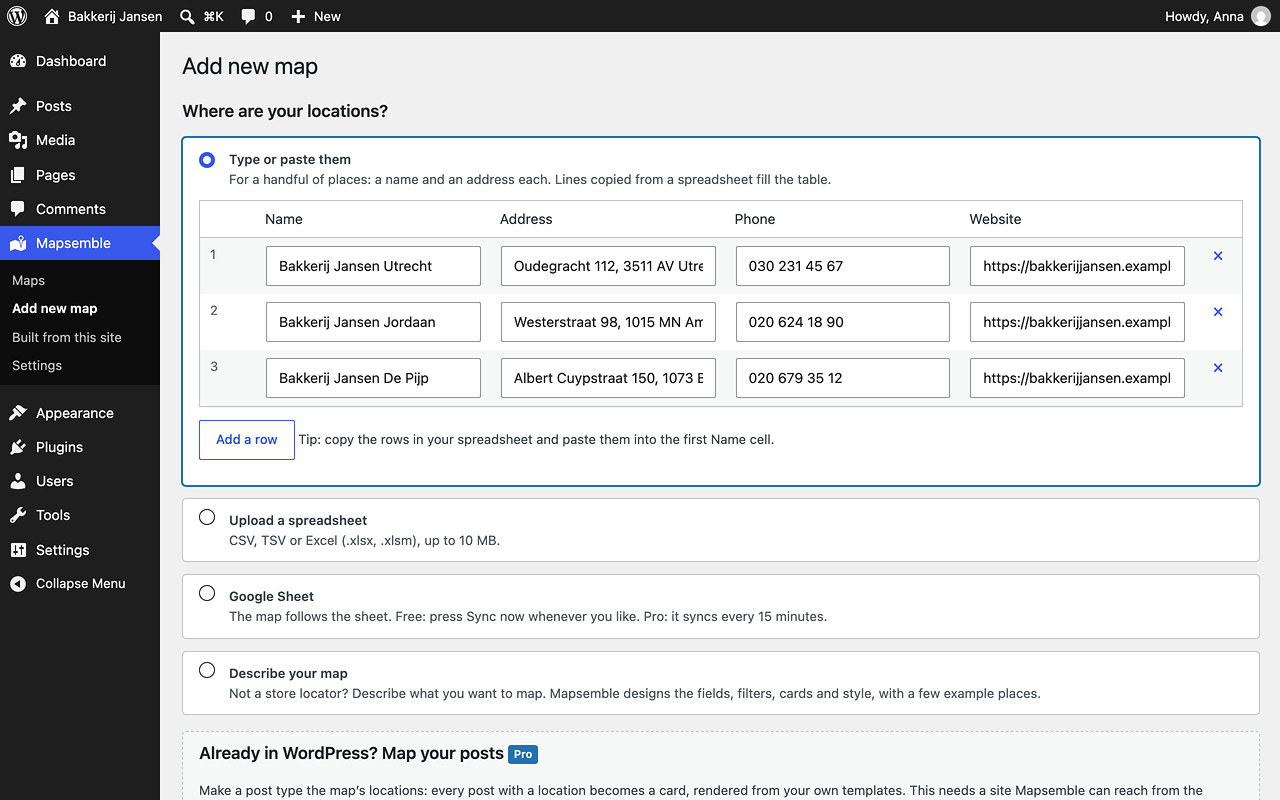
[mapsemble map="…"] shortcode, or the mapsemble_embed() template function. No setup on this site is needed: the block lists your account's maps, a typed id works for any public map, and [mapsemble map="sample"] renders a real, fully populated sample map before you have entered any credentials at all. Your account's maps are listed under Mapsemble → Maps, where locations for maps hosted on Mapsemble are edited in the Mapsemble location editor, which opens from your admin in a new tab with the map beside it — this works on a local development site too.
Or build a map from this site's content
Add a map under Mapsemble → Built from this site to make a post type the map's data: give posts a location and Mapsemble fetches them from a public endpoint on your site, with the cards rendered from your own templates. Always-on filters, visitor filter mappings, sort options and marker style properties shape the feed per map. This is the advanced option: it needs a publicly reachable site, and the Pro plan on the Mapsemble side — nothing is blocked before then; visitors see an upgrade notice over the map until the account is upgraded.
Editing follows the data: maps hosted on Mapsemble are edited in the Mapsemble editor (opened from Mapsemble → Maps in your admin); maps built from this site are edited by editing the posts themselves.
Shaping a site-fed map
A map built from this site does not have to serve the whole post type:
- Always-on filters restrict which posts appear — by taxonomy term or custom field — so two maps on the same post type can show different posts.
- Visitor filters bind the filter widgets you configured on Mapsemble to your taxonomies and custom fields, so choosing one actually narrows the results. Option pickers are fed from your content.
- Sort options bind the map's sort choices to publication date, title, a custom field, or entropy — an even geographic spread, so the first results cover the map instead of clustering.
- Marker style properties put taxonomy terms or custom field values on every map feature, for Mapsemble's marker-style rules to match.
- Block editor — add the Mapsemble Map block (under Embed) and pick any map right in the canvas: search your account's maps and maps built from this site, or choose the sample or a typed id. The chosen map previews live, and "Change map" in the block toolbar picks another. New blocks insert as Wide. Height, scroll behaviour and initial filters are in the block sidebar. The same block works in Appearance → Widgets and in the Site Editor.
- Classic editor, Text widgets, page builders — use the shortcode.
maptakes a Mapsemble map id (orsample);idtakes a site-fed map's WordPress id, shown ready to copy on the Built from this site list:[mapsemble map="0198…" height="60vh" scroll_capture="mobile"]or[mapsemble id="123"] - Theme templates —
mapsemble_embed( '0198…' )/the_mapsemble_embed( 'sample' )for any map by id, ormapsemble_map( 123 )/the_mapsemble_map( 123 )for a map built from this site.
height and the two offsets take a CSS length (50vh, 480px, 2rem). scroll_capture is none or mobile, and turns the map into a sticky section: scroll gestures over it move the card list instead of the page. While scroll capture is on, the map sticks at the top offset — that is how you clear a fixed site header. While the map fills the visible screen, both offsets are also taken off its height, leaving room above and below it — as long as the minimum height leaves that room. Leave any of them out and the map keeps its own default.
Two more attributes shape the embed:
fill_viewport="false"stops the map from growing to the visible viewport. Normallyheightis a minimum: the map is at least that tall and grows to fill the visible screen. Withfill_viewport="false"it is the exact height —height="300px"makes a 300px map.filtersseeds the map's filters on load, as a JSON object of filter slug to value. Quote it with single quotes so the editor does not mangle the JSON:[mapsemble id="123" filters='{"category":"parks"}']. An unreadable value is ignored. In the block, both live in the sidebar; inmapsemble_map(), passfiltersas a native array.
安装:
- Install and activate the plugin.
- Under Mapsemble → Settings, click Authenticate on Mapsemble, approve the connection in the tab that opens, and the page finishes on its own. (You can still paste a client ID and secret by hand.)
- Add the Mapsemble Map block to a page and pick one of your maps — nothing else is needed. Your account's maps are listed under Mapsemble → Maps, where "Edit locations" leads to a button that opens the Mapsemble location editor in a new tab.
- To feed a map from this site's posts instead, go to Mapsemble → Built from this site and click Build a map from this site. Pick a map from your account, or create a new one from this screen.
- Pick a post type and a location source, and save. Then give your posts a location with the built-in location box (find an address, or enter latitude and longitude) or an ACF Google Map field.
- Embed it with the Mapsemble Map block, or with the shortcode shown on the Built from this site list:
[mapsemble id="123" height="60vh"].
屏幕截图:

常见问题:
Where does the map design come from?
From your Mapsemble account. Styling, clustering, filters and layout are configured in the Mapsemble map builder. This plugin decides only where the locations come from, and renders the content cards when they come from this site.
Who can edit a map's locations?
Editors, by default. Maintaining locations is content work, so it has its own capability (edit_mapsemble_map_data) that the administrative ones deliberately do not imply — the person adding locations does not need the screen holding your API credentials. Administrators hold both.
Can I change the card markup?
Yes. Copy templates/card.php from the plugin into your theme as mapsemble/card.php and adjust it. Developers can also use the mapsemble_card_html, mapsemble_card_css_urls and mapsemble_card_data filters.
My coordinates live in custom fields already. Can I use them?
Yes. Choose the "Custom fields (latitude/longitude meta keys)" location source and name the two meta keys — that covers Metabox.io, Pods, imported data and hand-rolled meta. An ACF Google Map field has its own named source. For computed cases, the mapsemble_post_coordinates filter remains. After switching sources, run "Reindex locations" on the map.
Is the map's interface translatable?
Yes. The widget's interface strings ("Filters", "Search", "Sort by", …) run through the plugin's mapsemble text domain, so a .po file for your language translates them; English sites send nothing extra. Developers can add or override strings with the mapsemble_widget_translations filter.
Can I develop against a local site?
A map whose locations live in Mapsemble works on a local site with no extra setup: nothing on the Mapsemble side ever fetches from your server.
A map built from this site's content does not, because the Mapsemble service has to reach your feed. Expose the site through a tunnel and define MAPSEMBLE_REMOTE_BASE_URL in wp-config.php; the plugin then hands Mapsemble that address instead of your local one.
Two more constants exist for people running the Mapsemble service itself locally. MAPSEMBLE_APP_BASE points the plugin at another Mapsemble host; TLS is still verified against it. MAPSEMBLE_SSL_VERIFY set to false switches that verification off — define it only for a local stack whose certificate the WordPress container does not trust, never on a public site.
The sample map is the exception: it always loads from app.mapsemble.com whatever MAPSEMBLE_APP_BASE says. A stack that publishes its own copy can point it elsewhere with the mapsemble_sample_app_base filter.
Can I keep the credentials out of the database?
Yes — define MAPSEMBLE_CLIENT_ID and MAPSEMBLE_CLIENT_SECRET in wp-config.php and the settings fields become read-only. One caveat: credentials set that way never pass through the settings form, which is what normally clears the cached access token and plan details. After changing them, delete the mapsemble_token, mapsemble_token_failed, mapsemble_remote_maps, mapsemble_feature_flags and mapsemble_backoff transients — from code, \Mapsemble\Api\Client::forget_account_caches() drops exactly that set, as the settings form and the connect flow do — or the plugin keeps answering for the previous account for up to fifteen minutes.
How many posts can a map serve?
The feed is a standard WordPress meta query and is comfortable up to roughly ten thousand geo-tagged posts. Beyond that, use a persistent object cache. The entropy sort option additionally needs MySQL 8 or MariaDB 10.2 for its window function; on older databases it degrades to a stable per-map random order. The filter option pickers group over meta values, capped at ten options per lookup.
What are the public endpoints?
For site-fed maps only: mapsemble/v1/features (the GeoJSON feed), mapsemble/v1/feature (one rendered card) and mapsemble/v1/filter/options (values for a mapped filter). All serve published, geo-tagged content that the map's own conditions admit — a post excluded by an always-on filter answers 404 exactly like a missing one. Maps whose locations live in Mapsemble answer 404 on all three. Responses carry Cache-Control: public, max-age=60 and an ETag; the cache is refreshed when a served post, its terms, or the map's settings change, and developers can tune or disable it with the mapsemble_feed_cache_ttl filter.
The map preview in the block editor stays blank. Why?
The editor shows a chosen map live in a frame served by this site to a request that carries no login cookie — the block editor isolates itself in Chromium browsers, and the frame's request goes out without cookies. Anything that turns such requests away before WordPress parses them keeps the preview out: a maintenance or "members only" plugin that redirects logged-out visitors on init, or HTTP basic auth in front of a staging site. The published page is unaffected; the map still renders there.
更新日志:
- Changed: the Mapsemble location editor opens in a new tab, with the map beside it, instead of in a frame inside the admin. The sign-in token is minted when you click, not when the screen loads.
- Added: the block's map picker is searchable — type part of a name or paste an id. Maps are listed newest first with "Another map id…" at the top, and maps that share a name are told apart by their creation date and a short id. The map edit screen's select follows the same order and gains a filter box on long lists.
- Added: a chosen map renders live in the block editor, and a "Change map" toolbar button picks another.
- Added: "Find an address" in a post's Map location box looks the address up through Mapsemble and fills in the coordinates, with a link to check the spot on OpenStreetMap.
- Added: with one of your maps chosen, the block's Filters panel lists that map's filter slugs; clicking one adds it to the initial filters.
- Added: a map built from this site shows how many posts it currently serves, and saving warns about always-on filter terms that do not exist.
- Added: Mapsemble → Maps is searchable and paginated, newest first, with a Created column and All / Hosted on Mapsemble / Built from this site views. The location editor's heading names the map and links back to the list.
- Added: the Built from this site list shows each map's shortcodes with a Copy button, and a shortened map id.
- Changed: the Mapsemble menu reads Maps / Built from this site / Settings. Maps (formerly Map data) lists your account's maps and comes first; the site-fed maps (formerly Maps) are under Built from this site. Links are unchanged.
- Changed: new Map blocks insert as Wide, so desktop visitors get the desktop layout; "None" is still a choice. Blocks already set to Wide or Full now render that way on the published page; others are unchanged.
- Changed: with "Fill the visible viewport" off,
heightis the map's exact height, on existing blocks too; with it on, the sidebar calls it "Minimum height". - Changed: switching a block's "Which map" to "Select a map" clears the sample's still from the canvas, which now just asks which map.
- Changed: map screens say "Map saved." instead of "Post published.", bulk actions count maps, and creating a map on Mapsemble from the edit screen confirms it.
- Changed: the Pro plan note appears once, inline; "Add them on Mapsemble" links straight to the map's filters or sort panel in the Mapsemble builder.
- Changed: on a map's edit screen the manual map id is folded away unless the list is empty, and the meta-key and ACF inputs show only for their location source.
- Changed: on Settings, "Finish connecting" appears only once the automatic connect gives up, and the uninstall choice has its own Data section.
- Fixed: a typo in the location box no longer erases the saved location — invalid input leaves it untouched and says what is wrong. Comma decimals work, and a pasted "lat, lng" pair fills both fields.
- Fixed: an unknown or unavailable map no longer leaves a screen-tall blank box — visitors see the section collapse, and editors get a notice naming the likely cause, on the page and in the block preview.
- Fixed: a one-click connect or reconnect ends on the "Connected to Mapsemble" notice instead of a silent reload.
- Fixed: with
MAPSEMBLE_CLIENT_IDdefined inwp-config.php, saving the settings no longer wipes the stored client ID; a save that only changes the uninstall choice keeps the cached token and map list. - Fixed: the "cannot reach this site" warning no longer shows when Mapsemble itself runs on your local network; private-network and loopback addresses now count as local.
- Fixed: an always-on filter whose only slug is
0no longer drops out and lets the map serve every post. - Fixed: accessibility — the location-source radios are a fieldset with a legend, location box errors, filter matches and copied shortcodes are announced, address search keeps focus, and the Maps list's actions column is labelled.
- Developer: new REST routes
mapsemble/v1/geocodeandmapsemble/v1/map-filters, for users who can edit posts; theloadErrorTextwidget setting is gone.
- Added: one-click connect on Mapsemble → Settings — Authenticate on Mapsemble, approve in the tab that opens, and the page finishes on its own. A "Finish connecting" button covers the no-JavaScript case; pasting a client ID and secret by hand is still available in a collapsed section.
- Added: the block defaults to the sample map, so a freshly inserted block always shows a real map. A "Which map" choice switches to your own maps, listed by where their data comes from (fed by this site / on your Mapsemble account), and the canvas shows a still of the sample map while no map is chosen.
- Added: suggested privacy-policy text under Settings → Privacy → Policy Guide, naming the configured Mapsemble host.
- Added: the block editor's strings are translatable — the editor script now carries the plugin's translations.
- Changed: the sample map is the one shared with the Drupal module and the Framer plugin (id
019c09be-4113-7222-95d8-c616d8d7efc1) and always loads from app.mapsemble.com, even whenMAPSEMBLE_APP_BASEpoints elsewhere. A block or shortcode usingsamplepicks the new map up on the next render. - Changed: TLS verification of the Mapsemble service is no longer switched off by
MAPSEMBLE_APP_BASE. Local stacks whose certificate the container does not trust must now defineMAPSEMBLE_SSL_VERIFYasfalse— a DDEV site that relied on the old implicit behaviour will fail to connect until it does. - Changed: the public feed endpoints answer from a 60-second cache with
Cache-Controland an ETag (a browser revalidating gets a bodiless 304). Saving, trashing or deleting a served post, changing one of its terms, or saving the map configuration refreshes it; logged-in requests bypass it. - Changed: after a 429 from the Mapsemble service the plugin waits as long as
Retry-Aftersays (at most five minutes) before asking again, instead of retrying on every admin screen. - Changed: site-fed embeds seed the widget with the map's first configured sort, so the card list and the map agree on what comes first.
- Fixed: the map list no longer shows a map twice when several configurations bind the same map id, and a picker with no maps to list still offers a typed id.
- Fixed: reconnecting from an already connected site works the same as a first connect.
- Fixed: uninstalling on a multisite network with more than 100 sites now cleans every site; uninstall also removes the connect state, the backoff marker and the feed cache counters.
- Fixed: every "Read more" card link has an accessible name that includes the post title; the Map data editor frame sends no referrer.
- Developer:
mapsemble_map_config_savedaction (MapConfig $config,string $previous_map_id) fires after a configuration's meta is written;mapsemble_feed_cache_ttlfilter tunes or disables the feed cache;mapsemble_sample_app_basefilter for a self-hosted Mapsemble that publishes its own copy of the sample;MAPSEMBLE_SSL_VERIFYconstant;Client::forget_account_caches()drops every account-derived transient; CI fails when the version is stated inconsistently.
- Added: embed any map by its Mapsemble map id — block picker (account maps, maps on this site, a typed id),
[mapsemble map="…"], andmapsemble_embed(). A map id bound to a site-fed configuration automatically serves from this site. - Added: a published sample map —
[mapsemble map="sample"]— that renders before any credentials are entered. - Changed: map configurations are source-only; the hosted/site mode choice is gone. Existing hosted configurations keep working exactly as before (embeds render, feeds keep refusing them) and gain an explicit convert option.
- Changed: Mapsemble → Map data lists your account's maps directly — hosted locations are editable in-admin for any account map, no configuration post needed. Old links redirect.
- Fixed: embedding the same map twice on one page now boots both instances.
- Developer: the
mapsemble_widget_settingsfilter's second argument is nowMapConfig|null— null for embeds of maps this site has no configuration for. Type-hinted callbacks need widening.
- Added: always-on filters — per-map taxonomy/custom-field conditions, so two maps on one post type can differ.
- Added: visitor filter mappings and the
mapsemble/v1/filter/optionsendpoint — the map's filter widgets now narrow the served posts. - Added: sort mappings, including entropy ordering for an even geographic spread (MySQL 8/MariaDB 10.2, with a stable random fallback).
- Added: marker style properties — taxonomy terms and custom-field values on every feature, remaining dots included, for Mapsemble style rules.
- Added: a generic custom-fields location source — name a latitude and longitude meta key, no PHP filter needed.
- Added: the widget's interface strings are translatable through the plugin text domain.
- Added: embeds pass a fresh backend endpoint each render (stale data-source URLs heal without a re-save), and new
fill_viewportandfiltersoptions on the block, shortcode and template functions. - Improved: creating a map on Mapsemble is an inline form instead of a browser prompt; the map screen opens with a "How this works" explainer.
- Improved: a Settings link on the Plugins row, and a dismissible pointer to the settings screen until credentials are entered.
- Improved: save notices are tied to the map that produced them and can no longer be consumed by another admin page.
- Fixed: the loading placeholder resolves to an error message when the map widget cannot be loaded, instead of spinning forever.
- Developer: refreshed translation template, guarded by CI against drifting again.
- Fixed: maps whose locations live in Mapsemble now show their cards — the embed no longer installs a card renderer that only site-fed maps can use.
- Fixed: the Map data screen answers a real 404 for maps that are not edited there.
- Fixed: a failed connection names the fix — bad credentials point at the client ID and secret, an unreachable service points at the connection — and failed sign-ins are not retried for a minute.
- Fixed: saving the settings shows a confirmation notice, and saving a map shows every applicable warning instead of only the first.
- Fixed: the uninstall option describes what is always deleted, not only the opt-in part.
- Fixed: capabilities granted to your own roles survive deactivating and reactivating the plugin.
- Fixed: an unreadable map extent is ignored instead of hiding every location.
- Initial development version.