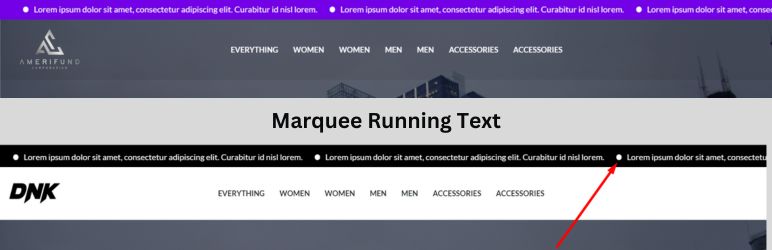
Marquee Running Text
| 开发者 |
jahid49
jahid49 bongdevs bongdevs |
|---|---|
| 更新时间 | 2025年12月21日 03:59 |
| 捐献地址: | 去捐款 |
| PHP版本: | 5.6 及以上 |
| WordPress版本: | 6.8 |
| 版权: | GPLv2 or later |
| 版权网址: | 版权信息 |
详情介绍:
Marquee Running Text is a lightweight and user-friendly WordPress plugin that lets you add customizable scrolling text to the top of your website's header. It's fully responsive and designed to work seamlessly with popular page builders—no coding required.
Features
- No setup needed: Get started right away.
- Show/Hide option: Easily toggle the marquee in the top header.
- Unlimited colors: Customize the text and background to match your site's design.
- Multiple texts: Add up to five individual marquee texts, each with its own link.
- Page builder support: Works with popular page builders without any extra configuration.
- Shortcode: Display the marquee anywhere on your site using
[mrtext].
- No setup needed.
- Marquee at the top header (Show/Hide Option)
- Unlimited colors.
- Five Marquee Text with a link.
- Support popular page builders.
- Shortcode available.
[mrtext]
安装:
Automatic Installation
- In your WordPress dashboard, go to Plugins > Add New.
- Search for "Marquee Running Text."
- Click Install Now and then Activate.
- Download the plugin to your desktop.
- Unzip the package.
- Using an FTP client, upload the
marquee-running-textfolder to the/wp-content/plugins/directory. - In your WordPress dashboard, go to the Plugins screen and click Activate next to "Marquee Running Text."
- Unzip the download package
- Upload
marquee-running-textto the/wp-content/plugins/directory - Activate the plugin through the 'Plugins' menu in WordPress
- Download Marquee Running Text Plugin to your desktop.
- If downloaded as a zip archive, extract the Plugin folder to your desktop.
- With your FTP program, upload the Plugin folder to the
wp-content/pluginsfolder in your WordPress directory online. - Go to Plugins screen and find Marquee Running Text Plugin in the list.
- Click Activate Plugin to activate it.
更新日志:
1.0.0
- Initial release.
- Fix error.
- Fix error.
- Fix header hide/show error.
- Core code update.
- Fix error.
- Settings link added.
- Upgrade to Pro link added,
- Fix error.
- Get Pro button added.
- First Release.
1d39ed9aebe41fa0eef02c8fccc497a5261dc127