
mee-table
| 开发者 | breedartstudios |
|---|---|
| 更新时间 | 2026年11月6日 22:59 |
| PHP版本: | 7.4 及以上 |
| WordPress版本: | 7.1 |
| 版权: | GPLv3 or later |
| 版权网址: | 版权信息 |
详情介绍:
api.mee-table.com, so there is no server to maintain. mee-table is a WhatsApp Tech Provider (Meta), a company verified by Meta to build on its official APIs and process data for other businesses. The restaurant connects its own WhatsApp number with Meta's official Embedded Signup, keeps ownership of the number and the account, and messages go out on the official WhatsApp Business Platform. No resellers, no unofficial tools. The WhatsApp messages are templates approved by Meta, and they cover one thing only: communication about the plugin's functions, such as a new booking request, a confirmed or changed booking, a reminder, or a cancellation. The restaurant cannot create a message and cannot edit one: the text is fixed, and the only thing that changes is the booking data inside it, such as the guest name, the date, the time and the number of guests. No free text, no composing by hand, no advertising. That is what keeps the number in good standing: Meta quality rules and restrictions are what hit unofficial tools that blast free-text messages, not verified numbers sending approved templates.
安装:
- Upload the plugin folder to
/wp-content/plugins/or install via the WordPress plugin directory. - Activate the plugin through the 'Plugins' menu. 3. Go to mee-table -> Settings, paste your licence key (from your mee-table.com dashboard), and click Activate licence.
- Set up your location(s), opening hours and payment methods on the Locations and Settings pages. 5. Optional: to switch the guest assistant on, open mee-table -> Guest assistant and paste a Groq key. Until you do, nothing is sent anywhere and the chat does not appear.
屏幕截图:




常见问题:
Where should my Google Business Profile booking link point?
To your dedicated booking page, not to your homepage, even if the widget is on the homepage too. A link always opens at the top of a page: on a long homepage the guest lands on the header and has to scroll to find the widget, on the booking page they land right on it. The plugin creates that page for you (see mee-table -> Settings) and the floating booking pill brings guests there from every other page of your site.
Does mee-table store guest data on my WordPress server?
On the free Lite plan, reservations stay in the restaurant owner's WordPress database. On plans with an active mee-table licence, booking data is stored on the mee-table server (api.mee-table.com).
Does the AI guest assistant cost anything, and is it on by default?
It is off until you paste a Groq API key in mee-table -> Guest assistant, and while that field is empty the plugin contacts no AI service at all and the chat is not even loaded on your pages. The key is free to create at https://console.groq.com/keys and the account is yours, so the free allowance is yours alone and the plugin never resells anything.
What does the assistant tell guests about allergens?
If you have ticked your menu page and the answer is written there, it repeats what you wrote and says it read it from you. What it never does is promise a guest that a dish is safe for their own allergy: a question like "I am allergic to hazelnuts, can I eat this?" always goes to your phone, whatever your menu says. Cross-contamination is decided in your kitchen, not on a menu, and only you know how you work.
And about prices?
The same rule. If your menu with prices is on a page you ticked, it can repeat a figure you wrote. If it is not published, it tells the guest to ask you. It never invents a figure, and it never says a percentage: on time-slot discounts it tells the guest which times are discounted and that they are marked on the list, so the number is read from your own page and cannot be misquoted.
The admin panel is in the wrong language. Where do I change it?
By default the panel follows Settings -> General -> Site Language. If you want it pinned to one language regardless, set it in mee-table -> Settings -> Panel language.
Do you take a commission on my bookings?
No. Table reservations never carry a commission, on any plan, including the free one. A percentage applies only to tickets sold and paid online: Dating Aperitivo is 20% free, 15% Bronze, 12% Silver, 10% Gold; Cooking Class tickets go 12% free, 5% Bronze, 3% Silver, 2% Gold; gift cards are 10% free, 5% on every paid plan. It is taken at the moment of payment; the rest reaches your own Mollie, Stripe or PayPal account directly. Sell no tickets and you pay no percentage.
What happens to my data if I delete the plugin?
It stays. Deleting the plugin from the Plugins page keeps your reservations, your customers, your venues, your time slots, your discounts and your hourly capacity: install it again and they are all still there. Only what the plugin generated by itself is cleaned up, such as caches and counters. If you really do want everything gone, there is a switch in mee-table -> Settings, off to begin with, that has to be turned on first. With it on the deletion is immediate and there is no undo, so only a backup of your site would bring anything back.
Where can I manage my licence or upgrade?
Log into your dashboard at https://mee-table.com/dashboard. There you can manage your location(s), billing, and staff accounts.
Why does the plugin need to connect to api.mee-table.com?
The connection is required for the booking widget, payment processing, and no-show protection to work. Without it, Mee-Table cannot retrieve availability, process payments, or update reservations.
What is the difference between the no-show guarantee and the prepayment tiers?
They are two different things, each with its own refund setting. The no-show guarantee only authorises the card: no money is taken, so there is nothing to refund. Its setting is a deadline, up to when the guest may cancel without a penalty. The prepayment tiers take real money at booking time, for a fixed-price menu you have already shopped for: that setting decides whether it is refundable at all, and defaults to non-refundable. A venue can run a flexible guarantee alongside a non-refundable tasting menu, which a single shared setting made impossible.
I set up an SMS provider. How do I know the credentials are right?
Use the "Send test SMS" button under the credentials. It sends one real message, using what is typed in the form even if you have not saved yet, and it costs one credit of your plan. Missing fields are reported before anything is dispatched, and the button locks for ten seconds after each attempt so a double click cannot burn credits. Note that the test leaves from your own site while real reminders leave from the mee-table servers: if your provider filters by IP address, the test can succeed where real sending fails.
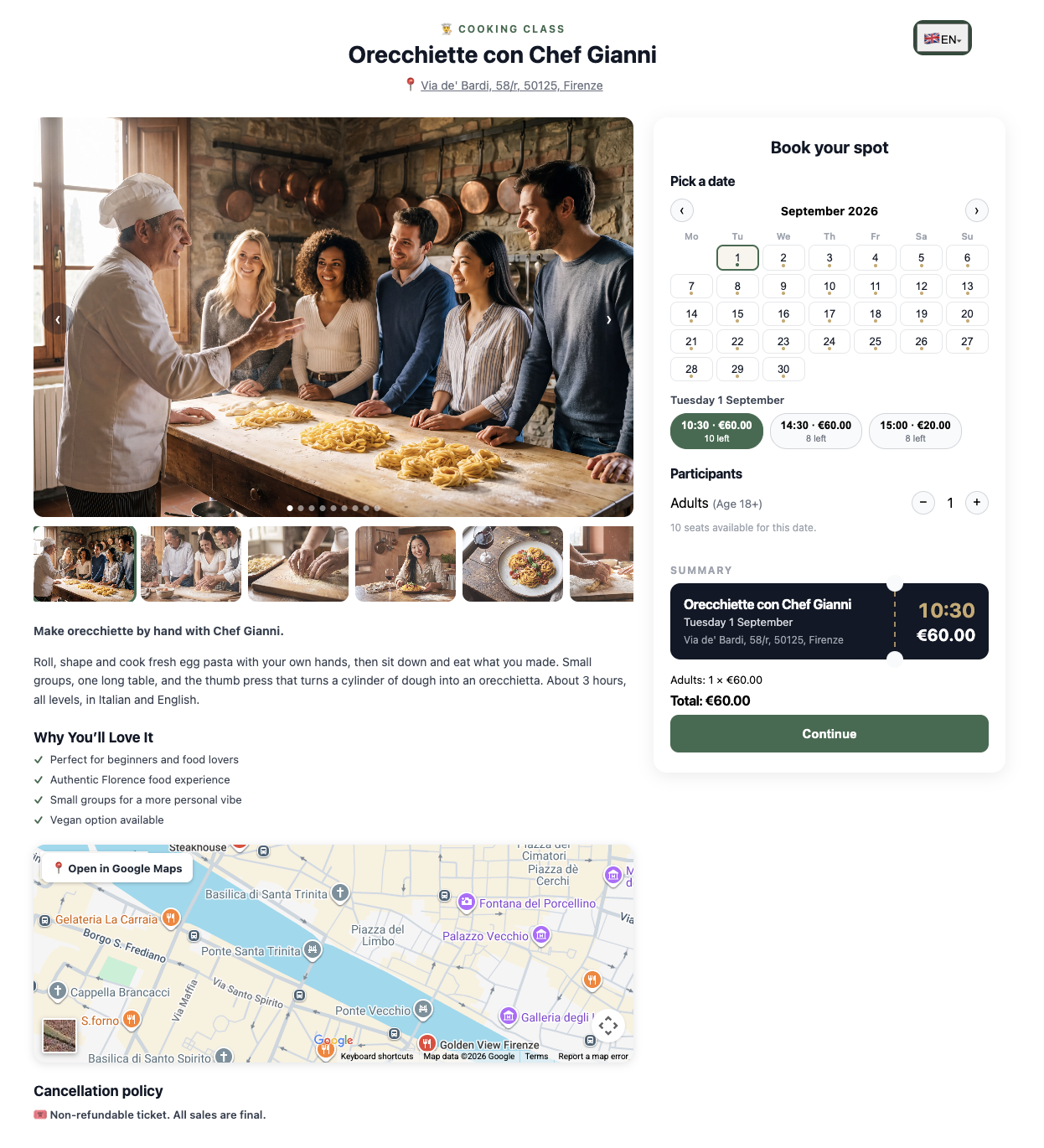
What photo should I use for a cooking class?
A horizontal one, and as large as you can. The picture sits in a wide band on the flyer and in the email, so a portrait shot only shows a central strip of itself. When you pick the file the plugin crops it to 3:2, tells you which print sizes that photo can actually carry (A3 needs about 2200 px of width, A4 about 1550) and compresses it below 600 KB before it leaves your computer, so the 15 MB a modern phone produces is never uploaded. No compression invents pixels that were never there: a small photo stays small.
Which paper size should I print the flyer on?
A3 for a poster read from a distance, A4 for a window or a wall, A5 for a table stand, portrait or landscape. Each size is laid out separately rather than being a scaled copy, because what makes text readable is the distance it is read from, not the size of the sheet. The flyer always shows the next scheduled event: if nothing is scheduled it says so instead of printing a date that has passed.
Can a guest give a gift card to someone else? Does it arrive on WhatsApp?
Yes. The buyer can add the recipient's name, email and phone. If they add the email, mee-table emails the gift card to the recipient right after payment. The buyer can also choose the day the email goes out ("Send on"), from tomorrow up to a year ahead, for example for a birthday: it is sent that morning at 9:00. If they leave the email empty, the gift card reaches only the buyer, who then has to send it separately. After payment a window opens with a green "Share on WhatsApp" button: WhatsApp opens with the message ready (amount, venue, code and link) and the buyer taps send. The WhatsApp message is not sent automatically and cannot be scheduled. If the buyer typed the recipient's phone it is already filled in; if not, the number can be typed in that window. They can also add a personal message of up to 200 characters, which the recipient reads in the email. Gift cards are paid with Mollie or Stripe Connect, whichever the venue has connected.
Can I have different sittings on different days?
Yes. In mee-table → Location, edit the location and open the first tab, Venue, hours & booking confirmation: right after the opening hours you find Rates by time slot / custom shifts (the ? next to the title opens the guide). Add one row per sitting with + Add tier, then Save the rates only, tick its days and set its time. Example: three rows at 20:00, 21:45 and 23:00 ticked Fri, Sat and Sun, and other rows for Tue, Wed and Thu. Type any start time you like, for example 20:05 or 21:45: the sitting times do not depend on the time interval, which only sets the grid of the normal times for the whole location (every 30 or every 15 minutes). Tick "One time for the sitting" to show a single button per sitting, or choose "Show only the times of the tiers" to hide the normal grid. A row with an empty amount or 0 has no prepayment; the no-show guarantee (from Silver), if you keep it on, still applies. Sittings without an amount work on every plan, Free included; prepayment amounts are part of the Gold plan, and below Gold the amount field is switched off with a note.
Can I close at different times during the week, for example earlier on weekdays than on weekends?
Yes, with the same sittings, and it holds for good until you change it. In mee-table → Location, edit the location, first tab, Rates by time slot / custom shifts. Switch on Show only the times of the tiers below and add one row for each group of days with different hours. Set From to the first bookable time and To to the last bookable time, leave the amount empty, and leave One time for the sitting unticked. Example: Mon to Thu from 12:00 to 22:00 (last bookable time 22:00) and Fri to Sun from 12:00 to 22:30 (last bookable time 22:30). Tick the days for each row, then Save the rates only. Guests see the times from From through To, including To, at the interval set for the location (every 30 or 15 minutes). A day with no row keeps the location's normal opening hours and closing time; you do not need to add a row for every day. Discounts and hourly capacity stay tied to the times actually offered on each day. The quick blocks in the calendar (Hourly Capacity) are for single dates or a period, such as holidays, not for fixed weekly hours. With Show all normal times, the rows do not change the schedule: only the location's normal opening hours and closing time count.
How do I enable the WhatsApp contact button?
Go to mee-table → Location, edit the location, and fill in the "WhatsApp (digits only)" field with the number in international format, digits only (e.g. an Italian number +39 333 123 4567 becomes 393331234567). Once saved, a WhatsApp chat button appears automatically under the booking widget on your site, linking to a direct chat with that number. This uses the free wa.me link: no paid service, no extra setup, available on every plan tier.
更新日志:
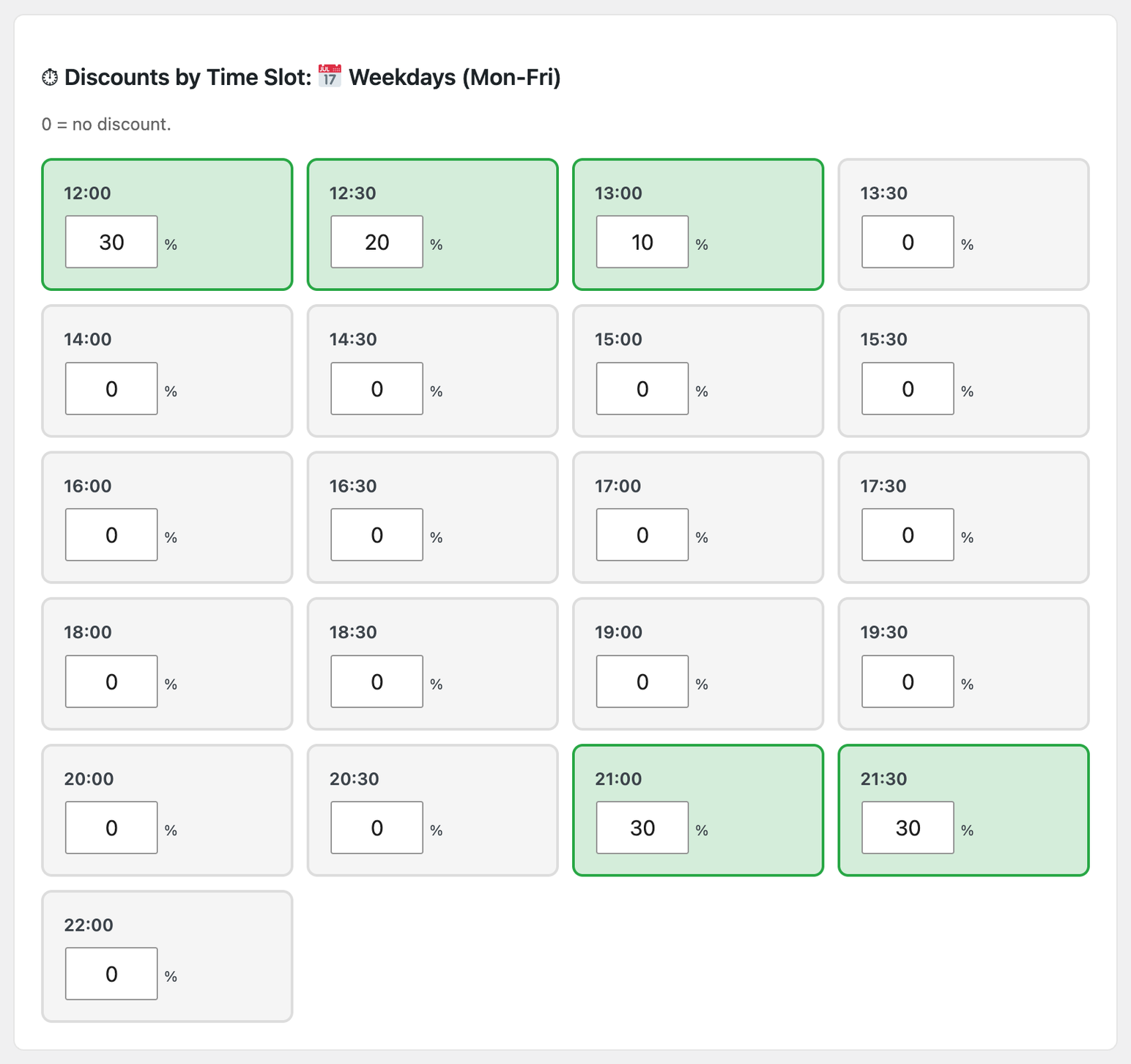
- New: Special period in Discounts. Choose from and to dates, enter the percentages and press Save all: every day becomes a specific date you can change or remove.
- Fixed: Capacity and Discounts no longer say "saved" when the save did not go through.
- Fixed: specific dates in Discounts stay in date order, and the phone layout of these pages no longer overflows.
- Fixed: the mobile Staff dashboard now uses the same UTC date ranges and reservation visibility filters as the Floor Dashboard.
- Fixed: the "Capacity and quick blocks" button in the Floor Dashboard opened a "not allowed" page in 1.4.0. It opens the capacity screen again.
- Fixed: the staff Capacity page no longer appears a second time in the menu next to Hourly Capacity. It opens from the button in the Floor Dashboard, and it is the same screen with the same numbers.
- Capacity and quick blocks from the staff dashboard on your site, not only from the WordPress admin: pick a day, change the seats per time slot, close or reopen the day, and undo back to the saved values.
- A seventh staff permission, Capacity, per venue: the owner chooses whether all staff or managers only can change it.
- Phone prefixes in the readme widget are now alphabetical.
- Time slots stay in two columns on narrow phones instead of one very tall column.
- The WhatsApp line in this readme, and the description is now shorter.
- Changed: the "manage booking" link of a fixed menu now opens your menus page ready to pick the new menu, with a short note on top and a link to cancel instead. The old booking is cancelled by itself when the new one is confirmed.
- New: you can close a venue completely by setting "Max guests" to 0. No date can be booked and guests see your no-slots message instead of the times.
- New: an optional message for when there are no available times, one box for every language active on the site.
- New: the save button shows "Saved" right next to it.
- Changed: the "Connect WhatsApp in one click" button carries a temporary permission (thirty minutes, that venue only), asked when you press it, so the venues page stays fast and you land straight on Meta.
- Fixed: "Always required" for the guest phone number no longer goes back to "Automatic" when "Save all" sends forms that do not contain that field.
- Fixed: the "Staff login" window is no longer cut in half by themes that clip their sections (seen with BeBuilder).
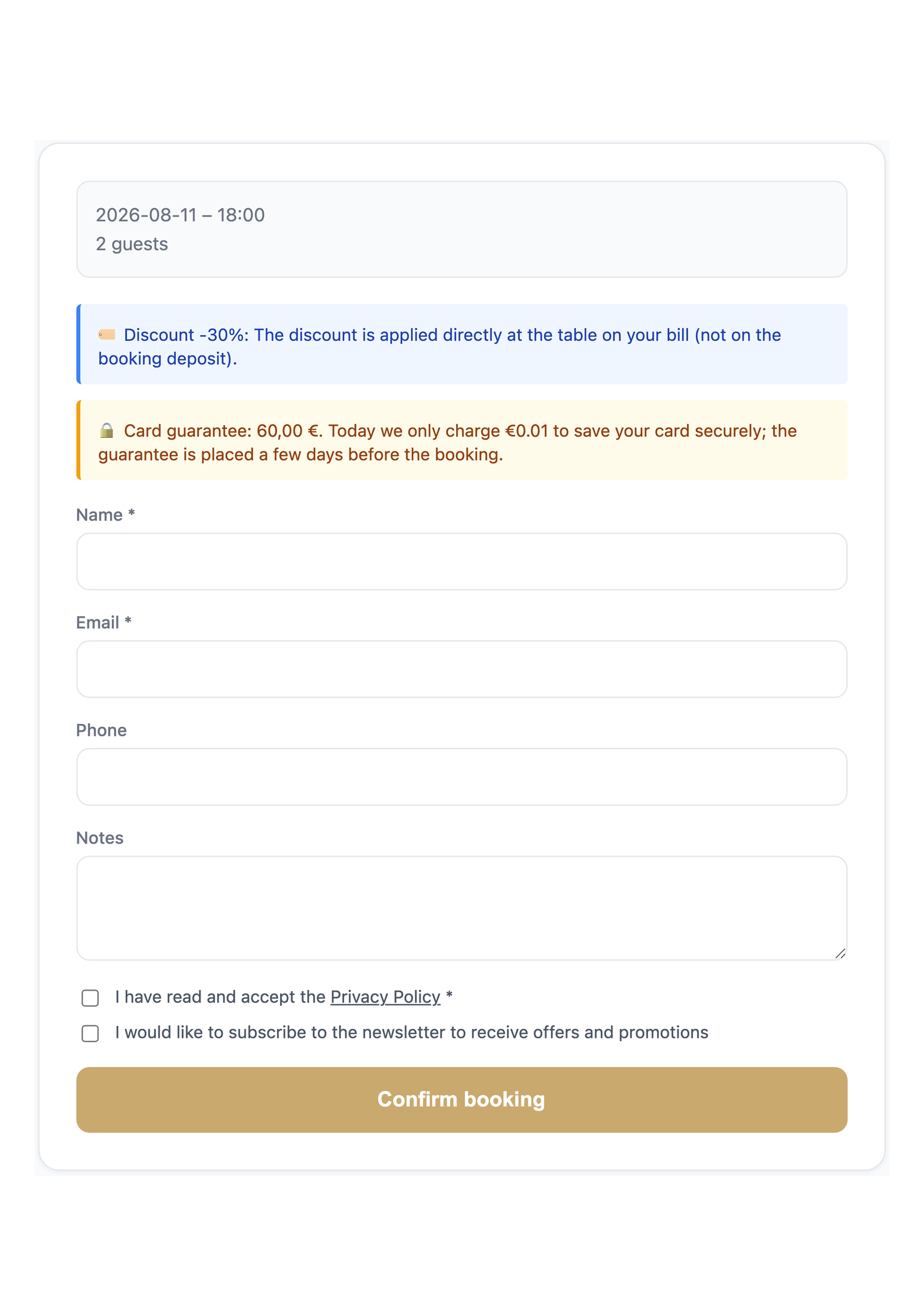
- Fixed: the discount note in the booking form says "(not on the booking deposit)" only when there is a deposit.
- Fixed: a venue saved with 0 guests no longer falls back to the default 80, and saving no longer wipes the logo you had already uploaded.
- Fixed: on a phone the last bookings of the staff dashboard could not be reached. The window now scrolls as a whole and is sized on the visible part of the screen, without the browser bars. Older versions are listed in changelog.txt, inside the plugin folder.