
Memory Scan - PHP Memory Usage - No Crash
| 开发者 | service2client |
|---|---|
| 更新时间 | 2026年8月1日 04:11 |
| 捐献地址: | 去捐款 |
| PHP版本: | 7.0 及以上 |
| WordPress版本: | 7.0 |
| 版权: | GPLv2 or later |
| 版权网址: | 版权信息 |
详情介绍:
memory_limit with a built-in safety margin.
What you get:
- Real measured headroom — based on the heaviest actual request seen, not a synthetic number.
- Three at-a-glance metrics — current headroom, recommended-for-your-site-type, and real peak by request — that escalate from "You're fine" to "Urgent" as memory gets tight.
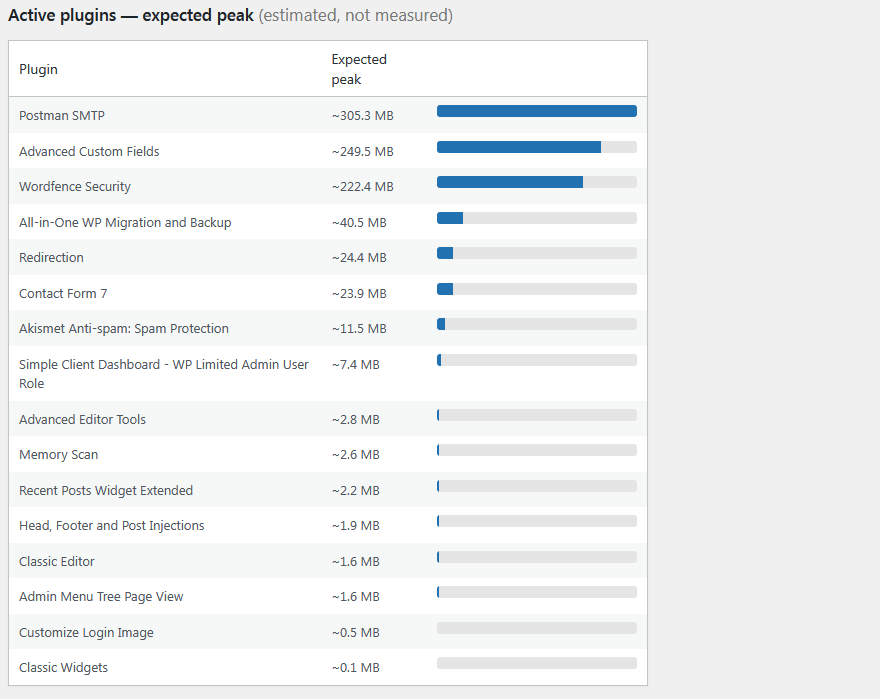
- Per-plugin expected-peak ranking so you can see which plugins (page builders, SEO suites) demand the most memory. This figure is a deliberately conservative estimate, not a live measurement — WordPress cannot bill runtime memory to a single plugin — so it errs high to keep your site safe.
- A recommended
memory_limitfor your detected site type (simple blog, Elementor, WooCommerce, or a heavy stack). - A proactive warning that appears on every admin page when memory is low — so you are told without hunting for it.
- A
WP_MEMORY_LIMITcheck that flags when it is set below your PHPmemory_limit, with the exactwp-config.phpline to fix it. - A Dashboard widget — an at-a-glance memory status on your main dashboard, so you can see the plugin is watching without any nag.
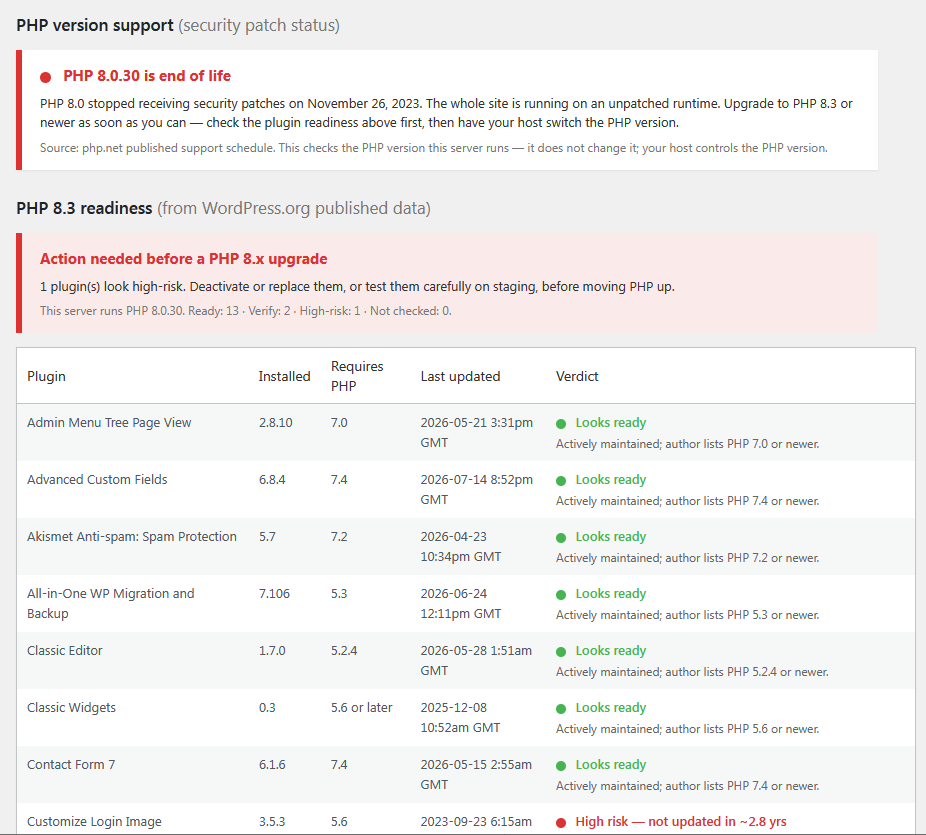
- A PHP version support check — tells you whether the PHP version your server runs still receives security patches, and when it reaches end of life, based on php.net's published schedule.
- A PHP 8.x plugin-readiness check — compares your active plugins against WordPress.org's own published data (declared PHP requirement, WordPress "tested up to," and last-updated date) and flags which look ready, which to verify, and which are high-risk before you move PHP up. It reads published data — it does not run your plugins — so a green result is a strong signal, not a guarantee, and premium or custom plugins that are not in the WordPress.org directory are shown as "could not verify."
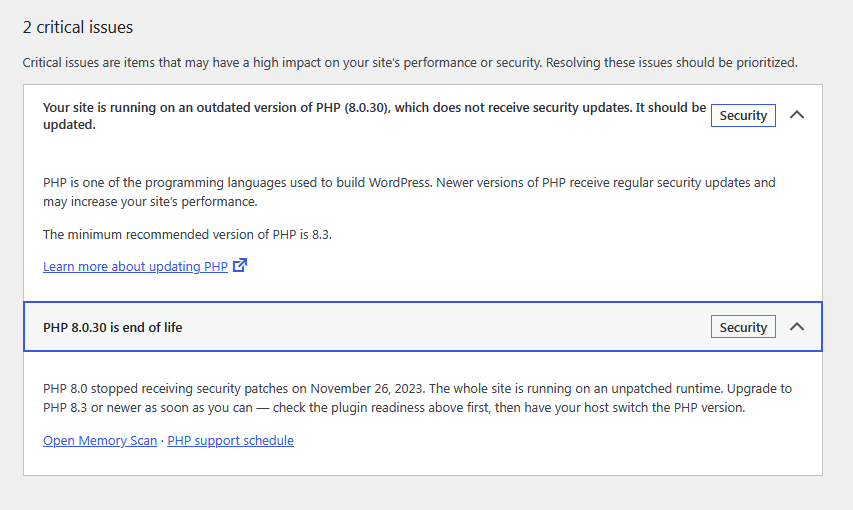
- Site Health integration — the PHP-support and memory verdicts also appear under Tools → Site Health, where hosts and experienced admins look.
安装:
- Upload the
memory-scanfolder to/wp-content/plugins/, or install it through the Plugins screen in WordPress. - Activate the plugin through the Plugins screen.
- On first activation you'll be taken to the Memory Scan page. After that you can open it any time from the Memory Scan menu.
- Browse a few pages and run your heaviest task so it can record real peaks, then reload the scan.
屏幕截图:
常见问题:
Does this slow my site down?
No. It records the memory peak at the end of each request (a couple of arithmetic operations), and only performs the heavier per-plugin scan on admin requests, cached hourly. Nothing extra runs on front-end page loads beyond recording a single number.
Is the per-plugin "expected peak" an exact measurement?
No, and it says so on screen. PHP cannot attribute runtime memory to an individual plugin from a single request, so the per-plugin figure is a conservative estimate based on each plugin's code size. It errs high on purpose, so you provision enough memory rather than too little. The overall verdict uses your real measured peak.
Does the PHP compatibility check run my plugins?
No. It reads WordPress.org's published data about each plugin — the declared PHP requirement, the WordPress "tested up to" version, and the last-updated date, the same information shown on each plugin's page. It never executes your plugin code, so it is safe, but a green result is a strong signal rather than a guarantee. The only certain test is running the upgrade on staging.
Does the compatibility check call an external server or slow my site?
It looks plugins up on WordPress.org — the same service WordPress already uses to check for plugin updates. Those lookups happen only when you click the "Check compatibility" button on the Memory Scan page, are limited to a handful at a time, time out quickly, and are cached for a week. Nothing runs on your visitors' pages, and if WordPress.org is slow or unreachable the plugin simply shows "could not verify" rather than waiting.
Why do some plugins show "not in the WordPress.org directory"?
Premium plugins and custom-built plugins are not hosted in the WordPress.org directory, so there is no published data to read. Those are shown as "could not verify" — check the developer's own PHP-compatibility information for them.
It says my WP_MEMORY_LIMIT is below my PHP memory_limit. What do I do?
The plugin shows the exact line to add to wp-config.php. That setting lives outside any plugin, so Memory Scan can only detect and advise, not change it for you.
Does it change or delete any of my content, or change my PHP version?
No. Memory Scan is read-only with respect to your content — it never touches posts, pages, or other plugins' settings, and it never changes your PHP version. It only detects and advises.
更新日志:
- Improved: Clearer first-run and low-memory messaging, with dismiss and never show again.
- New: Dashboard widget showing an at-a-glance memory status.
- New: PHP version support / end-of-life advisory on the Memory Scan page, based on php.net's published schedule.
- New: PHP 8.x plugin-readiness check using WordPress.org published data (declared PHP requirement, "tested up to," and last-updated), with bounded, cached, opt-in lookups that never block a page.
- New: Site Health integration — the PHP-support and memory verdicts now also appear under Tools → Site Health.
- New: Menu icon and a logo at the top of the Memory Scan page.
- Improved: Clearer first-run and low-memory messaging.
- Maintenance and text fixes.
- Initial release.