
Mench Migrate
| 开发者 | menchhub |
|---|---|
| 更新时间 | 2026年11月7日 01:41 |
| PHP版本: | 8.1 及以上 |
| WordPress版本: | 7.1 |
| 版权: | GPLv2 or later |
| 版权网址: | 版权信息 |
详情介绍:
.mmig
backup and imports it on another WordPress install, or restores it on the same one. There is no archive size limit and
no paid step to restore (tested with 500,000 files at a 256 MB PHP memory limit; see Known limitations).
- Any size. Exports, uploads and imports run in short resumable steps, so large sites work on ordinary hosting. An interrupted job carries on from where it stopped.
- Safe imports. A compatibility report comes first. The database is rebuilt in temporary tables from data (no SQL from the backup is ever run) and switched in one step, and your previous site is kept for a rollback (24 hours by default). A failed import rolls itself back.
- Clean URLs. Old addresses are replaced everywhere, including serialized and JSON data such as Elementor's, and the links of the new site are checked after the import.
- Encryption. Protect a backup with a password (Argon2id and XChaCha20-Poly1305).
- Import .wpress archives. Mench Migrate imports
.wpressarchives made by All-in-One WP Migration (exported without encryption and compression). - WP-CLI.
wp mench-migrate export,import,restore,rollback,keep,listanddelete, free. - Private by default. Backups live in a randomly named folder with server guards, only administrators can use the plugin, and logs never keep passwords, keys or email addresses.
- Recovery without WordPress. A free command-line tool from menchplugins.com unpacks a backup when the site is down.
安装:
- In Plugins → Add New, search for "Mench Migrate", then Install and Activate. Or upload the ZIP under Plugins → Add New
→ Upload Plugin, or copy the
mench-migratefolder towp-content/plugins/. - Open Mench Migrate in the admin menu.
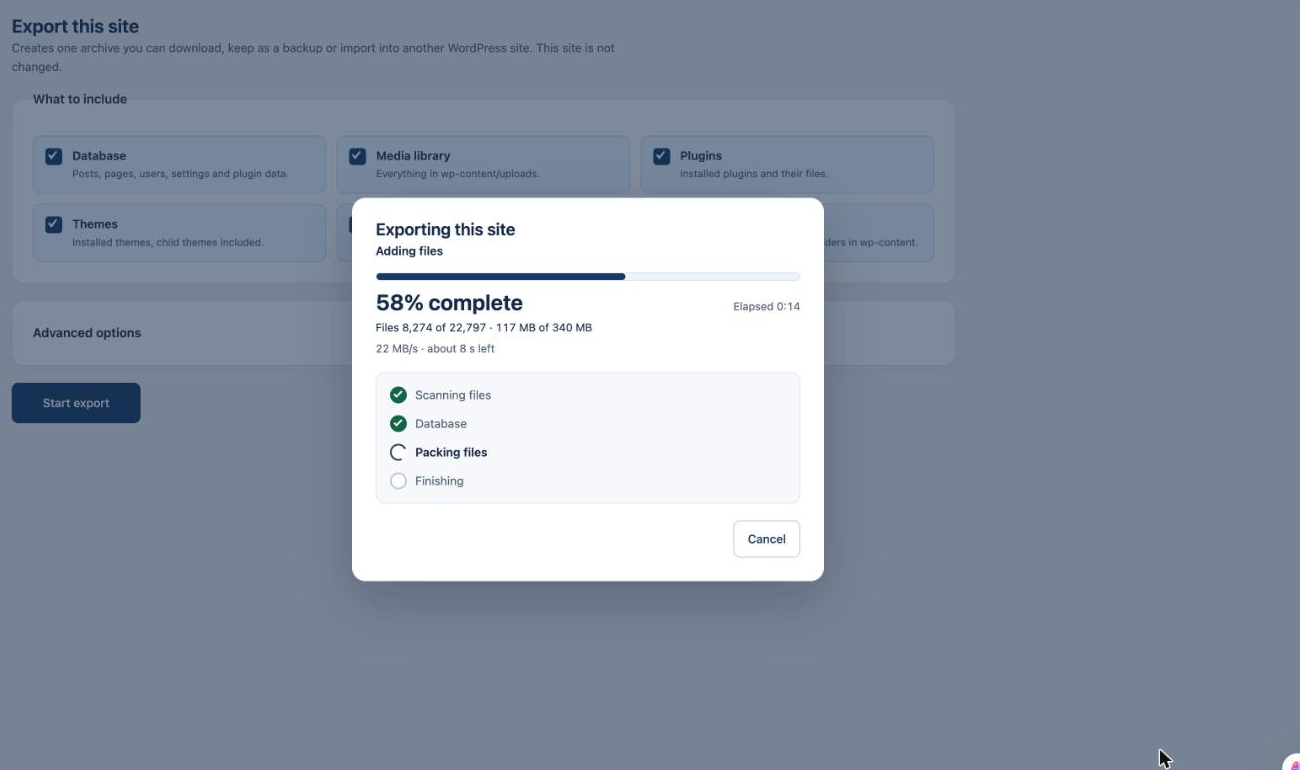
- Export this site, or import a
.mmigor.wpressbackup on the site you are moving to.
屏幕截图:


常见问题:
Is it really free for big sites?
Yes. There is no archive size limit and no paid step to import or restore. Large sites are exported, uploaded and imported in short resumable steps.
Can I import a backup made by All-in-One WP Migration?
Yes. Mench Migrate imports .wpress archives made by All-in-One WP Migration, as long as they were exported without
encryption and compression. Mench Migrate is not made by or affiliated with the makers of All-in-One WP Migration.
What are the add-ons?
Optional paid plugins from menchplugins.com: Cloud Storage (S3-compatible), Schedules and Site-to-Site. You buy one, download its ZIP from your menchplugins.com account and upload it under Plugins → Add New → Upload Plugin. This plugin works fully without them and does not contact menchplugins.com.
What happens to my backups when I delete the plugin?
They stay. Deleting the plugin removes its settings, scheduled events and any leftover import tables. Turn on Settings → "Delete all backups when the plugin is uninstalled" to remove the backups folder too.
My server runs nginx. Are backups safe?
nginx ignores the .htaccess guard. The folder name is random and contains an index.php, and the dashboard warns when
files in it can be fetched over the web; add a rule denying that folder to your nginx configuration.
What does an import keep from this site?
Your own object-cache.php, advanced-cache.php, db.php, db-error.php, maintenance.php and sunrise.php drop-ins stay (they belong to this server, and the compatibility check lists any the backup carried). mu-plugins are merged: the backup's entries replace those of the same name, and this site's others stay.
Known limitations
- Very large files lists need PHP memory: about 250 bytes per file (500,000 files fit in 256 MB). Beyond that, raise memory_limit; the error says so.
- A hand-crafted or damaged .wpress database dump with huge statements can exhaust memory while it is read. The import stops before anything on the site changes.
- On MySQL servers with lower_case_table_names=1 (Windows, some Azure hosts), tables with capital letters in their name (such as wp_wfConfig) cannot be imported; the import stops before the switch.
- When the old table prefix appears inside the new one (wp_ to wp_wp_), prefixed option and user meta keys may be rewritten twice; use clearly different prefixes.
- Files reached through a symlinked folder inside wp-content are backed up, even when the link points outside it.
- Encryption uses Argon2id with 256 MB of memory outside PHP's memory_limit; hosts that cap process memory below that may stop an encrypted export or import.
- If the WordPress salts are stored in the database (no salt constants in wp-config.php), the import replaces them, so you are asked to sign in again to finish the import.
更新日志:
- The Add-ons tab lists the Site-to-Site add-on as available.
- The standalone recovery tool is no longer inside the plugin. It is a free separate download from menchplugins.com, for when WordPress will not load; restore inside WordPress is unchanged.
- Fixes from the wordpress.org directory review: the plugin reads its own JSON files with WordPress's JSON helper, and every folder carries an index.php.
- Core API 3 for add-ons: an add-on can keep its own options when a site is imported (the mench_migrate_keep_options filter).
- Roll back works with a short-lived continue token after the session ends.
- The progress window attaches to an import that is waiting for confirmation.
- Ready for wordpress.org: the plugin no longer installs add-ons from menchplugins.com or checks for updates there. The Add-ons tab links to each add-on's page and activates an uploaded add-on with WordPress's own Activate link.
- The licence-key install moved to the free Mench Migrate Connect plugin, available from your menchplugins.com account.
- Hooks for Mench Migrate Connect on the Add-ons tab.
- In-plugin add-on activation with a licence key; one key for the All Add-ons bundle.
- Add-on hooks: a settings section on the Settings tab, dashboard cards, an archive-name filter, a reaper action, a cancel hook for cloud uploads, and error sentences for add-on codes.
- Add-on job options are kept through the export (a schedule id), and an add-on screen can show its job in the progress window.
- First release: export, import and restore of a whole site of any size, with resumable chunked uploads.
- Compatibility report, temporary tables and one-step switch, rollback for 24 hours and automatic rollback on failure.
- Find and replace of URLs and paths in serialized and JSON data; link check after import.
- Optional password encryption; All-in-One WP Migration
.wpressimport; standalonemmig-extract.php. - WP-CLI commands export, import, restore, rollback, keep, list and delete.