
Login with Google Apps
| 开发者 | cyberlord92 |
|---|---|
| 更新时间 | 2021年4月27日 21:24 |
| 捐献地址: | 去捐款 |
| PHP版本: | 5.3 及以上 |
| WordPress版本: | 5.7 |
| 版权: | GPLv2 or later |
| 版权网址: | 版权信息 |
详情介绍:
Now Secure your website login by Google Apps Login which allows Single Sign On(SSO) to WordPress using Google credentials (Gsuite) for your users or employees. Google Apps Login use Google credentials to provide better experience compared to WordPress login options. For example - User can do One-Click Login to WordPress account with their Google Credentials so it’s not required of them to remember multiple sets of username & password.
Google Apps Login is trusted enterprise plugin & used by many organizations for Single Sign On(SSO). Google Apps Login supports both OAuth & SAML to provide secure authentication. You can choose from either SAML or OAuth protocol to Single Sign On(SSO) into WordPress. Which protocol to choose depends on your requirements. You can contact us at info@xecurify.com for help with deciding the protocol you choose.
Google Apps Login maps attribute like username, firstname, lastname & email to your WordPress user details. With the help of Google Apps Login, you can manage user attributes from Gsuite Profile data to your WordPress site & WordPress updates user details according to the Gsuite user profile data at the time of registration/login. Also, you can control user access through role mapping which helps you to assign specific roles to users in WordPress according to the user's group in Google Apps/Gsuite.
FREE VERSION FEATURES
- Unlimited authentication with your Google Apps as IDP or OAuth Provider.
- Automatic user registration after login if the user is not already registered with your site.
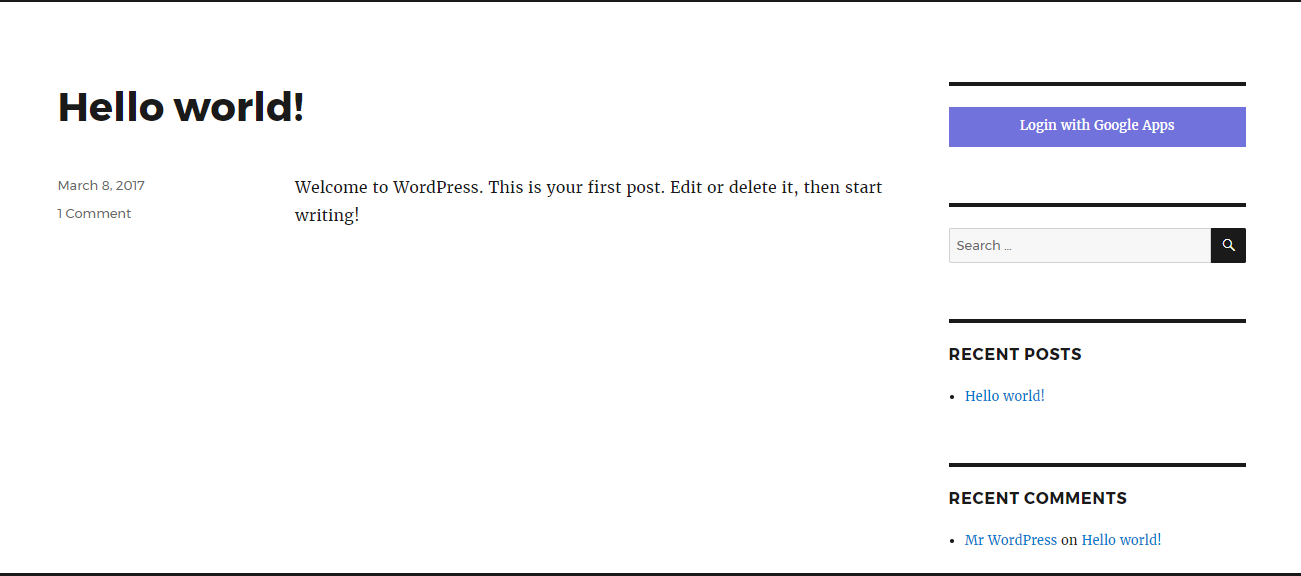
- Use Widgets to easily integrate the login link with your WordPress site.
- Attribute Mapping- Basic Attribute Mapping feature to map wordpress user profile attributes like email and first name. Manage username & email with data provided
- Oauth Provider Support- It Supports only one Oauth Provider. (ENTERPRISE : Supports Multiple Oauth Provider)
- Redirect URL after Login- Automatically Redirect user after successful login. Note: Does not include custom redirect URL
- Login to WordPress using google credentials.
- All the Free version features.
- SAML Single Logout [Premium] - Support for SAML Single Logout (Works only if your IDP supports SLO).
- Auto-redirect to IDP [Premium] - Auto-redirect to your IDP for authentication without showing them your WordPress site's login page.
- Protect Site [Premium] - Protect your complete site. Have users authenticate themselves before they could access your site content.
- Advanced Attribute Mapping [Premium] - Use this feature to map your IDP attributes to your WordPress site attributes like Username, Email, First Name, Last Name, Group/Role, Display Name.
- Advanced Role Mapping [Premium] - Use this feature to assign WordPress roles your users based on the group/role sent by your IDP.
- Short Code [Premium] - Use Short Code (PHP or HTML) to place the login link wherever you want on the site.
- Reverse-proxy Support [Premium] - Support for sites behind a reverse-proxy.
- Select Binding Type [Premium] - Select HTTP-Post or HTTP-Redirect binding type to use for sending SAML Requests.
- Integrated Windows Authentication [Premium] - Support for Integrated Windows Authentication (IWA)
- Step-by-step Guides [Premium] - Use step-by-step guide to configure your Identity Provider like ADFS, Centrify, Google Apps, Okta, OneLogin, Salesforce, SimpleSAMLphp, Shibboleth, WSO2, JBoss Keycloak, Oracle.
- WordPress Multi-site Support [Premium] - Multi-Site environment is one which allows multiple subdomains / subdirectories to share a single installation. With multisite premium plugin, you can configure the IDP in minutes for all your sites in a network. While, if you have basic premium plugin, you have to do plugin configuration on each site individually as well as multiple service provider configuration's in the IDP.
- Attribute Mapping- Custom Attribute Mapping feature to map wordpress user profile attributes like username, firstname, lastname, email and profile picture. Manage username & email with data provided
- Support for Shortcode- Use shortcode to place login button anywhere in your Theme or Plugin
- Advanced Role Mapping- Assign roles to users registering through Oauth Login based on rules you define.
- Customize Login Buttons / Icons / Text- Wide range of Oauth login Buttons/Icons and it allows you to customize Text shadow
- Custom Redirect URL after Login- Provides Auto Redirection and this is useful if you wanted to globally protect your whole site
- Redirect URL after logout- Auto Redirect Users to custom url after logout in WordPress
- OpenID Connect Support- Supports login with any 3rd party OpenID Connect server.
- Multiple Userinfo Endpoints Support- It Supports multiple Userinfo Endpoints.
- Account Linking- Supports the linking of user accounts from OAuth Providers to WordPress account.
- App domain specific Registration Restrictions- Restricts registration on your site based on the person's email address domain
- Multi-site Support- Unique ability to support multiple sites under one account
- Reverse Proxy Support- Support for sites behind a reverse-proxy or on-prem instances with no internet access.
- Email notifications- You can customize the E-mail templates used for the automatic email notifications related to user registration.
- Extended OAuth API support- Extend OAuth API support to extend functionality to the existing OAuth client.[ENTERPRISE]
- BuddyPress Attribute Mapping- It allows BuddyPress Attribute Mapping.[ENTERPRISE]
- Page Restriction according to roles- Limit Access to pages based on user status or roles. This WordPress plugin allows you to restrict access to the content of a page or post to which only certain group of users can access.[ENTERPRISE]
- Login Reports- Creates user login and registration reports based on application used. [ENTERPRISE]
安装:
From your WordPress dashboard
- Visit
Plugins > Add New - Search for
Google Apps Login. Find and InstallGoogle Apps Login (OAuth/SAML) - Activate the plugin from your Plugins page
- Download miniOrange otp verification.
- Unzip and upload the
Google Apps Logindirectory to your/wp-content/plugins/directory. - Activate Google Apps Login from your Plugins page.
屏幕截图:
更新日志:
7.0.0
- WordPress 5.7 compatibility and Code improvement according to WordPress Guidelines
- UI Changes and bug fixes
- Security fixes
- Error Description Handling
- Tested upto WordPress 4.9.6
- Minor Improvements in readme.
- Added support for OAuth SSO.
- Compatible with WordPress 4.9.4 and Removed External Links
- Fixed OTP related bug
- Added Custom Display Button
- First version with supported applications as slack, discord, aws, google, facebook