Modules Insight
| 开发者 | Pedro Matias |
|---|---|
| 更新时间 | 2026年9月10日 22:56 |
| PHP版本: | 8.0 及以上 |
| WordPress版本: | 7.1 |
| 版权: | GPL-2.0-or-later |
| 版权网址: | 版权信息 |
详情介绍:
安装:
- Upload the
modules-insightfolder to the/wp-content/plugins/directory, or install through the WordPress plugin screen directly (Plugins > Add New). - Activate the plugin through the Plugins menu in WordPress.
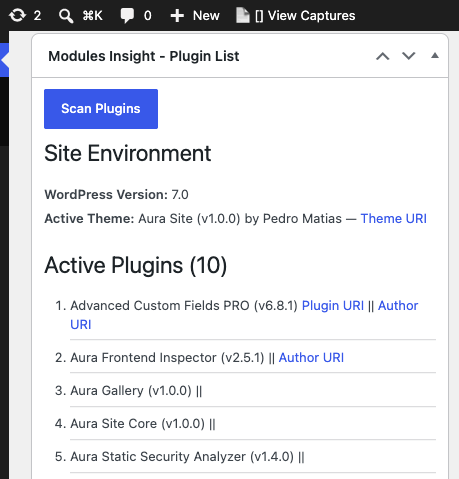
- Check your Dashboard for the "Modules Insight - Plugin List" widget, or use the shortcode
[plugin_list]on any page or post. - Press Scan Plugins to load the plugin list.
- Pick your Target PHP and Target WP versions, then press Check Upgrade Compatibility to run the risk evaluation against the WordPress.org API.
- Once the scan is complete, press Download List as JSON, Download List as CSV, Download List as Excel, or Send report to Google Sheet to export the full report, including the compatibility data.
- Optionally, set up the Google Sheets export and (on WordPress 7.0+) the AI Q&A under Settings → Modules Insight.
屏幕截图:


常见问题:
How is the PHP upgrade risk calculated?
Risk is based on two signals pulled from the WordPress.org plugin directory for each plugin:
1. Last Updated — how recently the plugin received a published release.
2. Minimum PHP Declared — the Requires PHP value the author set on WordPress.org.
The rating is assigned as follows:
- High — Not updated in over 3 years, OR declares a minimum PHP below 7.0. Investigate before upgrading.
- Low — Updated within 12–18 months AND declares PHP 7.4 or higher as its minimum.
- Medium — Anything between High and Low. Test on staging before upgrading production.
- Not on WP.org — Plugin not found in the directory. Risk must be assessed manually.
Why is my recently-updated plugin showing as Medium instead of Low?
The most common reason is that the plugin’s Requires PHP field on WordPress.org is set below 7.4 — even if the plugin runs perfectly on modern PHP. Authors often set this conservatively and forget to update it. In this case Medium does not mean the plugin is broken; it means the metadata is incomplete. Check the plugin’s own changelog or test directly on staging.
What does "Not on WP.org" mean in the risk table?
The plugin was not found in the WordPress.org directory. This is normal for premium plugins (WooCommerce extensions, page builder add-ons, etc.) and custom-built plugins. Their compatibility cannot be assessed automatically — check with the vendor or test directly on a staging environment running the target PHP version.
Are the risk ratings a guarantee?
No. They are a triage guide based on publicly available metadata. A Low-rated plugin could still have incompatibilities; a High-rated plugin might work perfectly. The table helps you decide where to focus your testing effort, not whether to skip testing altogether.
Does this plugin make any changes to my site?
No. MI does not activate, deactivate, install, or delete any plugins, and it never modifies your site's data. The only write it performs anywhere is appending report rows to a Google Sheet you configure — and only when you press Send report to Google Sheet.
How does the Google Sheets export work? Do I need a Google Cloud account?
No Google Cloud project, no API keys. You create a normal Google Sheet, add a short Google Apps Script (provided on the settings page) and deploy it as a Web App. You then paste that Web App URL and a shared secret token into Settings → Modules Insight. The plugin POSTs the report to your script, which appends the rows. The token is stored in your database (or a wp-config.php constant) and is never shown again after saving.
What does "Ask AI" need?
WordPress 7.0 or newer (the AI Client ships in core from 7.0), with an AI provider (Anthropic, Google, or OpenAI) configured by an administrator in your site's AI settings. Modules Insight uses the core AI Client — it stores no API keys of its own. If no provider can serve a request, the "Ask AI" button doesn't appear and the settings page explains why. If the "Connector Approvals" experiment is enabled, an administrator must approve Modules Insight after its first request. Answers are cached for 12 hours per question to limit provider costs.
Who can see the plugin list and run the compatibility check?
Only users with the activate_plugins capability (typically Administrators). The settings page requires manage_options.
What formats can I export?
JSON, CSV, Excel, or a Google Sheet. All include the PHP and WordPress compatibility data (last updated, "tested up to", minimum PHP, both risk levels) for any plugin that has been checked. Plugins not yet checked show not_checked in those fields.
Can I use this on a live/production site?
Yes. MI loads no assets unless an admin explicitly presses Scan, and makes no outbound requests except the admin-initiated ones listed under "External services" above.
更新日志:
- Feature: "Download List as Excel (for SharePoint)" — a native
.xlsxexport. It opens with real columns and correct UTF-8 text in Excel, Excel Online and SharePoint, where CSV delimiter and encoding detection is unreliable. Written in-plugin; no library or PHP zip extension required. - Fix: The CSV export now begins with a UTF-8 BOM, so Excel stops mangling accented author names after the download loses its charset header.
- Fix: "Send report to Google Sheet" failed with "The Google Sheet rejected the request: HTTP 200". The Apps Script Web App replies with a 302 to script.googleusercontent.com, an endpoint that only accepts GET; WordPress re-issued the redirect as POST and never received the JSON reply. The plugin now follows the redirect with a GET.
- Fix: The report's spacer row is no longer an empty array — Apps Script's appendRow() rejects one, which could fail the whole push. The bundled Apps Script also guards against it.
- Change: "Send report to Google Sheet" now warns when upgrade compatibility has not been checked yet, so you don't push a report whose risk columns all read "not_checked".
- Fix: A single failed plugin lookup during "Check Upgrade Compatibility" no longer aborts the whole run — the remaining plugins are still checked and the progress line reports how many failed. Row updates also tolerate an unexpected table layout instead of throwing.
- Feature: WordPress upgrade risk — a second risk column, rated against a selectable target WordPress version (6.7–7.1), derived from each plugin's "Tested up to" value and last-updated age.
- Feature: PHP 8.5 added to the target-PHP selector.
- Feature: Send report to Google Sheet — push the full report into a spreadsheet via a Google Apps Script Web App you deploy once. No Google API keys are stored in WordPress. Configured under Settings → Modules Insight.
- Feature: Ask AI — for plugins rated Medium / High / Not on WP.org, ask a free-text question and get an answer from the WordPress core AI Client (WordPress 7.0+ with a provider configured under Settings → AI). Answers cached 12 hours.
- Change: The compatibility check now covers both PHP and WordPress in one pass; the button is relabelled "Check Upgrade Compatibility".
- Change: JSON and CSV exports gain the WordPress risk column and record both selected targets. CSV cell values starting with = + - @ are now prefixed to prevent spreadsheet formula injection.
- Change: Asset cache-busting is tied to the plugin version again (was pinned at 3.2.0).
- Fix: Translation files renamed from
modules_insight-*tomodules-insight-*so WordPress actually loads them (the text domain ismodules-insight). - Fix: Compatible with WordPress 7.1; README requirements corrected to WordPress 6.0 / PHP 8.0.
- Dev: Code split into
includes/(settings, google-sheets, ai).
- Fix: Compat table no longer overflows the dashboard widget — wrapped in a horizontally scrollable container.
- Fix: "Tested up to (WP)" now always reflects fresh data — stale transients built before 3.2.0 are ignored and re-fetched automatically.
- Fix: Plugin icon now shown in the dashboard widget title bar.
- Fix: Renamed icon-265x256.png to icon-256x256.png so WordPress.org recognises and displays the plugin icon correctly.
- Updated plugin icons (128x128 and 256x256).
- Feature: Target PHP version selector — choose PHP 8.0 through 8.4 before running the compatibility check. Risk thresholds shift with the selected version.
- Feature: "Tested up to (WP)" is now fetched from WordPress.org and shown as a third signal. An age-driven High rating is softened to Medium when the plugin declares compatibility with a recent WordPress version (6.3+), suggesting the author is actively maintaining it.
- Export: JSON and CSV exports now include the "Tested up to (WP)" field and reflect the selected target PHP version in the risk column header.
- Fix: Screenshots and plugin icon now correctly deployed to the WordPress.org assets directory.
- Compat: Tested and confirmed compatible with WordPress 7.0.
- Updated minimum requirements: WordPress 6.0+, PHP 8.0+.
- Updated screenshots and plugin icon.
- Plugin URI updated to https://aura-plugins.com.
- Docs: Rewrote plugin description and FAQ to lead with the PHP upgrade risk evaluator and document how risk is calculated.
- Feature: PHP Compatibility Checker — after a scan, a "Check PHP 8.3 Compatibility" button queries the WordPress.org API for each plugin (last updated, minimum PHP required) and displays a colour-coded risk table (Low / Medium / High / Not on WP.org). Results are cached per plugin for 24 hours.
- Feature: JSON and CSV exports now include the cached compatibility data (last updated, min PHP, risk level) for any plugin that has been checked. Exports without a prior check show "not_checked".
- Feature: Plugin assets now load on the admin dashboard as well as the frontend, enabling the compatibility checker inside the dashboard widget.
- Feature: Plugin data is now loaded on demand — a Scan button must be pressed before any data is retrieved. Nothing runs on page load automatically.
- Perf: Plugin data is cached via transient (5 min) and auto-invalidated on plugin activate/deactivate/update and theme switch.
- Perf: Replaced O(n) in_array() loop with O(1) array_flip()+isset() for active plugin lookups.
- Perf: Cached is_single()||is_page() result before the plugin loop to avoid redundant calls per iteration.
- Perf: Removed redundant wp_kses() pass in the dashboard widget — all output is already escaped at source.
- Fix: Print CSS now correctly hides the download buttons wrapper (was targeting a stale selector).
- Feature: Report now includes WordPress version and active theme info (name, version, author, URI) in the HTML output and in both JSON and CSV exports.
- Feature: Added CSV export — administrators can now download the plugin list as a .csv file alongside the existing JSON export.
- Version bump.
- Version bump.
- Version bump.
- Version bump.
- Version bump.
- Fix: Remove duplicate nonce hidden field in the download form (wp_nonce_field() already outputs it).
- Fix: JS print listener now only closes
<details>elements that were auto-opened, preserving manually-opened ones. - Fix: Declare
elmsandewithconstin the print media listener to avoid implicit globals. - Perf: Move
get_site_option('active_sitewide_plugins')call outside the plugin foreach loop on multisite. - Security: Simplify shortcode capability check — remove
is_admin()context check, rely solely onactivate_plugins. - Perf: Register assets on
wp_enqueue_scriptsand enqueue them inside the shortcode, so they only load on pages using[plugin_list]. - Perf: Update asset version strings from 2.3.0 to 2.9.2 to ensure browsers pick up current files.
- Accessibility: Replace
outline: noneon button focus with a visible2px solidoutline. - Dev: Add
.vscode/settings.jsonenabling Intelephense's built-in WordPress stubs for accurate static analysis.
- Style: Added
fusion-tb-footerandfusion-footerCSS classes to print hide rules for Avada theme compatibility. - Version bump for CSS and JS assets.
- Feature: Report header now shows site name, date, and URL when shortcode is rendered on a page or post.
- Fix: Corrected plugin GitHub URI to https://github.com/matias2018/Plugin-List-Display.
- Style: Added specific print-hide rules for Avada theme custom footer elements.
- Feature: Added informational message for users without the download capability.
- Feature: Enqueue JavaScript to auto-expand
<details>elements when printing.
- Feature: Show plugin description inside
<details>/<summary>when shortcode is rendered on a page or post. - Feature: Added
is_single()/is_page()context check to conditionally show the description block.
- Feature: Added print styles to hide the download button, header, and footer when printing.
- Feature: Added network-active status display for multisite installs.
- Refine: Removed
<details>/<summary>wrapper from description in default (non-page) view.
- Fix: Use
current_time()instead ofdate()for JSON filename timestamp to respect WordPress timezone settings (Fixes PHPCS error).
- Feature: Wrap plugin descriptions in
<details>/<summary>tags for a cleaner default view. - Fix: Add required
translators:comments for internationalization functions with placeholders (Fixes Plugin Check error). - Fix: Ensure
<details>and<summary>tags are allowed inwp_ksesfor the dashboard widget. - Refine: Improve multisite plugin detection slightly.
- Refine: Use case-insensitive sorting for plugin lists.
- Refactor: Introduce helper function
get_plugin_insight_data()to centralize data retrieval. - Security: Regenerate plugin data on download instead of passing via POST.
- Security: Add capability checks (
activate_plugins) for viewing list and downloading JSON. - Security: Remove
noprivaction hook for downloads. - Feature: Add more plugin details (version, description, author, URIs) to data structure.
- Feature: Handle network-activated plugins on multisite installs.
- Improvement: Use
wp_json_encode()for standard JSON output. - Improvement: Use output buffering and proper escaping (
esc_*,wp_kses_post) throughout HTML generation. - Improvement: Make widget title translatable.
- Fix: Address various Plugin Check escaping errors.
- Initial version shared for review (contained shortcode, dashboard widget, basic JSON download via POST).
- (Internal/Previous Version) Initial concept release.