
Mortgage Calculator
| 开发者 | mlcalc |
|---|---|
| 更新时间 | 2026年10月24日 18:35 |
| PHP版本: | 7.4 及以上 |
| WordPress版本: | 7.1 |
| 版权: | GPLv2 or later |
| 版权网址: | 版权信息 |
详情介绍:
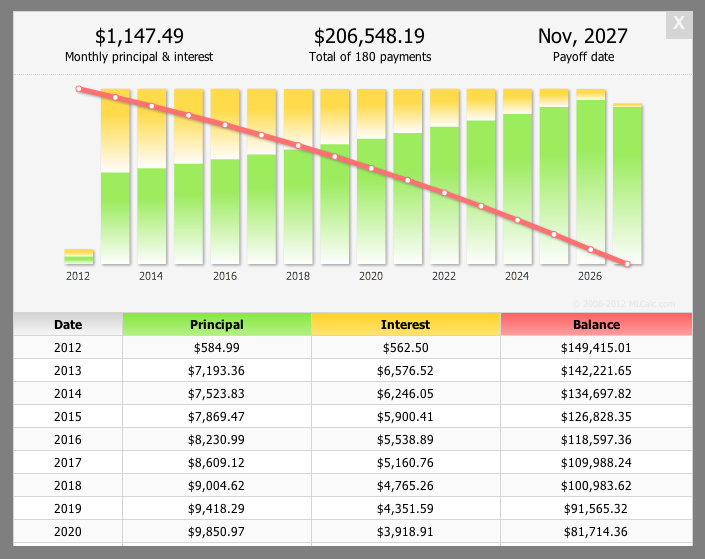
[mlcalc] shortcode. Visitors enter the purchase price or loan amount, down payment, rate and term, then press Calculate to see a summary, a chart and an amortization schedule in a popup. It is built for mortgage loan officers, real-estate agents and finance or home-buying sites.
The calculation and the results popup are provided by the MLCALC.com service, which means the calculator needs an internet connection and sends the entered values there when Calculate is pressed (see External services below).
Features
- Mortgage calculator with property tax, home insurance and PMI
- Loan calculator for general loans
- Summary, chart and amortization schedule (by month or by year) in a popup window
- Choose which calculators to show: mortgage and loan, mortgage only or loan only
- Narrow (150px) or wide (300px) form, suitable for sidebars and page content
- Preset default values with shortcode attributes or in the widget settings
- Currency: US dollar, euro, pound or a currency code of your own
- Interface languages: English, German, Spanish, French, Italian, Russian, Portuguese and Albanian
- CSS, JavaScript and images are bundled with the plugin and loaded from your own server
- Free for commercial use
[mlcalc]
Set default values:
[mlcalc default="mortgage" size="narrow" price="125,000" rate="6.2" language="es" currency="eur"]
You can also add the "Mortgage Calculator" widget under Appearance > Widgets, or call <?php display_mlcalc(); ?> from a theme template.
Shortcode parameters
- default = mortgage | loan | mortgage_only | loan_only
- size = wide | narrow
- currency = usd | eur | gbp | any code of your own
- rate = interest rate
- price = purchase price
- mterm = mortgage term in years
- down = down payment in percent
- tax = property tax
- insurance = property insurance
- pmi = PMI in percent
- amount = loan amount
- lterm = loan term in years
- schedule = month | year | month_nc | year_nc | none (_nc stands for "no choice" for the visitor)
- language = en | de | es | fr | it | pt | ru | al
[mlcalc]
[mlcalc default="mortgage_only"]
[mlcalc default="loan_only" amount="20,000" lterm="5"]
[mlcalc default="mortgage" size="narrow" price="125,000" rate="6.2" language="es" currency="eur"]
安装:
- Upload the
mortgage-loan-calculatordirectory (including all files within) to the/wp-content/plugins/directory. - Activate the mortgage calculator plugin through the 'Plugins' menu in WordPress.
- If you are using widgets, just add the Mortgage Calculator to the sidebar through the
Appearance -> Widgets -> Mortgage Calculatormenu in WordPress. - Add the following code:
<?php display_mlcalc(); ?>to your template where you would like the mortgage loan calculator form to appear. - Add the shortcode
[mlcalc]to your page or post and configure default mortgage parameters.
屏幕截图:
常见问题:
How do I add the mortgage calculator to a page?
Paste [mlcalc] into the page or post. In the block editor use a Shortcode block. To start with specific values, add attributes, for example [mlcalc default="mortgage" price="400,000" rate="6.5" down="20"].
How do I show only the mortgage calculator, or only the loan calculator?
Use default="mortgage_only" or default="loan_only". With default="mortgage" or default="loan" both calculators are available and the chosen one is shown first.
Does it calculate PMI and property tax?
Yes. The mortgage form has fields for property tax, home insurance and PMI, which you can preset with the tax, insurance and pmi attributes.
Which languages and currencies are supported?
English, German, Spanish, French, Italian, Russian, Portuguese and Albanian, set with the language attribute (or the widget settings). Currencies: usd, eur, gbp, or any currency code of your own.
Does it send data to an external service?
Yes. When a visitor presses Calculate, the numbers typed into the form are sent to MLCALC.com, which returns the results popup. Nothing is sent before that and no personal data is collected. See the External services section for details and links.
Does it work offline?
No. The results are produced by MLCALC.com, so the visitor needs an internet connection.
May I use your widget on my commercial website
Yes. Absolutely.