
MotionKit – Visual GSAP Animation Builder for Elementor, Divi, Bricks & More
| 开发者 | wealcoder |
|---|---|
| 更新时间 | 2026年11月4日 17:17 |
| PHP版本: | 7.4 及以上 |
| WordPress版本: | 7.1 |
| 版权: | GPLv2 or later |
| 版权网址: | 版权信息 |
详情介绍:
- Design your website with any page builder or theme.
- Install this connector plugin and create a free MotionKit account.
- Connect your website with one click.
- Animate without coding. Open the visual editor, click an element, pick one of 95+ presets or build a custom GSAP timeline, preview on every device and publish.
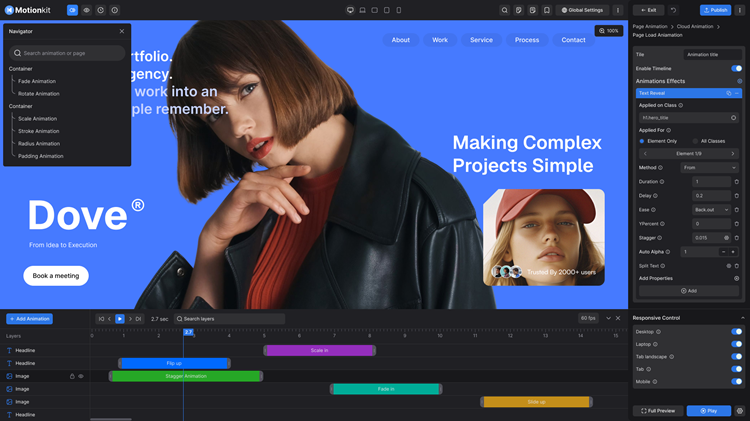
- Visual GSAP animation builder – point, click and animate on a live preview of your real page. No code snippets, no enqueuing scripts.
- 95+ ready-made animation presets – text, image, scroll, horizontal scroll, smooth scrolling, flip, split text, parallax, SVG, physics and more. Select an element, apply a preset, done. See the full preset library below.
- One plugin for every builder – animate Elementor, Divi, Gutenberg, Avada, Bricks, WPBakery, SeedProd, Breakdance, Oxygen, Beaver Builder and any theme with the same tool and the same saved animations.
- Full GSAP plugin support – ScrollTrigger, ScrollSmoother, ScrollToPlugin, Observer, SplitText, ScrambleText, DrawSVG, MorphSVG, MotionPathPlugin, MotionPathHelper, Flip, Draggable, InertiaPlugin, CustomEase, EasePack, GSDevTools and Physics2D.
- Visual timeline editor – sequence multiple elements, overlap tweens, stagger cards and grids, fine-tune easing.
- Complete ScrollTrigger controls – start and end position, scrub, pin, pin spacing, play once, toggle actions and debug markers.
- Responsive animations – separate settings for desktop, laptop, tablet landscape, tablet and mobile. Disable any effect on any device.
- Save, export and reuse – save animations to your library or export them as JSON and import them into any other website on any other page builder. Build once, reuse on every client site.
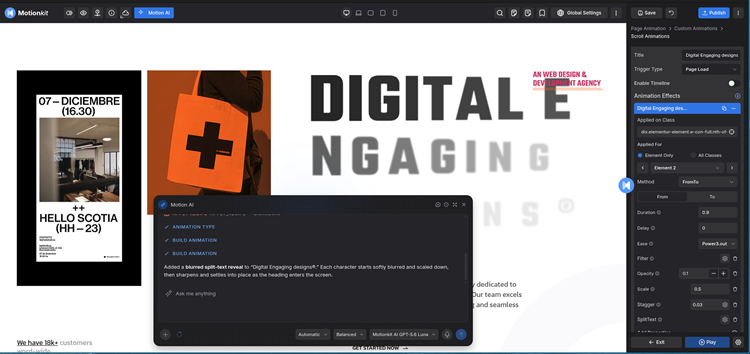
- AI animation builder – describe the motion you want and MotionKit's built-in AI adds it to the page or element.
- MCP server for AI assistants – connect Claude, ChatGPT or any MCP-compatible AI, say "add professional animations to my whole website", and MotionKit does it automatically.
- Fast and lightweight – GSAP + WAAPI runtime loaded only on pages that use animations, compiled timelines cached, all assets bundled locally. Nothing loads from third-party CDNs on your front end.
- Accessible by default – respects the visitor's reduced-motion preference.
- Beyond WordPress – the same editor supports Webflow, Shopify, Wix and Framer, plus an SDK for AI-built and custom-coded sites, so your animation library travels with you.
- Elementor – the easiest way to use GSAP in Elementor. Animate any widget, container or section, including Elementor V4 atomic elements. No Elementor Pro required. GSAP animation for Elementor
- Divi – a complete Divi animation plugin for Divi 4 and Divi 5. Scroll animations, split text reveals, parallax and hover effects on any Divi module, row or section, far beyond Divi's built-in options. GSAP animation for Divi
- Gutenberg – animate any core, pattern or third-party block in the block editor and full site editing themes. GSAP animation for Gutenberg
- Bricks Builder – ScrollTrigger animations, pinned sections and text reveals without custom interactions code. GSAP animation for Bricks
- Avada, WPBakery, SeedProd, Breakdance, Oxygen, Beaver Builder – full support, no extra setup.
- Any theme – Astra, Kadence, GeneratePress, OceanWP, Hello Elementor, Twenty Twenty-Five and every classic or block theme.
- Animate with plain language – ask "fade the hero heading up on scroll" or "stagger the service cards", and your AI assistant picks the element, builds the animation and plays it in the MotionKit editor.
- Whole-page animation in one prompt – say "add professional scroll animations to this page" and the assistant reads the page's sections, headings and card groups, then animates each one with consistent, calm timing.
- Edit with words – "make it slower", "change the easing", "scrub it with the scroll". The assistant changes the animation you already have instead of stacking new ones.
- Real GSAP, fully editable – everything the AI builds is a normal MotionKit animation. See it on the timeline, fine-tune any setting by hand and save it to your library.
- Uses the editor's own rules – the AI works through the same validated commands as the editor, so it can only make changes you could make yourself, and every change shows in the live preview.
- Works with your favourite AI – Claude (claude.ai, Claude Desktop and Claude Code), ChatGPT and other MCP clients connect with one URL and your MotionKit sign-in.
- In Claude, open Settings → Connectors → Add custom connector. In another MCP client, add a remote MCP server.
- Enter the MotionKit MCP URL
https://editor.motionkit.io/mcpand sign in with your MotionKit account. - Open your page in the MotionKit editor, then ask your assistant to animate it.
安装:
- In your WordPress dashboard go to Plugins → Add New, search for MotionKit and click Install Now, or upload the plugin ZIP file.
- Click Activate.
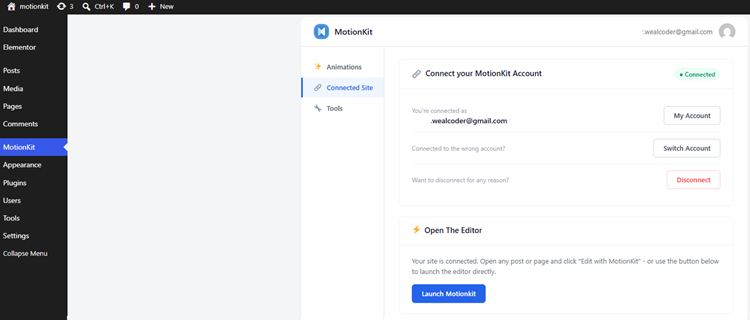
- Open the MotionKit menu and click Connect to link your site with your MotionKit account (free to create).
- Click Launch Editor, select any element on your page and apply a preset or build your own animation.
屏幕截图:
常见问题:
What is MotionKit?
MotionKit is a visual GSAP animation builder for WordPress. You design your site with any page builder or theme, connect it to MotionKit, and add scroll animations, text reveals, parallax, hover effects and page transitions by clicking elements on a live preview, without writing code.
Who makes MotionKit?
MotionKit is built by Wealcoder, the team behind Animation Addons for Elementor and other WordPress plugins and themes used on more than 30,000 websites.
Is MotionKit free?
Yes. The plugin is free and the free plan covers 1 website, 2 pages and 15 active animations with no time limit. Paid plans add unlimited pages and animations, premium presets and AI features.
Why use MotionKit instead of Elementor Pro Motion Effects or Divi's built-in animations?
Built-in builder animations give you a fixed menu of entrance effects. MotionKit gives you real GSAP: scroll-scrubbed timelines, pinning, split text, SVG drawing, Flip transitions, physics and a visual timeline for sequencing several elements. It also works identically across every builder, so your animations are not locked to one tool, and you can reuse them on other sites.
Do I need to know GSAP or JavaScript?
No. MotionKit generates the GSAP and Web Animations API code for you. If you do know GSAP, you will recognise ScrollTrigger start/end, scrub, pin, stagger and easing controls.
How do I add GSAP animations to WordPress without coding?
Install MotionKit, connect your site, open the visual editor, click an element and choose a preset such as "Text Reveal" or "Stagger Fade Up". Adjust timing, preview on each device and publish.
Which GSAP plugins does MotionKit support?
ScrollTrigger, ScrollSmoother, ScrollToPlugin, Observer, SplitText, ScrambleText, DrawSVG, MorphSVG, MotionPathPlugin, MotionPathHelper, Flip, Draggable, InertiaPlugin, CustomEase, EasePack, GSDevTools and Physics2D.
Does MotionKit work with Elementor?
Yes, with Elementor Free and Elementor Pro, including Elementor V4. Elementor Pro Motion Effects are not required.
Does MotionKit work with Divi?
Yes. MotionKit is fully compatible with Divi 4 and Divi 5 and animates any Divi module, row or section.
Does MotionKit work with Gutenberg, Avada, Bricks, WPBakery, SeedProd, Astra or my theme?
Yes. MotionKit works with the block editor and block themes, Avada, Bricks Builder, WPBakery, SeedProd, Breakdance, Oxygen, Beaver Builder, Astra, Kadence, GeneratePress and any WordPress theme.
How do I create a scroll-triggered animation (ScrollTrigger) in WordPress?
Select an element, choose the Scroll trigger, then set the start and end positions. Turn on Scrub to tie the animation to scroll progress, or Pin to hold a section in place while content scrolls.
Can I add parallax, horizontal scroll or smooth scrolling?
Yes. Parallax, horizontal scroll and smooth scrolling (ScrollSmoother) are available as presets and as custom timelines.
Can I animate text by letter, word or line?
Yes. Split text presets animate headings by character, word or line with stagger, including typewriter, scramble and masked reveal effects.
Can I reuse animations on another website or page builder?
Yes. Save any animation to your library or export it as a JSON file, then import it into any other website built with any page builder.
Can I use AI to build animations?
Yes, in two ways. The editor has built-in AI that adds animation to a page or element from a prompt. MotionKit also provides an MCP server, so AI assistants such as Claude and ChatGPT can connect and add professional animations across your entire website automatically.
How do I connect Claude or ChatGPT to MotionKit?
Add MotionKit as a remote MCP server in your AI assistant using https://editor.motionkit.io/mcp, then sign in with your MotionKit account. In Claude this is Settings → Connectors → Add custom connector. Open your page in the MotionKit editor and ask the assistant to animate it, for example "add a smooth scroll reveal to every section".
Will MotionKit slow down my website?
No. The runtime is lightweight, built on GSAP and the native Web Animations API, loads only on pages that contain animations and caches compiled timelines. All scripts and styles are bundled locally.
Are animations responsive?
Yes. Every animation has separate settings for desktop, laptop, tablet landscape, tablet and mobile.
Is MotionKit accessible?
MotionKit respects the visitor's "prefers-reduced-motion" setting, so animations are reduced or skipped for users who request it.
Does MotionKit work outside WordPress?
Yes. The MotionKit editor also supports Webflow, Shopify, Wix, Framer and other platforms, and an SDK is available for AI-built and custom-coded websites. This plugin is the WordPress connector.
Do I need a MotionKit account?
Yes, a free account is required to use the hosted visual editor. Published animations are stored on your WordPress site and keep running even if you disconnect.
What happens to my animations if I deactivate or disconnect?
Your animation data stays on your site. Disconnecting only revokes the editor connection; nothing is deleted unless you remove it from the Tools tab.
更新日志:
- New: Live demos for 19 more presets in the preset library: 11 image animations and 8 container animations.
- New: On connected sites running MotionKit with GSAP older than 2.0.2, the MotionKit page says a newer version is available, with a link to download it. This notice runs until November 12, 2026.
- Fixed: Deleting MotionKit no longer removes your animations and connection while MotionKit with GSAP is installed but inactive.
- Fixed: The DrawSVG demo link in the plugin description.
- New: Motion AI chat in the MotionKit editor. Describe the animation you want in plain words and it builds it on your page, ready to fine-tune on the timeline.
- New: Filter the Animations list by page.
- New: Publish a draft animation straight from the MotionKit dashboard.
- New: Bulk Publish and Set as Draft for selected animations.
- Improved: Animation details open in a popup, so the list stays readable on any screen.
- Improved: Lists load more rows as you scroll, headers and tabs stay in view, and a Back to top button.
- Improved: View page and Edit in editor open the right URL for every page type, including the blog page, 404, search and archives.
- Improved: A simpler Connect screen that shows only your MotionKit account and tells you what to do next.
- Tweak: Build Animation is now called Animate with MotionKit.
- Fixed: The Animations tab showed "No animations found" on sites that had animations.
- Fixed: Bulk actions on several animations of the same page no longer undo each other.
- Fixed: Connect appears again when the site was removed from the MotionKit dashboard.
- Removed: The Upgrade to GSAP and Revert to Free actions, which did not change how an animation played.
- Improved: The MotionKit settings screen now leads with Connect, and offers the optional MotionKit with GSAP add-on only after the site is connected.
- Fixed: In the MotionKit editor, hovering or clicking a split text heading now selects the whole heading instead of a single letter.
- Improved: Preset library links in the description.
- New: Export and import animations as JSON for reuse on other sites.
- Improved: Runtime performance and caching of compiled timelines.
- Improved: Compatibility with Elementor V4, Divi 5 and Bricks.
- Fixed: Editor connection edge cases.
- Initial release.
- Free animations now load on the front page, archives, search and 404 pages.
- Scroll animations follow scroll position smoothly.
- Scroll trigger element settings and edits to Start, End, Play Once and Scrub take effect immediately.
- Free animations start at the viewport centre by default.