
MsgBox – AI Sales Agent & Lead Capture
| 开发者 | aviyo |
|---|---|
| 更新时间 | 2026年10月7日 09:56 |
| PHP版本: | 7.4 及以上 |
| WordPress版本: | 7.1 |
| 版权: | GPLv2 or later |
| 版权网址: | 版权信息 |
详情介绍:
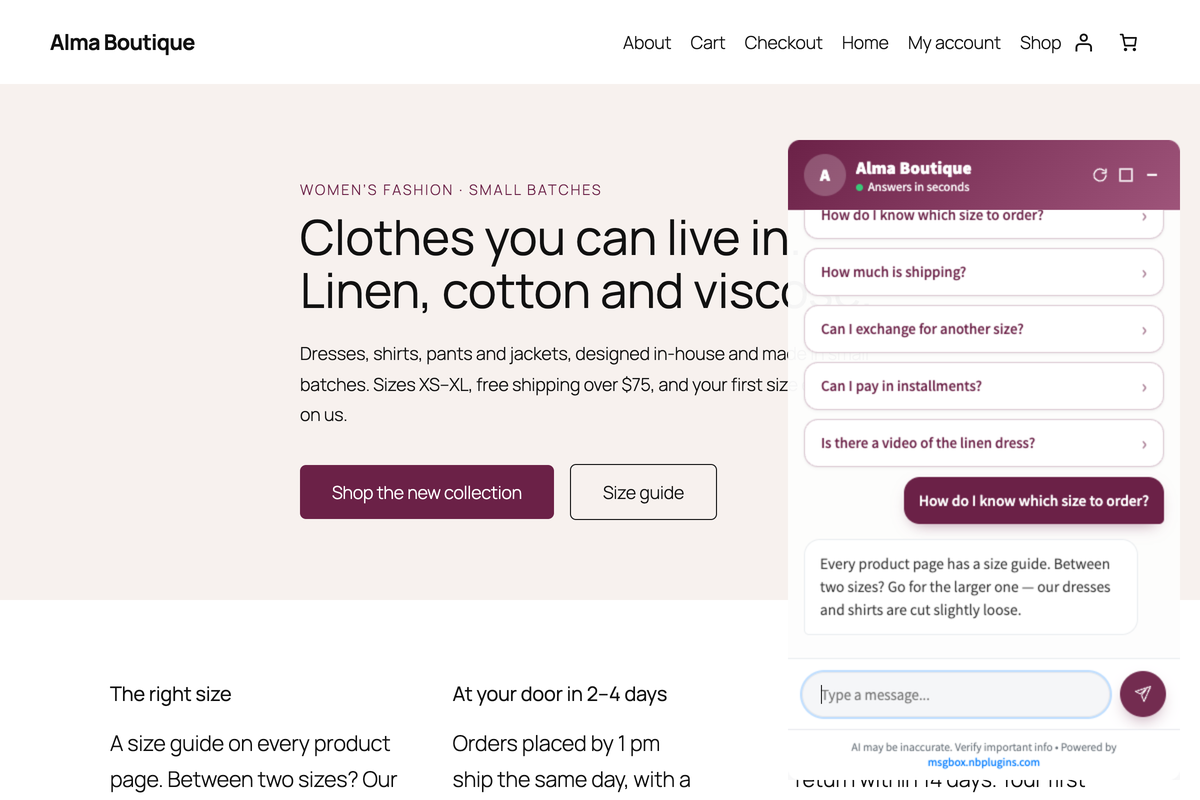
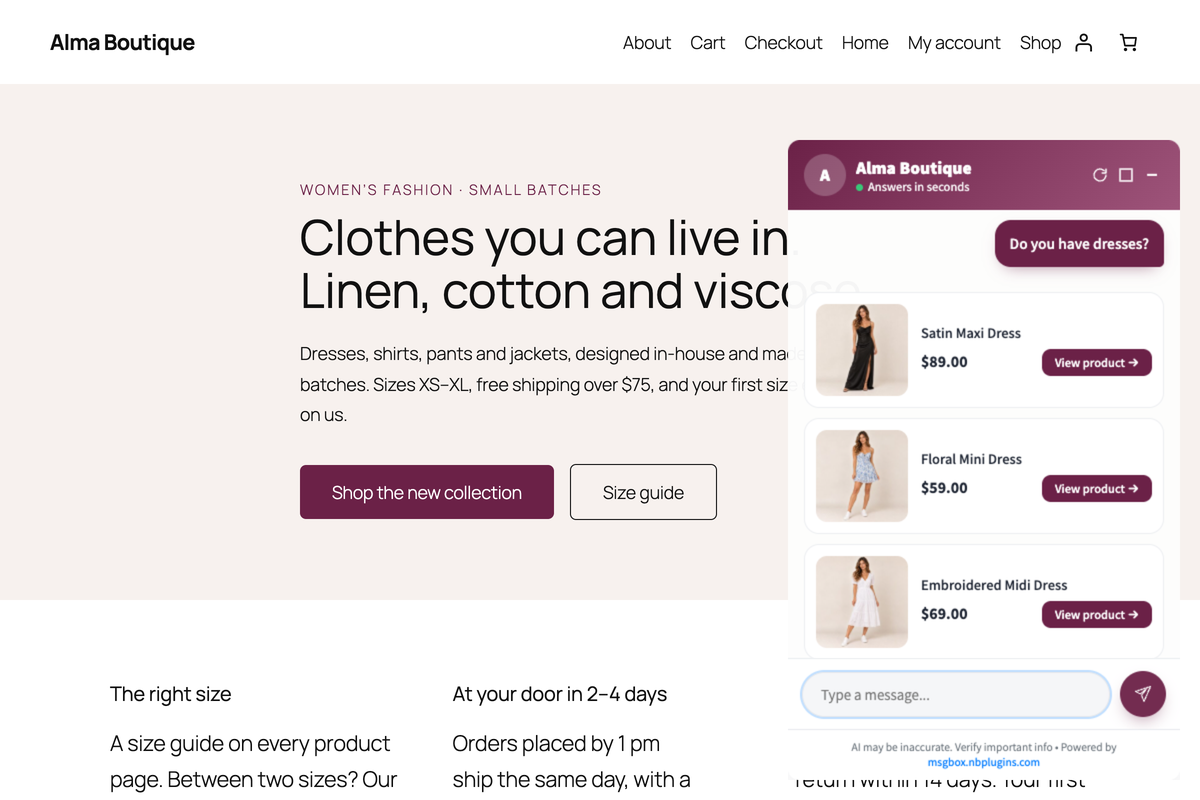
- It sells, not just chats - it understands what the visitor is looking for and shows matching products with photo, price and a "View product" button.
- Leads straight to your phone - the MsgBox app for iPhone and Android alerts you as soon as someone leaves their details (paid plans). Get the app: App Store · Google Play
- Knows your business - describe your business once, the way you would brief a new employee. No scripts, no flow builder.
- Speaks your customers' language - replies automatically in the visitor's language, in 28 languages.
- Shows, not only tells - add a YouTube or Vimeo link to an answer and the video plays right inside the chat.
- Looks like your brand - your colours, your icon, your greeting.
- AI included - no OpenAI account, no API keys, no extra AI bill.
- Product recommendations - "Do you have dresses?" gets product cards with photo and price.
- "Where is my order?" - shoppers check their order status themselves, with their order number and email or phone.
- Ask the AI on product pages - an optional box on the product page for questions about that product.
- One-click store connection - no WooCommerce keys to create or paste; disconnect any time.
- Install the plugin and create your free account from its settings page.
- Tell the bot about your business in your MsgBox dashboard.
- Turn the chat on for your visitors.
- MsgBox is an automated assistant, not a live-chat console. When a visitor wants a person, the bot collects their details and you follow up by phone, WhatsApp or email.
- Everything is set up in your MsgBox dashboard. The plugin only connects your site and decides where the chat appears: which pages, which visitors, which corner, and whether to wait for your cookie banner.
- WordPress 5.9 or higher
- PHP 7.4 or higher
- A MsgBox account (free to create from the plugin)
安装:
- Install and activate the plugin.
- Open MsgBox Chat in the WordPress admin menu.
- Enter your Site ID, or create a MsgBox account from there.
- Choose who sees the chat. It starts as administrators-only so you can check it first; set User Visibility to Everyone when you are ready for visitors.
屏幕截图:




常见问题:
Where do I get my Site ID?
Your Site ID is available in your MsgBox Dashboard at https://msgbox.nbplugins.com. Sign up for an account if you don't have one.
Can I hide the widget on certain pages?
Yes! In the plugin settings, you can enter comma-separated page or post IDs where you want to hide the widget.
Does this work with WooCommerce?
Yes! If WooCommerce is installed, MsgBox connects to your product catalog automatically and securely — there are no API keys to generate or paste. The plugin answers MsgBox over a signed, read-only connection.
Is the widget mobile-friendly?
Absolutely. The MsgBox widget is fully responsive and works great on all devices.
Does this plugin slow down my site?
No. The widget script loads asynchronously with the defer attribute, ensuring it doesn't block your page rendering.
Can a human agent take over a conversation?
No. MsgBox is an unattended chatbot — there is no agent console and nobody can join a live conversation. When a visitor wants a person, the bot offers a contact form; the details land in your MsgBox inbox and, on paid plans, as a push notification on your phone. You follow up by phone, WhatsApp or email, outside the chat.
Do I need my own OpenAI or other AI account?
No. The AI is included in your MsgBox plan. There are no AI keys to create, paste or pay for separately.
What counts as an AI reply?
Only replies the AI generates. Answers served from the Q&A you wrote yourself, and the contact form, are not counted — so the Q&A keeps answering visitors even after the monthly AI allowance is used up.
What happens when the monthly allowance runs out?
The chat stays on your site and keeps working. Visitors are told the assistant is not available right now and are offered the contact form, so you still get the lead; your own Q&A answers continue as normal. The allowance resets each month, and nothing is switched off.
Are the texts I write myself translated?
The assistant's own answers follow the visitor's language automatically. Text you author works differently, and it is worth knowing which is which before you build:
- Q&A - translatable. Add a translation per language in your dashboard; a visitor is offered the questions that exist in their language, and the ones you wrote yourself are shown to anyone reading in your site's own language.
- Conversation Flows - not translatable. A flow card is shown exactly as you typed it, to every visitor, in every language. If your visitors read more than one language, bear that in mind when you write a flow.
Can I make the bot always answer in one language?
Yes. By default the bot replies in the visitor's own language. Turn the multi-language option off in your dashboard and every reply comes back in your site's content language instead.
Is my data used to train AI models?
No. We do not use your content or your visitors' messages to train models, and our AI routing explicitly forbids the providers from retaining data for training. Messages are processed to produce the answer and nothing more.
How long are conversations kept?
Up to 90 days on paid plans and 30 days on the free plan, after which they are permanently deleted by an automated daily process. Operational logs that contain visitor data are kept 30 days on every plan.
Can I have my data deleted sooner?
Yes. Email support@nbplugins.com and we will delete it. Deleting your account removes your data within 30 days, apart from billing records we are required to keep for tax purposes.
Is MsgBox free?
Yes. MsgBox includes a free plan that keeps working on your site — it answers visitors from the Q&A you set up, plus a monthly allowance of AI replies, at no cost. Premium plans add faster responses, WooCommerce product search, mobile push notifications, and higher limits. New accounts also get a 7-day head start with premium features to try — afterwards the account simply continues on the free plan. Nothing is switched off.
更新日志:
- Added: the chat button no longer appears on top of your cookie-consent banner. When a visible consent banner covers the chat's corner, the chat waits until the visitor closes it (accepts or rejects), for up to 30 seconds, and then appears as usual. Works with most cookie-consent plugins; a banner the chat cannot recognize simply changes nothing. A new "Cookie Banner" setting turns this off.
- Changed: the dashboard's "force this position for all visitors" setting now really moves the chat button for every visitor — including sites where this plugin sets an explicit position.
- Changed: when the chat is set to "Admins Only", the status box on the settings page says so in its title, in amber — instead of a green "Live!" — and offers a one-click "Show the chat to everyone" button.
- Changed: the chat now respects what you hid in your store. Products with catalog visibility "Hidden" (or excluded from search), password-protected products and — when your WooCommerce setting "Hide out of stock items from the catalog" is on — sold-out products are never suggested in chat answers.
- Changed: order-status phone verification uses one simple worldwide rule — the last 8 digits of the phone number must match the order's billing phone. Country codes, "00" prefixes, spaces and dashes no longer matter, in any country.
- Changed: order-status lookups now require the buyer to identify themselves. The chat asks for the order number together with the email address or phone number used on that order, and the plugin itself checks the match against the order's billing details before answering — anyone with just an order number gets nothing. Status, dates and shipping method only, as before.
- Changed: the "Connect WooCommerce" dialog now states that you, the store owner, remain responsible for what the chat answers your visitors and for your site's privacy notice, and links the Terms of Service and the Data Processing Agreement alongside the Privacy Policy.
- Fixed: the Terms of Service and Privacy Policy links inside the plugin pointed to outdated copies; they now open the current legal pages.
- Removed: the "is this email a registered customer?" check. The chat no longer answers whether an email address has an account on your store, and the plugin no longer exposes the endpoint that answered it (
msgbox/v1/customer). It disclosed a third party's registration status to any visitor; everything else about the WooCommerce connection is unchanged.
- Changed: new look for the "Ask the AI" box — the question field is a single pill with the send arrow inside it (no separate button), the title is in your accent colour with a sparkle mark, and the suggested-question chips are borderless white pills with a soft shadow. Same behaviour, same keyboard/screen-reader semantics.
- Fixed: the suggested-question chips and the question field in the "Ask the AI" box could pick up the theme's button/input colours (the send button was already protected in 1.4.2) — the whole box now follows the accent colour set in your MsgBox dashboard, whatever the theme.
- Fixed: the "Ask the AI" send arrow pointed the wrong way on Hebrew/RTL sites (it was mirrored twice) and could sit off-centre or pick up the theme's button outline; it is now an inline icon, centred, mirrored once for RTL, and styled independently of the theme.
- Improved: three shimmering placeholder pills show while the suggested questions load (they are generated once per product and then cached), and the box waits up to 8 seconds for them before falling back to the generic questions.
- Maintenance: packaging/version bump of the 1.4.0 release. No functional change.
- New: "Ask the AI" box on WooCommerce product pages. Visitors ask about the product they are looking at and the answer appears inside the box, on the page (no popup). Turned on, positioned (below/above add-to-cart, after the excerpt, end of summary, below the description, or manual via the
[msgbox_ask]shortcode / "MsgBox: Ask the AI" block) and styled from your MsgBox dashboard; the plugin renders exactly what the dashboard sent it. Off by default. - New: Suggested questions under the box are generated automatically from the product's own description and attributes; you can switch them off in the dashboard. Only the product ID leaves the visitor's browser — product text is read server-side over the existing signed connection.
- New:
msgbox_product_block_showandmsgbox_product_block_priorityfilters for developers; Block Hooks support for block themes (WordPress 6.4+). - Improved:
MSGBOX_API_URL,MSGBOX_WIDGET_URLandMSGBOX_PUBLIC_BASE_URLcan be overridden from wp-config.php (staging/dev).
- New: Key-free WooCommerce connection. Product search, categories, and order-status lookups work without generating or pasting any WooCommerce REST API keys — the plugin answers MsgBox over a signed (HMAC), read-only connection scoped to your store. You can remove any old MsgBox API keys from WooCommerce > Settings > Advanced > REST API.
- New: You connect WooCommerce explicitly — a "Connect WooCommerce to MsgBox" button shows exactly what the chat can read (catalogue, order status, registered-customer yes/no — never personal data, never write access) and only links after you confirm. A "Disconnect" button lets you revoke it anytime.
- Security: No WooCommerce credentials are stored by MsgBox. Requests are authenticated per-install, replay-protected, and read-only.
- New: "Admins Only" visibility option — show the chat to administrators only, for previewing or testing on a live site before exposing it to visitors.
- Changed: New installs now default to Admins-Only visibility — the chat stays private to you until you set User Visibility to "Everyone" (or another audience). Existing sites keep their current setting.
- New: Smart visibility — the chat appears to you (site admins) as a preview the moment you connect, and goes live for all visitors automatically once your bot is activated (a business description is set). An unconfigured chat is never shown to your customers, and there is nothing to toggle manually.
- New: Clearer onboarding — if the welcome email fails to send, the plugin now says so and offers a one-click resend, instead of telling you to check an inbox that received nothing.
- Fixed: Output escaping on the connected-status card (WordPress.org Plugin Check compliance).
- Compatibility: Tested up to WordPress 7.0.
- New: Clearer free-plan messaging on the registration form.
- New: One-time welcome notice after registration with login details (username = your email, password sent to inbox).
- New: Connected status card now shows login reminder and AI activation guidance instead of the technical Site ID.
- New: Custom bot icon in the WP admin sidebar menu (replaces the generic chat dashicon).
- Removed: "Disconnect" button (was confusing and rarely needed; widget can be turned off via the Enable Widget toggle).
- Fixed: Terms checkbox label rendering — text wrapped awkwardly in English due to a flex layout issue.
- Fixed: Bot mascot illustration alignment in LTR locales.
- i18n: Updated Hebrew translations.
- Improved: Registration form now uses the WordPress Site Administration Email (Settings → General) instead of the current logged-in user's profile email. This is the canonical site identifier and remains stable across user changes (more appropriate for agencies and multi-admin sites).
- New: "Refresh Chat Cache" button under Troubleshooting — forces visitors' browsers to fetch the latest chat assets immediately. Useful for emergency fixes when you don't want to wait for cache expiration.
- New: Auto cache reset on plugin update — visitors automatically get fresh assets after every plugin upgrade, no manual action required.
- Internal: Added
msgbox_cache_busteroption (timestamp-based) appended to widget script version.
- Security: Migrated chat widget to a sandboxed cross-origin iframe architecture (industry standard, same as Intercom, Zendesk, Drift). The chat UI now runs in full isolation from your site — its CSS, JavaScript, cookies, and storage are completely separated from your WordPress theme and other plugins.
- Security: All chat code now executes in our origin (msgbox.nbplugins.com) under our own Content Security Policy, preventing any potential script from the chat from affecting your site.
- Performance: Lazy-loaded chat content for faster initial page render.
- Compatibility: No action required for existing sites — automatic upgrade.
- Initial release
- Widget injection with customizable position
- Page exclusion feature
- User visibility controls
- WooCommerce detection and setup guide
- RTL language support
- Full internationalization support