
MUDRAVA Migration & Backup
| 开发者 | mudrava |
|---|---|
| 更新时间 | 2026年10月3日 03:13 |
| PHP版本: | 7.4 及以上 |
| WordPress版本: | 7.1 |
| 版权: | GPL-2.0-or-later |
| 版权网址: | 版权信息 |
详情介绍:
.mudrava archive.
The free plugin includes export, import and restore. You do not need a MUDRAVA account, and you do not need a paid extension to remove an archive size cap. Available disk, PHP and database resources still determine what your host can handle.
A complete free migration workflow
- Export your database and selected site files, including media, themes and plugins.
- Upload archives in chunks rather than one large request.
- Resume supported interrupted jobs from saved checkpoints.
- Protect an archive with optional password encryption.
- Split a backup into parts when that makes transfer easier.
- Exclude tables or paths you do not want to copy.
- Rewrite URLs, including recognized PHP-serialized values.
- Check the full archive before the restore begins replacing site data.
MUDRAVA_MB_STORAGE_DIR. Treat backups as sensitive: they contain the data and credentials already present in your site.
Compatibility and final migration checks
MUDRAVA currently supports standalone WordPress installations. Multisite is not supported by this release.
Migration fixtures with Elementor, Advanced Custom Fields and Polylang have been tested. This does not cover every widget, custom field type, plugin extension or configuration. Inspect your pages, links, media, translated routes and custom data after restoring.
Pause writes during the final export. Orders, form submissions, uploads and background integrations can change the source while it is being read. This release does not make a snapshot from one point in time of a changing site.
Documentation and support
Plugin page
Support forum
Source code and developer documentation
Compatibility and tested scenarios
About MUDRAVA
安装:
- Install MUDRAVA Migration & Backup from the WordPress plugin directory, or upload the plugin ZIP.
- Activate the plugin and open MUDRAVA in the admin menu.
- Review the Environment report for PHP, extensions, storage and permissions.
- Create and download a backup on the source site.
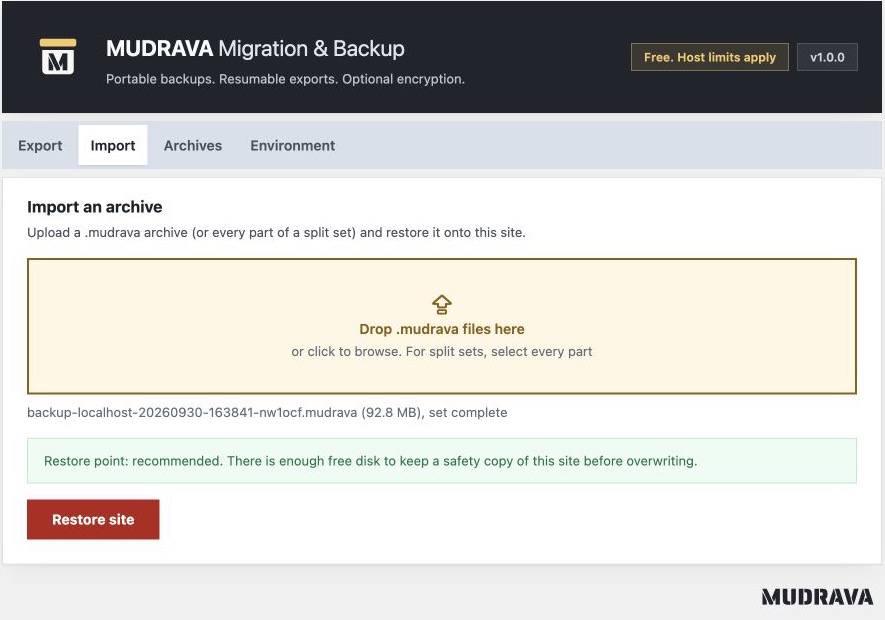
- Install the plugin on the destination, upload the archive or all split parts, check the restore settings and restore.
- Inspect the destination before sending visitors to it.
屏幕截图:


常见问题:
Can I export and restore for free?
Yes. Manual export, import, restore, optional encryption, splitting and resumable jobs are included in the free plugin.
Is there an archive size limit?
There is no paid archive size cap. Your host's available disk, memory and request limits still apply. Very large individual database rows can exceed the format's frame limits. Test your workload on the intended host.
Do I need an account or an external migration service?
No. The free plugin operates on your sites and your uploaded archives. You transfer the files yourself.
What happens when a job is interrupted?
The job saves durable checkpoints. Supported interruptions can resume from the last completed checkpoint. Errors caused by changed files, changed archive parts, storage failure or other failed safety checks may require intervention. Keep the original archive and inspect the reported error.
Can I restore a backup on another domain?
Yes, with the destination URL settings and URL rewriting. Recognized serialized values are handled without instantiating PHP objects. Inspect custom serialized and binary data after migration; parse failures are reported.
Must I pause writes on the source?
Yes, for a consistent final migration. Pause orders, submissions, uploads and external writers from export start to completion. Maintenance mode alone does not stop every background process. Concurrent changes can stop export or leave unvisited content out of the backup.
Does verification guarantee a working website?
No. Archive verification checks the archive and the supported restore paths. You still need to test the restored site's pages, accounts, media, integrations and business workflows.
Are encrypted archives authenticated?
Yes. The selected backend uses authenticated encryption. Unencrypted archive checksums detect accidental corruption but do not authenticate an archive against deliberate modification. Only import backups from sources you trust.
Can I import an archive from the earlier closed MUDRAVA plugin?
This public plugin uses a different container format. Earlier archives sharing the .mudrava extension are not assumed compatible. Keep the older reader and original backups until compatibility or a conversion path is explicitly documented.
Does this release include scheduled cloud backups?
No. This release provides the local manual migration and backup workflow. It can continue an already started export through cron; that is different from scheduling new backups.
更新日志:
- Initial public release: resumable export and restore, portable archives, optional authenticated encryption, chunked uploads, split sets, exclusions, URL rewriting and archive verification before restore.
- Destination restore points, recovery attempts, private archive storage and environment checks.