
Multi-Touch Attribution for WooCommerce
| 开发者 | kiito0 |
|---|---|
| 更新时间 | 2026年8月14日 13:39 |
| PHP版本: | 8.0 及以上 |
| WordPress版本: | 7.1 |
| 版权: | GPLv2 or later |
| 版权网址: | 版权信息 |
详情介绍:
- Multi-touch attribution for WooCommerce orders.
- See the real source and medium behind orders that would otherwise appear as Direct / Direct or a payment gateway.
- View the full journey to an order, including the first visit, visits in between, and the final visit before purchase.
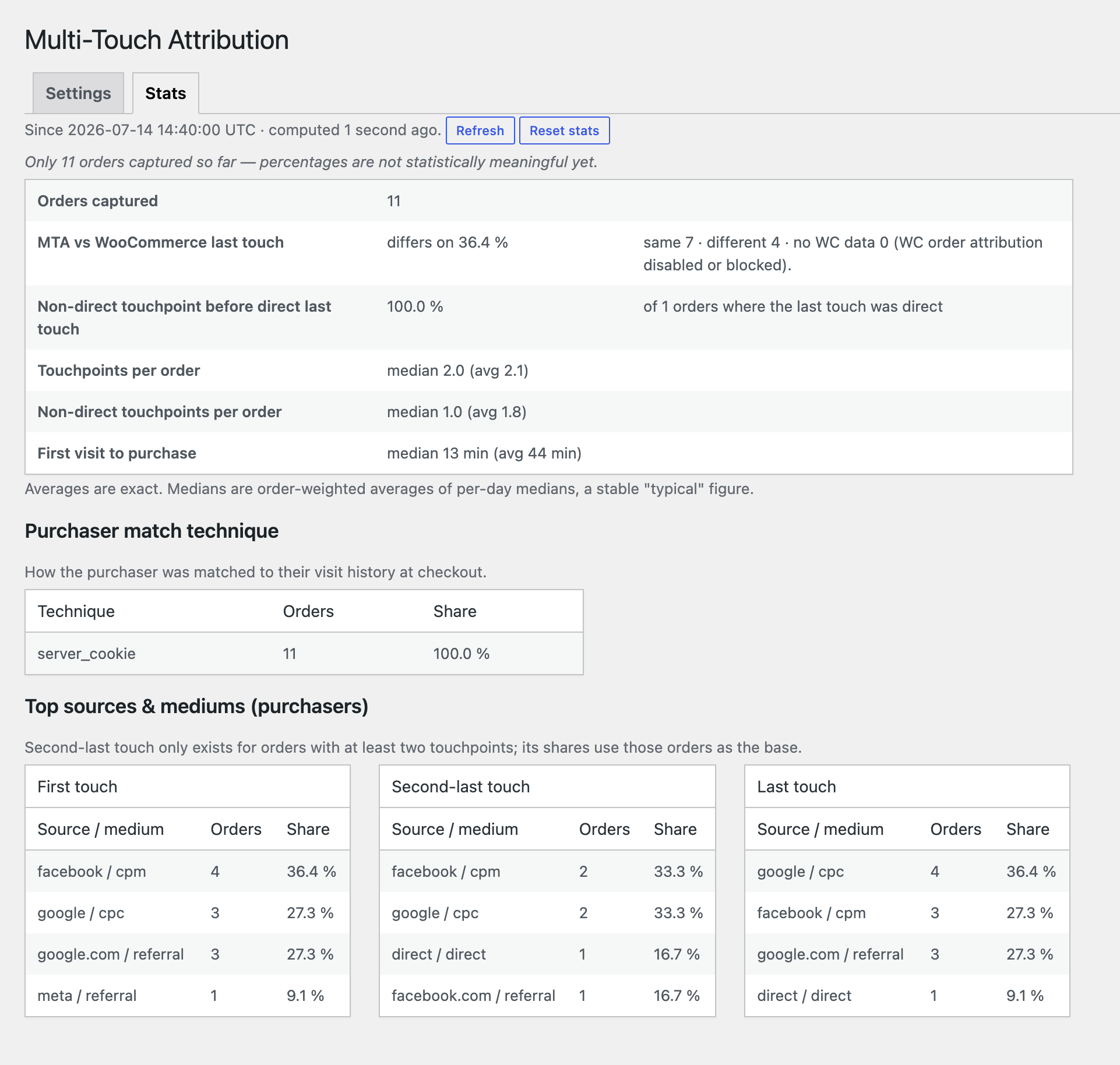
- Attribution analytics for top traffic sources, source/medium combinations, tracked visit counts (touchpoints), and comparisons with WooCommerce attribution.
- UTM parameter support:
utm_source,utm_medium,utm_campaign,utm_content,utm_term,utm_idandutm_kiito. - Click ID support for Google Ads, Meta, TikTok, X, Reddit, Microsoft Ads, Google Marketing Platform and LinkedIn.
- Uses the referring website (referrer) to identify the source and medium when campaign parameters are missing.
- A panel on each WooCommerce order showing recorded store visits, source/medium, UTM details, and visitor match diagnostics.
- Export the sources recorded for orders to CSV.
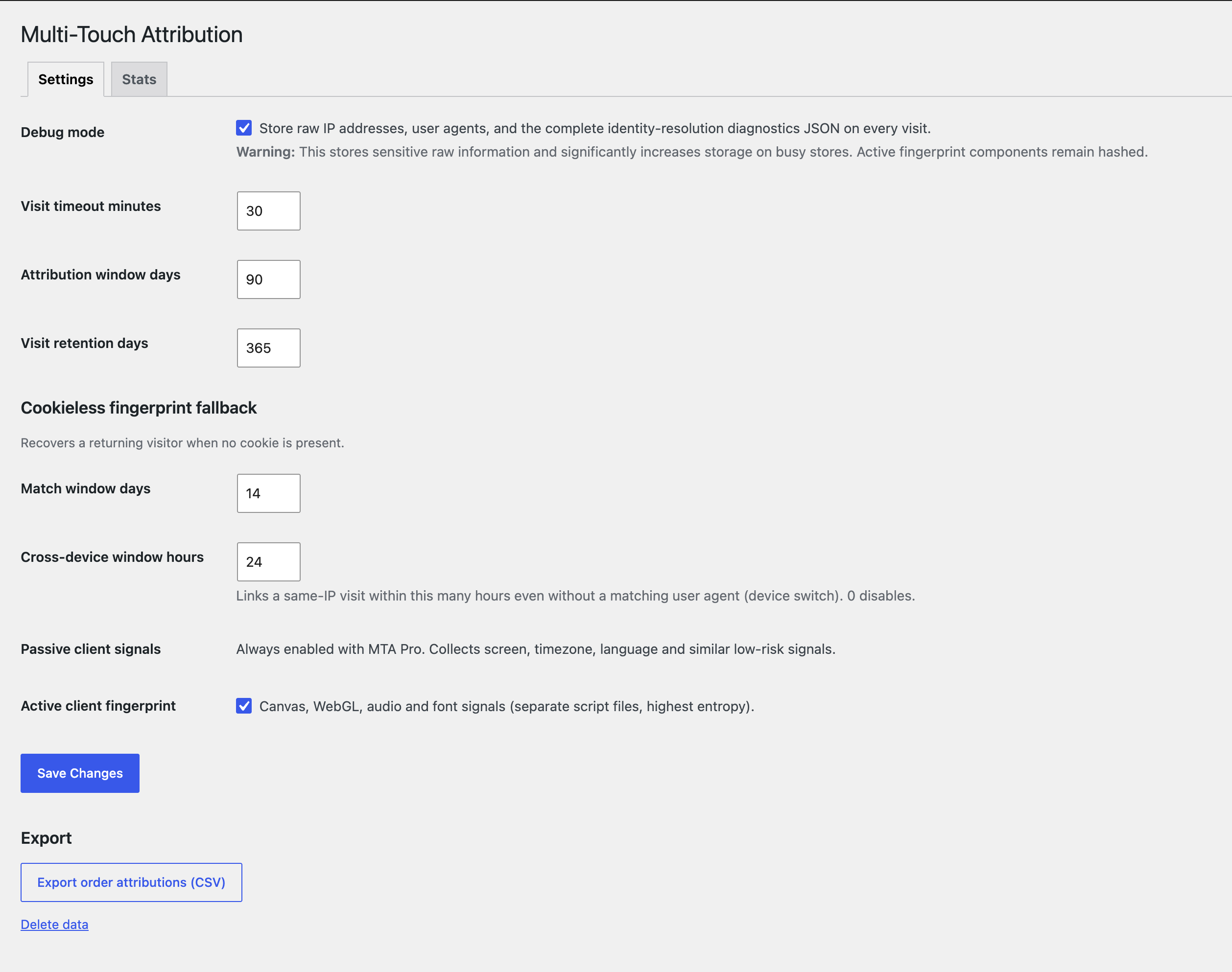
- Choose the visit timeout, attribution window, and how long visit data is kept.
- Hashed privacy mode by default, with the option to store raw diagnostics for debugging.
- WP Consent API support. On stores that require opt-in consent, tracking waits until the chosen consent category is allowed.
- First-party cookie fallback tracking to help keep visits connected.
- Connect with Kiito.io WooCommerce profit analytics for deeper revenue, cost, and profit reporting.
marketing consent category by default. When your store is configured to require opt-in consent, MTA waits for permission before recording visits. Developers can change the category with the mtawc_consent_category filter.
The plugin uses first-party attribution cookies to connect earlier visits with later orders. Store owners are responsible for explaining this tracking in their privacy policy and configuring consent for the laws that apply to their store.
MTA Pro visitor matching
The free plugin includes WooCommerce attribution tracking, order capture, settings, reports, and exports. Advanced fingerprinting requires MTA Pro. With a compatible add-on, MTA can recognize returning visitors when cookies are unavailable.
Kiito profit analytics
MTA collects attribution data in WooCommerce. To get the full value from that data, connect your store to Kiito, where you can view attribution together with WooCommerce revenue, ad costs, margins, and profit performance.
Kiito helps store owners see not only which sources were involved in orders, but which sources are linked to profitable growth.
安装:
- Install the plugin through Plugins > Add New, or upload the
multi-touch-attributionfolder to/wp-content/plugins/. - Activate Multi-Touch Attribution for WooCommerce from the Plugins screen.
- Make sure WooCommerce is installed and active.
- Go to WooCommerce > Multi-Touch Attribution.
- Review the privacy mode, visit timeout, attribution window, and data retention settings.
- Visit your storefront using UTM parameters, then place a test order and confirm that the recorded sources appear on the order.
屏幕截图:
常见问题:
Does MTA require WooCommerce?
Yes. MTA adds source tracking to WooCommerce orders, so WooCommerce must be installed and active.
Does MTA support High-Performance Order Storage?
Yes. MTA declares compatibility with WooCommerce High-Performance Order Storage and adds its attribution metabox to the WooCommerce order screen.
Does MTA replace WooCommerce attribution?
MTA works independently from WooCommerce's built-in attribution. You can disable WooCommerce's attribution if you want to avoid running both systems and improve page speed.
Does MTA track visitors without consent?
When your store uses the WP Consent API and requires opt-in consent, MTA waits until the configured consent category is allowed before recording visits. If no consent manager is active, WordPress does not provide an opt-in status, so MTA records first-party attribution visits by default.
Can I export attribution data?
Yes. WooCommerce > Multi-Touch Attribution includes a CSV export for captured order attributions.
How do I get support or share feedback?
For questions and feedback, contact us. We try to answer within 24 hours.
What happens on uninstall?
By default, uninstalling MTA keeps its custom attribution tables, settings, and WooCommerce order metadata so you can reinstall without losing attribution data. The Data removal settings let you opt in to removing the MTA tables and settings, the order metadata, or both when WordPress deletes the plugin. Deactivating the plugin keeps the attribution data.
更新日志:
- Support for WordPress 7.1
- Visit identity resolution report
- First stable release.
- Preserved percent-encoded characters in landing and referrer URLs so UTM values such as encoded spaces are parsed correctly.
- Added a reproducible JavaScript build process and moved the production tracking script to the distribution asset directory.
- Added opt-in uninstall controls and separate cleanup actions for MTA database tables and WooCommerce order metadata.
- Improved the plugin documentation and WordPress.org readme.
- Renamed public hooks, browser identifiers and stored data with the distinctive
mtawcprefix. - Consolidated user settings into one validated option and adopted namespaced classes.
- Updated the base extension API to version 5 for the coordinated Pro release.
- Hardened CSV exports, identity creation, retention batching and request throttling.
- Improved retry handling, UTF-8 input truncation and internal schema consistency.
- Initial public release.
- Added first-party visit tracking and WooCommerce order attribution snapshots.
- Added order metabox, stats tab and CSV export.
- Added configurable privacy mode, attribution window, visit timeout and retention.
- Added WP Consent API support and HPOS compatibility.
- Added extension API for optional add-ons.