Multicolumn Category Widget
| 开发者 | awelzel |
|---|---|
| 更新时间 | 2025年12月14日 20:51 |
| PHP版本: | 3.6 及以上 |
| WordPress版本: | 6.9 |
| 版权: | GPLv2 or later |
| 版权网址: | 版权信息 |
详情介绍:
安装:
- Extract the contents of the package to the
/wp-content/plugins/multicolumn-category-widgetdirectory - 通过 WordPress 的的“Plugins”菜单激活插件
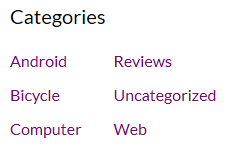
屏幕截图:
常见问题:
How can I customize the style of the widget?
All styles can be found in css/frontend.css. Since these styles get overwritten when updating the widget, you should add the custom styles to your theme.
Is it possible to get more translations?
Generally the widget supports multiple languages - you can use Loco Translate to add more languages, if needed. If you want to provide a translation in your language which is missing yet, you're welcome to send me the po/mo files for the next update.
The categories are not displayed in multiple columns, why?
The layout uses multiple lists which are displayed next to each other using the CSS rule display:inline-block.
This means: If there not enough room to display multiple columns (either because the sidebar of the template is too narrow or the available viewport of the device is very small), the browser will eventually fall back to show only a single column. But this is intentional to make sure that the category list is always completely visible - even on smaller screens or on narrow smaller sidebars - and won't break the layout of the template by using more room as available.
In rare cases a template or a plugin changes the default behaviour of the WordPress core function the_widget(), which usually outputs widgets with their own CSS classes - in this case you might have to add your own styles based on the rules in css/frontend.css but without .widget_multicolumncategorywidget. However the better solution would be to check the template and/or other plugins, why the widget specific CSS classes are missing.
更新日志:
- Update compability information for WordPress 6.9.
- Updated plugin initialization as a preparation for WordPress 6.8.
- Fix warnings in WordPress 6.7 by removing translation for plugin name.
- Updated plugin initialization as a preparation for WordPress 6.7.
- Updated compatibility information for WordPress 6.6
- Updated compatibility information for WordPress 6.5
- Updated compatibility information for WordPress 6.3
- Updated compatibility information for WordPress 6.0
- Code refactoring
- Updated compatibility information for WordPress 5.5
- Updated compatibility information for WordPress 4.6
- Updated compatibility information for WordPress 4.5
- Added translation for plugin information in the backend (plugin title, description etc.)
- Modified default frontend styles to avoid bullets in category titles in certain themes (for example Twenty Fifteen).
- Updated compatibility information for WordPress 4.3
- Updated compatibility information for WordPress 4.2.3
- Added placeholder for the category title in the backend configuration options
- Updated compatibility information for WordPress 4.1.1
- Proper use of version parameter for frontend styles (plugin version and not WordPress version)
- Added Russian (thanks Flector)
- Updated compatibility to support WordPress 4.0
- Fixed version information
- Updated translations (German, Italian, French)
- Updated WordPress compatibility information (3.9.1)
- Added "show post counts" option
- Updated WordPress compatibility information (3.9)
- Updated WordPress compatibility information (3.8.3)
- Fixed a bug in the title output: Standard title was displayed even with a custom title set.
- Added French and Italian.
- Added translation template (pot).
- First release.