MultiLayer Image and Text Block
| 开发者 | nickdigitalprojects |
|---|---|
| 更新时间 | 2026年10月4日 06:38 |
| 捐献地址: | 去捐款 |
| PHP版本: | 7.4 及以上 |
| WordPress版本: | 7.1.2 |
| 版权: | GPLv2 or later |
| 版权网址: | 版权信息 |
详情介绍:
- Hero sections with layered images, typography, and CTA buttons
- Promotional banners and campaign sections
- Creative photo compositions
- Landing page headers
- Portfolio showcases
- Visual blocks that need both design freedom and clickable actions
- Unlimited Layers: Add image, text, and button layers in the same container
- Dedicated Button Layer: Create real call-to-action links, not just styled text
- Native Link Picker: Choose internal WordPress content or enter an external URL
- New Tab Control: Open links in the same tab or safely in a new tab
- Button Style Presets: Start quickly with Primary, Accent, Soft, or Outline styles
- Fill and Outline Variants: Switch between solid and outlined button designs
- Button Colors and Hover: Control text, background, and border colors for normal and hover states
- Border Controls: Set width, style, color, and radius independently
- Fixed or Fit Content Width: Size buttons manually or let them adapt to their text
- Typography Controls: Font family, size, weight, spacing, transform, alignment, and line height
- Modern Sidebar UI: Gutenberg-style ToolsPanel controls with collapsible and resettable options
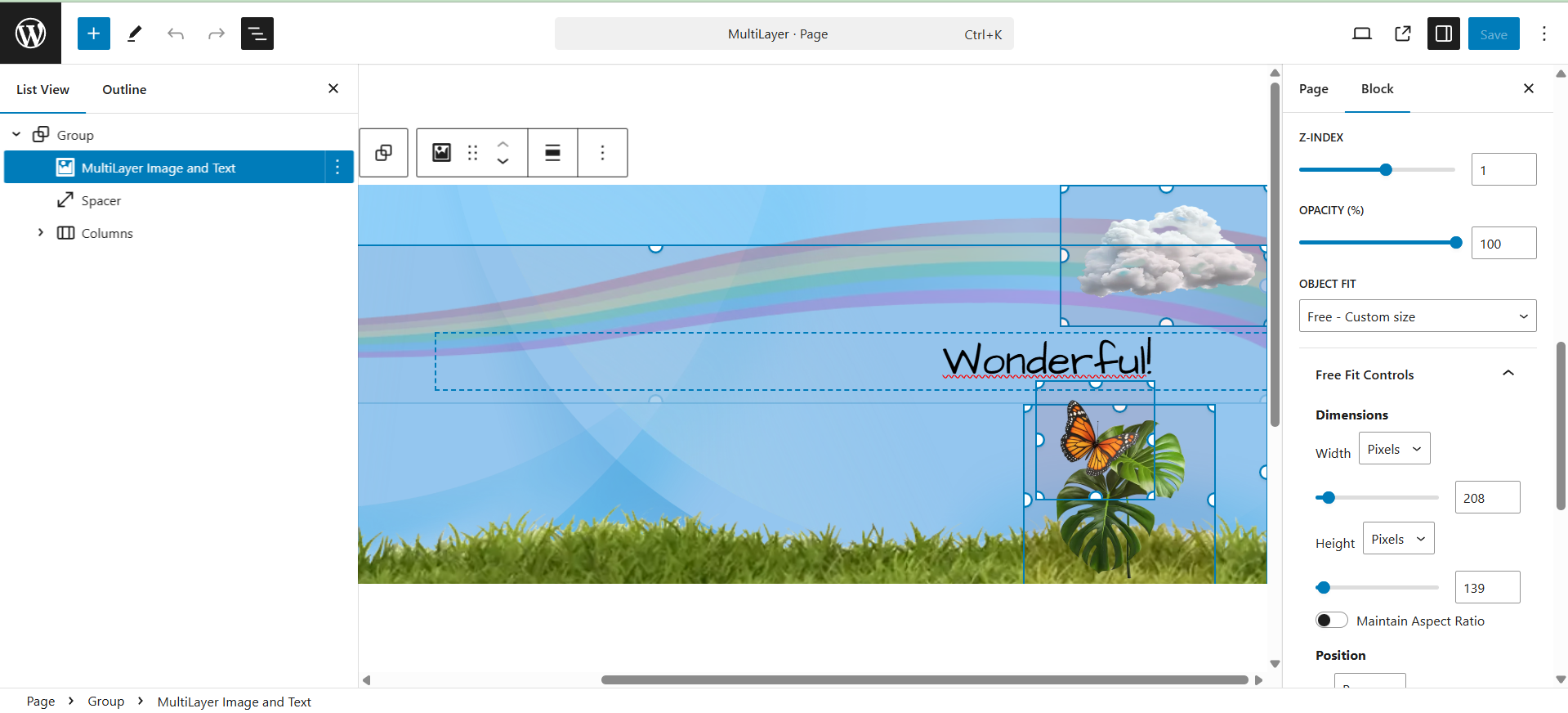
- Free Positioning: Position layers with percentage or pixel controls
- Image Fit Modes: Cover, contain, fill, scale down, or free sizing
- Layer Management: Rename, reorder, duplicate, select, and remove layers
- Z-Index and Opacity: Control stacking order and transparency
- Responsive Layouts: Flexible positioning for desktop, tablet, and mobile
- Quick Demo Layouts: Load sample compositions to get started instantly
- Backward Compatibility: Existing blocks and legacy block names remain supported
安装:
- Upload the plugin files to
/wp-content/plugins/multilayer-image-and-text-block/, or install it from the WordPress plugins screen. - Activate the plugin through the Plugins screen.
- In the block editor, search for MultiLayer or find the block in the Design category.
- Insert the block and customize the included demo layout, or clear the layers and start from scratch.
- Use Layer Tools to add image, text, and button layers.
屏幕截图:


常见问题:
Can I add real buttons and links?
Yes. The dedicated Button layer creates a real <a> element when a URL is set. You can link to internal content, external pages, anchors, mailto: addresses, or tel: links.
Can buttons open in a new tab?
Yes. Enable Open in new tab in the Link panel. The frontend output uses target="_blank" with safe rel attributes.
Can I customize button hover colors?
Yes. The Hover colors panel lets you control text, background, and border colors independently from the normal state.
Can I use multiple blocks on the same page?
Yes. You can add as many MultiLayer blocks as needed, each with its own independent layers and settings.
Is it compatible with my theme?
The block works with modern block themes and most classic themes that support the block editor. Button and text styles can inherit or override theme typography.
Is it responsive?
Yes. Layers can be positioned and sized with percentages or pixels, and the frontend script adapts the composition to different screen sizes.
Will existing blocks still work after updating?
Yes. Existing image, text, and button layers remain supported. The plugin also keeps compatibility with the legacy block name used by earlier releases.
How do I get started quickly?
Insert the block to load the demo layout, or use the sample presets in the sidebar. You can then replace images, edit text, and add one or more Button layers.
更新日志:
- NEW: Dedicated Button layer for real call-to-action links
- NEW: Editable button text directly in the block canvas
- NEW: Native WordPress
LinkControlfor internal and external URLs - NEW: Explicit Open in new tab toggle with safe frontend
relattributes - NEW: Fill and Outline button variants
- NEW: Independent text, background, and border color controls
- NEW: Hover color controls for text, background, and border
- NEW: Border width, style, color, and radius controls
- NEW: Button padding controls
- NEW: Primary, Accent, Soft, and Outline style presets
- NEW: Fixed width or Fit content button sizing
- IMPROVEMENT: Sidebar controls reorganized with Gutenberg-style ToolsPanel sections
- IMPROVEMENT: Cleaner layer hierarchy for image, text, and button settings
- IMPROVEMENT: Layer controls now preserve nested values when editing partial settings
- FIX: Link control reopens correctly after removing a URL
- FIX: Negative letter-spacing values are parsed correctly
- FIX: Disabled unsupported gradient UI until full gradient rendering is implemented
- FIX: Improved compatibility for previously saved blocks and legacy block names
- NEW: Auto-loading demo layout with included images (mountain, monster, hot air balloon, fire) for instant visual impact
- IMPROVEMENT: Moved block to Design category for easier discovery
- IMPROVEMENT: Added custom multilayer icon for better visual recognition
- IMPROVEMENT: Added 3 block variations (Hero, Compact, Blank) for instant starter templates
- FIX: Standardized text domain for proper internationalization
- FIX: Updated WordPress dependencies (wp-block-editor instead of deprecated wp-editor)
- FIX: Corrected render callback to ensure dynamic styles always apply
- NEW: Added two Sample Presets (demo blocks) to quickly evaluate the plugin's features and capabilities
- NEW: Quick-Add buttons (Image/Text) added to the sidebar for fast layer creation
- NEW: Quick Tips section included in the sidebar with brief instructions for quick utilization
- NEW: Added simple "How To" instructions for basic layer customization
- NEW: Introduced up/down arrow buttons for quick layer reordering
- NEW: Layer names can now be renamed for better recognition in the editor
- NEW: Added text padding controls for text blocks to manage spacing between text and its container
- NEW: Enhanced text customization options with additional parameters
- IMPROVEMENT: Significantly improved the graphical interface (UI) of the sidebar for better usability
- IMPROVEMENT: Layer Preview/Highlighting: Added image/text previews and tooltips in the editor to easily identify the active layer in editing mode
- IMPROVEMENT: Added an "Eye" icon toggle in the block's standard menu bar to switch between Editing View and Final Result Preview
- FIX: Corrected the issue where "Fixed Width" visualization mode failed to correctly manage the block's horizontal dimensions in both editor and frontend
- FIX: Fixed the block alignment issue which was functioning incorrectly
- FIX: Resolved the background color management bug where the general background color was lost when "Fixed Width" was selected
- FIX: Corrected the management of negative positioning values for layers
- FIX: Fixed the issue where the layer X position value in pixel units was incorrectly capped at 100
- First public release
- Add unlimited image and text layers
- Dynamic height and width controls
- Full localization support