My Trail Camera
| 开发者 |
vitocech
w1k freemius |
|---|---|
| 更新时间 | 2026年5月10日 00:12 |
| PHP版本: | 7.4 及以上 |
| WordPress版本: | 6.9 |
| 版权: | GPLv2 or later |
| 版权网址: | 版权信息 |
详情介绍:
My Trail Camera is growing — and moving to its own home. We've decided to give the project its own space at mytrailcamera.pro — a standalone web app with more flexibility than a WordPress plugin can offer: faster updates, no WordPress required, and room to grow well beyond what fits inside wp-admin. This plugin will keep working for existing installations but will not receive further updates.The complete trail camera management and protection system for WordPress. Whether you have a handful of trail cameras or a whole fleet, My Trail Camera keeps everything organized — models, locations, battery status, accessories, and total investment. And if a trail camera goes missing, the built-in honeypot trap gives you a real chance to get it back. Trail Camera Management
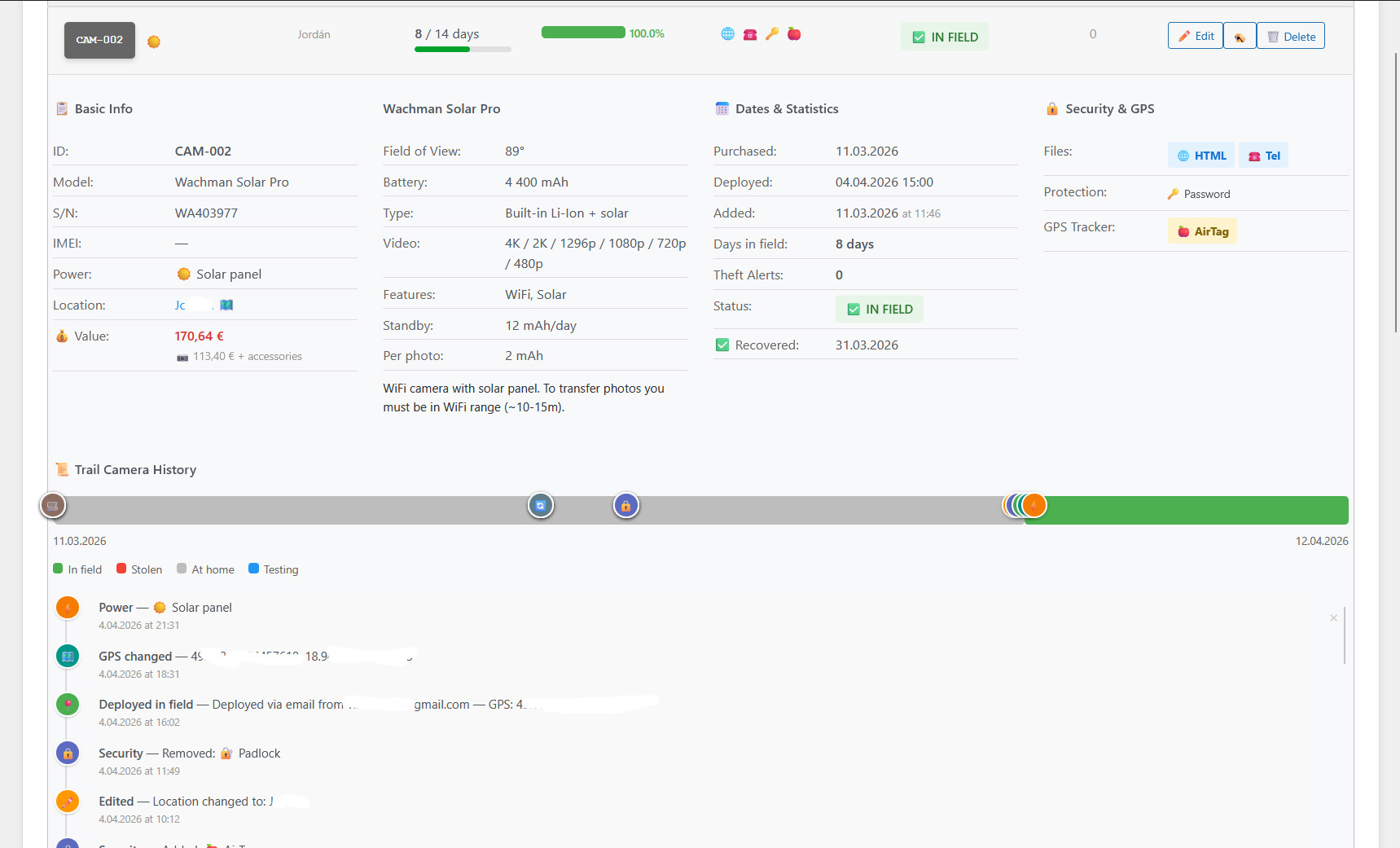
- Register trail cameras with model, location, GPS coordinates, deploy date, and accessories
- 80+ built-in trail camera profiles (Browning, Bushnell, Reconyx, Spypoint, Stealth Cam, Wachman, OXE, and 20+ more brands) with autocomplete search
- Battery life estimation based on trail camera profile, power type (lithium, solar panel, external), trigger count, recording mode (photo/video), and video resolution (480p–4K)
- Accessories per trail camera — batteries, SD cards, locks, metal boxes, GPS trackers (AirTag, Tile, Samsung SmartTag), SIM cards — with total gear value in €
- Trail camera status: active, stored, stolen (with date), tested, recovered, police reported
- Days-in-field counter with planned deployment duration and progress indicator
- WordPress dashboard widget with active/stolen counts, low battery warnings, and 24-hour detection summary
- Admin bar quick access with recent detection count badge
- Import/export all trail camera data and settings as JSON backup
- Works with any trail camera that uses SD cards — no special hardware needed
- Generate a ZIP with trap files that mimic real trail camera file naming (manufacturer-specific)
- Captured data: IP address, GPS coordinates with accuracy, browser fingerprint (OS, screen resolution, timezone, CPU cores)
- Real-time email alerts to multiple recipients — immediate notification on every detection
- Recovery chance scoring (0–100%) based on GPS accuracy, IP data, time factor, and device fingerprint — with recommended next steps
- Theft detection dashboard with per-trail-camera filtering, detection history, and device analysis
- Owner test mode — open the trap file yourself to verify it works before deployment
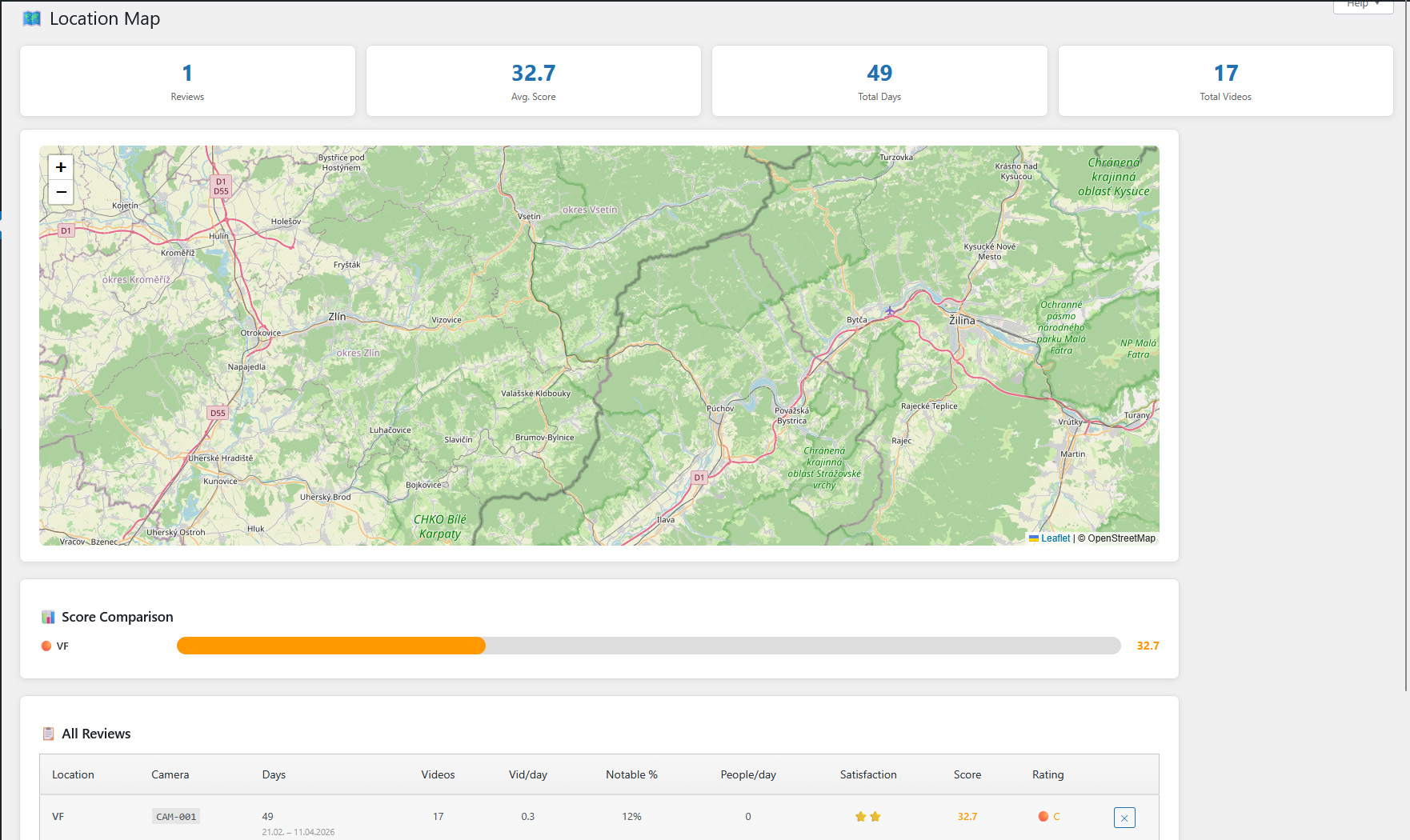
- Rate your trail camera locations after each deployment (activity, wildlife interest, human disturbance, satisfaction)
- Automatic scoring algorithm: A (75+), B (50–75), C (25–50), D (under 25)
- Interactive Leaflet map with color-coded markers — find your best spots at a glance
- Statistics: total reviews, average score, total monitoring days, total recordings
- Email notification configuration with multiple recipients
- IP source selection: direct, Cloudflare (CF-Connecting-IP), or reverse proxy (X-Forwarded-For)
- Public widget visibility controls — choose exactly which fields to show for stolen trail cameras
- Privacy policy auto-contribution — automatically adds data collection disclosure to your site's privacy policy
- Maintenance tools: orphan record cleanup, manual data deletion, database optimization
- Import/export trail cameras, settings, and location reviews as JSON
- Onboarding checklist for first-time setup
- KML export for Google Earth
安装:
- Upload the plugin folder to the
/wp-content/plugins/directory - Activate the plugin through the 'Plugins' menu in WordPress
- Navigate to the menu in your admin panel
- Add your first trail camera and configure notification settings
屏幕截图:
常见问题:
How do the bait files work?
The plugin generates HTML files that you place on your trail camera SD cards. If someone steals the trail camera and opens these files on their computer, the files silently report the thief's location and device information back to your WordPress site.
Does this work with any trail camera?
Yes, works with any trail camera that uses SD cards. The bait files are standard HTML files that work on any computer or phone with a web browser.
Is GPS tracking accurate?
GPS accuracy depends on the thief's browser and device. Modern browsers can provide accuracy within 10-500 meters when the user grants location permission. The system also captures IP-based location as a fallback.
What data do the bait files collect and from whom?
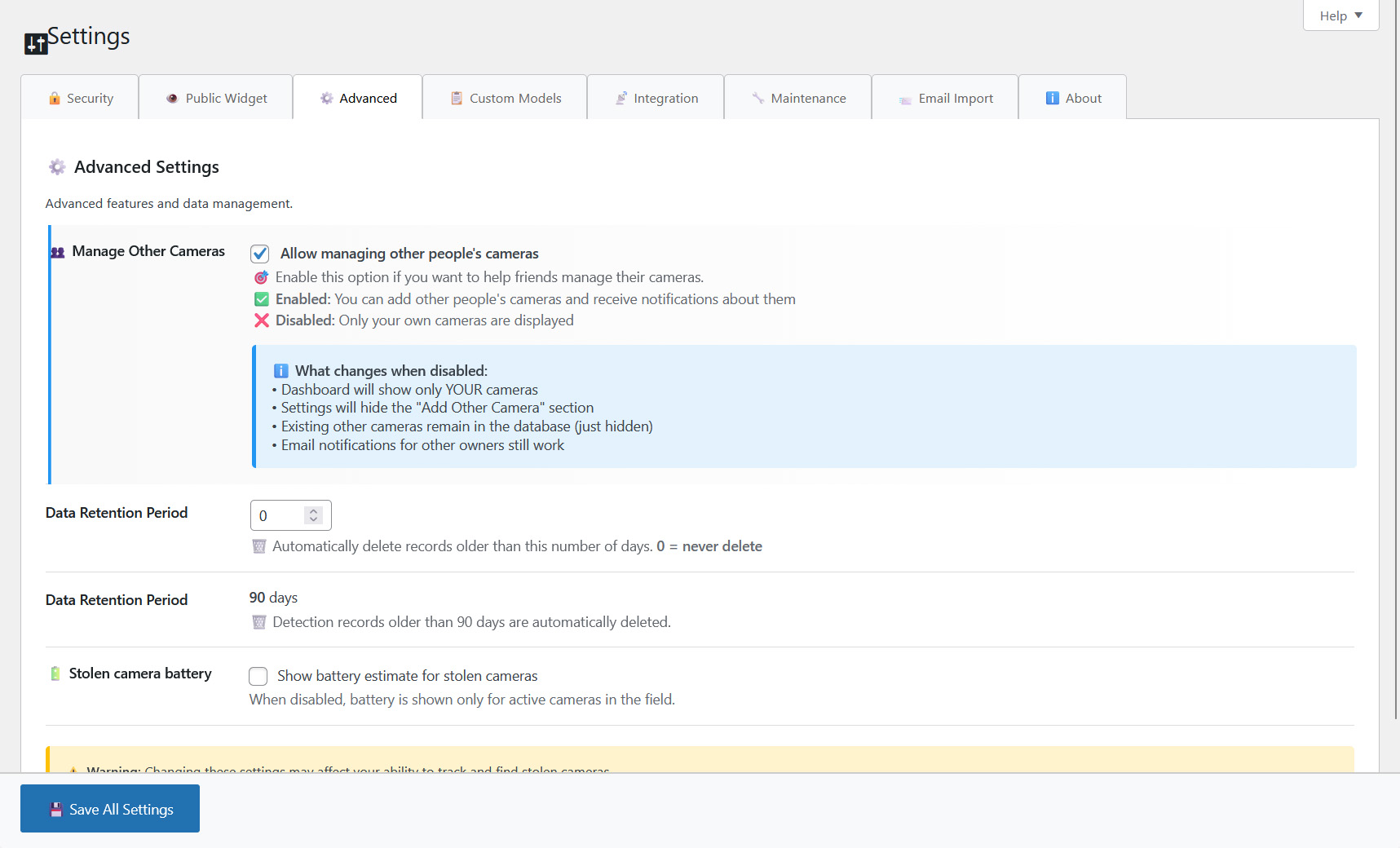
Bait files collect IP address, browser fingerprint (user agent, screen resolution, timezone, OS), and optionally GPS coordinates — only when someone opens the HTML file from a stolen SD card. No data is collected from your website visitors. The trail camera owner can also open the bait file to verify it works, which marks the trail camera as "tested" using their own IP. All collected data is stored in your site database and can be deleted at any time. Data is automatically deleted after 90 days.
Does this plugin use any external services?
Yes. All external services are fully documented in the "External services" section below. A summary:
- Google Maps — GPS coordinate links (user-initiated, no automatic data transfer).
- OpenStreetMap — map tiles for location views. Sends viewport coordinates.
- Freemius — license management and optional analytics. Opt-in.
更新日志:
- Maintenance Export: backup JSON now covers every table the user can populate — added detections, file tokens (bait-file authentication for already-deployed SD cards), and 32 additional settings (notifications, IP source, all 21 public-widget visibility toggles, plus the email-import config block under PRO)
- Detection records are exported and re-imported with their original IDs preserved so the captured-phone foreign key (
log_id) remains valid round-trip - Location review import now preserves the per-review weather snapshot, the stored score/rating, and (PRO) the technical-issue flag — re-calculating these on a different site without the original weather data would otherwise change the result
- Fixed: Maintenance Export wrote an empty
custom_textfield because it read the wrong option key. The export now readsmtcam_email_custom_textso the email "custom text" survives the round trip
- Notice: My Trail Camera is growing and moving to its own home — a standalone web app at https://mytrailcamera.pro/. This plugin will keep working for existing installations but will not receive further updates. A dismissible admin notice points users to the new home.
- Add Camera form: power type selector now visible (previously only on Edit form, so newly added cameras silently defaulted to lithium even when the chosen profile was solar-only)
- Add Camera form: power-type options filtered live from the picked trail camera profile (e.g. a solar-only camera no longer offers Lithium)
- Battery model dropdown on Edit Camera — 25 real products grouped by format (AA, AAA, 18650, 21700, built-in packs): Energizer Ultimate L91, Varta Professional Lithium, GP Extra, Fujitsu Premium, Panasonic NCR18650B/GA, Samsung 35E/30Q/50E/40T, LG MJ1/HG2, Molicel M35A/P42A, Sony VTC6, plus generic fallbacks
- New "Number of cells" field — selected battery × cell count replaces the old profile-level capacity default; live capacity preview in the form
- Chemistry-aware temperature factor: LiFeS₂ primaries hold 90–97 % capacity down to -20 °C (matches Energizer L91 datasheet), Li-ion keeps the conservative curve. Previous calc underestimated winter runtime on AA lithium cameras by ~30–40 %
- Self-discharge now modelled — Li-ion packs lose 2 %/month passively, LiFeS₂ ~1 %/year
- One-time migration backfills battery_preset / cell_count from each profile's battery_type string
- Alkaline batteries removed from power-type options (lithium is the only sensible choice); existing cameras with power_type='alkaline' migrated to 'lithium' on upgrade
- Edit form Price & Accessories consolidation — Security and GPS Trackers merged into one priced list; total value adds prices of every ticked item
- New price fields for security layers (Metal Box, Cable Lock, Padlock, Password, Monitored by another trail camera) and GPS trackers (AirTag, Tile, SmartTag, Other)
- Removed duplicate accessory entries that overlapped with Security/GPS items (Lock, Metal Box, GPS Tracker); one-time migration copies their values into the canonical fields
- Add Camera handler reuses the shared process_camera_fields() helper — single source of truth with the edit handler
- Fixed: acc_metalbox checkbox from the Add Camera form was silently dropped on save
- Power-type icons deduplicated via new mtcam_get_power_icon() helper in labels.php
- Fixed: owner-test detection falsely matched IPv6 (or any non-IPv4) addresses — strrpos($ip, '.') returned false, collapsing both subnets to empty strings so any two non-IPv4 IPs with identical user-agent were treated as the same network. Subnet match is now guarded by FILTER_FLAG_IPV4 and skipped for IPv6/unknown addresses; exact IP+UA match is unchanged
- Fixed: mtcam_camera_exists() cached its result in object cache but the cache was never invalidated on save/delete — within a single request a check-then-add flow could see a stale false. mtcam_invalidate_cameras_cache() now optionally takes a camera ID and clears the per-camera existence cache
- Renamed trail camera status "stored" to "at home" across all code, comments, and UI
- CSS class renamed from mtcam-status-stored to mtcam-status-home
- "At Home" state cleanup: deployment data (location, GPS, deploy date/time, battery, solar, recording settings, terrain, last check) is cleared when a trail camera goes home, via a central helper used by End Monitoring and edit form
- Trail camera detail: Battery & Solar section and GPS map link hidden when camera is at home
- Edit form: GPS, Deploy date/time, Planned stay, Recording Settings and Battery Status hidden when camera is at home
- Dashboard: battery bar no longer shown for cameras at home
- IMEI row hidden for trail cameras without SIM (non-4G models)
- Check button (record servicing visit) now available in the free version
- Fixed: Check action no longer shows a silent blank page when the trail camera no longer exists — redirects back with an error notice
- Locations page: new Score Comparison bar chart; derived metrics Vid/day, Notable %, People/day; date range shown under days count
- Locations page: new technical issue flag — monitoring that failed for technical reasons (dead batteries, bad SD card) can be kept in history but excluded from score averages and chart
- Locations page: edit existing location reviews — change any field and toggle the technical issue flag retroactively
- Locations page: flagged reviews shown dimmed with ⚠️ badge in the table, grey marker with dashed border on the map
- Locations page: fixed weather summary not counting cloudy days
- Slovak translations for all new strings
- Security: file token verification — each generated trap file gets a unique token stored in DB, REST API verifies token before recording detection
- Security: backward compatible — old trap files without token still work
- Fixed raw cURL error messages shown when weather API is unavailable — now shows user-friendly message
- Weather API errors cached for 5 minutes to prevent repeated timeouts slowing down the dashboard
- Weather API timeout reduced from 10s to 5s
- Tested trail cameras no longer get false recovered_date when unmarking stolen status
- Existing recovered_date cleared automatically when editing a tested trail camera
- Fixed "End Monitoring" form not saving — nonce mismatch prevented location review from being created
- Fixed "Quick Check" form silently failing due to same nonce routing issue
- Fixed location map not rendering — Leaflet loaded in header before inline map script was attached
- Fixed weather detail toggle not responding to clicks on Locations page
- Trail camera profiles: 80+ built-in models (Wachman, OXE, Spypoint, Browning, Bushnell, Stealth Cam, Tactacam, Moultrie, Reconyx, GardePro, and 20+ more brands)
- Profiles split into per-manufacturer files (includes/profiles/*.php) — easy to add new models
- Profile autocomplete: text input with instant filtering by manufacturer/model name, grouped by manufacturer with model count
- Video resolution setting: per-trail-camera select populated from profile (480p–4K), affects battery estimation
- Battery estimation improvements: uses profile-specific battery capacity, standby drain, 4G drain, and per-photo consumption instead of hardcoded constants
- Photo mode battery calculation: realistic per-event drain from profile (drain_photo × 1.8 for night/IR)
- Resolution power factor: higher resolution = proportionally higher video power draw (1080p=1.0, 2K=1.15, 4K=1.30)
- Night video draw updated from 600 to 750 mA (more realistic for IR illumination + processing)
- Trail camera detail: new "Trail Camera Profile" section showing specs (FOV, battery, video, features, drain values, tip)
- SIM card accessory and IMEI field hidden for trail cameras without 4G capability (profile-aware)
- Metal Box added to accessories with price tracking; Security section label updated
- Edit form: trail camera model displayed as readonly text (not editable — model is physical)
- Moved thor_get_camera_total_value() and thor_battery_color() from cameras-battery.php to core-helpers.php
- Profile data corrections: verified FOV (lens vs PIR), battery capacity, video resolutions, SIM/WiFi/solar flags for all models
- Slovak translations: 1059 entries — all profile tips, battery types, and UI strings translated
- Compiled .mo translation file updated
- Added external services documentation to readme
- Replaced inline script/style tags with wp_add_inline_script and wp_add_inline_style
- Fixed Freemius SDK configuration for WordPress.org compliance
- Improved output escaping for full WordPress coding standards compliance
- Fixed PHP 7.4 compatibility (replaced str_contains with strpos)
- Inline sanitization of $_SERVER superglobals
- Enhanced battery estimation and trail camera management
- Unified prefix to thor_ for WordPress.org compliance
- Automatic migration from previous versions
- Security hardening: escaping, prepared statements, capability checks
- Improved plugin header with required fields
- Database-backed trail camera storage (migrated from wp_options)
- Location rating system with interactive map
- Battery estimation
- HMAC signature verification for bait file communications
- Rate limiting and nonce protection