MyFatoorah - WooCommerce
| 开发者 |
myfatoorah
nermeenshoman rashasaeed |
|---|---|
| 更新时间 | 2026年2月17日 20:59 |
| PHP版本: | 7.4 及以上 |
| WordPress版本: | 6.9 |
| 版权: | GPLv3 |
| 版权网址: | 版权信息 |
标签
下载
2.0.1.8
2.1.1
2.0.3.4
2.2.10
2.0.0.3
2.0.0.8
2.0.0.9
2.0.1.0
2.0.1.2
2.0.1.1
2.0.1.3
2.0.1.5
2.0.1.7
2.0.2.2
2.0.2.8
2.0.3.0
2.0.3.2
2.0.1.4
2.0.3.3
2.0.3.5
2.0.2.7
2.0.3.6
2.0.2.9
2.0.3.10
2.0.3.11
2.0.3.9
2.0.2.11
2.0.1.6
2.0.3.12
2.0.3.13
2.1.0
2.0.2.0
2.0.2.4
2.0.2.6
2.0.3.8
2.0.2.1
2.2.4
2.2.5
2.0.2.3
2.2.6
2.2.7
2.2.2
2.0.2.5
2.2.1
2.2.8
2.2.9
详情介绍:
Introduction
MyFatoorah is a flexible and open-source payment gateway built on the WooCommerce e-commerce solution. Sell anything, anywhere, and make your way.
MyFatoorah offers a seamless business experience by offering a technology put together by our tech team. This enables smooth business operations involving sales activity, product invoicing, shipping, and payment processing. MyFatoorah invoicing and payment gateway solution trigger your business to greater success at all levels in the new age world of commerce. Leverage your sales and payments at all e-commerce platforms (ERPs, CRMs, CMSs) with transparent and slick applications that are well-integrated into social media and telecom services. For every closing sale click, you make a business function gets done for you, along with generating factual reports and statistics to fine-tune your business plan with no-barrier low cost.
Our technology experts have designed the best GCC E-commerce solutions for the native financial instruments (Debit Cards, Credit Cards, etc.) supporting online sales and payments, for events, shopping, mall, and associated services.
Payment Gateways
MyFatoorah plugin supports off-site and on-site payments. If you need more payment options, you can contact the MyFatoorah support team to activate payment gateways in your account.
MyFatoorah supports below payment gateways:
- KNET
- VISA/MASTER
- MADA
- Benefit
- Qatar Debit Cards
- UAE Debit Cards
- AMEX
- Apple Pay
- KFast
- STC Pay
- Mezza
- Orange Cash
- Oman Net
- DHL
- Aramex
安装:
Before you start, you need to create a new account on the MyFatoorah portal website. Then, contact support@myfatoorah.com to activate it by an account manager.
After that, follow the installation steps in this link.
Demo configuration
- You can use the demo token mentioned here.
- Make sure the test mode checkbox is enabled.
- You can use one of the test cards.
- You can use the live token mentioned in this link.
- Make sure test mode is disabled.
- Contact the MyFatoorah account manager or sales representative person to activate the shipping feature in your account.
- Add a valid address in your MyFatoorah account from update profile → Shipping configuration details. For more details.
- All products should have dimensions and weight.
- Follow the shipping configuration guide.
屏幕截图:
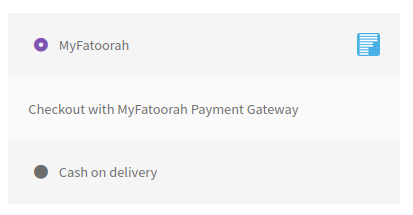
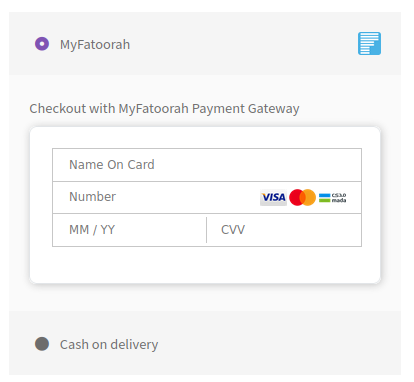

常见问题:
What's the difference between the MyFatoorah - Cards and MyFatoorah - Embedded payment methods?
- MyFatoorah - Cards: This uses the default gateways that were enabled in your portal account. You should enable only this payment method.
- MyFatoorah - Embedded: This is used only if you have any gateway that has the direct payment feature in it at your portal account.
What is the difference between the List Payment Options?
- MyFatoorah Invoice Page (Redirect): It will redirect the buyer to the MyFatoorah invoice page that contains a list of all payment gateways with their service charges.
- List All Enabled Gateways in Checkout Page: It will list the payment gateways inside your website and then will redirect the buyer straightway to the payment gateway page.
What is the Single Gateway View?
Select this option if you enabled only one gateway in your MyFatoorah portal account, and you need to display a custom title/icon instead of the default title/icon.
What is the Webhook Secret Key?
This option enables triggering events each time the order status changes at the MyFatoorah portal side. This feature recovers the lost orders due to connection loss or delay called back. Kindly refer to the https://myfatoorah.readme.io/docs/woocommerce-webhook.
更新日志:
2.2.10 (2025-02-11)
- Introduced support for Webhook v2
- Added Webhook support for multi-vendor functionality
- Updated the payment form to reflect total changes on the Blocks Checkout page
- Added mfVersion to the Blocks Checkout page
- Fixed the thousand separator display issue for the Apple Pay button in the Blocks Checkout page
- Fix plugin loaded order
- Sends expiry minutes to MyFatoorah to calculate the invoice expiration based on the vendor’s timezone See changelog.txt for older logs.