B2B Product Catalog – No E-Commerce, Global RFQ & Bulk Quote
| 开发者 | naibabiji |
|---|---|
| 更新时间 | 2026年9月17日 20:56 |
| PHP版本: | 7.4 及以上 |
| WordPress版本: | 7.1 |
| 版权: | GPL v2 or later |
| 版权网址: | 版权信息 |
标签
下载
详情介绍:
- Bulk RFQ Inquiry Cart — Multi-spec product selection with persistent inquiry cart. Buyers pick SKU variants with quantities and submit a single combined quote request — no account required
- Three Inquiry Modes — Each product supports None / Standard / Bulk inquiry type. Choose the right lead capture strategy per product: simple contact, external link, or full spec-based RFQ
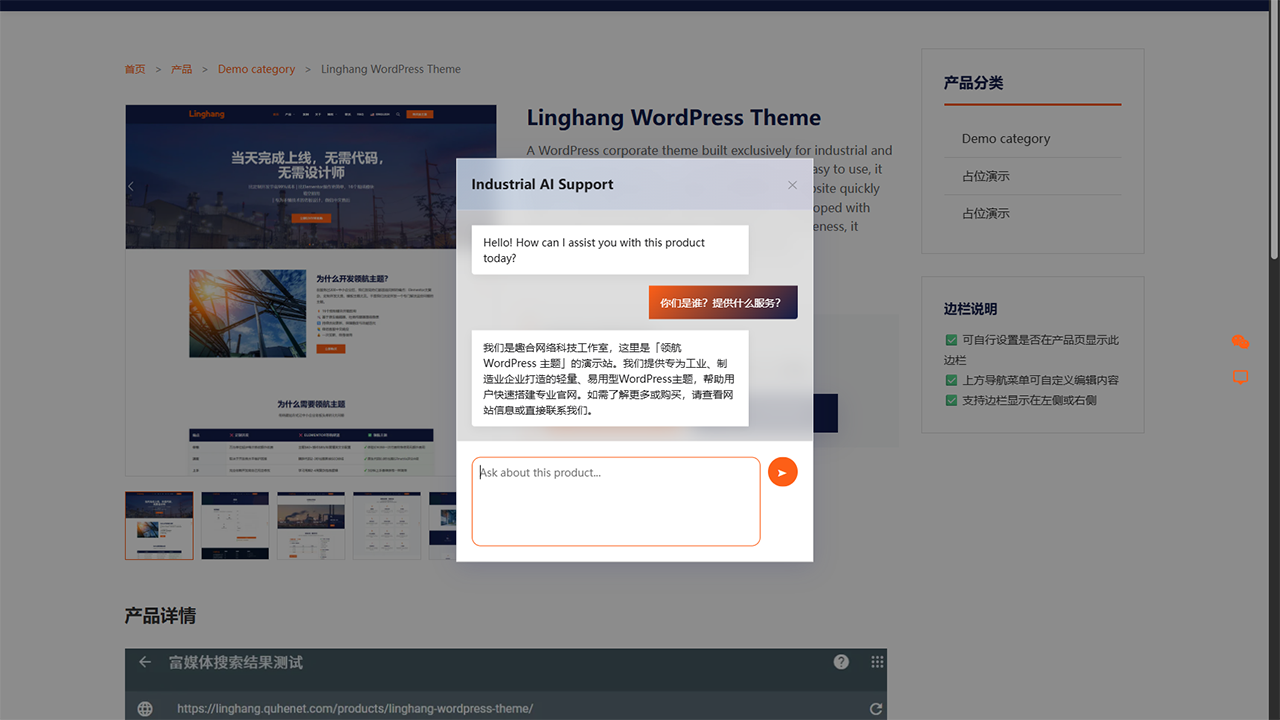
- AI-Powered Lead Capture — Built-in AI chatbot (SPEC v2 protocol) for automated customer engagement and lead qualification, with seamless fallback to inquiry forms
- AI Integration — Expose your published product catalog to compatible AI agents and MCP adapters through the WordPress Abilities API. Read-only by design, so AI can browse and search products but cannot change them
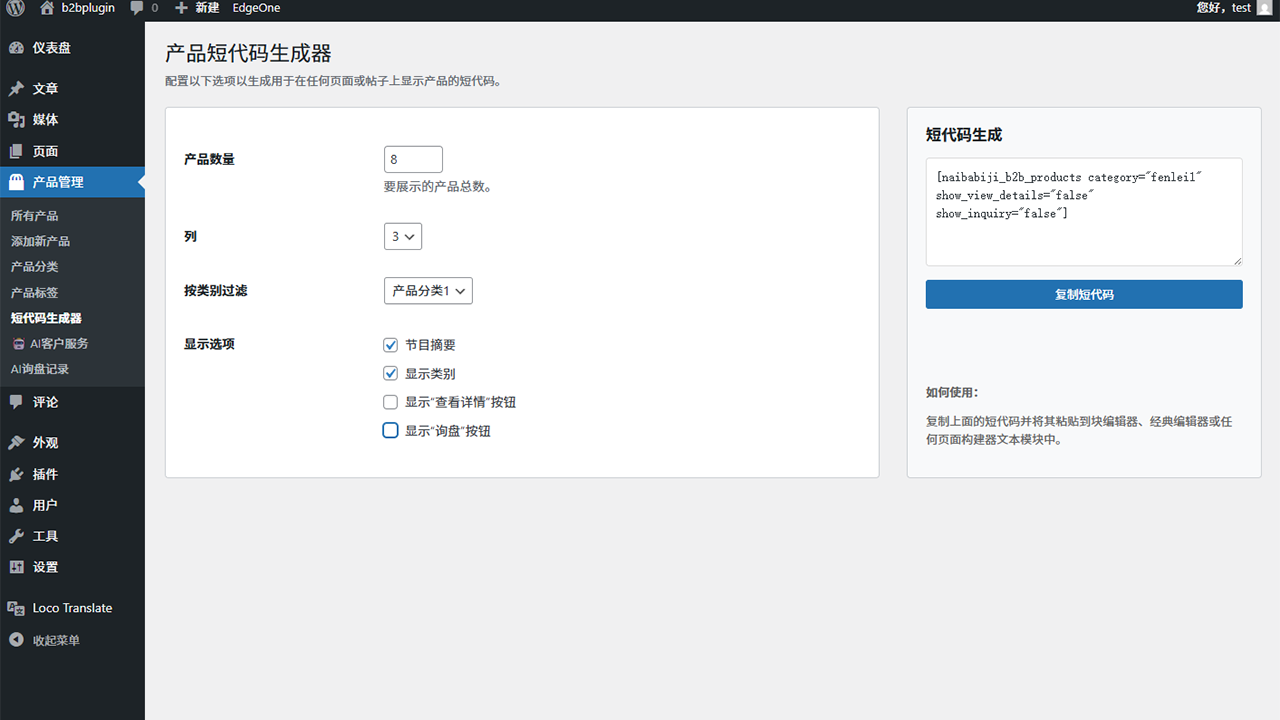
- Visual Shortcode Builder — Create product grids and category displays with real-time admin preview. No coding needed
- WordPress 7 Dynamic Blocks — Add product grids, featured products, category tabs, carousels, category entries, single featured products, and inquiry CTAs directly in the block editor
- Multilingual Support — Ready for international trade with translation files and locale-aware formatting
- SEO Content Management — Customize top and bottom content for archive, category, and tag pages independently
- Flexible Category Navigation — Choose compact top buttons or a responsive hierarchical sidebar for large product catalogs
- Widget & Sidebar Support — Add product showcases anywhere with smart CSS loading that won't affect page speed
- Enterprise Architecture — Model-driven design, version-controlled database migrations, and clean code for custom integrations
- Security First — Strict nonce verification, rate limiting, and input sanitization across all AJAX operations
- 🚫 Zero E-Commerce Overhead — No shopping cart, no checkout, no payment processing. Just products and inquiry forms — exactly what B2B businesses need
- 🌐 Global RFQ Ready — International-friendly quote forms with multilingual support. Capture inquiries from buyers worldwide, no matter the language
- ⚡ Lightweight & Fast — Purpose-built codebase without e-commerce bloat. Optimized for Core Web Vitals, won't slow down your site
- 🔍 SEO Optimized — JSON-LD structured data, breadcrumb navigation, and clean URLs for better search rankings out of the box
- 📱 Fully Responsive — Seamless display on all devices from desktop to mobile, with adaptive product grid layouts
- 🛠️ Easy Setup & Highly Customizable — Intuitive admin with visual shortcode generator gets you online in minutes. Rich hooks and template overrides for unlimited flexibility
- Complete Product Profiles: Title, detailed description, featured images, and multi-image galleries
- Organized Categorization: Hierarchical categories and flexible tagging system
- Inquiry Management: Customizable inquiry buttons with AI-powered customer service integration
- SEO Optimization: Built-in meta fields for better search engine visibility
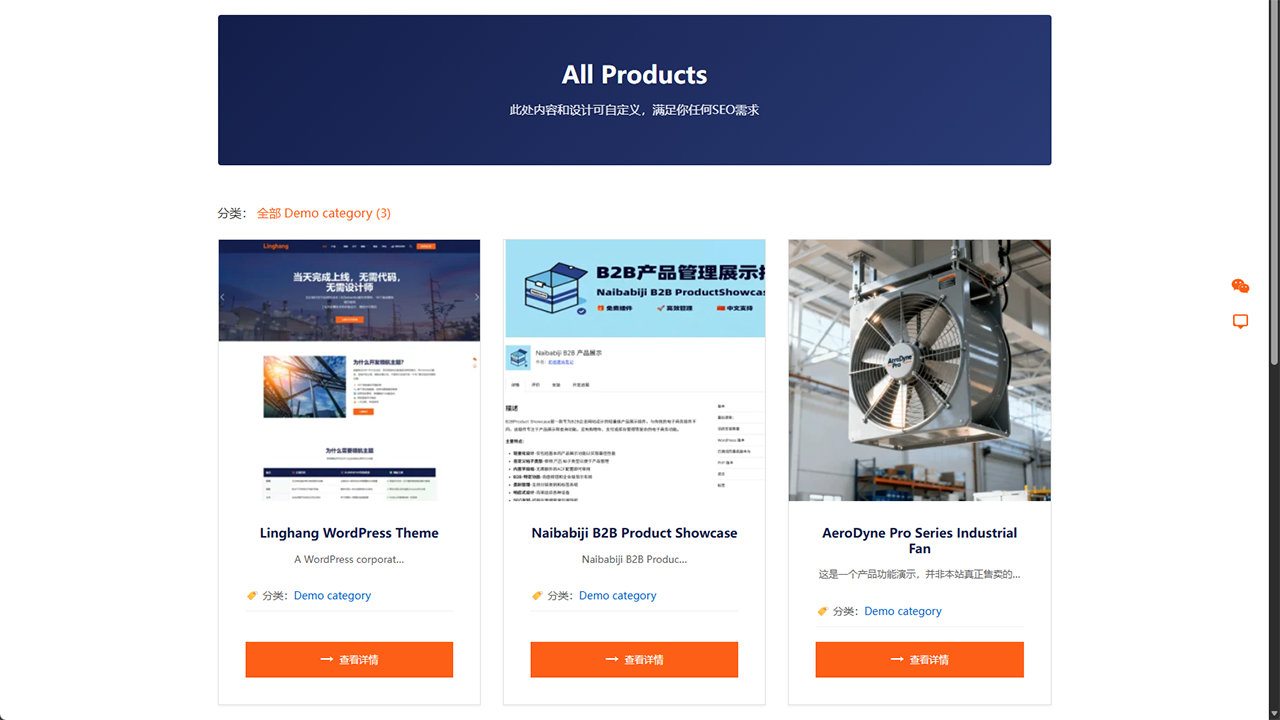
- Beautiful Archive Pages: Responsive grid or table layouts with selectable top or sidebar category navigation
- Detailed Product Pages: Comprehensive product information with image galleries
- Category & Tag Pages: Organized browsing experience
- Powerful Shortcodes:
[naibabiji_b2b_products]and[naibabiji_b2b_product_categories]for flexible display - Native Product Blocks: Product Grid, Featured Products, Product Categories, Product Carousel, Category Tabs Products, Single Featured Product, and Inquiry CTA
- Sidebar Widgets: Add product showcases to any sidebar with automatic CSS loading
- Intuitive Interface: Clean, organized settings with tab-based navigation
- Visual Shortcode Generator: Create custom product displays with real-time preview
- SEO Content Management: Customize top and bottom content for archive, category, and tag pages
- Customizable Styles: Button colors, product layouts, category navigation, and display controls
- Rich Hooks & Filters: Extensive customization options
- Template Override Support: Easy integration with any WordPress theme
- AJAX Interfaces: Modern, interactive functionality
- Clean Code Structure: Well-documented, maintainable codebase
- Enterprise Architecture: Model-driven design for scalability 🎯 Who This Plugin Is For
- Manufacturers — Showcase production lines with multi-specs selection and collect RFQs from global buyers
- Exporters & Trading Companies — Display products in multiple languages, capture inquiries from international markets
- Distributors & Wholesalers — Present product ranges to retailers and partners without exposing pricing logic
- Industrial Suppliers — List hardware, components, or standard parts with model codes and quantity selection tables
- Service Providers — Highlight service offerings with detailed profiles and custom inquiry forms
- Corporate Websites — Create professional product galleries without e-commerce overhead, payment gateways, or cart abandonment
- Developers — Extend functionality with rich hooks, template overrides, and clean model-driven architecture 💡 Common Use Cases
- Replace WooCommerce Catalogs — Already using WooCommerce just for product display? Switch to a lightweight catalog without cart/checkout bloat
- Global RFQ & Lead Generation — Capture structured quote requests from international buyers with multilingual forms and product specs
- Multi-Specs Product Catalogs — Display products with variants (sizes, models, grades) in an interactive selection table with bulk inquiry cart
- Trade Show & Virtual Exhibits — Launch product showcases online for virtual trade shows and international exhibitions
- Partner & Dealer Portals — Share product information with authorized partners and distributors via password-protected pages
- Sales Team Enablement — Give sales teams an always-up-to-date product catalog with built-in inquiry tracking and lead management
安装:
- Upload & Activate: Install the plugin through WordPress admin or upload files to
/wp-content/plugins/naibabiji-b2b-product-showcase/ - Configure Settings: Go to
B2B Showcase → Settingsto customize product display, inquiries, SEO content, and archive navigation - Add Products: Create new products using the custom "Products" post type
- Display Products: Use shortcodes or widgets to showcase products on your site
- Optimize SEO: Add custom content to archive, category, and tag pages for better search rankings
屏幕截图:
常见问题:
Does this plugin support shopping cart functionality?
No. This plugin is designed for B2B businesses, focusing on product display and inquiry functionality, without e-commerce features like shopping carts or payments.
How can I customize product templates?
You can create the following template files in your theme directory to override the default templates:
single-naibb2pr_products.php- Single product pagearchive-naibb2pr_products.php- Product archive pagetaxonomy-naibb2pr_product_category.php- Product category pagetaxonomy-naibb2pr_product_tag.php- Product tag page
What shortcodes are supported?
The plugin provides the following shortcodes:
[naibabiji_b2b_products]- Display product grid[naibabiji_b2b_product_categories]- Display product categories[naibabiji_b2b_contact_form]- Display an inline contact form for collecting messages
Does the plugin support sidebar widgets?
Yes! You can use the plugin's shortcodes in any text widget with the following features: Key Features:
- Smart Style Loading - Automatically detects shortcodes in sidebar and loads CSS styles only when needed
- Flexible Configuration - Supports product count, column layout, category filtering and other parameter settings
- Responsive Design - Automatically adjusts to single column layout on mobile devices
- Theme Compatibility - Works seamlessly with most WordPress themes Usage Steps:
-
Go to WordPress admin
Appearance → Widgets - Add a "Text" widget to your sidebar
- Paste the product shortcode into the text widget
- Customize the shortcode parameters as needed
- Save settings Recommended Configuration:
-
For sidebars:
[naibabiji_b2b_products limit="3" columns="1" show_category="false" show_excerpt="false"] - This configuration works well in sidebar spaces, showing 3 products in a single column layout without categories or excerpts
How do I change the category navigation on product archive pages?
Go to B2B Showcase → Settings → Archive Content and choose Top buttons or Left navigation under Category Navigation Layout. Top buttons work well for a small catalog. Left navigation is recommended for larger or multi-level catalogs and automatically becomes an expandable panel on smaller screens.
Why don't product styles work in the sidebar?
This issue has been fixed in v1.0.13. If you still encounter style problems, please try:
- Clear Cache - If using a cache plugin, clear all caches
- Refresh Page - Use Ctrl+F5 to force refresh the browser
- Check Widget Configuration - Ensure the widget is properly saved
- Theme Compatibility - Some themes may require additional CSS adjustments
How do I set up bulk (multi-spec) inquiry for a product?
- Edit the product and set Inquiry Type to Bulk.
- In the B2B Product Fields editor panel, add at least two Bulk Inquiry Specs with model codes and descriptions. You can also import or export CSV files there.
- Save the product. On the frontend, visitors will see a specs selection table where they can add items to an inquiry cart and submit a combined batch inquiry.
What is the difference between Inquiry Mode and Inquiry Type?
Inquiry Type is set per product (None / Standard / Bulk) and defines what kind of inquiry experience that single product offers. Inquiry Mode is a site-wide setting (External Link or Built-in Form) that only affects Standard-type products — it controls whether the inquiry button links to an external URL or opens a popup. Bulk-type products always use the built-in bulk inquiry form regardless of this setting.
Why do I see "Too many submissions" when testing bulk inquiry?
The plugin enforces a rate limit of 3 submissions per IP address within 5 minutes to prevent spam. If you need to test frequently or want a higher threshold, install a captcha plugin that integrates through the naibabiji_contact_form_validate filter.
Does this plugin support AI agents or MCP?
Yes. B2B Product Showcase exposes read-only product catalog capabilities through the WordPress Abilities API. Compatible MCP adapters can make these abilities available to AI clients such as Claude, ChatGPT, Codex, and other MCP-compatible tools. The plugin itself does not include an MCP server.
Can AI edit or delete my products?
No. The current AI integration is read-only. AI agents can read published product catalog data, but cannot create, edit, publish, or delete products through these abilities. They also cannot access inquiries, change plugin settings, or read API keys.
更新日志:
- New: Added a Product Page setting for showing or hiding the Related Products section; it remains enabled by default for existing sites.
- New: Added independent "Show category" and "Show excerpt" controls to the Featured Products, Product Carousel, and Category Tabs Products blocks.
- Fixed: Related Products now follows the Archive Content grid-card setting for showing or hiding short descriptions and product categories.
- Changed: Clarified the Grid Card Fields setting description to state which pages it affects and that it does not override shortcode or Gutenberg block display settings.
- New: This plugin now detects WooCommerce and blocks activation (in either activation order) with a clear message, because both plugins default to the same product category/tag URL structure and would otherwise break product links if run together.
- New: The
[naibabiji_b2b_products]shortcode and the Shortcode Generator now support filtering by product tag, in addition to product category. - Fixed: The Product Carousel block could show an unwanted horizontal scrollbar and off-center previous/next arrow icons on some themes. The block now sets its own sizing and button styles instead of relying on the active theme's defaults.
- Fixed: Category and tag filtering silently failed for non-Latin category/tag names (for example Chinese names), because their slugs are percent-encoded and were being cleared out by input sanitization meant for plain text.
- Improved: The product editor now shows a reminder with a one-click action when a product has no Featured Image set, since without one the product displays with no photo at all on cards and the product page.
- Improved: The Product Gallery's empty-state message now explains that you can select or upload multiple images at once.
- Improved: Addressed findings from an official WordPress Plugin Check scan, including a deprecated core function call and unprefixed template variables.
- Fixed: Product detail tabs now switch content without adding URL anchors or moving the user's page position.
- Fixed: Product and category images in the plugin's blocks now preserve their original aspect ratio instead of being cropped to a fixed frame.
- New: Added AI Integration — read-only product catalog access through the WordPress Abilities API for compatible AI agents and MCP adapters.
- New: AI clients can browse and search published products, read product details and specifications (including bulk inquiry specs), view categories and tags, and get a catalog overview.
- Security: The AI integration is read-only. AI clients cannot create, edit, publish, or delete products, access inquiries, change plugin settings, or read API keys.
- Compatibility: Requires an authenticated WordPress user with read permission; only published product data is exposed.
- New: Added a Grid Card Fields setting under Archive Content to let you show or hide the short description and category on product cards for the default archive, category, and tag pages in grid layout.
- Compatibility: Confirmed compatible with WordPress 7.1.
- Improved: Better theme compatibility and more consistent spacing across product archives, category pages, product details, and inquiry forms.
- Settings: Archive display controls are now grouped under Archive Content, with separate inquiry button color controls.
- Simplified: Appearance settings are easier to understand while retaining configurable button colors and border radius.
- Fixed: Table action buttons now fill the action column consistently and no longer inherit unwanted link underlines.
- New: Choose top category buttons or a hierarchical left navigation from the Archive Content settings.
- Improved: Product archive and category pages provide clearer browsing for large and multi-level catalogs, including current-category highlighting and product counts.
- Responsive: Left category navigation automatically becomes an expandable panel on tablets and mobile devices.
- Localization: Added Simplified Chinese translations for the new archive navigation settings and interface.
- Fixed: Removed block-editor-only RichText markers and unintended blank lines from product short description lists.
- Improved: Existing short descriptions are cleaned safely when read, without requiring a bulk content migration.
- Improved: Updated the bundled Simplified Chinese translations, including Custom Product Tabs and product block editor controls.
- Improved: Added a contextual link to an external visual HTML editor for product short descriptions and custom tab content.
- Fixed: Product category permalinks now refresh correctly after activation and rewrite-sensitive setting changes.
- New: Added a setting for customizing the product category URL base.
- New: Added custom inquiry notification recipients with support for multiple email addresses.
- Improved: Unified inquiry/contact/bulk notification recipient handling and contact field formatting.
- Developer: Added filters for notification recipients and reserved product category URL bases.
- Developer: Added stable public taxonomy getters so themes and integrations can read category images and archive title visibility without depending on internal term meta keys.
- New: Added seven dynamic WordPress 7 product showcase blocks: Product Grid, Featured Products, Product Categories, Product Carousel, Category Tabs Products, Single Featured Product, and Inquiry CTA.
- New: Added server-rendered block previews in the editor so product queries are handled consistently by PHP.
- New: Added basic block styles and style variants for default, minimal, luxury, compact, and overlay layouts where applicable.
- Developer: Added filters for product block query args, card meta, action buttons, image size, product card HTML, category card HTML, category image ID, and Inquiry CTA output.
- Improved: Cleaned up table layout template variables for better WordPress coding standards compatibility.
- New: Added an optional editor AI writing assistant for product titles and short descriptions.
- Compliance: Added external AI service disclosure for optional AI features.
- Improved: Theme compatibility is easier to control with appearance options for product pages, buttons, cards, tables, images, and forms.
- Improved: Added Chinese translations for the block-editor B2B Product Fields panel.
- Improved: Bulk Inquiry Specs now only appears when the product Inquiry Type is set to Bulk, reducing confusion for standard products.
- Improved: Bulk spec rows are more compact with single-line spec descriptions and smaller reorder/delete controls.
- Improved: Added clearer editor guidance for adding detailed product descriptions below the B2B Product Fields block.
- Fixed: Existing products now reliably show the B2B Product Fields panel when opened in the block editor.
- Compatibility: Minimum required WordPress version is now 7.0.
- New: Added a block-editor B2B Product Fields panel for product short description, gallery, and bulk specs, replacing the old bottom meta boxes in the block editor.
- Compatibility: Existing product data remains unchanged and no data migration is required.
- New: Table layout display mode — products displayed as a compact data table with customizable columns (image, SKU, excerpt, action buttons), ideal for industries with many models like PCB, electronic components, and machinery.
- New: Help page tabbed navigation — reorganized into 4 tabs (Quick Start, General Help, Template Override, Bug Report) for easier browsing and cleaner layout.
- New: Style Override help card — documents all Table layout CSS class names so users can easily add custom CSS to match their theme.
- Improved: Help page grid layout — increased minimum card width to 400px, preventing cramped 4-column layouts on wide screens.
- Improved: Template Override help card now lists all partial templates including the new Table row template.
- New: Getting Started guide on Help page — 5-step tutorial walks new users through setup: appearance settings, inquiry mode, product categories, publishing products (with visual guide), and navigation menus.
- New: Auto-redirect to Help page on first plugin activation, so new users land directly on the setup guide.
- New: uninstall.php — clean removal of custom database tables, plugin options, and transients when the plugin is deleted.
- Improved: Unified all $_POST access through Security::get_post_data() in Leads Handler for consistent input sanitization.
- Improved: Moved inline admin scripts to admin.js for cleaner separation of PHP and JavaScript.
- Fixed: PHPCS warnings in uninstall.php (variable prefixes, direct DB annotations), mixed line endings in class-frontend-display.php, and post__not_in annotation in product template.
- Security: Added server-side validation (name, email, message) for inquiry and contact forms to prevent empty submissions.
- Security: Added IP-based rate limiting to all form submission endpoints (5 submissions per 5 minutes for standard forms, 3 per 5 minutes for bulk inquiry).
- Security: Added JS escaping for chat history and contact info in admin leads detail modal to prevent XSS.
- Security: Sanitized CSS values (colors, border-radius, float offset) before inline output to prevent CSS injection.
- Fixed: Nonce refresh in frontend AJAX retry logic now correctly reads the nonce from the response object.
- Fixed: Lead list cache key now includes the source filter, preventing incorrect cache hits when switching filter tabs.
- Improved: Frontend now sends structured fields (name, email, company, etc.) alongside contact info for more reliable backend processing.
- Improved: Database upgrade routine now independently checks and adds missing columns and indexes.
- Improved: Removed debug console.log statements from production JavaScript files.
- Fixed: Related products on single product pages now correctly exclude the current product from the random query via
post__not_in, preventing the displayed count from dropping below the expected 4 when the current product appears in the random results. - New Hook:
naibabiji_b2b_product_after_related_products— fires after the related products section on single product pages, allowing custom content injection below the related products grid.
- Fixed: Plugin action links "Settings" URL now correctly points to the new B2B Showcase → Settings page instead of the old options-general.php URL.
- Fixed: Categories-only archive display mode no longer limits taxonomy (category/tag) pages to a single product; the limit now correctly applies only to the main archive page.
- New Feature: Archive Display Mode — Choose between default (filters + products), categories-only (category card grid), or products-only on the archive page.
- New Feature: Category Images — Upload a category image via the term editor; displayed as cards in categories-only archive mode.
- New Feature: Default Product Sorting — Set a default sort order (newest, oldest, title A-Z, title Z-A) for all product listing pages from the settings.
- Improved: Category Button Styles — Archive and category page category navigation now uses consistent button styling with product counts.
- Improved: Container Width CSS — Added
width: 100%andbox-sizing: border-boxto archive/taxonomy containers for more predictable cross-theme width behavior.
- New Feature: Post-submission redirect — optionally redirect users to a custom thank-you page after successful inquiry/contact/bulk form submission, enabling Google Ads conversion tracking.
- New Setting: "Redirect After Submission" toggle and "Redirect URL" field added to Settings → Inquiry tab (visible when Built-in Form mode is active).
- Improved: Redirect URL supports both absolute URLs and relative paths (e.g.
/thank-you).
- Fixed: Product gallery thumbnails now display as uniform squares with consistent borders across all themes, eliminating misalignment and height variance issues caused by theme-specific image sizes and aspect ratios.
- New Feature: Bulk Inquiry Mode — Products can now offer a multi-specs selection table (e.g. model codes, sizes, variants) so B2B buyers add multiple SKUs with quantities to an inquiry cart and submit one combined quote request.
- New Feature: Inquiry Cart — Persistent localStorage-based cart with floating sidebar, quantity editing, and per-spec removal. Customers browse across products and submit all at once.
- New Feature: Specs Management — Admin meta box for managing product specifications (code + description), including drag-and-drop sorting, CSV bulk import/export, and duplicate detection.
- New: Three-Mode Inquiry System — Each product now supports None / Standard / Bulk inquiry type via radio toggle, replacing the old binary checkbox.
- New: Job Title Field — Added Job Title to inquiry form fields (configurable in settings, synced across bulk/standard/contact forms).
- New: AJAX Lead Detail — Admin leads list now loads bulk inquiry details on demand via
naib_get_lead_detailendpoint, avoiding large JSON in HTML data attributes. - New: Database Upgrade — Version-controlled schema migration adds
inquiry_typeandinquiry_datacolumns to the leads table with idempotent checks. - New: Theme Compatibility Detection — Automatically checks if the active Linghang theme meets minimum version requirements and displays a non-dismissible admin notice when outdated, preventing template-level fatal errors from version mismatches.
- Improved: Enhanced form field sanitization (CSV content, bulk specs JSON, lead_id validation) to meet WordPress Plugin Check standards.
- Improved: Bulk inquiry JS now loads on all frontend pages instead of only bulk-type product pages, ensuring the inquiry form modal and hash-based navigation always work.
- Improved: Bulk inquiry form modal correctly applies
.activeCSS class on overlay/panel for compatibility with plugin's shared Glassmorphism style system. - Fixed: Inquiry Note (textarea) now spans full width in the 2-column form grid via
naib-field-fullclass. - Fixed: Cart sidebar "Submit Inquiry" button handler rewritten from fragile inline onclick to robust DOM event listener with graceful fallback chain.
- Fixed: Inquiry Mode settings (Built-in Form vs External Link) — Form Fields and Success Message rows are now fully hidden (including their
<tr>label headers) when External Link mode is selected, eliminating orphaned section titles on the settings page.
- Improved: Changed product tag URL slug from
naibb2pr-product-tagtoproduct-tagfor cleaner, more SEO-friendly URLs. - New Feature: Added Template Override guide to the Help tab, documenting page templates and partial template overrides.
- New Feature: Inline contact form shortcode
[naibabiji_b2b_contact_form]— embed a standalone contact form on any page without product association. - New Feature: Contact form email notifications display page title instead of product name.
- New Feature:
Contact Formsource filter in Customer Inquiries admin list. - New Feature: Captcha extension hooks (
naibabiji_contact_form_validatefilter,naibabiji_contact_form_before_submitaction). - Improved: Customer Inquiries admin page fully redesigned to support all source types (AI Chat, Inquiry Form, Contact Form).
- Improved: Inquiries list now shows Context column (page title for contact forms, product link for others), parsed contact names, and 30-word message preview.
- Improved: Detail modal for form submission inquiries with full contact info, message, and context display.
- Improved: Email validation on contact form (client-side regex check).
- Improved: Automatic nonce refresh for cached pages — contact form resubmits transparently on nonce expiry.
- New Feature: Built-in Inquiry Form Mode with unified design.
- New Feature: Premium UI System featuring Glassmorphism and responsive 2-column layout.
- New Feature: Intelligent AI Fallback system that automatically switches to the inquiry form on technical errors.
- Improved: Standardized form controls across all plugin components.
- Improved: Optimized database query security and satisfied WordPress coding standards.
- Fixed: Resolved various output escaping and linting warnings in templates and settings.
- Fixed: Action hook callback issue in
class-leads-handler.php- addedrun_cleanup_for_cron()wrapper method to prevent return values in cron callbacks. - Improved: Code quality validated with PHPStan Level 3 static analysis.
- Changed: Plugin name updated to comply with WordPress.org repository guidelines (removed "Plugin" from name).
- New Feature: Industrial AI Support: Integrated AI customer service system with SPEC v2 protocol for automated inquiry handling.
- New Feature: Archive Page SEO Content: Added ability to add custom content to the top and bottom of product archive/category/tag pages.
- New Option: Hide Title: Added option to hide default titles on archive, category, and tag pages for flexible header design.
- Improved: Settings Page Layout: Reorganized settings page with tab-based navigation for better user experience.
- AI Context Awareness: Automatic product data extraction (SKU, Price, Description) for precise AI responses.
- Shortcode Generator: Visual tool in admin dashboard for easy shortcode creation with real-time preview.
- CSS Variable Optimization: Enhanced
:rootCSS variables for better theme synchronization. - Production Security: Enhanced all AJAX and save operations with strict nonce verification.
- Simplified: Removed the confusing "Enable Inquiry Button Globally" switch from the settings page.
- Improved: Inquiry button logic now defaults to "Enabled" for all products unless explicitly disabled individually.
- Fixed: Resolved a bug where the inquiry button was not checked by default when publishing new products.
- Fixed: Short description content with inline HTML elements (e.g.
<strong>) was rendered on a single line instead of separate paragraphs due towpautop()not handling single line breaks between inline elements correctly. - Improved: Line endings are now normalized and single newlines are converted to double newlines before
wpautop()processing, ensuring each line gets its own<p>tag.
- Fixed: Resolved Google Structured Data "Missing price" and "Missing SKU" errors by adding an optional price field and optimizing JSON-LD generation.
- Improved: Schema.org "Offer" data is now only generated if a price is specified, ensuring B2B compatibility.
- Improved: Enhanced the description in the admin settings for Schema.org markup with important usage tips.
- Major Architectural Rebirth: Transitioned to a professional model-driven architecture for enterprise-grade scalability.
- New Product Model: Centralized all data access through the
Naibabiji_B2B_Productclass, ensuring consistent logic and cleaner templates. - Efficient Grouped Meta: All product-specific metadata is now stored in a single, high-performance array, reducing database bloat.
- One-Click Migration Tool: Added an automated utility in the settings page to safely upgrade legacy product data to the new v3.0.0 format.
- Shortcode Generator: Introduced a brand new visual tool in the admin dashboard for easy shortcode creation with real-time preview.
- Production Security: Enhanced all internal AJAX and save operations with strict nonce verification and context-aware escaping.
- Modular SEO: Decoupled Schema.org logic into a standalone builder for improved rich result precision.
- Added smooth transition animation when switching product detail page images
- Added loading spinner animation during image switch, with color synced to admin button color setting
- Added opacity transition effect during image loading for better user experience
- Thumbnail active border color now follows the admin button color setting
- Added language file direct access protection for zh_CN translation
- Changed subcategory display from vertical list to horizontal buttons for better visual balance
- Synchronized subcategory button styles with global plugin button settings (colors, hover effects, border radius)
- Improved responsive layout for subcategory navigation on mobile devices
- Fixed button color settings not taking effect due to CSS specificity conflicts with themes
- Changed CSS
backgroundshorthand tobackground-colorto allow dynamic inline styles to override defaults - Added product card hover border color to follow the admin button color setting
- Major Feature Update: Separated SEO content area into independent top and bottom sections
- Added ability to set different SEO content for page top and bottom positions
- Each position has independent enable/disable toggle
- Automatic data migration from old single content field to new dual-field structure
- Improved flexibility and control over category/tag page SEO optimization
- Breaking change: Removed position dropdown, now using separate editors for top/bottom content
- New backend product display column count setting for frontend products
- Fixed foreach() warning error in sidebar widget processing
- Added type checking for widget_ids to prevent type mismatch errors
- Improved data validation for WordPress sidebar widgets configuration
- Enhanced plugin stability and error handling
- Enhanced CSS loading logic with sidebar widget shortcode detection
- Fixed CSS styles not working in sidebar widgets
- Smart detection of shortcode content on pages, loading CSS resources only when needed
- Improved responsive design for better product card display on mobile devices
- Added Elementor shortcode support in SEO content area
- Standardized function and variable prefixes to comply with WordPress plugin best development practices
- Added toggle to enable/disable product meta information display
- Improved translations and updated localization files
- Added button color customization entry for front and back, managers can quickly adjust styles to match brand vision
- Replace the product short description with the fill-in area, use a rich text editor to optimize the input experience and improve Gutenberg compatibility
- Changed product category URL slug from 'naibb2pr-product-category' to 'product-category'
- Improved URL structure for better SEO and user experience
- Note: After updating, please deactivate and reactivate the plugin or visit Settings > Permalinks and save to refresh rewrite rules
- Changed product archive page URL from 'naibb2pr-products' to 'products'
- Fixed PHP syntax error in admin settings page
- Fixed an issue with WordPress official review feedback
- Optimized internal connection styles and script loading to comply with WordPress best practices
- Improved sanitize_callback parameter configuration of register_setting () function
- Make sure all custom article types and taxonomies are named with unique prefixes
- Removed the direct < style > and < script > tags and replaced them with wp_add_inline_style () and wp_add_inline_script () functions
- Enhanced code security and WordPress compatibility
- Fixed a PHP syntax error
- Optimize the display of search results page
- Removed deprecated load_plugin_textdomain() function call for WordPress 4.6+ compatibility
- Enhanced security with improved nonce verification in form processing
- Fixed input sanitization in POST and GET request handlers
- Improved security logging mechanism to follow WordPress best practices
- Replaced direct database query with WordPress API functions in meta fields handling
- Enhanced security in AJAX handlers
- Improved nonce verification and input sanitization
- Added recursive array sanitization
- Added GET parameter sanitization method
- Fixed permission checks in admin functions
- Improved security event logging
- Front-end display bug fixes
- Multi-language support
- Modify the code to meet the requirements for submitting to the official WordPress repository
- Initial release
- Basic product showcase functionality
- Custom post types and taxonomies
- Frontend templates and shortcodes
- Admin dashboard settings page
- AJAX functionality support
- Developer hook system