NanoTrans Agent Paywall
| 开发者 |
nanotrans01
wiselake |
|---|---|
| 更新时间 | 2026年8月20日 09:07 |
| PHP版本: | 8.1 及以上 |
| WordPress版本: | 7.1 |
| 版权: | GPLv2 or later |
| 版权网址: | 版权信息 |
详情介绍:
- Dual Access - Humans pay via browser wallet (MetaMask); AI agents pay automatically via x402 protocol
- Gasless Payments - Buyers unlock content with a signature only and sellers receive payouts automatically — neither side needs ETH for gas (with the Facilitator Proxy connection enabled on Base mainnet; see "When is payment really gasless?" in the FAQ)
- x402 Protocol - Industry-standard HTTP 402 payment flow with EIP-712 signatures
- USDC Payments - Stablecoin payments on Base Network (low gas fees, fast settlement)
- Agent Discovery -
/.well-known/x402endpoint for automatic content discovery - Gutenberg Block - Visual paywall block editor with price configuration
- Batch Payments - Purchase up to 20 articles in a single transaction
- Admin Dashboard - Revenue tracking, anomaly detection, emergency controls
- Real-time Notifications - SSE-based payment alerts
- Permanent Access - One-time payment grants permanent access via signed wallet cookie
- Publisher sets content prices using the Gutenberg paywall block
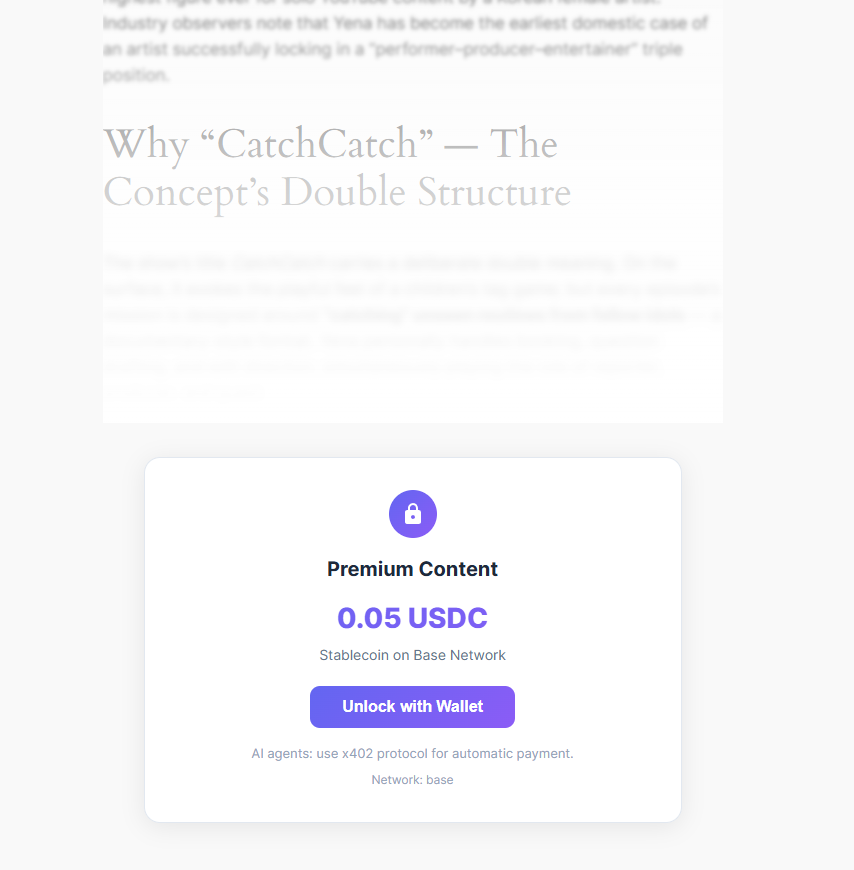
- AI agent requests content and receives HTTP 402 with payment requirements
- Agent signs USDC payment via EIP-712
- x402 Facilitator verifies payment on-chain
- Content is delivered as structured JSON
- Set per-article prices in USDC
- Dynamic pricing (agent vs human, time-based)
- Revenue dashboard with real-time analytics
- Automatic fund distribution via Splitter contracts
- Standard x402 (HTTP 402) payment flow — works with any x402-capable agent or SDK
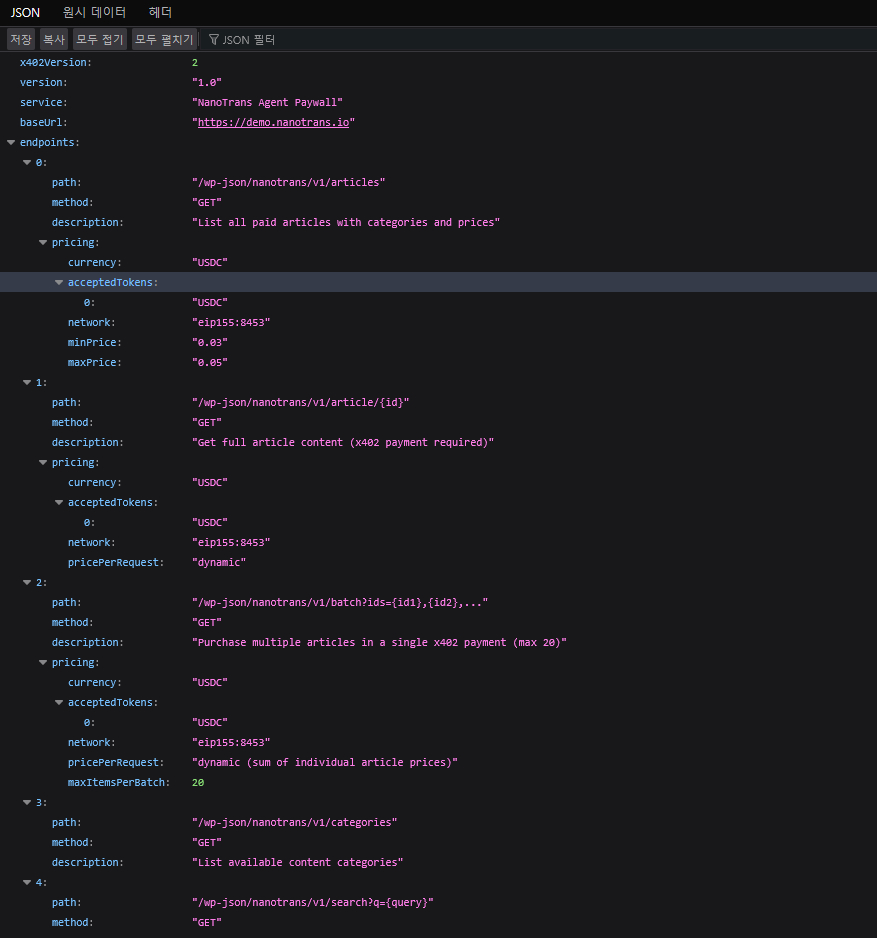
- Machine-readable site discovery at /.well-known/x402
- Structured JSON API responses (articles, categories, search)
安装:
- PHP 8.1 or higher with GMP extension
- WordPress 6.9 or higher
- Base Network wallet (MetaMask or compatible)
- USDC tokens on Base Network
nanotrans-x402 folder to /wp-content/plugins/, or install directly from the WordPress plugin directory. Activate the plugin through the 'Plugins' menu.
On activation, the plugin automatically connects to the Facilitator Proxy service. You will see a success notice: "Successfully connected to Facilitator Proxy."
Step 2: Configure Your Wallet
Go to Settings > NanoTrans and enter your Base Network wallet address (the address that will receive USDC payments). Configure default content prices and other options as needed.
Step 3: Create Paywalled Content
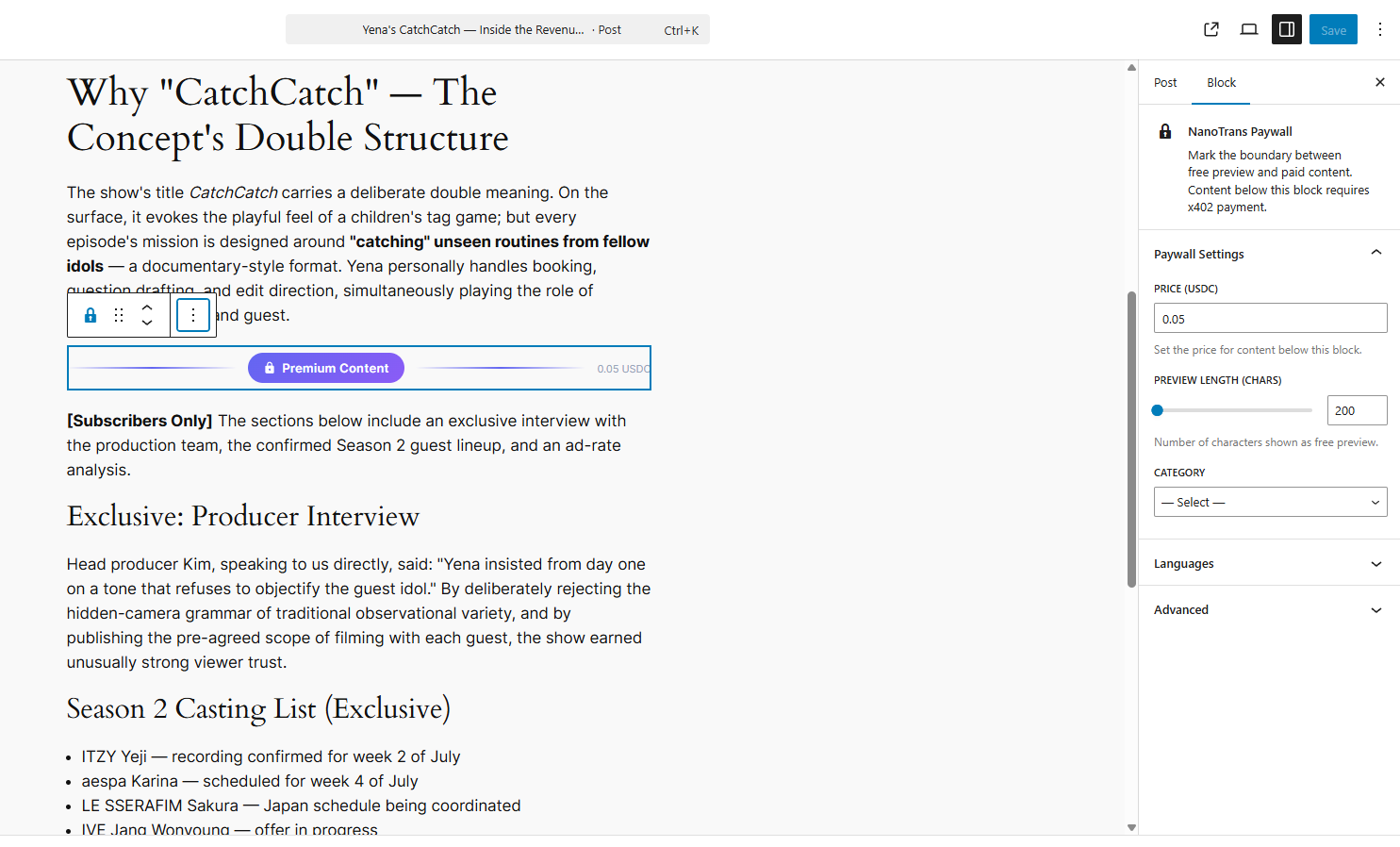
Add the NanoTrans Paywall block to any post or page using the Gutenberg editor. Set the price in USDC and publish.
That's it! No wp-config.php editing required. The plugin handles Facilitator authentication automatically.
Testing:
To test with the Base Sepolia testnet, change the network to "base-sepolia" in Settings > NanoTrans and use testnet USDC from a faucet.
Advanced Configuration (optional):
For custom Facilitator Proxy deployments, you can override the default by adding constants to wp-config.php:
define( 'NANOTRANS_FACILITATOR_URL', 'https://your-worker.workers.dev' );
define( 'NANOTRANS_PROXY_AUTH_SECRET', 'your-manual-bearer-token' );屏幕截图:
常见问题:
When is payment really gasless (no ETH needed)?
Gasless is the default path, but it depends on three things:
- Buyers sign a USDC payment authorization (EIP-3009) and the Facilitator submits it on-chain and pays the gas — this requires the Facilitator Proxy connection to be enabled (Settings > NanoTrans). Without it, or if the wallet cannot sign typed data, buyers are offered the classic wallet transfer, which needs a little ETH for gas — the plugin never switches to that path silently; the buyer must explicitly choose it.
- Sellers receive their share without holding ETH when Automatic Payout Distribution is enabled (Settings > NanoTrans; off by default) on Base mainnet with the Facilitator Proxy connection — the Facilitator service pays the gas to distribute Splitter funds. On Base Sepolia, or with a custom NANOTRANS_RELEASE_KEY, the site's own key signs the payout and needs ETH. If no Splitter is configured, payments go straight to the seller wallet and no payout step is needed at all.
- Agents (x402 API) always pay by signature; the Facilitator pays the gas.
What is x402?
x402 is an open protocol that enables machine-to-machine payments over HTTP. When content requires payment, the server responds with HTTP 402 (Payment Required) along with payment details. The client automatically signs and submits payment, then receives the content.
Which blockchain network does this use?
NanoTrans uses the Base Network (Ethereum L2) for USDC stablecoin payments. Base offers low gas fees (~$0.01) and fast confirmation times (~2 seconds).
Is this compatible with WooCommerce?
NanoTrans operates independently of WooCommerce. It uses its own payment flow (x402 protocol) and does not conflict with WooCommerce product pricing.
How are payments secured?
- EIP-712 typed data signatures for payment authorization
- x402 Facilitator verifies signatures on-chain before settlement
- Replay attack prevention via unique transaction hashes
- Rate limiting and anomaly detection
- All payment attempts logged for audit
What AI agents are supported?
Any AI agent that supports the x402 payment protocol. The plugin exposes a standard HTTP 402 flow plus a machine-readable discovery endpoint (/.well-known/x402), so any x402-capable agent or SDK can discover and purchase content.
How do I test without real money?
Use the Base Sepolia testnet. Set the network to "base-sepolia" in plugin settings and use testnet USDC from a faucet.
Do I need CDP API keys or manual configuration?
No. The plugin automatically registers with the Facilitator Proxy on activation and receives an API key. No wp-config.php editing or CDP keys required. The Cloudflare Worker proxy handles all CDP JWT signing on your behalf.
Does this plugin store private keys?
No. The plugin does not require or store any private keys. Payment verification is handled by the Facilitator proxy (Cloudflare Worker). Only your public wallet address is needed.
Does this work with WordPress Multisite?
No. NanoTrans Agent Paywall currently supports single-site WordPress installations only. On multisite, settings and transaction records would be shared across all sites, which is not suitable for separate content publishers. Multisite support is planned for a future release.
Is this compatible with caching plugins?
Yes. NanoTrans sends Cache-Control: no-store and X-NanoTrans: payment-gateway headers on all payment-required (HTTP 402) responses, so caching plugins like WP Super Cache and W3 Total Cache should automatically exclude them. If you experience issues, add a cache exclusion rule for URLs containing /nanotrans/v1/.
What happens if the payment Facilitator goes down?
NanoTrans includes a circuit breaker that detects Facilitator outages. After 3 consecutive failures, payments are temporarily paused for 5 minutes to prevent cascading timeouts. An admin notice will appear on the NanoTrans dashboard. The system automatically retries when the cooldown expires. If a settlement response is lost after the transfer may already have been broadcast, the payment is marked "uncertain" and reconciled from chain state (USDC authorization state + transfer receipt) — buyers are never asked to sign again while that is unresolved, and "Already paid? Restore access" re-checks it on demand.
My site is behind Cloudflare / a reverse proxy — rate limits hit every visitor at once
By default the plugin only trusts REMOTE_ADDR (forwarded headers are spoofable). Behind a proxy or CDN every visitor then shares one per-IP bucket. Register your proxy addresses in wp-config.php — define( 'NANOTRANS_TRUSTED_PROXIES', '10.0.0.0/8, 173.245.48.0/20' ); (comma-separated IPs/CIDRs; the nanotrans_trusted_proxies filter also works) — and the plugin will read the real client IP from X-Forwarded-For (right-most hop that is not a trusted proxy) only when the request actually arrives from one of those proxies. Make sure the proxy appends the client address to X-Forwarded-For (nginx: proxy_set_header X-Forwarded-For $proxy_add_x_forwarded_for;); Cloudflare does so by default.
更新日志:
- New: a wallet that already paid for a post can now recover access with just a fresh signature even when its USDC balance has dropped below the price — the plugin verifies the payment authorization signature itself (against the real USDC signing domain) and serves the content without contacting the payment facilitator or charging anything.
- New: "Unresolved Settlements" card on the NanoTrans dashboard — shows payments whose settlement outcome is still being confirmed on-chain (with stale and stalled counts) and a "Reconcile now" button that checks chain state immediately.
- Improvement: replayed or expired payment authorizations are never accepted for the signature-only recovery path; recovery requires a live, unused authorization.
- Compatibility: tested up to WordPress 7.1 — the full test suite passes on 7.1 (including the always-iframed post editor); no behavior changes were needed.
- Fix: if the Facilitator's settlement response is lost (timeout, gateway error) after the USDC transfer may already have been broadcast, the payment is now recorded as "uncertain" and reconciled from chain state (USDC authorization state + transfer receipt) instead of being reported as a charge-free failure. Buyers are never asked to sign again while that is unresolved; "Already paid? Restore access" and the settle endpoint re-check it on demand, and a wallet that already owns a post is never charged for it twice (this also gives agents a retry path after an unknown outcome).
- Fix: the same signed payment authorization can no longer be submitted twice (for another post).
- Improvement: the classic wallet-transfer fallback (which needs ETH for gas) is no longer entered silently — temporary hiccups are retried once, and switching to the gas-costing path requires an explicit second click.
- Improvement: sites behind a reverse proxy or CDN can register trusted proxy addresses (NANOTRANS_TRUSTED_PROXIES) so per-visitor rate limits use the real client IP.
- Improvement: new "uncertain" status in the dashboard transaction filter; MCP clients and the agent skill describe the unknown-outcome case and the safe retry.
- Docs: the conditions under which payments are gasless are spelled out (FAQ).
- New: articles can be tagged with any language — any well-formed IETF code (e.g. ja, fr, pt-BR) is accepted instead of the previous fixed Korean/English/Spanish list. The paywall block's language picker is now a free-entry field with suggestions.
- New: /.well-known/x402 and the agent API advertise the languages your published paid content is actually tagged with, derived from post metadata instead of a hardcoded list.
- Improvement: agents can filter articles and categories by any well-formed language code; malformed codes are still rejected.
- Fix: buyers who take longer than 30 seconds to approve the signing prompt no longer hit an opaque payment failure — the expired (charge-free) signature is detected and a fresh one is requested automatically, with a clear message. The signing button now shows the 30-second window.
- New: category bundles can now be purchased with a single wallet signature — the Facilitator settles the payment on-chain and pays the gas, so bundle buyers need no ETH. The classic wallet-transfer flow remains as an automatic fallback.
- Fix: the bundle purchase card now renders on block themes (e.g. Twenty Twenty-Four) whose category archives show excerpts — it was previously unreachable there — and renders exactly once per page on classic themes.
- Fix: bundle prices are displayed at USDC precision (micro-prices such as 0.0054 no longer round up to 0.01).
- Fix: buyers who already unlocked every article in a category are no longer offered the bundle again.
- Buyers no longer need ETH: a post can be unlocked by signing a USDC payment authorization in the wallet — the Facilitator submits it on-chain and pays the gas. The classic wallet-transfer flow remains as an automatic fallback when gasless payment is unavailable.
- Sellers no longer need ETH: earned funds are distributed automatically (seller / platform split) by the Facilitator service. Sites that explicitly set NANOTRANS_RELEASE_KEY keep signing releases themselves.
- New settings: an "Automatic Payout Distribution" toggle and a "Payout Threshold (USDC)" field (default 1 USDC; 0 = distribute after every payment; smaller balances are swept hourly).
- Behavior change: with a NANOTRANS_RELEASE_KEY configured, distribution now waits for the payout threshold (set it to 0 to restore release-on-every-payment).
- Paywalled content is no longer exposed through the core WordPress REST API (wp-json/wp/v2/posts), RSS/Atom feeds, or auto-excerpts on archive/home/search pages.
- Human payment verification now requires a wallet signature bound to the specific post and transaction, so an observed on-chain payment cannot be replayed by a third party.
- Transaction hashes are single-use via an atomic ledger — one on-chain payment unlocks exactly one post, including under concurrent requests.
- Bundle payment verification now checks the sender and the USDC contract and requires a wallet-ownership signature, closing a free unlock via crafted tokens; bundle buyers now get a persistent access token.
- The emergency kill switch now halts human, gasless, and bundle payments too, and its admin toggle is processed before the page renders and is idempotent.
- Facilitator proxy hardening: constant-time auth-secret comparison, fail-closed rate limits on gas-spending endpoints, wallet-to-site Splitter binding, and registration URL validation.
- Categories are now site-agnostic: the plugin uses your site's own WordPress categories instead of a fixed taxonomy, and the set can be pinned with the
nanotrans_allowed_categoriesfilter. Agents discover the live category set via /categories and /.well-known/x402. - New: configure the paywall from a document-sidebar panel — add a paywall and set price, preview length, and category without hunting for the block.
- A failed payment verification now offers a no-charge retry instead of risking a second charge, and buyers can restore access on a new device with "Already paid? Restore access".
- The batch price lock now actually applies (a locked quote is honored after a price change), and gross overpayments are rejected before on-chain settlement.
- Re-registering with the Facilitator Proxy no longer deletes the working API key on failure.
- Correct private-key prefix handling in auto-release (previously corrupted ~1 in 16 keys), malformed prices are rejected, and oversized payment headers are rejected instead of truncated.
- The admin real-time dashboard no longer replays days of stored events as new notifications on every page load.
- The settings page now shows validation errors and save confirmations.
- Tested up to WordPress 7.0 (block API v3, PHP 8.1+).
- Initial release
- x402 payment protocol support (v1 and v2) with USDC on Base Network
- Dual access: human (browser wallet) and agent (x402 auto-payment)
- Permanent human access via HMAC-signed wallet cookie after one-time payment
- Gutenberg paywall block with visual editor
- Agent discovery via /.well-known/x402 endpoint
- JSON API for structured content delivery to AI agents
- Batch payments (2-20 articles per transaction)
- Admin dashboard with revenue tracking and anomaly detection
- SSE real-time payment notifications
- Splitter contract integration for automatic fund distribution
- Circuit breaker for Facilitator outage resilience
- Cloudflare Worker proxy for CDP Facilitator authentication
- Automatic Facilitator Proxy registration on activation (no manual config needed)