
Netdesign Session Guard
| 开发者 | netdesign |
|---|---|
| 更新时间 | 2026年11月2日 19:26 |
| PHP版本: | 7.4 及以上 |
| WordPress版本: | 7.1 |
| 版权: | GPLv2 or later |
| 版权网址: | 版权信息 |
详情介绍:
Selling courses, memberships or subscriptions? Session Guard shows you when one account is used by several people, and can stop it.
Live view
Everyone signed in right now: user, device and browser, IP and country, the page they're on, and when they were last seen. Users on more than one device at the same time stand out. Sign out any device with one click.
Account-sharing detection with risk levels
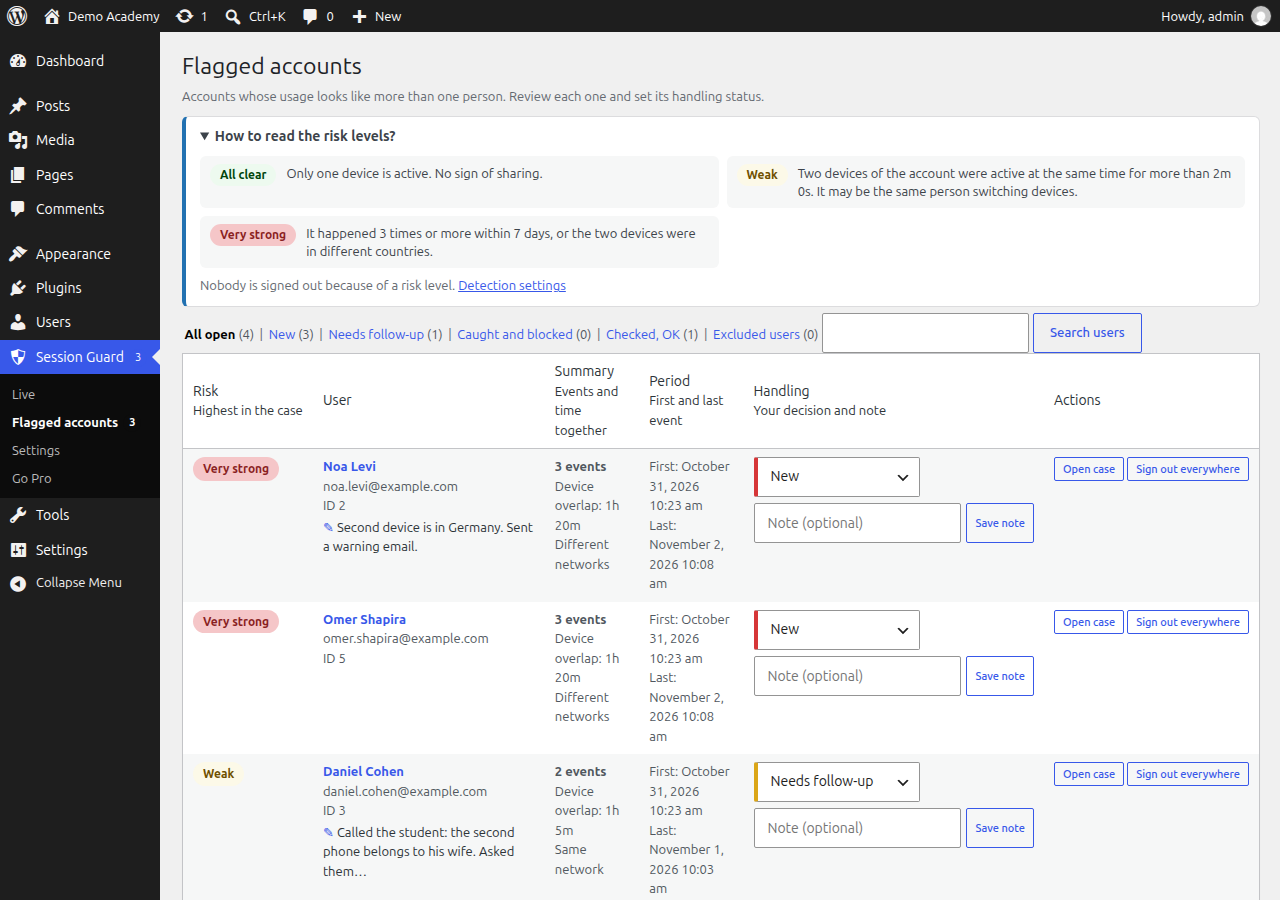
The clearest sign of a shared account is two devices used at the same moment. Session Guard records every overlap (two devices of one account active together), and rates it:
- Weak: two devices active together longer than the grace period.
- Very strong: the devices were in different countries, or it keeps happening (several times in a week).
- With the Pro add-on, which detects video playback: medium (only one device watching a video) and strong (both watching at the same time).
- Handling status for every flagged account: New, Needs follow-up, Caught and blocked, or Checked, OK. Filter the list by status.
- Notes on any user ("called the student, the second phone is his wife's"), with author and date.
- Online at the same time: each user's page lists the periods when two of their devices were active together, how long, from which devices, and whether from the same network.
- Sign the user out everywhere, or exclude them from monitoring (test accounts, staff). The Excluded users tab lists them, and the setting of the same name lets you paste a list of emails or user IDs.
- Monitoring switch: turn collection off without deleting anything.
- Automatic client-IP detection behind Cloudflare and local proxies, which visitors can't fake.
- Right-to-left support; Hebrew translation included.
- Imports sessions that were already open when you activate it.
- video detection (Vimeo, YouTube, HTML5) for the medium and strong levels, and a viewing report for every overlap,
- email alerts about flagged accounts and active suspects, with an email history, and a warning email to the user,
- per-user device limits,
- LearnDash: device limits per group, and the course each user is in,
- a faster heartbeat endpoint.
安装:
- Install from Plugins → Add New, or upload the zip, then activate.
- Open Session Guard → Live to see who is online.
- Leave Settings → Device limit → Mode on Monitor only for a few days, and review Flagged accounts.
- When you're ready, switch the mode to Enforce.
屏幕截图:


常见问题:
Does it slow my site down?
No. Page views do no extra database work. The heartbeat runs once every 30 seconds (configurable), and only while the tab is visible. Detection runs every 5 minutes in the background.
What does a signed-out device see?
A message that the account was signed in on another device (you can change the text), then the login page or a URL you choose.
Will a user with two tabs open be signed out?
No. Tabs in the same browser share one session and count as one device.
Does it work with page caching?
Yes. Logged-in pages are normally not cached, and the heartbeat is a REST request that caches skip.
I use another plugin that limits logins.
Use only one of them, or users will be signed out in confusing ways.
更新日志:
1.4.0
- New "Go Pro" page in the Session Guard menu, comparing the free plugin with the optional Pro add-on. It only shows while Pro is not active, and nothing in the free plugin is locked.
- Downloading Cloudflare's IP ranges is now opt-in (Settings → Advanced), off by default.
- Translations come from translate.wordpress.org instead of being bundled.
- Fixed: the daily cleanup job could run out of memory and never finish.
- Code cleanup in the heartbeat's database update (no change in behavior).
- The heartbeat keeps each session's IP address, network and country current. They were saved only at sign-in, so a device that signed in weeks earlier elsewhere could make two devices at home look like different networks.
- The heartbeat can carry the title of the playing video (used by the Pro add-on).
- The heartbeat switches to the REST endpoint by itself when a faster endpoint is blocked by the host, and always uses https on https pages.
- "Caught and blocked" closes the case: it leaves the "All open" tab, like "Checked, OK".
- "Don't flag again for (days)" accepts 0. After "Checked, OK" only new overlaps count.
- Flagged accounts list: summary (events, device-overlap time, double viewing), period (first and last event), phone and user ID, quick note, "flagged before", and an "Open case" button.
- "Whitelist" is now "Exclude from monitoring" / "Excluded users".
- Live screen: cards for users active now and users at each risk level today.
- Risk levels (weak / medium / strong / very strong) replace the points score. Accounts are flagged from a level you choose, with a plain explanation and a "How to read the risk levels?" box.
- Detection runs every 5 minutes.
- Simpler detection settings: monitoring on/off, grace period in seconds, level to list from, repeats for "very strong", days to check.
- Excluded users box (emails, usernames or IDs), synced with the whitelist.
- Status "Checked, OK" replaces "Checked and resolved" and "Dismissed".
- The heartbeat identifies each page view, so add-ons can tell open tabs apart.
- Whitelisted users tab under Flagged accounts.
- Extension points for add-ons: heartbeat callback and
ndsg_heartbeataction,ndsg_user_page_sections, and the heartbeat can report a playing video (keeps it running in a background tab).
- Overlaps: the heartbeat records when two devices of a user are active at the same time, and for how long. Listed on the user page.
- New detection rule: minutes online together (default: flag from 10 minutes, +40 points).
- Handling status for flags: New, Needs follow-up, Caught and blocked, Checked and resolved, Dismissed. Filter tabs with counts.
- Notes on users.
- Plain-language explanation of why an account was flagged.
- The menu badge counts new flags only.
- First release on wordpress.org: live sessions, account-sharing detection and flags, device limit (the oldest device is signed out), manual sign-out, whitelist, automatic client-IP detection, Hebrew translation.