
NetDraw
| 开发者 | aida-martinez |
|---|---|
| 更新时间 | 2026年8月28日 22:32 |
| PHP版本: | 7.4 及以上 |
| WordPress版本: | 7.0 |
| 版权: | GPL-2.0-or-later |
| 版权网址: | 版权信息 |
详情介绍:
NetDraw is a lightweight, spreadsheet-style WordPress plugin designed specifically for managing and displaying knockout tennis tournaments. Think of it as "TablePress, but built for brackets instead of standard tables."
It eliminates the need to use clunky third-party bracket websites or messy image uploads, keeping the entire tennis tournament experience native to your WordPress site.
For Tournament Admins (Backend)
- Simple Setup: Create a new tournament draw just like writing a standard post or page in WordPress.
- Flexible Sizing: Choose your tournament size (8, 16, 32, or 64 players) via a simple dropdown selection.
- Draw Types: Choose between a Standard single-elimination draw and a Qualifying draw that stops once the configured number of players secure advancement spots into a main draw.
- Easy Data Entry: Dynamically generates a clean grid of input fields where you can type in player names for the first round and log scores as matches finish.
- Automatic Progression: Mark a player as the winner of a match and the plugin automatically pushes their name forward into the next round's slot — saving you from manual re-typing.
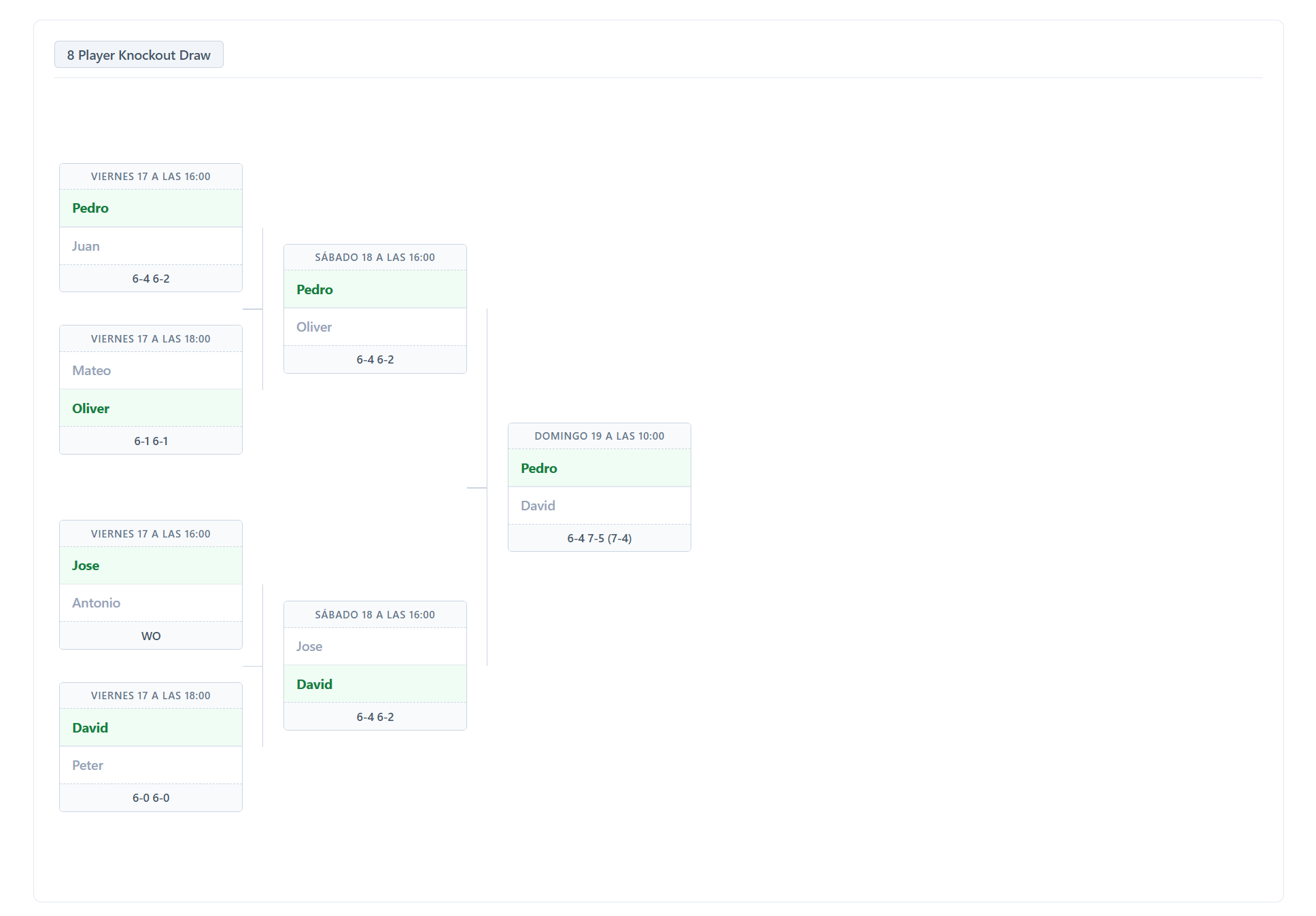
- Visual Brackets: Generates a clean, classic, tree-style tournament bracket on any page or post using a simple shortcode (e.g.,
[netdraw id="123"]). - Qualified (Q) Badges: In qualifying draws, players who win their final qualifying match get a clear Q badge indicating they have advanced to the main draw.
- Path Highlighting: Hovering over any player highlights their entire journey (matches won, played, and progressed) across all rounds in real-time.
- Responsive Design: Uses a custom CSS tree-structure layout that enables smooth horizontal scrolling on mobile, tablet, and desktop screens without breaking the visual integrity.
- No Bloat: Built purely using Vanilla JS and native CSS — no jQuery or external visual dependencies.
安装:
- Download the
netdraw.zipfile from the plugin page. - In your WordPress Admin Panel, navigate to Plugins > Add New Plugin.
- Click on Upload Plugin at the top.
- Select the
netdraw.zipfile and click Install Now. - Once installed, click Activate Plugin.
屏幕截图:
常见问题:
What tournament formats are supported?
NetDraw currently supports single-elimination (knockout) brackets with 8, 16, 32, or 64 players. Draws can be Standard (crowned through to a champion) or Qualifying (stopped once the configured number of players have secured their advancement spots).
Can I use this for sports other than tennis?
Yes! While designed with tennis in mind, NetDraw works for any knockout-style tournament.
Does NetDraw work on mobile?
Yes. The frontend bracket uses horizontal scrolling and is fully functional on mobile and tablet devices.
Where is tournament data stored?
All tournament data is stored in your WordPress database as post meta attached to the tournament post. No data is sent to any external service.
What happens to my data if I uninstall the plugin?
When you delete the plugin via the WordPress admin, all tournament posts and their associated data are permanently removed from your database.
更新日志:
1.1.0
- Added Qualifying Draw support: choose Standard or Qualifying draws with configurable Main Draw Qualifying Spots (2, 4, 8, ...).
- Qualifying brackets truncate automatically at the round where remaining winners equal the qualifying spots.
- Added Qualified (Q) advancement badges and a dedicated Qualifying Round label in both the admin editor and the frontend bracket.
- Preserves hidden bracket data so switching between draw types is non-destructive.
- Fixed multiple shortcodes on the same page each rendering their own bracket instead of always showing the last one.
- Added Spanish, French, Italian, and Galician translations.
- Localized admin and frontend JavaScript assets.
- Initial release.
- Custom Post Type for tournaments.
- Admin bracket editor with dynamic grid and automatic progression.
- Frontend visual bracket with path highlighting via shortcode.
- Responsive CSS tree layout with no external dependencies.