NeuroContent
| 开发者 | verselabwp |
|---|---|
| 更新时间 | 2026年11月4日 04:16 |
| PHP版本: | 8.0 及以上 |
| WordPress版本: | 7.1.4 |
| 版权: | GPL v3 |
| 版权网址: | 版权信息 |
详情介绍:
- Plan content for visibility, website traffic, leads, or sales.
- Manage article and social ideas in one campaign calendar.
- Guide articles with SEO topics and relevant WordPress categories.
- Review generated content and provide feedback for future posts.
- Track completed workflows, pending approvals, and errors.
- AI content campaigns with goals, a content calendar, and linked triggers.
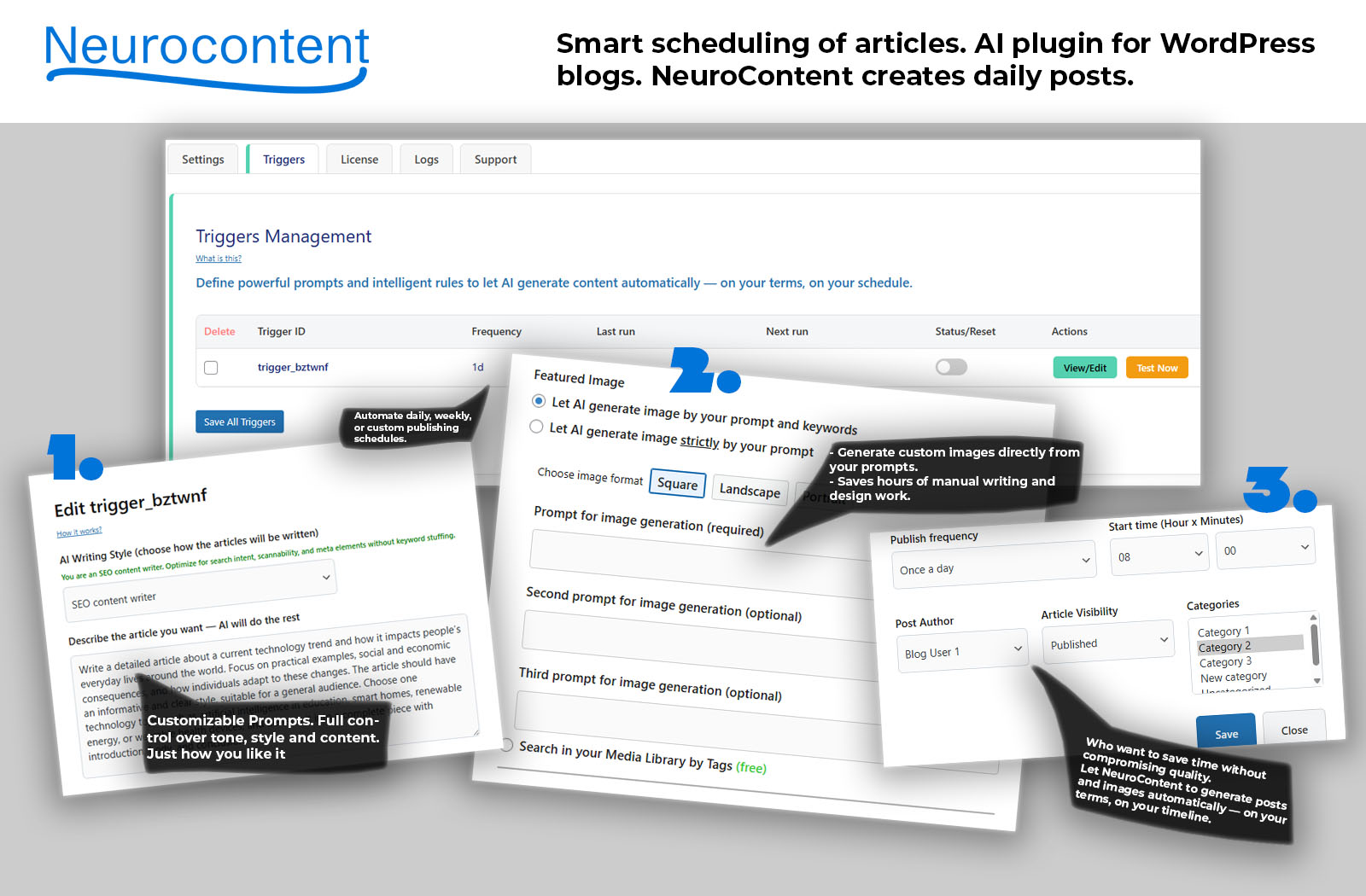
- Two automation trigger slots with their own prompts and settings.
- Article Automation to generate WordPress articles and featured images.
- Social Creative to generate images and captions. Facebook publishing requires Pro.
- Email approval and manual Review & Edit for draft articles.
- AI image generation with visual instructions and image quality settings.
- Optional OpenAI Web Search to provide additional context during generation.
- Scheduled runs, daily pause periods, and Test Now to check a workflow.
- A trigger list showing each workflow, schedule, status, and test result.
- Searchable activity logs with run details, errors, and publishing events.
- Support diagnostics to help investigate problems.
- Research Context: use articles or feeds as source material and track used links to avoid selecting the same source again.
- Facebook publishing: publish or schedule posts to a connected Facebook Page, including reviewed content.
- Auto-share existing posts: share eligible WordPress posts with sharing history, configurable limits, and title-based exclusions.
- Image references: provide up to three images, such as logos or product photos, to guide AI image generation.
- Review image tools: find or upload replacement images and copy remote images into the Media Library.
- Social Creative review tools: regenerate text or images before publishing.
- Source images: use an article's source image, with local-copy and remote-image options.
- Analytics: monitor generation activity, publishing results, AI usage, and estimated costs.
- More automation: add and delete triggers and use additional publishing intervals.
安装:
- Install and activate NeuroContent.
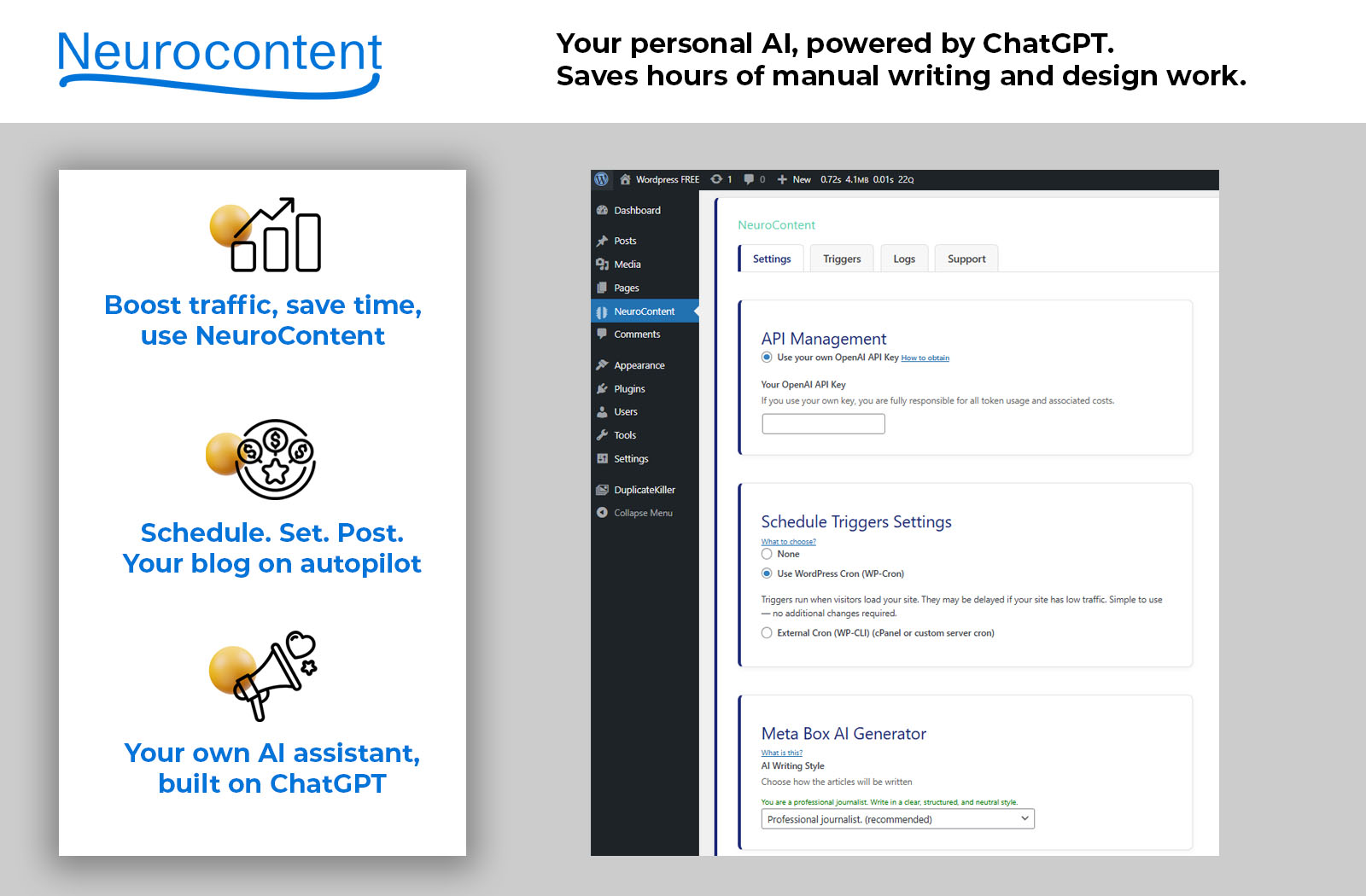
- Open NeuroContent settings and enter your OpenAI API key.
- Configure a trigger with your prompt, image settings, and schedule.
- For article approval, select Draft, enable Notifications, and enter the review email address.
- Use Test Now and check the generated content and Logs before enabling scheduled runs.
屏幕截图:


常见问题:
Can I edit an AI article before publishing it?
Yes. Configure the article trigger to create drafts and send notifications. Open Review & Edit from the email, update the title, content, excerpt, or tags, then choose Save & Publish. Manual article review is included in Free.
Will every article wait for my approval?
Only when you configure that workflow. Choose Draft and enable notifications for email review. A trigger configured to publish automatically does not wait for email approval.
Can I change the generated image?
You can inspect the image during article review. The Pro add-on provides additional image tools on review pages, including Media Library search and image upload. Pro also supports reusable reference images during generation.
What is the difference between Web Search and Research Context?
Optional OpenAI Web Search gathers additional online context during generation. Research Context is a Pro feature that reads a source URL or feed you choose and tracks source links already used by the trigger.
Does the free plugin publish to Facebook or show live analytics?
No. Facebook publishing and live Analytics require the Pro add-on. The free plugin includes previews of those features and working activity logs for its own workflows.
Are AI results guaranteed to be accurate or original?
No. Review facts, wording, images, and usage rights before publishing. Web Search and source material can provide context, but they do not guarantee accuracy, originality, or search rankings.
What happens to remote featured images if I deactivate Pro?
Images used through the remote featured image option depend on the Pro add-on to display correctly. Deactivating it can stop those images from displaying. Remote images can also become unavailable if the source removes or blocks them. Choose local copies when you need the files stored on your own site.
更新日志:
- Added AI content campaigns with goals, daily content plans, and linked automation triggers.
- Added a campaign calendar for planning articles and social creatives.
- Added campaign SEO topics and automatic article category selection.
- Added campaign feedback to guide future content.
- Improved campaign completion counts, email approval status, and Facebook API submission tracking.
- Improved campaign settings, calendar layouts, and delete confirmation dialogs.
- New: Redesigned the automation triggers list to show each trigger's workflow, schedule, status, and actions more clearly.
- Fix: Improved trigger controls and test results for easier monitoring in WordPress.
- Fix: Fixed Logs pagination to show 25 events per page, making large activity histories easier to navigate.
- Improved responsive layouts and usability across the Triggers and Logs tabs.
- Added GPT-6 Astra as an optional AI model for article and social content generation.
- PRO: Added title-based exclusions for automatic Facebook sharing, with support for related word forms.
- PRO: Added clear logs showing why posts were excluded from Facebook auto-sharing.
- Kept existing model selections and image generation settings unchanged.
- Improved plugin performance and internal code organization.
- Fixed minor admin interface and responsive layout issues.
- Improved compatibility with WordPress 7.1.
- PRO: Added up to three reusable reference images for more accurate AI-generated visuals.
- PRO: Added support for logos, product images, and brand assets in image prompts.
- PRO: Improved Analytics with clearer charts and useful publishing insights.
- Improved WordPress.org compatibility and code quality checks.
- Fixed minor admin styling and layout issues.
- PRO: Added Facebook auto-share for existing published posts.
- PRO: Added duplicate-safe Facebook sharing history for existing posts.
- Major update: introduced the new Free + Pro add-on architecture.
- Added stronger WordPress.org compatibility cleanup across core plugin files.
- Improved code quality, escaping, sanitization, and plugin check readiness.
- Updated internal file formatting for cleaner WordPress coding standards compliance.
- Prepared the plugin foundation for future Pro features and safer long-term updates.
- Reduced procedural helper complexity to improve maintainability, feature separation, and long-term extensibility for AI/LLM-driven content automation.
- Added full support for OpenAI GPT Image models for improved image generation quality
- Updated image size handling with automatic migration from legacy DALL·E formats
- Fix: Resolved a fatal activation error caused by a missing function neurocontent_create_logs_table(), which triggered:
- New Feature: Web Search support for AI article generation using OpenAI Web Search.
- New PRO Feature: AI Content Analytics dashboard with detailed metrics for token usage, article generation, costs, and workflow performance.
- New PRO Feature: Social Share integration for automatic Facebook posting.
- Improved prompt handling and sanitization for maximum stability and data integrity.
- Enhanced support for long, multi-line AI prompts with consistent line endings.
- Prevented accidental loss of trigger prompts when saving settings.
- Optimized internal data handling to ensure reliable storage of complex prompt content.
- General hardening of settings logic for improved reliability in advanced configurations.
- New PRO Feature: One-Click Article Approval via secure email notifications.
- New Feature: You can pick ChatGPT model
- Compatibility with WordPress 6.9
- First public release