
Newsroom OS – Google Discover, Google News, Schema & Editorial Workflow
| 开发者 |
kostaskarapapas
koskar22 |
|---|---|
| 更新时间 | 2026年8月24日 01:30 |
| PHP版本: | 7.4 及以上 |
| WordPress版本: | 7.1 |
| 版权: | GPLv2 or later |
| 版权网址: | 版权信息 |
详情介绍:
- News websites and online newspapers
- Magazines and digital publishers
- Editorial teams and multi-author WordPress sites
- Sites targeting Google Discover and Google News traffic
- Publishers who outgrew generic SEO plugins but still use Yoast or Rank Math
- NewsArticle JSON-LD —
@graphwith Organization, WebPage, authorPerson, geo,about/mentionsfrom entity tags - LiveBlogPosting — breaking news mode with live H3 updates and auto-expire
- CollectionPage from story timelines; optional editor FAQ block (opt-in, off by default)
- Wikidata entity enrichment on tags (lazy, on assign)
- Richness presets (Minimal / Balanced / Full) — complements Yoast SEO, Rank Math, AIOSEO, SEOPress
- Discover Score — pre-publish checklist: hero 1200px+, 16:9, headline quality, topic/tags, OG image, timeliness
- Trend Radar — Google Trends + Google News RSS in the editor sidebar (localized by country)
- Breaking news mode — faster IndexNow/Google ping, LiveBlog schema, optional “developing story” badge
- Search Console clicks — real Discover and Google News traffic via GSC sync (separate from the editorial Discover Score)
- Google Discover readiness scoring in the editor
- Google News + Discover Search Console analytics per writer
- NewsArticle / LiveBlogPosting publisher schema graph
- Editorial workflow — tasks, My Inbox, chief dashboard, Chief Insights
- Author performance coaching tied to real traffic
- Smart tags, duplicate-tag guard, archive internal links, GSC traffic-drop alerts
NEWSAI_PRO_UNLOCKED to false in wp-config.php — all license code stays in place.
Update 2.8 — Schema performance for megasites + nightly warm
Newsroom OS 2.8 keeps JSON-LD on high-traffic sites without daytime CPU spikes: Lite Mode no longer runs the schema backfill cron, Background schema warm is optional, and Nightly schema warm runs migration only in an off-peak window (default 02:00–06:00, site timezone). New/edited posts still get full schema on save. On cache miss under Megasite mode, visitors get a slim NewsArticle graph while full caches backfill overnight. Also: Unicode-safe word counts (Greek), story-cluster accessibility contrast, and safer warm scheduling (hourly / 15-min only with backlog).
Update 2.7 — Classic command center (stable) + parked React UI
Newsroom OS 2.7 ships a premium classic admin redesign: vertical sidebar shell, bento Dashboard (Kanban-first), refreshed Chief Insights and Author Performance, and a cleaner Settings workspace. Classic is the default on all sites. An experimental React admin remains in the codebase for a future opt-in release — it is off by default; the Settings banner shows Coming Soon until the redesign is ready.
Desk workflow: AI Content brief from Trend Radar now lives on the Dashboard (chief plans → assigns task → writer sees brief in the editor). The editor Radar tab stays lightweight (live trends/news + copy headline).
Update 2.3 — Desk workflow + Chief command upgrades (Pro)
Newsroom OS 2.3 adds brief → editorial task, AI desk overview (Author Performance), Kanban drag-and-drop, War room live KPIs (AJAX), CrUX / Core Web Vitals (PageSpeed Insights), GSC device channel toggle, and category-aware AI prompts. No database migration. Configure CrUX under Settings → Instant Indexing (PageSpeed API key).
Update 2.2 — AI Assist SEO pipeline (Pro BYOK)
Newsroom OS 2.2 upgrades AI Assist (Pro) for newsroom SEO: shared article analysis (keywords, entities, intent), stronger headline, optimize, and trend suggestions, meta description generation with one-click apply to Yoast SEO / Rank Math (or excerpt), smarter tag match, and Discover Score entity signals when analysis is saved on the post. Editor blocks (story timeline, key takeaways, FAQ) use semantic HTML, dedicated CSS (story-cluster.css, newsai-content-blocks.css), and no empty DOM nodes in published markup.
Big update 2.1 — Chief Insights, AI Daily Brief, and indexing diagnostics
Newsroom OS 2.1 adds Chief Insights (desk-wide KPIs, channel tables, top categories/articles), AI Daily Brief (Morning/Evening), and Print to PDF. Clear Last attempted vs Last successful diagnostics for Google Indexing API and IndexNow.
Preview the product at newsos.io.
Big update 2.0 — Google Search Console meets your newsroom
Newsroom OS 2.0 connects your editorial desk to real Google traffic. Writers get Focus (article quality) and Discover readiness (distribution checklist) in the editor — separate from Search Console clicks (Discover, Google News, and web search). Chiefs see who publishes well and who earns traffic, in one dashboard.
(From 2.9 onward, GSC sync and all former “Pro” modules ship unlocked in the same plugin — no license key.)
Classic Editor & Gutenberg (Block Editor)
Newsroom OS is built for real newsroom setups — including sites that still use Classic Editor, sites on full Gutenberg, and hybrid installs (block editor with the classic Tags metabox).
Gutenberg / Block Editor
- Publication Readiness sidebar (Editorial + Discover twin gauges, Next Best Action)
- REST-aware duplicate tag guard (snackbar + “Use existing” / “Keep anyway”)
- Breaking news mode, live H3 update insertion via blocks
- Trend Radar, Smart Tags, AI Assist (BYOK) in the editor sidebar
- JS strings via
wp_set_script_translations(el, en, de, es)
- Same Publication Readiness panel and scores (TinyMCE /
#contenthooks — no block editor APIs on classic screens) - Classic Tags metabox duplicate guard (AJAX before the tag chip is added)
- Breaking mode, live updates, and smart tag insert via Classic UI
- Stability: Gutenberg-only APIs (
wp.data.subscribe,getEditedPostContent) run only whenblock-editor-pageis present — prevents Classic Editorblocks.min.jsstack overflows on large sites
- Publication Readiness — twin scores in the editor: Editorial (Focus) and Discover readiness. They are separate on purpose.
- Discover Score — Google-aligned checklist: hero 1200px+, 16:9, 300k pixels, alt; clear 55–70 headline (anti-clickbait); topic/tags; optional trend fit; saved OG image when available.
- Breaking news mode — one toggle: LiveBlogPosting schema, faster IndexNow/Google ping, optional “developing story” badge, auto-expire, live-update workflow (H3 headings).
- Trend Radar — Google Trends + Google News in the sidebar, localized per country.
- Service account sync — connect Search Console with
webmasters.readonly; separate token from the Indexing API. - Discover, Google News, and web search — per-post clicks, impressions, CTR, and average position stored in your database (
wp_newsai_gsc_performance). - Sync now in settings plus daily cron (04:00 site time) when GSC is enabled.
- Author Performance — real clicks per writer, top articles by traffic, coaching tab, 7d / 30d / 90d windows.
- Posts list — GSC (30d) column for chiefs (
edit_others_posts). - My Inbox — writers see their own GSC totals when sync is enabled.
- Clear labeling — Discover Score = editorial readiness; GSC numbers = measured Google clicks (not the same metric).
- NewsArticle / LiveBlogPosting JSON-LD —
@graphwith Organization, WebPage, authorPerson, geo,about/mentions. - Entity tags — Wikidata Q-IDs, coordinates, entity types woven into schema; lazy enrichment when tags are used (1.9+).
- Richness presets — Minimal / Balanced / Full; optional
articleBodymodes (omit, full, first N words). - Works with Yoast SEO & Rank Math — reads your meta; does not replace them.
- Tasks & assignments — deadlines, keywords, briefs, reference links.
- Dashboard — active / overdue / completed, KPIs, SEO health.
- Roles — chiefs see the full desk; writers see My Inbox only.
- GSC traffic-drop alerts — surfaces articles losing Search Console clicks vs the prior period.
- OpenAI, Gemini, or Groq — your API key stays on your site; free tiers supported (Groq / Gemini).
- Discover-optimized titles (55–70 chars, five angles), targeted optimization hints, trend-aware keywords, AI Tag Match from your site taxonomy.
- Geo-aware language — answers in the language of your configured region (40+ locales).
- Smart Tag Suggester — weighted, confidence-scored tags from your taxonomy; one-click insert; duplicate-tag guard.
- Story timelines — archive clusters + internal-link blocks + CollectionPage schema.
- Archive link finder — semantic internal links from your own back catalog (accent-aware scoring).
- Author E-E-A-T — profiles, schema
Person, performance analytics.
languages/README.txt for gettext catalogs.
安装:
- Upload the plugin folder to
/wp-content/plugins/, or install via Plugins → Add New → Upload. - Activate "Newsroom OS – Google Discover, Google News, Schema & Editorial Workflow".
- Run the 4-step Wizard (it auto-launches on first activation).
- Open any post in Gutenberg or Classic Editor — the Newsroom OS sidebar appears on the right.
- Settings → Indexing — (optional) add your Search Console service account, set the property, run Test and Sync now to populate Author Performance and Chief Insights.
- Settings → AI — (optional) add your OpenAI, Gemini, or Groq API key for AI Assist (BYOK).
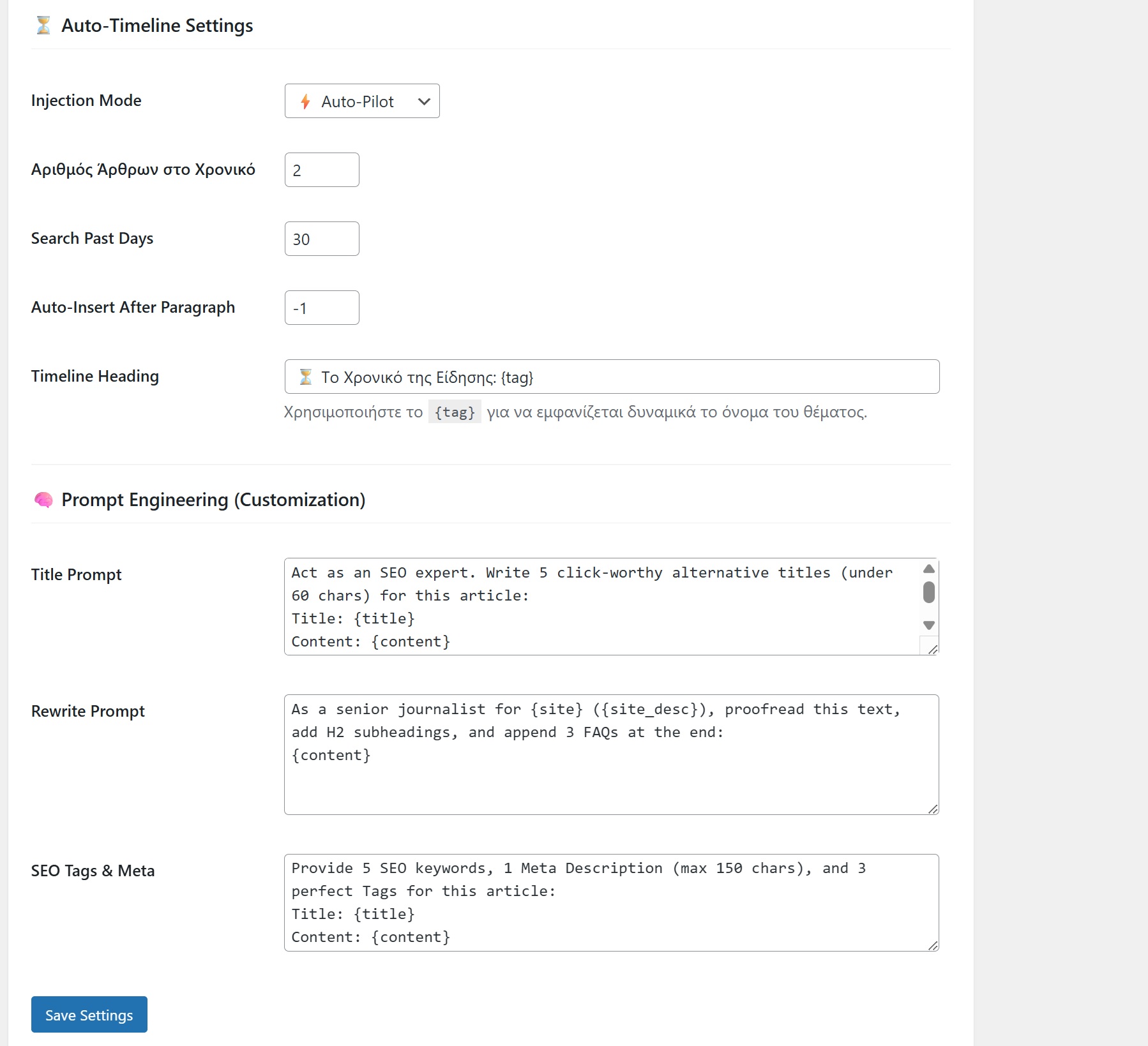
- (Optional, 2.7+) Settings & Prompts — click Enable modern settings UI for the guided React settings screen, or toggle Editorial → Editor UX → Modern settings UI. Classic form stays at
?tab=settings&ui=classic.
屏幕截图:



常见问题:
How do I enable the new React admin UI (2.7)?
No wp-config edit needed. After upgrade, open Settings & Prompts and click Enable modern settings UI, or enable Modern admin UI under Editorial → Editor UX and save. The setup wizard (step 4) can turn it on during first run. You get the full React admin — Dashboard (Kanban + radar), Chief Insights, Author Performance, and Settings — with sidebar navigation. Switch back anytime via Classic links or ?ui=classic on any tab.
Is Newsroom OS a Google Discover plugin for WordPress?
Yes — for publishers and newsrooms, not generic blogs. The Discover Score checklist scores hero image (1200px+, 16:9), headline quality, topic/tags, OG image, and timeliness before publish. Trend Radar pulls Google Trends and News for your target country. Search Console sync adds real Discover clicks per post and author (separate metric from the editorial score).
Is this a Google Search Console plugin?
Partially — built for editorial teams. Connect via service account (webmasters.readonly), sync Discover, Google News, and web search clicks into WordPress, and show them on Author Performance, Chief Insights, My Inbox, and the Posts list. It does not replace the Search Console UI — it surfaces GSC data where writers and chiefs already work.
Does Newsroom OS add schema markup?
Yes. NewsArticle and LiveBlogPosting JSON-LD with Organization, WebPage, author Person, geo, and entity about / mentions from your tags (Wikidata enrichment). Story timelines output CollectionPage schema. Works alongside Yoast SEO, Rank Math, AIOSEO, and SEOPress.
Is everything really free in 2.9?
Yes. GSC sync, Chief Insights, Author Performance, IndexNow, Auto-Timeline, task messaging, duplicate-tag guard, and all desk modules are included — no license key. AI Assist is also included but uses your own OpenAI, Gemini, or Groq API key (BYOK); provider free tiers work. Optional anonymous install ping sends site URL + version to NewsOS (no post content).
Does it include an AI assistant for writers?
Yes (BYOK): OpenAI, Google Gemini, or Groq with your own API key — titles, optimize, trend keywords, meta description (apply to Yoast/Rank Math), tag match, and content brief from trends. Without an API key you still get Publication Readiness, Smart Tags, tasks, Discover Score, schema, GSC, and Trend Radar.
What is the newsroom workflow feature set?
Tasks & assignments (deadlines, keywords, briefs, reference links), Dashboard KPIs and kanban-style desk view, My Inbox for writers, task threads + email alerts, Breaking news mode with live updates, GSC traffic-drop alerts, and weekly desk report email. Chiefs use Chief Insights; writers see only their assignments.
How does Newsroom OS help with Google Discover?
The Discover Score checklist runs before publish: featured image size and aspect ratio, headline length and clickbait cues, topic/tags, OG image, author signals, and internal links. Trend Radar surfaces rising topics from Google Trends and News. Search Console sync adds measured Discover clicks so chiefs can coach writers on outcomes, not just checklists.
What is Google Discover optimization in WordPress?
It means aligning articles with Discover distribution signals — strong hero images, clear non-clickbait headlines, timely topics, entity-rich tags, and valid publisher schema — while tracking whether those choices correlate with real Discover traffic after publish (GSC sync).
Can Newsroom OS improve Google Discover visibility?
No plugin can guarantee Discover placement. Newsroom OS gives editors a repeatable pre-publish workflow (Discover Score + Focus), breaking-news LiveBlog tools, and Search Console Discover metrics per post and author so you can iterate on what actually earns clicks.
Does Newsroom OS support Google News?
Yes. Trend Radar includes Google News headlines for your region. GSC sync stores the Google News channel separately from Discover and web search — visible on Author Performance, Chief Insights, My Inbox, and the Posts list.
What is new in version 2.0?
Google Search Console integration: sync Discover, Google News, and web search metrics into WordPress; show real clicks on Author Performance, My Inbox, and the Posts list. Plus a redesigned Author Performance UI (tabs, coaching, search/sort, 7d/30d/90d). Requires a one-time database table on upgrade (wp_newsai_gsc_performance).
How do I connect Google Search Console?
Settings → Indexing → enable GSC → paste a Google Cloud service account JSON with Search Console access to your property → enter the property exactly as in GSC (sc-domain:example.com or https://www.example.com/) → Test → Sync now. Daily sync runs automatically when enabled.
Does Newsroom OS replace Google Search Console?
No. You still use Google Search Console for verification and property management. Newsroom OS reads Search Analytics via API and surfaces the numbers in the editorial desk.
What is the difference between Discover Score and GSC Discover clicks?
Discover Score is an editorial readiness checklist in the post editor — it does not read Search Console. GSC Discover clicks are real measured traffic from Google after you enable sync.
Does it work with Classic Editor and Gutenberg?
Yes — both, out of the box. Publication Readiness, Discover Score, Trend Radar, Smart Tags, Breaking news mode, and live H3 updates work in Gutenberg and Classic Editor. Duplicate-tag guard uses REST in Gutenberg and AJAX in Classic.
Is it compatible with WordPress 7?
Yes. Tested up to WordPress 7.0. Minimum PHP 7.4; PHP 8.1+ recommended.
Will it conflict with Yoast SEO or Rank Math?
No. Newsroom OS reads your SEO meta and adds editorial workflow, smart tags, scores, and JSON-LD enrichment.
Will it slow down my website?
No. External requests use strict timeouts; dashboards use transients; GSC sync runs on a schedule — not on every page view.
How does the Smart Tag system work?
In-browser ranking against your taxonomy (title, lead, body weighted). HIGH/MEDIUM/LOW confidence badges. Duplicate-tag guard and AI Tag Match (BYOK) included.
Which AI providers are supported? Can I use AI for free?
OpenAI, Google Gemini (free tier at aistudio.google.com), and Groq (free tier at console.groq.com). Your key never leaves your server. No Newsroom OS license required.
Will the AI answer in my language?
Yes — geo-aware prompts for 40+ locales (Greece → Greek, Brazil → Portuguese, etc.).
Does the plugin store private data off-site?
Article text and API keys stay on your server. GSC rows and AI cache live in your database. An anonymous install/upgrade ping (site URL, plugin version, locale) may be sent to newsos.io on activation — no post content. Optional weekly opt-in heartbeat under Settings → Site Details.
更新日志:
- NEW: All Pro features unlocked — no NewsOS license key required (
NEWSAI_PRO_UNLOCKED, default true). GSC, Chief Insights, Author Performance, AI Assist, IndexNow, Auto-Timeline, task messaging, and all Pro settings work out of the box. - NEW: Install registry — anonymous
install_idping on activation and on version upgrade (action: install|upgrade) to NewsOS registry API. No post content or API keys sent. Weekly opt-in heartbeat unchanged. - REVERT PATH: Set
define( 'NEWSAI_PRO_UNLOCKED', false );in wp-config.php to restore license-only Pro — no code removal needed. - FIX: Homepage WebPage JSON-LD on static front pages (was missing Organization graph node).
- FIX: Groq default model →
openai/gpt-oss-120bwith auto-migration from deprecatedllama-3.3-70b-versatile. - SAFE: No database migrations. License options and PRO tab remain for future paid tier.
- NEW: Nightly schema warm — optional off-peak backfill window (default 02:00–06:00, site timezone). Works with Lite Mode ON: daytime CPU stays calm; full JSON-LD migrates overnight for thousands of posts.
- NEW: Background schema warm toggle — disable the migration cron on overloaded servers without turning schema output off. Manual Warm next 25 posts still works.
- PERF: Lite Mode no longer schedules the schema legacy warm cron (was the main 80–100% load cause when “only schema” was enabled with Megasite + Lite).
- PERF: Megasite warm schedule — hourly / twice-daily by default; 15-minute cadence only with a large backlog or forced kick. Frontend cache misses no longer run backlog-probe SQL.
- PERF: On megasite cache miss, emit slim NewsArticle JSON-LD immediately; queue full rebuild for cron/nightly (new posts still warm inline on save/publish).
- FIX: Unicode-safe word count for Information Gain / AI readiness (Greek and other multibyte languages) — PHP + live Structure tab JS.
- FIX: Story cluster CSS — WCAG AA contrast, clearer dates/links; asset version via
newsai_asset_verfor cache busting. - IMPROVEMENT: Editor Structure quick-check also reports geo summary, external sources, word count, and information-gain %.
- SAFE: No database migrations. New options only (
nros_schema_background_warm,nros_schema_nightly_warm, start/end times). Safe upgrade from 2.7.x.
- NEW: Classic admin shell (stable default) — vertical sidebar navigation (Dashboard, Chief Insights, Author Performance, Settings, PRO) with SaaS-style layout across all Newsroom OS admin tabs (
nros-classic-shell,nros-admin-dashboard.css). - NEW: Dashboard polish — bento KPI cards with sparklines, Kanban-first task board (table toggle), workflow filter chips, collapsible inline task form, Latest Published thumbnails, enhanced kanban cards (SEO tag, avatar, filter attrs).
- NEW: Chief Insights refresh — command-center bento layout, KPI strips, channel breakdown bars, seasonal radar card, accordions, dedicated
nros-chief-insights.css/ JS. - NEW: Author Performance refresh — vertical accordion author rows, progress bars, AI Desk Overview header, tab underline polish (
author-performance.css/ JS). - NEW: Settings bento — section sidebar nav (Site, Schema, Timeline, UX, AI, Team, Indexing, Performance), publisher profile cards, cleaner form layout.
- NEW: Cross-cutting classic polish —
nros-classic-polish.css/ JS: semantic Trend Radar rows, competitor + Brief buttons, kanban title links. - NEW: Desk AI Content Brief — generate brief from Dashboard → Trend Radar (not the post editor); Create task + assignee in one flow (
nros-content-brief.js). Editor Radar keeps Copy headline + toast for writers. - NEW: Dashboard Trend Radar fix — dedicated
nros-dashboard-radar.jsloads trends/news on the Alerts tab (no longer depends on editorscript.js). - NEW: Editor Radar CSS fix — shared radar row styles in
nros-theme.cssso AJAX trends/news render correctly in the post sidebar. - NEW: Separate editor vs desk radar cache — trends/news HTML cached per context (
v4/v7keys) so editor Copy buttons and desk Brief buttons stay correct. - IMPROVEMENT: Settings UX — hide overlapping WordPress
#wpfooteron classic Newsroom settings; version shown in plugin sidebar footer. - IMPROVEMENT: Command palette (⌘K) — content brief action scrolls to Dashboard Trend Radar (desk workflow).
- IMPROVEMENT: React UI parked — experimental unified React admin remains in
assets/admin-app/(pre-built) for a future opt-in; disabled by default on upgrade (newsai_settings_ui→classic). Settings shows Coming Soon instead of enabling React. One-time admin notice after update. - NEW (codebase, opt-in later): Unified React admin shell — React Dashboard (Kanban, radar, KPIs), Chief Insights (charts, PDF, AI brief), Author Performance, Settings registry (14 sections), PRO tab, REST
/newsroom-os/v1/*+ AJAX fallbacks, inline task form, GSC/Indexing tools, AI policy page generator. - FIX: Dashboard radar regression from 2.5.0 (Trends widget stuck on “Loading…” without editor bundle).
- FIX: Settings save — React mode toggle blocked until redesign ships; classic remains authoritative.
- SAFE: No database migrations. New options only (
newsai_settings_ui, admin UI policy version). Safe upgrade from 2.6.x.
- PERF: Megasite schema mode (default on) — serve-stale cached JSON-LD on version mismatch, 15-minute warm cron (40 posts/batch), per-post invalidation; avoids mass cold rebuilds on high-traffic sites.
- NEW: Setup wizard site scan — posts count, cache/object cache, SEO plugin, PHP; auto-picks Standard / Busy / Megasite performance profile.
- NEW: Floating AI toolbar — highlight text in the editor for Rewrite / Shorten / Expand / Simplify (Pro BYOK; Settings → UX & AI).
- NEW: GEO summary block — AI generates
<section class="nros-geo-summary">with lead + Q&A for AI Overviews. - NEW: ClaimReview schema — optional fact-check meta in the AI tab emits ClaimReview JSON-LD on debunk articles.
- NEW: GSC 12-month backfill — chunked AJAX backfill with progress UI (queries, site metrics, post batches).
- NEW: Per-post geo targeting — Article market select; category-level override; Trend Radar and Discover respect locale.
- FIX: Auto-Timeline intelligence — IDF topic tag selection, generic-tag blocklist (e.g. ΑΛΛΑΓΕΣ), accent-insensitive title match (Πατίνια ↔ ΠΑΤΙΝΙ), topic-first candidate pool, same-category boost, optional GSC click tiebreaker.
- FIX: Internal archive links — GSC click boost ranks high-performing evergreen pages; clearer scoring.
- FIX: GSC service account JSON — dedicated AJAX save (megasite-safe), PEM normalization, Settings tab redirect; GSC Sync JSON response hardened (output buffer + graceful parse).
- FIX: AI alt text button — visible success/error messages, manual regenerate overwrites existing alt, attachment ID detection feedback.
- FIX: GSC Sync now — survives long megasite runs; auto-refresh on non-JSON AJAX response.
- UX: Idle editor scoring — publication readiness runs after 1.2s typing pause via
requestIdleCallback; tag suggestions load on Readiness tab only. - UX: 3-tab editor sidebar — Readiness / AI / Radar; gauges stay visible above tabs.
- SCHEMA: Hybrid default — new installs and wizard keep Yoast/Rank Math JSON-LD; Strict is opt-in.
- GLOBAL: WPML / Polylang AI prompts — output language from post locale, then per-post geo.
- SAFE: Duplicate plugin folder notice on activate; expanded uninstall cleanup for new options/crons.
- TESTS: SchemaArticleBodyTest, SchemaWikidataConfidenceTest (plus existing author/body coverage).
- NOTE: After deploy on megasites, run GSC Sync now once; re-save service account JSON if Indexing/GSC tokens fail. Timeline cache bumps to v5 automatically.
- FIX: articleBody stability — rolled back aggressive
nn/line-break rewriting that could emptyarticleBodyafter post Update; body is now plain extract + JSON quote safety only (NROS_SCHEMA_BUILD263). - FIX: articleBody cache — post_meta stores JSON-LD as base64 so WP slash/unslash cannot break
\\nescapes (NROS_SCHEMA_BUILD265). - SCHEMA: Publisher trust node on singles — posts, categories, tags, and author archives emit the same
#organizationwith description, sameAs, contact, address, and policy URLs (no taxID/VAT repeat); full legal org remains on home/About (NROS_SCHEMA_BUILD266). - SCHEMA: E-E-A-T pack A — singles add WebSite/WebPage
description,inLanguage, dates; trust org addsfoundingDate/areaServed; slim Person keepssameAs(NROS_SCHEMA_BUILD267). - FIX: Empty body fallback — when HTML extract is empty but
post_contentexists, retriesthe_contentand raw strip_shortcodes/strip_tags soarticleBodyandwordCountstay populated on all sites. - NOTE: After deploy, Update one post to refresh cached schema. Legacy plain meta is still read until rebuild.
- TESTS: SchemaArticleBodyTest — extract/fallback and JSON quote safety.
- SAFE: No database migrations.
- SCHEMA: Enriched archive ItemList — home, blog feed, categories, tags, and author archives emit
ListItementries with nestedNewsArticle(headline,url,datePublished,authorPerson withname/url, featuredimage) for Google Discover / Rich Results compatibility. - SCHEMA: Category & tag CollectionPage —
aboutentity from term (auto Place/Thing + WikidatasameAs),BreadcrumbList, and enrichedItemListon taxonomy archives. - SCHEMA: Blog feed fixes — correct
ItemList@idon posts page; breadcrumb on blog index. - SCHEMA: About page — full Organization publisher graph (not slim
#organizationlite) for transparency / E-E-A-T. - SCHEMA: Publisher logo — registered
nros-publisher-logosize (600×60); JSON-LD caps display height at 60px (Google guideline). Settings hint updated. - SCHEMA: Author slim node — keeps
knowsAbouton single-post pointer Person; full E-E-A-T remains on author archive only. - SCHEMA:
articleBodycleanup — shortcode strip, heading/paragraph structure preserved, HTML entities decoded in headlines, literalnn/rnjunk repaired. - SCHEMA: Wikidata
sameAscascade — tags and mentions resolve Wikidata URLs via confidence gate, city map, soft match (≥50), or manual term URL. - SCHEMA: Auto cache invalidation — bumps schema global + listings version on plugin upgrade (
NROS_SCHEMA_BUILDin archive cache keys). - TESTS: SchemaArticleBodyTest, SchemaAuthorTest (slim
knowsAbout), SchemaWikidataConfidenceTest. - NOTE: After upgrade, Save Settings once (or wait for auto-invalidate) and re-update posts if cached
articleBodystill shows oldnnartifacts. - SAFE: No database migrations.
- PERFORMANCE: Editor DOM scan fix — removed global
keyupon all textareas/contenteditable; SEO meta is read from Gutenberg store or targeted Yoast/Rank Math fields only. - NEW: Sidebar tabs — Desk / Tools / Radar / AI replace accordion clutter; tab choice persists in localStorage.
- NEW: Per-post geo targeting — Article market select in the editor (post meta → category → site default); Trend Radar, Discover momentum, and AJAX feeds respect it. Category-level override on the category edit screen.
- NEW: Publisher transparency URLs — Settings for
publishingPrinciples,correctionsPolicy,ownershipFundingInfo, andactionableFeedbackPolicyon homepage Organization schema. Generate page with AI (BYOK) creates a draft policy page and fills the URL. - NEW: Yoast / Rank Math in Chief Insights — average SEO score KPI and per-article score column on winning/losing posts tables (read-only).
- IMPROVEMENT: GSC 12-month backfill hardening — smaller URL batches, sub-step loop (queries → site → post batches), 60-minute lock refresh, longer pause between AJAX steps.
- FIX: Dashboard Trend Radar — Trends/News widget on the Dashboard loads
script.jsand auto-fetches on the Alerts tab (was stuck on “Tap TRENDS”). - FIX: Editor Radar tab — removed broken
<details>wrapper so Trends/News panels render in the sidebar. - FIX: Article market default — “Site default (GEO)” option in the editor; clears per-post override correctly.
- FIX: AI Daily Brief & Author desk overview — server-built metrics payload, real API error messages (not generic “AI request failed”), Gemini-first with fallback trail; author desk caps payload at 24 writers.
- IMPROVEMENT: Schema settings UI — cleaner Article body in JSON-LD row (stacked layout, max-words only when Limited).
- SAFE: No database migrations.
- NEW: Wikidata confidence gate — auto tag enrichment picks the best Wikidata hit and stores
sameAsonly when the label match score meets the threshold (default 72/100). Low-confidence matches are skipped; manual Wikidata URLs in the tag editor always emitsameAs. - NEW: Slim author
worksFor— article graphs link the slimPersonauthor node to the publisher Organization (#organization) without expanding full E-E-A-T on every post. - FIX: JSON-LD quote safety — sanitize ASCII and curly
"quotes across the full@graphbefore encode; prevents invalid schema when article text contains quoted phrases (e.g.Επιτροπή αγώνα "ελεύθερο …"). - FIX: Schema cache read —
wp_unslash()on post meta JSON-LD cache for correct escape round-trip after save. - FIX: Admin layout & load — Newsroom Dashboard / Settings / PRO tabs no longer enqueue the full post-editor
script.js+style.cssbundle; fixes broken admin CSS after switching away from Lite profile and reduces wp-admin CPU. - NOTE: Includes all 2.4.2 schema fixes (contentLocation/dateline, articleBody cleanup, optional primary-city fallback). Save Settings after upgrade to rebuild JSON-LD cache.
- SAFE: No database migrations.
- FIX: Article
contentLocation/dateline— Primary city no longer copied onto every post by default. International and national stories no longer inherit the publisher HQ (e.g. Patras on a Canada wire story). Story geography comes only from Place tags, city tags, or lede dateline patterns. - NEW: Optional setting — “Use primary city on articles when no story place is detected” (off by default; enable only for purely local newsrooms).
- FIX:
articleBodycleanup — Full and Limited modes sanitize plain text: strip emoji/pictographs, decode HTML entities, remove literalrn/rnrnjunk, collapse block whitespace, and replace ASCII/curly"quotes so JSON-LD stays valid (omit mode unchanged). - FIX: Admin Dashboard CSS — stop loading the full post-editor
script.js/style.cssbundle on Newsroom settings tabs (Dashboard, Settings, PRO); use lightweight palette + tab-specific JS only. - IMPROVEMENT: Primary city copy — clarified in Settings that Primary city applies to Organization
areaServed/location; article fields are opt-in via the new checkbox. - SAFE: No database migrations. Save Settings once after upgrade to refresh cached JSON-LD.
- NEW: GSC 12-month backfill (Pro) — one-click historical import for top posts and tagged URLs; incremental step loop in Chief Insights; 13-month retention; locks against daily sync overlap.
- IMPROVEMENT: Chief Insights v2 — clearer KPI cards, channel legend, per-table hints, “Refresh now” link, movers show prev→current position and signed click deltas (
new/+N), aligned site-wide GSC channel totals. - IMPROVEMENT: Copy-paste prompts restored — AI Prompts accordion and Settings → Prompts tab stay visible even when BYOK / AI Assist is active.
- IMPROVEMENT: Settings selects — Schema richness and output mode use short labels with live detail text; wider dropdowns (no truncated options).
- FIX:
newsai_varsJS error on Chief Insights — sharednewsai_ensure_admin_vars_script(); command palette depends onnewsai-admin-vars; removed unsafe inline that referencednewsai_varsbefore it was defined; editorwindow.newsai_varscopy runs after localize. - FIX: PHP warning —
$newsai_is_pro_activedefined once at the start of the settings screen (Site Details / usage registry row). - FIX:
strip_tags()deprecation — admin page$titleset per tab (Dashboard, Chief Insights, etc.) so wp-admin header no longer receives null. - PERFORMANCE: Asset cache-bust —
newsai_asset_ver()appends filemtime to Chief Insights / palette / war-room JS-CSS after plugin updates. - SAFE: No new database migrations beyond 2.4.0 tables.
- NEW: Auto alt text (Pro BYOK) — AI vision alt on image upload (optional) + “Generate alt (AI)” in Media Library; never overwrites manual alt; boosts Discover score accessibility bucket.
- NEW: Seasonal radar (Pro) — YoY GSC keywords & tags with 14/30/45-day lead time; daily trend history; Chief Insights panel + weekly email section; feeds AI Daily Brief.
- NEW: GSC search query sync (Pro) — stores web search queries (query + date) for accurate Seasonal radar YoY forecasting; incremental sync each GSC run, weekly 56-day refresh, 400-day prune.
- IMPROVEMENT: Phase A megasite polish — clearer UX toggle descriptions; copy prompts hidden when AI Assist active; Content Decay off by default (legacy notice); FAQ block opt-in (no empty placeholders); conditional frontend CSS for editor blocks.
- PERFORMANCE: Phase B — lean core bundle on anonymous frontend pageviews (~15 admin-only modules skipped); Publisher performance profiles (Lite / Standard / Full); trend cron uses Google Trends RSS directly (no AI bundle required).
- CLEANUP: Phase D — Content Decay Radar retired (cron removed); GSC traffic-drop alerts in Chief Insights + weekly email; Prompts settings tab hidden when BYOK active; Performance settings consolidated.
- FIX: Settings save — nested Performance profile form no longer breaks the main Save button in wp-admin.
- FIX: AI desk overview — desk actions render as text (not “Array”); zero-post authors only in silent list; metrics-backed summaries when the model omits detail.
- DATABASE: New table
wp_newsai_gsc_queries(NEWSAI_DB_VERSION1.4).
- PERFORMANCE: GSC incremental sync — post-level rows sync only new dates (3-day overlap, 14-day cap); site charts refresh 14 days daily, full 93-day window weekly.
- PERFORMANCE: Content Decay Radar — weekly cron (was daily) and lean SQL ID batch fetch instead of
WP_Query. - SAFE: No database migrations.
- PERFORMANCE: Home / blog / category / tag schema — persistent option cache (was 1-hour transient); early exit without org rebuild. Invalidates on schema settings save (
nros_schema_global_v) or publish/unpublish (nros_schema_listings_vfor ItemList freshness). - SAFE: No database migrations.
- FIX: Schema cache invalidation — saving Lite mode, messaging, or other non-schema settings no longer bumps
nros_schema_global_vand forces a full-site JSON-LD rebuild storm. - SAFE: No database migrations.
- PERFORMANCE: Schema post_meta cache — single-post JSON-LD stored in post meta (Rank Math style); early exit on pageview (2 meta reads, no org rebuild). Legacy posts backfill on first visit, existing transients migrate automatically, optional “Warm next 25 posts” + daily cron batch.
- SAFE: No database migrations.
- IMPROVEMENT: Lite mode scope — also skips Speakable snippet on articles, pauses War-room 30s AJAX polling, and stops loading the full editor bundle for Tag Guard in Lite.
- NOTE: Lite mode still keeps JSON-LD schema and background crons active (main load on high-traffic sites).
- SAFE: No database migrations.
- FIX: Weekly report email — safer UTF-8/HTML sending via
wp_mail_fromfilters (no brokenFrom:header); captures PHPMailer errors; test send works without saving first; clearer admin error messages. - SAFE: No database migrations.
- IMPROVEMENT: Lazy Trends/News radar — live feed loads only when the sidebar section opens or the user taps TRENDS/NEWS (no RSS fetch on every editor load).
- IMPROVEMENT: Command palette on all admin tabs — ⌘K/Ctrl+K works on Chief Insights and Author Performance without loading the full editor script bundle.
- IMPROVEMENT: Schema warm on publish — JSON-LD transient is pre-built at save/publish so the first frontend pageview is a cache hit.
- IMPROVEMENT: Lite mode — hides the Trends/News radar section entirely in the post editor.
- SAFE: No database migrations.
- IMPROVEMENT: Lite / Performance Mode — optional toggle disables post editor sidebar, Auto-Timeline injection, and Breaking badge only; JSON-LD schema, GSC, indexing, and crons stay active.
- IMPROVEMENT: Admin asset loading — editor bundle loads only on post editor, Settings, Dashboard, and PRO tabs; Chief Insights / Author Performance load tab-specific JS/CSS.
- IMPROVEMENT: Chief Insights & Author Performance caching — heavy admin aggregates cached for 24 hours (auto-refresh at UTC midnight or after GSC sync).
- IMPROVEMENT: Large-site load — schema
foundingDatecached; cron registration off frontend (wp_next_scheduledonly in admin/activation). - FIX: Wizard — Manual Timeline preserved — wizard "Manual Only" choice no longer overridden by site-profile defaults.
- FIX: Schema — duplicate ΑΦΜ —
vatIDomitted when identical totaxID. - SAFE: No database migrations. Safe upgrade from 2.3.1 and 2.2.x.
- IMPROVEMENT: Admin menu unread badge — cache TTL raised from 30 seconds to 5 minutes (invalidates when a new task message is posted).
- SAFE: No database migrations. Safe upgrade from 2.3.0 and 2.2.x.
- NEW: Content brief → editorial task (Pro) — after generating a brief in the editor sidebar, chiefs can one-click Create task with angle, outline, keywords, and competitor link pre-filled in the desk workflow.
- NEW: AI desk overview (Pro BYOK) — Author Performance tab: AI summary of top/bottom writers, who did not publish, low traffic, and why (posts, Focus/Discover scores, GSC clicks, overdue tasks).
- NEW: Device donut channel toggle (Pro) — Chief Insights: switch Web / Discover / Google News for GSC device breakdown.
- NEW: War room live dashboard (Pro) — desk pulse (publishes, GSC clicks, open/overdue tasks, latest posts) refreshes every 30s via AJAX.
- NEW: Core Web Vitals monitor (Pro) — CrUX field data via PageSpeed Insights API key (Settings → Instant Indexing); full https:// page URL.
- NEW: Kanban drag-and-drop — move editorial tasks between Overdue / Due Soon / Scheduled / Done columns on the Dashboard.
- IMPROVEMENT: Category-aware AI prompts — editorial rules per detected
article_type(breaking, sports, politics, etc.) in AI Assist. - IMPROVEMENT: Author Performance panel — desk overview respects 7d/30d/90d window toggle.
- SAFE: No database migrations. Safe upgrade from 2.2.x.
- NEW: Chief Insights command center (Pro) — redesigned header (LIVE badge, period window, Export PDF, AI Daily Brief), KPI period-over-period deltas, and Commands button.
- NEW: Command palette — Ctrl+K / ⌘K in post editor and Newsroom settings (navigate tabs, AI tasks, content brief, GSC sync, Chief actions).
- NEW: GSC charts (Pro) — site-wide daily click trend per channel (Web / Discover / Google News with totals) and device breakdown donut (Desktop / Mobile / Tablet) from real Search Console API data.
- NEW: GSC site sync tables —
wp_newsai_gsc_site_dailyandwp_newsai_gsc_devicecreated automatically on sync/activation (no manual migration). - NEW: Weekly desk report email (Pro) — optional HTML digest to editors/chiefs (Settings → Team): KPIs, top stories, test send.
- NEW: Content brief from trend (Pro BYOK) — generate editorial brief from Google Trends topic in the editor sidebar.
- IMPROVEMENT: Dark mode — shared
--nros-*tokens for admin dashboard, Chief Insights, editor sidebar, and Author Performance. - IMPROVEMENT: Dashboard (Alerts tab) — inline styles moved to
nros-admin-dashboard.css(KPIs, kanban, tasks, sidebar cards). - IMPROVEMENT: Trend Radar resilience — circuit breaker + stale cache for Google Trends and News RSS feeds.
- IMPROVEMENT: WordPress.org readme SEO — clearer title and short description for Google Discover, Google News, schema markup, Search Console, and editorial workflow searches; “Who is this for”, schema section, Yoast comparison, and Discover/News FAQ.
- FIX: Security hardening — output escaping audit, safer SQL
LIKEpatterns, centralized transient cleanup on uninstall. - FIX: Accessibility —
:focus-visibleon editor action buttons and Author Performance controls. - IMPROVEMENT: Admin notice — chiefs/editors see a reminder to run GSC Sync now until Chief chart tables are populated (dismissible per user).
- IMPROVEMENT: My Inbox — inline styles moved to
nros-admin-dashboard.css(performance card, discussions, assignments). - I18N: refreshed
.pot/.po/.moand JS translation JSON (includes command palette strings). - SAFE: Upgrade from 2.2.1 — run GSC Sync now once after update to populate chart tables. Uninstall drops new GSC tables.
- NEW: Site registry (NewsOS) — Pro licenses send site name and plugin version on activate/check; Registered with NewsOS URL shown on the PRO tab.
- NEW: Free usage insights (explicit opt-in) — optional weekly anonymous ping (site URL, name, version, WP/PHP, locale) to newsos.io only after administrator consent (setup wizard or Settings → Site Details). Pro sites use license registration instead. Privacy policy text added for site owners.
- GDPR: No ping without recorded consent — default opt-out on new installs; one-time migration revokes legacy “on by default” opt-ins and notifies administrators.
- FIX: Discover Score — auto Storytelling Timeline counts toward the links bucket when enabled; legacy
newsai-story-clustermarkup detected. - NEW: Organization Logo URL (Schema) — override for JSON-LD publisher logo (square image; not favicon).
- SAFE: No database migrations. Safe upgrade from 2.2.0 and 2.1.x.
- IMPROVEMENT: Story cluster / timeline blocks use semantic
<aside class="newsai-story-cluster">(complementary related coverage, not main article body) and externalstory-cluster.cssinstead of heavy inline styles — better parser clarity and front-end performance. - FIX: Timeline labels — empty saved settings no longer output blank
<span class="newsai-story-cluster__date">or footer links; defaults apply (Σήμερα / Χθες / dates / «Όλο το χρονικό»). Blank label fields are removed from options on save. Timeline HTML cache bumped (v2transient). - IMPROVEMENT: Key takeaways & FAQ blocks —
<aside class="newsai-key-points">and<section class="newsai-faq">(FAQPage schema) replace inline-styled divs; styles innewsai-content-blocks.css. No insert when key points cannot be built from content. - IMPROVEMENT: Chief Insights — separate Google Discover and Google News top-article tables with period-over-period trend arrows (▲ rising, ▼ falling, new traffic); Web search table includes trends too.
- NEW (Pro BYOK): Shared SEO article analysis — primary keyword, entities, search intent, and article type extracted once per post (cached) and reused across AI Assist tasks.
- IMPROVEMENT (Pro BYOK): Title suggestions — Discover/News headline rules, internal quality scoring, entity/keyword-aware angles; uses article lede (first paragraphs) for focus.
- IMPROVEMENT (Pro BYOK): Content optimization — search-oriented suggestions (5W in lede, E-E-A-T, entities, internal linking ideas) without full rewrites.
- IMPROVEMENT (Pro BYOK): Trending keywords — anti-stuffing guidance, direct vs adjacent relevance; no forced headline weaving.
- IMPROVEMENT (Pro BYOK): Key takeaways — snippet-friendly bullets with primary entity/outcome when supported by the article.
- IMPROVEMENT (Pro BYOK): AI Tag Match — existing tags plus up to three suggested new tag labels for manual creation.
- NEW (Pro BYOK): Generate meta description — 140–160 character factual snippet; Apply to SEO fields (Yoast, Rank Math, or post excerpt) with editor sync.
- IMPROVEMENT: Discover Score — small entities bucket bonus when AI SEO analysis is stored on the post (after running AI Assist).
- I18N: refreshed gettext and JS translation catalogs (el, en, de, es).
- SAFE: No database migrations. Safe upgrade from 2.1.x and 2.0.x.
- NEW: Chief Insights (Pro) — executive dashboard tab for chiefs with KPI summary, channel table (Web / Discover / Google News), top categories, top articles by traffic, and top keyword/entity coverage.
- NEW: AI Daily Brief (Pro) — one-click brief inside Chief Insights with Morning / Evening mode and structured output (wins, risks, next actions).
- NEW: Print to PDF from Chief Insights for editorial reporting.
- NEW: FREE demo mode for Chief Insights — same layout with demo metrics and upgrade CTA.
- IMPROVEMENT: Indexing diagnostics (Google + IndexNow) now track and display Last attempted and Last successful ping/URL/code separately, plus a health badge.
- IMPROVEMENT: AI provider hardening — retries for transient failures and fallback chain across configured providers.
- IMPROVEMENT: Schema date edge-case guards — safer datetime resolution for publish/schedule workflows, with resilient fallback behavior in JSON-LD.
- I18N: refreshed gettext/script catalogs for new 2.1 UI strings (el/en/de/es).
- BIG UPDATE — Google Search Console (Pro): Search Analytics sync via service account (
webmasters.readonly). Stores Discover, Google News, and web search metrics per post and author inwp_newsai_gsc_performance(DB version 1.3). - GSC settings: property helper (
sc-domain:and URL-prefix), connection test, Sync now, daily cron at 04:00 site time when Pro + enabled. - Author Performance 2.0: redesigned dashboard — personal card, compact team grid, expandable cards with Summary / Articles / Coaching tabs, search & sort, 7d / 30d / 90d AJAX range, GSC channel chips and totals, top articles by clicks, coaching weak spots + action links, micro-tips on low traffic.
- Posts list: GSC (30d) column for users with
edit_others_posts(batch prefetch per page). - My Inbox: writers see own GSC totals when sync is active.
- Clarity: Discover Score remains editorial readiness; GSC numbers are real Google clicks (labeled separately everywhere).
- Assets: dedicated
author-performance.css+author-performance.jsfor the perf tab (tabs, expand, grid refresh). - Includes 1.9.x stability: schema filters on
plugins_loaded, author E-E-A-T save hardening, holiday import validation,representativeOfPageon lead image, PHPUnit smoke tests, editor tag pool cap, Wikidata lazy enrich, AI Tag Match, decay pagination improvements. - Upgrade: creates GSC table on activation/upgrade; safe from 1.7.4+ and 1.9.x.
- STABILITY: Schema SEO conflict filters moved to
plugins_loaded(no globalget_option()at file load — safer for CLI/imports). - STABILITY: Author E-E-A-T profile save — nonce + section gate so partial profile saves cannot wipe custom fields.
- STABILITY: Holiday bulk import — validates each JSON row (title, day 1–31, month 1–12, lead 0–365) before insert.
- SCHEMA: Lead image —
representativeOfPage: trueon the firstNewsArticleImageObject. - UX: Admin menu icon uses
currentColor(visible in wp-admin dark mode). - DEV: PHPUnit smoke tests for Discover Score helpers and author slim/full entity (see
composer test). - SAFE: No database migrations (except 2.0.0 GSC table).
- PERF: Editor tag pool cap — separate Editor tag pool (sidebar JSON) setting (default 300 tags) from the larger tag-guard pool; faster post editor loads on tag-heavy sites.
- PERF: Content Decay Radar — cursor pagination with
newsai_decay_scan_last_idinstead of slow SQLOFFSETon large archives. - PERF: Dashboard overdue KPIs — SQL
COUNTfor dated tasks plus PHP only for recurring date rules (year/month rollover). - PERF: SQL date thresholds — static datetime strings in Author Performance and dashboard queries instead of
DATE_SUB(UTC_TIMESTAMP())inWHERE. - NEW: AI Tag Match (Pro BYOK) — semantic tag suggestions from your site pool via the editor sidebar button.
- NEW: Wikidata lazy enrich — auto-fills empty tag entity fields (Wikidata URL, type, geo when known) when a tag is assigned to a post or created; Settings toggle.
- AI: Input limit raised to 25,000 characters (filter
newsai_ai_max_input_chars) for long-form Key Points / optimization. - UX: Timeline — clearer errors (
no_tags/no_matches), Gutenbergpost_idresolution, improved default message. - SAFE: No database migrations. Upgrade from 1.8.x preserves all data.
- FIX: IndexNow rewrite flush — no longer calls
flush_rewrite_rules()on publicinit; uses versionednewsai_indexnow_rewrite_ver, flushes on plugin activation and when IndexNow is enabled in settings, with a one-time admin migration from the legacynewsai_indexnow_flushedflag. - NEW: My Inbox personal performance (Free) — every writer sees their own 30-day stats card (posts, tasks, Focus, Discover); Pro CTA for team Author Performance remains on the chief dashboard.
- COMPAT: Discover OG score — explicit and featured-image fallback for AIOSEO and SEOPress (alongside Yoast SEO and Rank Math).
- SAFE: No database migrations. Safe direct upgrade from 1.8.1 or 1.8.0.
- FIX: Find archive links — candidate pool no longer relies on core
WP_Querysearch (s), which often returned zero rows on large Greek newsrooms. Uses shared tags/categories, title token SQL (OR), accent-normalized scoring, Gutenbergpost_idresolution, and does not cache empty “no matches” for 10 minutes. - FIX: Discover OG score — counts Yoast SEO / Rank Math featured-image OG fallback (same as front-end HTML) when no explicit
og:imagemeta is set; breakdown showsfeatured_fallbackvsexplicitin the editor checklist. - COMPAT: Tested up to WordPress 7.0 — verified on wp-admin, Gutenberg and Classic post editor, dashboard tasks, and editor AJAX. Readme
Tested up to: 7.0(major.minor format for WordPress.org). - STANDARDS: GPL
License+License URIin main plugin header; Plugin Check hardening — output escaping in editor sidebar and admin dashboard; prepared SQL for dynamic task lists, views meta-key detection, semantic archive link queries, and weekly task cleanup. - FIX: Escaping —
includes/sidebar.php(tasks, summaries, breaking panel, prompts);includes/admin-ui.php(nav tabs, KPI cards, Google status banner, task table, latest posts); task thread close button usesesc_attr__with text domain. - FIX: SQL —
$wpdb->prepare()with spread args for archive link candidate queries; whitelistedORDER BYon task dashboard queries; inlinepreparefor done-task cleanup. - i18n: Discover checklist & next-action badges — strings ship from PHP via
discover_ui(wp_localize_script) for English, Greek, German, and Spanish; removed hardcoded Greek/English branches inscript.js. Translators comments for sidebar placeholders; new strings in.pot/.po. - UX: Publication Readiness sidebar — full-width stacked Fix Now (primary) and Open Detailed Panel (secondary); structured Discover checklist rows with sublines (timeliness cache, OG hints).
- SAFE: No database migrations. Safe direct upgrade from 1.8.0 or 1.7.4+.
- RELEASE: Major public release since 1.7.4 — bundles Discover Score v2, Breaking News Mode + live coverage tools, Author Performance Discover layer, Classic Editor stability fixes, duplicate tag guard fix, and readme/positioning refresh (see 1.7.5–1.7.12 entries below for detail).
- DOCS: WordPress.org readme —
Stable tag1.8.0, dedicated Classic Editor & Gutenberg section, FAQ, installation step, and plugin tags for block/classic editor discoverability. - SAFE: No database migrations. Existing posts, tags, schema, tasks, Focus/Discover scores, and settings stay intact. Safe direct upgrade from 1.7.4+ on small and large sites.
- FIX: Classic tag duplicate guard — AJAX check used invalid
assign_termscapability (always denied for Authors/Editors), so the UI silently added tags without the “keep or use existing?” prompt. Fixed taxonomy capability check; classic script no longer bypasses on 403. Improved typo detection (e.g. NEWSOS vs NEWSSS). Classic script also loads when the classic Tags metabox is shown alongside the block editor.
- NEW (Pro): Author Performance — Discover readiness layer — per-writer avg Discover Score, up to 3 coaching weak spots (16:9 hero, headline, topic, OG, author profile), Discover column on cards, and Focus + Discover per article in drill-down. Uses saved
_newsai_discover_score/ breakdown meta from the editor (Phase 2 GSC traffic stays separate).
- CHANGE: Discover Score v2 aligned with Google Discover best practices: hero 1200px+, 16:9, 300k+ pixels, descriptive alt (35 pts); headline 55–70 chars with anti-clickbait penalties (25 pts); softer timeliness/trends (10 pts); saved OG image from Yoast/Rank Math when post is saved (5 pts). Not scored in-editor:
max-image-preview:large, Core Web Vitals.
- DOCS: Positioning & readme refactor — hero “Discover & AI-Visibility OS”, five-pillar narrative (Discover / Semantic / Workflow / AI / Knowledge), clearer free vs Pro story; updated screenshot list and plugin short description. No feature code changes.
- FIX: Classic Editor crash —
Maximum call stack size exceededinblocks.min.jswhen Breaking/live-update code called Gutenberg APIs (getEditedPostContent,createBlock,wp.data.subscribe) on Classic Editor screens. Block APIs now run only whenblock-editor-page+core/block-editorstore are present; Classic uses TinyMCE/textarea only.
- NEW: Live coverage editor tools — collapsible “How to write live coverage” guide, Insert live update (H3) button (Gutenberg heading block or Classic insert), and a warning when Breaking is active but the post has no H2/H3 headings (live
liveBlogUpdateneeds structured headings). - FIX: LiveBlog schema — no more fallback
liveBlogUpdatebuilt from the first 24 words when Breaking/LiveBlog is on or when content looks like a pasted plugin readme; avoids bogus updates on announcement posts. - i18n: Greek, English, German, and Spanish catalogs updated for Discover Score, Breaking News Mode, and new editor strings (PHP
.po+ JSnewsai-script.json).
- NEW: Breaking News Mode — replaces the editor “LiveBlogPosting” checkbox with a unified workflow: enable breaking coverage (LiveBlog schema +
liveBlogUpdate), optional “developing story” badge on the article, IndexNow / Google ping on enable, Resolve now, and auto-expire (24/48/72h, hourly cron). AJAX toggle works in Gutenberg; classic editor uses the same metabox save path. - NEW: Settings → Schema: breaking auto-expire hours and frontend badge toggle.
- NEW: Discover Score — separate from Editorial (Focus) score: hero image width/aspect/alt, cached regional trend token fit (daily refresh + on-demand when empty), entity/tag/category/geo cues, author E-E-A-T fields, internal links / storytelling; headline subscore (50–65 char sweet spot, numbers, power chars, recency cues, specificity) merged in the editor. Publication Readiness meta box: twin gauges, Editorial / Discover tabs under Score Details, combined Next Best Action across both tracks. Postmeta:
_newsai_discover_score,_newsai_discover_score_breakdown. Filter:nros_discover_score_weights. - NEW:
includes/discover-score.php— AJAXnewsai_discover_score_partial,newsai_save_discover_score, cronnros_refresh_trend_keyword_cache(cleared on plugin deactivation).
- FIX: JSON-LD dates use site local time —
datePublished,dateModified,dateCreated, LiveBlog coverage times, and videouploadDatenow output ISO 8601 with the WordPress timezone offset (e.g.2026-05-16T09:45:00+03:00) instead of UTC (+00:00), aligning with wp-admin display and Rank Math Open Graph. - FIX: Site Health REST false alarm — removed a UTF-8 BOM (3 bytes) at the start of
includes/admin-ui.phpthat WordPress reported ascharsout=3on activation and that could prefix REST loopback responses so Site Health showed "The REST API did not process the context query parameter correctly" even when the endpoint returned HTTP 200. - FIX: REST-safe i18n — on
/wp-json/*requests the plugin no longer reloads its text domain or overridesplugin_localefornewsroom-ai-assistant, so core REST and Site Health checks stay stable while the per-site language picker (1.7.1+) continues to work in wp-admin. - FIX: Per-site UI language picker — restored the 1.7.3 gettext loading path (
load_textdomainwithdetermine_locale()lookup) after an experimental init-only loader caused the dashboard to stay in English regardless of Settings → Language. - FIX: Task assignment dropdown uses
capability=>edit_postsinstead of deprecatedwho=>authors(WordPress 5.9+). - IMPROVEMENT:
the_content/ timeline shortcode and speakable snippet bail out during REST/JSON requests (no mutation of API payloads).