
Nimble Security
| 开发者 | nimbleplugin |
|---|---|
| 更新时间 | 2026年10月3日 22:08 |
| PHP版本: | 8.1 及以上 |
| WordPress版本: | 7.1 |
| 版权: | GPLv2 or later |
| 版权网址: | 版权信息 |
详情介绍:
- Brute-force lockouts with generic login errors, so an attacker cannot tell a wrong username from a wrong password.
- Two-factor authentication with encrypted secrets, local QR enrolment, ten single-use recovery codes and replay protection.
- Session control, Application Password auditing and revocation, and optional XML-RPC authentication protection.
- Author-enumeration blocking.
- WordPress core verified against the official checksums.
- SHA-256 baselines for plugins, themes, must-use plugins, drop-ins and selected configuration files.
- Plugin and theme updates are recognised as maintenance, so a routine update does not turn into a false alarm.
- Optional permission auditing reports paths writable by group or others and tightens them only when you ask. It never loosens a permission, never acts on its own and never touches anything outside the WordPress installation.
- A web application firewall with Protect, Learning and Off modes.
- Rate limiting, plus correct client-IP handling behind a proxy or CDN.
- Optional Smart 404 blocking, disabled by default.
- A local malware scanner that streams files in the background and resumes after a timeout. Nothing is uploaded for analysis.
- An inventory of installed components, ready to be matched against advisory data.
- Incidents, encrypted quarantine and restore, plugin component containment, privileged-session containment and Emergency Lockdown.
安装:
- Upload and activate Nimble Security.
- On a new installation, choose Start Easy Setup or Skip for now.
- Easy Setup can apply the recommended local protection profile and start the first checks automatically.
- Enroll administrator 2FA when prompted.
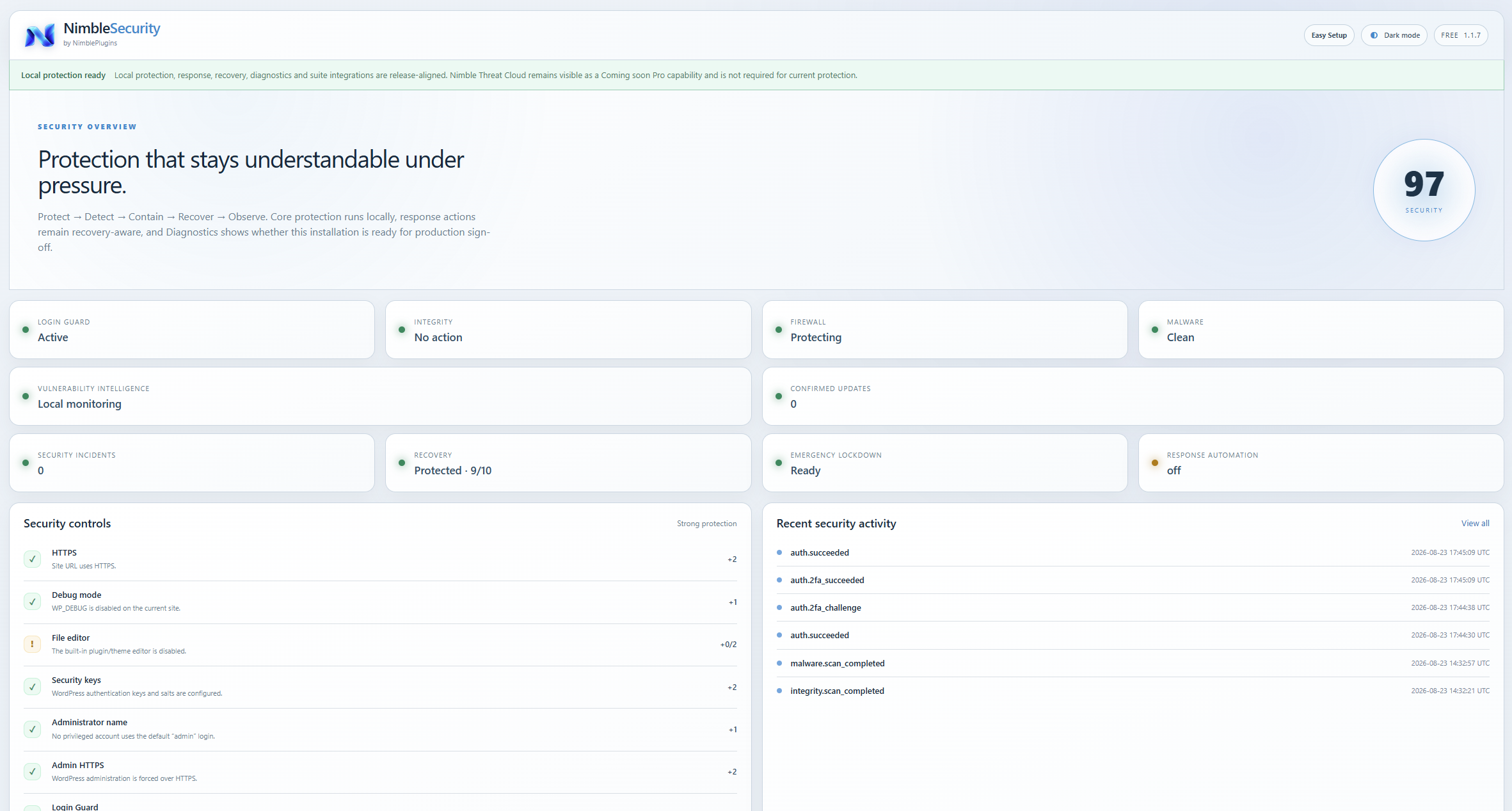
- Review Identity, Integrity, Firewall, Scanner and Recovery status from Nimble Security > Overview.
屏幕截图:



常见问题:
Do I need a licence key or an account?
No. Nimble Security is complete on its own. It contains no licence check, no account requirement and no time limit, and it does not contact NimblePlugins.
Does Free work without Pro?
Yes. Free owns the local identity, integrity, firewall, malware, vulnerability-inventory and manual response engines.
Does a changed plugin file mean malware?
No. Integrity findings are interpreted in context. Known WordPress maintenance can be correlated automatically; unexplained file changes are presented for review rather than being labelled malware by file type alone.
Why can wp-config.php still require review after WordPress is reinstalled?
WordPress normally preserves wp-config.php. Site-specific cron, proxy, database or debug configuration can therefore legitimately differ from a previous baseline. Nimble Security lets an administrator explicitly mark the current recognized configuration as intentional without storing its contents.
Does Nimble Security upload files for malware scanning?
No. The Free malware scanner runs locally.
Can Security delete malware automatically?
Free response is manual-first. Pro contains conservative recovery-gated automation, but destructive actions remain bounded by the Free enforcement and recovery contracts.
Does Nimble Security replace backups?
No. Security protects/detects/responds; backup provides recovery. Recovery readiness is intentionally part of Security Score because remediation is safer when a verified recovery point is available.
更新日志:
- Fixes a fatal error on activation in 1.2.1. The file holding the remembered-device code shipped with the plugin, but the line that loads it did not, so the class was missing the moment the plugin booted. This plugin loads its classes from an explicit list rather than an autoloader, and the new file was never added to that list. The build now refuses to package a release where a class file is not on it.
- The Security incidents banner on the Response page no longer describes automatic incident correlation as an unreleased Pro feature. It now reads "Coming soon" like the rest of the plugin's Pro references, since Pro is not yet purchasable on nimbleplugins.com.
- Quarantine payloads now live in a protected folder inside the uploads directory, resolved at runtime with wp_upload_dir() instead of a hard-coded wp-content path. Existing payloads are moved there automatically on update, and the folder is still closed to direct access.
- Extended Protection has been moved to the Nimble Security Pro add-on. It was the only part of the plugin that generated a PHP file, and generated PHP does not belong in a plugin hosted here. Every rule it enforced is still enforced by the built-in firewall through WordPress; nothing is left unprotected.
- If Extended Protection was prepared on your site, remove the auto_prepend_file directive you added, or install the Pro add-on to keep managing it.
- Removes two core-file includes that were not needed: wp-admin/includes/plugin.php in the quarantine policy check and wp-admin/includes/update.php in the update-status refresh.
- Documents the WordPress.org checksum API in full, including what is sent, when, and links to its Terms of Service and Privacy Policy.
- Removes the Nimble Security Pro licence client, the licence screen and all licence storage from the free plugin. Licensing now lives entirely in the commercial Pro package; nothing in the free plugin is gated, checked or limited.
- The two-factor login screen loads its styling from a stylesheet, and the interim-login handoff script is registered through the script API instead of being printed inline.
- Uninstall still clears any licence options left behind by an earlier version.
- The licence key field is hidden until Nimble Security Pro is actually installed, so the free plugin never asks for a key that cannot be obtained yet. A filter, nimble_security_license_entry_visible, can reveal it early.
- No behaviour change.
- The licence screen no longer presents an unreleased product as a missing one. With no key stored it reads "coming soon" instead of "not activated", and the key field is labelled for the few who already hold one rather than shown as a call to action.
- Pro capabilities are described in the future tense throughout, because Pro is not released yet.
- No behaviour change.
- Rewrites the plugin description for the directory and removes internal release wording.
- Corrects the Contributors username.
- Documents why the quarantine and scanner paths use direct filesystem calls instead of WP_Filesystem.
- No behaviour change.
- Replaces the placeholder brand mark with the real Nimble logo in the admin menu, the plugin header, the licence screen, the two-factor login screen and both request-blocked pages.
- No behaviour change.
- Declares Tested up to 7.1.
- Uninstall passes plugin-owned table names through prepared %i identifiers instead of interpolating them. No behaviour change.
- Plugin Check compliance: aligns a phpcs suppression with the sniff names used elsewhere in the package. No behaviour change.
- Adds Smart 404 blocking (opt-in, disabled by default). Administrators and allowlisted paths are never counted; blocking is Protect-mode only.
- Adds file permission auditing with bounded, opt-in hardening. Tightens only, never loosens, and only inside the install.
- New settings and events for both.
- No licensing, Easy Setup, malware scanner, integrity, Threat Cloud, Operations or Backup contract changes.
- Streams eligible script-bearing files from 5–50 MiB in bounded 1 MiB chunks instead of marking every file above 5 MiB as unscanned.
- Keeps a 16 KiB overlap between stream windows so bounded signatures split across a chunk boundary remain detectable.
- Only unreadable eligible files or files above the 50 MiB safety ceiling now make malware coverage incomplete.
- Incomplete-scan notices show the actual counts and a bounded list of affected relative paths.
- No licensing, Easy Setup, firewall, integrity, Threat Cloud, Operations or Backup/Recovery contract changes.
- Fixes horizontal admin-page overflow by sizing the main Security canvas inside the WordPress viewport.
- Makes dashboard and Easy Setup grid columns shrink safely without forcing side-scrolling.
- No security, licensing, Easy Setup, Threat Cloud, Operations or Backup/Recovery behavior changes.
- Adds first-run Easy Setup with a clear Skip option for non-technical site owners.
- Recommended setup enables compatibility-safe local defaults, starts the first integrity check and queues malware/software monitoring.
- Keeps XML-RPC changes, proxy trust, global per-IP rate limiting and Extended Protection as explicit advanced choices.
- Preserves the 1.0.1 Free-owned Nimble Security Pro licensing client and the Pro response-automation admin hook.
- Fixes inline Pro/licence notice contrast inside Nimble Security pages in both dark and light modes.
- Fixes the Response admin page never firing
nimble_security_response_automation_panel. Nimble Security Pro attaches its recovery-gated automation policy form to that hook, so with Pro active the automation panel could not render and the policy could not be moved off its default Off state. - No security policy, schema, Threat Cloud, Operations or Backup contract changes.
- First stable release. Clean version number replaces the 1.0.0-rc release-candidate series.
- Adds the NimblePlugins signed licensing client, owned by Free, with an RSA-SHA256 verified verdict, encrypted local key storage, a 7-day offline grace period and a daily background validation.
- Adds a Licence admin page for activating, checking and deactivating a Nimble Security Pro licence.
- Fixes a corrupted uninstall.php that had lost its opening PHP tag, which prevented all uninstall cleanup from running and prevented the fail-open disabling of a generated Extended Protection auto_prepend_file policy.
- Uninstall now also clears licence state and the licence validation schedule.
- No security policy, schema, Threat Cloud, Operations or Backup contract changes.