
Ninja Job Board
| 开发者 |
techjewel
wpmanageninja |
|---|---|
| 更新时间 | 2026年11月3日 18:24 |
| PHP版本: | 7.4 及以上 |
| WordPress版本: | 7.1 |
| 版权: | GPLv2 or later |
| 版权网址: | 版权信息 |
详情介绍:
- Create a job. Write the description in the block editor and add the job type, location, vacancies and experience.
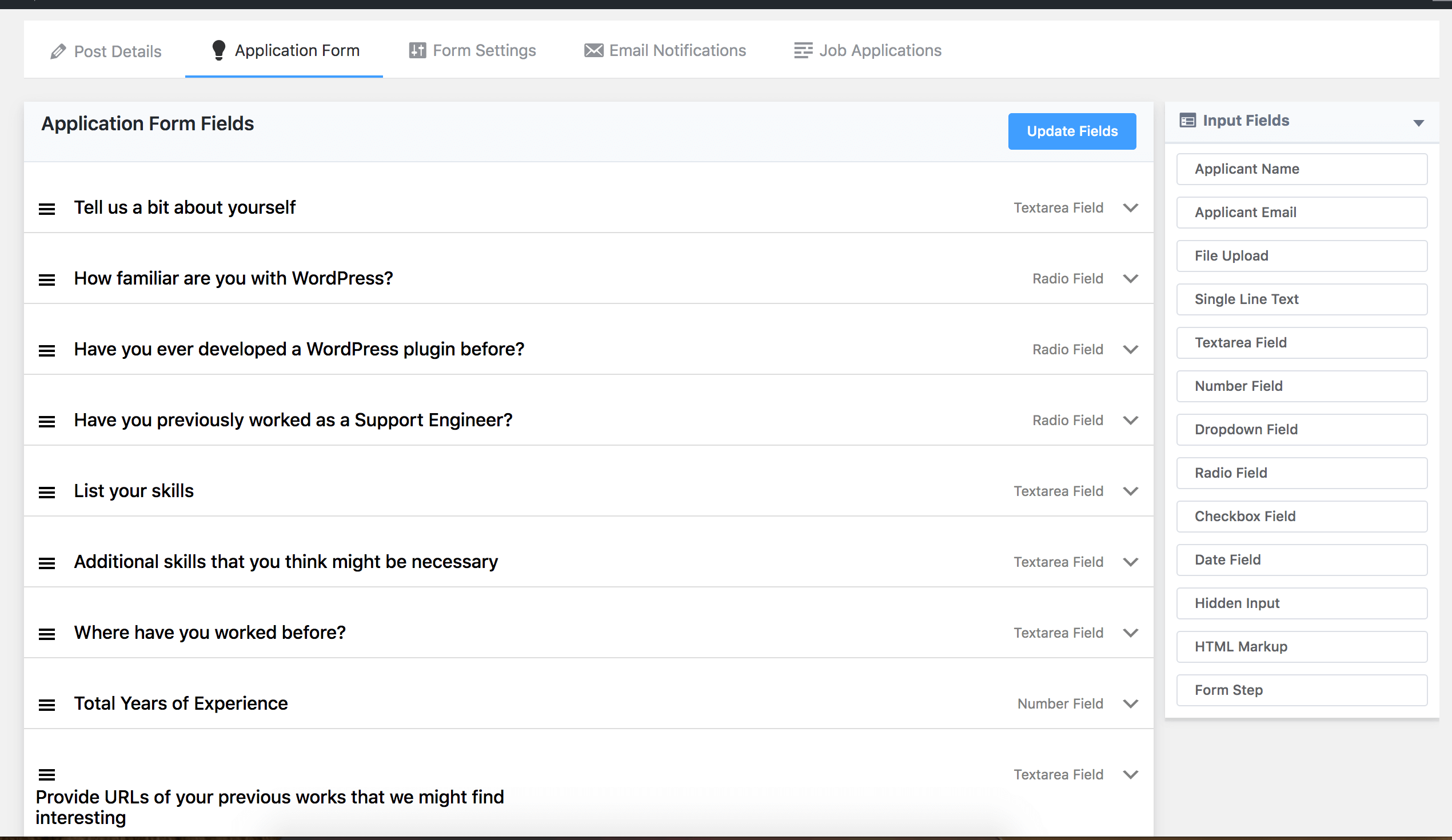
- Build the application form with the drag and drop form builder.
- Publish. The job page shows the job details and the application form automatically.
- Review applications. Filter them by status, open each applicant's CV, add notes, and move them through your hiring steps.
- Reply to applicants one by one, or send one email to all applicants with a given status.
- Each job is a WordPress post with its own page, category and details.
- Job List block and
[wp_job_list]shortcode: show your open jobs on any page, with an optional category filter. - Job Application Form block and
[wp_job_form id="123"]shortcode: show a job's application form anywhere. - Job Details block: show a job's type, location, vacancies, experience and posting date.
- Job categories, and an option to hide jobs that are no longer open.
- Applicant name and applicant email
- CV upload and file upload
- Single line text, paragraph text and number
- Dropdown, radio buttons and checkboxes
- Date
- Hidden field
- HTML content
- Form steps, to split a long form into pages
- Confirmation: show a message, or send the applicant to a page or URL.
- Scheduling: open and close applications on set dates.
- Restrictions: require login, or limit the number of applications.
- Design: label placement, required marker and submit button position.
- All applications for a job in one table, with tabs that count each status.
- Two statuses per application: the application status (Applied, Processing, Pending, Completed) and a private internal status for your team (New, Audited, Interviewed, Shortlisted, Hired and more).
- An application page with the answers, the CV and other files, notes, and an activity timeline.
- See the other applications from the same applicant.
- Search applications, print an application, and export applications to CSV.
- Email notifications when someone applies: to the applicant, to your HR team, or both. Use placeholders such as the applicant's name and the job title.
- Email broadcast: send one email to all applicants of a job, filtered by application status and internal status.
- Uploaded CVs are private. Only users who can view the application can download them. Direct links to the upload folder are blocked (see the FAQ for Nginx).
- Spam protection: a hidden honeypot field on every form, and optional Cloudflare Turnstile.
- WordPress privacy tools: export or erase an applicant's data from Tools > Export Personal Data and Tools > Erase Personal Data.
- Option to stop storing applicants' IP addresses.
- Option to delete all plugin data when you delete the plugin.
assets/admin, assets/blocks, assets/css and assets/js are compiled. Their source (the Vue admin app, the blocks and the SCSS) is on GitHub. Each release has a matching tag, for example v2.0.0.
To build: npm install, then npm run build. Bug reports and pull requests are welcome.
Other plugins by WPManageNinja
- Fluent Forms: drag and drop form builder
- FluentCRM: email marketing and CRM for WordPress
- Fluent Support: helpdesk and customer support
- Ninja Tables: data tables for WordPress
安装:
- In your WordPress admin, go to Plugins > Add New, search for "Ninja Job Board", then click Install Now and Activate. Or upload the plugin folder to
/wp-content/plugins/and activate it on the Plugins screen. - Go to Job Board > All Jobs and click Add job.
- Build the application form, then publish the job.
- To list your jobs, add the Job List block to a page, for example "Careers".
屏幕截图:



常见问题:
How do I create a job?
Go to Job Board > All Jobs and click Add job. Give the job a title, then build its application form. To write the job description and add the job type, location, vacancies and experience, click the "Edit job post" tab.
How do I show my jobs on the website?
Each job has its own page. To list all open jobs on a page, add the Job List block, or the [wp_job_list] shortcode.
To show an application form somewhere else, add the Job Application Form block, or [wp_job_form id="123"] where 123 is the job ID.
On a job's own page, the job details and the application form are added automatically. If you add the Job Details or Job Application Form block to the job yourself, the automatic copy is left out, so nothing shows twice.
Can I change an application form after the job is published?
Yes. Changes apply to new applications. Applications you already received keep their answers.
What do applicants see after they apply?
You choose in the job's Form Settings: a thank-you message, a page on your site, or any URL.
How do I get notified about new applications?
Open the job and go to the Email Notifications tab. You can email the applicant, your HR team, or both.
Who can open uploaded CVs and other application files?
Only logged-in users who are allowed to view the application. Every file link points to wp-admin/admin-post.php?action=wpjb_download_file, which checks the permission before it sends the file. On Apache, the upload folder wp-content/uploads/wpjobboard/ also blocks direct access with an .htaccess file.
On Nginx, .htaccess files are ignored. Add this rule to your server block so nobody can open the folder directly:
location ^~ /wp-content/uploads/wpjobboard/ { deny all; return 403; }
How do I stop spam applications?
A hidden honeypot field is always on. For stronger protection, turn on Cloudflare Turnstile in Job Board > Settings > General and add your Turnstile site key and secret key.
Can applicants ask for their data to be exported or erased?
Yes. Ninja Job Board adds job applications to the WordPress privacy tools (Tools > Export Personal Data and Tools > Erase Personal Data). Erasing deletes the applications of that email address, their activity log and their uploaded files.
What happens to my data when I delete the plugin?
Nothing, by default. To remove all jobs, applications, uploaded files and settings when you delete the plugin, turn on "Delete all data when the plugin is deleted" in Job Board > Settings > General first.
Does it work with my theme?
Yes. The job pages use your theme's single post template, and the blocks and shortcodes work in any theme, including block themes.
更新日志:
- Fixed stored XSS through file upload values in the application view
- All submitted field values are sanitized on save and escaped on display
- File uploads are checked against a server-side record of uploaded files
- Uploaded files (CVs) are served only to users who can view the application; direct access to the upload folder is blocked on Apache (see the FAQ for Nginx)
- The admin uses the WordPress REST API; every route checks the user's capability and, for "own forms" permissions, the form owner
- Nonce checks on the public form and file upload
- Users with only the "add form" permission can no longer edit forms of other users
- Email notification placeholders are escaped and email headers are sanitized
- Confirmation page links use an unguessable hash
- The job meta box saves only the known job fields, with nonce and capability checks
- Form import accepts only known form settings
- CSV export protects against spreadsheet formula injection New
- Redesigned admin that matches the Fluent plugins (FluentCRM, Fluent Support): one app header, job tabs, settings sidebar, clean tables and cards
- Applications filter by status with tabs that show the count for each status
- Color-coded status badges for job posts, application status and internal status
- Application view with an activity timeline, a status panel and compact file attachments
- A job opens on its applications
- Personal data export and erase for applicants (WordPress privacy tools) and suggested privacy policy text
- Spam protection: a honeypot field on every form and optional Cloudflare Turnstile
- Option to delete all plugin data when the plugin is deleted
- Gutenberg blocks: Job List (with categories, filter, number of jobs and order), Job Application Form and Job Details, with live previews in the editor
- Job posts use the block editor, with a Job details panel (job type, location, vacancies, experience) and the job's tabs (applications, form, settings, emails) at the top
- New logo, icon and banner Improvements
- Admin app rebuilt with Vue 3, Element Plus and Vite
- Smaller admin bundle; removed unused libraries (Spout, Ace editor, vue-html-to-paper, lodash, clipboard)
- Updated Dropzone to 5.9.3 and flatpickr to 4.6.13; the release ships only their minified files
- Email CSS is inlined with the same library as FluentCRM (css-to-inline-styles 2.4.0); @media rules are kept for mobile email clients
- New browser and platform detection for applications: knows Edge, Opera, Samsung Internet, iPadOS and ChromeOS
- Campaign emails are claimed before sending, so an email is never sent twice Fixes
- Turning off IP address logging now really stops storing the IP address
- Deleting an application or a job also deletes its uploaded files
- Form scheduling "off" clears the start and end timestamps
- Fatal errors in multi-step forms and the
{other.user_ip}default value on PHP 8 - Email notification From and Reply-To headers used the unparsed template values
- Status labels "Initial rejected" and "Shortlisted"
- Short month names in the date picker; the calendar now starts on the site's "Week starts on" day
- PHP 8.2+ deprecation notices Removed
- The "Recommended Plugins" box on the application screen Requirements
- WordPress 6.3 or newer, PHP 7.4 or newer; tested with WordPress 7.1 Developers
-
window.WPJobBoardkeeps the hooks API (applyFilters, addFilter, addAction, doAction) and now also exposesappandrouter - New filters:
wpjobboard/spam_check,wpjobboard/verify_public_nonce,wpjobboard/client_ip - Renamed filters:
wppayfrom/element_control_classis nowwpjobboard/element_control_class, andwppayfrom/element_input_classis nowwpjobboard/element_input_class
- Database Query Issue Fixed
- Security Fix for File Index for NGINX indexed enabled servers
- Fix issues for esc_* functions
- Added feature to show other job applications by same applicant
- Added a new feature to send bulk emails to the applicants.
- Fixed text-domain issues
- Fixed email sending issues
- Few other performance improvements
- Added Bulk email feature where you can send emails to applicants
- Initial Release