NiroRoadmap - Public Product Roadmap & Kanban Board
| 开发者 | nirosuite |
|---|---|
| 更新时间 | 2026年10月18日 19:46 |
| PHP版本: | 8.0 及以上 |
| WordPress版本: | 7.1 |
| 版权: | GPLv2 or later |
| 版权网址: | 版权信息 |
详情介绍:
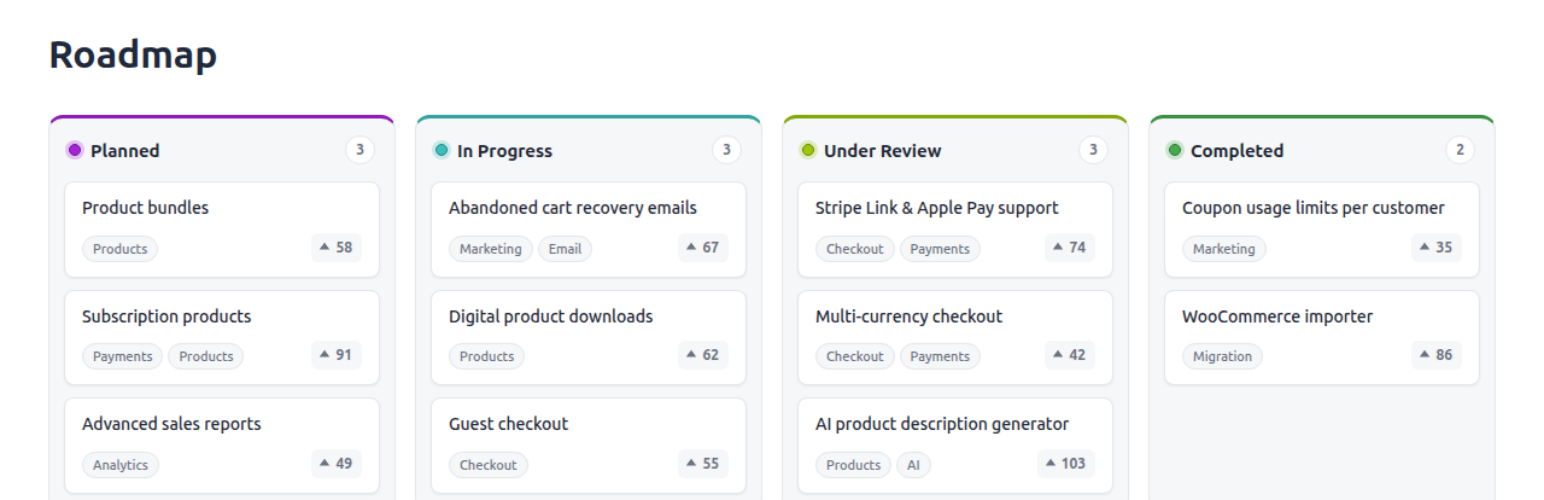
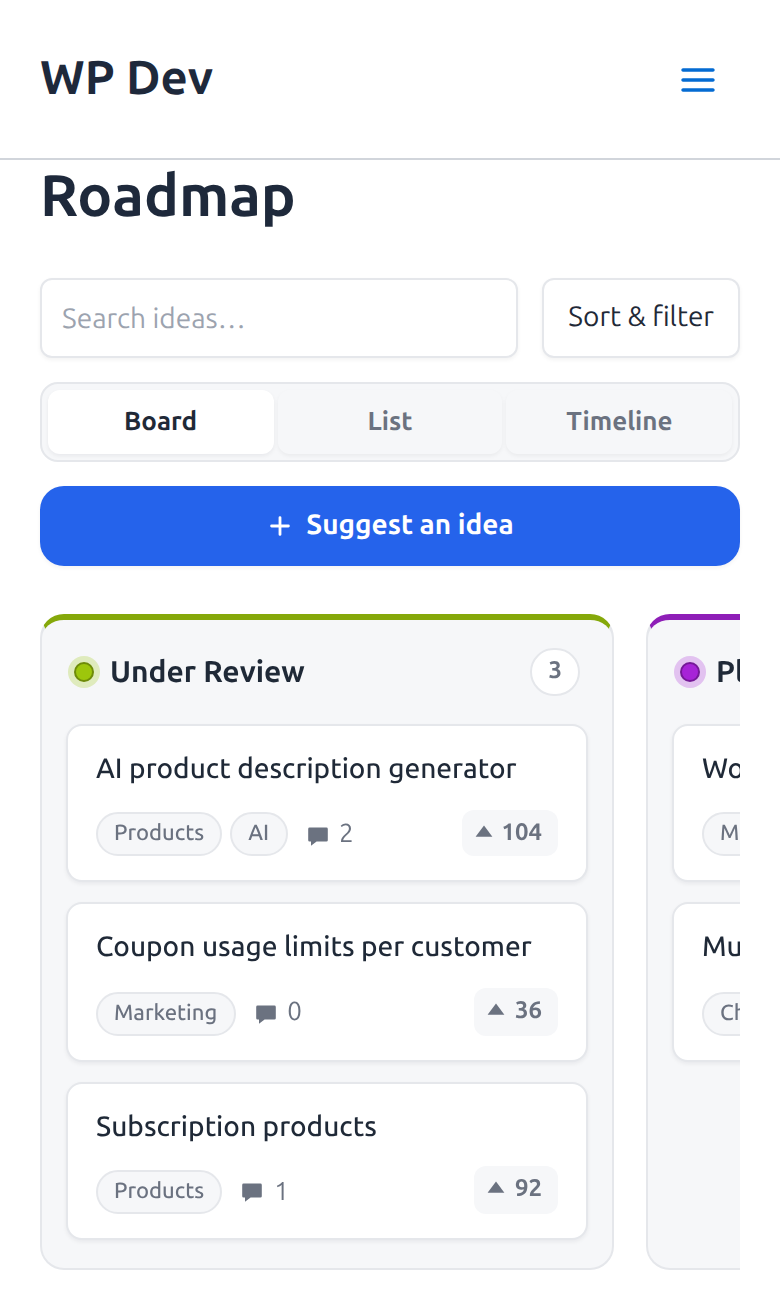
- Kanban board: Items are grouped into status columns, each with its own accent color and item count.
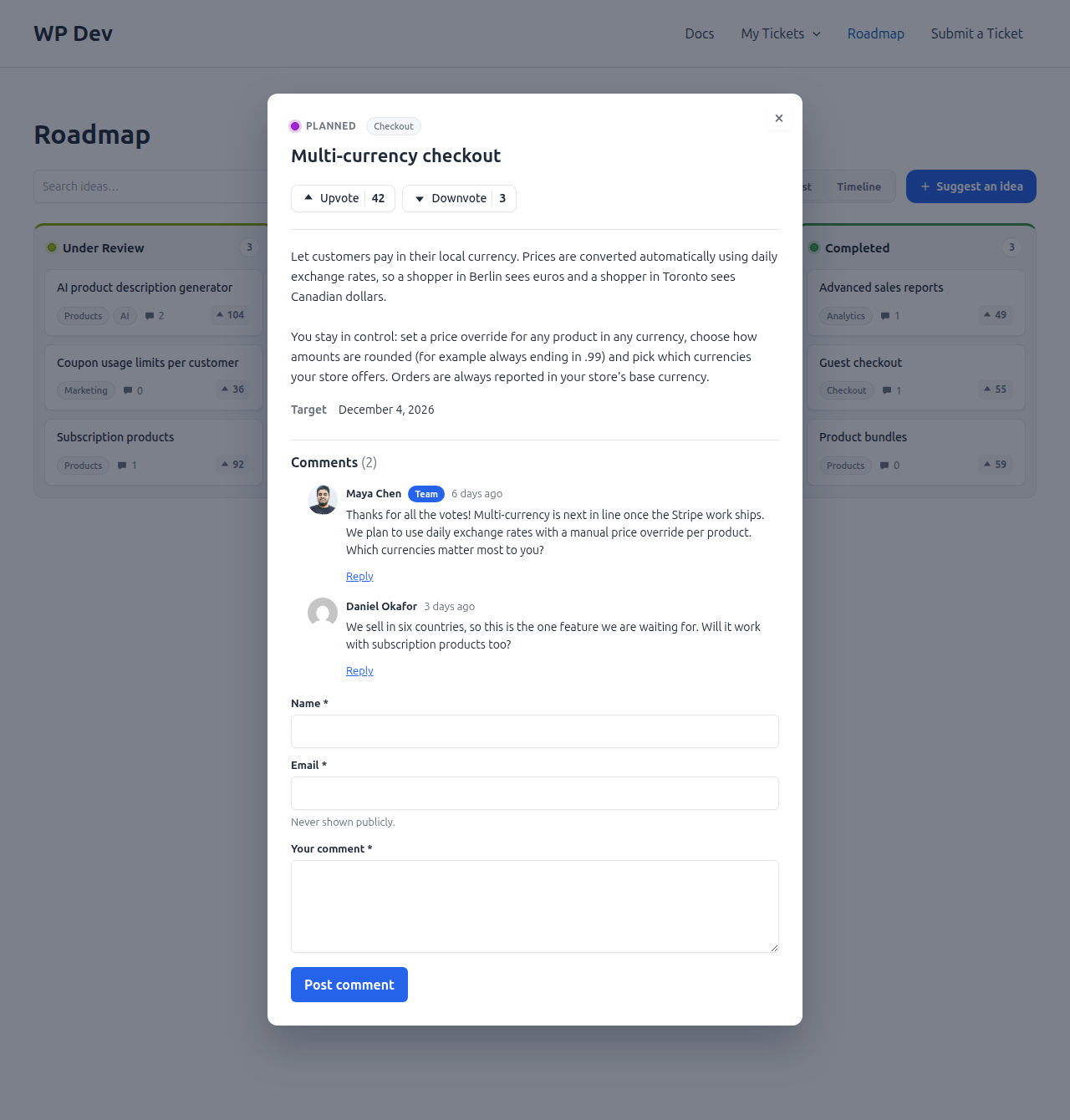
- Item details popup: Clicking an item opens a popup with its status, tags, description and votes. It zooms out of the card in the style of macOS Quick Look.
- Voting: Anyone can upvote or downvote an item, with no account needed. One vote per visitor per item, enforced on the server. Optionally require a login, let voters change their vote, hide the downvote button, or show downvote counts to administrators only.
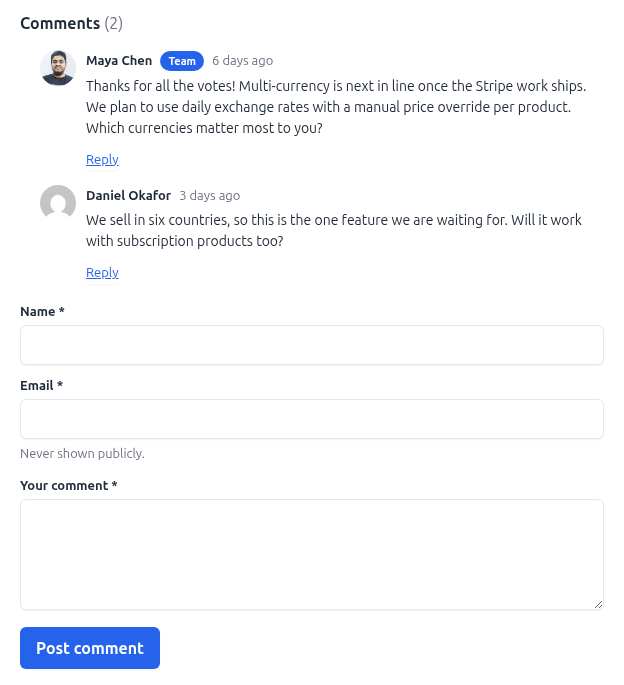
- Comments: Visitors discuss an item right in its popup, with threaded replies and a Team badge on staff replies. Comments are normal WordPress comments, so your moderation tools and spam plugins apply. Require a login, choose the order, and close comments automatically when an item is completed.
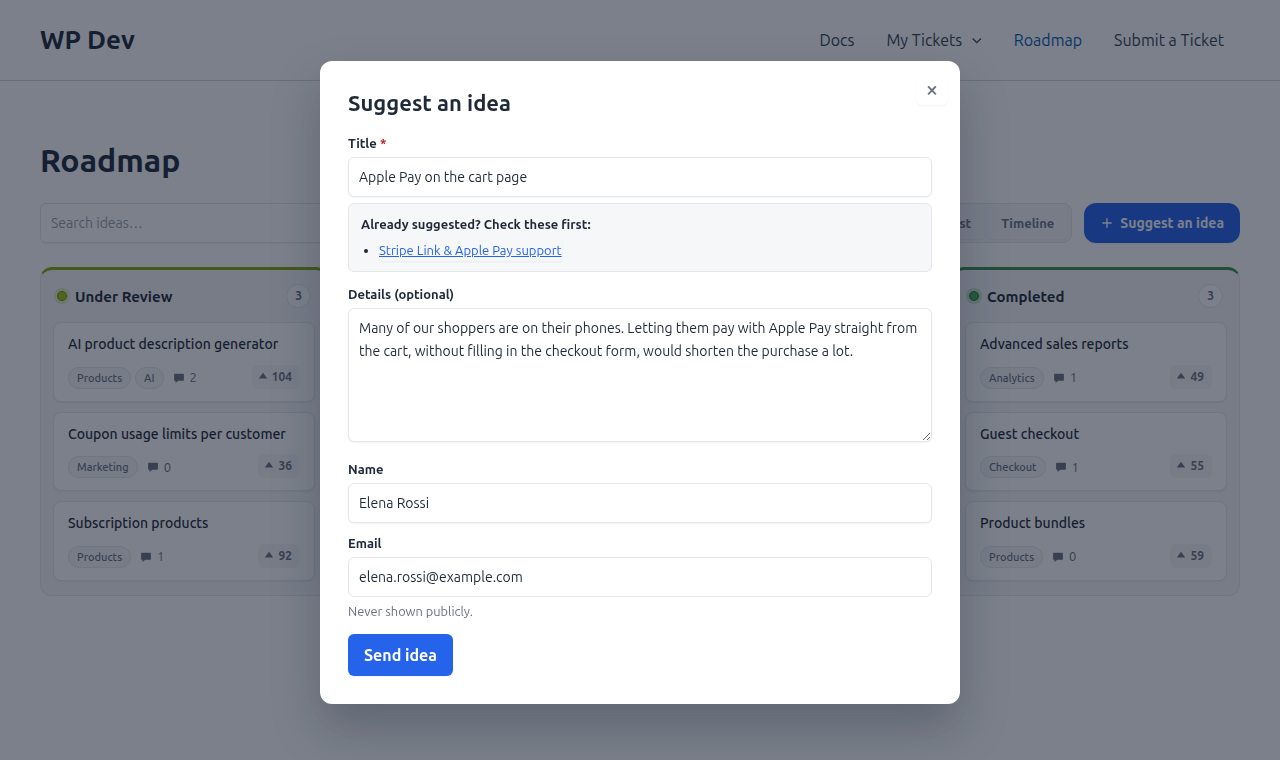
- Suggest an idea: A Suggest an idea button opens a short form. While the visitor types a title, similar existing items are listed so duplicates are caught early. Ideas arrive as Pending items, are never public until you approve them, and can notify you by email. A one-click Approve action is added to the Items list.
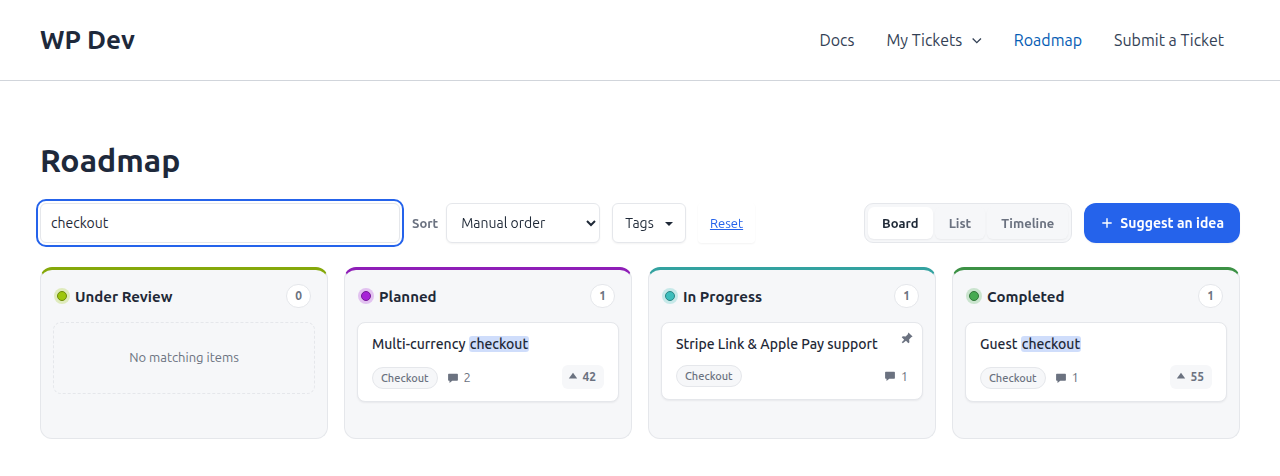
- Search, sort and filter toolbar: Visitors search the board and sort by most votes, newest, oldest or most commented. They can filter by tag and product too. The toolbar loads no extra script or styles on boards that don't use it.
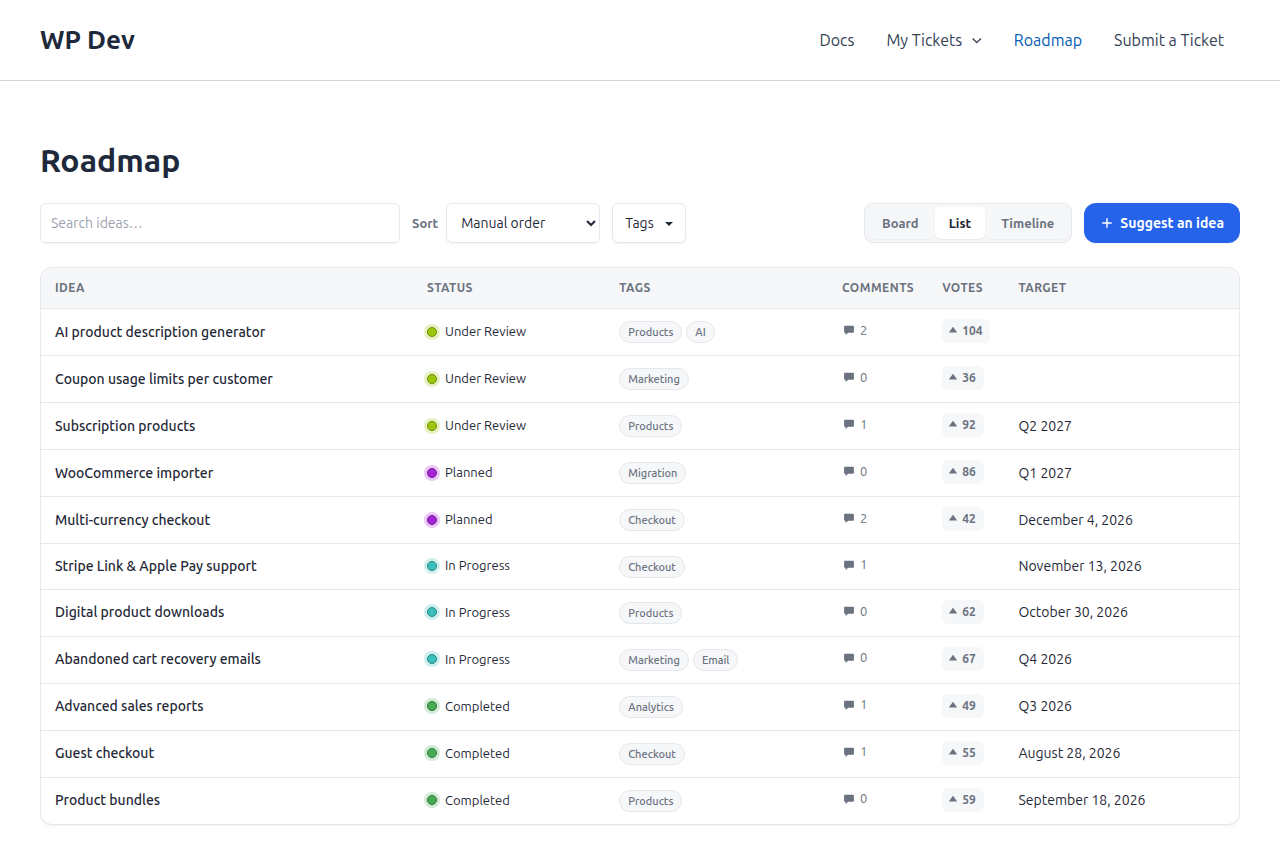
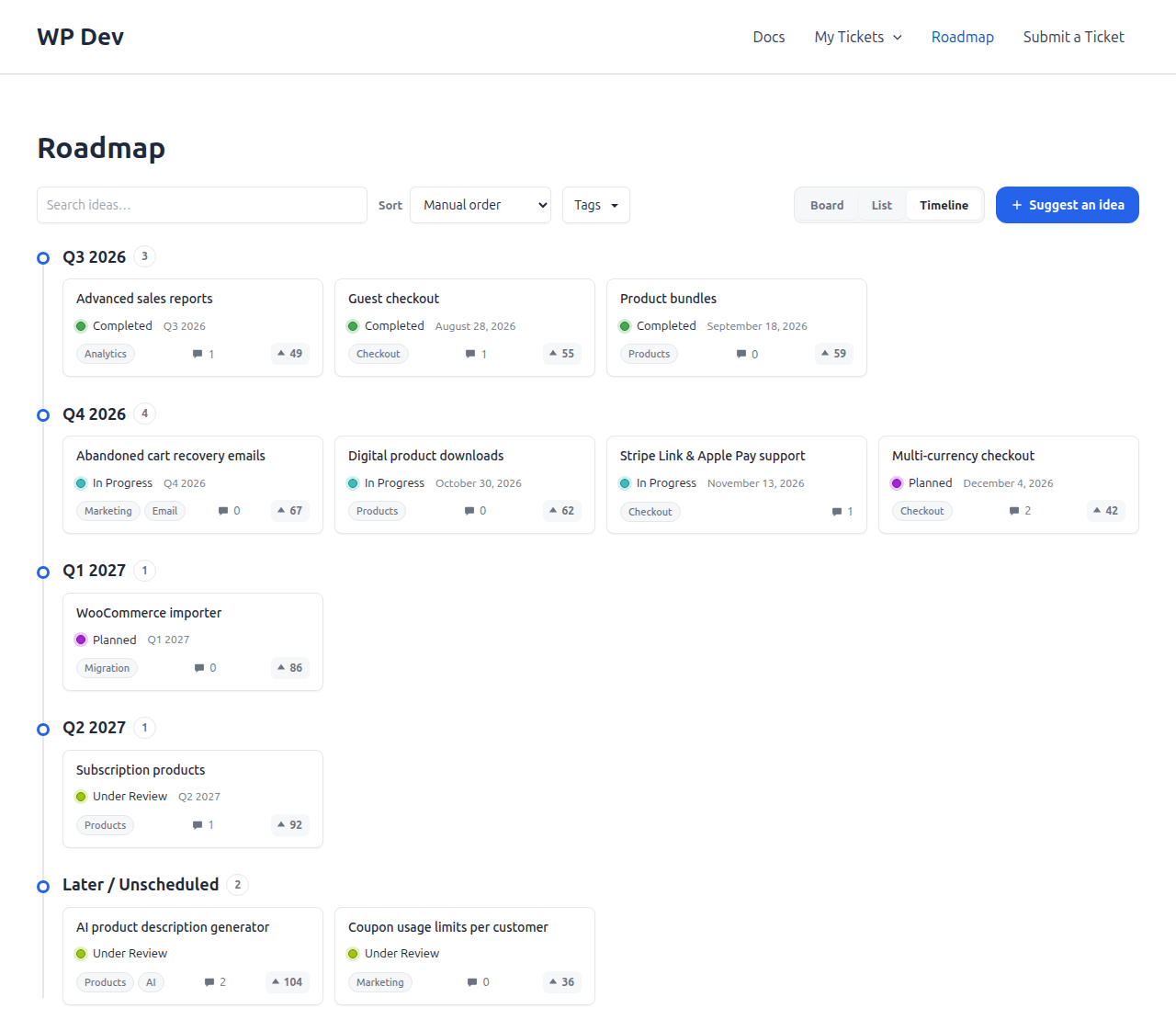
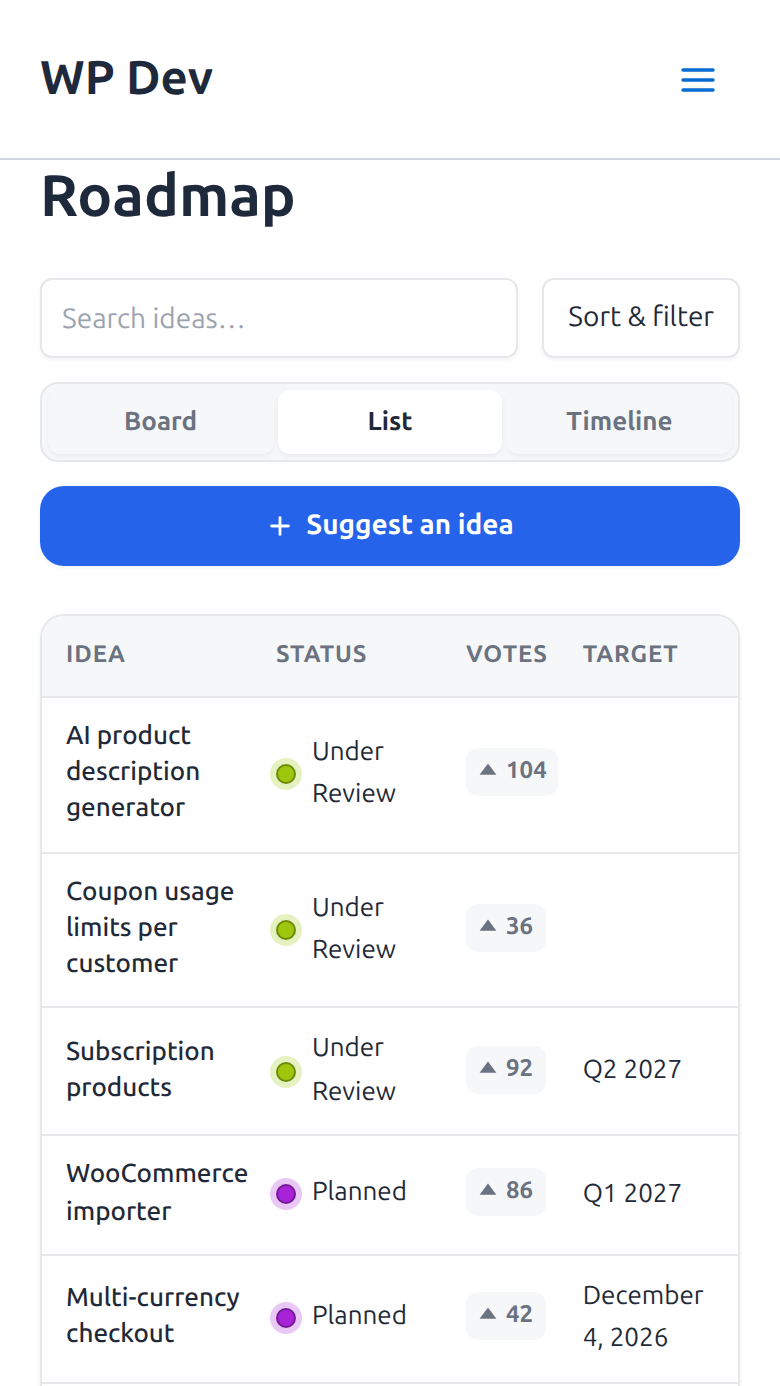
- Board, List and Timeline views: Show the roadmap as Kanban columns, a compact sortable table, or a timeline grouped by quarter, month or Now / Next / Later. A switcher lets visitors choose, and their choice is remembered and can be shared in the page address. Boards that don't use the extra views load no extra script or styles.
- Drag and drop: Editors and administrators can drag items between columns and reorder them right on the public board.
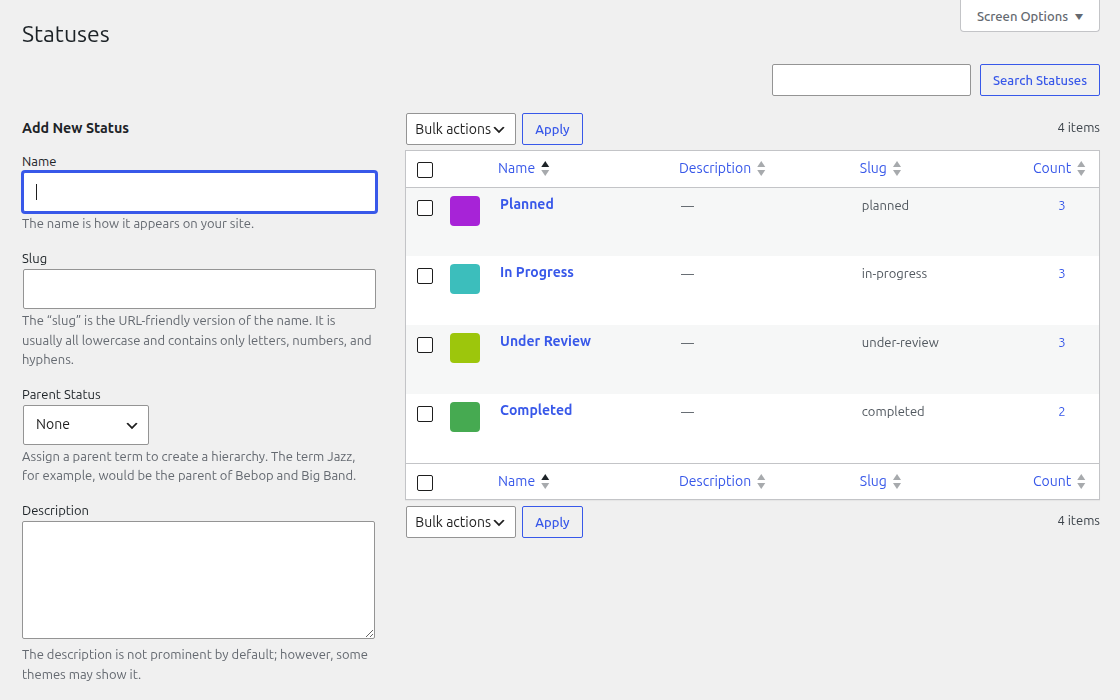
- Sortable statuses: Drag statuses into the order you want on the admin screen. The public board uses the same order.
- Products: Run separate roadmaps for several products and show one product per board.
- Tags: Label items (e.g. Payments, Checkout). Tags are shown on each card.
- Item details: Give an item a target (a date or a quarter like Q4 2026), a release date and version, a link, a cover image (its Featured image), an effort size and private notes for your team. Pin an item to the top of its column, or hide its vote counts.
- Status history: See who moved an item to which status and when, and optionally show visitors the path an item took.
- Shortcode and block: Use the
[niroroadmap]shortcode or the Roadmap block. - Settings page: Eight tabs (General, Voting, Comments, Submissions, Toolbar, Views, Appearance, Advanced) control everything without code.
- Appearance: Light, dark or automatic color scheme, an accent color, the corner radius and your own custom CSS.
- Responsive: On phones the columns scroll sideways with snapping and the toolbar collapses into a Sort & filter button. The list view can be the default on narrow screens.
- Accessible: Cards can be opened with the keyboard, Esc closes the popup, and the animation is replaced by a plain fade for visitors who prefer reduced motion.
- Theme-friendly: Colors, borders and spacing are CSS custom properties you can override from your theme.
- Developer-friendly: A REST API under
niroroadmap/v1, a dozen filters and actions, and a regular custom post type.
- Adjust the columns under NiroRoadmap → Statuses if you like. Rename them, pick colors, and drag them into order.
- Optionally add your products under NiroRoadmap → Products and your labels under NiroRoadmap → Tags.
- Add items under NiroRoadmap → Add New. Give each one a status, and optionally a product, tags and the Roadmap details (target, release date and version, link, effort, pin).
- Open NiroRoadmap → Settings and turn on what you want: comments, the Suggest an idea button, the search toolbar, a dark color scheme.
- Visit the Roadmap page. To show the board somewhere else, use the
[niroroadmap]shortcode or the Roadmap block.
- General: the Roadmap page, a default product, linking status names to their archive, and what the board shows: vote counts, tags, the downvote button, an item's target and its status timeline.
- Voting: who can vote (everyone or logged-in users), whether voters may change their vote, and who sees downvote counts.
- Comments: turn comments on, require login, choose the order, and close comments when an item is moved to Completed.
- Submissions: turn the Suggest an idea button on, require login, ask for name and email (not asked, optional or required), pick the status new ideas start in, count the submitter's own upvote, and set the notification email.
- Toolbar: turn the toolbar on, pick the initial sort and which filters to offer (search, tag, product).
- Views: the default view, whether visitors get the Board / List / Timeline switcher, opening boards as a list on narrow screens, how the timeline groups items, and how many items each Board column shows before "Load more".
- Appearance: light, dark or auto color scheme, accent color, corner radius and custom CSS.
- Advanced: delete all plugin data on uninstall, and reset every setting to its default.
- Ideas visitors suggest appear in NiroRoadmap → All Items as Pending, with a Submitted by column. Click Approve to publish one, or edit it first.
- Each item has a Roadmap details box with its target (a date or a quarter like Q4 2026), release date, version, link, effort size (XS to XL), private team notes, and switches to hide its votes or pin it to the top of its column.
- A Status history box on the item screen shows every status change, who made it and when.
- The Items list has Target and Votes columns.
[niroroadmap] shows every item.
[niroroadmap product="12"] shows only the items of one product. Use the term ID from NiroRoadmap → Products.
[niroroadmap toolbar="yes" sort="votes" filters="search,tag"] adds a search, sort and filter toolbar. toolbar is yes or no; sort is manual, votes, newest, oldest or commented; filters is a comma list of search, tag and product (or none). Without these options a board follows Settings → Toolbar. The Roadmap block has the same options in its sidebar.
[niroroadmap view="timeline" switcher="yes" group="month"] opens the board as a timeline and lets visitors switch views. view is board, list or timeline; switcher is yes or no; group is quarter, month or nownext (Now / Next / Later). Without these options a board follows Settings → Views. Visitors can share a link to a view with ?nr_view=list in the address. The Roadmap block has the same options in its sidebar.
[niroroadmap per_column="20"] shows 20 items in each Board column, with a Load more button for the rest. The number at the top of a column always counts every item. The default is 10 (Settings → Views); 0 shows every item. The Roadmap block has the same option in its sidebar.
[niroroadmap submissions="yes"] shows a "Suggest an idea" button on that board even when it is off site-wide; submissions="no" hides it.
Options combine, for example [niroroadmap product="12" toolbar="yes" sort="votes" submissions="yes"].
The older [roadmap] shortcode still works.
For developers
Filters:
niroroadmap_setting_{$key}: filter any setting value, e.g.niroroadmap_setting_comments_enabled.niroroadmap_show_stage_links: returntrueto link each column title to its status archive.niroroadmap_get_posts: filter the items loaded for a column.niroroadmap-localized_vars: filter the variables passed to the front-end scripts.niroroadmap_vote_fingerprint,niroroadmap_voter_ip: change or disable how anonymous voters are recognised.niroroadmap_vote_rate_limit,niroroadmap_comment_rate_limit,niroroadmap_submission_rate_limit: change the rate limits (array( count, seconds )).niroroadmap_comment_max_length,niroroadmap_comment_show_avatars: limit comment length, or hide avatars.niroroadmap_completed_status_slugs: the status slugs that count as completed for closing comments (defaultcompleted).niroroadmap_submission_verify: returnfalseor aWP_Errorto reject an idea, for example to add a CAPTCHA.niroroadmap_submission_max_title,niroroadmap_submission_max_description,niroroadmap_submission_min_time: limits for the suggestion form.niroroadmap_submission_notify_to: change the recipient of the new-idea email.
niroroadmap_comment_created: fires after a visitor's comment is saved.niroroadmap_submission_created: fires after an idea is submitted.
niroroadmap/v1): GET /tasks/{id}, POST /tasks/{id}/vote, GET and POST /tasks/{id}/comments, POST /tasks/submit and GET /tasks/search are public and rate limited. Moving and ordering items and statuses (/tasks/{id}/move, /tasks/order, /stages/order) need an editor or administrator.
The board's look can be changed by overriding these CSS custom properties on .nr-kanban-columns and .nr-modal-overlay: --nr-bg, --nr-card, --nr-border, --nr-text, --nr-muted, --nr-accent, --nr-radius.
Helper: niroroadmap_get_setting( $key ) returns a plugin setting.
Roadmap data is stored as a regular custom post type (niroroadmap_item) with the taxonomies niroroadmap_status, niroroadmap_product and niroroadmap_tag, so it works with the standard WordPress APIs.
Source code and build tools
The full source code is publicly available at github.com/codexpertio/niroroadmap.
The only compiled file is the block script in build/roadmap/. Its human-readable source ships with the plugin in app/Blocks/roadmap/. To rebuild it, run npm install and then npm run build:blocks (uses @wordpress/scripts). PHP dependencies are listed in composer.json; run composer install to install them.
Privacy
NiroRoadmap makes no requests to external services. To allow one vote per visitor per item, it recognises voters like this:
- Logged-in users are identified by user ID.
- Other visitors get a random token in a first-party cookie,
niroroadmap_voter(1 year,SameSite=Lax,HttpOnly,Secureon HTTPS), set when they first vote. They are also recognised by a salted hash (HMAC-SHA256, keyed with your site's WordPress salts) of their IP address and browser user agent, so clearing cookies doesn't reset their votes.
niroroadmap_vote_fingerprint filter; votes are then recognised by cookie only. Votes are also shown as plain counts on each item, and the visitor's browser keeps a list of the items it has voted on in local storage (niroroadmap_votes) to display the buttons correctly. That list is never sent to the server. A short-lived counter keyed by a hash of the IP address limits how fast votes can be sent. Vote data is deleted when you uninstall with "Delete all data" turned on.
When comments are turned on, a comment is a standard WordPress comment. WordPress stores the commenter's name, email address, IP address and browser user agent with it, the same as on any post, and your spam plugin may send these to its own service. The roadmap board never shows email addresses or IP addresses. It does show each commenter's avatar, which for people without a profile picture is a Gravatar image whose address contains a hash of their email; return false from the niroroadmap_comment_show_avatars filter to turn avatars off. A hidden form field and a per-IP rate limit (using a hash of the IP address, as for votes) help keep out spam. Comments are deleted with their item, and when you uninstall with "Delete all data" turned on.
When visitors can suggest ideas, an idea is stored as a pending item, like any other. If you ask for a name and email, or the person is logged in, those are stored privately with the idea so you can follow up. They are shown only in the admin Items list, and never on the board or in the public API. The idea itself becomes public only when you publish it. A hidden form field, a minimum fill-in time and a per-IP rate limit (using a hash of the IP address, as for votes) help keep out spam, and a filter lets you add a CAPTCHA. If you turn on the email notification, the idea and the submitter's name and email are sent to the address you choose. Ideas, and the name and email stored with them, are deleted with the item, and when you uninstall with "Delete all data" turned on.
Item details: the target is shown to visitors only if you turn that on in Settings → General. The release date, version, link and cover image are shown when filled in. The effort size and the internal notes are for your team only: they are never shown on the board or returned by the public API.
Status history: each time an item moves to another status, the plugin records which status, when, and the ID of the user who moved it (0 when it was done by code or by a visitor's submission). Only your team sees who; the optional timeline shown to visitors has statuses and dates only. The history is deleted with the item, and when you uninstall with "Delete all data" turned on.
安装:
- In your dashboard, go to Plugins → Add New, search for "NiroRoadmap", then install and activate it. Or upload the
niroroadmapfolder to/wp-content/plugins/and activate it from the Plugins screen. - A Roadmap page and default statuses are created for you. If a page already shows the roadmap, it's used instead of creating a new one.
- Add items under NiroRoadmap → Add New.
屏幕截图:
常见问题:
Where can I get help?
Visit support.nirosuite.com or email niro@nirosuite.com. New to the plugin? The Getting Started screen under NiroRoadmap walks you through the setup.
Do visitors need an account to vote?
No, unless you want them to. Anyone can upvote or downvote an item, and each visitor gets one vote per item. To require a login, change Settings → Voting → Who can vote.
Can visitors comment?
Yes, when you turn on Settings → Comments. Comments show in the item popup and are moderated like any WordPress comment. You can require a login, close comments on one item from its Discussion box, or close them automatically when an item is completed.
Can visitors suggest ideas?
Yes, when you turn on Settings → Submissions, or add submissions="yes" to one board. Ideas are saved as Pending and stay hidden until you approve them from the Items list. Visitors see similar items while they type, which cuts down on duplicates.
How do I stop spam on comments and ideas?
Both forms use a hidden honeypot field, a per-IP rate limit and (for ideas) a minimum fill-in time. Comments also pass through your usual WordPress moderation and spam plugins. To add a CAPTCHA to the idea form, use the niroroadmap_submission_verify filter.
Can I use a dark theme?
Yes. Choose Dark or Auto (follows the visitor's device) under Settings → Appearance.
Who can drag items between columns?
Editors and administrators. They can drag items directly on the public board while logged in. Everyone else sees a read-only board.
How do I change the order of the columns?
Go to NiroRoadmap → Statuses and drag the rows into the order you want. The order is saved right away and used on the public board.
How do I change a column's color?
Edit the status under NiroRoadmap → Statuses and pick a color. It's used for the column's top border and status dot.
Can I show a separate roadmap per product?
Yes. Assign items to a product, then use [niroroadmap product="ID"] with that product's term ID. To pick the product for boards that don't name one, set Settings → General → Default product.
Where do I manage my roadmap items?
Under NiroRoadmap → All Items. Add or edit an item like any post: give it a title, a description, a status, and optionally a product, tags, a Featured image (shown as its cover) and the Roadmap details.
How do I show the roadmap on another page?
Add the Roadmap block, or a Shortcode block with [niroroadmap]. The page chosen in Settings → General → Roadmap page is just the page the plugin created for you, so you can also build your own and ignore it.
What can I enter as an item's target?
A date written YYYY-MM-DD (for example 2026-12-31) or a quarter such as Q4 2026 (also q4-2026). Anything else is rejected with a message and the old value is kept. Visitors see the target only if you turn on Settings → General → Show an item's target date or quarter in its popup.
How do I show visitors where an item is in its journey?
Turn on Settings → General → Show an item's status timeline in its popup. Visitors see statuses and dates. Only your team ever sees who moved the item.
Is the effort size or the internal notes visible to visitors?
No. They are for your team and are never shown on the board or returned by the public API.
Can I pin an item or hide its votes?
Yes. Use the Pin to the top of its column and Hide votes switches in the Roadmap details box of the item. Pinned items stay at the top of their column whatever the sort order.
Can someone vote twice by clearing their cookies?
Not easily. Besides the cookie, votes are matched by a salted hash of the visitor's IP address and browser. If you prefer to use cookies only, return an empty string from the niroroadmap_vote_fingerprint filter. See "Privacy" below.
Can voters take their vote back or change it?
When Settings → Voting → Let voters change their vote is on, a voter can switch between an up vote and a down vote. A vote can't be withdrawn. When the setting is off, a vote is final.
Can I turn off downvotes?
Yes. Turn off Settings → General → Show the downvote button. The server then rejects downvotes too. To keep downvotes but hide the numbers, use Settings → Voting → Show downvote counts to.
Who can comment, and do they need to enter an email?
Anyone, unless you turn on Require login to comment (or WordPress requires registered users to comment). Guests give a name and email; the email is kept private. Logged-in users aren't asked.
How do I moderate comments?
Like any other WordPress comments, from the Comments screen. Roadmap comments follow your Settings → Discussion rules (for example "hold for moderation"), and a visitor sees their own held comment as awaiting moderation. Roadmap comments are also open to your spam plugin.
How do I close comments on one item?
Open the item and use its Discussion box on the edit screen. To close them automatically, turn on Settings → Comments → Close comments when an item is moved to Completed.
Do comments have replies?
Yes, one level deep: a visitor can reply to a comment, but not to a reply. Long threads load a page at a time.
Where do the ideas visitors suggest go?
They are saved as Pending items. Open NiroRoadmap → All Items, look at the Submitted by column and click Approve to publish one, or edit it first. A published idea appears on the board in the status you picked under Settings → Submissions → Status for new ideas.
Do I get an email when someone suggests an idea?
Yes, by default, at the site's admin address. Change the address, or turn it off, under Settings → Submissions. The niroroadmap_submission_notify_to filter can change the recipient from code.
Can I stop anonymous visitors from suggesting ideas?
Yes. Turn on Settings → Submissions → Only logged-in users can suggest ideas. You can also set Ask visitors for their name and email to Don't ask, Ask, but optional or Ask, and require both.
Can visitors choose a product for their idea?
Yes, when you have products, the dialog shows a Product field. On a board limited to one product, the idea is filed under that product automatically.
What limits are there on comments and ideas?
By default a comment can be 2000 characters, an idea title 200 and its details 2000. A visitor can send 5 comments per 10 minutes and 3 ideas per hour, and 30 votes per 10 minutes. An idea can't be sent within 2 seconds of the dialog opening. Developers can change all of these with filters (see "For developers").
Does the search work with accents?
Yes. It ignores accents and capital letters, so "cafe" finds "Café".
Can I share a link to a filtered board?
Yes. The search, sort, filters and the chosen view (Board, List or Timeline) are kept in the page address, so copy the address from your browser.
Why can't I drag items while a sort or search is active?
A sorted or filtered view doesn't show every item in its manual order, so saving a drag would store a misleading order. Clear the search or put the sort back on Manual order to drag again.
Does the board work on phones?
Yes. The columns scroll sideways with snapping, and the toolbar collapses into a Sort & filter button. The list and timeline views stack to fit a narrow screen, and Settings → Views → Open boards as a list on narrow screens makes the list the first thing phone visitors see.
Is it accessible?
Cards can be opened with the keyboard, the popup and the dialogs can be closed with Esc, vote and toolbar messages are announced to screen readers, and the zoom animation becomes a plain fade for visitors who prefer reduced motion.
Can I translate it?
Yes. The text domain is niroroadmap and a template file is in the languages folder. You can also translate it from translate.wordpress.org once the plugin is listed there.
Can I add my own CSS?
Yes. Paste it into Settings → Appearance → Custom CSS, or override the CSS custom properties listed under "For developers" from your theme. The accent color and corner radius have their own settings.
Which users can change things?
Administrators change the settings. Editors and administrators can edit items and drag them on the board. Visitors can vote, and comment or suggest ideas when you allow it.
Does it send data to other services or set cookies?
It makes no requests to outside services. A first-party cookie is set the first time a visitor votes. See "Privacy" for the details. Comment avatars use Gravatar like the rest of WordPress, unless you turn them off.
Is there a REST API?
Yes, under /wp-json/niroroadmap/v1/. See "For developers" for the routes.
Will the board match my theme?
It uses your theme's fonts and a neutral design. To adjust the colors, override the CSS custom properties listed under "For developers".
Can I show the roadmap as a list or a timeline?
Yes. Turn on Settings → Views → Let visitors switch between Board, List and Timeline, or use [niroroadmap switcher="yes"] on one board. To show a view without a switcher, use [niroroadmap view="list"] or view="timeline". The timeline groups items by their target, so turn on Show an item's target date or quarter in the General tab first. Items without a target are listed last under Later / Unscheduled, and a group with no items is left out. The List is a table of title, status, tags, comments, votes and target; click a heading to sort it. All three views show the same items, follow the same search and filters, and open the same popup, so voting and comments work in each. Dragging works on the Board only.
Can I put more than one roadmap on a site?
Yes. The [niroroadmap] shortcode and the Roadmap block take their own options (product, toolbar, sort, filters, view, switcher, group and submissions), so every board can have its own settings.
Can I add a search box and sorting to the board?
Yes. Turn on Settings → Toolbar, or use [niroroadmap toolbar="yes"] on one board. Visitors can then search, sort by votes, newest, oldest or most commented, and filter by tag and product. Sorting applies inside each column, and the search highlights the matching words.
Can I reset the settings?
Yes. Settings → Advanced → Reset to defaults restores every setting on all tabs. Your items, statuses, products and tags are not affected.
Will activating it create pages or statuses every time?
No. The Roadmap page is created once, and only if no page already shows the roadmap. The default statuses are added once, and only if you have none. If you delete them, they won't come back.
What happens to my data if I delete the plugin?
By default, nothing but a few internal options is removed: your roadmap items (with their votes and comments), statuses, products, tags, settings and the Roadmap page are kept. To remove everything, turn on Settings → Advanced → Delete all data when the plugin is uninstalled before you delete the plugin. The Roadmap page is always kept.
更新日志:
- New: "Max items per column" setting (Settings > Views). Each Board column shows that many items, 10 by default, followed by a Load more button that reveals the same number again. Use 0 to show every item.
- New:
per_columnshortcode attribute, for example[niroroadmap per_column="20"], and a matching "Max items per column" option in the Roadmap block sidebar. - Improved: the number at the top of a column always counts every item in it, not just the ones showing. While a toolbar filter is active it counts the matching items.
- Improved: search, filters and sorting in the toolbar still reach every item, including ones not yet loaded. Matches beyond the limit get their own Load more button.
- Improved: an item an editor drags into a column stays visible instead of being hidden by the limit.
- The List and Timeline views are unchanged.
- New: Getting Started screen (NiroRoadmap > Getting Started) with a four-step checklist: set up your columns, add your first item, see your public roadmap and choose what visitors can do. Each step ticks off by itself, based on what the site actually has.
- New: the screen opens once each time the plugin is activated. It is skipped for bulk activation and in the network admin.
- New: "New here? Follow the Getting Started guide" reminder on every NiroRoadmap screen until all four steps are done. Sites that are already set up never see it. The menu entry is hidden at the same point; the screen stays reachable from the Plugins list.
- New: "Add example content" adds seven example items with votes and targets, two products and a few tags, and makes sure the statuses and the Roadmap page exist. "Remove example content" deletes only what it added. Statuses and the Roadmap page are kept, and a product or tag your own items now use is kept too.
- New: example items never count towards the checklist, so it still reflects your own roadmap.
- New: the screen also explains the
[niroroadmap]shortcode and the Roadmap block, and links to the website, the support site and the support email. - New: Getting Started, Documentation and Support links on the Plugins screen. Settings
- Improved: every setting now has a description. Ten settings had none, and the Roadmap page, Default product, Corner radius and Custom CSS descriptions say more. Developers
-
New: filters
niroroadmap_docs_urlandniroroadmap_support_urlchange where the Documentation and Support links point.
- New: List and Timeline views alongside the Kanban board, with an optional view switcher, a remembered choice, and shareable
?nr_view=links. - New: List view is a compact table, sortable by title, status, comments, votes and target.
- New: Timeline view groups items by quarter, month or Now / Next / Later, with undated items listed last. It is offered only when targets are shown, so private targets never leak.
- New: Settings > Views tab: default view, switcher, list on narrow screens and timeline grouping.
- New:
view,switcherandgroupshortcode attributes and matching block sidebar options. - New: all three views share the same items, toolbar search and filters, and popup. View assets load only on boards that use them. Settings
- New: Settings page (NiroRoadmap > Settings) with General, Voting, Comments, Submissions, Toolbar, Views, Appearance and Advanced tabs. Invalid values are rejected with a message and the saved value is kept.
- New: choose the roadmap page and default product, show or hide vote counts, tags, status archive links and the downvote button, and decide who can vote and who sees downvote counts.
- New: light, dark and auto color schemes, accent color, corner radius and custom CSS.
- New: "Delete all data on uninstall" option (off by default) and a reset to defaults. Voting
- New: one vote per visitor per item is now enforced on the server, not only in the browser. Logged-in users are identified by user ID, anonymous visitors by a first-party cookie plus a salted hash, so clearing cookies does not reset a vote. Raw IP addresses and user agents are never stored.
- New: "Let voters change their vote" setting (off by default).
- New: vote rate limit per visitor (default 30 votes per 10 minutes).
- Improved: the popup shows the visitor's real recorded vote instead of trusting local storage.
- Improved: hidden vote counts are left out of API responses, not just hidden with CSS.
- Existing vote counts are kept as they are. Comments
- New: visitors can discuss an item in its popup, with threaded replies, a "Team" badge, "Load more" and comment counts on the cards. Off by default.
- New: built on native WordPress comments, so moderation, spam plugins, the disallowed words list and flood control keep working. Held comments are shown only to their author, labeled "Awaiting moderation".
- New: require login, set the order, and automatically close comments when an item moves to Completed.
- New: rate limit per visitor (default 5 comments per 10 minutes, moderators exempt). Emails and IP addresses are never returned. Suggest an idea
- New: "Suggest an idea" button and dialog. Ideas are saved as pending items, so nothing appears on the board or in the public API until you publish it. Off by default.
- New: similar existing ideas are suggested while the visitor types a title, to cut down duplicates.
- New: optional name and email (off, optional or required), the submitter's own upvote counted automatically, and a status for new ideas (default Under Review).
- New: email notification for each submission, a "Submitted by" column and an Approve row action in the Items list.
- New: spam protection with a honeypot, minimum fill-in time, rate limit per visitor, login-only mode and a
niroroadmap_submission_verifyfilter for CAPTCHA. Works on cached pages. - New:
submissionsshortcode attribute and block option. - New: accessible dialog with focus trapping, Escape to close and screen reader announcements. Toolbar
- New: search, sort and filter toolbar above the board. Live search over title and tags with highlighted matches, sort by most votes, newest, oldest or most commented, and filter by tag or product.
- New: shows "Showing X of Y", live column counts and a Reset button. State is kept in the URL (
nr_q,nr_sort,nr_tag,nr_product), so filtered boards can be shared. - New:
toolbar,sortandfiltersshortcode attributes and block options. Several boards on one page work independently. - Improved: on narrow screens the search stays and the rest folds behind a button.
- Improved: editors cannot drag cards while a filter or sort is active, so the saved order never goes wrong. Item details and history
- New: "Roadmap details" box on the item edit screen: target (a date or a quarter such as "Q4 2026"), release date, version and link, shown in the popup when filled in.
- New: team-only effort (XS to XL) and private notes, never shown on the board or returned by any API.
- New: pin an item to the top of its column, and hide an item's vote counts.
- New: cover image from the item's featured image, shown at the top of the popup.
- New: status change history recording from, to, who and when for every change, including drag and drop, Quick and bulk edit and imports. Shown in a "Status history" box on the edit screen.
- New: optional public timeline of status changes in the popup (statuses and dates only, never who).
- New: sortable Target and Votes columns in the Items list. Developers
-
New: hooks
niroroadmap_vote_fingerprint,niroroadmap_vote_rate_limit,niroroadmap_comment_created,niroroadmap_comment_max_length,niroroadmap_comment_rate_limit,niroroadmap_comment_show_avatars,niroroadmap_completed_status_slugsandniroroadmap_submission_verify. - New: REST routes for the visitor's own vote, comments (
GET/POST /tasks/{id}/comments), idea submission (POST /tasks/submit) and similar ideas (GET /tasks/search). - New: integration tests, run with
composer test. - New: database tables for votes and status history, created on activation and on update. Fixes
- Fixed: on phones the whole page scrolled sideways when comments were on.
- Fixed: a guest who must log in to comment saw no form and no login link on an item without comments.
- Initial release with Kanban board, task voting, shortcode support, REST API integration, and customizable taxonomy columns.