NivoSearch – Ajax Search for WooCommerce
| 开发者 | nazmunsakib |
|---|---|
| 更新时间 | 2026年3月30日 22:57 |
| 捐献地址: | 去捐款 |
| PHP版本: | 7.4 及以上 |
| WordPress版本: | 6.8 |
| 版权: | GPLv2 or later |
| 版权网址: | 版权信息 |
详情介绍:
安装:
- Navigate to Plugins → Add New in your WordPress admin
- Search for "NivoSearch" or "ajax search for woocommerce"
- Click Install Now, then Activate Plugin
- Create your first search preset in NivoSearch → Presets
- Add the search form using the Gutenberg block or shortcode
- Download the plugin ZIP file from WordPress.org
- Upload via Plugins → Add New → Upload Plugin
- Activate the plugin
- Configure your search preset and deploy to your theme
屏幕截图:
常见问题:
What makes NivoSearch different from other WooCommerce Ajax Search plugins?
NivoSearch is engineered for performance and scale. While many Ajax search plugins rely on standard WP_Query, NivoSearch uses a custom indexing engine to deliver results in under 200ms — even for stores with 100,000+ products. It also includes advanced features like GTIN/UPC/EAN/ISBN lookup and fuzzy matching at no cost, with a truly open-source, no-tracking philosophy.
Is NivoSearch suitable for large WooCommerce stores?
Yes. NivoSearch is built with scalability as a core principle. Its custom indexing architecture minimizes database load during live searches, and efficient caching strategies ensure consistent performance under high traffic. It has been benchmarked successfully on catalogs exceeding 100,000 products.
How does NivoSearch improve conversion rates?
By reducing search friction. Instant Ajax results mean customers find products faster. Fuzzy matching handles typos gracefully. SKU and GTIN support helps professional buyers locate exact items. Add-to-cart buttons in results shorten the purchase path. Together, these features reduce bounce rates and increase add-to-cart actions.
Does NivoSearch work with caching plugins?
Yes. NivoSearch is designed to work seamlessly with major caching solutions including WP Rocket, W3 Total Cache, and server-level caches. Ajax requests bypass page cache appropriately, while static assets are fully cacheable for optimal performance.
Can I customize the search results design?
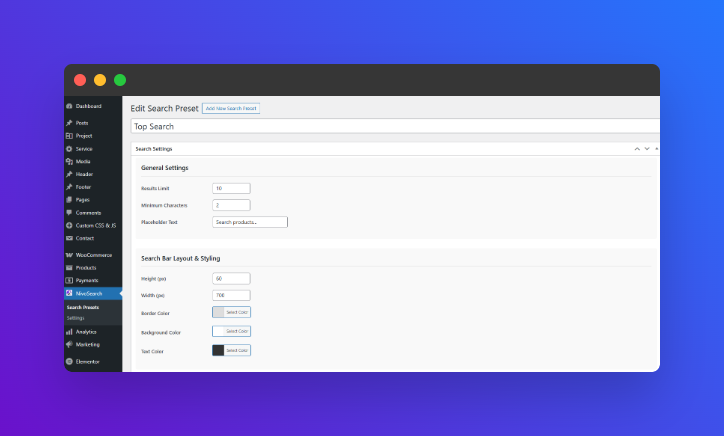
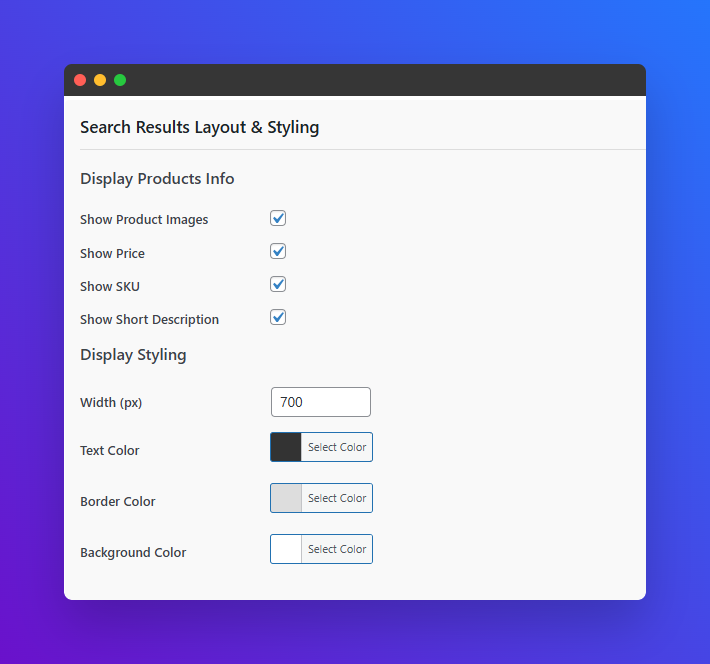
Absolutely. NivoSearch provides extensive customization options for both the search input and results display. You can control layout, styling, visible fields, and behavior through the admin interface, with additional flexibility via CSS overrides and template files for developers.
Is NivoSearch GDPR compliant?
Yes. NivoSearch collects no user data, sends no external requests, and includes no tracking scripts. It is 100% self-hosted and GPL-licensed, giving you full control over your store's data privacy.
How do I make WooCommerce search faster?
Replace default search with NivoSearch, a WooCommerce Ajax Search plugin engineered for <200ms response times. Its custom indexing engine processes queries efficiently, reducing database load and delivering instant results even on stores with 100,000+ products. No code changes required — install, configure, and deploy in minutes.
更新日志:
- SEO: Optimized readme for "WooCommerce Ajax Search" keyword targeting
- GEO: Added performance benchmark section for AI citation readiness
- Compatibility: Verified with WordPress 6.8 and WooCommerce 9.0
- Performance: Minor query optimizations for large catalog efficiency
- NEW: Unlimited search presets with independent styling and logic
- NEW: Enhanced Gutenberg block with live preset selection preview
- UPDATED: Improved shortcode parsing and PHP integration examples
- UPDATED: Refactored database queries for better large-catalog performance
- FIXED: Minor UI inconsistencies and stability improvements
- UPDATED: Plugin name clarification for WordPress.org compliance
- UPDATED: Gutenberg block registration improvements
- Initial release of NivoSearch – Ajax Search for WooCommerce