NoIndexer
| 开发者 |
fernandot
ayudawp |
|---|---|
| 更新时间 | 2026年4月19日 16:46 |
| PHP版本: | 7.4 及以上 |
| WordPress版本: | 7.0 |
| 版权: | GPLv2 or later |
| 版权网址: | 版权信息 |
详情介绍:
noindex robots directive, telling search engines not to include it in their results. No bloated SEO plugin needed — just clean, focused noindex management.
Features:
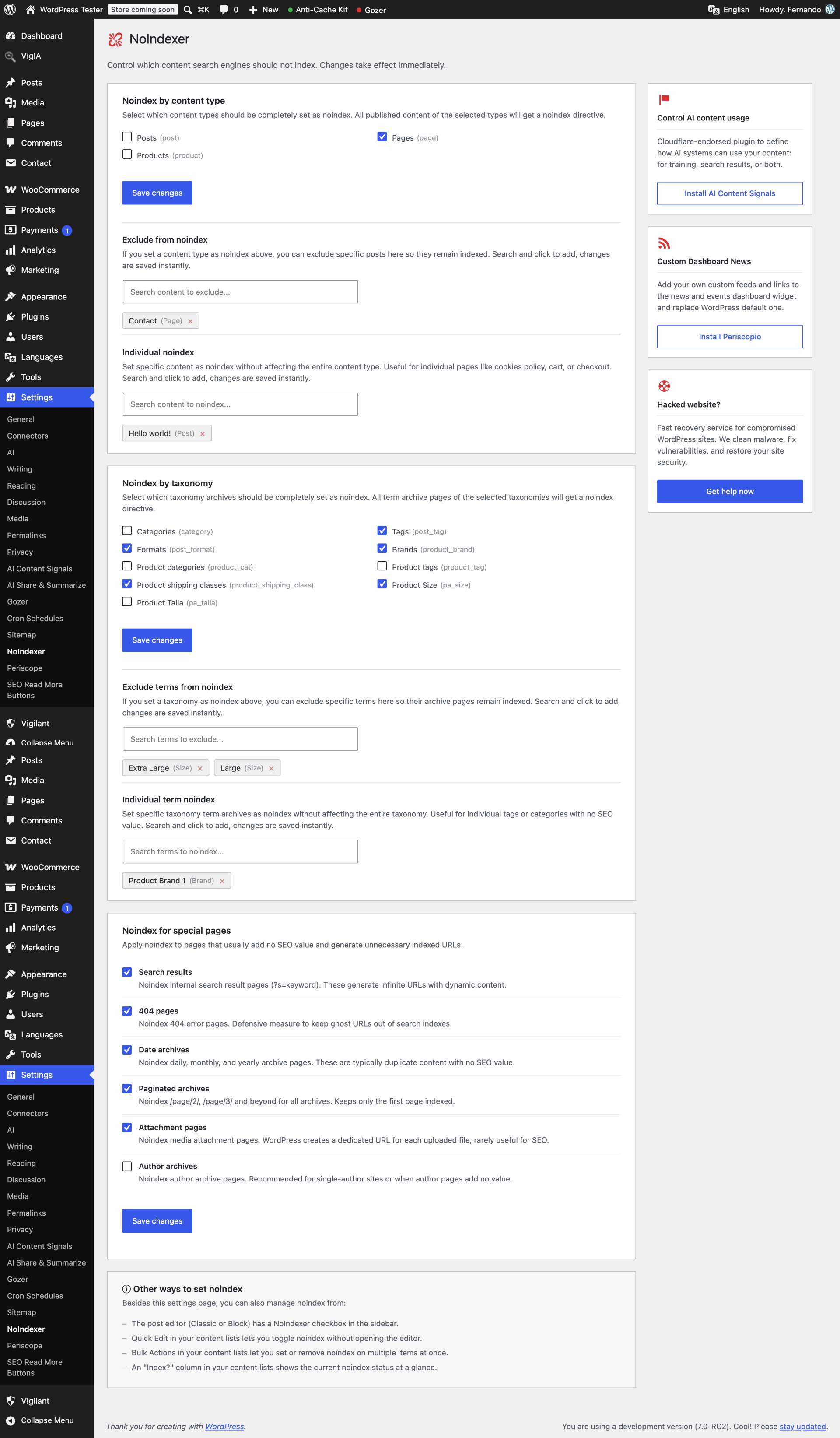
- Bulk noindex by content type — Set entire post types (pages, posts, products, etc.) as noindex with a single checkbox.
- Bulk noindex by taxonomy — Set entire taxonomy archives (categories, tags, product attributes, etc.) as noindex with a single checkbox. Works with all public taxonomies, including WooCommerce product categories, tags, and attributes (requires "Enable Archives?" in WooCommerce attribute settings).
- Smart exclusions — When a content type or taxonomy is set to noindex, exclude specific posts or terms that should remain indexed.
- Individual noindex — Set noindex on specific posts or taxonomy terms without affecting the entire content type or taxonomy.
- Instant search — Find content and terms quickly with a live search field in the settings page. Click to add, click to remove.
- Editor integration — Noindex checkbox available in both the Classic Editor and Block Editor sidebar.
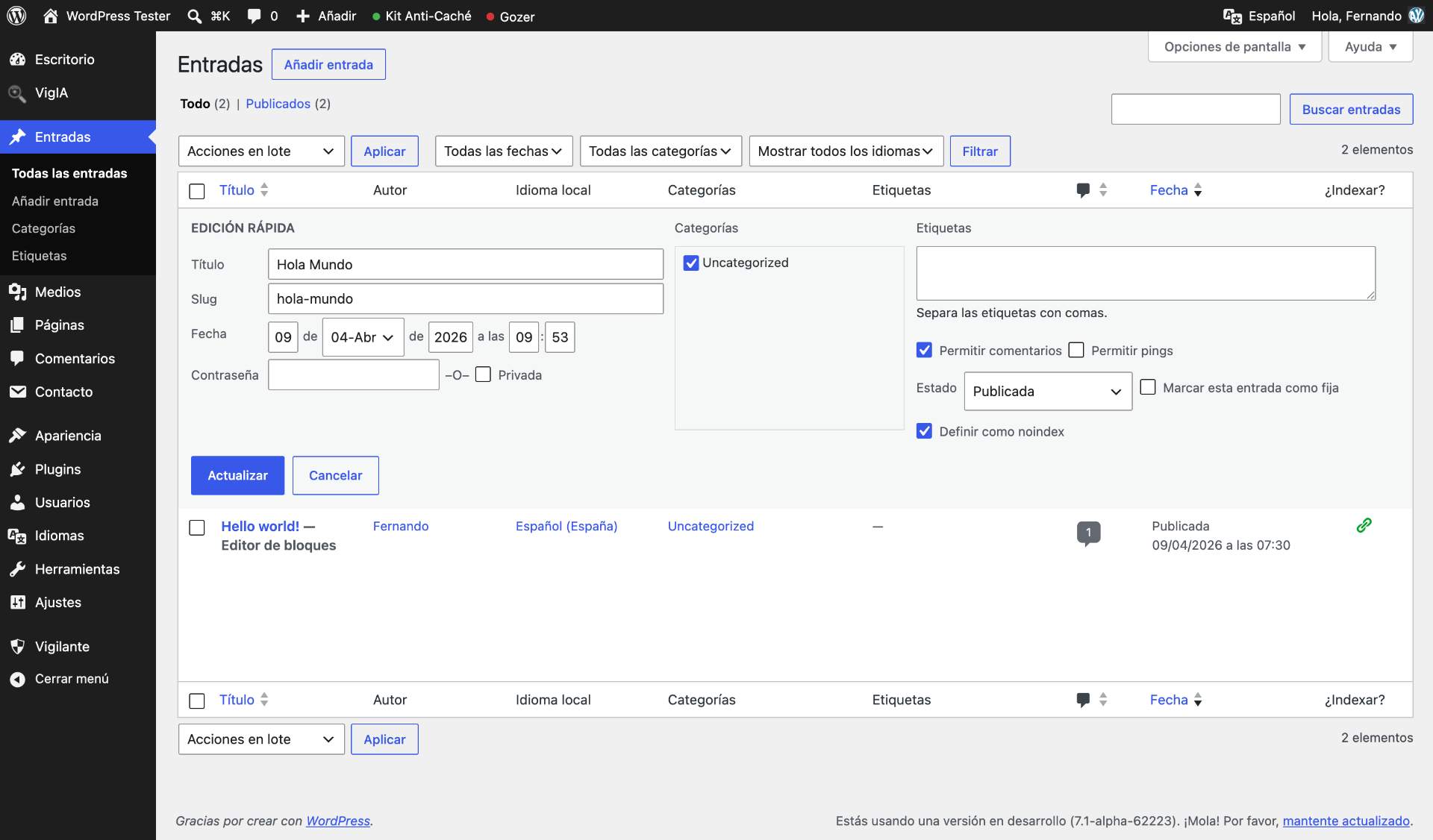
- Quick Edit — Toggle noindex directly from the post list table without opening the editor.
- Bulk actions — Set or remove noindex on multiple posts at once from the post list.
- Index? column — See at a glance which posts are noindexed in your content lists.
- Search results noindex — Prevent internal search result pages from being indexed.
- 404 pages noindex — Keep 404 error pages out of search indexes.
- Date archives noindex — Noindex daily, monthly, and yearly archive pages.
- Paginated archives noindex — Noindex /page/2/, /page/3/ and beyond for all archives.
- Attachment pages noindex — Noindex media attachment pages created by WordPress.
- Author archives noindex — Noindex author archive pages.
- RSS feeds noindex — Granular control to noindex RSS feeds by type: main feed, taxonomy feeds, author feeds, site comments feed, and per-post comments feeds. Works via the
X-Robots-TagHTTP header since feeds are XML, not HTML. - Native sitemap integration — Automatically excludes noindexed content from the native WordPress sitemap. Posts, post types, taxonomy terms, and taxonomy archives marked as noindex are removed from the sitemap without needing any additional plugin.
- Lightweight — No unnecessary features, no frontend scripts, no database tables. Just a meta tag when needed.
<meta name="robots" content="noindex, follow"> tag to the <head> of posts and taxonomy archives set as noindex. This tells search engines not to index the page while still following its links.
Priority logic for posts:
- Individual noindex always applies.
- Post type bulk noindex applies unless the post is specifically excluded.
- Exclusions override the bulk setting for specific posts.
- Individual term noindex always applies.
- Taxonomy bulk noindex applies unless the term is specifically excluded.
- Exclusions override the bulk setting for specific terms.
Noindexer_Frontend::is_noindex( $post_id )— returnstrueif a post should not be indexed.Noindexer_Frontend::is_term_noindex( $term_id, $taxonomy )— returnstrueif a taxonomy term archive should not be indexed.
安装:
- Upload the
noindexerfolder to/wp-content/plugins/. - Activate the plugin through the 'Plugins' menu in WordPress.
- Go to Settings > NoIndexer to configure your noindex rules.
屏幕截图:
常见问题:
What does noindex do?
A noindex directive tells search engines like Google not to include a page in their search results. The page is still accessible to visitors, but it won't appear in search results.
Does this plugin remove content from my sitemap?
Yes. Since version 1.3.0, NoIndexer automatically excludes noindexed content from the native WordPress sitemap. Posts, post types, taxonomy terms, and taxonomy archives marked as noindex are removed from the sitemap. This works only with the native WordPress sitemap — third-party sitemaps from SEO plugins like Yoast or Rank Math are not affected, as those plugins manage their own sitemaps independently. For additional sitemap customization, you can also use Native Sitemap Customizer.
Will this conflict with my SEO plugin?
NoIndexer uses the standard WordPress wp_robots filter. If another plugin or theme also sets robots directives, the noindex directive from NoIndexer will be combined with them. If you only need noindex control and nothing else from your SEO plugin, NoIndexer is a lightweight alternative.
Can I set noindex from the editor?
Yes. Both the Classic Editor and the Block Editor (Gutenberg) include a NoIndexer checkbox in the sidebar. You can also use Quick Edit or bulk actions from the post list.
Can I noindex RSS feeds?
Yes. Since version 1.4.0, NoIndexer includes a dedicated section to noindex WordPress RSS feeds by type: main feed, taxonomy feeds, author feeds, site comments feed, and per-post comments feeds. Each type has its own independent toggle. Feeds are XML, so NoIndexer uses the X-Robots-Tag HTTP header instead of the meta robots tag. These rules work independently from your content noindex settings.
What happens when I deactivate or delete the plugin?
Deactivating the plugin stops the noindex meta tags from being output, but your settings are preserved. Deleting the plugin removes all settings, post meta, and term meta data from the database.
Does this work with custom post types?
Yes. NoIndexer automatically detects all public post types registered on your site, including those from plugins like WooCommerce (products), bbPress (forums), or any custom post type.
Does this work with custom taxonomies?
Yes. NoIndexer automatically detects all public taxonomies, including WooCommerce product categories, product tags, and any custom taxonomy registered by other plugins.
Why don't I see WooCommerce product attributes in the taxonomy list?
WooCommerce product attributes (color, size, etc.) only appear in NoIndexer when they have archives enabled. Go to WooCommerce > Attributes, edit the attribute, and check "Enable Archives?". Without this option, WooCommerce does not create public archive pages for the attribute, so there is no URL to noindex.
Can I noindex specific categories or tags?
Yes. You can either set an entire taxonomy as noindex (e.g., all tags) and then exclude specific terms, or set individual terms as noindex without affecting the rest of the taxonomy.
How can other plugins detect NoIndexer?
Developers can use Noindexer_Frontend::is_noindex( $post_id ) for posts and Noindexer_Frontend::is_term_noindex( $term_id, $taxonomy ) for taxonomy terms. Both methods resolve the full priority logic.
更新日志:
- New: NoIndex for RSS feeds with granular control by feed type.
- New: Checkbox to noindex the main site feed (/feed/ and its format variants) plus date archive and search feeds.
- New: Checkbox to noindex taxonomy feeds (categories, tags and custom taxonomies).
- New: Checkbox to noindex author feeds.
- New: Checkbox to noindex the site-wide comments feed.
- New: Checkbox to noindex per-post comments feeds.
- Improved: Renamed the "special pages" settings section to "Additional noindex rules" to better reflect its scope.
- New: Native WordPress sitemap integration — noindexed content is automatically excluded from the sitemap.
- New: Fully noindexed post types and taxonomies are removed entirely from the sitemap for better performance.
- New: Posts and terms excluded from bulk noindex rules remain in the sitemap as expected.
- New: Individual noindex posts and terms are excluded from the sitemap without affecting the rest of the content type.
- New: Author archives removed from sitemap when author noindex is enabled.
- New: Attachment pages removed from sitemap when attachment noindex is enabled.
- Fixed: A post or term could be added to both the exclusion list and the individual noindex list simultaneously. Adding to one list now automatically removes from the other.
- New: Bulk noindex by taxonomy — set entire taxonomy archives as noindex with a single checkbox.
- New: Term exclusions — exclude specific terms from taxonomy-level noindex rules.
- New: Individual term noindex — set noindex on specific term archives without affecting the entire taxonomy.
- New: Instant search for taxonomy terms in the settings page.
- New: Support for all public taxonomies, including WooCommerce product categories, tags, and attributes.
- New:
Noindexer_Frontend::is_term_noindex()method for third-party integration. - Improved: Paginated archives noindex now also detects Query Loop block pagination (?query-1-page=2) used by block themes.
- Improved: Search sections now support both posts and terms with a unified interface.
- Fixed block editor panel strings not being translated.
- New: Noindex for search result pages.
- New: Noindex for 404 error pages.
- New: Noindex for date archives (daily, monthly, yearly).
- New: Noindex for paginated archives (/page/2/, /page/3/, etc.).
- New: Noindex for attachment pages.
- New: Noindex for author archives.
- Improved: Post type checkboxes now display in a 2-column grid for better readability.
- Improved: Unified terminology across the plugin (set vs mark).
- Fixed: Block editor sidebar showed duplicate NoIndexer panels.
- Fixed: Noindex checkbox did not save in the block editor.
- Improved: Added SEO context to the plugin description.
- Improved: Added integration instructions for third-party developers.
- Initial release.
- Bulk noindex by post type with checkboxes.
- Exclusion system with instant search.
- Individual noindex with instant search.
- Classic Editor and Block Editor meta box.
- Quick Edit checkbox in post list tables.
- Bulk actions to set/remove noindex.
- Indexed? status column.