Notification - Custom Notifications and Alerts for WordPress
| 开发者 |
notification
bracketspace Kubitomakita tomaszadamowicz insejn mateuszgbiorczyk |
|---|---|
| 更新时间 | 2026年3月11日 16:32 |
| PHP版本: | 7.4 及以上 |
| WordPress版本: | 6.9 |
| 版权: | GPLv3 |
| 版权网址: | 版权信息 |
标签
下载
详情介绍:
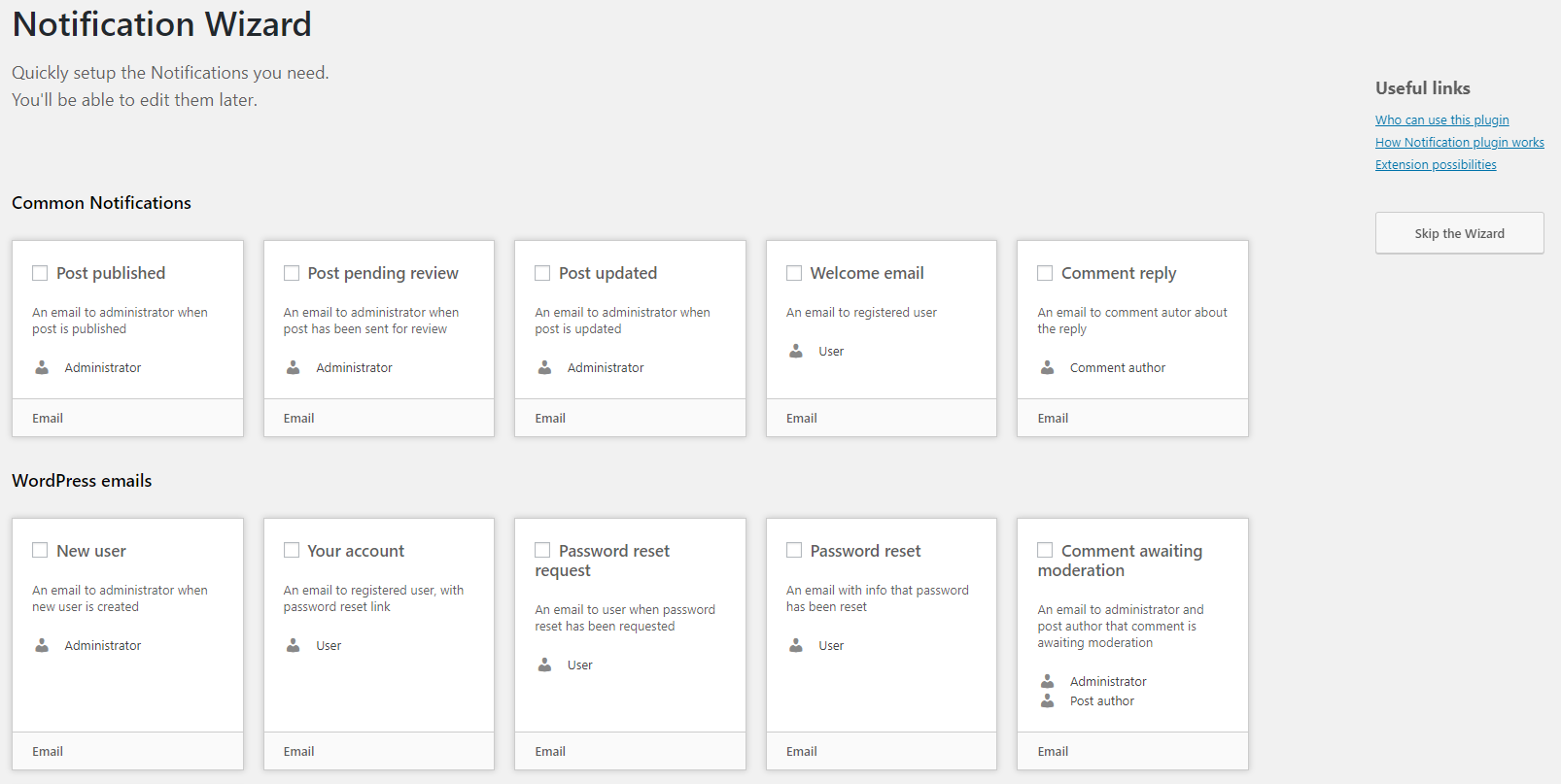
- Replace default WordPress emails — Disable any built-in email (new user, password reset, comments, etc.) and replace it with your own version using the built-in Wizard
- Create custom notifications — Get notified when posts are published, users register, comments arrive, plugins update, and 50+ other WordPress events
- Use dynamic content — Insert Merge Tags like
{post_title},{user_email}, or{comment_content}to personalize every message - Send to anyone — Route notifications to specific email addresses, users, or entire roles
- Send via email or webhook — Email is built-in; webhooks let you connect to any external service or automation tool
- Control with precision — Enable or disable individual triggers, configure carriers, and set up multiple notifications per event
- Posts & Custom Post Types — published, drafted, updated, pending review, approved, trashed (works with any CPT)
- Taxonomy terms — created, updated, deleted (works with any taxonomy)
- Comments, Pingbacks & Trackbacks — new, replied, approved, unapproved, spam, trashed
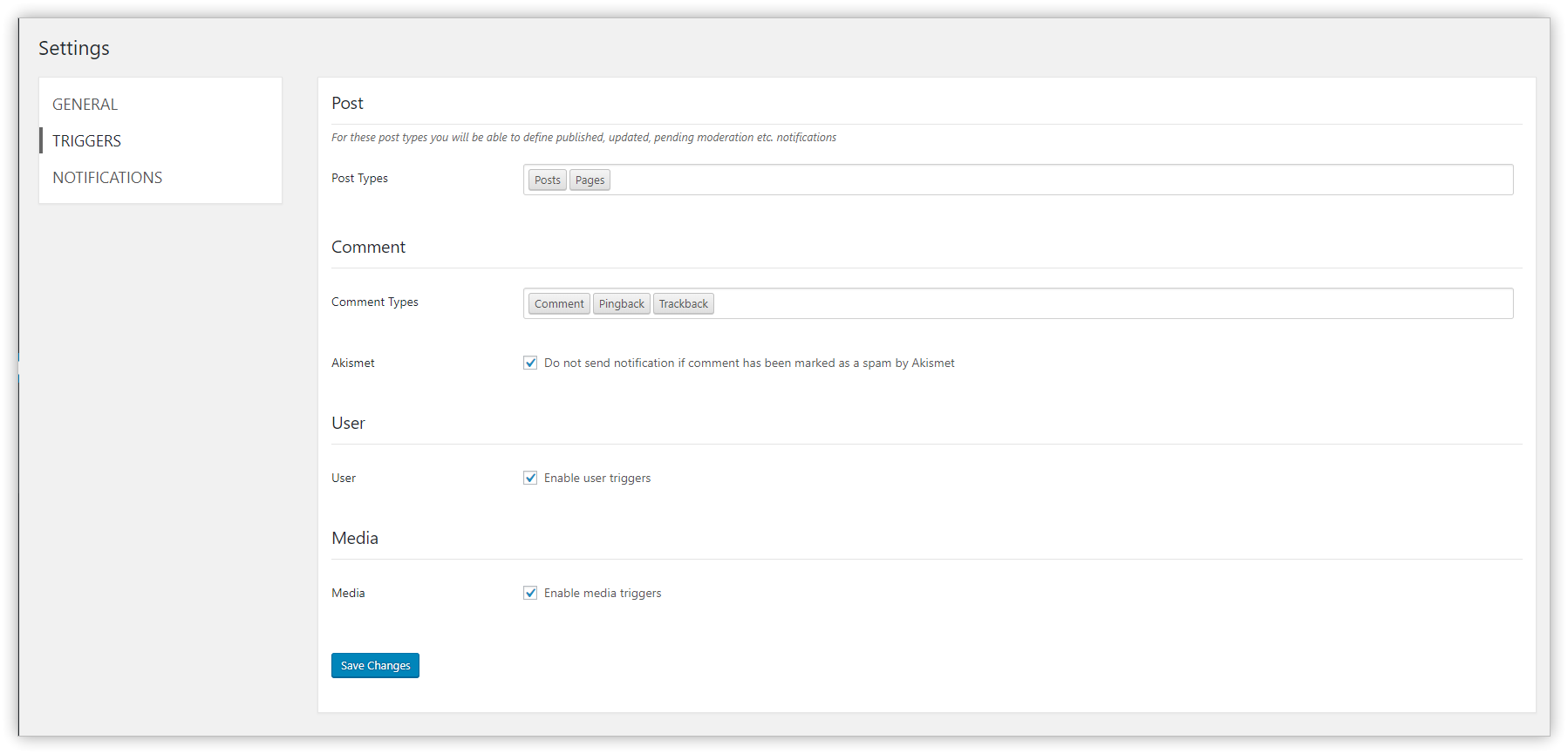
- Users — registered, profile updated, logged in, failed login, logged out, password reset/changed, deleted
- Media — added, updated, deleted
- Plugins — activated, deactivated, installed, removed, updated
- Themes — installed, switched, updated
- WordPress — available updates (on a schedule you define)
- Privacy — personal data erased, erase request, exported, export request
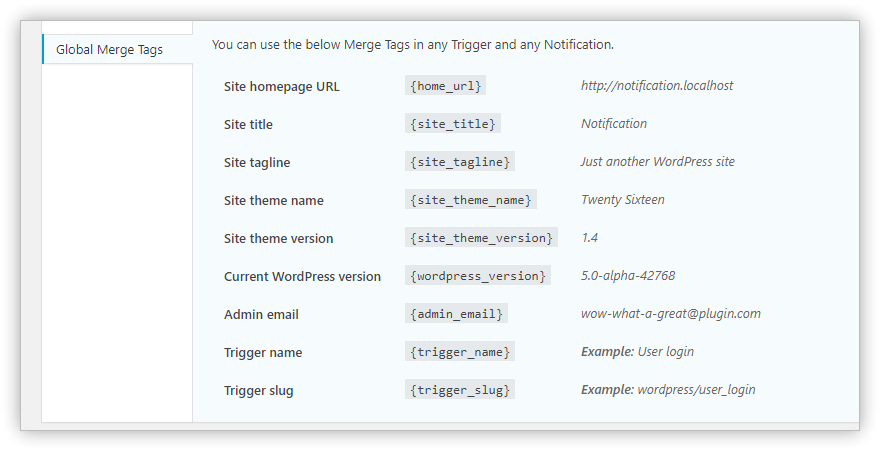
{site_title}, {admin_email}, {home_url}, etc.) anywhere.
EXTENSIONS
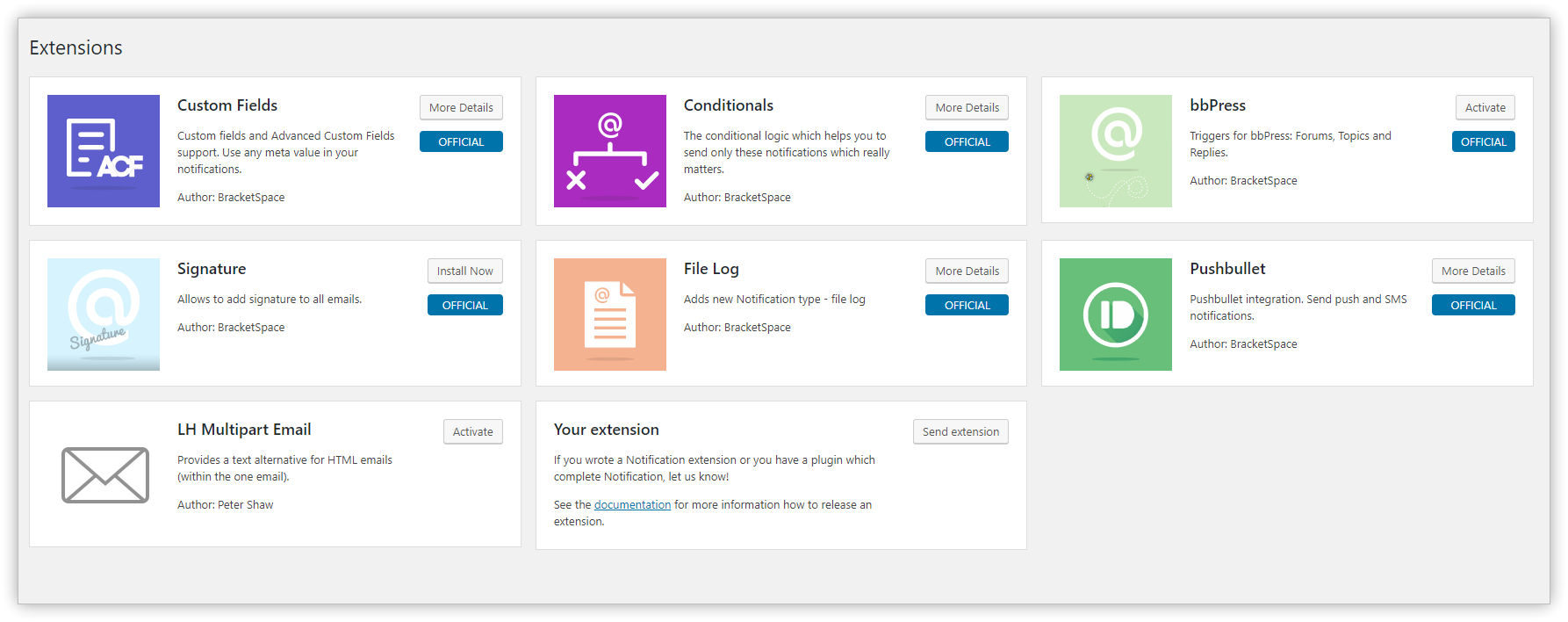
Extend the plugin with additional carriers, triggers, and features:
- Webhooks - send and receive Webhooks
- Conditionals - send Notifications only when specific conditions are met
- Custom Fields - use any meta value in your Notifications
- Slack - post messages to Slack channel
- Push - send push notifications via browser’s native system
- Discord - post messages to Discord channel
- Twilio - send bulk SMS messages from your Twilio registered phone number
- Scheduled Triggers - schedule your notifications based on events time
- Review Queue - catch your Notifications into a queue for manual review
- WooCommerce - triggers specific to WooCommerce
- Pushbullet - send Push and SMS Notifications via your phone
- Pushover - send Push messages to devices registered in Pushover
- SendGrid - send emails using SendGrid service
- Mailgun - send emails using Mailgun service
- File Log - save Notifications as file logs on the server
- bbPress - bbPress triggers
- BuddyPress - BuddyPress triggers and integration with their notification system
- Signature - add a signature to all your emails automatically
- Email Attachments - attach files to your notification
do_action() call, add Merge Tags in a single line of code, or build entirely new Carriers. The plugin can be bundled with your theme or plugin and white-labeled with one function call.
- Developer documentation
- Extension Boilerplate to start building your own add-on
- Editorial workflows — Notify editors when a post is submitted for review, and authors when it's approved or scheduled
- Security monitoring — Get alerts on failed login attempts, user role changes, or plugin activations
- Client sites — Replace confusing default WordPress emails with branded, clear messages for your clients
- Team coordination — Send Slack or webhook notifications when content is updated, users register, or comments need moderation
- WooCommerce stores — Trigger custom alerts for orders, stock changes, and customer activity (with the WooCommerce extension)
- Notify authors when their post is published
- Email editors when a post is submitted for review
- Replace the default new user welcome email with a branded version
- Alert admins on failed login attempts with IP address details
- Get notified when someone edits a published post
- Send Slack/webhook alerts when plugins are activated or updated
- Notify users when their role changes
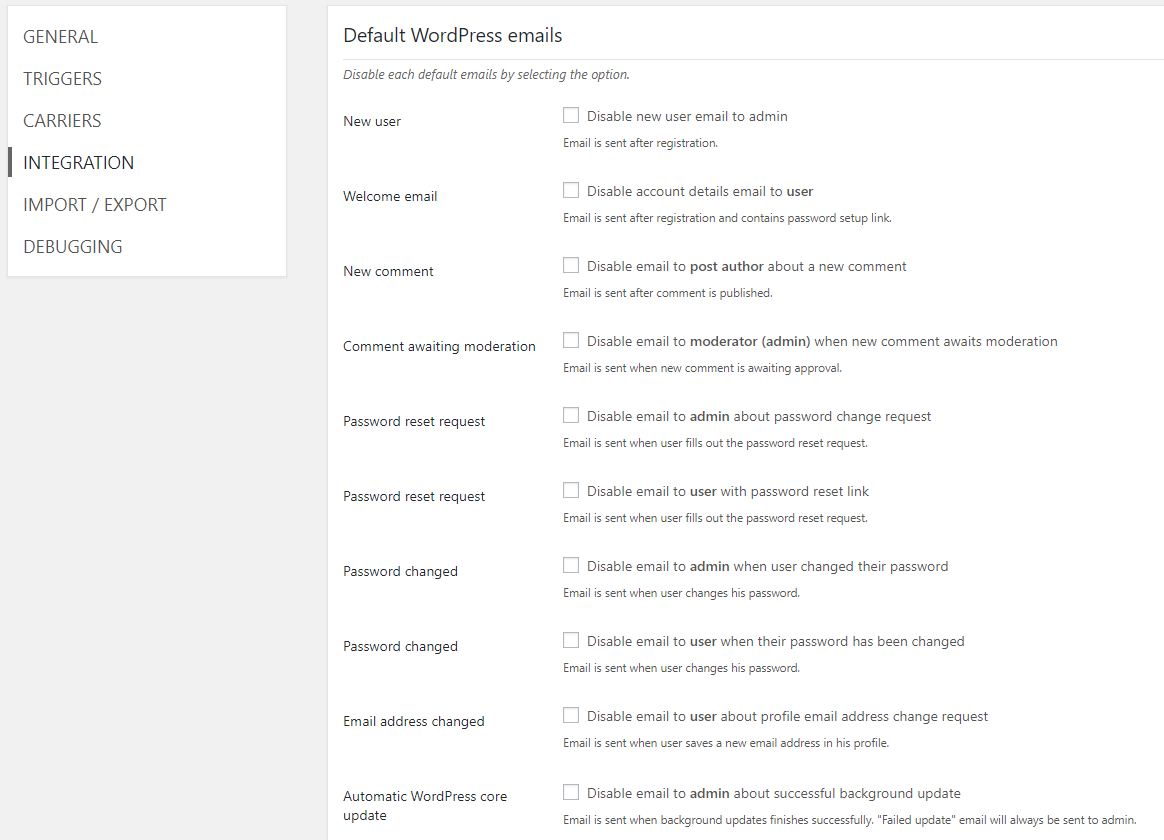
- Disable default WordPress emails and replace them with custom ones
- Monitor user registrations, password resets, and account deletions
- Set up comment moderation notifications for post authors
安装:
load.php file. It will figure out if it's loaded from theme or from plugin.
See the detailed guide屏幕截图:
常见问题:
How can I test my notifications?
No 3rd-party plugins needed. The Notification plugin comes with a built-in logger — activate it in Settings > Debugging and you'll see all notification parameters in a log visible only to you.
Why am I not receiving any emails?
First, check if WordPress sends any emails at all — try resetting your password. If that email doesn't arrive, the issue is your server configuration, not this plugin. Use any SMTP plugin to fix that. You can also activate the debug log in plugin settings to confirm whether the notification is being triggered.
Is this plugin for regular users?
Absolutely. The plugin has an intuitive visual interface in the WordPress Admin — no coding skills required. Developers get a powerful API on top of that, but it's entirely optional.
How do I notify authors when their post is published?
Create a new notification and select the Post Published trigger. Add an Email carrier and set the recipient type to Email/Merge Tag with the value {post_author_user_email}. Use merge tags like {post_title} in the subject and {post_permalink}, {post_publication_datetime} in the body.
How do I get email notifications for posts pending review?
WordPress doesn't send these by default — it's one of the most requested missing features. Create a notification with the Post Pending Review trigger. Set the recipient to the Role type and choose Editor (or Administrator). Use {post_title}, {post_author_user_display_name}, and {post_permalink} to build a useful message.
How do I replace the default WordPress new user email?
First, disable the default WordPress new user email in Notifications > Settings > Integrations. Then create a notification with the User Registered trigger. Set the recipient to Email/Merge Tag → {user_email}. Use {user_login}, {user_password_setup_link}, and {site_title} in the body to create your branded welcome message.
How do I get notified about failed login attempts?
Create a notification with the User Login Failed trigger. Set the recipient to the Administrator role. Include {user_login}, {user_IP}, and {user_login_failed_datetime} in the body to see who tried to log in, from where, and when.
How do I know when someone edits a published post?
Use the Post Updated trigger. Set the recipient to the Administrator role (or any role/email you prefer). Include {post_title}, {post_permalink}, {post_updating_user_display_name}, and {post_revision_link} in the body to see what changed and who changed it.
How do I get notified when plugins are activated or updated?
Create two notifications — one with the Plugin Activated trigger and one with the Plugin Updated trigger. Use {plugin_name}, {plugin_version}, and {plugin_activation_date_time} in the message body. Similar triggers are also available for themes.
How do I notify a user when their role changes?
Create a notification with the User Role Changed trigger. Set the recipient to Email/Merge Tag → {user_email} so the affected user gets the notification. Use {user_display_name}, {old_role}, and {new_role} in the body.
How do I set up comment notifications for post authors?
Create a notification with the Comment Published trigger. Set the recipient to Email/Merge Tag → {post_author_user_email} so the post author is notified. Use {comment_author_user_display_name}, {comment_content}, {post_title}, and {post_permalink} in the body.
How is this plugin different from Better Notifications for WP (BNFW)?
Both plugins let you customize WordPress email notifications, but they take different approaches:
- Merge Tags vs shortcodes — Notification uses a visual Merge Tag picker with a click-to-insert interface. BNFW uses shortcodes typed into a WYSIWYG editor.
- Multiple carriers — Notification has a carrier architecture that supports email, webhooks, and (via extensions) Slack, Discord, Push, SMS, and more. BNFW focuses on email only.
- Developer API — Notification lets you create custom triggers from any WordPress action, add merge tags, build new carriers, and bundle/white-label the plugin. BNFW doesn't offer this level of extensibility.
- Extension ecosystem — 20+ extensions for additional carriers (Slack, Twilio, Pushover), conditional logic, scheduled triggers, WooCommerce, and more.
How does Notification compare to OneSignal?
They solve completely different problems. OneSignal sends browser push notifications to re-engage visitors after they leave your site. Notification sends event-driven alerts (email, webhook, Slack, etc.) when something happens inside WordPress — a post is published, a user registers, a comment needs moderation. They complement each other rather than compete. Use OneSignal for marketing push notifications to your audience, and Notification for internal workflow alerts for your team.
How does Notification compare to Manage Notification E-mails?
Manage Notification E-mails gives you on/off toggles for default WordPress emails — you can mute them, but that's it. Notification can also disable default emails, but then lets you replace them with fully customized versions — custom content, custom recipients, merge tags, and multiple carrier options. It's the difference between muting emails and owning them.
How to register my own triggers?
With register_trigger() function. See the detailed guide
How to include a custom field in the notification?
You can write a merge tag yourself or use the Custom Fields extension for a no-code solution.
How to target only specific post / category / user etc?
Use the Conditionals extension to control exactly when a notification is sent.
Can I send to a custom recipient list based on my own plugin or theme logic?
Yes, just include filter-id:some-value in the Recipient value (using the Email/Merge tag type with the Email carrier), then return your recipient list from the notification/recipient/email/some-value filter.
Can I bundle the plugin with my plugin or theme?
Can you create a plugin for me?
Yes! We offer custom plugin development services. Feel free to contact us.
更新日志:
- [Fixed] Carrier recipient data lost during cron background processing, causing emails to receive user IDs instead of email addresses
- [Fixed] Warning on activation when cron period setting is not yet initialized
- [Fixed] Plugin crash on certain hosting configurations due to missing build file
- [Changed] Optimized plugin package by removing build tool dependencies from the distributed archive
- [Fixed] Hardened security for AJAX handlers, file imports, and database queries
- [Fixed] Filesystem method filter no longer globally overrides server SSH2/FTP configuration
- [Added] Background license verification via daily WP-Cron
- [Added] 24-hour cooldown after failed license server requests to prevent repeated timeouts
- [Changed] Added $notification and $trigger parameters to notification/background_processing/delay filter for better context when filtering delay time.
- [Changed] License inactive notices suppressed during server communication failures
- [Changed] Upgraded PHPCS dev dependencies for PHP 8.4+ compatibility
- [Fixed] License checks no longer block admin page loads when license server is unreachable
- [Fixed] Bedrock compatibility for asset URL resolution
- [Fixed] Various PHP warnings and deprecation notices
- [Added] "Refresh All Licenses" button in Extensions page to manually check all extension license statuses from the store.
- [Changed] Updated package.json files to support Node.js 22 compatibility with explicit engine requirements.
- [Changed] Improved GitHub workflows - removed development workflow and enhanced stable workflow with automatic WordPress.org deployment alongside GitHub releases.
- [Fixed] Extension license status not refreshing after reactivation in store, showing stale "inactive" warnings despite valid licenses.
- [Fixed] Deactivate license button not working for expired licenses and other license statuses.
- [Fixed] Deactivated licenses still appearing in extension boxes due to cache key mismatch.
- [Fixed] Renewal links not appearing for licenses expired in the past but cached with different status.
- [Fixed] Password reset and setup links now properly handle email addresses with @ symbols and usernames with spaces in merge tags.
- [Added] Comprehensive unit tests for password reset and setup link encoding to prevent regression.
- [Fixed] Code editor field width is now properly constrained to 100% of its container.
- [Fixed] Repeater fields layout incompatibility with other plugins.
- [Fixed] Code linting errors.
- [Fixed] Dochooks compatibility file has been updated.
- [Fixed] Fix issues with invalid JSON of Notification in wp_posts table.
- [Fixed] Duplicate email prevention not working for custom post types.
- [Fixed] No license activated in v8 being displayed in the admin.
- [Fixed] WP CLI add command function is not giving warnings anymore.
- [Fixed] Comment author email and display name merge tags.
- [Fixed] Do not escape HTML entities in URL merge tags.
- [Fixed] Fix user password setup link and user password reset link resolvers.
- [Fixed] Post triggers various user merge tags.
- [Fixed] Comment triggers post author merge tags.
- [Changed] Notification data is now kept in the wp_posts table for easier reverting to previous version.
- Webook and Webhook JSON Carriers are now deprecated and won't work. Read more about that change
- Notifications are now saved into the custom table instead of relying on wp_posts.
- Class methods and properties has been changed from snake_case to camelCase.
- In Post Triggers, dynamic property
$trigger->{$post_type}has been replaced with static prop$trigger->post. - The same as above applies to Post Trigger datetime tags, namely: postCreationDatetime, postPublicationDatetime, and postModificationDatetime.
- Post Merge Tags will now use
property_nameattribute rather thanpost_typeto set trigger property used by resolvers. - Hook
notification/data/saveandnotification/data/save/afternow pass Core\Notification instance in the first param instead of the WordPress adapter instance. - Runtime components are now referenced by FQCN (Fully Qualified Class Name), instead of the name.
BracketSpace\Notification\Defaults\changed toBracketSpace\Notification\Repository\BracketSpace\Notification\Abstracts\Carrierchanged toBracketSpace\Notification\Repository\Carrier\BaseCarrierBracketSpace\Notification\Abstracts\Fieldchanged toBracketSpace\Notification\Repository\Field\BaseFieldBracketSpace\Notification\Abstracts\MergeTagchanged toBracketSpace\Notification\Repository\MergeTag\BaseMergeTagBracketSpace\Notification\Abstracts\Recipientchanged toBracketSpace\Notification\Repository\Recipient\BaseRecipientBracketSpace\Notification\Abstracts\Resolverchanged toBracketSpace\Notification\Repository\Resolver\BaseResolver-
BracketSpace\Notification\Abstracts\Triggerchanged toBracketSpace\Notification\Repository\Trigger\BaseTriggerHook depracations: -
notification/data/save/after, usenotification/data/savedFunction and method deprecations: -
BracketSpace\Notification\Admin\PostType::getAllNotifications(), useBracketSpace\Notification\Database\NotificationDatabaseService::getAll() notification_convert_data(), useBracketSpace\Notification\Core\Notification::from('array', $array)notification_register_settings(), use thenotification/settings/registeraction directlynotification_get_settings(), use\Notification::component('settings')->getSettings()notification_update_setting(), use\Notification::component('settings')->updateSetting()notification_get_setting(), use\Notification::component('settings')->getSetting()notification_adapt(), useBracketSpace\Notification\Core\Notification::to()notification_adapt_from(), useBracketSpace\Notification\Core\Notification::from()notification_swap_adapter(), use::from()and::to()methods on theBracketSpace\Notification\Core\Notificationclassnotification_add(), useBracketSpace\Notification\Register::notification()notification_log(), useBracketSpace\Notification\Core\Debugger::log()-
notification(), useBracketSpace\Notification\Register::notificationFromArray()Removed deprecated hooks: -
notitication/admin/notifications/pre, usenotification/admin/carriers/pre notitication/admin/notifications, usenotification/admin/carriersnotification/email/use_html_mime, usenotification/carrier/email/use_html_mimenotification/email/recipients, usenotification/carrier/email/recipientsnotification/email/subject, usenotification/carrier/email/subjectnotification/email/message/pre, usenotification/carrier/email/message/prenotification/email/message/use_autop, usenotification/carrier/email/message/use_autopnotification/email/message, usenotification/carrier/email/messagenotification/email/headers, usenotification/carrier/email/headersnotification/email/attachments, usenotification/carrier/email/attachmentsnotification/webhook/args, usenotification/carrier/webhook/argsnotification/webhook/args/{$type}, usenotification/carrier/webhook/args/{$type}-
notification/notification/form_fields/values, usenotification/carrier/fields/valuesFull changelog - [Added] Option to disable notification about admin email address changed.
- [Added] New trigger after user confirms his new email address.
- [Added] New trigger after admin confirms new site email address.
- [Added] New trigger after WordPress update.
- [Added] notification/admin/allow_column/$column filter.
- [Added] Notification converter concept, with array and JSON default converters.
- [Added] Custom wp_notifications table (with corresponding helper tables).
- [Added] User nickname merge tag.
- [Added] Possibility to define return field for built-in recipients (ID or user_email)
- [Changed] Notification is now saved to the custom table instead of wp_posts.
- [Changed] Global functions has been deprecated and got equivalents in respective classes.
- [Changed] Removed v6 & v7 deprecated functions.
- [Changed] Minimum required PHP version to 7.4 or newer.
- [Changed] WordPress Coding Standards to PSR-12 standards.
- [Changed] Trigger dropdown is now taller for better UX.
- [Changed] Notification table is now filtered from uneccessary columns.
- [Changed] Multiple function, method and hook deprecations, see above for detailed list and replacements.
- [Changed] Runtime components names, see above for detailed list and replacements.
- [Changed] Namespace
BracketSpace\Notification\Defaults\toBracketSpace\Notification\Repository\. - [Changed] Runtime components are now referenced by FQCN (Fully Qualified Class Name), instead of the name.
- [Changed] Abstract classes are now renamed BaseSomething convention and placed in Repository dir.
- [Changed] Date-related merge tags (
Date,DateTimeandTime) now requirestimestampargument to be callable. - [Changed] Unify attribute name used by resolvers to
property_namein all Merge Tags. - [Fixed] Shortcodes being uncorrectly stripped leaving closing "]" behind.
- [Fixed] PHP 8.2 deprecations.
- [Fixed] Stripping shortcodes in carrier fields.
- [Fixed] Email carrier header "From" prioritized over header in settings.
- [Fixed] User password reset link requires encoded username.
- [Fixed] Notification class serialization.
- [Removed] DOING_NOTIFICATION_SAVE constant.
- [Removed] NotificationQueries class in favor of NotificationDatabaseService.
- [Removed] Webook and Webhook JSON Carriers.