
Nuclear Engagement – Instantly Generate AI Summaries, Quizzes & TOC at Scale
| 开发者 | stefanolodola |
|---|---|
| 更新时间 | 2026年1月25日 21:49 |
| 捐献地址: | 去捐款 |
| PHP版本: | 7.4 及以上 |
| WordPress版本: | 6.9 |
| 版权: | GPL-2.0+ |
| 版权网址: | 版权信息 |
详情介绍:
- Generate AI summaries and quizzes from blog post content
- Fully automate the process from input, through creation and storage, all the way to display
- Process posts in batches (not one by one) When I say "the only solution", I mean it. This plugin is created from my own custom code that I had to write because I couldn't find any plugin or tool that does that.
★★★★★ “It instantly boosted our blog’s engagement.” – Evan Kurzyp, fertility2family.com.au[youtube https://www.youtube.com/watch?v=np9boMarsBU] Made for You
- Business: Generate engaging content effortlessly, increasing visitor retention, SEO performance, and conversions through interactive summaries, quizzes and table of contents.
- Educators: Quickly transform lengthy educational content into interactive quizzes and concise summaries, enhancing student engagement and comprehension.
- Agencies: Offer clients bulk content upgrades easily, saving time and providing high-value, SEO-optimized content enhancements at scale.
- Content marketing: AI-generated quizzes, summaries and table of contents encourage visitors to interact more deeply, boosting user engagement and dwell time.
- SEO: Enhanced on-page activity sends positive signals to search engines, potentially improving search rankings.
- Lead generation: Built-in no-code email opt-in integration helps capture leads effortlessly, supporting your marketing strategy. Nuclear Engagement breathes new life into old blog posts and boosts reader interaction. Instead of passive articles, you’ll offer an active learning experience that keeps visitors on your site.
★★★★★ “An incredible tool that made our content strategy so much more effective.” – Chad Finegold, improvingchess.comFeatures [youtube https://www.youtube.com/watch?v=te6X4ls6ds0]
- Bulk Content Generation: Upgrade multiple blog posts at once, saving time and streamlining your workflow.
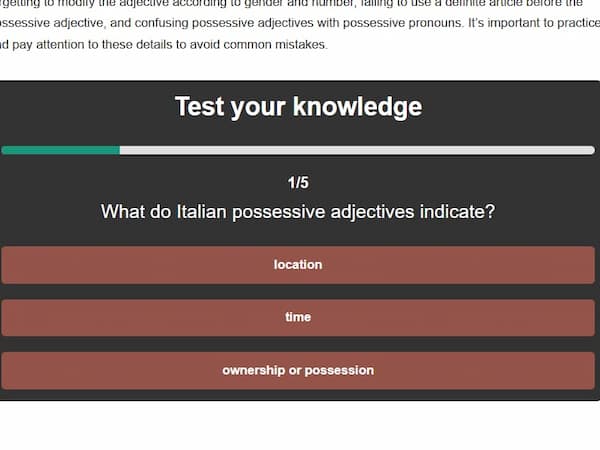
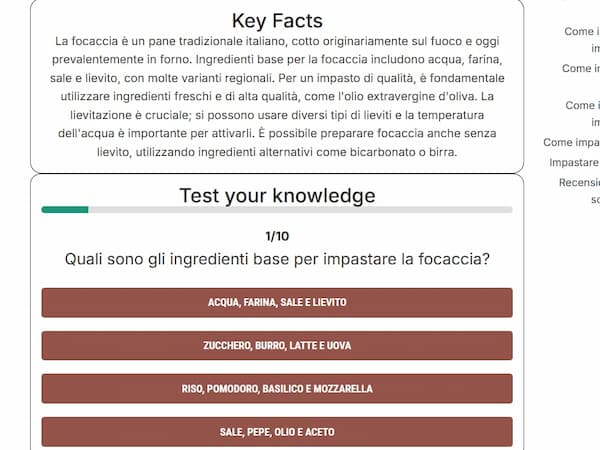
- AI-Powered Quizzes: Automatically create engaging content that keeps visitors on page.
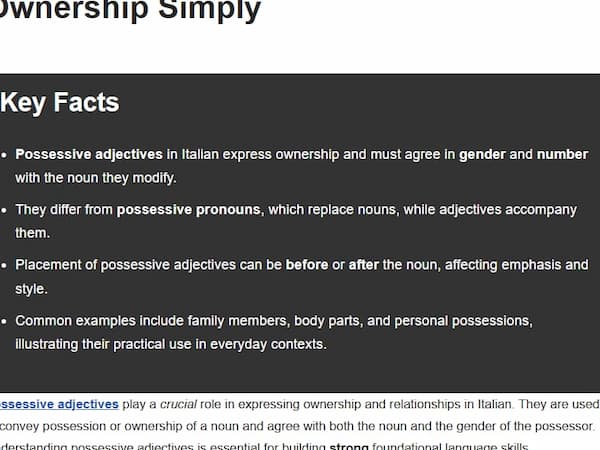
- AI Summaries: Automatically create a skimmable outline that hooks your readers.
- Automatic Table of Contents: Automatically create a TOC to help navigation.
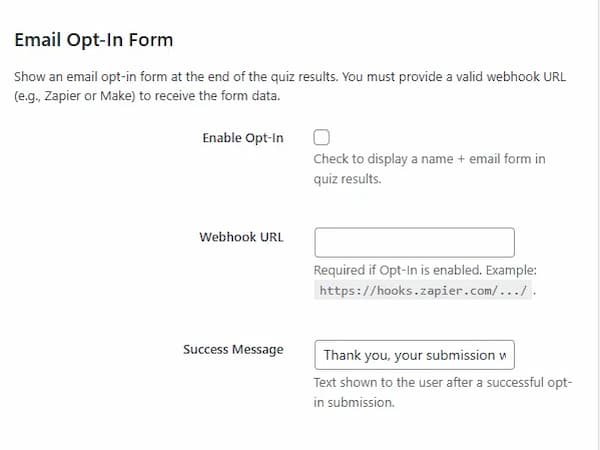
- Email Opt-in: Collect email addresses at the end of quizzes to add them to your mailing list via Zapier, Make, etc.
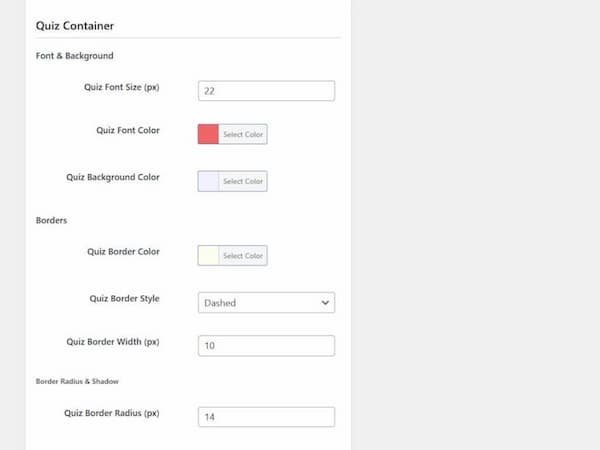
- Customizable Display Options: Choose to insert generated content before, after, or via shortcodes or blocks for optimal layout.
- Seamless WordPress Integration: Enjoy an easy-to-install plugin that fits smoothly into your existing site setup.
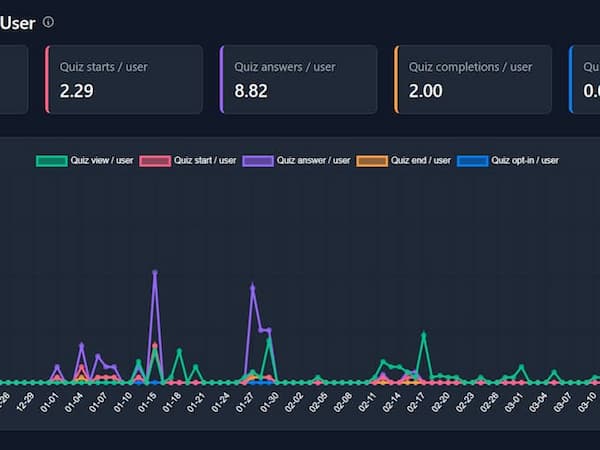
- Engagement Analytics: Monitor reader behavior and quiz completions to refine your content strategy.
- Mobile Optimization: Deliver responsive quizzes and summaries that look great on any device.
- Brand Consistency: Maintain your unique voice with AI content that adapts to your style and aesthetic.
- Easy Setup, No Coding Required: Activate the plugin and enable AI generation – that’s it. Nuclear Engagement is built for non-technical users: no code to write. It auto-inserts the quiz and summary into your posts (you can choose the position). In minutes, your site gets an interactive makeover.
- Lightweight & Optimized: The tiny codebase and lazy loading assure fast loading, both in admin and on frontend. You won't even notice it's active.
★★★★★ “Helped us scale our blog content without losing quality.” – Elena Benelli, allitaliannames.comQuiz + Summary + TOC in 1 Plugin AI Quiz Plugin Generate interactive quizzes in one click to keep visitors on the page longer, increase dwell time, and collect email leads—no coding required. Google rewards sites where users stay and interact, so quizzes boost both UX metrics and SEO performance. AI Summary Plugin Instantly add concise, skimmable summaries at the top of every post. Readers grasp key points fast, reducing bounce rates and signalling helpful content to search engines. Better engagement means stronger on-page SEO without extra writing effort. Table of Contents Plugin A dynamic TOC lets users jump to any section, cutting scroll fatigue and raising time on site. Clear structure improves accessibility, satisfies Google’s page-experience signals, and helps long-form content rank for multiple keywords. 🛣️ Growing with You 🛣️ More features are coming! ➡️ See the Roadmap Submit feature requests and suggestions here: ➡️ Share your thoughts
安装:
- On activation, you will be redirected to the setup page
- Create a free account on the Nuclear Engagement app
- On the NE app, create a Gold Code (API key used for authentication)
- On the plugin's setup page, enter the Gold Code (to connect your site to the NE app)
- A plugin password is generated automatically, completing setup (used for secure communication with the NE app)
- Done! You are ready to generate engaging content. [youtube https://www.youtube.com/watch?v=NJBjsCSEj34]
屏幕截图:

常见问题:
Is Nuclear Engagement really free?
With a free account, you can use every feature included in the plugin. Manual content creation is unlimited, while AI generation uses credits. When you create a free account, you get free credits to use right away. In any case, the content that you generate is yours forever and you can keep displaying it with a free account. The TOC is free forever.
How does Nuclear Engagement work?
Nuclear Engagement uses AI to generate engaging quizzes and summaries from your blog posts by sending selected post content to an external AI service.
How quickly can I start seeing results?
You’ll likely notice changes in engagement metrics (e.g., time on page, bounce rate) within a day or two, as soon as quizzes or summaries are visible. Check NE’s analytics or Google Analytics in real time.
Why are quizzes good for reader engagement?
They prompt visitors to interact, increasing on-page time and pages viewed. This is especially effective if your content is educational or problem-solving in nature.
Why are summaries good for reader engagement?
They help readers quickly grasp key points. If visitors see value up front, they’re more likely to stay for the full post (rather than bouncing).
Is the AI content good enough?
Yes! The latest models are smarter than ever and, combined with the right prompt, they give excellent results. There's virtually no need for manual editing or regeneration.
Is AI Content Good for SEO?
Google cares about helpful content, whether it’s AI-generated or human-written. Longer stay times and lower bounce rates generally signal positive user experience—benefitting SEO.
Can I edit the generated content?
Yes, you can manually edit the content from the post editor or regenerate it from the post editor or the plugin's generation page.
Will the content match the post content?
Yes, the generated content is based on the post content and matches it also in terms of tone and style.
How are the generated quizzes and summaries displayed on my site?
They can be automatically appended to your posts or inserted manually using shortcodes or blocks in your post templates.
Can I customize the style and placement of the generated content?
Yes, you can adjust styling options to ensure that quizzes and summaries blend seamlessly with your theme and choose whether they appear before or after your post content.
How does the AI-generated content benefit my site's SEO?
By increasing reader engagement and encouraging longer visits, the interactive content helps improve user signals—an important factor for SEO.
How long does it take to generate content?
It only takes a minute or so to process hundreds of posts. Generation starts right when you trigger it.
How can I preview the generated quizzes and summaries before publishing?
You can review the generated content in the post editor or view it as a preview on the frontend prior to publishing.
What if I need to update or regenerate the AI content later?
You can rerun the content generation process at any time to refresh or update the quizzes and summaries as your content evolves.
Why are Table of Contents good for reader engagement?
They show your post’s outline at a glance and let readers jump to sections, cutting down scrolling and keeping them on your page longer.
How are TOCs created?
TOCs are created automatically from your post content - no manual work, no AI needed. You can select which headings to include (h2-h6) and customize the styling.
How to add a quiz to a WordPress post?
To add a quiz to a WordPress post with the Nuclear Engagement plugin, create the quiz with AI or edit manually. Customize the look and feel, set the number of questions and answers. Display the quiz via block or shortcode, or append it to the post content automatically.
- Open the post in the WordPress editor.
- In the Nuclear Engagement metabox, click Generate Quiz.
- Wait for the success notice (a few seconds).
- Publish or preview the post.
How to add a summary to a WordPress post?
To add a summary to a WordPress post with the Nuclear Engagement plugin, create the summary with AI or edit manually. Customize the look and feel, set the number of questions and answers. Display the quiz via block or shortcode, or append it to the post content automatically.
- Open the post in the WordPress editor.
- In the Nuclear Engagement metabox, click Generate Summary.
- Wait for the success notice (a few seconds).
- Publish or preview the post.
How to add a table of contents (TOC) to a WordPress post?
To add a table of contents (TOC) to a WordPress post with the Nuclear Engagement plugin, simply enable display in the plugin settings. It will be automatically added to all posts set to display it. Display the TOC via block or shortcode, or append it to the post content automatically.
- Go to Nuclear Engagement → Settings → TOC.
- Enable TOC, choose heading levels (e.g., H2–H4), and select the insertion point.
- Save settings (no per-post action needed).
- The TOC now appears automatically.
Does Nuclear Engagement provide analytics to track user engagement?
Yes, the plugin triggers Google Analytics events like quiz start, quiz answers, and email opt-ins. On the Nuclear Engagement web app, you can see metrics like summary view rates, quiz completion rates, and opt-in rates.
Do I need technical skills to use this tool?
No. No coding is needed. It only takes a few clicks to set up and a few more to generate and display content.
Where is the generated content stored?
The generated content is stored in post meta fields in your WordPress site's database. Yes, that's yours forever.
Do I need to keep the plugin active after generating content?
Yes, you still need the plugin to display the generated content. Free, forever!
Do I need an account on OpenAI?
No. Generation is done via the NE app. You only need a free account on the NE app.
Will the plugin slow down or break my site?
The tiny codebase and lazy loading assure fast loading, both in admin and on frontend. You won't even notice it's active. No conflicts are known to occur.
更新日志:
- Fixed: Non-admin users blocked from accessing admin pages.
- Fixed: Excessive logging of timeout checks on every page load.
- Improved: Timeout checks now handled exclusively by cron job (every 5 minutes) instead of on every request.
- Removed: Redundant timeout check cron job (consolidated into single cron).
- Updated: Block apiVersion from 2 to 3 for WordPress 6.9 compatibility.
- Tested up to WordPress 6.9.
- Fixed: Summary format field visibility toggle in post editor metabox now correctly switches between paragraph and bullet list options.
- Improved: Generation tasks handling.
- Fixed: Content generation.
- Fixed: Bulk content generation.
- Added: Settings for summary auto-generation on publish.
- Improved: Generation task updates on tasks page.
- Added: Summary generation options in post editor.
- Fixed: Minor UI issues.
- Fixed: Skip content generation for posts with empty content.
- Fixed: Other minor bugs.
- Fixed: post drafts incorrectly filtered out from bulk processing.
- Fixed: Made content generation process compatible with Kinsta hosting.
- Fixed: Status, progress display on tasks page.
- Fixed: UI success message during content generation.
- Fixed: Bugs upon content generation start.
- Fixed: Batch processing.
- Changed: moved progress display from generation page to tasks page.
- Added: Bulk generation timeout handler.
- Added: Bulk generation batch processor.
- Added: Batch processing handler.
- Added: Generation tasks listed on the new tasks page.
- Fixed: Background processing with cron jobs.
- Fixed: Bulk generation timeout.
- Fixed: Bulk generation progress updates showing late.
- Fixed: Post content not being displayed on the frontend.
- Fixed: Missing pages.
- Fixed: Post inventory not loading.
- Fixed: Missing script.
- Changed: Minor performance improvements.
- Fixed: Load scripts only where needed.
- Added: Gutenberg blocks for summaries, quizzes and TOC.
- Added: Dashboard section showing scheduled content generation tasks.
- Added: Inventory data caching with manual refresh and persistent transients.
- Added: Test infrastructure for improved code quality.
- Added: TOC analytics events.
- Changed: Improved theme system.
- Changed: Improve background processing.
- Changed: Expanded cache invalidation to cover more post and term events.
- Changed: Total architecture refactoring.
- Changed: Improved security.
- Changed: Improved performance with optimized database indexes, lazy loading etc.
- Changed: Improved settings management.
- Fixed: Frontend display of summaries and quizzes.
- Changed: Architecture refactoring.
- Changed: Improved security.
- Changed: Improved performance.
- Changed: Uninstall data options.
- Added: Uninstall data options.
- Fixed: Auto content generation upon post publish.
- Fixed: Default settings.
- Fixed: Settings saving.
- Fixed: Content generation.
- Changed: Architecture refactoring.
- Added: Table of Contents (TOC) feature with:
- Styling options.
- Static and sticky placement.
- Heading selection (h2–h6).
- Sticky offsets (left and top).
- Sticky max-width setting.
- Sticky z-index setting.
- Default show/hide state.
- TOC toggle enable/remove option.
- Fixed: Styling settings.
- Added: Display email opt-in form before or alongside results.
- Added: Mandatory or optional opt-in setting.
- Added: Store opt-in data in the database.
- Added: Export opt-in data to CSV.
- Fixed: Display of empty sections on the frontend.
- Changed: Content generation metaboxes in post editor now apply to all allowed post types.
- Fixed: Quiz start message style.
- Fixed: Auto-generate content upon post publish.
- Changed: Default content placement.
- Improved: Authentication flow.
- Fixed: Cache-clearing logic.
- Improved: UI.
- Fixed: Manual summary creation.
- Fixed: Quiz creation.
- Fixed: Quiz frontend display.
- Fixed: Various minor issues and improvements.
- Added: Content generation credit system.
- Added: Account page on app with usage log.
- Improved: Security.
- Improved: UX.
- Fixed: Various minor issues.
- Fixed: Minor bugs and improvements.
- Added: Expanded quiz and summary styling options.
- Fixed: Various minor bugs and improvements.
- Improved: Security.
- Improved: UX.
- Added: Expanded styling options.
- Fixed: Various minor issues.
- Added: Multisite support.
- Changed: Auto-clear post cache upon section generation.
- Added: Plugin update checker.
- Added: Support for custom post types.
- Added: Option to update post “last modified” date upon storage to signal new content to search engines and visitors.
- Added: Metrics to analytics dashboard: quiz start/quiz view %, quiz answers/quiz start %, quiz end/quiz start %, quiz opt-in/quiz end %.
- Added: Per-post performance with posts ranked by performance.
- Added: Summary options, including section title text, format (paragraph vs. bullet list), and length/number of items.
- Added: Additional styling settings.
- Added: Quiz options: section title text, number of questions per quiz, and number of answers per question.
- Added: Embedding at the top or bottom of post content.
- Added: “Summary view” and “Quiz view” events to analytics.
- Added: App pages for connected sites and user profile.
- Added: In-app engagement analytics dashboard with sitewide metrics (average session time, engaged sessions per user) and summary/quiz engagement counts.
- Added: Display of custom HTML at the beginning or end of quizzes (for coupons, secret links, etc.).
- Added: Email opt-in in quizzes.
- Added: Send data to webhook (Zapier, Make, etc.).
- Added: Automated quiz and summary generation from blog post content.
- Added: Reading post content, generating, and storing quiz/summary in WordPress.
- Added: Display of quiz and summary on blog posts.
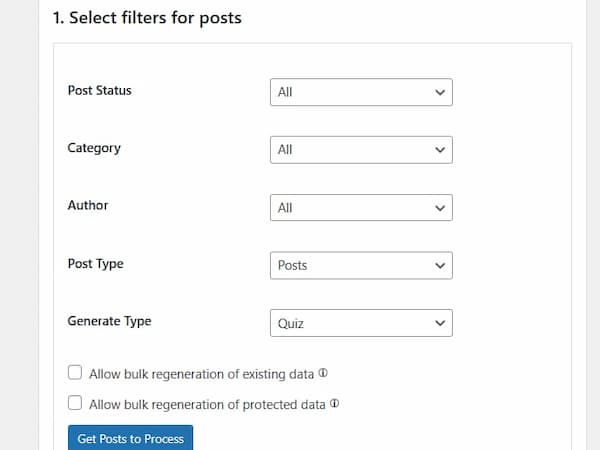
- Added: Bulk post processing in one click (filter by post status, category, author, and post type).
- Added: Styling options for quiz and summary look and feel.
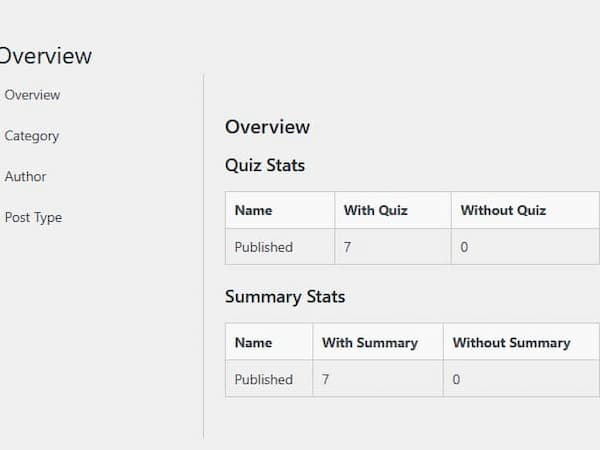
- Added: Content inventory to identify posts lacking a quiz or summary.
- Added: Engagement tracking events on Google Analytics (quiz start, answer, finish).