
Offer Countdown Timer for WooCommerce
| 开发者 |
queuecommerce
riko910 |
|---|---|
| 更新时间 | 2026年5月10日 02:02 |
| PHP版本: | 7.4 及以上 |
| WordPress版本: | 6.9 |
| 版权: | GPLv2 or later |
| 版权网址: | 版权信息 |
详情介绍:
woocommerce_before_add_to_cart_form. Scripts and styles load only when a product actually has an active countdown and timers are enabled globally—keeping unrelated pages light.
Why merchants use this plugin
- Clear urgency — A live clock reinforces ethical scarcity (deadline visibility, not fake stock counts).
- Native WooCommerce workflow — Works alongside your products and optional automatic sale-price cleanup when an offer ends.
- Operator-friendly — Global switches, per-product overrides, and optional offer start date so the banner stays hidden until go-live.
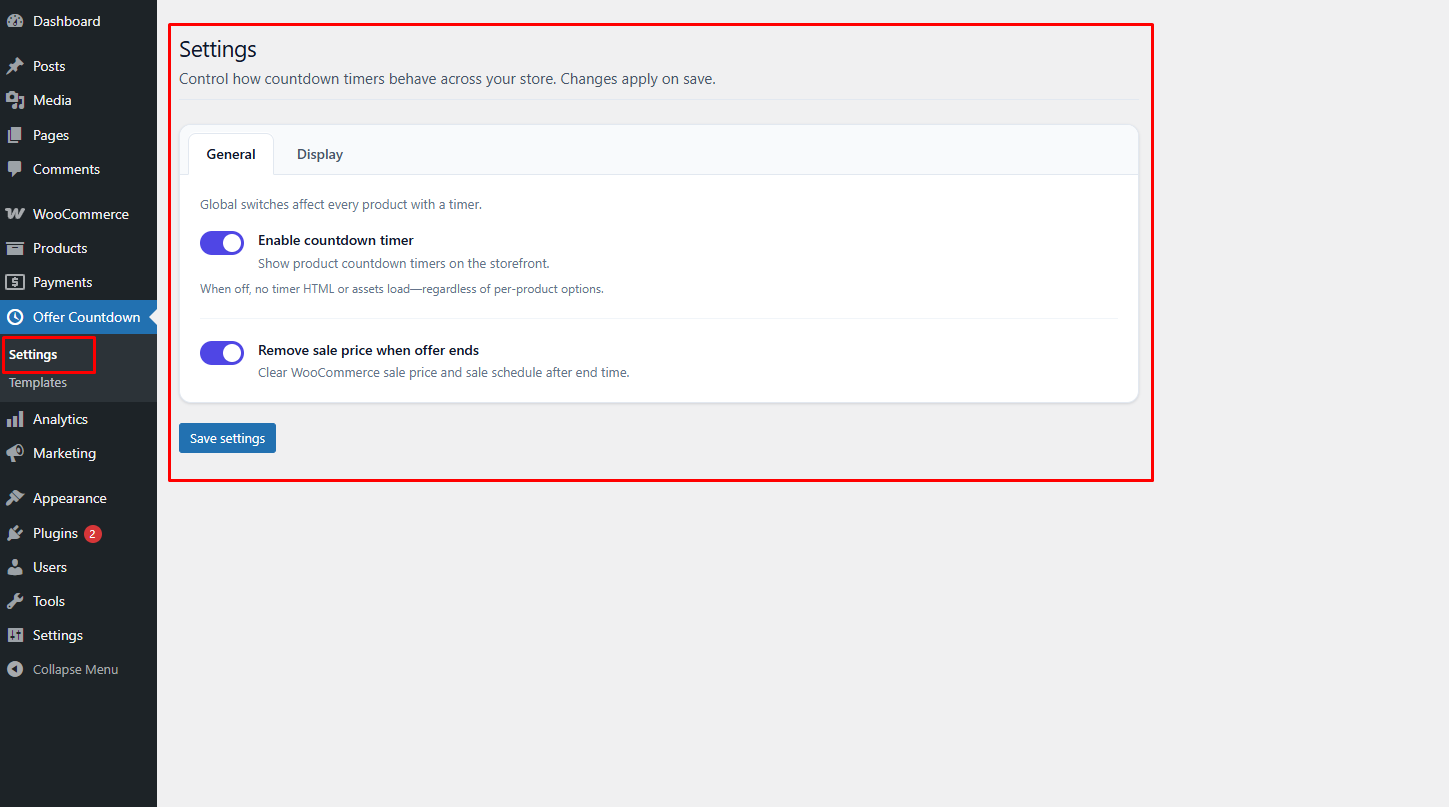
- Global enable/disable — Pause every storefront countdown from Offer Countdown → Settings without editing products.
- Configurable sale cleanup — When the countdown ends, optionally remove the WooCommerce sale price or leave pricing unchanged.
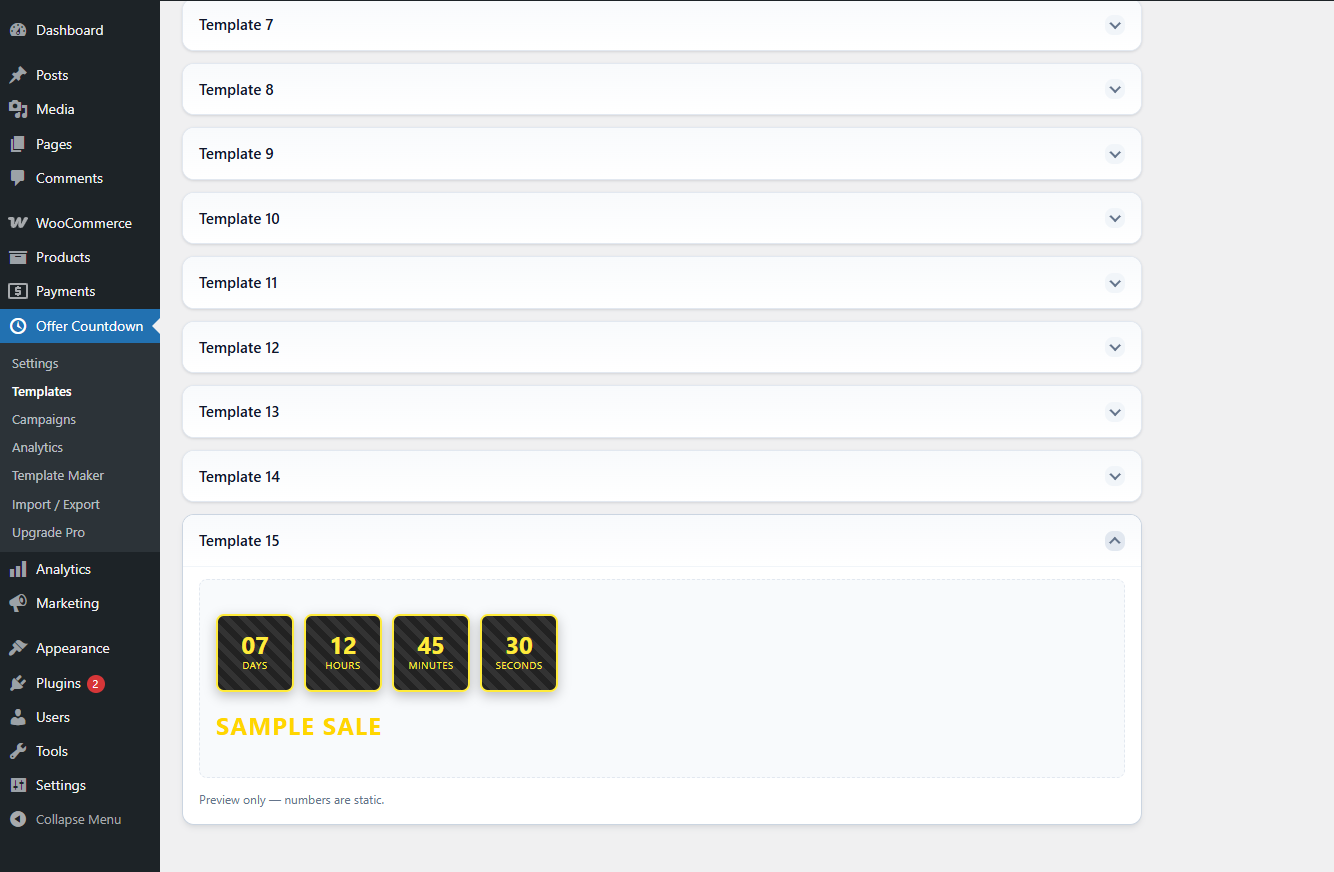
- Five countdown templates — Circular, gradient, pill, and more; preview under Offer Countdown → Templates (Template 1 opens first).
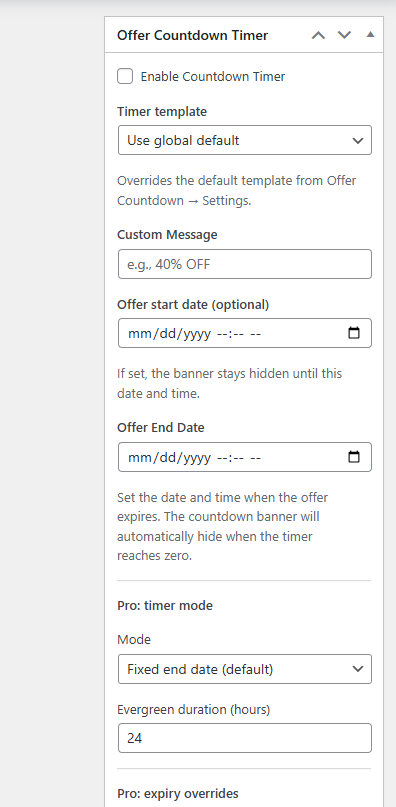
- Default template + per-product override — Store-wide default with optional template choice per product in the Offer Countdown Timer meta box.
- Custom promo message + placement — Short headline-style message above or below the digits.
- Optional offer start date — Set Offer start date (optional) on the product; the banner appears only after that moment (uses WordPress timezone handling via
current_time/ localized datetime inputs). - Accessibility-oriented display — Optional
role="timer",aria-label, dedicatedaria-liveregion, and periodic screen-reader announcements (toggle under Settings). - Expired banner behavior — Choose whether the banner hides when time hits zero or remains visible at zero (paired with frontend expiry logic and optional AJAX-driven cleanup).
- Responsive layouts — Timer blocks adapt across breakpoints defined in bundled CSS.
- Developer hooks — Filters/actions include
offct_resolve_end_time,offct_banner_html,offct_banner_root_attributes,offct_before_render_banner,offct_after_render_banner,offct_countdown_labels,offct_oct_data_localize,offct_product_meta_box_fields,offct_template_ids, andoffct_template_label. - Translation-ready — Text domain
offer-countdown-time.
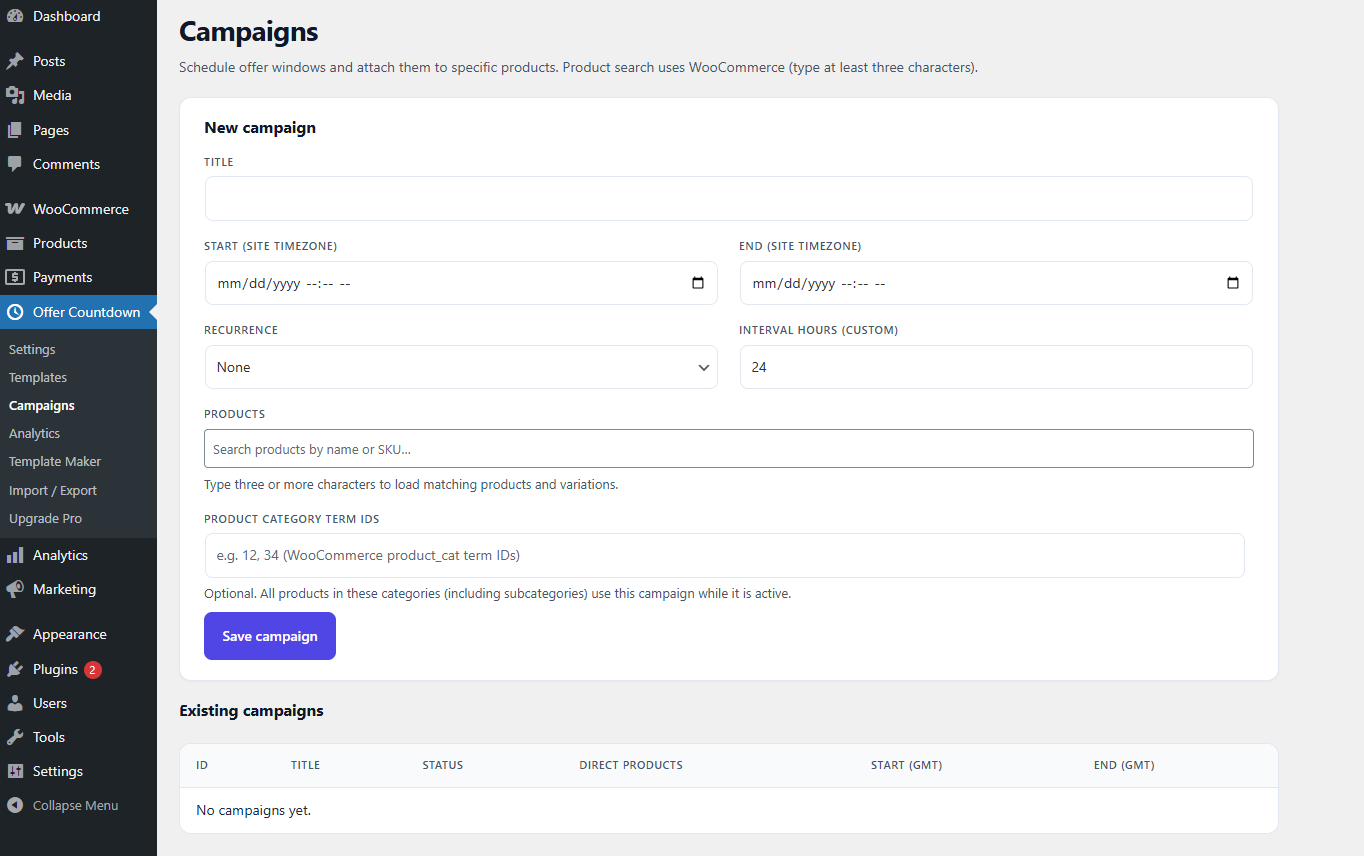
- Campaign-driven end times — Assign schedules and recurrence patterns to products or categories; active campaigns override fixed product end timestamps via
offct_resolve_end_time. - Evergreen timers — Per-product visitor windows (
_oct_timer_mode) coordinated through Pro services. - Extra placements — Shop/archive compact timers (
woocommerce_after_shop_loop_item), cart/checkout reservation timers,[oct_countdown]shortcode, and theoffct/product-countdownGutenberg block (WooCommerce block category). - Analytics — Lightweight storefront tracking with configurable retention (see Pro settings).
- REST API — Namespaced routes under
offct/v1for authenticated store managers (list/update products tied to countdown meta). - Visual customization — Additional preset templates (IDs 6–15), Template Maker–built custom templates with generated CSS, sticky banner mode, colour tokens, custom digit sizing, custom unit labels, and optional custom CSS inlined when scripts enqueue.
- Bulk tooling & expiry actions — Bulk editors plus configurable expiry behaviours (redirects and related flows exposed through frontend JSON).
Requires Plugins: offer-countdown-time and validates dependencies on bootstrap.
Privacy
The free countdown does not profile visitors for marketing retargeting. Standard WordPress, WooCommerce, and hosting logs apply. Pro analytics (when licensed) store merchant-facing metrics according to Pro settings—review those screens before enabling in regulated industries.
安装:
- In WordPress, go to Plugins → Add New.
- Search for Offer Countdown Timer for WooCommerce (when listed on WordPress.org) or upload the ZIP from your vendor.
- Click Install Now, then Activate.
- Ensure WooCommerce is active (the plugin shows an admin notice if it is missing).
- Open Offer Countdown → Settings for global behaviour.
- Edit a product: enable Offer Countdown Timer, set dates (and optional message/template), then save.
- Upload the plugin folder to
/wp-content/plugins/offer-countdown-time/, or upload the ZIP via Plugins → Add New → Upload Plugin. - Activate through the Plugins screen.
- Configure WooCommerce and Offer Countdown as above.
- WordPress 5.8+
- PHP 7.4+
- WooCommerce active
屏幕截图:
常见问题:
Where are global options?
Offer Countdown → Settings. Enable/disable all storefront timers, sale cleanup, default template, message position, accessibility enhancements, and expired-banner visibility.
How do I schedule when a banner becomes visible?
On the product, fill Offer start date (optional). Until that timestamp passes, OFFCT_Frontend::get_product_countdown_context() returns no banner even if an end date exists.
Where does the countdown appear on the product page?
Immediately before the add-to-cart form (woocommerce_before_add_to_cart_form). Developers may relocate output using the surrounding actions/filters.
What happens when the timer reaches zero?
Visually, the banner can hide or remain at zero depending on Hide expired banner under Settings. If Remove sale price when offer expires is enabled, WooCommerce sale metadata can clear via admin/cron checks and optional frontend coordination—consistent with OFFCT_Offer_Countdown_Time::remove_sale_price().
Can I silence every countdown without editing products?
Yes. Disable Enable countdown timer globally on Offer Countdown → Settings.
Does the plugin support accessibility preferences?
Yes. Keep Accessibility enhancements enabled to expose timer semantics and polite aria-live updates (throttled in assets/js/frontend.js). Screen reader users get periodic consolidated announcements instead of noisy per-second chatter.
Which timezone applies?
WordPress Settings → General timezone and GMT offset feed both PHP (current_time) and the JavaScript offset parser shipped with frontend.js.
Are Campaigns or Template Maker fully available in the free plugin?
You can explore the interfaces and previews. Persisted campaigns, saved Template Maker designs, and licensed analytics require Offer Countdown Timer for WooCommerce Pro with an active license (offct_is_pro_licensed() gates mutations).
How do I upgrade to Pro?
Visit Offer Countdown → Upgrade Pro inside wp-admin or https://www.queuecommerce.com/offer-countdown-time/ . Activate Pro after this free plugin and WooCommerce.
更新日志:
- Added: Optional offer start date meta (
_oct_start_date) so banners stay hidden until publish time. - Added: Accessibility enhancements setting (
enable_accessibility) with timer semantics and screen reader region updates. - Added: Hide expired banner setting (
hide_expired_banner) to control DOM removal versus displaying zeros at expiry. - Added: Expanded admin navigation (Campaigns, Analytics, Template Maker, Import / Export, Upgrade Pro) with preview-capable screens aligned to Pro workflows.
- Improved: Shared Settings handler persists core fields alongside Pro option arrays when Pro is active (
handle_save_all_settings). - Improved: Frontend localized data prepared for Pro coordination (
offct_oct_data_localize, nonce pairs for expiry/analytics endpoints).
- Added: Global enable/disable for all storefront countdowns.
- Added: Option to disable automatic removal of sale price when the offer ends.
- Added: Five countdown templates with admin preview page (Template 1 open by default).
- Added: Default template setting plus per-product template override.
- Added: Custom message position (above or below the timer).
- Improved: Conditional page reload when the timer ends (only when sale removal is enabled).
- Improved: Admin menu Offer Countdown with Settings and Templates submenu.
- Initial release: WooCommerce integration, live countdown, product meta box.